
Think of client portal software as a secure, private digital lobby for your accounting firm. It’s a single, branded space where you and your clients can exchange documents, send messages, and track progress without the chaos of a dozen different tools. It replaces messy email threads and insecure file-sharing links with a professional platform built for efficiency.
Picture the peak of tax season. Your inbox is a disaster zone, clients are sending W-2s from personal email accounts, and your team is wasting precious hours just trying to find the right version of a spreadsheet. This isn't a hypothetical nightmare—it's the daily reality for firms still clinging to outdated ways of working. The old email-and-spreadsheet shuffle creates bottlenecks, bloats administrative costs, and leaves sensitive client data dangerously exposed.
Trying to run a modern accounting practice on email is like managing a busy office with an overflowing, disorganized filing cabinet. It’s messy, insecure, and a massive time-waster. This reliance creates some serious headaches for both your firm and the clients you serve.
To give you a clearer picture, let’s compare the two workflows side-by-side.
The table below highlights just how different the day-to-day experience is when you move from a reactive email system to a structured client portal.
| Feature | Traditional Email Workflow | Client Portal Workflow |
|---|---|---|
| Document Exchange | Unsecure attachments, lost files, size limits. | Encrypted, drag-and-drop uploads in a central hub. |
| Communication | Disjointed threads, missed messages, no audit trail. | Secure, organized messaging linked to specific tasks. |
| Task Tracking | Manual checklists, spreadsheets, constant follow-ups. | Automated reminders, clear status updates for everyone. |
| Security | High risk of phishing, data breaches, and interception. | Multi-factor authentication, bank-level encryption. |
| Client Experience | Confusing, frustrating, and feels unprofessional. | Simple, branded, and empowers clients with 24/7 access. |
As you can see, a portal brings order to the chaos, creating a single source of truth that benefits everyone involved.
The shift toward client portal software for accountants is a direct answer to all this frustration. This isn't about adding another complicated tool to your tech stack; it's about adopting a solution built from the ground up to solve these exact problems. It’s the difference between that messy filing cabinet and a secure, digital command center designed for a modern practice.
A dedicated portal transforms a reactive, cluttered workflow into a proactive, structured system. It establishes a single source of truth for all client documents and messages, putting you back in control.
This is more than a simple tech upgrade—it’s a fundamental change in how you operate. The numbers don't lie. Research from Australia and New Zealand shows that while a staggering 79% of firms still rely on email, those that switch to a portal cut their document collection time by a massive 71% and slash errors by 52%. Projects that used to take 30 days are now wrapped up in just hours.
By implementing a centralized platform, you can learn how to improve workflow efficiency and finally free up your team to focus on high-value advisory work instead of just chasing paperwork. For any firm looking to modernize and grow, it’s the clear next step.
Let's clear up what client portal software for accountants really is. It’s so much more than a shared digital folder. Think of it as a private online space that blends the security of a bank vault with the convenience of a 24/7 meeting room, all wrapped in your firm’s professional branding.
This is your client portal: a single, secure hub where you and your clients can exchange sensitive documents, send encrypted messages, track key deadlines, and even handle payments and legally binding e-signatures. It’s the new operational heart of modern client collaboration, built from the ground up for efficiency and security.
Take a second to think about all the separate tools you’re likely using right now. You probably depend on email for communication, a generic service like Dropbox for sharing files, another app for e-signatures, and maybe a completely different system for sending invoices. This scattered approach creates confusion, wastes valuable time, and opens up significant security risks.
A client portal gets rid of that jumbled mess of apps, replacing it with a single, unified platform. Instead of digging through endless email chains for one specific document, everything is neatly organized and instantly accessible. It establishes one source of truth for every client interaction.
For a deeper look into organizing client files, you can check out our guide on choosing the best document management software for accountants. This kind of system is often the engine powering a great client portal.
A great way to think about it is to picture the portal as your firm's digital office. It’s a professional, branded space where clients can "walk in" to interact with you and your team. This dedicated environment offers a far cleaner, more organized experience than the chaos of an email inbox.
A client portal transforms your service from a series of fragmented emails into a streamlined, professional, and secure client experience. It’s the difference between mailing documents back and forth and having a dedicated, secure courier service on standby 24/7.
This shift directly impacts how your firm runs. It delivers:
At the end of the day, a client portal isn't just another piece of software you have to learn. It’s a fundamental upgrade to your firm’s infrastructure, designed to tighten security, boost efficiency, and deliver the kind of seamless digital experience that modern clients now expect. It’s the essential tool for building stronger, more transparent relationships.
Not all client portals are created equal. While plenty of platforms offer basic file sharing, a top-tier solution for an accounting firm is a sophisticated command center built with specific, powerful features. Getting a handle on these components is key to choosing a tool that actually simplifies your workflow instead of just adding another login to your list.
This diagram breaks down the core functions of an effective portal, showing how it acts as a central hub for exchanging information, communicating with clients, and tracking progress.
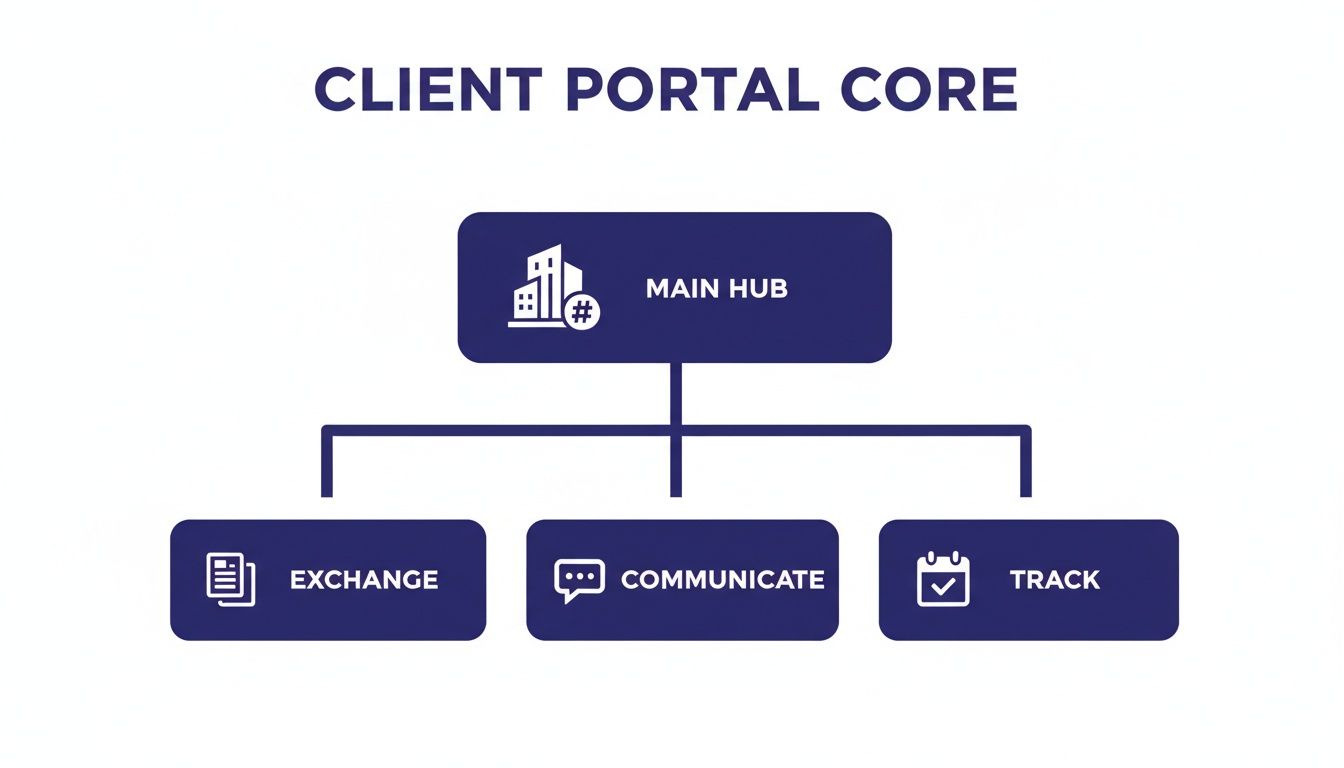
As you can see, a branded main hub branches into three key operational areas—Exchange, Communicate, and Track—which together form the foundation of a comprehensive client portal.
In accounting, security is completely non-negotiable. Your firm handles incredibly sensitive financial data, making it a prime target for cybercriminals. A premier client portal acts as a digital fortress, moving confidential information out of vulnerable email inboxes and into a protected environment.
Look for these essential security layers:
These features aren't just technical jargon; they're the bedrock of client trust and regulatory compliance.
A great portal goes way beyond simple file uploads. It brings order to the chaos of document collection and collaboration, serving as a single source of truth for every client file. Think of it as a smart, self-organizing digital filing cabinet.
Key document management capabilities include:
For firms wanting to build a robust and secure digital foundation, understanding the principles of cloud-based document management systems is a great next step, as these systems are what power the most effective client portals.
Modern clients expect convenient, digital ways to pay. Integrating billing directly into your client portal creates a seamless experience, allowing clients to view invoices and make payments in the same place they access their documents.
This integration cleans up your accounts receivable process, reduces the friction of getting paid, and presents a much more professional image. It connects the work you do directly with the invoicing process, closing the loop on the entire client engagement.
By bringing secure document exchange, communication, and payments into a single branded platform, a client portal transforms scattered interactions into a cohesive, professional client experience.
The days of printing, signing, scanning, and emailing documents are over. A built-in e-signature function is a must-have for any modern accounting firm. It allows clients to sign engagement letters, tax forms like the 8879, and other agreements with just a few clicks.
This dramatically speeds up your onboarding and approval processes. Just make sure the platform you choose offers legally binding e-signatures that comply with relevant regulations to maintain a clear and enforceable audit trail for all signed documents.
Your client portal shouldn't be another isolated data silo. To be truly effective, it has to connect with the accounting and practice management software your firm already relies on.
Look for direct integrations with key tools like:
These connections automate data flow between systems, which means less manual entry and consistent information across your entire tech stack.
Workflow automation is at the heart of this interconnected approach. The 2025 State of Accounting Workflow and Automation Report shows that 60.6% of firms list client portals as a top desired feature. This demand is driven by massive efficiency gains—a whopping 60.7% of firms using these tools now collect client documents in just 1-3 days, a huge improvement from the 25% who could do so before automation. You can read the full research on accounting workflow automation to see more of these findings. This data confirms that a well-integrated portal is an engine for productivity.
In accounting, data security isn't just another box to check—it's the bedrock of client trust. When you choose a client portal software for accountants, you're handing over the keys to your clients' most sensitive financial information. Getting a handle on its security protocols and compliance features isn't just important; it's a core responsibility.

This responsibility goes way beyond simply preventing a data breach. Your firm operates within a tangled web of regulations dictating how you handle, store, and protect client data. A misstep can lead to staggering fines and a damaged reputation that’s nearly impossible to repair.
Modern accounting firms are under constant regulatory scrutiny. A solid client portal is designed with these rules baked in, helping you satisfy your obligations with built-in tools instead of clunky manual workarounds.
You’ll need to keep a few key regulations in mind:
A well-built client portal acts as your first line of defense. Features like detailed audit trails, which log every touchpoint on a document, and role-based access controls ensure only the right people see sensitive information. These aren't just features; they're essential tools for maintaining a compliant practice.
Data security is non-negotiable for client portals handling sensitive financial information. Adhering to essential website security best practices is crucial to meet compliance requirements and protect client data.
It's not enough to know your data is secure; you also have to know where it lives. Data residency refers to the physical, geographic location where your client data is stored. This is a big deal because data is subject to the laws of the country it resides in.
A reputable software provider will be upfront about their server locations, allowing you to stay compliant with any national data sovereignty laws. Paired with this is encryption. Look for platforms that offer end-to-end encryption, which scrambles data both in transit (as it zips across the internet) and at rest (while it's sitting on a server). For a deeper dive into important security frameworks, our guide on what is SOC compliance offers some great context.
Tech-forward accountants are already pushing for these secure platforms. Wolters Kluwer's 2025 Future Ready Accountant Report found that 52% of firms are expanding their cloud solutions. Portals hit on key firm priorities, including easier client onboarding (a top benefit for 43%), higher client satisfaction (40%), and stronger security (38%). The numbers make it clear: investing in a secure portal isn't just about defense; it's a strategic move to meet modern client expectations.
Picking the right client portal software for accountants is a big decision, but it doesn't have to be overwhelming. If you break it down and focus on what truly matters, you can avoid getting distracted by flashy features that don't add real value. The goal is to find a platform that feels like a natural extension of your firm—secure, professional, and dead simple for everyone to use.
A methodical approach ensures you find a solution that not only solves today's headaches but also grows with your practice for years to come. This means looking past the sales pitch and asking the tough questions about security, usability, and how it plays with your other tools.
Security is the absolute, non-negotiable foundation. You're entrusting this platform with your clients' most sensitive financial data, so it must meet the highest industry standards. A vendor simply saying their software is "secure" isn't enough. You need proof.
When you're evaluating options, ask for specific security certifications. Here are the big ones to look for:
Think of these certifications as a building inspection for your digital office. You wouldn't lease a physical space without knowing it's up to code, and you shouldn't adopt a digital platform without confirming it meets rigorous security standards.
A portal is only useful if people actually use it. That means it needs to be intuitive for both your internal team and your least tech-savvy clients. A clunky, confusing interface will just lead to frustration and low adoption, pushing everyone back into the insecure chaos of email.
During your evaluation, make sure you test the user experience from two different angles:
Most vendors offer free trials. Use them. Run a few test scenarios with both a tech-savvy staff member and someone who represents your average client. Their feedback will be gold. This process is similar to choosing the best accounting software for startups, where you'd prioritize ease of use, scalability, and integration capabilities to ensure long-term success.
Your client portal can't live on an island. To get the biggest efficiency gains, it must connect smoothly with the other critical applications in your firm's tech stack. Without the right integrations, your team will be stuck with mind-numbing manual data entry, which defeats the whole purpose of getting a new system.
Before you even start shopping, make a list of your must-have integrations. This usually includes:
Don't just take a vendor's word for it—verify the quality of these integrations. Ask if they offer a one-way or a two-way sync. A two-way sync provides far more automation and power, saving your team even more time.
Choosing the right software is a systematic process, not a guessing game. This checklist is designed to help you methodically compare different client portal options and make sure you select the best possible fit for your accounting firm's specific needs. Go through these questions with each vendor to build a clear picture of what they offer.
| Evaluation Criteria | Key Questions to Ask | Notes and Vendor Score |
|---|---|---|
| Security & Compliance | Do you have SOC 2 or ISO 27001 certifications? Can you provide the reports? How do you support GLBA and GDPR compliance? | |
| User Experience (Firm) | Is the admin dashboard intuitive? How long does it take to onboard a new staff member? Can we customize branding and workflows? | |
| User Experience (Client) | Is the login process simple (e.g., SSO, magic links)? How easy is it for a non-technical client to upload files or sign a document? | |
| Core Features | Does it have secure messaging, document request tracking, e-signatures, and integrated billing? What are the storage limits? | |
| Integrations | Does it offer a two-way sync with our accounting software? Does it integrate with our practice management and cloud storage tools? | |
| Support & Training | What does your onboarding process look like? What are your support hours and typical response times? Are there video tutorials or a knowledge base? | |
| Pricing & Scalability | Is the pricing based on users, clients, or features? Are there any hidden fees for setup or data migration? Can the plan grow with our firm? |
By using a structured checklist like this, you can move beyond the sales pitch and make a data-driven decision. This approach empowers you to confidently choose a client portal that will not only impress your clients but also give your team the tools they need to be more efficient and secure.
Choosing the right client portal software for accountants is a huge step, but the real payoff comes from a smooth, well-planned implementation. A great tool is only useful if your team and clients actually adopt it. A rushed rollout can create confusion and pushback, defeating the whole purpose of improving efficiency.
Think of it like building an on-ramp to a new superhighway. You can't just drop everyone onto the fast lane. You need a clear plan to guide people from the old, congested side roads onto the efficient new route. This process is about much more than just installing software—it's about managing change and setting your firm up for success.
A seamless switch from your old systems to a new client portal needs a methodical approach. Breaking the process down into manageable steps keeps things from feeling overwhelming and ensures no critical details get missed.
Here’s a simple plan to follow for a painless rollout:
Where your portal software "lives" is just as important as the software itself. The hosting environment determines its performance, reliability, and security. Trying to self-host or using a standard shared server can lead to slow load times, security holes, and frustrating downtime—all things that make clients want to pick up the phone instead.
This is why partnering with a dedicated cloud hosting provider is a game-changer. A specialized host manages all the tough IT stuff—security monitoring, server maintenance, and critical daily backups—so your portal runs at peak performance 24/7. This takes a massive technical weight off your shoulders.
By hosting your portal in a dedicated cloud environment, you transform it from just another piece of software into a reliable, high-performance asset. You’re free to focus on serving clients, not troubleshooting IT issues.
This strategic move guarantees the uptime and speed essential for a great client experience. For firms ready to make this move, understanding the typical cloud migration steps is a great way to prepare.
When you nail the implementation and hosting from the start, your new client portal software for accountants becomes a powerful engine for efficiency and client satisfaction.
Switching to a new platform always brings up a few questions. Let's tackle some of the most common ones accountants ask about client portals so you can clear up any last-minute uncertainties.
Getting clients on board is a common worry, but it’s almost always smoother than firms expect. Success really boils down to two things: clear communication and choosing a portal that’s genuinely easy to use. When you’re ready to launch, send out an announcement that spells out the benefits for them—things like 24/7 access to their documents and better security than email.
Many portals even offer pre-written email templates to get you started. A great strategy is to begin with a small pilot group of your more tech-savvy clients. Their positive feedback can build momentum and help convince anyone who might be a bit more hesitant.
Yes, and honestly, this is where the real magic happens. The best modern portals are designed to connect directly with the accounting software you rely on every day, like QuickBooks, Xero, and Sage. This creates a unified workflow, gets rid of mind-numbing double data entry, and ensures your information is always in sync.
When you're evaluating options, make sure to dig into the specifics of their integrations. Don't just check if it connects with your tools—confirm it offers a deep, two-way sync. That's what delivers the biggest automation payoff.
While both let you share files, thinking of them as the same is like comparing a specialized accounting calculator to a basic four-function one. A generic tool like Dropbox is great for simple file sharing, but a client portal is a complete, professional platform built for firms like yours.
A true portal brings everything together under your own brand:
Ultimately, a portal gives your clients a polished, branded experience and gives you the granular control and detailed audit trails required to stay compliant.
Hosting your client portal software for accountants in a specialized cloud environment adds layers of security that are tough to replicate on your own. Instead of a standard software-as-a-service plan where you share resources, you get a private, isolated digital workspace.
A dedicated cloud host like Cloudvara provides things like managed firewalls, automated daily backups, and robust multi-factor authentication right out of the box. This approach dramatically cuts down security risks and protects you from downtime, safeguarding sensitive client data far more effectively than a local server ever could. It takes the IT headache off your plate so you can focus on your clients.
Ready to secure your client communications and streamline your firm's workflow? Cloudvara provides a dedicated, high-performance cloud hosting environment for your essential applications, ensuring your client portal runs with maximum uptime and security. Discover a better way to host your firm's software.




