You can usually tell when a firm has outgrown informal coordination. Tax organizers are still coming in, audit requests keep changing, seniors are chasing status in email, and partners are making staffing decisions from memory instead of live workload data. Everyone is busy, yet deadlines still feel fragile.
That isn't a people problem as much as a system problem. In many firms, good staff are working inside bad operating habits. Work starts before scope is clear. Tasks live in too many places. Review points aren't defined. Files sit in local folders, inboxes, shared drives, and practice software at the same time. The result is familiar. Rework, write-downs, missed handoffs, and clients asking for updates you should've been able to give immediately.
Tax season exposes weak operations fast. So does a tight audit timeline, a messy client onboarding, or an advisory engagement that keeps expanding after the kickoff call. Most firms don't struggle because they lack technical accounting knowledge. They struggle because work moves through the firm without a disciplined structure for ownership, deadlines, and escalation.
That matters more than many partners want to admit. Globally, only 35% of projects are completed on time and on budget, and organizations waste an estimated 9.9% of every dollar due to poor project performance, according to project management statistics compiled by TaskFino. In accounting, where deadlines are fixed and margins are often narrow, that waste shows up as overtime, rushed reviews, deadline pressure, and strained client relationships.
Project management for accountants isn't about turning a CPA firm into a construction company. It's about running recurring and one-time engagements with enough structure that you can see risk early. A return, an audit, a cleanup job, and a CAS engagement are all projects. They have a defined start, a required outcome, resource constraints, and a deadline. Treating them like loose task lists is what creates chaos.
A few patterns show up again and again:
Those problems don't stay operational. They become financial. When seniors spend review time reconstructing what happened, you lose margin. When clients get inconsistent updates, trust drops. When managers can't see bottlenecks, staffing decisions become reactive.
Practical rule: If a partner has to ask, “Where does this stand?” more than once, the firm has a visibility problem, not a communication problem.
Structured project management fixes that by making the work visible. It gives each engagement a defined scope, a workflow, a responsible owner, milestone dates, and measurable signals of whether the work is on track. That's how firms improve profitability without asking staff to work harder.
If you're trying to restore control before adding more headcount, improving business efficiency in a more systematic way is the right starting point. The firms that scale well don't rely on heroic effort. They build repeatable operating discipline.
Most engagement problems begin before any real work starts. A weak intake process creates nearly every downstream failure. Staff start moving because a client is waiting, but nobody has locked the deliverables, timeline, dependencies, communication rules, or approval path.
A firm needs an engagement charter for every meaningful job, even if it isn't called that internally. It can be a template in your practice management system, a standardized intake form, or a kickoff record tied to the client file. What matters is that it forces clarity before work opens.
At minimum, document these items before assigning production work:
Many firms underestimate the value of discipline. A clean intake record doesn't slow down service. It prevents the invisible drag that comes from revisiting assumptions later.
For firms wrestling with boundary issues, this guide on managing project scope for professionals is useful because it addresses the operational side of scope creep, not just the contractual side.
| Item | Status | Notes |
|---|---|---|
| Engagement letter signed | ||
| Client objective documented | ||
| Deliverables defined | ||
| Out-of-scope items listed | ||
| Required client documents identified | ||
| Responsible manager assigned | ||
| Production owner assigned | ||
| Review point scheduled | ||
| Final deadline confirmed | ||
| Internal milestone dates set | ||
| Communication channel selected | ||
| Billing approach confirmed |
A checklist like this works for tax, audit, bookkeeping, and advisory because it standardizes the questions that matter. It also gives newer managers a framework they can follow consistently.
Firms usually get better results when intake is centralized. One person or one role reviews new work before it enters production. That doesn't mean one person does all setup. It means one checkpoint exists where the engagement is tested for completeness.
What doesn't work is letting each manager scope work in a different style. One manager writes detailed notes. Another gives verbal instructions. A third forwards an email chain and expects the team to figure it out. That creates avoidable variation.
A strong intake process should make a handoff possible without a second meeting.
Technology helps here, but only if the workflow is already defined. A platform for CPA practice management software can centralize templates, deadlines, client notes, and assignments, but it can't rescue vague scope. First define the rules. Then enforce them in the system.
Once the engagement is scoped, the next problem is execution consistency. Firms lose margin when every staff member builds the work from scratch. A repeatable workflow turns tribal knowledge into an operating system.
Here is the visual model many firms need before they start documenting.

A practical method comes from the Journal of Accountancy, which describes using a detailed issues list and tracking the Out-of-Balance metric, defined as completed tasks divided by tasks finished on or before the original estimated completion date. That creates a real-time signal of whether an engagement is on track and shifts control from retrospective time tracking to prospective deadline management, as outlined in the Journal of Accountancy article on client-focused project management.
Take a business return as an example. A repeatable workflow usually includes distinct phases such as:
Pre-work readiness
Engagement accepted, prior-year file reviewed, organizer or request list sent, source systems identified.
Document intake and validation
Client uploads arrive, staff check completeness, obvious gaps are logged, follow-up requests are issued.
Preparation
Trial balance mapped, workpapers prepared, return drafted, open questions flagged.
Manager review
Technical issues resolved, exceptions cleared, missing items escalated.
Client approval and filing
Signature process completed, filing confirmed, delivery package assembled.
Post-close wrap-up
Notes for next year recorded, recurring issues tagged, billing finalized.
The point isn't that every return follows identical steps. It's that every return follows a documented backbone. Then exceptions become visible instead of buried.
A workflow document by itself is static. The issues list is what makes it operational. Each issue should include:
Firms often think they're tracking progress when they're really tracking activity. Billable hours tell you effort already spent. The issues list tells you whether delivery risk is growing.
The earlier a workflow exposes a stuck item, the cheaper it is to fix.
That's why I prefer milestone-based management to purely time-based management for most accounting work. A senior can spend hours on a file and still leave the engagement less predictable than it was the day before. A well-maintained issues list makes that visible.
Teams trying to operationalize this across departments usually need both process maps and a central execution layer. Guidance on improving workflow efficiency is useful when you're moving from informal habits to a documented delivery model.
Scheduling in accounting isn't just a calendar problem. It's a capacity problem shaped by seasonality, specialization, review dependencies, and client behavior. Firms overload teams when they assign work based only on due dates. They plan better when they account for skill match, interruption risk, and the true amount of manager review time each engagement requires.

A tax partner may believe a manager has room for more work because the manager's week isn't fully booked on paper. But if that manager is also the primary reviewer for several entity returns, handling client questions, and clearing exceptions from bookkeeping cleanup work, available capacity is overstated.
The same thing happens in audit. Fieldwork may be scheduled well enough, but review bottlenecks appear because the same senior manager or partner has to sign off across multiple jobs in the same narrow window.
Common failure points include:
Resource planning improves when firms schedule around work type and role constraints, not just due dates. A few habits make an immediate difference.
Short-term scheduling also gets better when managers can see actual time patterns alongside workflow milestones. A tool or process for tracking time with QuickBooks-connected workflows can help firms compare planned effort, actual effort, and deadline performance in one view instead of treating time and delivery as separate conversations.
They don't try to keep everyone equally busy at all times. They protect the right people at the right moments. During peak periods, the scarce resource is often review judgment, not raw labor. Smart scheduling reflects that.
They also stop assuming that utilization alone tells the story. A heavily utilized senior who spends the week context-switching across too many files may produce less reliable throughput than one with fewer but cleaner assignments. Capacity planning works when managers ask two questions together: who has time, and who can finish this work without creating downstream rework?
Project management for accountants now sits on top of a more complex operating model. Teams work across offices, from home, and from client sites. Files move through tax software, audit platforms, document systems, email, e-signature tools, and chat. Some firms are also using AI-assisted extraction and drafting tools inside that process. If collaboration and document control are fragmented, the engagement becomes harder to supervise and harder to defend.

According to Thomson Reuters on project management in tax practice, as firms adopt AI for tasks like document extraction and operate in hybrid work models, project management must evolve from simple task tracking toward governing model-generated outputs, formalized testing phases, and communication protocols that preserve auditability and visibility. That shift is important. The question is no longer only whether the work got done. It's whether the firm can show how it was done, who reviewed it, and where exceptions were resolved.
A well-run firm doesn't let project communication scatter across inboxes, desktop folders, text messages, and side conversations. It defines one operational home for each engagement.
That environment should include:
Cloud infrastructure is no longer solely an IT topic; it is an operating topic. If staff can't reliably access the same systems, files, and workflow records from any location, collaboration breaks down under pressure. One option firms use is document management software for accountants hosted in a centralized cloud environment, which can keep tax, document, and line-of-business applications accessible without relying on scattered local setups.
AI-assisted tools can save staff time on document intake, extraction, categorization, and draft support. But they also create a governance requirement. Somebody must define where machine output is allowed, what review is required, how exceptions are logged, and when human override is mandatory.
That means adding controls such as:
Firms don't lose control because they adopt new tools. They lose control because they adopt them without a review framework.
The firms getting this right aren't using more software for its own sake. They're building a cleaner backbone for communication, files, review evidence, and accountability.
A project management system isn't working just because the team says it feels better. It's working when you can measure delivery, cost control, and predictability. In accounting, the most useful KPIs are the ones that connect operations to margin and deadline performance.
Here is a sample dashboard layout firms often aim for, even if the exact values in the image are only illustrative.
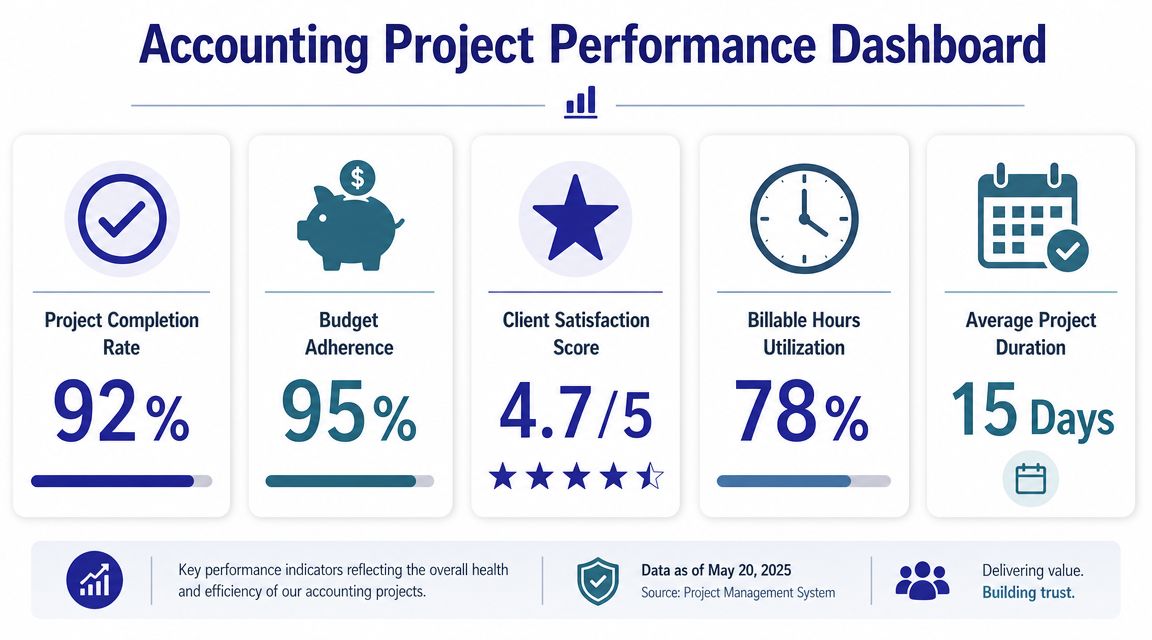
Effective project management in accounting is built around measurable KPIs such as timeline adherence, Cost Performance Index, and Schedule Performance Index, with CPI = earned value / actual cost and SPI = earned value / planned value, as explained in this overview of essential KPIs in project management. Those formulas matter because they connect execution directly to profitability and timeliness.
Some KPIs are more useful than others in a CPA environment.
Timeline adherence
Are engagements hitting internal milestones and final delivery dates consistently? This is the first signal that your workflow is functioning.
CPI
Cost Performance Index shows whether the value of work completed is aligned with actual cost incurred. If CPI weakens, the engagement may be consuming more labor cost than planned.
SPI
Schedule Performance Index shows whether completed work is keeping pace with the planned schedule. A weak SPI often appears before a deadline miss becomes obvious.
Issue-resolution time
How long do open items sit before somebody closes them? This is especially useful in tax notice work, audit support, and client onboarding where delays compound.
No single metric should drive decisions in isolation. A file can look profitable on raw realization while still carrying delivery risk that damages the client experience. Another file can appear behind schedule but remain healthy if the client caused the delay and the team re-sequenced efficiently.
Use KPI combinations instead:
| KPI pattern | What it often means | Management response |
|---|---|---|
| Strong timeline adherence, weak CPI | Work is on time but costing too much | Review staffing mix, pricing, or workflow inefficiency |
| Strong CPI, weak SPI | Costs look controlled but the deadline is at risk | Rebalance workload or escalate blocked items |
| Weak timeline adherence and growing issue-resolution time | Bottlenecks are forming | Check review queue, task definition, and client dependencies |
| Stable SPI but stressed team feedback | Schedule may be holding through unsustainable effort | Reassess capacity before burnout creates errors |
Many firms overvalue billable hours and undervalue predictability. Hours still matter, but they are a lagging measure. They tell you what was spent. They don't always tell you whether the engagement is manageable.
Management lens: Measure what helps you intervene early, not just what helps you explain the month after it closes.
The best KPI dashboard for project management for accountants is simple enough that managers use it and rigorous enough that partners can price future work more accurately. If your dashboard produces interesting reports but no staffing, pricing, or workflow decisions, it's too academic.
At this stage, many firms stall. They agree the current system is messy, approve new software, hold a kickoff meeting, and assume adoption will follow. It won't. Rolling out project management for accountants is its own engagement, with stakeholders, resistance points, training needs, and a required implementation sequence.
Partners and managers buy in faster when the case for change is tied to specific pain. Late reviews. Too many status meetings. Scope drift in cleanup work. Poor handoffs during tax season. Inconsistent onboarding. If the change is framed as “new software,” staff hear extra admin. If it's framed as “fewer dropped balls and clearer deadlines,” they pay attention.
Document the failures you want to eliminate. Keep them concrete. For example:
That creates a practical target state. Not a vague initiative.
Don't roll this out across the entire firm at once. Pick one workflow where the pain is obvious and the process is repeated often enough to teach the team useful lessons. Business tax returns, monthly close work, and client onboarding are good candidates because they combine recurring steps with visible deadlines.
A strong pilot usually includes:
One sponsor with authority
A partner or firm leader who can settle process disputes and hold people accountable.
One manager who owns execution
This person turns the workflow from concept into a working operating routine.
One defined template
Not five variations. One template with clear milestones, roles, and completion criteria.
One review cycle for refinement
Let the team identify friction after real use, then adjust before expanding firmwide.
Software training alone is never enough. Staff need to know how to classify work, when to escalate blockers, how to record exceptions, and what “done” means at each milestone. If your training only covers where to update status, people will still use the system inconsistently.
Train by role:
You'll hear that the process is too rigid, that every client is different, or that experienced people don't need templates. Some of that concern is fair. Accounting work does include exceptions. But that's exactly why the standard workflow matters. Standard steps create room to identify nonstandard work faster.
The right response is not to argue that every job is identical. It's to insist that every job deserves the same minimum control structure.
A few messages help:
Adoption becomes durable when the process is tied to routine management behavior. If partners still ask for updates outside the system, staff will stop maintaining the system. If managers allow work to start without intake discipline, old habits return.
To make the rollout stick:
The biggest mistake is treating implementation as a temporary push. It's a management standard. Once that clicks, project management stops feeling like overhead and starts functioning as margin protection.
Cloudvara can support that operating model by hosting accounting, document, and business applications in a centralized cloud environment so teams can access the same systems securely across offices and remote locations. If your firm is trying to standardize workflows, improve document control, and reduce the friction of scattered local setups, it's worth exploring Cloudvara.




