
Document management software for accountants is your firm's central nervous system for files. It’s a digital hub designed to organize, secure, and automate how you handle every single client document, ditching the chaos of paper-based systems and scattered digital folders for good. The goal? A clean, searchable, and compliant solution that saves time and cuts down on errors.

Let’s be honest—the traditional filing cabinet is a nightmare, especially during tax season. It’s a system where inefficiency is built-in. Every misplaced client file, every minute wasted hunting down a single form, and every compliance headache can be traced back to that outdated metal box.
Picture a small firm buried under stacks of engagement letters, tax forms, and financial statements. The lead accountant spends hours each week just sorting and filing, time that should be billable. Then, during a critical audit, a key document goes missing. Panic sets in, and the client relationship is strained. This isn't a made-up scenario; it’s the daily reality for countless practices.
The real price of manual, paper-based systems goes far beyond inconvenience. It hits your bottom line directly through wasted billable hours, the ever-present risk of costly human errors, and the constant threat of a security breach. It's a system that just doesn't scale.
This is a massive challenge. A recent survey revealed that 45% of small businesses still lean on paper-based systems, and another 11% have no formal document management at all. The result is staggering, with businesses losing up to $12 billion a year from lost files, wasted search time, and manual data entry errors. You can dig into the data on these trends from Market.us.
This is precisely where a Document Management System (DMS) changes the game.
A DMS isn't a luxury; it's the foundation of a modern accounting practice. It turns a chaotic mess of files into a strategic, organized asset that fuels efficiency and growth.
By bringing all your documents into one secure hub, a DMS opens up new levels of productivity and control. It gives you a clear escape route from the chaos of paper, paving the way for a more scalable and secure future. Getting started is easier when you follow clear guidelines, and we've put together some great tips in our guide to document management best practices for small businesses.
Ultimately, adopting document management software for accountants delivers a few immediate wins:
So, what is a document management system, really? Forget the jargon. Think of it as a dedicated, hyper-organized digital librarian for your firm—one that works around the clock to automatically capture, secure, and retrieve every document you handle. It’s the central brain for all your firm's information.
A DMS is designed to pull in everything from scanned tax forms and new client engagement letters to critical emails and financial statements. Instead of saving files in a dozen different places—a shared drive here, an email inbox there, and a physical cabinet over there—it brings everything into one secure, searchable hub. This shift from scattered files to a centralized library is the core job of document management software for accountants.
Imagine needing a specific W-9 form from three years ago. In a traditional setup, that probably means a frantic search through archived boxes or navigating a confusing maze of nested folders on a shared server. It’s tedious, non-billable work that just eats away at your day.
With a DMS, this takes seconds. A simple keyword search—like the client's name and "W-9"—instantly pulls up the exact document you need. This works because the software doesn't just store files; it intelligently indexes their content, making every single word searchable.
A DMS transforms your firm's scattered documents from a liability into a strategic asset. It makes information instantly accessible, turning hours of searching into seconds of finding.
This technology isn't just about finding old files faster. It’s about building an organized foundation that supports every workflow in your firm. Ready to learn more? Check out our overview of document management in the cloud to see how hosting amplifies these benefits.
The move toward document management is part of a much larger trend. As financial firms embrace digital tools to improve efficiency and security, the global market for these systems is growing fast. It's projected to expand from USD 10.51 billion to USD 19.81 billion by 2030.
Cloud-based solutions are leading this charge, now holding 68% of the market share. For accounting firms, this model offers huge advantages like lower initial costs, easy scalability during tax season, and continuous security updates without any downtime. You can explore the full Mordor Intelligence market report for more details on these industry shifts.
Ultimately, a DMS does more than just manage documents. It modernizes your entire operation by providing:
Picking a document management system isn't about finding the one with the most bells and whistles. It's about finding the right tools to solve the day-to-day headaches of running an accounting practice. A generic platform might give you storage, but a DMS built for accountants needs to be a secure, compliant, and efficient part of your firm's DNA.
Forget the generic checklists. To see a real return, your software needs a specific set of features—tools designed to handle sensitive financial data, make client collaboration a breeze, and play nice with the software you already depend on. These aren't optional extras; they're the foundation of a modern, productive firm.
The diagram below shows how a good DMS acts as a central hub, catching all the different documents that pour into your firm and putting them in order.
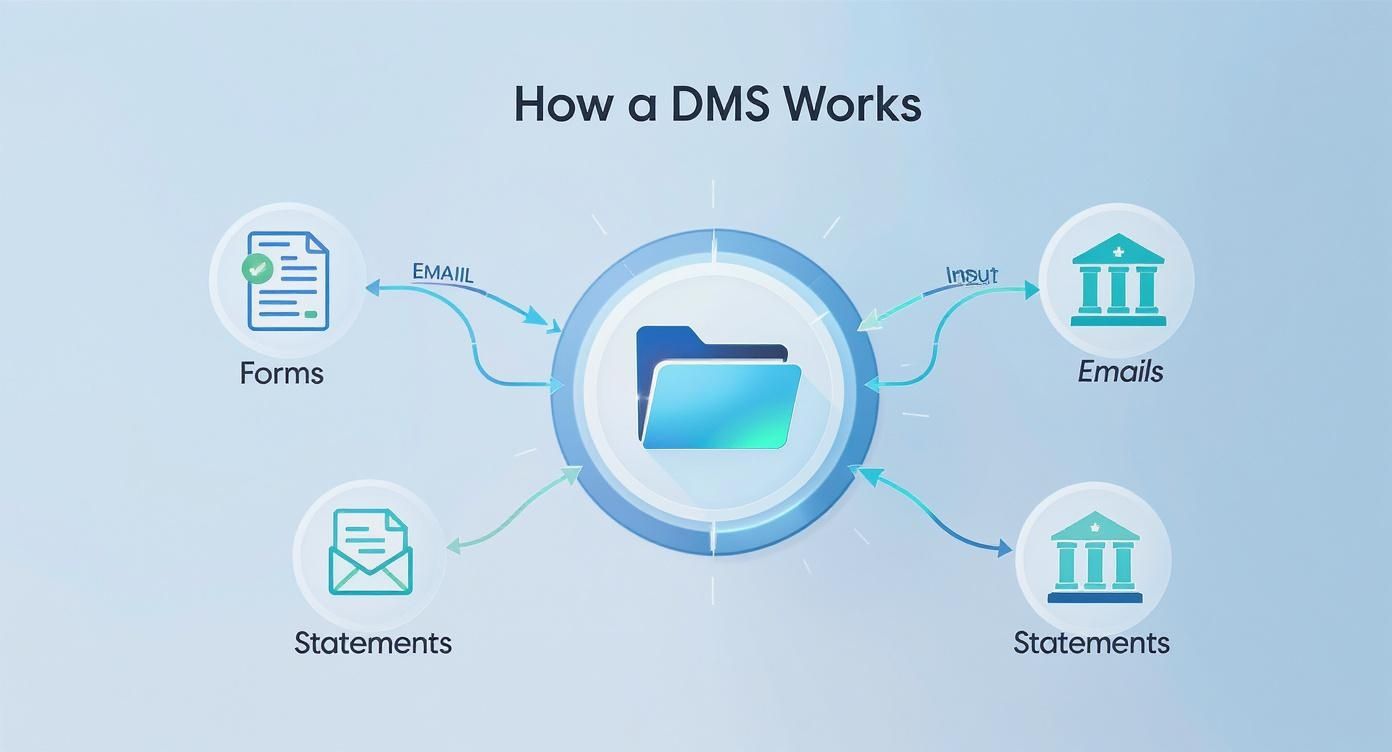
It’s a clear visual of how scattered forms, emails, and statements get funneled into one organized system. No more hunting for files. Just one single source of truth.
When evaluating a DMS, certain features are simply non-negotiable for any accounting practice that wants to stay secure, compliant, and competitive.
The table below breaks down the must-have features and explains why they're so critical in a real-world accounting setting.
| Feature | Why It's Critical for Accountants | Real-World Example |
|---|---|---|
| Ironclad Security | You're the gatekeeper of clients' most sensitive financial data. A breach isn't just an IT problem; it's a firm-ending event. You need multi-factor authentication, encryption, and granular access controls. | Setting permissions so a junior associate can only view client files for their assigned accounts, while partners can access and edit everything across the firm. |
| Complete Audit Trails | Essential for compliance and internal accountability. This feature creates an unchangeable log of every single action—who touched a file, when, and what they did. | During a compliance check, you can instantly pull a report showing the exact access history of a specific client's tax return to prove proper handling. |
| OCR & Search | Turns a shoebox of receipts or a scanned bank statement into fully searchable, digital text. It eliminates manual data entry and makes finding specific figures instant. | A client emails a blurry photo of a receipt. OCR automatically reads the vendor, date, and amount, making the data findable later without someone typing it in by hand. |
| Version Control | Prevents the nightmare scenario of working from an outdated financial statement or tax form. It tracks every revision, ensuring everyone is always on the same (and most recent) page. | Your team is collaborating on a complex financial model. Version control lets you see every change and revert to a previous draft if a calculation error is introduced. |
| Core Integrations | Your DMS shouldn't be an island. It needs to connect directly with your accounting and tax software (QuickBooks, Sage, etc.) to eliminate duplicate work and reduce errors. | You scan a source document into the DMS, and with one click, it syncs to the corresponding transaction inside QuickBooks, linking the proof directly to the entry. |
| Secure Client Portal | Emailing sensitive documents is a massive security risk. A client portal provides a secure, branded space for clients to upload files and download their returns. | Instead of emailing a completed tax return, you upload it to the client’s portal. They receive a secure notification, log in, and download it from a safe environment. |
These features aren't just about convenience; they're about building a more resilient, efficient, and trustworthy practice. They directly address the biggest risks and time-sinks that accountants face every single day.
For any accounting firm, security is everything. You're entrusted with your clients' most sensitive financial lives, and a data breach is a disaster waiting to happen. Your DMS has to go way beyond a simple password.
Look for systems that offer:
On top of this, strong encryption is non-negotiable. A quality DMS makes it simple to encrypt and share files securely, protecting client data whether it's sitting on a server or being sent over the internet.
Your document management system can't live on an island. To get the most out of it, it needs to talk to the other software that runs your firm. This connection builds a single, unified workflow, cuts down on mind-numbing data entry, and slashes the risk of errors.
The most critical connections are with your accounting and tax software. You need native integrations with platforms like QuickBooks, Sage, Lacerte, and UltraTax. This allows you to push a source document from your DMS straight into a transaction in your accounting software, linking proof to entry in one smooth motion.
You can learn more about how this works in our guide on Cloudvara's integration with QuickBooks Online.
This need for integration is a major reason why the global document management software market, valued at USD 6.78 billion in 2023, is projected to hit USD 16.37 billion by 2030. The growth is being driven by tools that automate document classification and metadata tagging, which make audits faster and help firms keep up with changing rules.
The days of exchanging sensitive financial documents through insecure email attachments are over. Or at least, they should be. A secure client portal is a non-negotiable feature for any accounting firm that takes security seriously.
It gives you a branded, password-protected online space where you can safely swap files and messages with clients.
This is a win-win. It dramatically improves your security and compliance posture while giving your clients a better, more professional experience. They'll appreciate having one easy place to upload their documents and grab their finished returns, which builds trust and strengthens the relationship.
For accountants, compliance isn't just another box to check—it’s woven into the fabric of the job. Handling sensitive client financial data puts your firm directly in the crosshairs of complex regulations. In this environment, a modern document management system (DMS) is less of an organizational tool and more of a powerful compliance ally.
Think of it as your firm's digital shield. It provides the structure, control, and proof needed to meet strict standards like the General Data Protection Regulation (GDPR) and the Sarbanes-Oxley Act (SOX). A DMS isn't just about storing files; it's about managing them in a way that stands up to intense scrutiny, making it a core part of your risk management strategy.
The foundation of compliance is control. You absolutely have to know who is accessing client data, when they’re accessing it, and what they’re doing with it. A DMS gives you the tools to build this digital fortress.
This is done through features that were purpose-built for high-stakes environments:
These controls are critical for stopping data breaches before they happen, whether from internal mistakes or external attacks. Ultimately, they protect your clients and your firm’s hard-earned reputation.
Imagine an auditor asks you to prove exactly how a specific tax document was handled over the past year. With paper files or a basic shared drive, that’s a nightmare—if not impossible. A proper DMS, however, provides an immutable audit trail, which is a detailed, unchangeable log of every single action taken on a document.
This audit trail is your evidence. It shows a complete history of who viewed, edited, downloaded, or shared a file, complete with exact timestamps. When regulators ask for proof of proper data handling, the audit trail delivers it instantly.
This level of transparency is invaluable. It not only satisfies external compliance requirements but also creates internal accountability, helping you trace errors and enforce firm policies more effectively. For those interested in a deeper dive, understanding frameworks like SOC is essential, and you can learn more about what SOC compliance means for data security in our detailed guide.
Compliance isn’t just about protecting data; it’s also about managing its entire lifecycle. Believe it or not, holding onto documents for too long can be just as risky as deleting them too soon. Different documents have different legal retention requirements, and trying to manage this manually is a recipe for disaster.
A key feature of document management software for accountants is the ability to create automated retention policies. You can set rules that automatically archive or flag documents for deletion once they reach the end of their required lifespan. For example, you can set a policy to keep tax-related workpapers for seven years and then have the system automatically purge them.
This automation prevents two huge risks:
Of course, managing digital documents is only half the battle. Accountants must also consider the secure disposal of the hardware that holds that data. Gaining a full perspective on the lifecycle of your firm's technology is crucial, so consider understanding IT asset disposition (ITAD) as part of your complete data security strategy.
Deciding to upgrade your document management system is a huge step toward modernizing your firm. But picking the right solution and pulling off a smooth transition takes a clear, deliberate plan.
Think of this as your practical roadmap. It’s designed to guide you through choosing the best platform and launching it successfully, all while keeping disruptions to a minimum and getting your team on board from day one.
The first big decision you'll face is where your system will live. Choosing between a cloud-based or an on-premise solution is a fundamental fork in the road that shapes everything—accessibility, costs, and your IT team's responsibilities. It really comes down to a choice between retaining full physical control and embracing the flexibility of the cloud.
An on-premise system is a lot like owning a house. You have complete control over the property, from the foundation to the roof, but you’re also on the hook for all the maintenance, security, and repairs. Something breaks, you fix it.
A cloud-based system, on the other hand, is like leasing a high-end apartment in a secure building. The building management handles all the heavy lifting—security, maintenance, infrastructure—while you get to enjoy the amenities without the headaches of ownership.
Each model brings distinct advantages to the table for an accounting firm.
The right deployment model depends on your firm's appetite for control versus convenience. On-premise offers maximum control at the cost of high upfront investment and maintenance, while the cloud delivers flexibility and lower overhead in exchange for a recurring subscription.
To help you weigh the factors most important to your practice, we've put together a direct comparison.
This table breaks down the key differences between cloud-based and on-premise document management solutions, helping you make an informed choice based on your firm's specific needs for cost, access, and maintenance.
| Factor | Cloud-Based Solution | On-Premise Solution |
|---|---|---|
| Initial Cost | Low; typically a predictable monthly or annual subscription fee per user. | High; requires significant upfront investment in servers, software licenses, and IT infrastructure. |
| Accessibility | High; access your files securely from any device with an internet connection, ideal for remote or hybrid teams. | Limited; access is typically restricted to the office network unless complex and costly remote access is set up. |
| Maintenance | Minimal; the provider handles all server maintenance, software updates, and security patches. | High; your firm or a hired IT professional is responsible for all updates, backups, and hardware maintenance. |
| Security | Managed by the provider, who often employs enterprise-grade security measures beyond the reach of a small firm. | Fully controlled by your firm, which can be a pro or a con depending on your internal IT security expertise. |
| Scalability | Easy; you can quickly add or remove users and storage as your firm grows or during seasonal peaks like tax season. | Difficult and expensive; scaling often requires purchasing and configuring new server hardware. |
Ultimately, your decision will hinge on your firm's priorities. If you value flexibility and predictable costs, the cloud is a strong contender. If total control and a long-term, one-time investment are more appealing, an on-premise solution might be the better fit.
Once you've picked a platform, a successful rollout is all about careful planning. Rushing the implementation is a classic mistake that almost always leads to poor team adoption and workflow chaos.
Follow this structured checklist to ensure a smooth and effective transition to your new document management software for accountants.
Audit Your Current Documents
Before moving a single file, you need an inventory. Map out where all your documents currently live—network drives, local computers, and yes, even those old filing cabinets. Then, you can decide what needs to be migrated, what can be archived, and what can be securely shredded.
Define Your Folder Structure
This is your chance to hit the reset button and create some order. Design a logical, standardized folder structure that everyone in the firm will use. A common best practice is to organize folders by Client Name > Year > Document Type (e.g., Tax Returns, Workpapers, Correspondence). Consistency is key.
Plan the Data Migration
Moving thousands of documents doesn't happen overnight. Break the migration process into manageable chunks, maybe starting with your most active clients. You’ll also need to decide whether your team will handle the migration internally or if you'll use the vendor's professional services to get it done.
Configure and Test
This is where you bring the system to life. Work with your vendor to set up user permissions, automated workflows, and integrations with your core software like QuickBooks or Sage. Before you go live, have a small group of power users thoroughly test everything to iron out any kinks.
Train Your Team
This is, without a doubt, the most critical step. Don’t just show your team where to click; explain why this new system is better and how it will genuinely make their jobs easier. Provide hands-on training sessions, create simple cheat sheets for quick reference, and remember that ongoing training is just as important as the initial launch.
Picking the right document management software for accountants is only half the battle. The other, more critical half is making sure it runs in a secure, reliable, and frustration-free environment. A hosted solution takes on the core operational headaches busy firms face, moving beyond simple file storage to deliver a fully managed infrastructure.
This is where a dedicated platform like Cloudvara makes all the difference. Instead of trying to patch together software, security, and backups on your own, our hosted solution bundles it all into one high-performance package. It’s like getting the keys to a professionally maintained car instead of buying all the parts to build one yourself.
The modern accounting firm isn’t tied to a single office anymore. Your team needs to access critical client files from home, a client’s office, or on the road—without ever compromising security. A hosted environment delivers this freedom with total confidence.
Cloudvara builds a centralized, secure cloud desktop where your firm’s and clients’ documents are always accessible from any authorized device. This isn’t just about convenience; it’s about keeping productivity high and client service seamless, no matter where your team is. Every connection is locked down with mandatory multi-factor authentication (2FA), adding a powerful defense against unauthorized access.
For any accountant, data loss is a catastrophe. Whether it comes from a hardware crash, a simple human mistake, or a cyberattack, the fallout can be devastating for your firm and your clients. Relying on on-premise servers or basic cloud storage often leaves the burden of backups on your shoulders, creating a huge point of failure.
A managed hosted solution completely removes this risk.
With Cloudvara, automatic and redundant daily backups are standard. Your data is continuously protected in a secure facility, ensuring that even in a worst-case scenario, your firm’s information can be restored in a snap.
This approach turns data protection from a nagging daily chore into a built-in, reliable safeguard. It frees you up to focus on your clients, knowing your digital assets are safe. Plus, with immediate access to expert IT support 24/7, you’re never left troubleshooting a critical issue alone. Any problem is handled swiftly by pros who already know your setup inside and out.
Migrating years of sensitive client data can feel overwhelming, and it’s often the one thing that stops firms from upgrading their systems. Cloudvara takes the complexity out of the entire process by providing professional migration assistance. Our team works directly with you to ensure a smooth, stress-free move from your old system to a modern, secure hosted platform.
You can see how we tailor environments for specific platforms, like our popular FileCenter DMS hosting solution, to get a feel for how it works.
Ready to see how a fully managed solution can reshape your practice? Discover the benefits firsthand and start your journey away from IT complexity.
Even when you see the benefits, bringing a new system into your firm naturally comes with questions. Let's walk through a few of the most common ones we hear from accountants weighing a switch to a modern document management system.
The timeline really depends on the size of your firm and how complex your current files are, but a typical rollout takes anywhere from a few weeks to a couple of months. The whole process involves taking inventory of your existing documents, mapping out a smarter folder structure, moving the data over, and, of course, training your team.
We've found a phased approach works best. Start with your most active clients to get a quick win and iron out the workflow. Partnering with a provider that handles the migration for you, like Cloudvara, makes a huge difference—it speeds things up and keeps your team from getting bogged down.
Not at all. Most modern document management software for accountants is built with the end-user—your client—in mind. These secure client portals are usually incredibly intuitive, with simple drag-and-drop uploads and clear notifications. Honestly, it's far easier and feels much more professional for them than digging through old email chains for attachments.
The key is making the process feel seamless and secure. A well-designed portal doesn't just get you documents faster; it builds client trust and shows you're serious about protecting their information.
Absolutely, and it’s not even close. A locked cabinet might stop someone from walking out with a folder, but a DMS protects you from a much wider—and more likely—range of modern threats. We're talking about things like multi-factor authentication, end-to-end encryption, and detailed audit trails that show you exactly who accessed what and when.
These systems are designed from the ground up to meet data privacy regulations like the GDPR and defend against cyberattacks, accidental deletions, and unauthorized access in ways a physical lock simply can't. In today's world, that level of digital security isn't just a nice-to-have; it's essential.
Ready to see how a truly secure and efficient document workflow can change your firm? With Cloudvara, you get a fully managed, secure platform for your document management software, complete with expert support and seamless migration. Start your free trial today and feel the difference.




