Your office probably already has the warning signs. Accounting lives in QuickBooks. Sales updates sit in a CRM. Inventory or project tracking happens in spreadsheets. Someone exports data on Friday, massages it over the weekend, and hopes the numbers still match by Monday morning.
That setup can work for a while. Then growth exposes every gap at once. Reports take too long, remote access feels clunky, backups become a concern, and nobody wants to find out during a busy week that the server in the back office is the single point of failure.
That's where the cloud ERP small business conversation usually starts. But it shouldn't end with “buy a new ERP.” For many firms, especially accounting practices, law firms, and nonprofits, the smarter move is often to separate two decisions: whether you need a new system, and whether you need a better way to run the systems you already trust.
Monday starts with a familiar problem. A client asks for updated numbers, someone checks QuickBooks, another employee opens the CRM, and a third person hunts through spreadsheets to confirm what changed. By the time the report is ready, the business has already moved on.
A cloud ERP is software that puts those core functions into one connected system and runs it on infrastructure managed by the vendor. Finance, purchasing, inventory, sales, operations, and reporting work from the same data instead of separate files and disconnected apps. For a small business, that usually means less on-site hardware, fewer manual updates, easier remote access, and a simpler path to growth, as explained in this overview of cloud ERP for small business systems.
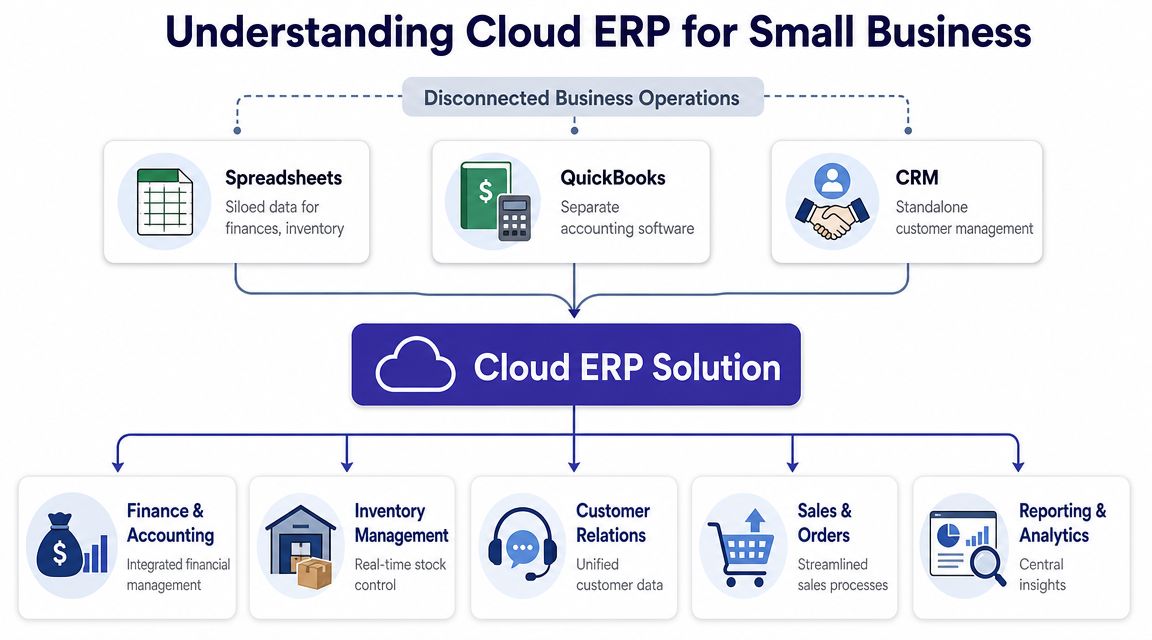
The practical difference is simple. Data gets entered once and used across the business.
If a customer places an order, accounting sees the revenue impact, operations sees the work required, and management sees updated reporting without waiting for someone to rekey information. That reduces duplicate entry, cuts down on version-control problems, and gives owners a clearer view of cash flow and workload.
For firms with physical inventory, this kind of integration can be highly beneficial. For professional services firms, the gains often come from tying time, billing, client work, approvals, and financial reporting together. Law firms, for example, may pair ERP-style financial controls with tools built to boost legal efficiency on the case management side rather than forcing everything into one platform.
Practical rule: If your team spends hours reconciling reports from different systems every month, the current setup already has a measurable cost.
Small business owners often hear "cloud" and assume it only means browser access. That is too narrow.
A true cloud ERP connects workflows across departments. Remote access is part of the package, but the bigger change is shared data, standardized processes, and reporting that does not depend on one employee stitching numbers together. That matters for control, auditability, and day-to-day decision-making.
It also matters to separate two decisions that often get lumped together. One decision is whether the business needs a new ERP at all. The other is whether the current software should keep running on a server in the office.
A full ERP replacement can make sense if your current systems are breaking under growth, compliance requirements, or complex operations. It can also be expensive, disruptive, and harder than vendors make it sound. Data cleanup, process redesign, staff retraining, and integration work are where small projects turn into long projects.
That is why many firms first look at cloud solutions for business that host the software they already know. This approach will not give you every benefit of a modern ERP, but it can solve remote access, backup, security, and business continuity problems without forcing an immediate software change.
For many accounting firms, law offices, nonprofits, and other service businesses, that is the better first move. Keep the trusted system. Fix the infrastructure. Then decide whether a full ERP migration has a real business case.
A small firm usually feels the need for cloud access on a bad day, not during a strategy meeting. The office internet drops. A server starts throwing errors. Someone needs a file from home or from court, and the only reliable copy sits on a desktop back at the office. That is when owners start asking whether the current setup is helping the business or subtly creating risk.
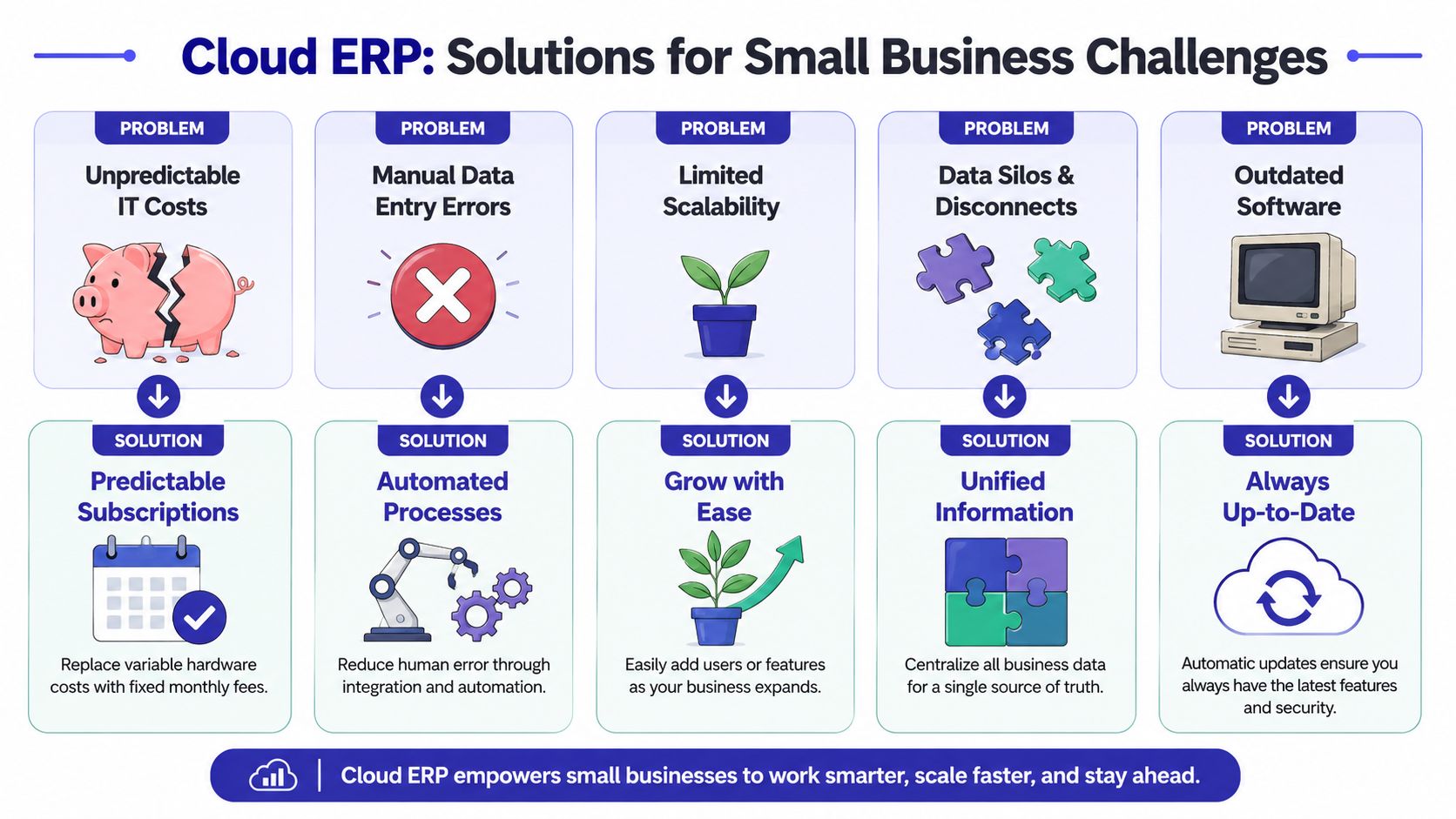
The business case usually starts with reliability and control. Owners want staff to work from anywhere, data to stay available, and routine IT problems to stop interrupting billable work. For a growing company, that alone can justify the move.
Cloud systems also shift some responsibility away from aging office hardware. Instead of worrying about one physical server, one backup device, or one person who knows the workarounds, the business gets a more consistent environment with managed access, offsite backups, and easier support.
That benefit applies whether you replace your ERP or keep the software you already trust and host it in the cloud.
For many professional services firms, that second path is the better first move. Accounting practices, law firms, and nonprofits often need secure remote access and better continuity long before they need a full process redesign.
Legal teams see this quickly. If you're evaluating systems that can boost legal efficiency, the hosting model matters almost as much as the application. Good case management software still causes friction if attorneys cannot reach documents reliably or if access depends on one office network behaving perfectly.
Cloud access solves infrastructure problems. It does not automatically fix broken approvals, duplicate data entry, or reporting logic built on spreadsheets. A company with weak processes can move those same weaknesses into a new cloud platform and still be frustrated six months later.
That is why a full ERP migration is not always the smartest first step. If the current system fits the business reasonably well, hosting it in the cloud can deliver many of the practical gains owners want first. Remote access, backups, security controls, and business continuity often improve without forcing a costly software replacement. These are some of the core benefits of cloud hosting for small businesses, especially for firms that cannot afford a long disruption.
The right move depends on the source of the pain. If the software no longer supports the business, a new ERP may be justified. If the software is fine and the actual problem is where and how it runs, fix the infrastructure first.
Feature lists get noisy fast. Vendors pile on modules, dashboards, and industry buzzwords. Small businesses are better served by focusing on the capabilities that reduce manual work, tighten controls, and make daily operations less dependent on tribal knowledge.
The core criteria are well established. Workday notes that the most important small-business ERP design requirements include core financial management, real-time dashboards, inventory traceability, and integrations with CRM and accounting tools. Those capabilities matter because they reduce manual touchpoints and shorten month-end close in this ERP selection guide for small businesses.
A modern cloud ERP small business platform should handle the basics cleanly before you worry about advanced modules.
For finance leaders trying to evaluate process improvements around payables, this explainer from Steingard Financial on transforming your finances is useful context because AP automation often reveals whether an ERP can remove real friction or just move it around.
A CPA firm, a law office, and a nonprofit don't need the same thing, even if they all use the phrase “better reporting.”
Accounting practices usually care less about manufacturing logic and more about dependable access, client file handling, payroll or tax application compatibility, and a stable environment during peak workload periods. Multi-entity reporting and strong accounting integrations matter more than flashy sales automation.
Legal teams need secure access to matter-related information, dependable document availability, and integrations with case management or billing tools. If trust accounting is part of the environment, accuracy and access control matter far more than broad feature volume.
Nonprofits often need reporting structures that reflect grants, programs, funds, and restricted spending. The platform has to support accountability without forcing staff into workarounds that break audit trails.
A useful test: Ask every vendor to show how your team completes one real task, not a generic demo. Closing a month, approving a bill, locating a client document, or reconciling a donation tells you more than a polished dashboard ever will.
A system can look strong in a demo and still fail in practice if it doesn't connect to the tools your team already uses. That's where application and data flow matter.
Before committing, map out how accounting, CRM, payroll, document management, and line-of-business apps interact today. Then compare that map against the vendor's integration approach. A simple primer on application integration in business environments can help nontechnical decision-makers ask better questions before they sign anything.
A small business usually feels vendor mistakes before it sees any payoff. The contract gets signed, the demo looked polished, and six months later the team is still waiting on fixes, training, or a clean answer about what the final bill will be.
Start by evaluating operational risk.

For a small firm, the right vendor is not always the one with the broadest feature list. It is the one that can support your business without creating avoidable downtime, surprise consulting fees, or a migration path you may regret. I usually tell clients to evaluate cloud ERP the same way they would evaluate an outsourced finance or IT function. You are not just buying software. You are handing over part of your operating continuity.
A serious evaluation should cover these areas:
Support model
Ask who responds when something breaks. Find out whether support is vendor staff, a third party, or a reseller, and whether help is available during your real working hours.
Data ownership and exit planning
Confirm how you retrieve data, reports, attachments, and audit history if you leave. A clean exit process matters more than sales teams like to admit.
Security controls
Ask for plain answers on multifactor authentication, backup frequency, access logs, encryption, and incident response. If the vendor cannot explain its controls clearly, that is useful information.
Integration approach
Review how the platform connects with the systems you still need, including accounting, document management, payroll, CRM, or industry software. A product that forces manual re-entry usually costs more than it first appears.
Implementation method
Ask whether the rollout is phased, limited by department, or done all at once. Small businesses usually absorb phased change better, especially when finance, billing, or client service cannot afford disruption.
Subscription pricing is the easiest number to compare and often the least useful on its own.
Cost sits in setup work, data cleanup, user training, testing, process redesign, support coverage, and the internal time your staff will spend getting the system live. A lower monthly fee can still produce an expensive project if the vendor depends on customization or leaves your team to figure out reporting and workflows after go-live. A higher recurring cost can be reasonable if it reduces server maintenance, upgrade labor, and recurring downtime.
Use a simple cost review that includes:
| Cost area | What to check |
|---|---|
| Subscription or licensing | How pricing changes as users or modules grow |
| Implementation | Configuration, migration, and setup work |
| Training | Time for role-based user education |
| Ongoing support | What's included and what triggers added fees |
| Internal effort | Staff time needed to manage change and testing |
Earlier in this guide, the broader ERP cost discussion showed why small organizations need to watch total ownership cost closely. That is the point to keep in mind here. Budget for the software, the transition, and the support model that follows.
A short video can help frame the selection process before vendor calls begin.
Demos rarely show the hard parts. Ask vendors to prove how they handle them.
That last point matters more than many owners expect. If your current accounting or operational software still fits the business, replacing it with a new ERP may be an expensive answer to the wrong problem. In plenty of small professional services firms, the better evaluation is not just which ERP to buy, but whether a hosted version of the software you already trust would deliver the cloud benefits you need.
If your team is still sorting out the infrastructure side, this guide on how to choose a cloud provider is a useful companion to ERP vendor review.
A full ERP replacement isn't automatically the right answer. For many small firms, it's too much change at once.
That's especially true when the business already runs on familiar applications like QuickBooks, Sage, document management tools, tax software, practice management systems, or a line-of-business CRM. In those environments, the underlying problem often isn't the application itself. It's the infrastructure around it.
Guidance on small-business cloud modernization increasingly recognizes that point. For firms already using tools like QuickBooks or Sage, a full ERP migration can create more overhead than value. A secure hosting layer that preserves current workflows while improving access, backups, and remote collaboration is often the better first move, according to this discussion of cloud ERP tradeoffs for small firms.
Hosted applications make sense when:
That model can fit professional services particularly well. A firm keeps the workflows staff already know, but runs them in a cloud environment with centralized access, backups, and easier support.
| Factor | On-Premise Software | Hosted Applications (e.g., Cloudvara) | Full Cloud ERP |
|---|---|---|---|
| Infrastructure responsibility | Internal team manages servers and maintenance | Hosting provider manages underlying infrastructure | ERP vendor manages platform infrastructure |
| Workflow disruption | Low at first, but technical upkeep remains high | Low to moderate, because existing apps stay in place | Moderate to high, because processes often change |
| Remote access | Often limited or awkward | Strong, if hosted correctly | Strong |
| Backups and continuity | Business must manage them directly | Typically built into the hosting environment | Typically built into the vendor platform |
| Integration scope | Depends on current setup | Keeps existing app relationships intact | Can unify processes across modules |
| Best fit | Firms committed to local control | Firms that want cloud benefits without replacing trusted software | Firms that need full process consolidation |
If your business problem is infrastructure, don't buy a process overhaul just because the market calls it modernization.
Migration projects usually fail in ordinary ways. Data is messy. Staff training gets rushed. Roles aren't defined. The go-live date arrives before the team is ready.
Whether you choose a full ERP or a hosted application model, the checklist is similar. The difference is how much process change rides along with it.

Audit and clean your data
Remove duplicates, fix naming inconsistencies, and identify which records still matter. Bad data moves just as easily as good data.
Define the workflows that matter most
Document how billing, approvals, reporting, client service, and document handling work today. If you skip this step, you'll discover process confusion after launch.
Train by role, not by generic overview
Owners, bookkeepers, attorneys, administrators, and nonprofit program staff all use systems differently. Training should reflect that.
Build a phased rollout where possible
Smaller steps are easier to test and easier to correct. They also create less anxiety inside the business.
Set up backup and rollback plans
Every migration needs a contingency path. That includes validating what's backed up, where it lives, and who can restore it.
Review after go-live
The first week reveals issues the planning meeting missed. Make time to fix friction quickly.
For teams that want more structure before kickoff, this guide to planning your enterprise resource planning move is a helpful companion to an internal rollout plan.
Underestimating data cleanup
Don't assume imports will fix inconsistent records. Assign ownership before migration starts.
Treating training as a one-time event
Staff need reinforcement after go-live, when they hit real tasks under real time pressure.
Skipping user testing
Have actual employees run common workflows in a test environment. Management approval isn't enough.
Ignoring change fatigue
If tax season, year-end, trial prep, or a grant cycle is approaching, adjust the rollout window.
“Successful migration” usually means boring execution. Clear ownership, tested workflows, and enough time for the people doing the work.
Many small businesses overbuild the project plan on paper and under-resource it in practice. Keep it grounded. One owner, one operations lead, one finance lead, and one vendor point person can often manage the work better than a large committee with unclear authority.
If you need a practical starting point, a focused cloud migration checklist for business systems can help you turn broad intentions into assigned tasks.
A small firm usually reaches this decision after a few avoidable disruptions. Someone cannot access the accounting system from home. Backups are inconsistent. The owner wants better reporting, but the team cannot afford six months of process upheaval while replacing every core application.
That is why the cloud ERP small business decision should be separated into two practical questions. Do you need tighter integration across finance, operations, and reporting? Or do you mainly need cloud benefits such as remote access, stronger backup discipline, better security controls, and less dependence on one office server?
Those questions lead to different projects, different budgets, and different risk levels.
As noted earlier, cloud delivery is becoming standard across the ERP market. That trend matters, but it does not mean every small business should start with a full ERP replacement. In many professional services firms, the better first move is simpler. Keep the accounting and line-of-business software your staff already knows, then host it in a managed cloud environment that improves access, continuity, and support.
Before you commit, test the decision against daily work. Ask a full ERP vendor to show your actual month-end close, billing cycle, reporting process, and document retrieval under real conditions. If you are evaluating hosted applications instead, test login speed, printer access, file handling, backup recovery, and support response times. Those details determine whether the solution helps your team or creates new friction.
A short pilot gives clearer answers than a polished sales demo.
If your business relies on QuickBooks, Sage, tax software, document management, CRM tools, or other line-of-business applications, Cloudvara offers a practical way to test cloud access without committing to a full rip-and-replace project. Its hosted application environment includes remote access, backups, and support for existing business software, and the available 15-day trial gives you a low-risk way to see whether cloud hosting solves your immediate operational problems before you take on a larger ERP decision.




