A lot of firms don't start looking at enterprise cloud computing services because they're chasing innovation. They start because the office server has become a liability.
It usually shows up in ordinary ways. QuickBooks crawls when staff log in from home. A partner calls because the document system is unreachable after a power issue. Backup jobs say they ran, but nobody feels sure the restore would work. Then a drive fails, an old firewall needs replacing, or a consultant recommends another round of patching and hardware spend. The costs aren't predictable, and neither is the risk.
For accounting firms, law offices, nonprofits, and small businesses, that old server closet often becomes the most fragile part of the operation. The work is digital, the team is distributed, and clients expect responsiveness regardless of where staff are sitting. That's why cloud has moved from “interesting IT option” to normal business infrastructure.
A growing accounting practice is a good example. Five people sharing one office can live with a local server for a while. Fifteen people working across the office, home, and client sites usually can't. The same setup that once felt efficient starts creating daily drag.
Remote access becomes the first pain point. Staff can technically connect, but performance is uneven, especially when they're opening tax software, a document management system, or shared company files at the same time. What should be a quick task turns into waiting, reconnecting, and asking, “Can anyone else get in?”
The second pain point is that on-premise IT often looks cheaper than it is. The server is already there, so it feels paid for. But actual costs keep arriving in pieces: replacement parts, security updates, failed backups, consultant time, and emergency support when something breaks at the worst possible moment.
That's where cloud changes the conversation. Instead of asking how long you can stretch aging hardware, you ask how to give staff consistent access to the applications they already depend on without tying that access to one box in one room.
Practical rule: If a single office outage can stop your team from working, your infrastructure is too concentrated.
This isn't a fringe strategy anymore. Gartner-related reporting in 2023 estimated worldwide public cloud end-user spending at $591.8 billion, and projected continued sharp growth, which signals that cloud is now a core operating model rather than a niche IT choice (Gartner-related cloud spending reporting).
Regulated and document-heavy businesses are moving this way for practical reasons. They need resilience, easier access control, and less dependence on office hardware. They also need a setup that supports growth without another server purchase every time headcount rises or software requirements change.
If you're weighing the trade-off between keeping systems in-house and moving them out, this guide to cloud vs. on-premise infrastructure choices is a useful starting point. The important point is simple: enterprise cloud computing services are no longer only for large corporations with complex internal IT teams. They now fit small firms that want fewer surprises and more control over how work gets done.
Enterprise cloud computing services aren't one product. They're an operating model.
The easiest analogy is electricity. You could run your own generator behind the building, maintain it yourself, fuel it, repair it, and worry about outage planning. Or you could connect to a utility that delivers power when you need it. Cloud works the same way for computing resources, storage, and business applications.
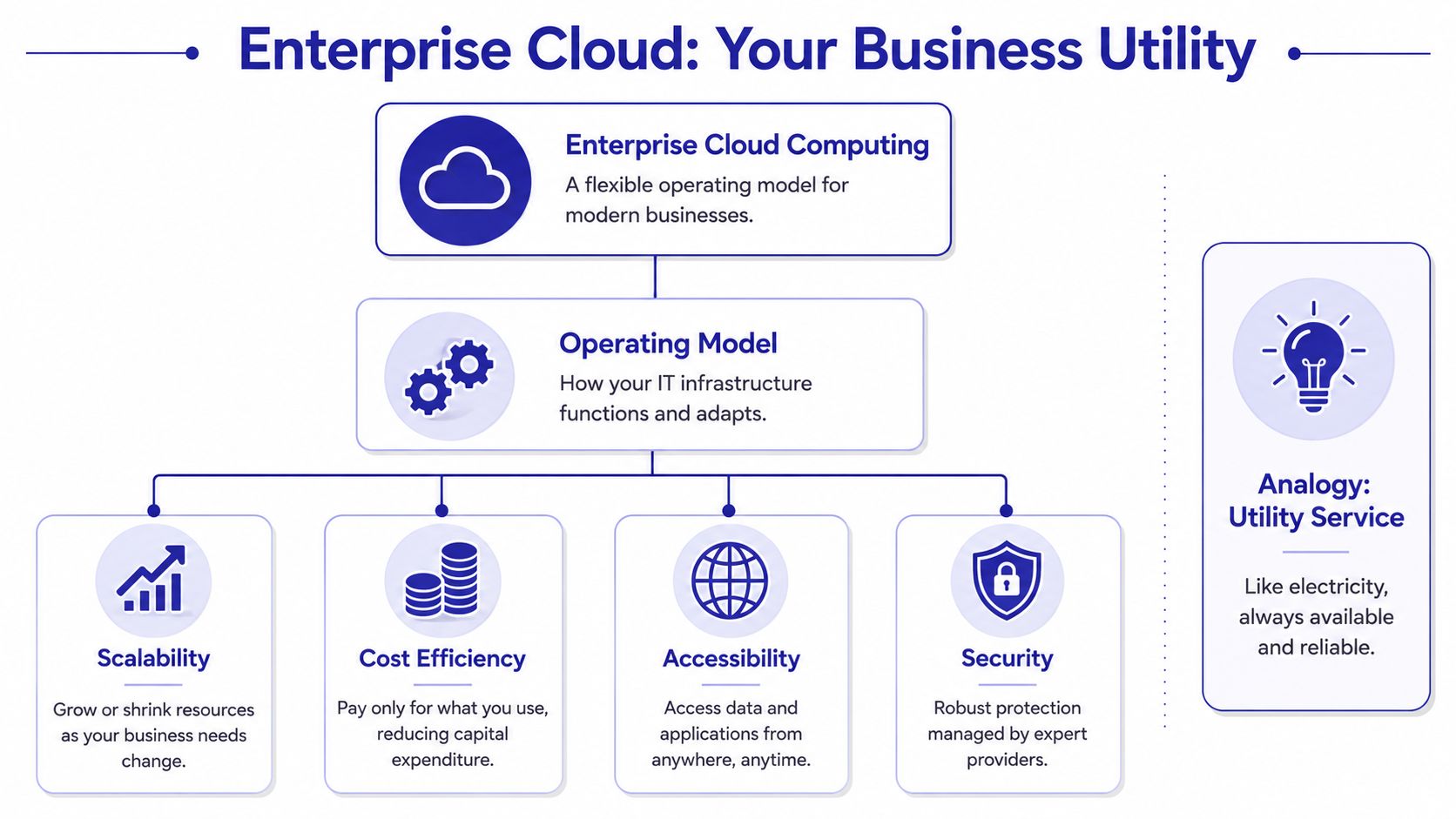
The word enterprise matters because it adds governance, not just hosting. Enterprise cloud computing is best understood as a unified operating model that combines public, private, and distributed cloud under centralized governance. That architecture uses a single control plane to enforce policy, auditability, and resource allocation rules, which improves resilience and scaling capacity without requiring on-premise hardware expansion (unified enterprise cloud governance model).
For a business owner, that means your systems don't have to become harder to manage just because they move offsite. Good enterprise cloud computing services give you structure around user access, security rules, backup processes, and application delivery.
Most firms only need a simple working understanding of the common models:
For many professional firms, the practical setup is mixed. You might use Microsoft 365 as SaaS, while your QuickBooks Desktop, Sage, tax software, or legal practice system runs in a hosted cloud environment that feels SaaS-like to end users but sits on an infrastructure layer underneath. If you want a cleaner primer on that underlying layer, review this explanation of cloud infrastructure for business applications.
A practical example appears in global operations. Firms that need consistent, controlled connectivity across regions often look for specialized guidance around reliable access for multinational firms in China, because enterprise cloud planning isn't only about where servers live. It's also about how users in different locations reach critical systems without friction.
Enterprise cloud should feel boring to the people using it. They open the app, do the work, and stop thinking about where the system lives.
The strongest case for enterprise cloud computing services isn't technical elegance. It's operational relief.
For small and mid-sized firms, cloud works when it removes bottlenecks that partners and staff deal with every week. That includes budget pressure, seasonal swings in workload, remote access headaches, and the constant fear that one hardware failure could interrupt client work.

Cloud is often sold as “pay as you go,” but the more useful point for a professional practice is that it can reduce the need for lump-sum infrastructure purchases. Organizations migrating key systems to the cloud commonly report 20% to 30% IT cost reductions, and the shift from fixed-capacity hardware to pay-per-use elasticity helps businesses absorb workload variability without overprovisioning (Akamai on enterprise cloud efficiency and cost reduction).
That matters when your work comes in waves. An accounting firm ramps up during tax season. A nonprofit may see sudden campaign activity. A law practice may add contract attorneys for a large matter. Buying local hardware for peak demand often leaves you paying for unused capacity during normal months.
Cloud also solves a practical staffing problem. If a firm adds users, opens another location, or shifts part of the team to hybrid work, the environment can expand without another round of office hardware planning.
A few examples make this concrete:
If you're comparing outcomes across smaller organizations, this overview of cloud computing benefits for startups and SMEs complements that decision.
Most firms don't appreciate continuity until they need it. A storm, office outage, stolen laptop, or failed device doesn't have to become a business interruption if applications and data are centralized properly.
Cloud also tends to improve teamwork because everyone works in the same environment instead of passing files around and wondering which version is current. That's not glamorous. It is valuable.
The best cloud setup usually doesn't change how your staff work. It removes the obstacles that were slowing them down.
Security is usually the first objection, especially from firms that handle tax records, legal documents, donor information, payroll data, or financial files. That concern is reasonable. Sensitive data deserves caution.
The mistake is assuming “on-premise” automatically means “safer.” In many small firms, the local server is protected by a mix of old hardware, inconsistent patching, limited monitoring, and whatever backup routine has survived over time. That's not a strategy. It's accumulated habit.

A credible provider should be able to explain its controls in plain English. For most professional firms, the essentials include:
A stronger checklist appears in these essential cloud security practices for businesses, which is worth reviewing before vendor conversations.
Many firms ask whether a provider is “compliant,” as if compliance were a single switch. It isn't. Compliance usually comes from a combination of provider controls, internal policies, user permissions, retention rules, and documented procedures.
If your internal team wants a clearer technical grounding in cloud security controls, this Azure Security certification guide is a helpful resource because it breaks down the kinds of safeguards enterprise environments rely on.
What matters most is whether the provider can support your actual operating requirements. A law firm may need audit-friendly file access. An accounting practice may need strict user separation. A nonprofit may need secure access for staff and contractors without an internal IT department.
Security and continuity overlap more than many firms realize. It's not enough to block unauthorized access. You also need to keep work moving when a system fails, an office becomes inaccessible, or a user device is lost.
Cloud adoption has become a core business continuity strategy, and around 70% of IT leaders report that moving to the cloud improved disaster recovery and resilience (cloud resilience and disaster recovery reporting). For smaller firms, that's one of the biggest practical advantages. Recovery shouldn't depend on who remembers where the last external backup drive is stored.
Good cloud security isn't only about keeping bad actors out. It's about making sure your team can keep working when normal conditions break down.
A common small-firm cloud mistake starts the same way. The managing partner wants remote access fixed before busy season, a provider promises flexibility and scale, and six months later the monthly invoice is higher than expected because storage, backup retention, support, and user changes were priced separately.
That is why provider evaluation should start with cost predictability. For firms that run on fixed fees, seasonal workloads, or tight operating budgets, the essential question is not how many cloud features a vendor can list. It is whether they can host your core systems reliably on terms your finance team can forecast.

Many cloud sales conversations begin with infrastructure diagrams. Smaller firms usually need a pricing conversation first.
Ask for a plain-English breakdown of the monthly charge and the conditions that change it. If a provider cannot explain billing clearly before the contract is signed, billing disputes usually get worse after migration, not better. I advise clients to ask for a sample invoice and review it line by line.
Focus on these points:
A short list of practical vendor checks appears in this guide on how to choose a cloud provider.
The right cloud provider for a software startup may be a poor fit for a law office, accounting firm, or nonprofit. The better test is operational fit. Can the provider support the applications, deadlines, and support expectations your team deals with every week?
Use a review table and insist on specific answers.
| Evaluation area | What to ask |
|---|---|
| Application support | Have you hosted QuickBooks, Sage, tax software, legal systems, CRM tools, or document management platforms like ours? |
| Support model | Who answers when users lose access on a filing deadline or month-end close? Are support hours aligned with our working hours? |
| Backup and recovery | How often are backups run, how long are they retained, and how is restoration tested? |
| User access | How are remote desktop access, permissions, device policies, and multi-factor authentication handled? |
| Contract clarity | Is pricing fixed, usage-based, or mixed? What happens to cost when we add staff, storage, or a second office? |
Cloudvara is one example of a managed hosting provider firms may review when they want to centralize existing business software in a secured cloud environment with remote desktop access, backups, and ongoing support. The same standard still applies. Check fit, scope, support boundaries, and billing clarity.
A careful migration protects two things at once. User productivity and cost control.
Moving everything in one weekend can work for a very small environment, but most firms are better served by a phased plan that limits disruption and avoids paying for emergency fixes. Start by documenting what exists today, including line-of-business apps, shared folders, user groups, printers, scanners, integrations, and any local workflows that no one has written down.
Audit the current environment
Identify the systems people use daily, the dependencies behind them, and the data that has to move first.
Run a pilot with real users
Test the cloud setup with a small group from different roles. Partners, admins, and front-line staff often expose different issues.
Before rollout, this short walkthrough can help your team understand the migration flow:
Train by workflow
Show each group how they will log in, save files, print, and get support. Training should reflect actual tasks, not generic platform features.
Cut over with rollback criteria
Pick a go-live date outside critical deadlines and define the point at which you pause, fix, or temporarily revert a problem application.
Review the first two invoices
This step gets skipped too often. Compare the quoted scope against the actual bill while the provider still has implementation details fresh in hand.
If your migration also touches custom development, application integration, or workflow redesign, lists of top Web3 and AI outsourcing companies can be useful as a separate reference for technical partner evaluation standards, even if your immediate need is narrower and focused on hosted business applications.
A practical way to judge enterprise cloud computing services is to look at the kinds of business problems they solve.
An accounting firm with staff in two offices and several home-based preparers keeps running into the same issue every busy season. The office server can host QuickBooks and tax software, but remote performance is inconsistent. Staff work around the problem by logging in at odd hours or saving files locally, which creates version confusion and support tickets.
In a hosted cloud setup, the firm keeps using the same core applications, but access is centralized. Staff log into one environment from wherever they're working, and the software runs in the cloud rather than overloading a single office machine. The business benefit isn't novelty. It's fewer interruptions during the months when delays are most expensive.
A multi-office law firm often struggles with document sprawl. Attorneys, paralegals, and support staff save drafts across desktops, local shares, and email attachments. Someone always ends up asking which version is final.
Centralizing the document management system in the cloud gives the firm one working environment. Teams access the same matter files, permissions can be enforced more cleanly, and audit expectations become easier to support. For legal work, that consistency matters as much as speed.
One of the biggest improvements in cloud projects is version control. Teams stop hunting for the right file and start trusting the system they're using.
A nonprofit may have remote staff, rotating contractors, and no dedicated IT department. It still needs dependable access to its donor CRM, financial systems, and office productivity tools. Local infrastructure is often hard to maintain because nobody owns it full time.
A managed cloud environment gives the organization centralized application access, routine backups, and a more structured way to handle user onboarding and offboarding. That lowers administrative strain. It also reduces the risk that one aging office device becomes the weak point for the whole organization.
If your current setup depends on one office, one server, or one overextended IT resource, the question probably isn't whether cloud fits your business. It's which form of cloud will give you reliable access, appropriate security, and costs you can forecast.
Start with an internal review. Identify the systems that cause the most friction, the workflows that break when staff work remotely, and the costs that keep appearing outside your normal budget. That gives you a business case grounded in operations instead of marketing language.
Then build a shortlist of providers that understand your type of software and your type of firm. Ask hard questions about billing, support, backups, access control, and what happens when your needs change. If the answers are vague, keep looking.
The lowest-risk move is usually a trial or pilot. Test your real applications with a small user group. See how performance feels. See how support responds. See whether the monthly cost model is clear enough that your finance lead won't dread the invoice.
A good cloud decision should make your business calmer, not more complicated.
If you're ready to test whether hosted business applications will work for your firm, Cloudvara offers a practical next step. You can use its free 15-day trial to run your own software in a managed cloud environment, check performance with your actual team, and evaluate whether the pricing and support model fit your operation before making a longer commitment.




