Server virtualization is the secret sauce behind modern cloud computing. It’s a technology that lets you take one powerful physical server and slice it into multiple, isolated virtual servers. Think of it as running several independent “mini-servers”—each with its own operating system and apps—all on a single piece of hardware. This approach is all about getting the absolute most out of your resources.
Imagine a big, empty warehouse. Without virtualization, you could only run one business inside—one operating system and its dedicated set of applications. This old-school, one-to-one model is often incredibly wasteful, leaving expensive hardware like processing power and memory sitting idle most of the time.
Server virtualization is like a contractor who comes in and installs flexible, secure walls, turning that single warehouse into a bustling marketplace of self-contained storefronts. Each of these storefronts is a virtual machine (VM), which is essentially a complete, software-based computer.
Every VM can run its own unique operation—maybe a Windows Server for email in one, and a Linux server for a database in another—completely unaware of its neighbors. They all share the building’s foundation and utilities (the physical server's hardware), but they operate in total isolation. This simple but powerful idea unlocks huge gains in efficiency, flexibility, and cost savings.
To really get what’s happening under the hood, it helps to know the main players involved. This isn’t just one piece of software; it’s a whole system working in concert. Let's break down the core components using our warehouse analogy.
| Component | Role in Virtualization | Analogy (The Warehouse & Storefronts) |
|---|---|---|
| Physical Server | The actual hardware—CPU, memory, storage, and networking—that provides the raw power. | The Warehouse Building: It's the physical structure providing the space, electricity, and foundation for everything inside. |
| Hypervisor | A thin layer of software that sits between the hardware and the virtual machines. It’s the "traffic cop" that allocates resources to each VM. | The General Contractor: This is the crew that builds the walls, runs the wiring, and manages the utilities, ensuring each storefront gets what it needs without interfering with the others. |
| Virtual Machine (VM) | A self-contained, software-based computer with its own virtual CPU, RAM, and operating system. | The Individual Storefronts: Each shop is a fully functional, independent business operating within its own four walls, unaware of the neighbors. |
This setup—the hardware, the hypervisor, and the VMs—forms the foundation of almost all modern IT. It's a core part of today's cloud infrastructure, enabling the dynamic, on-demand services we rely on.
The core principle here is abstraction. Virtualization separates the software (operating systems and applications) from the physical hardware, breaking the rigid, one-to-one link that used to define computing. This separation is what gives us so much flexibility.
This technology has become so essential that it fuels a massive global market. The server virtualization market was valued at around $79 billion in 2024 and is on track to hit $118.5 billion by 2032. That growth is a direct result of its power to transform IT efficiency and agility.
Server virtualization might sound complicated, but the magic behind it comes down to one brilliant piece of software: a hypervisor. Think of a physical server as a large warehouse building. The hypervisor is the facility manager—it doesn't run a business itself, but its entire job is to manage the space and make sure every tenant has what they need to operate smoothly.
This software layer sits right between the physical hardware and the virtual machines (VMs). It acts as the ultimate translator and resource distributor, taking the server’s raw CPU power, memory, and storage and slicing it up into dedicated portions for each VM. This is what allows a single physical machine to host multiple, completely separate operating systems at the same time, with each one thinking it has direct access to its own hardware.
The hypervisor is in charge of creating, running, and managing every VM. It makes sure that what happens inside one "storefront" (a VM) doesn't spill over and disrupt another. This strict isolation is the bedrock of server virtualization, providing both security and stability.
Just like facility managers, not all hypervisors work the same way. In the world of virtualization, they come in two main types, defined by how they interact with the server's hardware. Knowing the difference is key to understanding which approach fits different business needs.
A Type 1 hypervisor, often called a "bare-metal" hypervisor, is installed directly onto the physical server’s hardware. It essentially becomes the foundational operating system for the entire machine. With no other software layer between it and the server's components, it gets direct, unfiltered access to all the resources.
This is like a purpose-built facility manager who designed the warehouse from the ground up. They know every inch of the building and can manage resources with maximum efficiency and security. That direct control leads to far better performance and stability.
Examples of Type 1 hypervisors include:
Because of their high performance and tight security, Type 1 hypervisors are the industry standard for production environments. They power everything from small business servers to massive data centers and are the engine behind most cloud computing services, including powerful hosting solutions that form the basis of Infrastructure as a Service (IaaS).
Key Takeaway: Type 1 hypervisors deliver top-tier performance and security because they run directly on the server's hardware. This makes them the go-to choice for business-critical applications and cloud hosting.
In contrast, a Type 2 hypervisor, or "hosted" hypervisor, runs as a software application on top of an existing operating system (like Windows 10, macOS, or Linux). In this setup, the host OS manages the hardware, and the hypervisor has to go through it to get resources for its VMs.
Imagine a facility manager hired to oversee a few storefronts inside a building that already has its own general manager (the host OS). To get more electricity or adjust the plumbing, our facility manager has to submit a request to the general manager, adding an extra layer of communication and potential delays.
Common examples of Type 2 hypervisors are:
That extra layer means Type 2 hypervisors are generally slower and less efficient than their bare-metal cousins. For that reason, they aren't used for running production servers. Instead, they’re perfect for developers, IT pros, and tech enthusiasts who need to run different operating systems on their personal computers for things like software testing, development, or just learning the ropes.
Just like there are different ways to build a house, there are a few distinct approaches to server virtualization. Each method strikes a unique balance between performance, isolation, and flexibility, making it a better fit for certain jobs. Getting a handle on these core types is the next logical step in understanding how this technology really works.
The three main methods you’ll run into are full virtualization, paravirtualization, and OS-level virtualization. It helps to think of them as different architectural blueprints for splitting up that single physical server we talked about earlier.
This infographic breaks down the fundamental layers, showing how the hypervisor sits between the physical hardware and the virtual machines it supports.
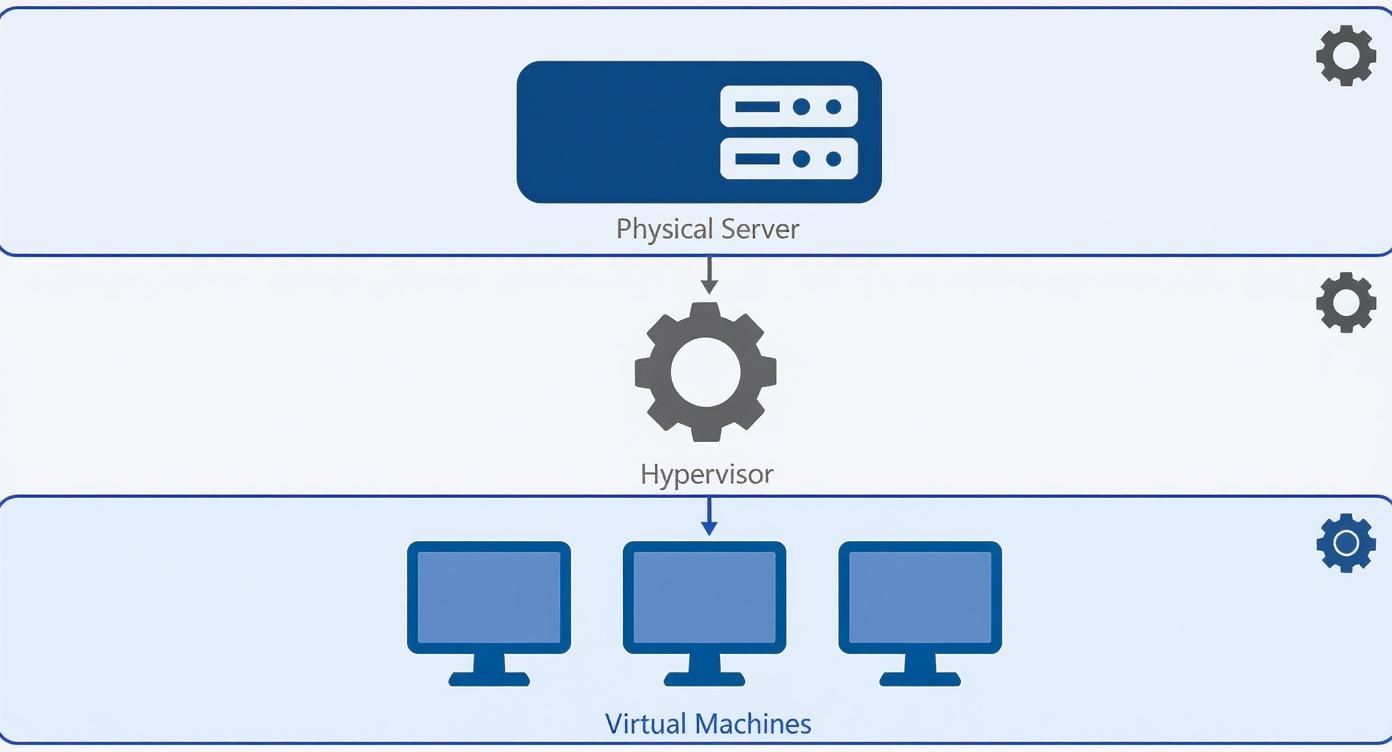
As you can see, the hypervisor is the essential go-between that makes the whole setup possible, directing resources from the server to each independent VM.
Full virtualization is easily the most common and robust type you’ll find. In this model, the hypervisor completely mimics a physical computer, creating a virtual world where the guest operating system runs without needing any changes. The guest OS has no idea it’s not running on real hardware.
This method gives you incredible flexibility and the strongest possible isolation between virtual machines. You can run completely different operating systems—like Windows Server and a Linux distribution—right next to each other on the same physical host. This strength is exactly why platforms like VMware ESXi and Microsoft Hyper-V are so popular in corporate data centers.
The trade-off for this total isolation is a slight performance hit. The hypervisor has to do a lot of translation work between the VMs and the physical hardware, which eats up some processing power. For most business-critical applications, though, the security and flexibility are well worth it.
Paravirtualization takes a more collaborative route. Instead of tricking the guest OS into thinking it's on physical hardware, this method uses a modified operating system that is fully "aware" it's in a virtualized environment. This awareness lets the guest OS and the hypervisor talk to each other directly.
That direct line of communication cuts down on the translation work for the hypervisor, often leading to better performance and efficiency. By working together, the two can streamline operations and reduce resource overhead.
The main catch is that the guest OS has to be specifically modified to support this conversation. You can’t just install any off-the-shelf operating system. Because of this, paravirtualization is less common for general use but shines in specific, high-performance computing situations.
Also known as containerization, this method takes a completely different path. Instead of virtualizing the entire hardware stack from the ground up, OS-level virtualization works at the operating system layer. All instances, or "containers," share the host server’s single OS kernel.
This approach is incredibly lightweight and fast. Spinning up a new container takes seconds, a huge difference from the minutes it might take to boot a full VM. This speed and efficiency have made containers—powered by tools like Docker and Kubernetes—wildly popular for modern app development and deployment.
While server virtualization is about creating entire virtual machines, you can learn more about how individual programs are isolated in our guide on what is application virtualization.
The downside? You lose OS diversity. Since all containers share the same kernel, you can only run applications compatible with that host OS. For instance, you can't run a Windows container on a Linux host. This makes it a specialized tool, perfect for deploying microservices and scalable web apps but less suited for consolidating servers with different operating systems.
To make the differences even clearer, here's a quick side-by-side comparison.
| Attribute | Full Virtualization | Paravirtualization | OS-Level (Containers) |
|---|---|---|---|
| Performance | Good, but with some overhead from the hypervisor's translation work. | Excellent, as the guest OS and hypervisor communicate directly. | Best, due to sharing the host OS kernel and minimal overhead. |
| Isolation | Strongest isolation; each VM is a completely separate entity. | Strong, but relies on the modified guest OS for security. | Weaker; containers share the host OS kernel, creating a larger shared attack surface. |
| OS Support | Supports unmodified guest operating systems (e.g., Windows, Linux). | Requires a guest OS specifically modified to be "virtualization-aware." | All containers must be compatible with the single host operating system. |
| Use Case | General-purpose servers, legacy applications, mixed-OS environments. | High-performance computing, specialized workloads where performance is key. | Microservices, cloud-native applications, DevOps, and CI/CD pipelines. |
Each type has its place. Full virtualization is the workhorse for enterprise IT, containers are the engine for modern apps, and paravirtualization fills a niche for high-speed tasks. Choosing the right one depends entirely on the job you need to get done.
Knowing how server virtualization works is one thing, but its real power is in the tangible business advantages it delivers. Companies don't adopt this technology just because it's clever; they do it because it solves critical, expensive problems and unlocks new levels of operational speed.
At its heart, virtualization is a strategic move to do more with less. Before it became mainstream, data centers were filled with underworked servers. A typical physical server often used just 5% to 15% of its total computing capacity, leaving a huge amount of expensive resources sitting idle. Server virtualization flips this inefficient model on its head, pushing hardware utilization rates upwards of 80%.
That consolidation is the first and most obvious benefit, but it's just the beginning.
The most immediate impact of server virtualization is a dramatic drop in costs. By running multiple virtual machines on fewer physical servers, businesses can slash their spending on hardware. Instead of buying ten servers for ten different applications, you might only need one or two powerful machines.
This reduction extends far beyond the initial purchase price. Fewer servers mean:
This financial impact is a primary driver of its adoption. The technology plays such a dominant role that by 2025, the server virtualization segment is projected to hold the largest revenue share—approximately 36.2%—of the entire data center virtualization market. This leadership is built on its proven ability to optimize server use and cut down hardware dependency. Learn more about the growth of the data center virtualization market.
In business, speed matters. Server virtualization replaces a slow, manual process with near-instant deployment. In a traditional IT environment, setting up a new physical server could take days or even weeks—from ordering and racking the hardware to installing the operating system and applications.
With virtualization, a new server can be provisioned and deployed in minutes. This speed allows organizations to respond to new opportunities and changing business needs almost instantly, accelerating innovation and project timelines.
This agility is a game-changer. A development team can spin up multiple isolated environments to test new software without waiting for hardware. A marketing team can quickly launch a temporary server to handle a short-term campaign. This on-demand capability fundamentally changes how businesses operate.
Server virtualization also provides a powerful safety net. Since each virtual machine is just a set of files, it's completely independent of the physical hardware it runs on. This makes backing up and restoring an entire server incredibly simple and fast.
You can create a complete "snapshot" of a VM—including its OS, applications, and data—and move or copy it with ease. This capability is the cornerstone of modern disaster recovery strategies.
By separating software from hardware, server virtualization gives businesses the resilience they need to withstand unexpected outages and get back up and running quickly. It turns disaster recovery from a complex, expensive project into a manageable, automated process.
The theory behind server virtualization is interesting, but its real value shows up when it solves tangible business problems. This technology isn’t just an IT concept; it’s a practical tool that reshapes how organizations operate, innovate, and grow.
From shrinking massive server rooms to creating secure testing grounds for developers, the applications are as diverse as they are impactful. Let’s dig into some of the most common scenarios where server virtualization really shines.
One of the biggest reasons businesses jump into virtualization is for server consolidation. Picture a company with a dedicated physical server for each core function—one for email, another for the CRM, and a third for the file server. That one-to-one model is incredibly inefficient, with most servers sitting idle, using only a tiny fraction of their available power.
Virtualization lets an IT team pack all those different jobs onto a single, powerful physical server. The email, CRM, and file servers now run as independent virtual machines, all sharing the same hardware without getting in each other's way.
This move delivers immediate and significant benefits:
Software development is a cycle of building, testing, and debugging. To do it right, you need safe, isolated spaces. Before virtualization, developers often had to share a limited number of physical test servers, which led to conflicts, overwritten code, and frustrating delays. If a new app caused a system crash, it could bring the entire test server down, derailing multiple projects at once.
Server virtualization completely changes this dynamic by letting developers create sandboxes. A developer can instantly spin up a new VM that’s a perfect copy of the live production environment.
Inside this isolated sandbox, they can experiment freely—installing new code, testing updates, and even trying to break things on purpose—without any risk to the live systems or anyone else's work. Once the testing is done, the VM can be deleted just as easily.
Many businesses depend on older, "legacy" applications that are critical for their operations but are no longer supported by modern hardware or operating systems. Keeping an ancient physical server running for just one application is both risky and expensive. Hardware failures become more likely, and finding replacement parts can be a nightmare.
Virtualization offers a clean solution. The old application and its outdated operating system can be moved into a virtual machine through a process called Physical-to-Virtual (P2V) migration.
This VM can then run on brand-new, reliable hardware, extending the life of that essential software indefinitely. The business gets to sidestep a costly and complex application rewrite while gaining the benefits of modern performance and reliability. Solutions like hosted virtual desktops often use this capability to deliver legacy apps alongside modern ones in a secure, remote-access environment.
Finally, server virtualization is the fundamental technology that makes nearly all forms of cloud computing possible. Whether it’s a private cloud built in a company's own data center or a massive public cloud, the ability to abstract and pool resources is what makes it all work.
Cloud providers use virtualization to create the multi-tenant environments that allow thousands of customers to share the same physical infrastructure securely and efficiently. This technology is what enables the on-demand provisioning, scalability, and flexibility that we expect from the cloud. It’s the engine that powers private, public, and hybrid cloud strategies all over the world.
While server virtualization offers incredible power and flexibility, it also redraws the security map. It’s not that a virtual world is inherently less safe—in fact, with the right approach, it can be even more secure than a traditional one. The key is understanding the new landscape and tackling its unique challenges head-on.
One of the sneakiest risks is "VM sprawl." This happens when virtual machines are created for temporary projects and then forgotten, accumulating like digital dust bunnies. These unmanaged VMs often miss critical security patches, creating hidden and unprotected backdoors into your network. A forgotten test server can quickly become a serious liability.
Then there's the hypervisor itself. As the brain of the whole operation, the hypervisor has keys to every virtual machine running on its host. If an attacker manages to compromise it, they could potentially control every single one of your servers. Protecting it isn't just important; it's everything.
Fortunately, the tools and methods for locking down a virtual environment are mature and effective. Instead of treating security as a roadblock, think of it as an integrated part of your virtualization strategy. A secure foundation is built with layers, protecting the hypervisor, the VMs, and the network that ties them all together.
A few non-negotiable practices include:
This disciplined approach is more critical than ever, especially as the global server virtualization software market, valued at $9.49 billion in 2024, keeps climbing. As more businesses adopt virtualization for its agility, built-in security becomes a major factor. You can find more details about the server virtualization market drivers on OpenPR.
Beyond just managing risks, virtualization opens the door to security tactics that are difficult, if not impossible, to pull off in a physical world. One of the most powerful is network micro-segmentation. This technique allows you to create granular, software-defined security rules that isolate individual workloads from each other, even if they’re running on the same physical server.
Think of it as putting a dedicated firewall around every single virtual machine. If one VM is compromised, micro-segmentation prevents the threat from moving laterally to infect other servers on the network—a huge security win.
This kind of isolation, paired with robust backup and snapshot features, creates a powerful formula for resilience. Protecting your environment requires a complete game plan, and you can learn more about the essentials of cloud data protection to build a strategy that holds up. By combining diligent management with modern security tools, you can turn your virtual infrastructure into a secure, efficient, and resilient powerhouse.
As you dig into server virtualization, a few questions always seem to pop up. Getting straight answers to these can clear up any confusion and show you exactly how this technology fits into the bigger picture. Let's tackle the most common ones.
This is probably the number one point of confusion, but the relationship is actually pretty simple. Think of it this way: server virtualization is the engine that makes cloud computing run.
Virtualization is the act of splitting one physical server into multiple virtual machines. Cloud computing, on the other hand, is a service that delivers computing resources—servers, storage, you name it—on demand over the internet. Cloud providers use virtualization on a massive scale to create those huge pools of resources they rent out to customers.
Key Takeaway: You can absolutely have virtualization without the cloud (many businesses do it in their own data centers), but you can't have cloud computing without virtualization. It’s the core technology that gives the cloud its incredible flexibility and scale.
Pretty much, yes. Modern servers are almost all built with virtualization in mind. That said, a couple of practical things determine if a server is a good candidate. The most important is its CPU.
To run a hypervisor well, a server’s processor needs hardware-level support for virtualization. These are special features baked right into the chip that make managing virtual machines way faster and more secure.
The two main technologies you’ll see are:
Besides the CPU, the server just needs enough raw power—RAM, storage, and network bandwidth—to handle all the virtual machines you want to run. A server that’s short on RAM, for instance, will quickly start to choke when trying to run multiple VMs, tanking performance for everyone.
There's definitely a learning curve, but modern tools have made it far less intimidating than it used to be. The days of being stuck in a complex command-line interface are mostly gone. Today’s hypervisors from providers like VMware and Microsoft come with slick, intuitive graphical interfaces.
These management dashboards let IT admins handle all the essential tasks—spinning up new VMs, assigning resources, checking performance, and moving servers around—from one central screen. While you’ll still want to understand the core concepts, you don't need to be a coding whiz to get started. Many basic tasks are surprisingly straightforward, letting teams get up and running fast.
At Cloudvara, we use the power of server virtualization to deliver secure, reliable, and scalable cloud hosting solutions. By moving your on-premise servers to our robust infrastructure, you can slash IT costs, ensure your business stays online, and get access to your critical applications from anywhere. See what it can do for you with a free 15-day trial.




