
Ever tried to run a program on your computer only to find out it won't install, or worse, it messes up other software you already have? Application virtualization is the technology that solves this headache by letting you use software without actually installing it the old-fashioned way.
It works by separating an application from the computer’s operating system, tucking it neatly into its own isolated bubble.
Think of it like streaming a movie on Netflix. The entire film isn't downloaded and permanently stored on your device; you just get the parts you need, right when you need them. Application virtualization does the same thing with software, delivering it to your device on demand.
The application runs inside a protected "sandbox." This isolation is the magic ingredient. It prevents the software from making any permanent changes to your computer’s system files or registry, keeping your operating system clean, stable, and free from the usual clutter of installed programs.
This approach cuts through some of the most persistent IT nightmares. By keeping applications separate from the OS—and from each other—it wipes out those frustrating software conflicts.
Need to run two programs that refuse to coexist on the same machine? Virtualization makes it happen. It’s a game-changer for businesses that need more flexibility and control over their software. If you want to dive deeper into how applications are delivered, you can learn more about the basics of application hosting in our related guide.
This demand for flexibility is fueling major growth. The global application virtualization market, valued at USD 2.72 billion, is expected to hit USD 5.93 billion by 2030. This surge shows just how essential this technology has become for enabling remote work and simplifying IT. You can find more details on this growth over at 360iResearch.com.
At its core, application virtualization gives you the freedom to run any app, anywhere, without being tied down by compatibility issues or complex installations. It simplifies deployment, boosts security, and ensures users have access to the tools they need to be productive.
So how does this all work behind the scenes? Let's move past the streaming analogy and look at the actual mechanics. The process kicks off when an application is bundled into a self-contained, portable package. This package is a neat little bundle that holds everything the software needs to run: its files, settings, and even registry keys.
When a user clicks to open the app, this package doesn't actually install anything on their computer in the traditional sense. Instead, it creates a temporary, isolated environment—often called a sandbox—right on the local device. Think of this sandbox as a protective bubble that separates the application from the computer's main operating system and all the other software running on it.
This isolation is the secret sauce that prevents software conflicts. For instance, if you're an accountant who needs to run two different, incompatible versions of a tax program for different clients, virtualization makes it possible. Each version operates in its own sandbox, completely unaware of the other's existence. This whole process hinges on two key actions working in harmony.
Application Streaming: To get you working faster, this method delivers just the essential bits and pieces of the application to your device first. This allows the program to launch in seconds. The rest of the software streams quietly in the background as you need it, which is a smart way to optimize performance and keep network traffic light.
Environment Isolation: Because the application is running inside that sandbox, it can't make permanent changes to the host computer’s files or system registry. Once you close the app, the sandbox—along with all its temporary changes—simply vanishes. Your device is left exactly as it was.
This diagram shows the simple three-step flow of the process.
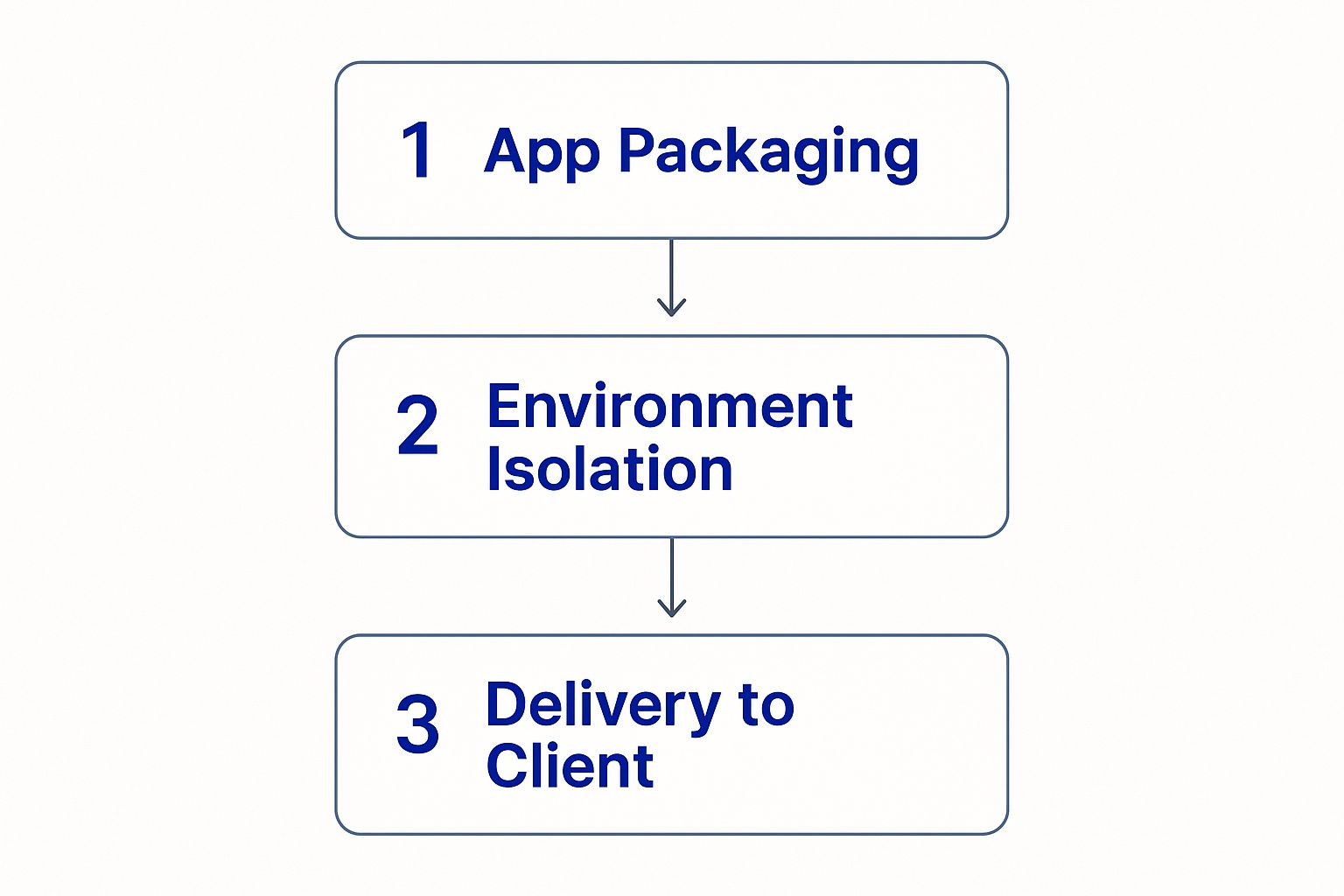
As you can see, the application is first packaged up, then isolated inside a virtual environment, and finally delivered to the user. This clean workflow is what allows IT teams to deploy and manage software effectively, no matter how much the company grows.
In short, application virtualization essentially tricks software into thinking it's running on a normal operating system. In reality, it's operating inside a controlled, temporary workspace that keeps everything clean and separate.
This entire mechanism delivers a smooth, seamless experience for the end-user while giving IT administrators the control and system integrity they need. It’s a powerful approach that also serves as the foundation for more advanced solutions, which you can read about in our guide to hosting virtual desktops.

Understanding the “how” is great, but the real magic happens when you see what application virtualization can do for your bottom line. This isn’t just a tech upgrade for the IT department; it’s a strategic move that directly boosts efficiency, tightens security, and cuts costs across the board.
One of the first things you’ll notice is how simple software deployment becomes. Forget touching every single workstation. Imagine rolling out a critical update to hundreds of devices in an instant. Your IT team gets back countless hours, and your employees don't miss a beat.
Security is where application virtualization really shines. By running programs in isolated “sandboxes,” you’re essentially building a digital quarantine zone. If malware sneaks into a virtualized app, it’s trapped inside that bubble, unable to infect the host computer or spread across your network. It’s a simple but powerful way to shrink your company’s attack surface.
This technology also breathes new life into older, business-critical software. Lots of companies depend on legacy programs that just won’t play nice with modern operating systems. Instead of undertaking a costly and disruptive replacement project, virtualization lets you run those essential tools on new hardware without the compatibility headaches. You get to extend the life of your software and avoid a massive expense.
By decoupling applications from the underlying hardware and OS, you gain unprecedented flexibility. This allows for seamless updates, ironclad security, and the ability to maintain crucial legacy systems without compromise.
The demand for this kind of flexibility is soaring. The virtualization software market is now valued at USD 94.82 billion and is expected to hit USD 218.76 billion by 2030. This explosive growth is coming from businesses in finance, manufacturing, and government who are using it to better manage resources and empower remote teams. You can find more details on this trend over at MordorIntelligence.com.
This shift toward centralized, secure application access is a cornerstone of modern business operations. To see how it fits into a bigger picture, it’s worth exploring the benefits of cloud hosting for small businesses and learning how these technologies work hand-in-hand.

Not all application virtualization is built the same. Different methods solve different problems, so knowing the three main approaches is key to finding the right fit for your business. Each one offers a unique way to get software into the hands of your team, creating a different balance of performance, resource usage, and IT management.
The most common approach you'll see is remote application virtualization. With this method, the software runs entirely on a central server. Your computer or device simply gets a live video feed of the user interface. Think of it like flying a high-tech drone from miles away—you’re in full control, sending commands and seeing the results instantly, but all the complex processing is happening somewhere else. This model is perfect for keeping sensitive data locked down in a central, secure location.
Next up is application streaming. It works a lot like watching a movie on Netflix; you don't download the entire film before you start watching. Instead, just enough of the application is sent to your device to get it up and running, and the rest of the code is streamed in the background as you need it. This gives you a much more “native” feel since some processing happens on your machine, but it keeps the installation footprint small.
Finally, there’s local application virtualization. This method packages an entire application into a single, self-contained file that runs directly on your computer. Even though the software is using your local hardware, it’s completely isolated in its own virtual bubble, or “sandbox.” This is a brilliant way to prevent conflicts between different programs and keep your computer’s operating system clean and stable.
Each type of application virtualization strikes a different balance between centralized control and local processing. Your choice really boils down to your priorities: is it maximum security (remote), a native-like experience (streaming), or conflict-free offline access (local)?
It's no surprise that the market for these tools is growing fast. The application virtualization market in the United States is expected to grow at a CAGR of around 12.9% from 2025 to 2030, and core products already make up over 70% of the revenue. That boom shows just how essential these solutions have become for modern businesses. You can dig into more market trends from Grand View Research.
Of course, getting these apps to talk to each other is another piece of the puzzle. You can learn more about that in our guide on what application integration is.
Sure, the technical details are interesting, but application virtualization really clicks when you see how it solves real-world problems for everyday businesses. From small accounting firms to growing legal practices, this technology delivers practical fixes that boost productivity, tighten security, and simplify IT headaches. This isn’t just a tool for massive corporations; it’s a game-changer for any organization that depends on specialized software.
Take a busy law firm, for example. Attorneys and paralegals need constant, secure access to case management software whether they’re in the office, at the courthouse, or meeting with a client.
Instead of installing sensitive software on dozens of different laptops—creating a mess of security risks and update nightmares—the firm can virtualize the application. This keeps all confidential client data locked down on a secure server while giving legal staff instant access from any approved device. It’s a simple shift that dramatically improves both mobility and data protection.
Accounting firms face a different, but equally frustrating, challenge—especially during tax season. They often need to run multiple, conflicting versions of tax preparation software to handle a diverse client list. The traditional solution? Separate computers for each version, which is as expensive as it is inefficient.
With application virtualization, an accountant can run two, three, or even more incompatible versions of the same software side-by-side on a single machine. Each program operates in its own isolated bubble, completely unaware of the others. This setup wipes out software conflicts and streamlines workflows when every second counts.
These examples show the technology's direct impact. Application virtualization delivers tangible benefits by:
Ultimately, these scenarios show how application virtualization moves from a technical concept to a powerful tool that helps businesses of all sizes operate more efficiently and securely.
Even with a good handle on the technology, a few questions always seem to pop up. Let's walk through the most common ones to clear up any confusion and give you some straightforward answers.
This is a great question, and one we hear all the time. The short answer is no. While they’re related technologies, application virtualization and desktop virtualization solve different problems.
Application virtualization isolates and delivers just a single application, like your accounting software or a specific CRM. Desktop virtualization, on the other hand, delivers the entire desktop operating system—the start menu, wallpaper, and all its installed programs. It's like streaming one specific movie versus streaming an entire cable TV package with every channel.
If you want to dive deeper into how a full remote desktop works, we have a helpful breakdown in our article explaining what a remote desktop connection is.
While the technology is incredibly versatile, not every piece of software is a perfect fit for virtualization. Most of your day-to-day business applications, from office suites to specialized industry software, work flawlessly.
The tricky ones are usually applications with deep system-level hooks or those that depend on specific hardware, like software needing direct access to a unique driver. It's always a good idea to test your mission-critical software to ensure full compatibility before rolling it out to the whole team.
The key is to remember that application virtualization excels at managing standard, self-contained software. For complex applications with extensive system hooks, a different approach might be needed to ensure everything runs smoothly.
Honestly, application virtualization is a huge win for security. By running applications in an isolated "sandbox," it stops malware from escaping and infecting the user's computer. Since everything is centralized, security patches can be applied once on the server and instantly protect the entire organization, closing vulnerabilities fast.
That said, no technology is a silver bullet. The primary concern shifts from protecting individual laptops to securing the central server where the applications live. A breach of this server could potentially compromise every app it hosts. That's why strong server-side security, strict access controls, and vigilant monitoring are absolutely essential. When you secure the core, you protect the entire network.
Ready to simplify your IT and empower your team with secure, accessible applications? Cloudvara centralizes your essential software on a secure cloud platform, accessible from any device. Get a free 15-day trial and see the difference.




