
A partner is at home preparing for a hearing. A paralegal needs the latest draft. The client expects an answer tonight. The file sits on an office server, remote access is unstable, and someone sends the document to a personal email account because the work cannot wait. That is no longer just an IT problem. It is a supervision problem, a confidentiality problem, and a business continuity problem.
Cloud adoption in law firms is often framed as a security question. Security matters, but it is only part of the decision. The harder questions are operational and ethical. Who approves user access for each matter. How is work supervised when lawyers and staff operate across home offices, courtrooms, and client sites. What is the firm's backup plan if a vendor has an outage, changes terms, or becomes too painful to leave.
A cloud computing law firm is not merely a firm with remote login. It is a firm that treats document access, communication, identity management, retention, backup, and vendor oversight as one operating model. That model can reduce friction and tighten control at the same time, but only if the firm sets rules for administration, audit trails, and exit planning before migration starts.
Firms that want a practical framework usually begin with their actual workflows, then match them to cloud solutions for law firms that support supervision, recovery, and controlled access. The technology matters. Governance matters more.
Done well, the move to the cloud gives the firm better continuity, clearer accountability, and fewer risky workarounds. Done poorly, it replaces a server closet with a stack of vendors the partnership does not fully control.
A partner gets a call at 9:30 p.m. A client needs a filing reviewed before morning, the associate is working from home, and the document sits on a server that requires a brittle VPN connection. The immediate problem looks technical. However, the underlying issue is that the firm is still running its practice on infrastructure that depends on people being in the right place at the right time.
That model no longer fits how law firms operate. Lawyers work across offices, homes, client sites, and courtrooms. Vendors host core systems. Staff expect reliable access outside business hours. In that setting, cloud adoption is less a technology trend than a management decision about control, continuity, and accountability.
As noted earlier, industry reporting shows cloud use is already common among law firms, and many firms expect that use to grow. The practical question is which systems should move first, which should stay put for now, and how the firm will supervise vendors, preserve client access during an outage, and leave a platform without chaos if the relationship goes bad.
The pressure usually comes from operations, not theory. Aging servers can survive another quarter. A failed sync during a closing, a dead remote desktop session before a hearing, or a scramble to restore files after a local hardware issue gets management attention much faster.
The firms that delay too long usually run into the same problems:
That last point gets missed in many cloud discussions. Security matters, but managing partner concerns usually broaden once the firm has lived through a provider outage, a rushed renewal, or a painful data migration. A sound cloud strategy includes an exit path, defined recovery priorities, and clear supervision over who can grant access, change settings, and respond when something fails.
For firms comparing approaches, cloud solutions for law firms should be evaluated as operating infrastructure, not just hosted storage. The same review applies to adjacent tools such as fax workflows. Firms replacing legacy fax servers can learn about SendItFax online fax as part of that broader shift.
Cloud computing sounds abstract until you translate it into firm operations. In practical terms, it means your lawyers and staff stop depending on a physical office server as the center of daily work. Instead, applications, files, email, and remote access are delivered through managed hosted systems.
Owning on-premise infrastructure is like owning the building your office sits in. You're responsible for the roof, power, maintenance, security systems, and repairs. A cloud model is closer to leasing space in a secure, professionally managed building that handles those functions so your firm can focus on practicing law.
That doesn't mean you give up responsibility. It means your responsibility changes. Instead of replacing drives and troubleshooting VPN appliances, you evaluate contracts, access controls, support quality, and recovery options.
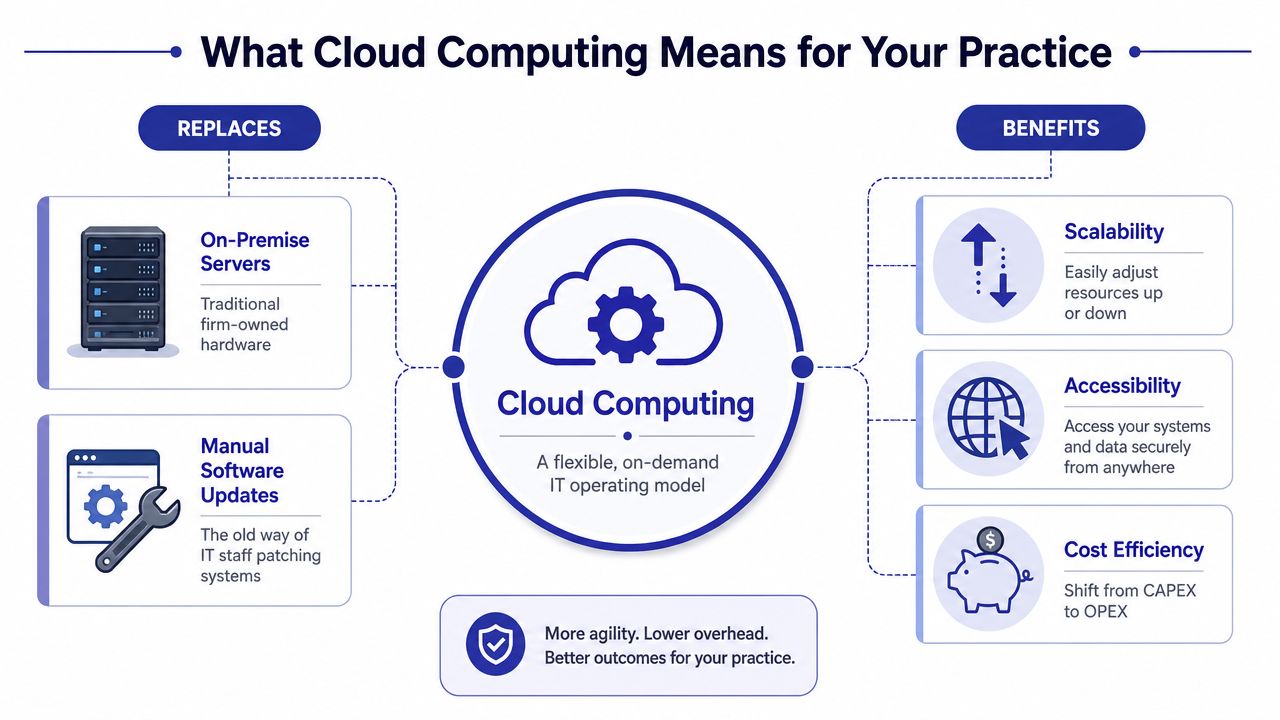
A lot of confusion comes from treating “the cloud” as a single thing. For law firms, it usually means a mix of delivery models.
| Model | What it looks like in a law firm | Best fit |
|---|---|---|
| SaaS | Browser-based tools such as case management, billing, e-signature, or document sharing | Firms willing to adopt modern platforms |
| Hosted desktop apps | Legacy applications like QuickBooks, PCLaw, or other Windows-based tools run in a hosted environment | Firms that need continuity with existing software |
| Virtual desktops | A full remote desktop workspace with firm apps and files in one managed environment | Firms that want a familiar office setup from any location |
That mix matters because many firms aren't starting from zero. They already have software they rely on. A hosted approach can preserve that software while removing the office-server dependency.
For firms comparing those models, cloud-based legal software options are worth reviewing alongside the tools you already use. Adjacent workflows matter too. If your firm still depends on fax for courts, healthcare, or government exchanges, it helps to learn about SendItFax online fax as part of the same modernization effort.
The right question isn't “Should we buy cloud?” It's “Which legal workflows should stay as they are, and which should be redesigned?”
Most partner discussions about the cloud go wrong in one of two ways. One side talks as if hosted systems solve everything. The other treats on-premise control as intrinsically safer. Neither is accurate.
The better comparison is operational. Which model gives the firm a more reliable, supportable, supervised way to deliver legal work?

The strongest business case usually comes from cost alignment and operational flexibility. A published law-firm cloud migration example discussed by Ollion reported a 50% cut in overhead costs, and the same article explains that cloud resources can scale on demand and are often billed on a pay-as-you-go basis. That won't happen in every firm, but the principle is sound. You stop buying for peak hardware capacity years in advance and start matching infrastructure to actual use.
The practical upside often includes:
Cloud risk is real. It's just different from server-room risk.
A few common failure points:
The cloud reduces some technical burdens, but it increases the importance of contract review, user governance, and continuity planning.
A useful way to evaluate the trade-off is to compare failure modes:
| Issue | On-premise environment | Cloud environment |
|---|---|---|
| Hardware failure | Firm owns the problem | Provider usually owns the platform issue |
| Remote access | Often patched together | Usually built into the service |
| Software updates | Firm schedules and tests | Provider often manages platform updates |
| Data portability | Usually local control | Depends heavily on vendor terms |
| Business interruption | Office outage can be severe | Connectivity and provider dependency become central |
If your partnership is building a formal business case, this pros and cons of cloud computing overview is a useful companion to internal planning.
Law firms can outsource infrastructure. They cannot outsource professional responsibility. That's the dividing line many cloud discussions miss.
American Bar Association guidance makes confidentiality, competence, and supervision central to cloud use. Surveys show firms value features like data backup (49%) and less reliance on IT staff (41%), which must be balanced with these core ethical duties. In other words, convenience is relevant, but it never overrides the lawyer's obligations.
A vendor may host the platform, but your firm still decides who gets access, how files are shared, what devices are permitted, and how client instructions are followed. That matters even more in hybrid work because the risk surface is larger. Home networks, personal devices, shared workspaces, and travel all create supervision issues.
The governance questions partners should be asking include:
A lot of law firms are “cloud-enabled” without being well governed. Lawyers can log in from anywhere, but no one has updated policy, access review, or vendor oversight to match the new environment. That's where trouble starts.
If a firm can't explain who may access a matter, from which devices, under what approval process, it doesn't have a cloud strategy. It has a convenience strategy.
The issue becomes sharper when legal assistants, contract staff, outside vendors, and clients all touch the same environment. Ethical supervision requires more than trust. It requires controls, logs, and defined approval authority.
A workable governance model usually includes a mix of policy, technology, and management discipline:
If your leadership team needs a plain-English framework for assessing operational exposures around hosted systems, this cybersecurity risk management guide is a useful outside primer. For legal-specific oversight, firms should also look at compliance risk management considerations when evaluating providers and internal controls.
Ethics sets the duty. Security implements it. If a provider can't answer detailed technical questions in plain language, the firm shouldn't move forward.
Many law firms waste time on broad promises. “Bank-grade security” and “enterprise protection” don't tell you what you need to know. You need specifics about encryption, authentication, logging, backups, and recovery.
A practical checklist helps separate real controls from sales language.

Some of the best vetting questions are simple:
| Ask this | Why it matters |
|---|---|
| How do you enforce multi-factor authentication? | Tells you whether access control is optional or built in |
| Can we restrict access by role or matter? | Shows whether confidentiality can be operationalized |
| What logs do we receive? | Determines whether supervision is possible after the fact |
| How are backups restored? | Reveals whether “backup” is real or just marketing |
| Where is data stored? | Helps assess jurisdiction and client requirements |
This walkthrough gives a useful visual overview of cloud security concepts in practice:
Many breaches and near-misses come from routine behavior, not exotic attacks. A lawyer downloads a file locally and leaves it there. A staff member shares a link too broadly. Someone reuses credentials. That's why technical controls and user training have to support each other.
Field note: The safest platform still fails if the firm lets convenience overrule permissions, authentication, and review.
For firms building a provider checklist, law firm data security requirements offer a useful starting point for evaluating hosted legal environments.
Vendor selection should be treated like selecting outside counsel for a sensitive matter. The glossy demo matters less than the quality of the answers under pressure.
The biggest miss I see is firms asking only about security and uptime. Those are important, but they're not enough. A cloud partner should also be able to explain support, legal-application experience, migration sequencing, and what happens when the relationship ends.
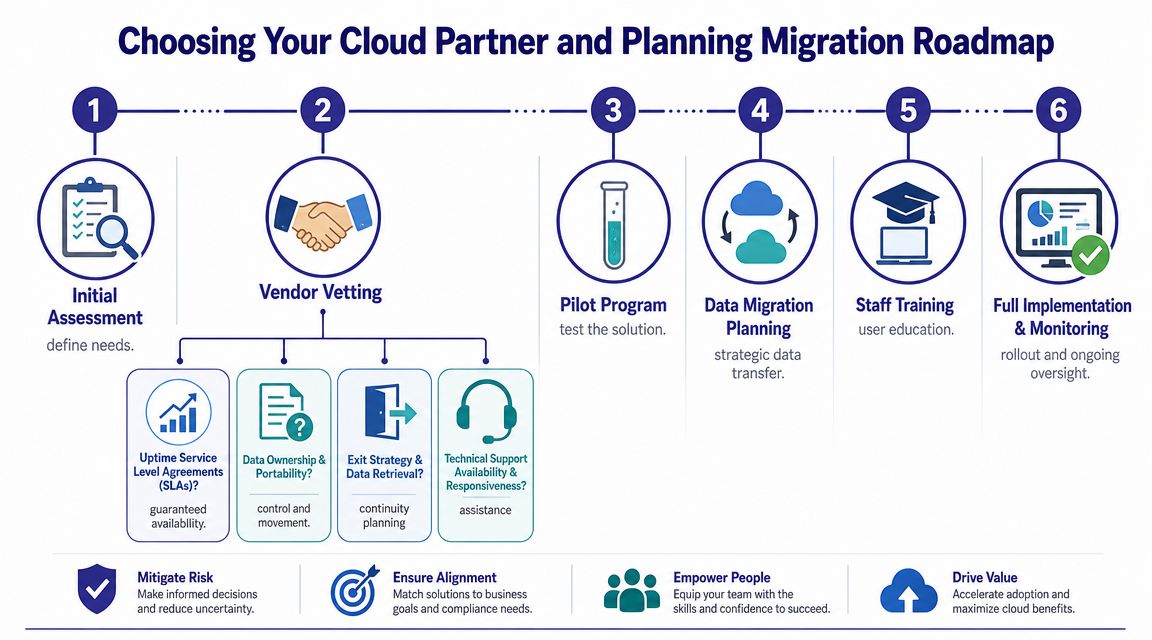
A key blind spot is exit planning. As legal commentary highlighted in the New York City Bar report explains, firms should ask how quickly matter files, metadata, and audit logs can be exported and who owns recovery if a provider becomes unavailable, shifting the question from “Is the cloud safe?” to “Can we recover our practice?”
That single issue often reveals whether a provider understands legal operations.
Use a vetting list that includes these topics:
The best migrations are phased. Firms that try to move everything at once usually create avoidable disruption.
A practical migration roadmap looks like this:
Assess and inventory
List applications, document stores, integrations, user groups, and workflows. Identify what is business-critical and what can move later.
Select a vendor and run a pilot
Start with a limited user group. Test performance, printing, scanning, permissions, and support responsiveness before expanding.
Migrate in stages
Move lower-risk systems first where possible. Then transition core applications and live matter access with a defined cutover plan.
Train and supervise
Show users how to log in, save files, share documents, and escalate access issues. Training should be role-specific, not generic.
Decommission old systems carefully
Don't keep half-retired servers alive indefinitely. That creates confusion, duplicate data, and security drift.
A lot of firms need hosting that supports existing legal and business software rather than forcing an immediate full-platform replacement. In that scenario, one option is Cloudvara, which provides hosted access for existing applications in a centralized cloud environment. That can be useful for firms that want continuity while retiring on-premise infrastructure.
Cloud computing in a law firm isn't an IT trend. It's an operating decision. It changes how your lawyers access files, how your staff collaborate, how your firm supervises confidential information, and how you recover when something goes wrong.
The firms that benefit most are not the ones that move fastest. They're the ones that move deliberately. They know which workflows belong in the cloud, which controls are essential, and which contract terms determine whether the platform is workable in real life. They don't stop at “Is it secure?” They ask harder questions about access governance, continuity, ethical supervision, and exit rights.
That shift in thinking matters because the cloud doesn't eliminate risk. It redistributes it. You usually gain mobility, shared systems, and less dependence on office hardware. In return, you take on greater dependence on provider competence, documented processes, and internal discipline. For most firms, that's still a smart trade. But only if leadership treats it as a management issue, not just a technology purchase.
A future-ready law firm is one that can keep working when the office is closed, when attorneys are traveling, when teams span locations, and when clients expect immediate response without any compromise in confidentiality. That's what the right cloud model supports. Not convenience for its own sake. Controlled, resilient legal operations.
If your firm is evaluating hosted legal applications, remote access, or a phased move away from office servers, Cloudvara is worth a look as a provider focused on secure cloud hosting for business-critical software. The right partner should be able to discuss not just access and uptime, but also supervision, backups, migration sequencing, and data exit planning in terms a managing partner can use.




