Imagine your entire office desktop—all your applications, files, and software—available on any device, anywhere you have an internet connection. That's the simple promise of remote desktop hosting services. Instead of being tied to a single machine in your office, your entire desktop environment lives in a secure, high-performance data center managed by a provider.
At its core, a remote desktop hosting service separates your digital workspace from your physical device. Think of it like streaming a movie from Netflix. You don’t own the movie file or the server it’s stored on; you just get seamless, on-demand access to the experience on your TV, laptop, or phone.
A hosting provider does the same thing, but for your professional life. They run your desktop, complete with specific software like QuickBooks or your legal practice management tools, on their powerful servers. Then, they stream a live, interactive view of that desktop directly to your screen. Your mouse clicks and keyboard strokes are sent to the remote server, and the screen updates are sent back instantly.
This secure, two-way communication is made possible by a Remote Desktop Protocol (RDP), which acts as the bridge between your local device and your hosted desktop. If you're curious about the nitty-gritty of how that works, you can learn more in our detailed guide explaining what is a remote desktop connection.
The biggest shift is the freedom it gives you. You’re no longer tethered to one powerful computer at a specific location. Your "work computer" becomes an accessible, cloud-based resource you can tap into from anywhere.
This unlocks a few immediate advantages:
To get a clearer picture, let's compare managing your own server with using a hosted remote desktop service.
| Aspect | On-Premise Server | Remote Desktop Hosting |
|---|---|---|
| Initial Cost | High (hardware purchase, setup) | Low (no hardware purchase) |
| Maintenance | Your responsibility (IT staff, repairs) | Managed by the provider |
| Accessibility | Limited to office or VPN setup | Accessible from anywhere with internet |
| Scalability | Difficult (requires new hardware) | Easy (adjust resources on demand) |
| Security | Your responsibility to implement & update | Managed by experts with enterprise-grade tools |
This comparison highlights why so many businesses are making the switch. You trade the high upfront costs and hands-on maintenance of an on-premise setup for the flexibility and expert management of a hosted service.
The shift from on-premise hardware to cloud-based solutions is a major industry trend. In fact, the global remote desktop software market is projected to grow from $3.92 billion in 2025 to a massive $14.73 billion by 2034, reflecting a compound annual growth rate of 15.60%. Cloud-based solutions are leading this charge, making up over 52% of the market as businesses look for lower maintenance costs and greater scalability.
A remote desktop hosting service gives you the power and security of an enterprise-grade IT department without the complexity or cost. It’s about accessing what you need, not worrying about where it runs.
It's also important to distinguish this service from other cloud offerings. Some managed services, for instance, only handle specific parts of your infrastructure, like a database. An RDS Relational Database Service, for example, focuses on database management, not the entire interactive desktop. Our focus here is on providing that full, familiar desktop experience for your entire team.
So, where does your digital office actually live when you move to a remote desktop? It’s a fair question. Your data isn’t just floating around in some vague “cloud”—it’s housed in an environment built from the ground up for airtight security and speed.
Think of your old in-office server like a single security guard at the front door. He’s doing his best, but he’s just one person. A remote desktop provider, on the other hand, moves your entire operation into a digital fortress, complete with layered defenses, 24/7 surveillance, and a whole team of specialists. In almost every case, your data is far safer there than on a machine sitting in your office.
This fortress is the provider's data center, a high-tech facility where powerful servers run specialized virtualization software. This technology is the magic that carves out a completely private, isolated desktop environment just for you, ensuring your work never crosses paths with anyone else’s.
This diagram shows how your device connects through the cloud to access your dedicated virtual desktop and all of its applications.
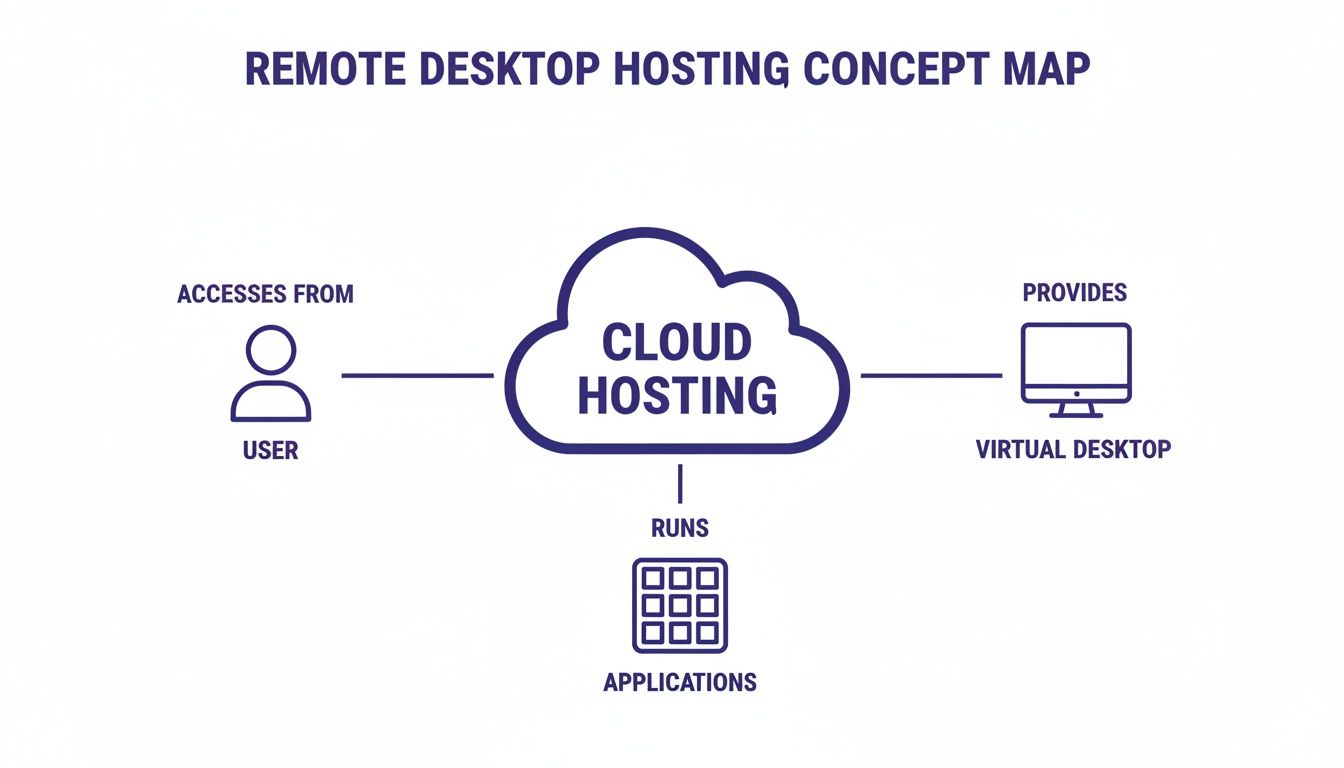
As you can see, the hosting service becomes the central, secure hub that delivers your entire workstation to you, wherever you happen to be.
Great security doesn’t have to mean slow performance. In a well-designed system, they actually support each other. The link between your computer and your hosted desktop is typically managed by the Remote Desktop Protocol (RDP), a messenger built for efficiency. It’s designed to send your screen’s display to you—and your keyboard and mouse clicks back to the server—with almost no perceptible lag.
Of course, all that communication is wrapped in multiple layers of protection.
Reputable hosting providers never bet on a single security tool. Instead, they build a defense-in-depth strategy where firewalls, encryption, and access controls all reinforce one another, creating a perimeter that’s incredibly difficult to breach.
Here are the key security layers you should expect:
Beyond fending off direct attacks, a quality hosting service also protects you from downtime and data loss. Unlike a single office server that can fail and bring your business to a halt, providers build in redundancy to keep you online.
This reliability comes from a few key practices:
By combining physical data center security, advanced network protection, and strict access controls, a remote desktop hosting service creates an environment that’s both fast and profoundly secure. For a closer look at safeguarding your connections, you can find more details in our guide on remote access security best practices.
Knowing the tech behind remote desktop hosting is one thing, but seeing how it helps your bottom line is what really matters. Moving to a hosted desktop isn't just an IT decision—it’s a strategic move that strengthens your budget, productivity, and overall resilience.

Instead of wrestling with physical servers, you’re essentially handing your IT infrastructure over to experts. This frees you up to focus on running your business, not your hardware.
For most small and mid-sized businesses, the first and most obvious win is financial. On-site servers come with a steep price tag—not just the initial purchase but also the hidden costs of maintenance, electricity, repairs, and eventual replacement. A hosted solution flips that large, unpredictable capital expense (CapEx) into a simple, predictable operating expense (OpEx).
Think of a small nonprofit with a tight budget. Dropping $5,000 – $10,000 on a new server is a massive financial blow. With remote desktop hosting, they just pay a straightforward monthly fee for each user, avoiding that huge upfront cost and putting funds back into their core mission.
This model brings a few key financial perks:
A hosted desktop gives your team the freedom to work from anywhere, at any time, with full access to their essential tools. For a busy law firm, this means a partner can securely pull up confidential case files on a tablet in the middle of a trial, instead of being chained to their office PC.
This kind of flexibility is no longer a perk; it’s a necessity. The explosion of remote work has put RDP VPS servers in high demand, with growth expected to continue as companies seek secure virtual solutions. Even after the pandemic, 81% of professionals still rely on remote tools, cutting their travel costs by 30% and enabling true global collaboration.
A hosted desktop ensures that a snow day, a business trip, or an office closure never grinds productivity to a halt. As long as your team has internet, they’re in business.
This flexibility also applies to your software. An accounting firm, for instance, can’t run resource-hungry programs like Lacerte or Drake on older laptops during tax season. A hosted environment solves this by running the software on powerful servers in the data center, giving everyone smooth, lag-free performance no matter what device they’re using.
A quality hosting provider’s data center is a digital fortress, built with security measures that are far beyond what a typical office server room could ever achieve. With enterprise-grade firewalls, 24/7 monitoring, and a dedicated staff of security experts, your sensitive data gets a level of protection that would be financially out of reach to build yourself.
Better yet, business continuity is baked right in. Your provider runs automated daily backups of your entire environment. If disaster strikes—whether it’s a fire, a flood, or a ransomware attack—your whole desktop can be restored in a flash with minimal downtime. It turns a potential business-ending catastrophe into a manageable hiccup.
Digging into the full range of virtual desktop benefits reveals just how deep these security advantages go. This robust backup and recovery system means you’re always ready for whatever comes next.
The idea of a remote desktop sounds great in theory, but where does it really make a difference? For professional services firms in accounting, law, and the nonprofit sector, this technology isn't just a nice-to-have—it’s a fundamental shift in how they work.
Let’s look at how these services solve the real-world headaches that firms face every day. The right setup can turn operational bottlenecks into a genuine competitive edge.
Accounting firms live and die by their software, especially during the chaos of tax season. Applications like QuickBooks, Sage, Lacerte, and Drake are the heart of their operations, but these programs are often resource-heavy and chained to a single office computer. This creates a massive bottleneck.
Imagine an accountant visiting a client. To pull up a critical file, they have to wrestle with a clunky, slow VPN or—even worse—wait until they’re back at the office. It’s a huge waste of time that leaves both the accountant and the client frustrated.
A hosted desktop environment erases this friction completely.
By hosting your entire suite of accounting and tax software in the cloud, you create a centralized, high-performance hub. Every team member gets a fast, consistent experience whether they are at the office, at a client’s site, or working from home.
This approach directly solves several key problems for accounting pros:
The legal field runs on a foundation of absolute confidentiality and instant access to information. Attorneys and paralegals need to retrieve case files, contracts, and evidence at a moment's notice, whether they're in a courtroom, at a deposition, or on the road. Here, security isn't just a best practice; it's an ethical and regulatory mandate.
A local server is a minefield of risks. A hardware failure could lock away critical case files right before a trial. A stolen laptop with downloaded documents could trigger a catastrophic breach of client confidentiality, leading to serious legal and financial fallout.
This is where remote desktop hosting services provide a rock-solid solution. Hosting case management software and document systems in a secure cloud gives legal teams the agility they need without ever compromising on security.
An attorney in court can securely pull up a last-minute piece of evidence on their tablet, knowing the data is guarded by enterprise-grade encryption and multi-factor authentication. That kind of instant access can be the difference between winning and losing a case. If you're curious about the tech behind this, you can learn more about what to expect when you are hosting a virtual desktop.
Nonprofits are tasked with achieving huge missions on incredibly lean budgets. Every dollar spent on IT overhead is a dollar that can't go toward community programs or outreach. Managing an on-premise server is a major financial and operational drain that many nonprofits simply can’t afford.
On top of that, nonprofits often depend on a mix of staff and volunteers working from different locations. They handle sensitive donor financial data in CRMs and confidential records for beneficiaries. Protecting this data is non-negotiable for maintaining donor trust and complying with privacy laws.
A hosted desktop is a perfect match for the nonprofit model. It turns a large, unpredictable capital expense (CAPEX) into a small, predictable monthly operating fee (OPEX). This lets organizations budget effectively and pour more resources directly into their mission.
Think about a nonprofit that uses volunteers for data entry. Instead of making them come into an office, the organization can give them secure access to the donor CRM through a remote desktop. This keeps sensitive donor information safe while empowering volunteers to contribute their time and skills from anywhere.
Choosing the right partner for your remote desktop hosting is one of the most critical business decisions you'll make. This isn't just about renting server space; it's about finding a partner you can trust with your firm's entire digital operation. The right one can fuel your growth, while the wrong one can become a constant source of frustration and downtime.
This guide gives you a practical checklist to help you look past the sales pitch and evaluate providers with confidence.
Navigating your options comes down to asking the right questions. By focusing on a few key areas, you can quickly tell the serious contenders from the rest of the pack.
Your first and most important checkpoint is security. Your provider becomes the guardian of your company’s most sensitive information, so their security practices need to be airtight. Don't just take their word for it—ask for clear proof of their security measures and compliance certifications.
If you’re a law or accounting firm, for example, your provider must demonstrate how they protect client financial data. For businesses in healthcare, HIPAA compliance is non-negotiable.
A provider's uptime guarantee is a direct reflection of their confidence in their own infrastructure. Anything less than 99.5% should be a major red flag, as it suggests they are not prepared to handle minor issues without service interruptions.
This commitment to uptime is what ensures your business keeps running, even if the provider runs into hardware failures or other technical hiccups.
When an issue pops up, you need to know that an expert is ready to help immediately. A server outage at 2 AM on a Saturday can be just as damaging as one during business hours, especially for teams working across different time zones.
For that reason, 24/7/365 support from qualified engineers is essential. Ask about their average response times and whether you'll be talking to a frontline agent or a real technician who can actually solve your problem.
Application compatibility is just as crucial. Before you sign anything, get written confirmation that the provider fully supports your essential software. Whether it’s QuickBooks, Lacerte, Sage, or a specialized case management system, the provider must have proven experience hosting and optimizing it.
Data loss can be catastrophic, which makes a clear and reliable backup policy another vital checkpoint. A reputable provider should offer automatic daily backups as a standard feature, not a pricey add-on. Find out how long they keep backups and what their process is for restoring data. A swift restoration process can turn a potential disaster into a minor inconvenience.
Finally, dig deep into the pricing model to make sure there are no surprises waiting for you. Ask for a complete breakdown of all potential charges beyond the base monthly fee. For a deeper analysis of provider evaluation, our complete guide on how to choose a hosting provider offers more valuable tips. Hidden costs for things like data overages, extra support, or software updates can quickly inflate your bill.
To help you get a clearer picture of your options, let’s compare two of the most common hosting models.
Understanding the key differences between common remote desktop hosting packages is the first step toward choosing the right fit for your business. The table below breaks down the two main types: Shared and Dedicated.
| Feature | Shared Hosting | Dedicated Hosting |
|---|---|---|
| Resources | Server resources are shared with other customers. | All server resources are exclusively yours. |
| Performance | Can be affected by other users ("noisy neighbors"). | Consistent, high performance with no sharing. |
| Cost | More affordable; ideal for smaller teams or standard use. | Higher cost; suited for larger firms or intensive apps. |
| Control | Limited customization and administrative control. | Full control over the environment and software. |
Ultimately, choosing between shared and dedicated hosting comes down to your firm’s specific needs. A smaller nonprofit might do great on a cost-effective shared plan, while a growing law firm may need the power and control of a dedicated server. By using this checklist, you can make an informed choice that aligns perfectly with your goals and budget.
Moving your entire business to a new IT environment might sound like a massive headache, but with the right remote desktop hosting partner, it’s a surprisingly smooth, managed process. A good provider does more than just give you access; they act as your migration team, handling all the technical heavy lifting so your team can keep working without skipping a beat.

The journey starts with a simple conversation. The provider’s experts will sit down with you to get a handle on your specific needs. They’ll map out every piece of software you use, your user roles, and your data structure to build a migration plan that fits your business—not the other way around.
This blueprint ensures everything you depend on, from QuickBooks to specialized industry software, is installed, tested, and ready for your team on day one.
The move itself is carefully planned to avoid disrupting your business. While every migration is unique, it generally follows a clear, time-tested path designed for zero downtime.
As you plan the move to a hosted desktop, don't forget about your old physical hardware. Securely decommissioning your old servers and workstations is a critical final step. Understanding the process for secure hard drive shredding ensures your company’s sensitive data is permanently and safely destroyed.
The only way to know if a provider is the right fit is to see their service in action. A free trial cuts through the sales pitches and shows you exactly how the platform works with your real-world files and applications.
This is precisely why a no-obligation trial is so important. It’s far more than a simple demo; it’s your chance to test-drive the service with your company’s actual software and data.
A trial lets you confirm the performance is snappy, see how responsive their support team is, and make sure you’ve found a partner you can trust for the long haul.
It’s smart to have questions when you’re considering a move to remote desktop hosting. We get it. This is a big decision that impacts your team's workflow and your company's security. Here are a few of the most common questions we hear, with straight answers to help you make the right call.
Yes, and the difference is significant. A professionally hosted desktop is almost always more secure than a typical in-house server. Reputable providers run their operations from high-security data centers with enterprise-grade firewalls, 24/7 expert monitoring, and automated daily backups. These are security measures that are simply too expensive and complex for most small or mid-sized businesses to build and maintain on their own.
Think of it this way: your on-premise server is like a safe in your office, whereas a hosting provider’s data center is like Fort Knox. The level of physical and digital protection is on a completely different scale, safeguarding your data against theft, fire, and cyber threats.
This multi-layered approach to security is exactly why firms that handle sensitive client information are increasingly putting their trust in professional hosting services.
This is a make-or-break question, and the answer is nearly always yes. The best remote desktop providers specialize in hosting the professional applications you already depend on. This includes popular accounting suites like QuickBooks and Sage, tax software like Lacerte or Drake, and a wide variety of legal or CRM platforms.
Of course, you should always get confirmation before signing up. A quality provider will be able to tell you definitively if they can host your specific applications. More importantly, they’ll have experience optimizing them to run at peak performance in a remote setting. Just be sure to list all your essential programs during your initial consultation.
The main difference between shared and dedicated hosting boils down to resources and control. It’s a lot like the difference between renting an apartment and owning a house.
Shared Hosting: This is like leasing an apartment. You have your own private, secure space, but you share the building’s core infrastructure—like the foundation and utilities—with other tenants. It’s incredibly cost-effective and a perfect fit for smaller firms with fairly standard software needs.
Dedicated Hosting: This is like owning a private home. All of the server’s resources—its processor, memory, and storage—are yours and yours alone. This option gives you maximum performance, control, and customization, making it the go-to for larger firms or those running resource-heavy applications.
The right choice really depends on your budget, how much performance you need, and the complexity of your software.
Ready to see how a secure, high-performance virtual desktop could work for your business? The best way to find out is to try it yourself. Cloudvara offers a free, no-obligation 15-day trial—no credit card required. Experience the freedom and peace of mind firsthand by visiting https://cloudvara.com to get started.




