Secure cloud hosting is a comprehensive service that goes far beyond simple online storage, acting like a digital fortress for your firm's critical data. It combines enterprise-grade physical security, robust digital defenses, and expert management to protect sensitive information like client files, financial records, and proprietary software.
Imagine your firm's most sensitive documents are currently stored in a standard office safe. This is a lot like your on-premise server—it's physically close, but you are solely responsible for its protection, maintenance, and defense against every single threat.
Now, picture moving those same documents into a Fort Knox-style bank vault. This vault is guarded 24/7 by a team of elite security experts, features state-of-the-art surveillance, and has redundant systems to protect against any conceivable disaster. That is the essence of secure cloud hosting. It’s a specialized service where a provider acts as your dedicated IT security partner.
True secure hosting isn't just about renting space on a server. It is a managed security solution designed to offload the immense complexity of modern cybersecurity from your shoulders. This allows professionals in accounting, law, and nonprofit sectors to focus on their core mission instead of worrying about IT.
The reality is that security threats are constant and evolving. For law firms, accounting practices, and nonprofits, a single data breach is not just an IT problem—it can be a business-ending catastrophe, destroying client trust and resulting in severe financial and legal penalties.
The threat is no longer a distant possibility but a daily operational risk. Recent reports reveal a staggering 80% of companies globally experienced at least one cloud security breach in the past year. What’s more, misconfigurations and human errors account for 82% of these incidents.
The financial stakes are incredibly high. For tax professionals, accountants, and law firms, the average global cost of such a breach has climbed to $4.44 million, escalating to an alarming $10.22 million in the US alone. You can explore more data on these trends and see why proactive security is essential.
Understanding what truly makes up secure cloud hosting means digging into the foundational elements of modern cloud data security. It's all built on several key pillars that work together to create a protected environment. These core components include:
Essentially, a secure cloud provider takes on the responsibility of building and maintaining this digital fortress. This partnership ensures your applications and data benefit from a level of security that would be impractical and cost-prohibitive for most individual firms to achieve on their own. While this concept is an evolution of standard services, you can learn the basics by checking out our guide on what is cloud hosting.
A truly secure cloud environment is much more than just a place to store files online. It's a digital fortress, meticulously designed with layers of protection that work together to shield your firm's most sensitive information. Understanding how these layers are built is the first step in appreciating what a specialized hosting partner really does.
The latest numbers paint a pretty stark picture. A shocking 98% of companies have experienced a cloud breach in the last two years, and 83% have been hit more than once. The biggest vulnerability isn't some super-sophisticated hack; it's simple human error, which is the root cause of 88% of breaches, often stemming from the 74% of cases involving compromised employee credentials.
The first and most fundamental layer of this fortress is encryption. Think of it as a two-part security system that protects your data throughout its entire journey.
This diagram shows how a secure cloud is built on both physical security measures and digital defenses, creating a comprehensive shield.
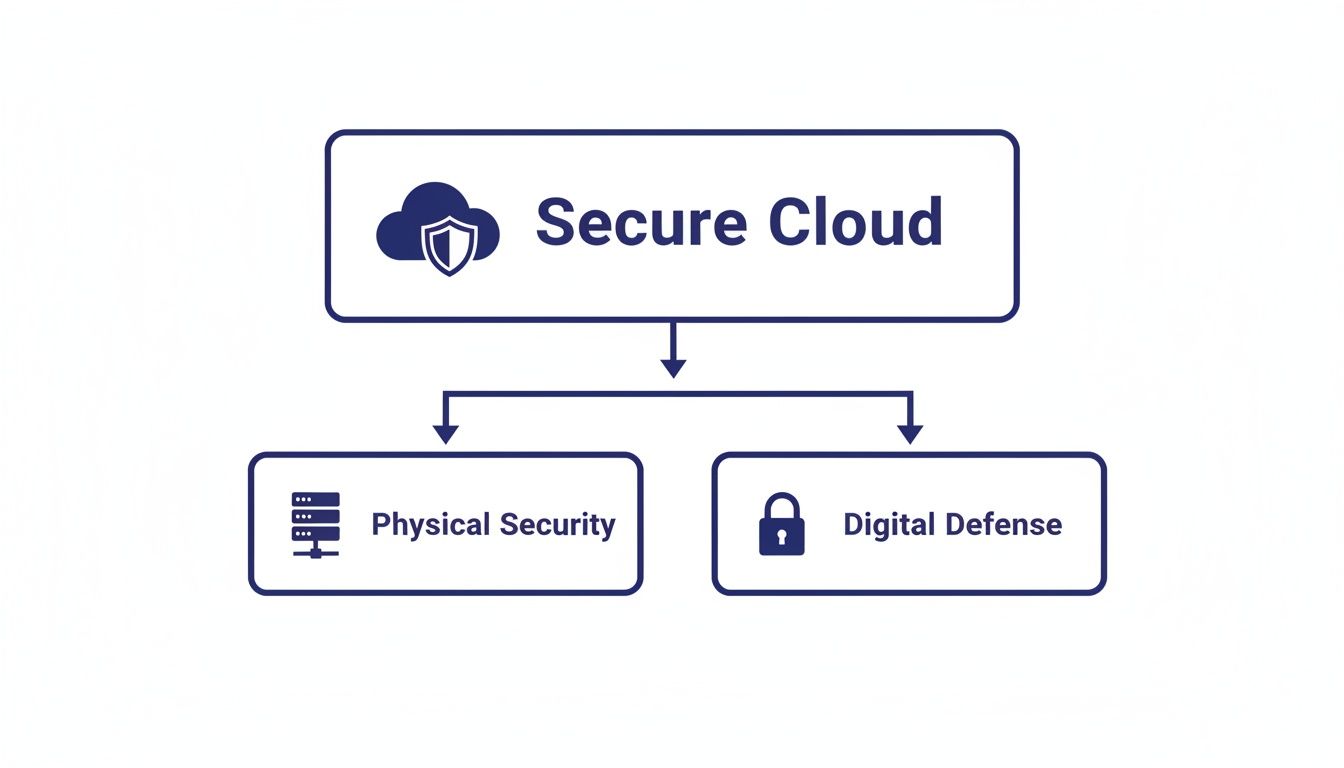
It’s clear that real security isn’t just about one thing; it’s a layered strategy where the physical and digital safeguards are equally vital.
Even with the strongest encryption, controlling who can access your data is absolutely critical. This is where multi-factor authentication (MFA) and network segmentation provide the next line of defense.
MFA is the digital equivalent of needing both a keycard and a secret PIN to get into a high-security room. It forces users to provide two or more verification methods to log in. A password alone is no longer enough; a second step, like a code sent to your phone, dramatically cuts the risk of an account takeover.
Simply put, a strong password can be stolen, but it's much harder for a cybercriminal to steal both your password and your physical phone. This simple control is one of the most effective ways to secure your accounts.
Network segmentation is another powerful but simple idea. Imagine a hospital where sensitive patient records, the pharmacy, and the public cafeteria are all in one big, open room. A breach in the cafeteria could easily put the entire facility at risk. Segmentation creates secure, isolated "wings" so a problem in one area can't spread. In the cloud, this means your firm’s environment is completely walled off from other tenants, keeping your data private and contained. You can explore more about how these elements fit together in our overview of what is cloud infrastructure.
The final pillar of a secure architecture is being ready for the unexpected. No matter how strong your defenses are, the risk of data loss—from hardware failure, a natural disaster, or a ransomware attack—is always there. This is where your digital insurance policy comes in.
Automated backups and disaster recovery are non-negotiable. A quality provider will create an identical, off-site copy of your entire operation—your applications, data, and configurations—on a regular, automated schedule. If a disaster takes your primary data center offline, this mirrored environment can be activated in minutes. This capability ensures business continuity, turning a potentially catastrophic event into a manageable hiccup.
The single most important security decision you'll make isn't about software—it's about who you trust with your firm's data. Not all cloud providers are built the same, and flashy marketing can easily hide major weaknesses in their armor. To find a true partner, you have to look past the sales pitch and scrutinize the details that really matter.
This means learning to vet providers like a security pro. You need a solid checklist to tell the difference between a provider offering genuine secure cloud hosting and one that’s just renting out server space. Let's break down exactly what to look for.
A provider’s Service Level Agreement (SLA) is their written promise to you, defining their commitment to performance. While uptime is the star metric, a simple percentage can be deceptive if you don’t translate it into hours and minutes.
For instance, a 99% uptime guarantee sounds solid, but it allows for over 87 hours of potential downtime a year. For a busy firm, that's more than two full work weeks. In contrast, a provider offering 99.5% uptime cuts that risk in half, down to about 44 hours. That difference is huge when client deadlines are on the line.
Always look for an SLA with at least 99.5% uptime and clear terms on what happens if they fail to meet it. This accountability is what separates a reliable partner from a risky one.
When something goes wrong, you need a solution, not just a ticket number and a long wait. The quality of a provider's support team is a direct measure of their dedication to your business's continuity. Don't be fooled by a generic "24/7 support" claim.
You have to dig deeper and ask the right questions:
A great provider acts as your dedicated IT advocate. Their support team should feel like an extension of your own, ready to solve problems quickly so your firm can get back to work.
Pricing is another area where the headline number rarely tells the whole story. Some providers will draw you in with a low monthly fee, only to hit you with extra charges for things you thought were included.
To avoid sticker shock, insist on a transparent, all-inclusive pricing model. Make sure you ask about potential overage fees for common items like:
A trustworthy partner gives you a simple, predictable bill that covers everything your firm actually needs. For more tips on vetting vendors, check out our in-depth guide on how to choose a cloud provider.
Finally, it's time to grill a potential vendor on their actual security measures. This is where you separate the security experts from everyone else. A provider's security posture is a collection of their policies, technologies, and practices. For example, you can see how a specific data platform approaches this by reviewing Streamkap's security measures.
Ask for concrete proof of their security readiness. Key questions include:
The following checklist can help you organize your evaluation and compare providers side-by-side.
This checklist is designed to help your firm systematically compare the key features and qualities of different secure cloud hosting providers. Use it to ensure you cover all the critical bases before making a final decision.
| Feature or Criteria | What to Look For | Why It Matters for Your Firm |
|---|---|---|
| SLA & Uptime | At least 99.5% uptime guarantee with clear remedies for failure. | Minimizes downtime that disrupts billing, client work, and deadlines. |
| Customer Support | Immediate access to US-based, senior-level engineers who support your applications. | Ensures problems are solved quickly by experts who understand your software and business context. |
| Pricing Model | All-inclusive, transparent pricing with no hidden fees for bandwidth, users, or storage. | Provides a predictable monthly cost and avoids budget-breaking surprises. |
| Security & Compliance | SOC 2 Type 2, HIPAA, or other relevant certifications; owned data centers. | Verifies that a third party has audited their security controls, reducing your firm's risk. |
| Infrastructure | Dedicated servers and resources, not shared hosting environments. | Prevents performance issues and security risks from "noisy neighbors" on the same server. |
| Backup & Recovery | Daily, automated backups with a clear and tested disaster recovery plan (DRP). | Protects your critical data from deletion, corruption, or ransomware attacks. |
By asking these tough questions and using a structured evaluation, you empower your firm to choose a partner that doesn't just meet your security needs but actively strengthens your defense against modern threats.
For professionals handling sensitive data—accountants managing IRS files, lawyers protecting attorney-client privilege, or nonprofits safeguarding donor information—compliance isn't just a buzzword. It's a non-negotiable duty. When you move to the cloud, those obligations follow you.
This is where your choice of a secure cloud hosting partner becomes one of the most important decisions you'll make for your firm's reputation and legal standing. Juggling frameworks like SOC 2, HIPAA, or GLBA can feel overwhelming, but the right provider turns that complexity into a manageable process. Security features stop being abstract tools and become the very instruments that help you meet your legal and ethical responsibilities.
A great hosting provider doesn’t just sell you security; they give you proof. Imagine you’re in an audit or a legal dispute and need to show a clear chain of custody for a specific file. A provider offering immutable access logs delivers exactly that: a verifiable, unchangeable record of who touched what data and when.
That kind of detail is priceless. When an accounting firm needs to prove to an IRS auditor that client tax records were only seen by authorized staff, these logs are the concrete evidence. A law firm can use the same logs to confirm privileged documents were handled with strict confidentiality.
These features transform abstract security policies into tangible proof, helping you get through an audit with confidence. To get a better sense of how these audits work, you can explore our detailed guide on what is SOC compliance.
A frequent point of confusion with the cloud is figuring out who is responsible for what. The answer lies in a straightforward concept called the shared responsibility model.
Think of it like renting a space in a high-security bank building.
A good partner makes your side of the bargain simple. They build the secure foundation and hand you easy-to-use tools to manage your duties, like enforcing strong password policies or requiring multi-factor authentication.
In this partnership, the provider secures the fortress, and you manage the keys to your specific room. This clear division of duties empowers you to maintain control without needing to become a cybersecurity expert yourself.
The need for a single, secure platform has never been more critical. Today’s IT environments are sprawling and complex, making compliance a serious challenge. The numbers don't lie: a startling 83% of organizations experienced a cloud security breach in the last 18 months, and 45% of all data breaches now happen in the cloud.
With 88% of organizations running on hybrid or multi-cloud setups and 63% admitting they lack formal AI governance, the attack surface has exploded. You can learn more about how cloud security is evolving by reviewing these cloud security statistics.
For professional firms, a specialized provider who already knows your compliance landscape is no longer a luxury—it's essential. They deliver a controlled, auditable environment that dramatically shrinks your risk. This partnership lets you confidently tell clients, regulators, and stakeholders that their data isn't just being stored; it's being actively protected to the highest industry standards.

Moving your firm's entire operation from an on-premise server to a secure cloud hosting environment feels like a huge undertaking. But it doesn't have to be. With a clear roadmap and an experienced partner, the project breaks down into a series of calm, manageable steps. This plan takes the guesswork out of the equation, ensuring a smooth transition with almost zero disruption.
A great migration isn't a frantic, weekend-long affair; it’s a carefully choreographed process. The goal is simple: replicate everything you do now, but in a more secure, accessible, and resilient environment. While a good provider will do the heavy lifting, knowing the stages helps you set expectations and ensures every one of your firm’s needs is met.
The journey starts with a simple question: What are we actually moving? This first step is all about taking stock of your digital assets to build a complete plan. You’ll work with your hosting partner to list every piece of software and all the data your firm depends on.
This inventory typically includes:
Getting this list right ensures nothing gets left behind. It also gives your provider the blueprint to build a cloud environment that’s a perfect match for your firm.
You wouldn't move to a new house without getting rid of some junk first. The same logic applies here. This pre-migration cleanup is your chance to organize your digital files, which makes the actual move much faster and more efficient.
It’s like digital spring cleaning. Archive old client files that you need to keep for compliance but don’t touch daily. This is also the perfect time to enforce a standard folder structure, get rid of duplicate documents, and tidy up your data. A lean, organized dataset is simply easier to move.
A well-planned migration pays dividends. In fact, organizations moving to the cloud often see a 15% reduction in IT spending and a real boost in day-to-day operational efficiency.
Now it’s time for your provider to take the wheel. They'll perform what's known as a "lift and shift" migration, creating an exact copy of your applications and data in the new secure cloud. Most of this happens behind the scenes, usually after hours, so your team’s workflow isn't disturbed.
Once the data is copied, the validation phase begins. This isn't the final cutover—it's a critical dress rehearsal. Your team gets to log into the new cloud desktop and test-drive everything in a live, parallel environment.
Key things to check include:
For a closer look at the technical details, you can explore our guide on the essential cloud migration steps. This testing phase is what guarantees the final switch will be completely seamless.
Here’s where a professional migration really shines: the ability to try before you buy. A top-tier provider will give you a no-obligation trial period. Your team gets to work in the new cloud environment with your actual software and data, giving everyone time to get comfortable and confirm it all works perfectly. There's zero risk.
After a successful trial, the final cutover is scheduled. Your provider will do one last data sync to capture any changes made since the initial move. From that point on, your team will work exclusively in the secure cloud. Your old, noisy server can finally be retired.
We’ve covered a lot of ground together, from the nuts and bolts of secure cloud hosting to the strategic thinking that turns a technical shift into a real business advantage. You’ve seen how essentials like encryption and MFA form your first line of defense, and you know what to look for when vetting a provider to handle your firm’s most sensitive data.
This isn’t just about upgrading technology. It’s about building a foundation for business continuity, client trust, and future growth. Now, it's time to bridge the gap between knowing and doing.
Reading about better security is one thing. Watching your critical applications run seamlessly in a protected, accessible environment is another entirely. The single most valuable next step you can take is to experience that peace of mind firsthand.
A no-obligation trial is the best way to do that. It lets you see exactly how your firm’s essential software performs with fortified security and smooth remote access. This is your chance to confirm that everything works just the way you need it to, without any commitment.
During a trial, a dedicated team steps in to help move your applications and data. Your staff gets to put the system through its paces in real-world situations, answering the most important question of all: "Will this actually work for us?"
Moving from an on-premise server to a secure cloud isn't just about adopting new technology. It is a fundamental shift that empowers your firm to operate more securely, efficiently, and resiliently, protecting your clients and your future.
You have the roadmap. The only thing left is to take action and see the results for your own firm.
By starting a free 15-day trial, you can directly evaluate the performance, security, and support that will define your firm’s operations for years to come. There’s no risk and no contract required.
This is your opportunity to take control. See how Cloudvara centralizes your applications, strengthens your defenses, and provides the expert support you need to thrive.
When professional firms think about moving away from an in-house server, we tend to hear the same questions pop up. Here are some quick, straightforward answers to the most common concerns about making the switch to secure cloud hosting.
For most small and mid-sized firms, the answer is a firm yes. A specialized secure cloud provider invests in enterprise-grade security that’s simply out of reach for a typical firm's budget. This includes 24/7 monitoring by a team of security experts, physical data center protection, redundant power systems, and advanced threat detection that spots trouble before it starts.
While having an on-premise server gives you a sense of physical control, it also makes you solely responsible for every security patch, update, backup schedule, and disaster recovery plan. When you move to the cloud, that immense burden shifts from your shoulders to a dedicated partner.
This is where a hosted environment truly shines. Reputable providers make scaling your operations incredibly simple. As your firm grows or your needs change with the seasons—a common scenario for accounting firms during tax season—you can add or remove users on demand.
This flexibility ensures you only pay for what you’re actively using. There’s no need to buy expensive new hardware or get bogged down in a complex IT project just to add a new team member. Your technology can finally adapt to your business, not the other way around.
The ability to scale on demand is a core benefit of secure cloud hosting. It allows your firm to be more agile, responding to business needs instantly without being held back by physical IT limitations.
Absolutely. This is a core function of application hosting. A quality provider creates a virtual desktop environment where your existing desktop programs—whether it's QuickBooks, Sage, or your practice management tools—run exactly as they do now.
You and your team get the very same user experience you’re used to, but with all the powerful benefits of secure remote access, centralized data, and superior security. It’s the best of both worlds: the tools you know in a much more powerful and protected environment.
A risk-free trial is the best way to see the service in action with no strings attached. A dedicated migration team will help you move a copy of your key applications and data onto their secure platform.
Your team then gets full access to this live test environment. You can check performance, test remote access from different locations, and run through your daily workflows just like you normally would. It’s the ultimate way to confirm the solution fits your firm’s specific needs before you sign any contract, giving you complete confidence in your decision.
Take the next step to protect your firm’s future. Experience the peace of mind that comes with enterprise-grade security and expert support. Cloudvara offers a free 15-day trial with no contract or credit card required. See how we can centralize your applications and strengthen your defenses. Learn more about our secure hosting solutions.




