
Before you start comparing uptime guarantees or looking at pricing tables, the most important step is to look inward.
Jumping straight to evaluating providers without a clear picture of what you actually need is a recipe for disaster. It’s like shopping for a new car without knowing if you need a two-seater or a minivan—you might end up with something that looks great but just doesn’t work for your day-to-day.
This initial discovery phase goes way beyond just server space or bandwidth. It's a practical audit of how your business actually runs. For an accounting firm, this means ensuring several team members can get into QuickBooks or Sage without a hitch. For a law firm, it’s all about secure, compliant hosting for case management software and highly sensitive client files.
First things first, make a comprehensive list of every single software application your business depends on. Don't just list the big names; include those niche, industry-specific tools, your CRM, and even Microsoft Office if it’s the backbone of your workflow.
For each application, you need to know:
Going through this process turns a vague idea of "hosting" into a concrete set of technical specs. This is the blueprint you'll use to make sure any provider you consider can actually support your team from day one.
The graphic below breaks down this simple but crucial process: applications, users, and data.
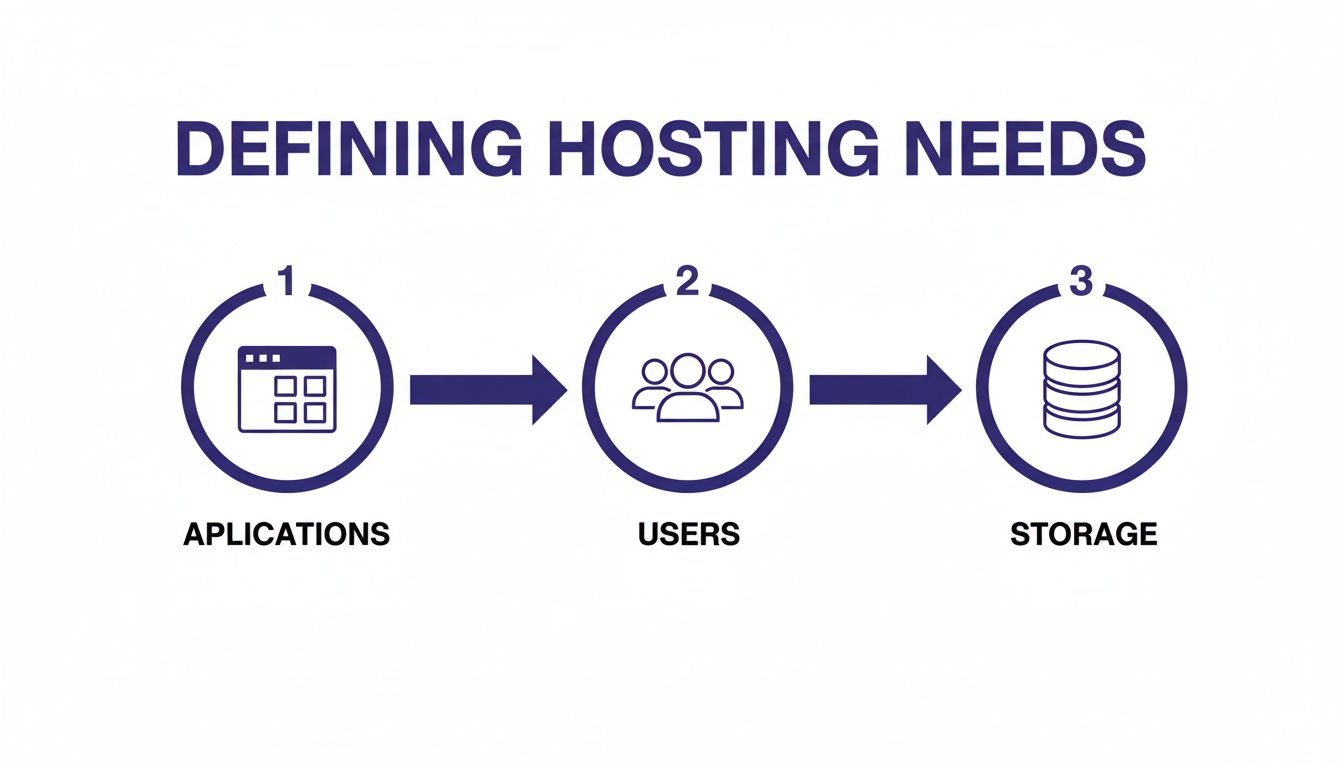
This straightforward flow—from software to people to data—builds the foundation for your entire evaluation.
Once your application list is solid, it's time to quantify your usage. How many people will need to be logged into these programs at the same time? A solo practitioner has completely different needs than a 20-person firm where everyone is hammering the CRM simultaneously. Underestimating your user load is a classic mistake that creates serious performance bottlenecks right when you can least afford them.
A provider might look perfect on paper, but if they can't handle your team's peak workload during tax season or at the end of a quarter, they aren't the right fit. Your hosting must support your business when it's busiest, not just on an average day.
Finally, calculate your current data storage and try to project its growth over the next one to three years. Think about everything: client files, databases, emails, and archived records. A good provider will offer scalable storage, letting you start with what you need now and easily add more space later without a painful migration.
Taking the time for a thorough evaluation is crucial. In fact, a formal business technology assessment can give you the detailed insights needed to make a truly informed decision. This kind of strategic planning helps you avoid hitting a storage wall and ensures your hosting solution can grow right alongside your business.
Once you've mapped out your needs, it's time to dig into the technical side of things. Let's cut through the jargon and focus on what really keeps a business running: speed and dependability. These aren't just nice-to-haves; they directly affect your firm's bottom line and your clients' sanity. For an accounting firm in the thick of tax season or a law practice facing a critical case deadline, even a few minutes of downtime can be a disaster.
The first thing to look at is the uptime guarantee, usually found in the Service Level Agreement (SLA). The numbers might look almost identical, but the difference between 99.9% and 99.99% uptime is huge. A 99.9% guarantee allows for about 8.77 hours of downtime per year. In contrast, a 99.99% ("four nines") guarantee cuts that down to just 52.6 minutes.

That difference is the bedrock of your business continuity. Don't be afraid to ask potential providers what happens if they miss their SLA target. Do they offer service credits? A provider who stands behind their SLA with meaningful compensation is one who's confident in their infrastructure.
It’s not enough for your applications to just be online; they have to be fast. Laggy, slow-loading software doesn't just annoy your team—it actively kills productivity. When you're evaluating a provider's performance, think about how it will feel to the end-user. A great resource for this is understanding Core Web Vitals, which breaks down how speed is actually measured from a user's perspective.
The physical location of the data center also plays a surprisingly big role. If your entire team is in New York, choosing a provider with servers in California is going to introduce a noticeable delay. Proximity matters. Look for providers with data centers geographically close to where your team works to keep latency to a minimum.
This focus on reliability is more important than ever as the web hosting market continues to explode. The industry is projected to grow from $125.36 billion in 2025 to a massive $355.81 billion by 2029. With 47% of users expecting a website to load in two seconds or less, poor performance from your hosting can translate directly into frustrated clients and lost business.
To help organize your evaluation, a checklist can be incredibly useful. It forces you to compare providers on an apples-to-apples basis, ensuring no critical details are overlooked.
| Feature/Criteria | What to Look For | Why It Matters for Your Business |
|---|---|---|
| Uptime Guarantee (SLA) | Aim for 99.99% ("four nines") or higher. Ask about service credits for SLA failures. | Minimizes downtime, ensuring your team can access critical applications when they need them most. |
| Data Center Location | Choose a provider with data centers geographically close to your main office or user base. | Reduces latency (lag), leading to a faster and more responsive experience for your staff. |
| Backup Frequency | Look for automated, daily backups as a minimum standard. | Protects against data loss from accidental deletion, corruption, or security incidents. Daily is a must. |
| Backup Retention | A 30-day retention period is a solid benchmark. | Gives you a wide enough window to recover files if a problem isn't discovered immediately. |
| Resource Allocation | Dedicated resources (not shared) for CPU, RAM, and storage. | Guarantees consistent performance for your applications, unaffected by other customers' activity. |
| Security Measures | Check for 2FA, encryption, firewall protection, and regular security audits. | Safeguards sensitive client data and protects your firm's reputation. |
| Customer Support | 24/7/365 availability via phone, email, and live chat. Test their response time. | When something goes wrong, you need immediate access to expert help, not a ticket that sits for hours. |
| Migration Assistance | Ask if they offer a fully managed migration service and if there are any associated costs. | A smooth, expert-led migration minimizes disruption and gets your team productive faster. |
This checklist serves as a great starting point. Customize it with your specific software needs and compliance requirements to build a comprehensive picture of each potential partner.
A hosting provider without a bulletproof backup strategy is a risk you can't afford to take. This is your safety net. Simply hearing "we offer backups" isn't enough—you need to know the details.
Drill down with these questions:
Imagine discovering a critical client file from last week was accidentally wiped out. With automated daily backups and a 30-day retention policy, you can restore that file in minutes. Without it, that data could be gone forever.
Finally, you need to understand whether you're getting dedicated or shared resources. In a shared hosting environment, your applications are running on the same server as other companies. This means you're all competing for the same pool of CPU, RAM, and bandwidth. If another user on your server has a massive traffic spike, your performance will suffer.
For businesses running essential software like QuickBooks or practice management tools, a provider offering dedicated resources is almost always the right call. This guarantees that a specific slice of the server's power is reserved just for you, ensuring your applications run smoothly and predictably, no matter what other tenants are doing. To dive deeper into this, check out this guide on finding the best cloud servers for small business. It's the best way to make sure your operations aren't at the mercy of your "neighbors."
For any professional handling sensitive data—whether it's an accounting firm’s financial records or a law practice’s confidential case files—security isn't just another feature. It's the entire foundation of your client relationships. When you choose a hosting provider, you’re not just renting server space; you’re entrusting them with your most valuable asset. A deep dive into their security and compliance protocols is non-negotiable.
A single data breach can be catastrophic, leading to steep financial losses, a shattered reputation, and serious legal penalties. The average cost of a data breach for a small business is often enough to put them out of business entirely. This makes a proactive defense absolutely essential.
Your evaluation should kick off with a checklist of the non-negotiables. These are the modern standards for data protection, and any provider worth their salt will offer them without hesitation. Don’t settle for vague promises of a "secure environment"—demand specifics.
Here’s what to look for:
These three items are the bare minimum. A provider that can’t clearly explain their strategy for each isn’t taking security seriously enough for a professional services firm. To get a better handle on how these fit into a complete strategy, our guide on small business cloud security offers a more detailed look.
For industries like finance and law, compliance isn't optional. Regulations like GDPR or various state-level data privacy laws carry heavy penalties. Your hosting provider must be able to prove their infrastructure meets these standards. Ask for their compliance documentation, such as a SOC 2 Type II report, which validates their controls over security, availability, and confidentiality.
Don't just take their word for it. Request to see their compliance reports or certifications. A transparent provider will have no issue sharing this information, as it validates the integrity of their operations and gives you peace of mind.
And remember, digital security is only half the picture. The physical security of the data center where your information lives is just as critical. You need to know what’s protecting their servers from real-world threats.
Key questions to ask about their data centers:
Choosing a hosting provider is a major decision that directly impacts your firm's integrity and your clients' trust. By making these security and compliance safeguards a priority, you're not just buying a service—you're investing in a partnership built on protection.
You’re not just picking a hosting provider for today; you're choosing a partner for where your business will be in one, three, or even five years. The perfect fit right now can quickly become a bottleneck that holds you back tomorrow. That's why thinking ahead about growth is one of the most important parts of this whole process.
Picture this: your accounting firm is swamped during its busiest tax season ever, or your law practice lands a massive case and needs to bring on several new paralegals overnight. Can your hosting environment handle that spike in demand without grinding to a halt? If it can't, you're looking at slow applications, frustrated employees, and lost productivity.

Getting this right from the start helps you avoid the painful and expensive process of migrating everything to a new provider just because you outgrew the old one.
When we talk about growth, providers generally offer two ways to handle it. Knowing the difference helps you understand what you're actually paying for.
Vertical Scaling (Scaling Up): Think of this like upgrading the engine in your car. You add more resources—like RAM, CPU power, or storage—to your existing server to make it more powerful. It's a straightforward approach that works great for predictable growth, like adding a few new employees over the course of a year.
Horizontal Scaling (Scaling Out): This is more like adding extra cars to your fleet. Instead of making one server bigger, you add more servers to spread out the work. It’s ideal for handling sudden, huge spikes in activity and offers better redundancy.
For most small and mid-sized businesses, a provider that’s really good at vertical scaling is usually the most practical and cost-effective option. It lets you pay for what you need today with a clear path to add more power when the time comes. If you want to dive deeper, our article on what is cloud scalability breaks it all down.
The ability to scale doesn't mean much if you need an IT degree to actually do it. A good hosting provider will give you an intuitive control panel that makes adding resources simple. You should be able to request more storage or add a new user in just a few clicks, without filing a support ticket and waiting hours for a response.
Your hosting provider should empower you, not create dependencies. The goal is a partnership where you can manage routine growth yourself, knowing that expert support is there when you face a more complex challenge.
This ease of management is more important than ever. The global cloud infrastructure market hit a staggering $99 billion in revenue in just the second quarter of 2025—a 25% jump from the previous year, all fueled by business demand. While giants like AWS, Azure, and Google lead the pack, their platforms can feel overly complex. Specialized providers are often a much better fit for non-technical users, like CPAs who just need to easily manage their Sage and Microsoft tools. You can read more about the global cloud infrastructure market share on cargoson.com.
Before you sign anything, get direct. Ask potential providers how they handle growth for clients like you. A transparent partner will be happy to walk you through the process and the costs involved.
Here are a few essential questions to get the conversation started:
Their answers will tell you a lot about how prepared they are to be a true long-term partner. Choosing a provider with a clear, simple, and affordable path for growth ensures your technology will support your success, not get in its way.
The technical specs are only half the story. The real value of a hosting partner emerges when you look at the complete picture: pricing transparency, the quality of human support, and how smoothly they can get your operations moved over.
A low sticker price can easily be wiped out by hidden fees, and unresponsive support during a crisis can cost you far more in lost billable hours. Let's dive into these three areas—price, support, and migration—to make sure you're making a smart, long-term investment, not just buying server space.
At first glance, hosting prices can seem straightforward, but the devil is always in the details. Many providers lure new clients in with a low introductory monthly rate, only for that price to balloon after the first year. It’s critical to look past the promotional offer to understand the real, ongoing cost.
Watch out for these common hidden costs that can inflate your bill:
A truly transparent provider offers a simple, all-inclusive pricing model without a long list of add-ons. You should be able to predict your monthly bill with near-perfect accuracy, which gives your business much-needed financial stability.
By asking direct questions about these potential extra costs, you can get a much clearer picture of your total investment. For a more detailed breakdown, our guide on cloud hosting cost comparison provides valuable insights into how different models stack up.
When an application freezes during a client presentation or you can't access a critical file at month-end, the quality of your hosting provider's support team is all that matters. This is where many budget providers fall short, offering slow, generic support from agents who can't solve real-world problems. For professional firms, quick access to expert help is completely non-negotiable.
Here’s how to put a provider’s support to the test before you commit:
A provider that invests in a high-quality, in-house support team is showing a real commitment to its clients' success. Don't settle for one that treats support as an afterthought.
Moving your entire digital operation from an in-house server or another provider can feel like a monumental task. A seamless, professionally managed migration is critical to minimizing disruption and ensuring your team can keep working without missing a beat. The right partner will do the heavy lifting for you.
A well-managed migration should feel like a white-glove service, not a DIY project you’re stuck with. The provider should assign a dedicated specialist to your account who will work with you to plan and execute the entire transition from start to finish.
Be sure to ask any potential provider these key questions about their migration process:
Choosing a provider with a proven, structured migration plan is the final piece of the puzzle. It ensures your journey to a new hosting environment starts on the right foot, with minimal stress and maximum efficiency.
Even with a checklist in hand, picking the right hosting provider can bring up some specific, nitty-gritty questions. It's a complex decision, and feeling confident means getting clear answers to the concerns that pop up as you get closer to a choice.
Let's walk through some of the most common questions I hear from professionals trying to find the perfect fit.

Getting your head around the basic hosting types is the first step. The easiest way to think about it is like real estate: you can rent a room, lease a whole building, or move into a custom-built office park.
Shared Hosting: This is like renting an apartment in a massive complex. You're sharing server power, memory, and bandwidth with hundreds of other "tenants." It's cheap, but if one of your neighbors decides to throw a huge, resource-hogging party, everyone's performance slows down. Security can also be a bit shaky.
Dedicated Hosting: Think of this as owning a standalone office building. Every single resource—the power, the security, the space—is exclusively yours. This offers incredible performance and security, but it comes with a hefty price tag and the full responsibility of managing the entire property yourself.
Cloud Application Hosting: This is the modern sweet spot, giving you the best of both worlds. It provides dedicated, guaranteed resources in a secure and scalable cloud environment, but one that's specifically fine-tuned to run business software like QuickBooks or Sage. You get far better performance and security than shared hosting without the astronomical cost and management headaches of a dedicated physical server.
This is a huge—and valid—concern, especially for firms that depend on niche, industry-specific, or even older legacy software. The smartest move here is to partner with a provider that specializes in hosting the exact applications you use day in and day out.
First things first, scan their website for a list of supported software. Any application hosting provider worth their salt will proudly list the programs they're compatible with, from tax software and CRMs to Microsoft Office.
But don't stop there. Get on the phone or send a detailed email to their team to confirm they support your specific software version. The ideal partner will have direct, hands-on experience with your applications and can confidently guarantee they'll run smoothly. They should be able to answer technical questions about how your software behaves in their environment.
The final proof is always in the pudding: a free trial. This is your chance to install and run your actual software to see for yourself how it performs before you sign on the dotted line.
A trial period should be a full-on test drive, not just a watered-down demo. This is your golden opportunity to kick the tires and make sure the service can handle your real-world workload before you commit to a contract.
A truly valuable trial gives you full administrative access to the environment without demanding a credit card upfront. It's a sign of confidence—the provider is betting that you'll be so impressed with the performance and support that you'll want to stay.
While you're testing, zero in on these three key areas:
For firms that also manage their own website, application hosting is just one piece of the puzzle. If your site runs on WordPress, you'll also want to explore the best WordPress hosting for small businesses, as website performance is a completely different (but equally important) beast.
Ready to experience what a dedicated cloud IT advocate can do for your firm? Cloudvara offers a free 15-day trial with no contract and no credit card required. See for yourself how we can centralize your applications and simplify your IT. Learn more at https://cloudvara.com.




