
Say you run a twelve-person accounting firm. Every March, the QuickBooks company file takes longer to open, tax software stalls, and staff wait for a shared office PC to finish someone else's task. You're considering private virtual server hosting, but you need more than a faster machine. You need to know what's actually private, who keeps it secure, and whether you could recover your work after a failure.
A private virtual server, usually called a virtual private server or VPS, is a software-defined server running within a physical machine. Virtualization lets a hosting provider divide that machine into isolated environments, each with its own operating system and assigned computing resources.
For the accounting firm, the practical change is straightforward. Instead of relying on an office PC that also serves someone's desktop, the firm runs its supported business applications in a server environment that staff access remotely.

Shared hosting resembles a room in a boarding house, with shared facilities and house rules. A dedicated server resembles a detached house. A private virtual server is closer to a flat in an apartment building: you control your space and keys, but you still depend on the building's structure and shared utilities.
The distinction matters because private describes the virtual environment, not necessarily the physical hardware. It also doesn't mean every advertised resource is exclusively reserved. Before choosing a plan, establish what the provider actually allocates:
This is an established hosting category. Credence Research valued the global virtual private server market at approximately $5.25 billion in 2024.
Ask yourself whether the workload needs root or administrator access, whether it uses custom or legacy software, and whether predictable resources matter to everyday work.
If most answers are yes, a private virtual server is worth evaluating. That's a practical screening rule, not proof that a particular plan will fit. Software compatibility, licensing, resource guarantees, and administration still need checking before migration.
Hosting options compared on the criteria that matter
| Option | Who shares the physical machine | Admin control | Isolation level | Best fit |
|---|---|---|---|---|
| Shared hosting | Many customer accounts | Control panel only | Application and account level | Brochure sites and small blogs |
| Private virtual server | Other isolated virtual machines | Full root or administrator access | Hypervisor-enforced virtual machine boundary | Accounting, legal and line-of-business applications |
| Dedicated server | No other customer | Full hardware and operating system control | Physical separation | Heavy databases and requirements for exclusive hardware |
| Public cloud instance | Provider pooled hardware with elastic capacity | Full operating system control | Hypervisor-enforced boundary with scaling options | Workloads with sharp demand spikes |
Shared hosting wins when the application needs are modest and server administration would add unnecessary work. A brochure website or small blog rarely needs control over the operating system. The provider manages the server platform, while you still manage website content, application settings, and account access.
A private virtual server fits business software that requires installation privileges, background services, or a particular operating system configuration. It offers an administrative boundary without requiring you to operate an entire physical server. The important purchasing question is whether you're buying an unmanaged machine or a defined managed service.
A dedicated server makes sense when a demanding database needs the machine's resources or an explicit contractual requirement calls for exclusive hardware. Don't assume that a compliance obligation automatically requires dedicated equipment. Identify the actual requirement first, then use this VPS versus dedicated server comparison to examine the deployment trade-offs.
A public cloud instance suits applications designed to expand and contract with demand. However, a cloud instance may itself be a virtual machine. The difference often lies in provisioning, automation, billing, and surrounding services rather than an entirely different isolation mechanism.
More control gives you more decisions to make. It doesn't automatically give you a better-operated system.
These options aren't a simple ladder from weak to strong. A well-managed virtual server can be a more suitable business choice than a dedicated machine nobody patches. Likewise, elastic infrastructure won't solve a desktop application's scaling limitations unless the application supports that deployment model.
Compare the total operating arrangement, including software licenses, administration, monitoring, recovery, and support. Then ask the decision question that matters: How much control does your workload need, and who will patch and monitor the system?
A hypervisor is the software layer that mediates access to the physical server's CPU, memory, storage, and networking. In the apartment analogy, it manages the building's resource allocations and the boundaries between flats.
The hierarchy below shows where those boundaries sit.
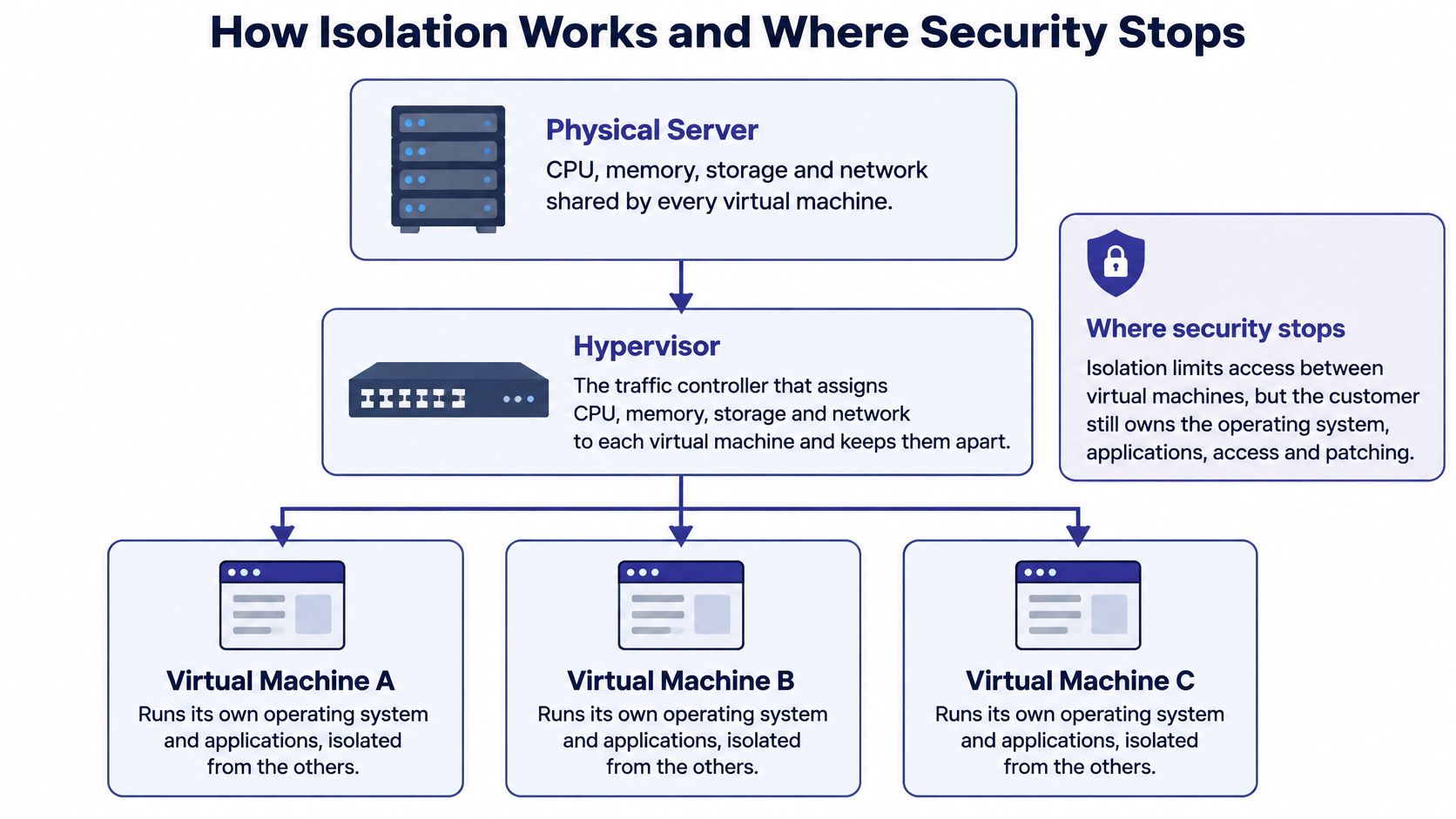
NIST's guidance on full virtualization security identifies the hypervisor's responsibilities as process isolation, privileged-operation control, device access control, virtual machine lifecycle management, and secure virtual networking. These are infrastructure protections. They don't establish whether someone inside your virtual machine has configured the application safely.
The stack runs from physical hardware through the hypervisor to the virtual machine. Inside that machine, the guest operating system runs your applications, services, and user sessions.
Each layer creates a different failure case:
A sound hosting design therefore needs a hardened hypervisor, narrowly scoped administrative access, a separate management network, and controlled virtual machine templates. Explicit CPU and memory reservations also matter when a workload needs assured capacity.
Virtual machines have logical proximity when they occupy the same host. If an attacker compromises that host or its hypervisor, several workloads may be exposed. Network segmentation helps restrict communication, but it doesn't remove the common physical dependency.
For a sensitive tax database, evaluate separate network zones and tightly restricted application connections. Where the risk assessment calls for stronger separation, consider separate physical hosts or availability domains. Understanding multi-tenancy in cloud computing helps distinguish customer separation from hardware exclusivity.
This video provides another way to visualize the virtualization layer.
Security boundary: A virtual machine boundary limits access between environments. It doesn't decide who should have access to your business records.
A private virtual server provides a stronger operational boundary than a shared application account. Its security still depends on hypervisor patching, image control, identity management, and correct isolation configuration. Those controls need owners, not assumptions.
Private does not mean secure. A server can have isolated resources while running an unpatched operating system, exposing an administrative login, or giving former employees access to client files.
LevelBlue's explanation of private versus secure hosting distinguishes infrastructure privacy from responsibility for operating systems, applications, access, monitoring, and incident response. For an accounting practice or law firm without security staff, that distinction determines which work needs an external operator.
Typical security ownership on a private virtual server
| Control | Usually the provider | Usually the customer |
|---|---|---|
| Physical facility, power and network uplinks | Yes | Verify through audit evidence |
| Hypervisor patching and host hardening | Yes | Confirm the patch schedule in writing |
| Guest operating system hardening and patching | Not included in unmanaged hosting | Yes, unless explicitly assigned to managed support |
| Application security and user access | Not included by default | Yes |
| Encryption keys and data at rest | Operates the contracted storage and encryption service | Confirm who holds keys and controls recovery |
| Logging and audit trails | Supplies infrastructure logs within the service scope | Enable, collect, review and retain guest and application logs |
| Monitoring and incident response | Shared within agreed service boundaries | Agree the escalation path and business response |
Facility security and power belong to the infrastructure provider. Your job is to examine relevant audit evidence and understand its scope, rather than treating a data-center credential as proof that your application is secure.
Guest operating system hardening belongs to your team unless a managed-service agreement explicitly transfers the work. Name the operator responsible for patch deployment, restart approval, failed-update investigation, and vulnerability remediation.
Encryption needs an equally precise answer. Establish who controls the keys, which administrators can decrypt data, and how recovery works if an account or key becomes unavailable. Encryption enabled doesn't answer those operational questions.
Use these questions when assessing a hosting agreement:
Use the secure cloud hosting guide to organize the wider control review. The deciding factors are operational ownership, verifiable controls, and support maturity, not the words private or dedicated.
Suppose the accounting firm's staff run heavy reports while the bookkeeping database receives continuous writes. Everyone experiences delays, but the cause could be processor contention, insufficient memory, slow storage, or the connection carrying remote sessions.
Adding virtual CPUs without identifying the bottleneck can leave the problem unchanged. A vCPU is a virtual processor allocation, not necessarily an exclusively reserved physical core.
Providers can allocate more virtual capacity than all customers could consume simultaneously. That overcommitment can work when demand is uneven, but competing peak workloads can produce contention. Ask whether your allocation is reserved, shared, or burstable, and match that answer to observed performance.
Collect measurements while the firm performs its real peak tasks:
On Windows, Performance Monitor can collect counters during busy periods. On Linux, tools such as vmstat and iostat help separate memory pressure from disk activity. Record which application task was running so the measurements have business context.
An independent comparison of VMware, KVM, and containers found that VMware and KVM performed similarly across most tested benchmarks, while containers generally achieved higher throughput and lower overhead.
That result isn't a sizing recommendation for your accounting software. Containers share a host kernel, whereas full virtual machines provide separate guest operating systems. Choose the model your software supports and your isolation requirements justify, rather than assuming lower overhead makes containers the better business platform.
Reserve adequate memory for database caches. Where measurement shows storage contention, separate high-write databases from general file workloads or use storage with provisioned performance.
Practical rule: Resize for a repeatable workload bottleneck, not an unexplained bad afternoon.
Before upgrading, rule out a stuck process, scheduled scan, failed update, or application lock. When the same constrained resource appears during recurring business peaks, you have a defensible reason to increase capacity.
After ransomware or database corruption, the useful question isn't whether a backup job ran. It's whether you can restore a usable environment within the time the business can tolerate.
A recovery plan must account for deletion, compromised accounts, hardware failure, provider outages, configuration mistakes, and corrupted application data. Each failure can require a different recovery path.
The VPS backup strategy guide recommends the 3-2-1 model: three copies, two media types, and one off-site copy, with immutable storage or isolated credentials helping protect backups from attackers. It also distinguishes RAID, which improves availability during certain hardware failures, from an independent backup.
Set a recovery point objective, meaning how much recent work the business can afford to lose. Then set a recovery time objective, meaning how long restoration can take before the interruption becomes unacceptable.
These are business decisions before they're technical settings. An accounting firm may need recent transaction recovery while accepting a different recovery window for an archived reference folder. Write those expectations into the recovery specification.
Failure modes, required protection and the check to run
| Failure | Protection to require | How to verify |
|---|---|---|
| Accidental deletion | Versioned backups with point-in-time restore | Schedule a recurring deleted-folder restoration |
| Ransomware or account compromise | Immutable or isolated backup copies | Verify separate credentials and test deletion restrictions |
| Hardware failure | Off-host copy, since RAID is not a backup | Restore to a new virtual machine within the target recovery time |
| Provider outage | Off-site copy in a separate location | Rehearse access and migration to another host |
| Misconfiguration or corrupted database | Application-consistent backups | Restore and check the database itself, not only the files |
Restore into an isolated environment so the test doesn't overwrite production work. Open the recovered application, validate database integrity, confirm permissions, and run a representative report. Record the elapsed time and any missing dependencies, including licenses or installation media.
Set retention periods around actual recordkeeping obligations and legal holds. Don't assume a rolling backup schedule preserves records for as long as your firm must retain them.
Our backup and recovery planning guide can help organize those requirements into an operational checklist. Assign someone to review failed jobs, investigate incomplete copies, and document restoration results.
Uptime guarantees don't prove recoverability. A server can remain online while its database contains corrupted records. Business continuity requires a verified route back to trustworthy data.
Choose a hosting arrangement by testing whether someone can operate it successfully on an ordinary workday and during a disruption. A feature list is useful, but written responsibilities, compatibility checks, and demonstrated recovery are more persuasive.
Start with a workload baseline. List the applications, versions, database sizes, concurrent activities, remote-access needs, and measured peak resource demand. Include peripherals and dependencies such as document scanners, printing workflows, add-ons, and integrations.
Use this checklist before signing:
The selection guide below also highlights contract details that deserve a written answer.
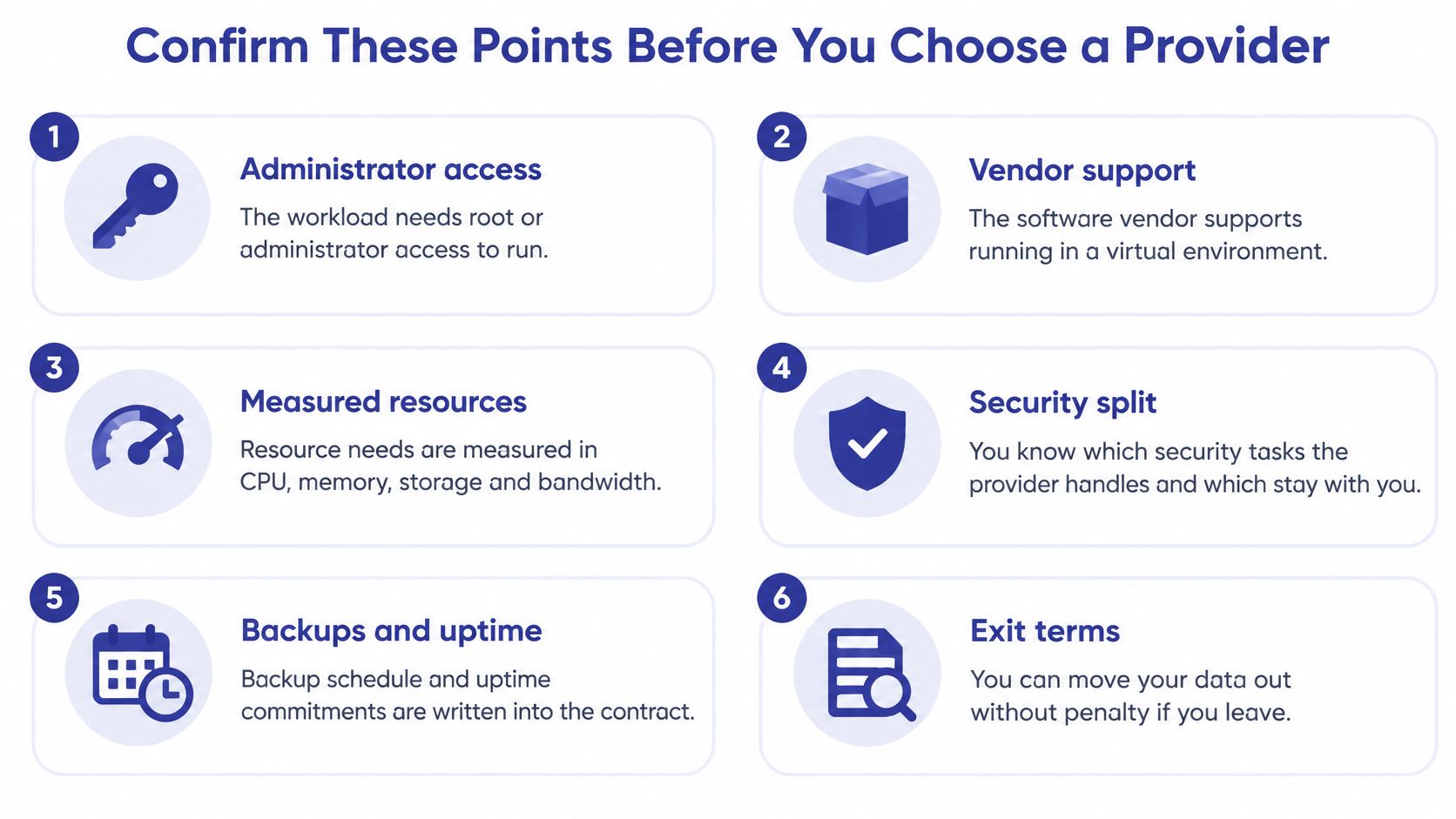
Check exit terms as carefully as onboarding terms. Establish how you'll export application data, retrieve backups, transfer licenses where permitted, and obtain usable documentation. Don't assume an exit is penalty-free unless the agreement says so.
For accounting, legal, and nonprofit teams evaluating applications such as QuickBooks, Sage, or Microsoft Office, our Cloudvara Workgroup Server is a fully managed IT environment with 24×7 support, server maintenance, and daily data backups. It can be deployed as a fully dedicated server to run any application the customer chooses, and our servers are located in SSAE16 compliant facilities.
Those facts should be evaluated against your requirements, not treated as a substitute for them. Facility credentials don't establish your application's permissions, and a backup schedule doesn't establish a tested recovery time. Document the agreed deployment and operating scope.
Use our hosting provider selection guide to prepare a consistent set of questions for competing proposals. This week, write down your workload baseline and send it with your security, recovery, and support questions for written answers.
Our managed hosting gives businesses a way to centralize existing applications without maintaining an office server themselves. Visit Cloudvara with your workload baseline to discuss a private virtual server hosting arrangement, clarify operational responsibilities, and identify the deployment your applications need.