If you're evaluating payroll software right now, there's a good chance the pain isn't limited to payroll itself. The core problem is usually operational. Staff are working from different locations, clients send changes late, one application lives on a local desktop, another sits in the cloud, and every payroll deadline feels less like a routine process and more like a controlled emergency.
That's why firms get this decision wrong when they shop by feature checklist alone. For an accounting practice, payroll is a recurring compliance service tied to deadlines, auditability, data security, and client trust. The software matters. But so does the environment it runs in, the way it connects to your accounting stack, and whether your team can access it reliably when it counts.
A small business running payroll for one employer can live with a fairly simple tool. An accounting firm can't. The firm has to manage many payroll calendars, many tax profiles, many exception workflows, and many client communication patterns at the same time. That changes the software requirement completely.
Payroll became a strategic category for firms as digital processing became standard. A 2021 study found that 85% of UK employees were paid via bank transfer, which reflects how normalized digital payroll processing had already become in a major accounting market, as summarized in this comparative analysis of payroll programs for accountants. Once payroll moved into standardized digital delivery, clients stopped treating it as clerical admin and started expecting continuous, dependable service.
A single employer usually asks, “Can this run payroll?” An accounting firm asks a harder set of questions:
That's why accountant-specific platforms developed around batch workflows, compliance handling, and repeatable processing. They are designed for scale and consistency, not just ease of use for one office manager.
Practical rule: If a payroll system is built mainly for a single business owner, expect friction the moment your firm needs standardization across many clients.
Older payroll processes were often periodic and manual. Data came in by email, spreadsheets were updated by hand, and filings were treated as a downstream step. Modern payroll software for accountants works differently. It's expected to automate calculations, support employee self-service, and generate compliance reporting as part of the normal workflow.
That shift changed the operating model inside firms. Payroll is now closer to a managed compliance service than a back-office task. If you're modernizing your stack, it helps to view payroll alongside the rest of your firm systems, not as a stand-alone utility. Firms that are reviewing broader application strategy usually end up pairing payroll decisions with a wider look at software for accounting firms.
Generic payroll tools often look attractive in demos because they simplify setup and basic processing. Where they fall short is in the middle of real firm work:
| Generic small-business tool | Accountant-focused platform |
|---|---|
| Built around one employer | Built around multiple clients |
| Limited review workflows | Better support for standardization and review |
| Narrow reporting | Multi-client reporting and consistency |
| Basic user access | More structured operational control |
That doesn't mean every firm needs the most complex platform on the market. It means the software has to match the service model you deliver. If payroll is recurring revenue, client retention work, and a source of compliance exposure, then accountant-grade capability is no longer optional.
The right feature set does two jobs at once. It protects the firm from avoidable compliance errors, and it keeps payroll work profitable enough to scale. Software that only does one of those jobs usually creates headaches somewhere else.

For firms, efficiency starts with how the system handles multiple clients and repeat activity.
For firms tightening this process, payroll selection should sit alongside document workflow decisions. A payroll platform works much better when it can feed records into secure document management software for accountants.
The technical features that matter most are not cosmetic dashboard tools. They are the calculation and filing controls that remove manual risk. Xero's payroll software guidance highlights automated gross-to-net calculation, tax jurisdiction handling, and filing automation for forms such as W-2s and 1099s, with automatic tax table and filing rule updates serving as the core mechanism for improving accuracy and reducing deadline risk in this payroll accounting software guide.
In practical terms, look for these capabilities:
Payroll doesn't usually break because someone can't multiply hours by rate. It breaks because tax handling, deadlines, and exceptions weren't controlled.
If your clients pay employees across borders or use standardized bank transfer workflows, it also helps to understand related payment formats. For teams dealing with European payment rails, this overview of SEPA for payroll employees is a useful operational reference.
A payroll system shouldn't stop at producing a payslip. It should produce clean downstream accounting and review data.
What doesn't work is buying software with a strong front-end payroll experience and weak accounting output. That's how firms end up “automating” payroll while still spending hours reworking the books afterward.
Most payroll problems that show up in financial review didn't start in financial review. They started when payroll ran in one system and accounting lived somewhere else, with staff bridging the gap by hand. That's the operational leak many firms tolerate for too long.
The better model is a closed-loop data flow. In that setup, each payroll run posts wages, employer taxes, deductions, and liabilities into the general ledger automatically. Rippling's overview of payroll tools for accountants describes that closed-loop value clearly, noting that it reduces duplicate entry and helps prevent the small mismatches that lead to misstated accruals or delayed filings in multi-client workflows in this discussion of payroll software for accountants.
A real integration does more than export a report file. It should:
If the vendor says “we integrate,” ask what that means technically. Is it native? Is it a one-way export? Does it support remapping? What happens when prior-period adjustments are posted?
The damage from weak integration is usually indirect, which is why it gets underestimated. A small mismatch in payroll liabilities can flow into accruals, bank reconciliations, management reports, and client conversations. Then someone on the team spends non-billable time tracing a variance that should never have existed.
Good payroll integration removes re-entry. Great payroll integration removes doubt.
That standard matters even more if your firm works heavily inside QuickBooks-based client environments. When evaluating options, it helps to review how your broader systems support integration with QuickBooks Online so payroll data doesn't become an isolated island inside the stack.
Use direct questions, not demo-friendly ones:
| Ask this | Why it matters |
|---|---|
| How are wages, taxes, and liabilities mapped to the ledger? | This reveals whether posting is structured or superficial |
| How are corrections handled after a payroll run closes? | This shows whether rework will land on your team |
| Is the sync one-way or bi-directional? | This affects review and exception handling |
| What audit detail is retained in the integration trail? | This matters for support and defensibility |
If a vendor can't answer those questions clearly, the integration probably isn't mature enough for a firm environment.
Many payroll software reviews stop at features and pricing. That leaves out the part that determines whether your team can run payroll reliably on deadline. The hosting layer matters because payroll is time-sensitive, full of sensitive data, and often dependent on a mix of cloud apps, desktop tools, add-ons, and client-specific workflows.
Patriot Software's accountant-focused guidance points to this exact gap. Firms are consolidating accounting and payroll work into hybrid cloud environments to standardize access and reduce IT burden, but buyers still need practical guidance on uptime, backups, and disaster recovery because outages or device failures create immediate compliance risk in payroll operations, as noted in this resource for accountants using payroll systems.
A payroll platform can have excellent features and still create operational exposure if it runs on fragile local infrastructure.
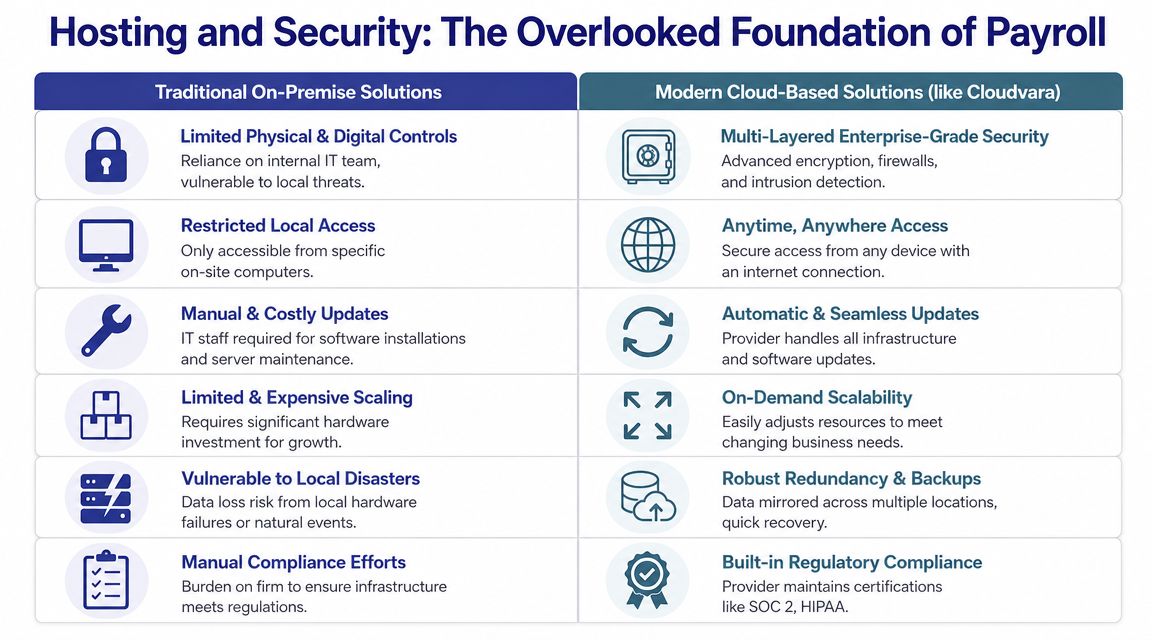
Most firms end up in one of three environments.
This is still common in firms with older payroll or accounting applications.
What works
What doesn't
This is better than local-only infrastructure, but it's not a complete answer when firms rely on desktop accounting or payroll tools.
What works
What doesn't
This model is often the most practical when the firm needs remote access, desktop application support, and centralized control. A hosted environment can place payroll applications, related accounting software, and supporting files in one managed setup with controlled access, backups, and continuity planning. One example is secure cloud hosting, which firms use to run Windows-based accounting and payroll applications off-site rather than on an in-office server.
Payroll data includes employee identifiers, pay rates, tax information, and banking details. That should change the way you evaluate infrastructure.
Ask these questions early:
For a broader risk lens beyond software selection, this guide to protecting accounting practices is worth reviewing because payroll exposure sits inside a larger professional and operational risk profile.
A short walkthrough can help frame what a hosted environment should support in practice.
They compare subscription price and ignore interruption cost. They compare software features and ignore recovery capability. They compare tax automation and ignore whether staff can log in, collaborate, and finish a run during a hardware issue, office outage, or remote workday.
The safest payroll process isn't the one with the flashiest interface. It's the one your team can access, control, and recover without improvising.
By the time you start vendor demos, most platforms will sound similar. They'll all mention automation, compliance, reporting, and support. The only reliable way to compare them is to use a scoring framework that reflects how accounting firms operate.
The market is mature enough that firms now have several established accountant-oriented options, including Thomson Reuters Accounting CS Payroll, QuickBooks Payroll, Xero Payroll, and Sage Payroll. These platforms are positioned around multi-client service needs such as batch processing, reporting, and compliance, as reflected in the Accounting CS Payroll product overview.
A polished demo can hide operational weaknesses. Score each vendor against the same criteria while the conversation is fresh.
| Evaluation Criterion | Vendor A Score (1-5) | Vendor B Score (1-5) | Notes |
|---|---|---|---|
| Multi-client payroll management | |||
| Batch processing capability | |||
| Role-based permissions | |||
| Tax jurisdiction handling | |||
| Filing automation | |||
| General ledger integration | |||
| Audit trail and history access | |||
| Reporting flexibility | |||
| Data export for audit support | |||
| Employee and client self-service | |||
| Hosting options for desktop dependencies | |||
| Backup and disaster recovery clarity | |||
| User training and onboarding | |||
| Support responsiveness | |||
| Pricing transparency |
Some criteria deserve more probing than others.
A useful cross-check is to compare your software questions with broader payroll service evaluation guidance. This article on streamlining your company's payroll is helpful because it reinforces the practical buying questions firms should ask beyond a feature tour.
You should also decide who owns the vendor relationship after purchase. If payroll software, hosting, security, and support come from different providers, someone at the firm has to coordinate them. That's where disciplined IT vendor management best practices become useful, especially when a payroll issue turns into a hosting or integration issue and responsibility starts bouncing between vendors.
A payroll vendor isn't just selling software. They're joining a deadline-driven service line inside your firm.
Most payroll software transitions fail for ordinary reasons. Data is messy, responsibilities are unclear, staff training is rushed, and too many clients move at once. A controlled rollout solves more problems than a perfect product ever will.

Before migration, document how your firm runs payroll today.
List:
If you skip that step, you'll configure the new system around assumptions instead of actual workflow.
A practical planning aid is a formal cloud migration checklist so the software move, file move, and access move are coordinated rather than treated as separate projects.
Historical payroll data, employee records, tax IDs, deductions, and ledger mappings should be reviewed before import. Bad legacy data becomes harder to fix after go-live, not easier.
Focus on:
Choose a small group of clients that reflects your real-world complexity. Don't select only your easiest payrolls. Include at least one client with approvals, one with recurring changes, and one that tests your reporting needs.
Run the pilot long enough to validate:
Pilot the workflow, not just the software.
Training should match the work each person performs. Payroll processors need different training than reviewers, partners, or admins.
Build short written workflows for:
A full rollout should be staged, not dumped on the team in one payroll cycle.
| Phase | What to do | What to watch |
|---|---|---|
| Phased rollout | Migrate clients in waves | Capacity strain and repeated setup mistakes |
| Go-live support | Keep vendor and internal escalation contacts ready | Delays during the first live deadlines |
| Optimization | Review process after early cycles | Manual workarounds that staff quietly reintroduce |
During rollout, hold short internal reviews after each payroll cycle. Ask three questions: what slowed us down, what created uncertainty, and what should be standardized before the next group moves over.
The strongest sign of success isn't that the system launched on time. It's that the team stops relying on memory and heroics. Payroll should become more predictable. Client communication should get cleaner. Access issues should decline. Reconciliation should take less detective work.
That usually happens when firms treat implementation as an operating model change, not a software install.
If you're ready to modernize payroll services, keep the next actions simple:
If your firm is weighing payroll software alongside remote access, desktop application support, and continuity planning, Cloudvara is one option to evaluate. It provides hosted access for accounting applications in a centralized cloud environment, which can help firms run payroll-related workflows without relying on local office servers or individual workstations.




