Choosing the right accounting software isn’t a quick decision—it’s a strategic one that breaks down into a structured look at your business needs, your team’s capabilities, and your plans for the future. The whole process starts by defining your specific operational requirements, from invoicing complexity to payroll, and nailing down your budget before you even think about comparing vendors.
This roadmap transforms what feels like a complex choice into a clear, manageable process.

Figuring out how to choose accounting software can feel overwhelming, but it really doesn't have to be. The most common mistake I see businesses make is jumping straight into vendor demos without a solid grasp of what they actually need. A successful selection process always begins with a thorough internal assessment, which provides a strong foundation for every decision you'll make later.
Think of this initial phase as creating a blueprint for your financial operations. Before you get dazzled by flashy features, you have to answer some fundamental questions about your business. This critical self-reflection is what keeps you from being swayed by bells and whistles you’ll never use, focusing you instead on tools that solve your real-world problems.
First things first: start by documenting your daily financial workflows. How are you currently handling invoicing, tracking expenses, and reconciling bank accounts? Pinpointing your existing bottlenecks is the first real step toward finding a solution that offers genuine improvements. The goal is to find software that streamlines these processes, not one that adds more complexity.
Next, you need to be honest about the technical skill of your team. A powerful platform is completely useless if your employees find it too intimidating to operate. An upfront assessment of your team’s tech-savviness will guide you toward a user-friendly solution that encourages quick adoption and keeps training time to a minimum.
The trend toward accessible, user-centric platforms is undeniable. In fact, the global accounting software market is projected to hit USD 33.47 billion by 2030. A massive 67.43% of that growth is driven by cloud-based solutions that put a premium on remote access and efficiency.
To help you get started, run through this quick self-assessment checklist. It’s a great way to organize your thoughts before you dive any deeper into the vendor search.
| Assessment Area | Key Question to Answer | Why It Matters |
|---|---|---|
| Current Workflows | What are the biggest time-wasters in our current financial process? | Identifying bottlenecks early ensures you're shopping for a solution, not just new software. |
| Team Skills | How comfortable is our team with new technology? | This determines whether you need a simple, intuitive interface or can handle a more complex system. |
| Budget | What is our total budget for the first year, including subscription, setup, and training? | A realistic budget prevents you from wasting time on platforms that are out of your financial reach. |
| Growth Plans | Where do we see our business's transaction volume in 3-5 years? | This helps you choose a scalable solution that grows with you, avoiding a costly migration down the road. |
| Must-Have Features | What are the top 3-5 features we absolutely cannot operate without? | Defining non-negotiables creates a clear filter for narrowing down your options quickly and effectively. |
Answering these questions gives you a solid framework for the rest of your evaluation.
Finally, it’s crucial to look beyond your immediate needs. Where do you realistically see your business in three to five years? The right software should not only solve today’s challenges but also scale right alongside your growth. As you evaluate options, ask whether a potential platform can handle increased transaction volumes, more users, or more complex accounting functions as your business expands.
Choosing software is about finding a long-term partner for your business's financial health. Your initial assessment is the most important step in ensuring that partnership is a successful one, preventing the costly mistake of having to migrate systems again in just a few years.
Taking the time to build this groundwork is essential for making a confident decision. For a deeper dive into how this technology actually works, check out our simple guide on what is cloud accounting.

Here’s the single biggest mistake I see companies make when choosing accounting software: they get completely mesmerized by a slick demo and a long list of features before they even know what problems they’re trying to solve. A successful choice isn't about finding the fanciest platform; it's about digging deep into your own operations first.
Before you even think about looking at a vendor website, you need a crystal-clear picture of your company’s financial heartbeat.
Start by literally mapping out your current financial workflows. Follow a dollar from the moment you send an invoice to the second you pay a vendor. Where does it get stuck? Maybe your team wastes hours every week manually keying in expense receipts or chasing down late payments. Nailing down these specific pain points is how you find software that delivers real value through automation, not just more bells and whistles.
This isn’t just about listing problems, though. It’s about recognizing that your needs are fundamentally shaped by your industry. A retail store operates on a completely different planet than a law firm or a nonprofit.
The right software has to speak your industry’s language. Generic, one-size-fits-all platforms almost never have the specialized tools that professional service firms or mission-driven organizations rely on every single day.
Let’s get specific:
Mapping these industry-specific needs saves you from paying for a bunch of features you’ll never touch. It’s the foundational work that makes the rest of the decision process fall into place. For a more structured way to tackle this, a formal business technology assessment can bring incredible clarity to what you have and what you truly need.
Beyond the company-wide view, you have to think about the actual people who will be clicking around in this software every day. Different roles need different things from your financial data. Creating simple user personas is a surprisingly powerful way to figure out who needs what.
Think about the key players on your team:
Defining these personas ensures the software you choose is not just powerful but also genuinely useful to the people using it. A system that works for Maria, David, and Sarah will see much higher adoption rates, giving you a far better return on your investment.
When you take this human-centric approach, you stop looking at a technical checklist and start doing a practical evaluation. You’re not just buying software; you’re investing in a system your team has to live in. Taking the time to get these business and user needs right ensures the software you pick is a perfect fit—one that solves today’s headaches and is ready for tomorrow’s growth.
One of the biggest forks in the road when choosing new accounting software is deciding where it will live. This isn't just a technical detail—it fundamentally changes how you access, manage, and protect your financial data. The choice between a cloud platform and a traditional on-premise installation will ripple through your budget, team flexibility, and IT workload for years to come.
First, let's clear up the core difference. Cloud software, often called Software-as-a-Service (SaaS), is hosted on the vendor’s servers and you access it through a web browser. On the other hand, on-premise software is installed directly onto your company’s own servers and computers. You own it, you control it, you maintain it.
Think of it like owning a house versus renting an apartment. On-premise feels like buying: a big upfront investment that gives you total control. The cloud model is like renting: you pay a predictable recurring fee, and the landlord—in this case, the vendor—handles all the maintenance and repairs.
The momentum behind cloud solutions is impossible to ignore. The cloud accounting software market was projected to grow at an 8.5% CAGR, and that was before the massive shift to remote work threw fuel on the fire. These platforms are built for streamlined processes and business continuity, making them a natural fit for modern, agile companies.
If you want to dig deeper, you can explore a detailed breakdown of the difference between cloud and on-premise to see how the two models really compare.
Cloud platforms bring some powerful advantages to the table, especially for dynamic, growing businesses.
A great real-world example is a marketing agency with project managers constantly moving between client sites and their homes. With a cloud solution, they can log expenses, send invoices, and check project profitability in real-time, no matter where they are.
Despite the cloud's meteoric rise, on-premise software is still the right call for certain organizations. The decision almost always comes down to three things: control, customization, and compliance. When the software lives on your own servers, you have the final say on every single aspect of its environment.
Here’s where an on-premise setup really shines:
A law firm managing highly confidential client trust accounts is a perfect candidate for an on-premise solution. It gives them complete sovereignty over their data, ensuring it never leaves their physical walls and allowing them to configure security protocols to their exact, exacting standards.
But all that control comes with heavy responsibility. You're on the hook for everything: purchasing and maintaining servers, managing backups, and installing every single software update and security patch. The total cost of ownership can easily eclipse that of a cloud subscription once you factor in all the IT overhead.
Ultimately, there's no single "best" answer. The right deployment model is the one that aligns with your operational reality, your security needs, and your vision for the future.
Modern accounting software is so much more than a digital checkbook—it’s the financial nervous system of your entire business. After you’ve settled the big-picture debate of cloud vs. on-premise, it's time to dive into the nitty-gritty details of daily operations. This is where you scrutinize the specific tools and connections that will either save you hours or create brand new headaches.
The core of your evaluation is simple: does the software solve your real-world problems? If you don't manage physical products, for example, then a slick inventory management module is just noise. But if you’re a consultant, powerful invoicing and project-costing tools are non-negotiable.
Before you get dazzled by flashy add-ons, you have to confirm the software nails the fundamentals. These are the pillars of any healthy accounting system, and getting them right is critical for financial clarity. If the foundation is weak, no amount of bells and whistles will matter.
Make sure to put these key areas under a microscope:
A classic mistake is assuming all software handles these basics equally well. During a demo, don't just listen—ask to see these specific workflows. A clunky invoicing process or a confusing bank rec tool can quickly become a major daily frustration for your team.
Your accounting software shouldn't be an island. It needs to talk to the other critical apps that run your business. This connectivity, known as application integration, is what elevates an accounting tool from a simple record-keeper to a true operational hub. It ensures data flows where it needs to go, wiping out redundant data entry and slashing the risk of human error.
Think about the tools your team uses every day. When they don't connect, you're stuck in a world of manual CSV exports and imports—a process that’s both painfully slow and a recipe for mistakes. To get a better handle on how these connections work, you can learn more about what is application integration and why it’s so vital.
Here are a few of the must-have integrations to look for:
With so many variables in play, comparing vendors can feel overwhelming. This is where a scoring matrix becomes your best friend. It’s a simple but incredibly effective way to bring objectivity to your decision, letting you rate each option against the criteria that matter most to your business.
This structured approach forces you to look past the sales pitch and evaluate the software based on your pre-defined needs. By assigning a weight to each feature, you ensure your final choice is grounded in logic, not just a gut feeling.
Here’s a basic template to show you how it works. You can build out your own with the features that are most important to you.
To compare vendors systematically, use a scoring matrix. First, list every feature and integration you need and assign an "Importance" score from 1 (nice-to-have) to 5 (mission-critical). Then, as you demo each vendor's software, score how well their platform delivers on that feature.
| Feature/Integration | Importance (1-5) | Vendor A Score (1-5) | Vendor B Score (1-5) | Vendor C Score (1-5) |
|---|---|---|---|---|
| Automated Bank Reconciliation | 5 | 5 | 4 | 4 |
| Native CRM Integration | 5 | 5 | 2 | 3 |
| Customizable Invoicing | 4 | 4 | 5 | 4 |
| Project-Based Costing | 3 | 2 | 4 | 5 |
| Mobile Receipt Capture | 3 | 4 | 4 | 3 |
To get your final result, multiply the "Importance" score by each "Vendor Score" for every row, then add up the totals for each vendor column. This weighted score gives you a clear, data-backed winner based on what you actually need.
Choosing the perfect software is a major milestone, but the real victory comes from a well-executed transition. Even the best platform will fail if the implementation is chaotic. A thoughtful plan for migration and onboarding is what turns a promising new tool into a genuine business asset that your team actually uses.
The journey from your old system to a new one is delicate. It involves technical precision with your data and, just as importantly, careful management of the human side of change. Getting this right prevents the frustrating scenario where you’ve invested in powerful new software only to see it gather digital dust.
Before you flip the switch for the entire company, it's smart to run a small-scale pilot program. Think of this as a dress rehearsal. You select a small, representative group of users—maybe one person from accounting, a project manager, and a team lead—to use the new software for a limited time with real data.
This approach offers immense benefits:
The feedback from this small group is invaluable for refining your final implementation plan and ensuring a much smoother company-wide transition.
Data migration is often the most technically demanding part of the process. A sloppy migration can corrupt your historical financial data, creating a massive headache that can take months to unravel. To keep things clean, it's crucial to follow essential data migration best practices from the very beginning.
A typical migration unfolds in several key stages. This simple timeline helps visualize the process.
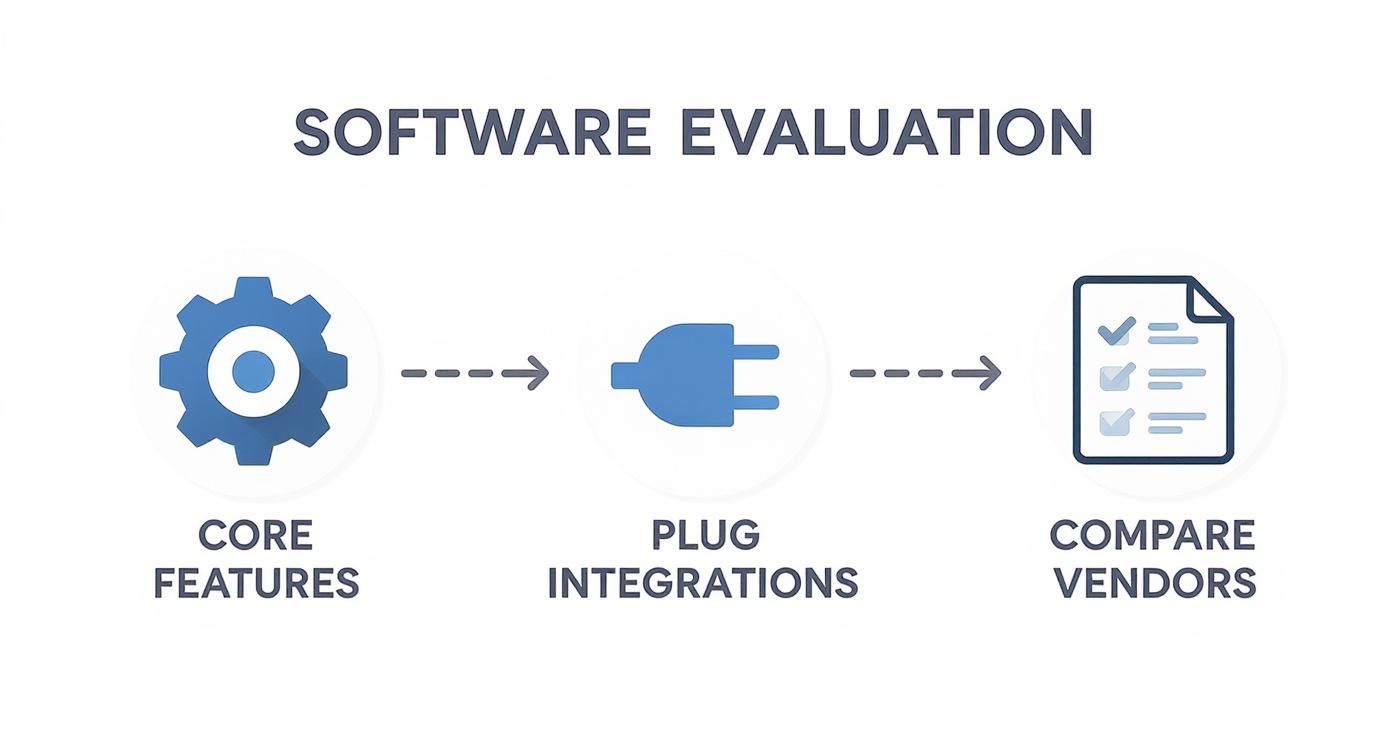
This process flow shows the core steps in evaluating software: analyzing core features, checking integrations, and finally, comparing vendors. This visualization underscores that a successful choice depends on a methodical process, starting with your internal needs and systematically narrowing down the options.
A Sample Migration Timeline:
This entire process can take anywhere from a month to several months, so plan accordingly. For more granular detail, a comprehensive cloud migration checklist can provide an excellent framework for your project.
Never underestimate the importance of a complete backup. Before you begin any migration, create a full, verified backup of your existing accounting data. Store it securely and do not touch it. This is your ultimate safety net in case anything goes wrong.
Simultaneously, schedule mandatory training sessions for your entire team. Don't just show them how to use the software; explain why the change is happening and how it will make their jobs easier.
Ask your potential vendor pointed questions about their role in this process. A vendor who acts as a true partner will offer robust support during this critical phase, significantly increasing your chances of a successful implementation.
Different vendors operate in different markets with varying compliance needs. In 2018, North America held 33.96% of the accounting software market share, a position driven by strong vendor presence and government investment in technology. This highlights that regional factors and compliance frameworks are crucial in the software selection process. You can discover more insights about the global accounting software market on fortunebusinessinsights.com.
https://www.youtube.com/embed/Hwmj10Zx9XU
You’ve done the heavy lifting. The research is complete, the demos are done, and your scoring matrix is filled with hard data. Now comes the moment of truth where all that diligence pays off. This final step is about pulling everything together to make a confident, forward-looking choice.
It’s tempting to just pick the vendor with the highest score, but the best decision goes deeper. You’re not just buying software; you’re choosing a long-term partner for your business. It's time to weigh your objective scores against the less tangible—but equally critical—factors like vendor reputation, future scalability, and the true cost of ownership.
One of the most common pitfalls is getting fixated on the monthly subscription fee. The real cost of any software is its Total Cost of Ownership (TCO), which includes every direct and indirect expense you'll encounter. A platform that looks cheap upfront can quickly become a budget drain if it’s loaded with hidden costs.
To get the real picture, you need to factor in:
Calculating the TCO gives you a far more realistic financial comparison. It prevents sticker shock later and helps you see the true value each finalist offers.
Your scoring matrix gives you a great, data-driven snapshot of how each platform meets your needs today. Now, it's time to overlay your future business goals on top of that data. The software that scored highest on current requirements might not be the one that can support your five-year plan.
Ask yourself some tough questions about scalability:
The right choice is a platform that meets you where you are but has a clear, established path to where you want to go. Choosing for growth now prevents a painful and expensive migration in just a few years.
As you narrow things down, remember that different industries have very specific needs. For example, businesses managing real estate portfolios require unique features, which is why it's worth looking into reviews of specialized accounting software options.
Finally, never underestimate the human side of this decision. Before you sign anything, ask for references—and actually check them. Talk to businesses similar to yours in size and industry. Get past the canned questions and dig into their real-world experiences.
Probe into specifics:
Honest feedback from current users is one of the most reliable predictors of a vendor's quality. It’s also vital to bring your key stakeholders—the bookkeeper, the CEO, the project managers—into this final review. When the people who will use the software daily feel heard and are part of the decision, you get company-wide buy-in. And that, ultimately, is the key to a successful rollout.
Ready to move your accounting software to a secure, reliable, and accessible cloud environment? At Cloudvara, we specialize in hosting the applications your business depends on, from QuickBooks to industry-specific tax and legal software. Eliminate IT headaches and empower your team to work from anywhere with our 99.5% uptime guarantee and 24×7 support. Discover how managed cloud hosting can transform your operations with a free 15-day trial. Visit us at https://cloudvara.com to learn more.




