When you hear "business continuity software," don't think of a single product you can just install and forget. It's more of a strategic system, a complete operational survival plan designed to keep your most critical functions running when things go sideways. The best solutions blend automated backups, fast recovery tools, and clear communication channels to make sure your firm stays resilient. This isn't just about backing up data; it's about keeping the lights on.

A lot of firms think their standard data backups are enough to get them through a crisis. That’s like having a fire extinguisher in the office. It's great for a small trash can fire, but it’s not going to do you much good if the whole building is ablaze.
True business continuity software is the fire department—the whole crew. It’s the evacuation plan, the first responders, and the temporary command center all rolled into one. It’s a proactive strategy, not just a reactive tool.
A simple backup just copies your data. That's an essential first step, but it only solves one tiny piece of a much larger puzzle. It doesn't answer the real questions: How will your team access that data during an outage? How will they use the critical applications needed to actually serve your clients?
Let's break it down:
For professional service firms, this proactive approach is everything. An accountant can't afford downtime during tax season. A law firm can't miss a court deadline. Any disruption, no matter how small, can be catastrophic.
"In seeking such a tool, don’t look for the 'best' such platform, look for the one that is best for you." – Michael Herrera, CEO of MHA Consulting
That insight gets to the heart of it. The best business continuity software is the one that aligns with your specific operational needs and protects the applications that are absolutely critical to your firm’s daily work.
Ultimately, business continuity is about protecting your ability to work. Period. When a local power outage hits, a server fails, or a natural disaster strikes, the goal is to make sure your team can still get into their essential tools—QuickBooks, tax software, case management systems—from anywhere.
This operational resilience is directly linked to client trust and your professional integrity. When you can keep delivering services without skipping a beat, you're proving your reliability. You're reinforcing your reputation as a firm that clients can count on, no matter what.
For a deeper dive, you might be interested in learning more about how a business continuity cloud solution provides this level of protection. Think of it less as an expense and more as an investment in safeguarding the very core of your business.
Not too long ago, business continuity was a conversation tucked away in the IT department. Today, it’s a non-negotiable topic in the boardroom, and the market is scrambling to keep up. The demand for reliable business continuity software isn’t just growing—it’s hitting an entirely new gear, pushed forward by a perfect storm of modern risks.
This isn't a temporary spike. The global business continuity software market is on a trajectory to expand from $4.0 billion to a massive $6.9 billion by 2032. That's a compound annual growth rate (CAGR) of 9.58%, a clear signal that business leaders finally see proactive resilience as a core operational pillar, not an optional extra.
This explosive growth isn't happening in a vacuum. Three powerful forces are converging, making business continuity an essential investment for firms of all sizes, especially those in high-stakes fields like accounting and law.
Escalating Cyber Threats: Ransomware, data breaches, and sophisticated phishing schemes aren't just hypotheticals anymore—they are daily realities. One successful attack can grind your entire firm to a halt, freezing billable hours and exposing sensitive client information.
Stringent Compliance Requirements: Regulations like GDPR and HIPAA have real teeth, handing out severe financial penalties for data breaches. These rules require firms to prove they have solid plans for protecting data and maintaining operations, turning continuity software into a vital compliance tool.
The New Reality of Hybrid Work: The shift to remote and hybrid work isn't going away. In fact, a staggering 89% of employees expect to work remotely at least part-time post-pandemic. With teams spread out, relying on a single on-premise server is a massive vulnerability. Cloud-based continuity plans are now the only practical way to ensure everyone stays securely connected to critical applications.
The real cost of downtime isn't just the immediate financial loss. It's the erosion of client trust, the damage to your professional reputation, and the long-term struggle to recover from a preventable disaster.
These big-picture trends have very real, gut-wrenching consequences on the ground.
Imagine it's the frantic final week of tax season, and a server crash locks your entire CPA firm out of its tax software. Every single hour of downtime means lost revenue, blown filing deadlines, and a flood of panicked client calls. The damage can be immense.
Or picture a law practice in the middle of a high-stakes trial. A data breach doesn't just disrupt operations; it threatens attorney-client privilege. Losing access to case files or critical evidence at a pivotal moment could be professionally catastrophic.
This is exactly why investing in a continuity solution has shifted from a "nice-to-have" to a strategic necessity. It's about building a resilient firm that can absorb a hit, protect its reputation, and keep serving clients without missing a beat. The market's rapid growth is proof that your competitors are already taking this seriously. The only question left is, are you?
Picking the right business continuity software is a bit like shopping for a new car. The flashy extras are nice, but what you really need are reliable brakes, a solid engine, and airbags that work every single time. In the software world, these are the core features that will determine whether your firm sinks or swims when a crisis hits.
You don't need to be an IT wizard to make a smart choice here. The key is to cut through the technical jargon and focus on what each feature actually does for your firm in a real-world mess. Adopting that practical mindset will help you find a solution that genuinely protects your revenue, reputation, and the trust you've built with your clients.
When you're looking at different options, certain features are simply non-negotiable. They form the bedrock of a resilient operation. We've broken down the essentials into a clear table so you can see exactly what to look for and, more importantly, why it matters for a professional services firm like yours.
| Feature | Core Function | Why It Matters for Your Firm |
|---|---|---|
| Automated Backups | Continuously copies your data to a secure, separate location without manual intervention. | Removes human error, ensuring your client files, financial records, and case data are always protected, even if someone forgets to run a backup. |
| Data Versioning | Saves multiple historical copies of your files, allowing you to restore a file from a specific point in time. | If ransomware strikes at 2 PM, you can simply roll back to the clean version from 1 PM, turning a potential catastrophe into a minor hiccup. |
| Rapid Recovery | Restores systems and data within minutes or hours, not days, to meet predefined recovery objectives. | Minimizes billable downtime. For a law or accounting firm, getting back online quickly means you can still meet critical deadlines and serve clients. |
| Risk Assessment Tools | Helps you identify your most critical business functions and the technology they rely on (Business Impact Analysis). | You can't protect everything equally. This helps you prioritize, ensuring your most vital systems—like tax or case management software—get the most protection. |
| Incident Management | Provides a central dashboard to declare a disaster, assign recovery tasks, and track progress in real-time. | Brings order to chaos. Instead of scrambling with phone calls and emails, your response team has a clear, coordinated plan of action. |
| Integrated Communication | Allows you to send mass notifications to employees, stakeholders, and clients directly from the platform. | Keeping everyone in the loop prevents panic and misinformation, presenting a calm, professional front even when things go wrong behind the scenes. |
These features aren't just technical bells and whistles; they are the fundamental tools that keep your doors open when the unexpected happens. Let's dig a little deeper into what makes each one so critical.
At its core, any continuity plan relies on having clean, recent copies of your data. Relying on manual backups is just asking for trouble—someone inevitably forgets, a file gets corrupted, or the backup drive fails right when you need it. That's why automated backups are the first non-negotiable. They run silently in the background, no human intervention needed.
Think of it this way: your firm creates critical data every single minute. Automated backups are like a tireless security guard, constantly making copies of your latest work. Just as important is versioning. This feature lets you rewind the clock on a specific file. If a document gets scrambled or hit with ransomware, you can just restore the clean version from an hour ago, keeping data loss to an absolute minimum.
Backups are completely worthless if it takes you days to get them back online. This is where two critical terms come into play that define just how fast you can bounce back.
Let's say your law firm’s server crashes at 9 AM. With rapid recovery, you’re not dead in the water. Your team could be accessing case files again within minutes or hours, not days, making sure deadlines are met and client service never skips a beat.
A strong business continuity plan doesn't just recover data; it restores operations. The goal is to make a major disruption feel like a minor inconvenience to your clients and your bottom line.
The best software doesn't just react to disasters—it helps you see them coming. Look for tools that let you perform a Business Impact Analysis (BIA). This is a structured way to identify your most critical business functions and pinpoint the exact applications they depend on.
For an accounting firm during tax season, a BIA would instantly flag its tax preparation software as a top-priority system. Knowing this helps you build a continuity plan that specifically shields that application. These tools give you a clear, data-driven roadmap for your resilience strategy, making sure you protect what truly matters most. To learn more about safeguarding your data, check out these 12 essential cloud security practices for businesses.
When a crisis hits, chaos is the real enemy. Good continuity software includes incident management protocols that act as a central command center. This feature lets you officially declare an incident, assign recovery tasks to your response team, and watch the progress toward a solution in real-time.
Clear communication is every bit as important. The platform should have built-in tools for sending mass notifications to employees, partners, and even clients. Keeping everyone informed calms nerves, reduces panic, and ensures a coordinated, orderly response. The thought process for selecting these features is similar to how you would choose the best legal practice management software; you're looking for a comprehensive system that covers all your operational bases and prepares you for anything.
Choosing how to deploy your business continuity software is a huge decision. It really comes down to the classic “build versus buy” dilemma, leaving you with two main paths: manage your own servers on-site or move everything to a cloud-based solution.
Think of it this way: an on-premise solution is like owning a massive power generator for your office. You buy it, install it in the basement, and take full responsibility for its maintenance, fuel, and repairs. When the power goes out, you're in control, but you're also the one who has to get it running and keep it fueled.
On the other hand, a cloud-based solution is like plugging into the city’s power grid. You don’t own the power plant or the infrastructure; you just pay a predictable fee to access a reliable, professionally managed service. The responsibility for uptime, maintenance, and keeping the lights on rests entirely on the provider.
For professional firms where every minute of uptime is money, getting this choice right is critical.
So, should you stick with a physical server in your office or move to the cloud? It’s not just about technology. It’s a strategic choice that impacts your budget, agility, and long-term resilience. Let's break down the core considerations.
This flowchart helps visualize which path might be a better fit for your firm's size and needs.
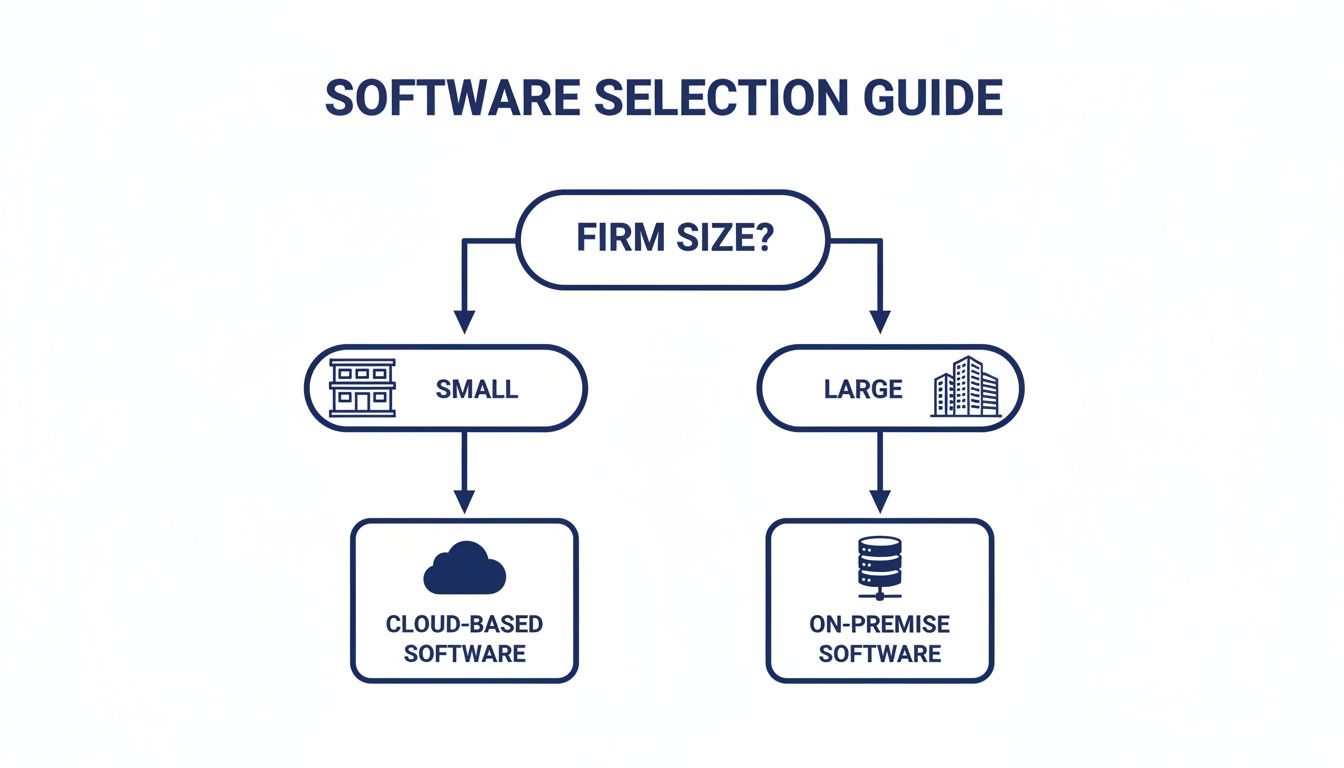
As you can see, smaller, more agile firms often get the most out of the cloud's flexibility, while larger enterprises with deep IT resources might still consider on-premise solutions.
For most small to mid-sized accounting firms, law practices, and other professional services, the cloud just makes more sense. It directly tackles the biggest headaches of managing in-house IT while delivering a level of resilience that's nearly impossible to achieve on your own.
The numbers back this up. The disaster recovery as a service (DRaaS) market is booming because cloud options can cut IT costs by up to 40% compared to traditional setups. And with cyberattacks jumping 30% every year, a solid continuity plan is no longer a "nice-to-have." It’s your front-line defense against the projected $4.45 trillion in global cybercrime costs. You can dig into more of this data in this market insights report.
Cloud-based continuity isn't just about moving servers off-site. It's about outsourcing the entire headache of IT management and getting enterprise-grade security you couldn't afford to build yourself.
This approach fits the modern professional firm perfectly. When you host your critical applications in a secure cloud environment like Cloudvara, you give your team secure remote access from any device. That means work doesn't stop during an office closure, a power outage, or any other disruption. The provider handles the backups, security, and infrastructure, giving you something invaluable: peace of mind.
If you're still weighing these options, our detailed guide on the difference between cloud and on-premise solutions can help you make the final call.

So far, we’ve been looking at business continuity software as a separate tool—something you add on top of your existing IT. But what if resilience wasn't another piece of software to manage? What if it was just part of how you worked every day?
That’s the big shift cloud application hosting brings to the table. Instead of a separate continuity plan that kicks in when things go wrong, your core operations are inherently protected from the start. It transforms resilience from a reactive scramble into a proactive, built-in advantage.
With a dedicated cloud provider like Cloudvara, vague concepts like "uptime" and "backups" become real-world strengths you can count on. These aren’t just line items on a service agreement; they are the bedrock that keeps your firm running, no matter what happens.
Here’s how those features translate into direct benefits for your firm:
This kind of built-in defense is a huge reason why the business continuity software market in North America has blown past $5.9 billion in a single year. While big corporations are major players, small and mid-sized businesses are quickly catching on, using cloud solutions to cut IT costs by 30-50% while achieving incredible reliability.
Let’s make this real. Imagine a small accounting firm in the final, chaotic push of tax season. A construction crew outside accidentally severs the power line to their building. The lights go out, the internet connection dies, and their on-premise server grinds to a halt.
For a firm running on in-house IT, this is a full-blown catastrophe. Deadlines are blown, clients are left hanging, and billable hours vanish into thin air.
Now, picture that same firm using Cloudvara. When the power goes out, the partners just send a quick text: "Everyone work from home." Each team member grabs their laptop, securely logs into their cloud desktop, and picks up exactly where they left off. The tax software, client files, and team chats are all running smoothly in a secure data center hundreds of miles away, completely untouched by the local outage.
This is the essence of built-in resilience. The disruption is a minor inconvenience, not a business-ending event. The firm sails through tax season, meets every deadline, and reinforces its reputation for reliability.
This ability to keep operations running smoothly is everything. In fact, exploring SaaS customer support best practices makes it clear that continuous availability is the foundation of client trust. By partnering with a dedicated cloud host, you’re not just buying technology; you’re investing in a guarantee of operational continuity. For a closer look at the mechanics, check out our guide on how cloud-based application hosting works.
When you're digging into business continuity, a lot of questions pop up. It doesn't matter if you're sketching out your first plan or comparing software vendors—getting straight answers is key. Here are some of the most common questions we hear from professional firms, with practical answers to help you move forward.
It's really easy to mix these two up, but they cover very different ground, even though they're related. Think of it like a medical emergency.
Disaster Recovery (DR) is the trauma team in the operating room. Their job is purely technical and kicks in after a crisis hits. They're focused on restoring servers, pulling data from backups, and getting the core IT infrastructure back on its feet. It’s a reactive, tech-first process.
Business Continuity (BC) is the entire hospital's emergency response plan. It's a much broader strategy that keeps the whole organization running during the crisis, not just after. This includes everything from keeping your team productive and communicating with clients to maintaining critical operations, even if your primary office is unavailable.
Disaster Recovery gets your servers running again. Business Continuity keeps your business running, period.
The best solutions, like a well-managed cloud hosting environment, don't make you pick one over the other. They weave both together, giving you the rapid technical fix of DR and the operational resilience of BC. This ensures your firm doesn't just survive an outage—it keeps serving clients right through it.
A plan that just collects dust in a binder isn't a plan at all; it's just a document. You have to test it regularly to know if it will actually hold up when you need it. It’s no different than a fire drill—you practice when things are calm so you know exactly what to do when smoke fills the hallway.
We always recommend a layered approach to testing:
If your firm uses a managed cloud solution, the focus of your testing changes a bit. The cloud provider handles the server and data restoration tests. Your job is to test your team’s side of the equation—can everyone access their software and files remotely? It’s a simpler drill, but just as vital for keeping everyone productive from anywhere.
This is a huge worry for a lot of small and mid-sized firms, but it usually comes from looking at the issue backward. The real question isn't about the cost of the software. It’s about the cost of doing nothing.
Take a moment to calculate the real financial hit of downtime for your firm. Think about the lost billable hours, the penalties for missed deadlines, and the long-term hit to your reputation if you went dark for a day—or a week. For most professional services firms, just a few hours of being offline can cost more than a year of a solid continuity solution.
Not too long ago, building a continuity plan in-house was incredibly expensive. It meant buying duplicate hardware and hiring more IT staff. But cloud-based solutions have completely changed the economics.
The cloud flips the financial model from a massive, one-time capital expense (CapEx) to a predictable, manageable monthly operational expense (OpEx). This puts enterprise-level resilience within reach for even the smallest firms.
It’s not an expense. It's an investment in your firm's survival and a non-negotiable part of modern risk management.
Starting can feel like a massive project, but you don't have to get everything perfect on day one. The trick is to start small and focus on what keeps your business running.
Here’s a simple, two-step way to get the ball rolling:
This quick risk assessment does two important things. It helps you get buy-in from leadership to invest in a solution, and it gives you a clear roadmap of exactly which applications you need to protect with a resilient platform like cloud application hosting.
Ready to build resilience directly into your operations? With Cloudvara, you get a 99.5% uptime guarantee, automated daily backups, and 24/7 support, ensuring your firm stays productive no matter what. Protect your critical applications and secure your peace of mind by visiting https://cloudvara.com to start your free trial today.




