
Sage 100 Contractor is a powerhouse for small to mid-sized contractors in the U.S., rolling job costing, project management, accounting, and payroll into one unified system. It's built to give you a single command center for your entire business, from the initial bid straight through to the final payment.

Think about a typical construction company. You’ve got estimators crunching numbers, project managers juggling schedules, and an accounting team tracking every single dollar. When this information lives in separate spreadsheets, notepads, and programs, things get messy fast. That's a recipe for chaos.
Sage 100 Contractor steps in to be the central command center for this whole operation. It’s not just another accounting program—it’s a complete construction management ecosystem designed to bring every critical business function onto one seamless platform.
You can think of it as the master blueprint for your business. Just as an architect’s blueprint ensures every trade works from the same set of plans, this software makes sure every department is working from the same data. An approved estimate automatically builds the project budget, which then informs purchase orders and updates job costs in real time. No more disconnects.
This software isn’t trying to be a one-size-fits-all tool. It’s specifically engineered for contractors who’ve hit the limits of generic accounting software like QuickBooks but don’t quite need a massive, enterprise-level system. If you’re tired of juggling multiple programs just to get a clear picture of your business, Sage 100 Contractor was made for you.
Its core users are:
The real magic of Sage 100 Contractor is its ability to create a "single source of truth." When your team—from the field crew to the back office—is working with the same real-time information, expensive errors and communication breakdowns all but disappear.
Many contractors still lean on manual spreadsheets for bidding and cost tracking, but that approach leaves too much room for error. Understanding how dedicated construction estimating software outperforms manual methods in accuracy and speed is a game-changer. Sage 100 Contractor builds this function right in, closing the dangerous gap between what you bid and what a job actually costs.
The construction world has financial and operational headaches that most other industries never see. Generic software just wasn't built to handle them. Sage 100 Contractor, on the other hand, was developed to tackle these specific needs head-on. There are many options out there, and it helps to understand how they differ. To see how Sage’s own products stack up, you can dive into the differences between Sage 50 and Sage 100 in our detailed guide.
This specialized focus means the software is ready to manage tasks like:
By bringing these functions under one roof, Sage 100 Contractor eliminates the double entry and costly mistakes that happen when you try to force different tools to work together.

Unlike generic software bloated with features you’ll never use, Sage 100 Contractor is laser-focused on what actually protects a construction firm’s bottom line. It’s not about adding more bells and whistles; it’s about creating a smooth, connected workflow from the first bid to the final invoice, turning your data into decisions that boost profit margins.
Think about what happens after your estimating team wins a bid. In a disconnected system, that win kicks off a chaotic wave of manual work. Someone in accounting scrambles to build a budget in a spreadsheet, a project manager starts creating purchase orders from scratch, and another person types up subcontractor agreements. Each handoff is a new opportunity for a costly mistake.
With Sage 100 Contractor, that approved bid instantly seeds the rest of the system. The estimate becomes the project budget, purchase orders are generated, and subcontracts are created—all from the same original data. This single, connected flow eliminates redundant work and drastically cuts down on the manual errors that quietly drain profits.
The most powerful tool in Sage 100 Contractor’s arsenal is its real-time job costing. Think of it as a live EKG for every single project in your portfolio. While generic accounting software might tell you what you spent last month, Sage 100 Contractor tells you if you’re over budget on plumbing for a specific job right now.
This detailed tracking lets you monitor actual costs against your budget for individual phases of work. You can see exactly where every dollar is going—labor, materials, equipment, and subs—as it’s spent. This immediate feedback is what makes proactive project management possible.
A construction project moves fast, and small overages can quickly spiral into major losses. The ability to spot a budget overrun the moment it happens, rather than weeks later at month-end, is often the difference between a profitable job and a losing one.
For instance, a commercial plumbing contractor can pull up the software’s Work-in-Progress (WIP) reports and see they’ve already burned through 75% of their labor budget on a task that’s only 50% complete. This early warning gives the project manager a chance to step in immediately. Was the job underbid? Is the crew working inefficiently? Or was there an unexpected site issue? Without that real-time insight, they wouldn't know there was a problem until the phase was finished and the loss was already locked in.
So, how does Sage 100 Contractor stack up against a standard accounting solution? The difference lies in its specialized, industry-specific design.
| Feature | Sage 100 Contractor | Generic Accounting Software |
|---|---|---|
| Job Costing | Real-time, detailed cost tracking by project and phase code. | Basic expense tracking, often delayed until month-end. |
| Payroll | Handles prevailing wages, certified payroll, union reporting, and multi-state jobs. | Standard payroll processing; requires manual workarounds for construction complexities. |
| Billing | Manages retainage, AIA billing, and unit-based or time-and-materials invoicing. | Simple invoicing, lacks retainage or progress billing features. |
| Subcontractor Management | Tracks compliance, insurance certificates, and lien waivers. | Basic vendor management with no industry-specific compliance tracking. |
| Project Management | Integrates change orders, RFIs, and submittals directly with financials. | No built-in project management; requires separate software and manual data entry. |
As the table shows, Sage 100 Contractor isn't just an accounting tool with a few construction-themed add-ons. Its features are woven into the fabric of project delivery, which is why specialized software is dominating the industry. The construction software market is set to grow from $11.78 billion in 2026 to $24.72 billion by 2034, driven by tools that solve these exact pain points.
Beyond job costing, you get other modules built for the unique financial rhythm of construction:
This deep integration delivers a true 360-degree view of your company’s financial health. You can explore our detailed overview of Sage 100 accounting software for more on its core financial capabilities. By connecting every dollar from the initial estimate to the final project closeout, Sage 100 Contractor gives you the clarity and control needed to protect your hard-earned profits.
Deciding where your Sage 100 Contractor software will live is one of the most critical choices you'll make. This isn’t just an IT decision—it impacts everything from your upfront cash flow and team’s workload to whether a project manager can access crucial job data from a trailer on-site. The two main paths are on-premise installation and cloud hosting.
Think of it like this: an on-premise server is like owning a standalone house. You have total control over the property, from the paint colors to the security system. But you’re also on the hook for everything—the mortgage (a huge capital investment), the alarm system, utilities, maintenance, and all repairs. If a pipe bursts in the middle of the night, it's your problem to fix, right then and there.
Cloud hosting, on the other hand, is like leasing a premium, fully-serviced office in a brand-new skyscraper. You get a professional, secure space without the massive upfront cost of buying the building. The management company handles all the infrastructure, security, power, and upkeep for a predictable monthly fee, letting you focus completely on running your business.
With an on-premise setup, you buy and physically keep the server hardware at your office. This traditional model puts your IT team in the driver's seat, with direct, hands-on control over both the hardware and your Sage 100 Contractor data.
This approach offers total autonomy, but that control comes with some serious responsibilities.
For a construction firm, this means a large chunk of capital is tied up in a server closet instead of being invested in new equipment or bidding on bigger jobs. It also means that if your server goes down, your entire operation—from payroll to job costing—grinds to a halt until your team can get it running again.
Cloud hosting completely flips the script. Instead of you owning the server, a specialized provider like Cloudvara hosts your Sage 100 Contractor software on their powerful, secure data center infrastructure. You and your team access it over a secure internet connection.
This service-based model turns a major capital expense into a predictable operating expense. Instead of a huge one-time investment, you pay a manageable monthly fee.
The core value of cloud hosting is a shift in focus. By offloading the IT burden of server management, security, and backups to an expert provider, your team is freed up to concentrate on what it does best—managing construction projects and driving profitability.
When looking at cloud options for Sage 100 Contractor, it's smart to consider the provider's measures for things like data center physical security to protect your information. A good provider invests heavily in redundant power, cooling, and top-tier security that most individual businesses could never afford on their own. As you think about moving to a more flexible system, our guide to Sage 100 cloud hosting can give you more in-depth insights.
This modern approach offers several key advantages for a construction firm today:
Trying to manage an on-premise server for Sage 100 Contractor can feel like you’ve been handed a second, high-stakes job you never asked for. The constant worry about server crashes, the drain on capital for hardware maintenance, and the stress of securing your company’s most sensitive financial data can easily pull focus from your real goal: running a profitable construction business. These aren't just small annoyances; they're serious operational risks.
When a project manager in a job-site trailer can't access real-time cost data to approve a change order, you’ve got a major bottleneck. A sudden server failure right in the middle of a payroll run can bring your entire operation to a dead stop. These are the exact headaches a managed hosting environment is built to eliminate, turning your software from a source of stress into a genuine tool for growth.
The single biggest fear for any business running software on-premise is data loss. Whether it's from a hardware meltdown, a ransomware attack, or even simple human error, the idea of losing years of financial history, job costs, and client information is nothing short of catastrophic. An on-premise setup puts the entire weight of data protection squarely on your shoulders.
This is where managed hosting steps in to provide immediate peace of mind. A quality provider builds business continuity right into its service.
This robust framework lets you effectively outsource your business continuity risk. Instead of your team scrambling to fix a crashed server, you have a dedicated partner whose only job is to keep your software online and your data safe.
One of the most frustrating limits of a traditional on-premise Sage 100 Contractor installation is its lack of mobility. Your team is chained to the office, making it tough for project managers, estimators, and executives to work effectively from the field, home, or on the road. Trying to set up a secure VPN is often a technical headache that results in slow, clunky performance.
Managed hosting smashes through these barriers by providing secure, high-performance remote desktop access.
Imagine your project manager pulling up a complete, real-time job cost report on their iPad right from the construction site. This isn't some stripped-down mobile app; it's the full, powerful desktop version of Sage 100 Contractor, accessible from any device, anywhere with an internet connection.
This capability empowers your team to make faster, better-informed decisions right where they matter most—in the field. Change orders can be processed instantly, material orders can be checked against the budget on the spot, and daily reports can be filed without a trip back to the office. This level of accessibility not only boosts productivity but also improves the work-life balance for your key employees.
Maintaining an in-house server brings a whole host of unpredictable costs. Beyond the initial five-figure investment in hardware, you’re looking at ongoing expenses for IT staff, emergency repairs, software patches, and eventually replacing the hardware every few years. When a server component fails, it’s an unexpected and often painful hit to your budget.
Managed hosting changes this volatile capital expenditure into a predictable, fixed monthly operating expense. The subscription fee covers all the hardware, maintenance, security, backups, and expert support. This streamlined approach delivers several key financial benefits:
This model gives you access to top-tier technology and support for a fraction of what it would cost to build and maintain it all yourself. To see what this involves, explore the details of comprehensive managed cloud services and how they can be fitted to your business needs. It’s a strategic shift that lets you get back to focusing on construction, not computer maintenance.
Moving to a cloud-hosted environment or implementing Sage 100 Contractor for the first time can feel like a huge undertaking. But with a clear plan, it becomes a manageable project that sets your business up for success. Think of this checklist as a roadmap to guide you smoothly from planning to launch.
A successful switch all comes down to preparation. The goal is to keep disruptions to a minimum, protect your data, and get your team comfortable with the new system as quickly as possible. This turns a complex IT project into a series of simple, actionable steps.
Your first move is to assemble a dedicated implementation team. This group will steer the project, make key decisions, and keep everything moving forward. A well-rounded team ensures every department’s needs are heard and handled from the start.
This team shouldn't just be your IT folks. To make sure all bases are covered, pull in people from:
Before you move a single file, you need to make sure your data is clean, accurate, and organized. Migrating messy data is like moving into a new house but bringing all the old junk with you—it just creates problems in your new space. This is your chance for a fresh start.
Take this time to archive old projects, get rid of duplicate vendors or customers, and standardize your data formats. A clean database helps Sage 100 Contractor run more efficiently and ensures your reports are accurate from day one.
Finding a partner who offers a trial environment is a game-changer here. It lets you test the migration with your actual data in a safe sandbox, catching any potential issues before the final move and giving you complete confidence in the process.
This infographic shows exactly how a cloud solution solves the common IT headaches this migration process helps you overcome.
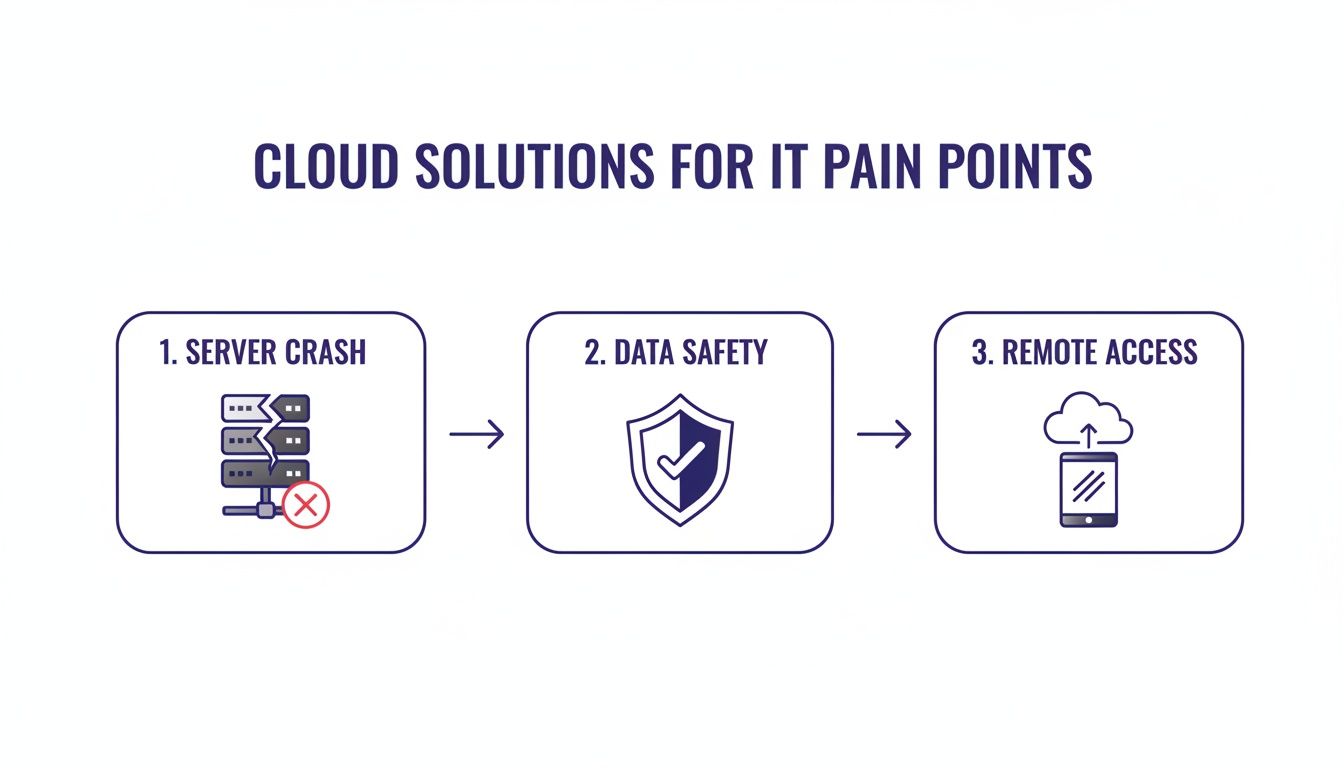
The flow demonstrates how a managed cloud provider moves your business from a state of risk (server crashes) to one of security (data safety) and flexibility (remote access).
With a clean dataset and a solid team, you can now map out a detailed migration timeline. Work with your hosting partner to schedule the move during off-peak hours, like over a weekend, to avoid any impact on daily operations. A solid plan is essential, and you can dive deeper with our cloud migration checklist.
Your execution and final checks should follow these steps:
Remember, the power of Sage 100 Contractor is often underestimated. For example, one user processes weekly payroll for over 400 employees, while another generates more than $275 million in annual sales. By following this checklist, you’re building your implementation on a solid foundation, ready to support your business as it grows.
When you’re evaluating new software, the right questions lead to the right answers. Making a confident decision means getting clear, straightforward details about how a tool will actually fit into your daily operations.
This section tackles the most common questions contractors ask about Sage 100 Contractor, giving you the practical insights you need.
Yes, and this is one of its biggest strengths. Many contractors switch to Sage 100 Contractor specifically because generic accounting software fails to manage the tangled web of construction payroll. This isn't just a basic payroll add-on; it's a purpose-built engine designed for your industry.
Its specialized functions handle the details that would otherwise require hours of manual spreadsheet work:
In short, it automates the most frustrating and error-prone parts of construction payroll so you can be confident in your accuracy and compliance.
This is a critical point of confusion, and picking the wrong one can mean ending up with a system that’s a poor fit. The two products were built for completely different industries, and their core designs reflect that.
Think of it this way: Sage 100 is like a versatile multi-tool made for general business needs, particularly manufacturing and distribution. It’s great at managing inventory, sales orders, and standard financials.
Sage 100 Contractor, on the other hand, is the specialized power toolset a builder needs to run a project profitably. Every feature was designed with a construction workflow in mind.
Sage 100 Contractor comes with essential, industry-specific functions that the standard Sage 100 simply doesn't have:
While both are solid financial platforms, only Sage 100 Contractor is truly equipped to handle the unique rhythm of a construction business.
The difficulty of a cloud migration depends almost entirely on who you partner with. Trying to do it yourself can be a risky and complicated technical project. But when you work with a specialized hosting provider, the process becomes remarkably simple for you and your team.
A professional hosting partner manages the entire technical lift. Their migration experts coordinate with you to ensure a smooth, secure transfer of all your critical company files, custom reports, and unique settings. They do the heavy lifting behind the scenes.
Typically, the migration is scheduled during off-hours, like over a weekend, to avoid any business disruption. The process includes a full verification step where your team can test everything in the new cloud environment before going live. This ensures all your data is intact and the software works perfectly from day one, making the switch feel seamless.
Yes, but only when it’s hosted in the cloud. Out of the box, Sage 100 Contractor is a Windows application, which means it won't install directly on a Mac or iPad. This is a common frustration for modern construction firms that use a mix of devices.
Cloud hosting neatly solves this problem. A cloud provider runs the software on their secure Windows servers and gives your team access through a remote desktop connection. This lets you run the full, powerful desktop version of Sage 100 Contractor inside an app on your Mac, iPad, or even an Android tablet.
This setup gives you total flexibility without sacrificing any functionality. Your project manager can be on-site with an iPad, your estimator can work from home on a MacBook, and your office staff can use their PCs—all accessing the exact same system in real-time. It effectively makes your software work on any device.
Ready to eliminate server headaches and empower your team with secure, anywhere access to your software? Cloudvara specializes in managed cloud hosting for essential business applications like Sage 100 Contractor. Experience the difference with a free, no-obligation trial.




