Let's be blunt: remote desktop two factor authentication is just adding a second lock to your digital front door. It’s the simple act of verifying who you are with something more than just a password before you’re granted remote access. Think of it like using your key to open a door, then showing your ID to a security guard. It makes it exponentially harder for the wrong people to get inside.
For professionals in accounting, law, and other small businesses, relying on a simple password for remote desktop access is a massive liability. The freedom to access files and software from anywhere comes with an equal, if not greater, need to protect that entry point. Cybercriminals know that Remote Desktop Protocol (RDP) is a common gateway into a company’s network, and they hammer it relentlessly.
This isn't just about scare tactics; it’s about facing the reality of today's threats. Automated brute-force attacks, where bots try thousands of password combinations a minute, are constantly scanning the internet for open RDP ports. If your only line of defense is a password—even a strong one—you're in a perpetual race against these tireless bots.
Picture this scenario at a small accounting firm. An accountant needs to log into a cloud-hosted server from home to work on a client's QuickBooks file. With only a password, a credential stolen from a data breach on a totally unrelated website could be all an attacker needs. From there, they could steal sensitive client financial data or even deploy ransomware, crippling the firm's operations overnight.
Now, let’s replay that scene with remote desktop two factor authentication in place. After entering their password, the accountant gets a push notification on their smartphone. They tap "Approve," and only then are they logged in. That simple, extra step makes the stolen password worthless, stopping the attack cold. It transforms RDP from a potential vulnerability into a secure and reliable tool for your business.
"For businesses handling confidential client information, 2FA isn't just a best practice; it's a fundamental requirement for maintaining trust and mitigating risk. It's the single most effective barrier you can place between your data and an outside threat."
This isn’t just a theory; the effectiveness is backed by hard data. A landmark 2019 Microsoft report found that enabling 2FA blocks a staggering 99.9% of automated attacks—the primary method used to breach remote desktop sessions. That means a simple second layer of verification thwarts nearly every automated attempt to compromise your login.
To really grasp the difference, let’s compare the security posture of a standard RDP setup versus one fortified with 2FA. This side-by-side look highlights the critical gaps that passwords alone leave wide open.
| Security Aspect | Standard RDP (Password Only) | RDP with Two Factor Authentication |
|---|---|---|
| Credential Theft | Highly Vulnerable. A single stolen password grants full access. | Highly Resistant. A stolen password is useless without the second factor (e.g., a phone). |
| Brute-Force Attacks | Constantly at Risk. Automated bots can guess passwords until they succeed. | Effectively Blocked. The second factor requirement stops automated login attempts. |
| User Verification | Weak. Only confirms the user knows a password, not that they are the right person. | Strong. Confirms the user knows the password AND possesses the second-factor device. |
| Security Control | Minimal. Relies entirely on password strength and complexity policies. | Layered. Adds a crucial, independent layer of security beyond just a secret phrase. |
| Audit Trail | Limited. Shows successful or failed password attempts. | Detailed. Provides a richer audit trail, including second-factor verification status. |
As you can see, the addition of 2FA fundamentally changes the security equation. It moves your defense from a single, guessable point of failure to a multi-layered system that confirms user identity with far greater certainty. If you'd like a more foundational understanding of the technology, our detailed guide on what a remote desktop connection is can provide more context on why these extra security layers are so important.
Picking the right strategy for adding remote desktop two factor authentication is the most critical first step—it dictates your cost, complexity, and the daily experience for your users. Before you get lost in the technical weeds, it’s vital to take stock of your current environment and what your business actually needs.
Let's break down the three main paths you can take.
Each approach is tailored for a different type of organization. We'll look at a traditional on-premise setup, a modern cloud-integrated solution, and a flexible third-party service. By understanding where each one shines, you can confidently pick the best fit for your firm, whether you’re protecting client financials or sensitive legal files.
This decision tree visualizes the fundamental choice you're facing: stick with a high-risk, password-only setup or secure your access with an essential second factor.
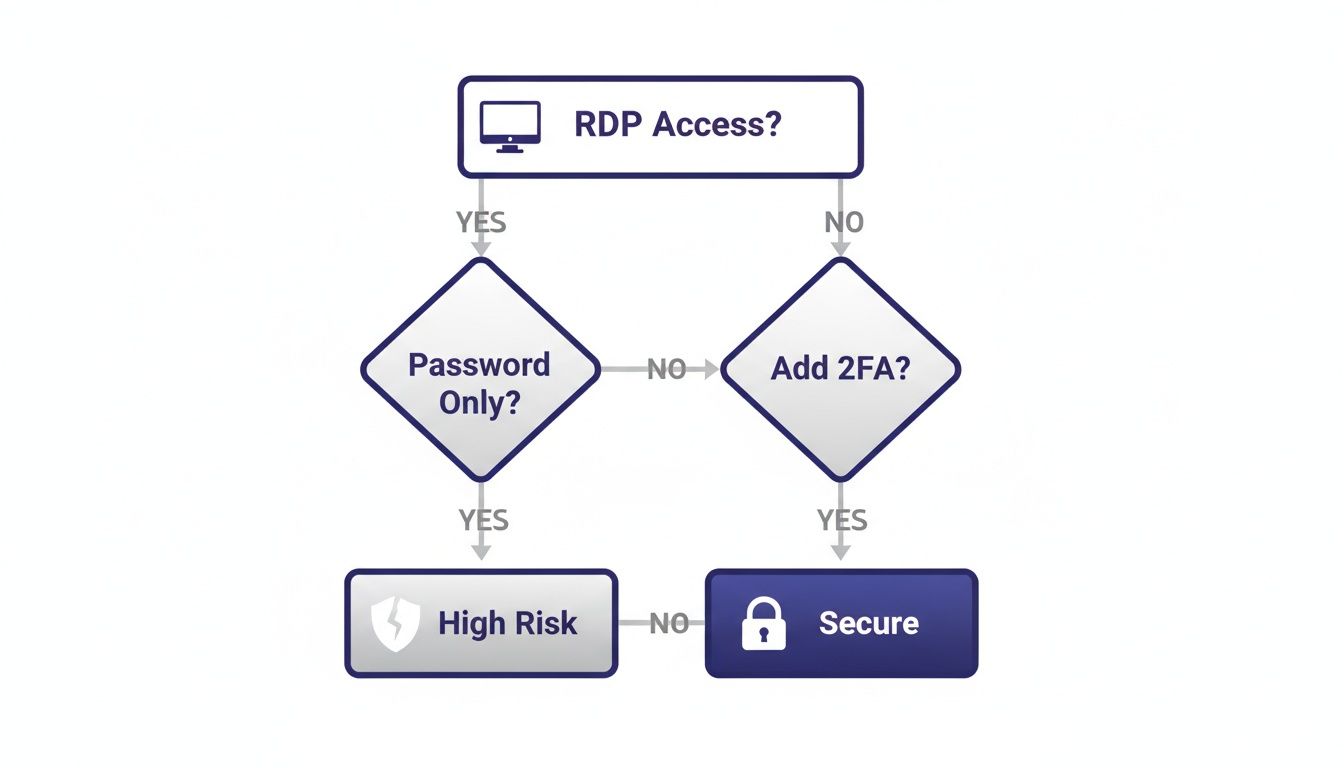
As the flowchart makes clear, adding 2FA is the only path to a secure remote desktop environment. It turns a massive vulnerability into a protected asset.
This is the classic, time-tested method for businesses already running a solid on-premise Windows Server infrastructure. If you have Active Directory humming along and servers in your office, using the Remote Desktop Gateway (RD Gateway) and Network Policy Server (NPS) roles is a natural extension of what you already own.
Here's how it works: the RD Gateway acts as a secure front door for your RDP connections, while the NPS server handles the authentication logic. By installing an MFA extension (like Microsoft's Azure MFA adapter or another RADIUS-compatible solution), you tell the NPS server to challenge users for a second factor before letting them in.
This approach gives you immense power and keeps everything centralized within your own network—a huge plus for firms with strict data residency rules.
For businesses that live and breathe in the Microsoft 365 and Azure ecosystem, this is often the cleanest path forward. If your users are already in Azure Active Directory (now Microsoft Entra ID), you can simply use Conditional Access policies to require MFA for remote desktop logons.
The integration here is seamless. It ties your RDP security directly to your cloud identity provider, which means user management and security policies are all handled in one place. No need to manage a separate on-prem server just for MFA.
This method is perfect for the modern law firm or accounting practice that has fully embraced the cloud. It radically simplifies security management and gives users a consistent login experience across all their Microsoft services.
One of the biggest wins here is the ability to create smart, context-aware security rules. For example, you can demand MFA for every RDP attempt coming from outside the office network but allow password-only access from trusted corporate locations. This gives you robust security without creating friction for your on-site staff. It also informs your broader remote access strategy; you can explore this more in our guide on VDI vs VPN.
Sometimes, the best tool for the job is a specialized one. Third-party providers like Duo Security (now part of Cisco) or Okta are experts in making MFA easy to roll out and manage across dozens of applications, including RDP.
These services are known for their incredibly user-friendly interfaces and painless setup. You typically install a lightweight agent on your network that talks to their cloud service. When a user tries to connect via RDP, the agent intercepts the request and triggers a simple push notification on their phone. It just works.
Going this route is all about prioritizing simplicity and speed, making it a fantastic option for SMBs that don't have a dedicated IT security team.
For businesses running a traditional on-premise Windows Server environment, this is your most powerful and integrated path to enabling remote desktop two factor authentication. This method uses existing server roles you likely already have, turning your own infrastructure into a robust security gatekeeper. It’s a hands-on approach that offers exceptional control, making it perfect for a law firm securing its document management system or an accounting practice protecting on-premise tax software.
The core idea is to configure the Network Policy Server (NPS) role to act as a RADIUS (Remote Authentication Dial-In User Service) server. Your Remote Desktop Gateway (RD Gateway), which serves as the front door for all RDP traffic, will then be set up to send authentication requests to this NPS server instead of handling them directly. This is the setup that lets you intercept the login process and inject that crucial second-factor challenge.
Think of RADIUS as a specialized doorman. The RD Gateway sees a user trying to connect and, instead of deciding on its own, it turns to the RADIUS server (your NPS) and asks, "Is this person allowed in?" The NPS server then consults its policies to make a decision. By adding an MFA provider into this mix, you give the NPS server an extra question to ask: "Does this person have their second factor?"
This architecture is incredibly flexible because the NPS server can talk to various MFA solutions. You can install the official NPS extension for Azure MFA if you're in the Microsoft ecosystem, or you can integrate it with third-party providers like Duo, which also use the RADIUS protocol.
Your first practical step is installing the NPS role on a Windows Server. This is usually done through the Server Manager dashboard under "Add Roles and Features." While you can install it on the same server as your RD Gateway, the best practice for security and performance is to place it on a separate member server within your domain.
Once installed, you'll be working inside the NPS console. This is where you’ll define the policies that govern who can connect and under what conditions. You'll configure two main types of policies:
Navigating the console is straightforward; you'll spend most of your time under the "Policies" and "RADIUS Clients and Servers" sections.
After setting up the basic NPS policies, you need to connect your chosen MFA provider. If you’re using Azure MFA, you'll download and install the NPS extension for Azure MFA on your NPS server. This small piece of software acts as a bridge, communicating with your Azure AD tenant to trigger the MFA prompt—like a push notification or text code—for the connecting user.
For a third-party solution like Duo, the process involves installing their authentication proxy, which also acts as a RADIUS server. You would then configure your NPS server to forward authentication requests to the Duo proxy. In either case, the principle is the same: the login request is passed from RD Gateway to NPS, and then from NPS to the MFA service for the final check.
A critical takeaway is that the RD Gateway itself doesn't need to know anything about MFA. It only needs to trust the NPS server. This separation of duties makes the configuration cleaner and more secure.
The rise of remote work has turned unsecured remote desktop services into a massive attack surface. Enforcing 2FA across all remote connections is essential for shrinking this vulnerability. A 2022 UK government survey revealed that only one in three organizations required 2FA, leaving the majority exposed to potentially devastating breaches.
The last piece of the puzzle is telling your RD Gateway to use this new, centralized authentication method. Inside the Remote Desktop Gateway Manager, you'll edit the properties of your Connection Authorization Policy (CAP). Instead of storing the policy on the local server, you will point it to your central NPS server.
This one change activates the entire workflow. From this point forward, every user attempting to connect through your gateway will have their credentials validated by the NPS server, which in turn will trigger the mandatory second-factor prompt.
While this setup secures the gateway, remember that directly exposing RDP ports to the internet is still a major risk. To learn more about hardening your environment, you might be interested in our guide on how to change the remote desktop port as another layer of defense.
While the on-premise RD Gateway and NPS setup gives you immense control, many modern businesses are looking for a more direct, cloud-native way to handle remote desktop two factor authentication. This is where integrating with a cloud identity provider like Azure Active Directory or a specialized third-party service completely changes the game.
These methods often require far less infrastructure to manage and can be rolled out much faster.
This approach is especially appealing for accounting firms, law practices, and SMBs that have already embraced cloud services. It aligns your remote access security with the rest of your IT strategy, creating a more unified and manageable environment.
Let's walk through two of the most popular paths for this cloud-centric approach.
For any organization already invested in the Microsoft 365 ecosystem, using Azure Multi-Factor Authentication (MFA) is the most natural and deeply integrated choice. If your users are already in Azure AD, you're halfway there.
This method completely skips the need for on-premise RADIUS servers. Instead, it uses powerful, cloud-based rules to enforce MFA when it matters most.
The heart of this setup is Azure AD Conditional Access. Think of these as simple "if-then" policies you create to control access. You can craft a policy that says, "IF a user is trying to sign in to our Remote Desktop app, THEN they must satisfy an MFA challenge."
This gives you incredible flexibility. For example, you can create policies that:
The real power of Azure AD MFA is its context-aware security. It moves beyond a simple on/off switch and lets you build intelligent, risk-based access rules that secure your environment without frustrating your team.
Setting this up does require the right licensing—typically an Azure AD Premium P1 or P2 license, which is often included in Microsoft 365 E3/E5 bundles. The configuration is done entirely within the Azure portal, making it a purely cloud-managed solution.
For firms looking to expand their cloud capabilities, our guide on Azure as the paragon of cloud ease provides more insights into the platform's benefits.
Sometimes, the best tool for the job is a specialized one. Third-party providers like Duo Security have built their entire reputation on making MFA incredibly simple to deploy and almost effortless for end-users. This path is perfect for organizations that need a fast, effective solution that "just works" across a wide range of applications, not just RDP.
Imagine a small accounting firm during tax season with temporary staff needing secure access to a server. They don't have a large IT team or a complex on-premise setup. For them, a solution like Duo is a perfect fit.
The typical deployment involves installing a lightweight piece of software, like Duo's Authentication Proxy, on a single server in your network. This proxy acts as a secure go-between. When a user tries to log in via RDP, the request hits the proxy, which then talks to Duo's cloud service to send a push notification to the user's smartphone. It's fast, intuitive, and requires minimal technical overhead.
Why Choose a Third-Party Solution?
| Feature | Benefit for Your Business |
|---|---|
| Rapid Deployment | You can often get a proof-of-concept running in under an hour, securing RDP access almost immediately. |
| User Experience | The push notification system is widely seen as the gold standard for user-friendliness. |
| Broad Compatibility | These tools are built to protect everything from RDP and VPNs to cloud apps like Salesforce. |
| Centralized Dashboard | A single, intuitive web console lets you manage users, policies, and view access logs easily. |
This approach hides much of the underlying complexity, making robust remote desktop two factor authentication accessible even to organizations without deep security expertise. It provides a polished and reliable security layer that protects your critical remote access points while ensuring a smooth experience for your team.

Successfully deploying remote desktop two factor authentication is about more than just flipping a switch. The technical setup is half the battle; the other half is all about people, processes, and long-term vigilance. A smooth rollout ensures your team embraces the new security measures rather than seeing them as a roadblock.
Clear communication is your most powerful tool here. Before you enforce anything, explain the "why" to your team. Draft a simple, non-technical email that outlines the risks you're mitigating and how this extra step protects both company and client data. This kind of transparency helps turn potential frustration into buy-in.
Instead of a company-wide "big bang" launch, start with a small, tech-savvy pilot group. This could be your IT department, a few partners at your law firm, or a single accounting team. Think of a pilot program as a crucial real-world test drive.
This initial phase lets you:
Gathering this early feedback is invaluable. It helps you refine your documentation and anticipate common questions, paving the way for a much smoother transition for the rest of the organization.
While robust security is the end goal, you don't want to create unnecessary friction for your team. One of the best ways to strike this balance is by using trusted IP ranges. You can configure your MFA policies to be less intrusive for users connecting from a known, secure location like your main office.
This means employees working on-site might not get an MFA prompt every time they log in. The moment they connect from a home office or a coffee shop, however, the full security protocol kicks in. It’s a smart way to apply security exactly where it’s needed most without hindering productivity.
The best security is the kind that feels almost invisible in low-risk scenarios but becomes an iron wall in high-risk ones. Your goal is to make security a seamless part of the workflow, not an obstacle to it.
This thoughtful approach to policy-making is a cornerstone of modern IT. For more strategies on fortifying your remote connections, explore our complete guide on remote access security best practices.
Your work isn't finished once the rollout is complete. Security is a continuous process, and ongoing management is essential for maintaining a strong defense. This starts with applying the principle of least privilege—making sure users only have access to the resources they absolutely need to do their jobs.
You should also get in the habit of regularly auditing your RDP access logs. Look for unusual patterns, like repeated failed attempts or connections from unexpected geographic locations. These audits can be your first warning of a potential threat and are a critical part of any proactive security strategy.
Microsoft's data continues to show that over 99.9% of compromised accounts lack MFA. These unprotected accounts face a relentless storm of over 1,000 password attacks per second hitting Microsoft's systems. Your best defense is company-wide enforcement using modern methods like mobile push approvals and biometrics. You can find more details on these emerging threats and discover more insights about MFA trends on JumpCloud.
Even with a solid plan, a few questions always pop up when rolling out remote desktop two-factor authentication. It's completely normal. Let's walk through some of the most common concerns we hear from firms just like yours to clear up any lingering doubts before you get started.
Many businesses, especially those without a big server room, worry that adding serious RDP security is just too complicated or expensive. There's a common myth that it requires a rack full of on-premise hardware, but that's simply not the case anymore.
Yes, you absolutely can. Modern, cloud-based solutions like Azure AD Multi-Factor Authentication are built for exactly this scenario. They let you enforce 2FA on remote desktop connections without needing a single dedicated server in your office.
This approach is perfect for businesses that are already cloud-first or are running a mix of cloud and on-premise systems. It shifts all the heavy lifting for security management to the cloud, which means less hardware for you to maintain and enterprise-grade protection for every remote login.
The "best" method really comes down to balancing user convenience with the level of security you need. For most daily work, push notifications are the gold standard. An app like Microsoft Authenticator or Duo Mobile sends a simple "approve" or "deny" alert to a user's smartphone. It’s fast, intuitive, and gets the job done with a single tap.
But for situations that demand a higher level of security—like accessing sensitive client financials or making system-wide administrative changes—you might want something a bit stronger.
The goal is to match the method to the risk. If you want to dive deeper into the core ideas behind this, check out this great overview of What is Two-Factor Authentication to see how these methods create a layered defense.
A common worry is that adding this extra step will bog down the connection and frustrate users. The reality is that the impact on performance is almost nonexistent, while the security benefit is enormous.
Not at all. The 2FA check only happens during the initial login. It has zero impact on the speed, performance, or responsiveness of the remote desktop session once you're connected.
The whole process adds just a few seconds to the sign-in time—a tiny price to pay for the massive leap in security you get in return. After that quick check, your RDP session will feel exactly the same as it did before.
This is a critical point and something you need a clear plan for. A lost phone shouldn't bring work to a screeching halt. Any good MFA system will have straightforward recovery options built in for administrators.
Most platforms give IT admins the power to:
Your rollout plan should include simple instructions for employees on who to contact and what to do if their primary device is ever lost, stolen, or replaced. A little prep here goes a long way.
At Cloudvara, we believe that world-class security shouldn't be complicated. We provide secure, cloud-hosted environments with built-in protections like two-factor authentication, ensuring your firm's data is safe without the IT headache. Discover how our tailored solutions can protect your remote workforce by visiting https://cloudvara.com for a free trial.




