
When people hear "Office 365 cloud hosting," they often think, "Wait, isn't Microsoft 365 already in the cloud?" And they’re right. When you use Word, Excel, or Teams, you're tapping into Microsoft's massive cloud infrastructure. But Office 365 cloud hosting, as offered by a specialized provider, is a different beast altogether. It's a fully managed environment that brings all your digital tools—not just Microsoft's—into one unified, secure virtual desktop.

Think of it this way: the service creates a complete digital workspace. It hosts your familiar Microsoft 365 suite right alongside all your other critical applications—QuickBooks, industry-specific CRMs, or tax software—on a single, high-performance server. Your team then accesses this entire ecosystem through a virtual desktop, from anywhere, on any device.
Let’s use a simple analogy. Standard Microsoft 365 is like a world-class engine. It's powerful, reliable, and does its job exceptionally well. But it's still just an engine. You still have to build the rest of the car around it—the chassis, the security system, the GPS. In business terms, this means your team is left to manage all the other software, devices, and security protocols separately.
A managed Office 365 cloud hosting provider gives you the whole car. They deliver a fully assembled, fine-tuned vehicle (your virtual desktop) where the engine (Microsoft 365) works in perfect harmony with all the other components. Everything is integrated, maintained, and secured by experts. You just get the keys and drive.
The core idea is simple: instead of juggling multiple cloud services and local applications, your entire office exists in one secure, accessible location. This model is a game-changer for professional services firms that need reliability and security.
The two approaches solve different business problems. Microsoft 365 delivers best-in-class productivity tools, but it leaves the integration, security, and IT management of your entire tech stack up to you. A managed hosting solution takes a much broader view. You can learn more about the fundamentals by exploring what is cloud hosting and how it differs from basic software-as-a-service models.
The table below breaks down the key differences between running Microsoft 365 on your own versus using a managed hosting provider.
| Feature | Standard Microsoft 365 | Managed Office 365 Hosting |
|---|---|---|
| Application Scope | Hosts only Microsoft apps (Word, Excel, etc.). | Hosts Microsoft 365 plus third-party apps (QuickBooks, CRM, etc.). |
| Access Method | Users access apps individually via web or local installs. | Users access a single, unified virtual desktop with all apps pre-installed. |
| Security | Secures Microsoft data, but you secure your devices and other apps. | Provides a comprehensive security umbrella over the entire environment. |
| IT Management | Your team handles updates, backups, and support for all other software. | The provider manages all server maintenance, backups, and user support. |
| Performance | Performance depends on the local device and network connection. | Performance is optimized and consistent, running on powerful data center servers. |
As you can see, a hosted solution provides a far more integrated and hands-off experience. It transforms a collection of separate tools into a cohesive and secure digital headquarters for your team, solving major headaches around remote work, data security, and application performance.
Moving to a managed Office 365 cloud hosting solution delivers real-world benefits that solve the nagging pain points growing businesses face every day. It’s all about leaving behind scattered software and inconsistent user experiences to create a work environment that’s stable, secure, and incredibly efficient. Let's walk through five core advantages you can expect.
Have you ever felt the frustrating lag when running QuickBooks, your CRM, and a few massive Excel files at the same time? It’s a common bottleneck that happens when your local computer runs out of steam. A managed hosting environment completely sidesteps this problem by running all your applications on powerful, dedicated servers tucked away in a data center.
This setup means your laptop or PC just acts as a window to a high-performance workspace. All the heavy lifting is done by enterprise-grade hardware, ensuring your apps run fast and smooth, no matter which device you’re using. It’s like trading in your personal laptop for a supercomputer.
A managed hosting solution gives your entire team a single, unified virtual desktop. This creates a perfectly consistent experience for everyone, whether they’re in the office, working from home, or visiting a client. No more wrestling with clunky VPNs or worrying if a file saved on one machine is available on another.
Everyone logs into the same secure digital office with the exact same apps and files. This setup dramatically simplifies IT management and gives your team true work-from-anywhere flexibility.
The key takeaway is that this model centralizes control and access. It gives your organization a secure, consistent, and always-on digital headquarters that adapts to the modern, mobile workforce.
Losing data can be catastrophic, and relying on manual backups or basic cloud sync services is a gamble you can’t afford to take. A managed hosting provider puts a robust business continuity plan in place that goes far beyond simple file recovery. They take daily, automated snapshots of your entire server environment.
This includes not just your files but also your applications, settings, and user configurations. If a disaster like a ransomware attack or hardware failure hits, your whole digital workspace can be restored quickly. This minimizes downtime and keeps your valuable data safe. You can see how these protections fit into a bigger picture by learning about managed cloud services that put business resilience first.
For many businesses, IT costs are a volatile and unpredictable part of the budget. Unexpected server repairs, software upgrades, and emergency support calls can create serious financial strain. A managed hosting environment turns this uncertainty into a predictable, fixed monthly expense.
You pay a simple, flat fee per user that covers everything—server hardware, maintenance, security, and expert support. This model gets rid of surprise capital expenses, letting you budget for IT with confidence and redirect resources toward growing your business.
Standard security measures often aren't enough to protect sensitive client data, especially for industries with strict rules like accounting and law. Microsoft's cloud dominance is clear; its Q1 FY2026 revenue hit $49.1 billion, a 26% jump fueled by its cloud hosting backbone. This powerful infrastructure helps firms collaborate securely, but a managed provider adds another critical layer of defense. These providers build their environments with advanced security at their core, offering features like enterprise-grade firewalls, two-factor authentication, and proactive threat monitoring to protect your entire workspace. You can find out more about how Microsoft's growth supports these robust platforms by reading the full report on its Q1 performance.
The full value of a managed hosting environment becomes clear when considering the benefits offered by comprehensive Remote Managed IT Services, including enhanced security, compliance, and ROI. By partnering with experts, you get a level of security and oversight that would be incredibly difficult and expensive to build on your own.
Moving to a managed Office 365 cloud hosting environment isn't just a technical swap—it's a strategic shift in how your business runs. Getting it right takes careful planning to make sure the transition is seamless and doesn't interrupt your day-to-day operations. Think of it as a well-orchestrated upgrade, a team effort between you and your hosting provider.
This isn’t about just copying files from one place to another. It’s about redesigning your digital workspace from the ground up to be faster, more secure, and accessible from anywhere. The trick is to tackle the big questions first, making sure every piece of your IT puzzle clicks into place in the new setup.
This diagram breaks down the core of a managed hosting process, showing how it all comes together for the end-user.
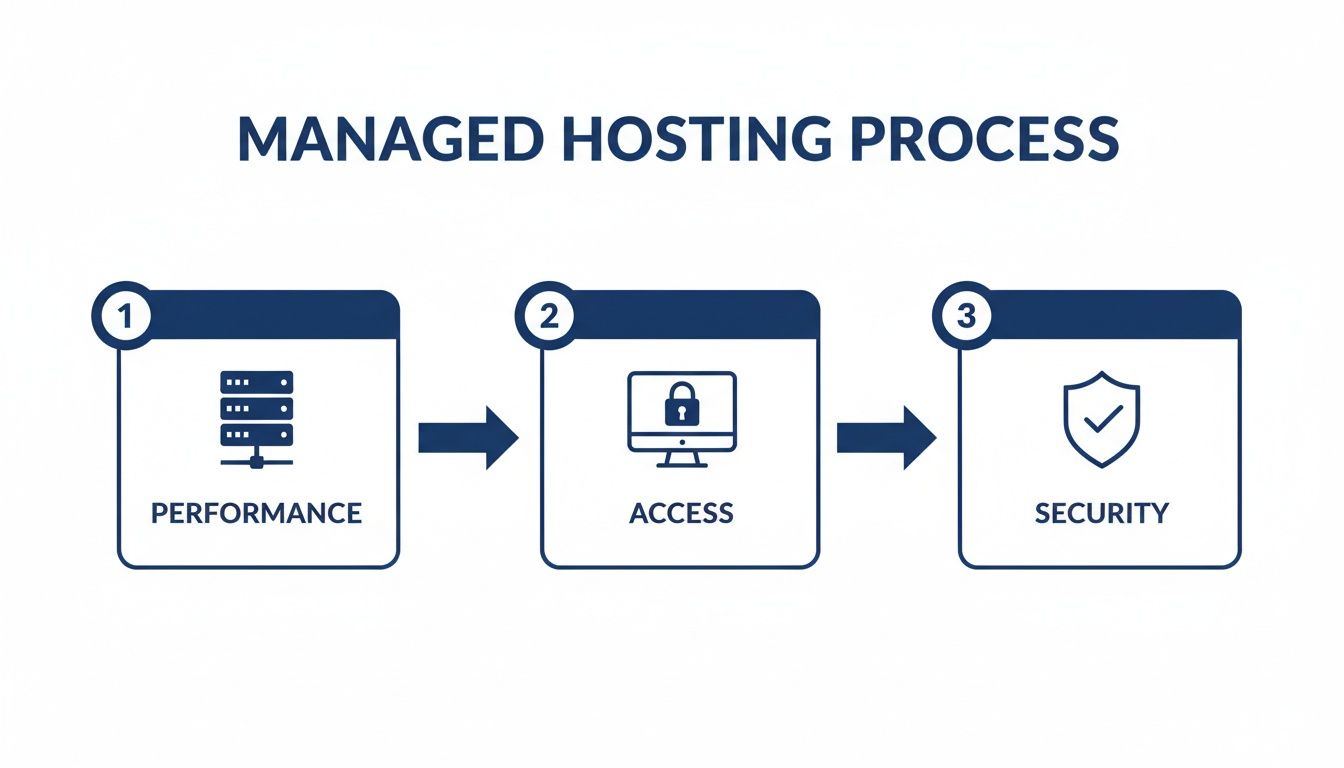
As you can see, dedicated server resources (Performance) power a unified virtual desktop (Access), which is all wrapped in a tight security framework (Security). That's a true managed solution.
One of the first things to sort out is identity management. In a typical office, an employee might have one login for their PC, another for their email, and a few more for different apps. A hosted solution aims to get rid of that clutter.
A good migration plan will unify all those credentials, usually with a Single Sign-On (SSO) system. This means your team uses one password to get into their entire virtual desktop, including Office 365 and every other app you use. It’s not just easier for them; it’s a huge security win because you’re managing access from one central point.
Licensing is a common sticking point. Do you need to buy new Microsoft 365 licenses, or can you just bring over the ones you already have? This is a make-or-break question for any provider you consider.
Most providers use a "Bring Your Own License" (BYOL) model. You keep your direct subscription with Microsoft, and the hosting company simply runs the software for you on their powerful servers. This gives you flexibility and control. Always get this cleared up early to sidestep any surprise bills.
The migration is the perfect time to give your licenses a quick audit. You might find you're overpaying for features nobody uses and can switch to a more cost-effective plan.
Your data is everything. A huge part of the migration plan is figuring out how all your existing files—from shared drives, local PCs, and old emails—will be moved safely to the new cloud server. Your provider should give you a clear, step-by-step plan for getting it all across without losing a single byte.
Then, you need to talk about backups. How does your data fit into their automated schedule?
A detailed plan ensures your data is not just moved, but protected from day one. You can get into the nitty-gritty with our cloud migration checklist, which lays out the whole process.
Finally, you need to make sure your team and your office are ready for a fully cloud-based workflow. This really boils down to two things: your internet connection and how people will connect to their applications.
Your office's internet bandwidth becomes the main highway to your new digital headquarters. Your provider can help you figure out if your current connection is strong enough to handle everyone working from the cloud without lag. For most companies, a standard business-class fiber connection does the job perfectly.
You'll also need to get set up for Remote Desktop Protocol (RDP) or virtual app access. This is the tech that lets your team log into their virtual desktops. The provider should walk you through setting up these secure connections on all devices—desktops, laptops, and tablets—so everyone can get to work from anywhere.
The real power of Office 365 cloud hosting clicks into place when you see it in action. For professional services firms wrestling with remote access, security, and IT overhead, a managed environment isn’t just an upgrade—it's a direct solution to their biggest operational headaches. Let’s walk through four stories of businesses that transformed their day-to-day work by moving to a hosted IT model.
These aren't abstract theories; they are practical examples of how centralizing applications and data on a secure cloud server fuels real efficiency and growth. Each case highlights a different but common challenge that a unified cloud desktop can solve.
Picture a CPA practice in the thick of tax season chaos. The team is working late nights and weekends, with some people in the office and others at home. Before, their critical tax software and QuickBooks files were trapped on an on-premise server. This forced remote staff to rely on a slow, clunky VPN that dropped connections at the worst possible moments.
By moving to a hosted solution, they put everything—tax software, QuickBooks, and their entire Office 365 suite—on a single cloud server. Now, every team member logs into an identical virtual desktop with all their tools ready to go. Performance is fast and consistent, whether they're at their office desk or their kitchen table. This move completely eliminated VPN headaches and created a secure, efficient environment that keeps productivity humming when it matters most. For more on this, check out our specific managed IT services for accounting firms.
A boutique law firm was in a constant battle with data security and compliance. Attorneys needed access to sensitive case files from court, home, and client meetings, but storing confidential data on personal laptops was a massive security risk. They needed a solution that was both flexible and airtight to maintain client trust and meet standards like HIPAA.
A hosted virtual desktop was the answer. It created a secure, encrypted bubble where all firm data and applications lived. Attorneys could now access their full desktop from any device—a tablet, a home computer, or a laptop—without ever downloading sensitive files locally. This gave them the mobile access they needed while ensuring all client data remained protected within the firm's secure cloud environment, dramatically strengthening their compliance posture.
For firms handling sensitive information, the core benefit is control. A hosted desktop ensures that no matter where your team works from, your data never leaves the safety of the secure server.
A nonprofit organization was running on a shoestring budget, and its aging on-premise server was a constant source of stress and unpredictable costs. When it wasn't needing expensive repairs, it required constant maintenance that pulled staff away from their mission-focused work. They needed a predictable, cost-effective IT solution that would let them focus on what they do best.
Switching to a managed Office 365 cloud hosting environment was a game-changer. They replaced their unpredictable IT expenses with a single, fixed monthly fee per user. This eliminated the need for an in-house server and all the associated costs of maintenance, upgrades, and emergency repairs. With zero IT overhead to worry about, the nonprofit could funnel more of its budget and staff time directly into its programs and community outreach.
A growing small business had finally outgrown its first on-premise server. The system was slow, storage was maxed out, and they had no real disaster recovery plan beyond a few external hard drives. They knew a single hardware failure could bring their entire operation to a halt. It was time for a more reliable and scalable foundation to support their future.
They migrated their entire operation to the cloud. This move gave them the high performance and reliability of enterprise-grade infrastructure without the huge capital investment. More importantly, their new hosting provider included automated daily backups and a solid business continuity plan. With the ability to easily add new users as they hired, the business was finally positioned for scalable, secure growth, knowing its data was protected. This proactive approach is becoming more common as AI tools are integrated into Office. By late 2025, Microsoft 365 Copilot adoption hit 70% among Fortune 500 companies, a trend that highlights the need for a robust cloud foundation. You can read more about M365 Copilot adoption rates to understand how AI is shaping cloud strategies.

Picking a provider for your Office 365 cloud hosting is one of the biggest technology decisions your business will make. The market is flooded with vendors making bold promises, but your real goal is to find a true IT partner—an extension of your own team. This choice goes far beyond a simple price comparison; it’s about reliability, security, and the quality of help you get when you need it most.
A thoughtful evaluation process helps you see past the marketing fluff and focus on what truly impacts your day-to-day work. You need a clear way to compare providers head-to-head, making sure you land on a partner who aligns with your business goals and technical needs.
The first thing to dig into is a provider's technical muscle and how they handle customer support. When your entire business runs on their infrastructure, you need to know that experts are on standby to fix any issues, day or night. Steer clear of providers who hide their support team behind automated chatbots or confusing ticket systems.
Real support means 24/7 access to real human beings. You should ask direct questions about their support setup. Are their technicians in-house or outsourced? What are their guaranteed response times? A provider's true colors show when things go wrong, and you need a team that communicates clearly and solves problems fast.
Your hosting provider should feel like your own dedicated IT department. They need to understand your specific applications, your workflow, and the unique challenges your business faces to provide truly valuable support.
Another critical detail is their uptime guarantee, which should be spelled out in a Service Level Agreement (SLA). A standard SLA should promise at least 99.5% uptime, but more importantly, it should specify what happens if they don’t meet that promise. This agreement is your proof that the provider is financially committed to keeping your business running. For a deeper look into this process, our guide on how to choose a hosting provider offers more valuable insights.
Security isn’t a feature; it's the foundation. When you hand over your sensitive business and client data to a third party, you have to be absolutely confident in their security measures. This means looking beyond marketing claims and asking for hard proof of their security practices and certifications.
A key part of this is understanding certifications like What Is SOC 2 Compliance. This certification means a provider has passed a tough, third-party audit of its security controls, giving you verified confidence that they can protect your data.
Your evaluation should include a checklist of essential security questions:
Finally, your hosting partner needs to be able to grow with you. A rigid hosting plan that’s a hassle to change will only hold your business back. Ask about the process for scalability—how easy is it to add or remove users? A flexible provider will let you adjust your user count monthly, so you only pay for what you actually use.
Just as important is application compatibility. Before you sign anything, get a firm guarantee that the provider can support every piece of software your business depends on. This isn't just about your Office 365 suite; it includes your accounting software, CRM, and any industry-specific applications. The best partners will even help you install and configure these applications to make sure they run perfectly in the new cloud environment.
Use this checklist to ask targeted questions during your evaluation. It will help you cut through the noise and compare providers on the factors that truly matter for your business operations and peace of mind.
| Evaluation Criteria | What to Look For | Why It Matters |
|---|---|---|
| Support Quality | 24/7 access to human support, in-house technicians, guaranteed response times. | When issues arise, you need fast, expert help, not a ticket queue. |
| Uptime Guarantee (SLA) | At least 99.5% uptime, with clear penalties for non-compliance. | Your business can't afford downtime. The SLA holds them accountable. |
| Security Certifications | SOC 2, HIPAA, or other industry-specific compliance verifications. | Certifications are third-party proof that their security isn't just talk. |
| Data Encryption | End-to-end encryption for data at rest and in transit. | Protects your sensitive information from unauthorized access at all times. |
| Scalability | Flexible, monthly adjustments for user counts and resources. | Ensures you only pay for what you need and can grow without friction. |
| Application Compatibility | Guaranteed support for all your essential business software, not just Office. | Avoids nasty surprises where a critical app won't run in their environment. |
| Disaster Recovery Plan | Clear procedures for data backup, redundancy, and restoration. | A solid plan ensures your business can recover quickly from any disaster. |
Choosing a hosting partner is a long-term commitment. A thorough evaluation using these criteria will help you find a provider that not only meets your technical needs today but can also support your business as it evolves tomorrow.
The next big leap in productivity isn't on the horizon—it's already here, powered by Artificial Intelligence. Tools like Microsoft Copilot are now woven directly into the Office 365 apps your team relies on daily, from Excel and Outlook to Teams. As these AI assistants become essential, the performance of the infrastructure they run on is more important than ever.
Think about it: an AI assistant analyzing a massive spreadsheet or drafting a complex proposal in Word needs some serious processing power. When you run these demanding tasks on local desktops, you get slowdowns and frustrating lag, which completely defeats the purpose of using AI in the first place. This is precisely where a managed Office 365 cloud hosting environment gives you a real edge.
A managed hosting provider gives you dedicated server resources and an optimized setup to run these tools smoothly. Instead of each employee’s computer struggling to keep up, all the heavy lifting is handled by powerful, enterprise-grade servers in a data center. This ensures your team gets the fast, responsive experience they need to make the most of AI.
This isn't just about solving today's IT problems. It's about future-proofing your business so you have the solid foundation needed to adopt the next generation of tools and stay competitive.
The shift toward AI is happening faster than you might think. By January 2026, Microsoft reported that Microsoft 365 Copilot had already reached 15 million paid seats. While adoption is still in its early stages, the trend is clear.
You can get more details about Microsoft’s AI growth on perspectives.plus. As AI becomes non-negotiable, so does an infrastructure that can handle it. By centralizing your applications with a provider equipped for AI, you make sure your business is ready for whatever comes next.
Moving to a managed Office 365 cloud environment raises some practical questions. Let's tackle the common "what ifs" and "how does this work" concerns that businesses have, so you can move forward with total confidence.
Think of this as the nuts-and-bolts conversation you'd have with an IT expert. We’ll cover the day-to-day realities of making the switch.
Yes, in nearly all cases, you'll still bring your own Microsoft 365 licenses to the table. A hosting provider doesn’t resell the software itself; they provide the high-octane infrastructure and expert management to run it seamlessly alongside your other critical business applications.
It’s a bit like leasing a premium, fully-serviced office space—you still bring your own team and their specialized tools. A good partner will help you sort through Microsoft's licensing options to make sure you’re not overpaying or under-equipped.
Absolutely. In fact, it’s almost certainly more secure. Reputable hosting providers build their entire business on security, investing in enterprise-grade protections that are out of reach for most small businesses. We're talking about physically secure data centers, advanced threat detection, and data encryption both in transit and at rest.
Security isn't just a feature for a hosting provider; it's their entire business model. They are built from the ground up to protect client data, undergoing regular third-party audits to prove their systems are airtight.
They also enforce essential security layers like multi-factor authentication, which slams the door on most unauthorized login attempts. It’s a level of security designed to give you complete peace of mind.
Your team keeps working. It’s that simple. Because your desktop, applications, and data are all running in a secure data center, a local internet outage at your office has zero effect on them. Everything stays online.
Your employees can just switch to another connection—a home network, a coffee shop's Wi-Fi, or even a mobile hotspot—and log right back into their virtual desktop. What would have been a day-killing disaster becomes a minor inconvenience. This is the kind of resilience that defines true Office 365 cloud hosting and a smart business continuity plan.
Ready to see how a secure, unified cloud desktop can transform your business operations? Cloudvara offers a powerful platform that centralizes all your applications, including Office 365, with 24/7 expert support and a 99.5% uptime guarantee. Start your free 15-day trial today!




