Your staff needs to send tax returns, engagement letters, bank statements, discovery files, and signed PDFs. Someone installs FileZilla because it’s free, familiar, and fast. The transfer works, so the tool gets accepted without much debate.
That’s exactly how small firms drift into avoidable security risk.
If you’re asking is filezilla safe, the honest answer is this: it can be used safely in a narrow, disciplined setup, but it’s not a strong fit for firms that handle sensitive client data and need operational control, auditability, and low administrative risk. For accountants, lawyers, and nonprofits, the question isn’t just whether the software can encrypt a connection. It’s whether your team can rely on it without creating compliance gaps, download risks, credential exposure, or support headaches.
A solo consultant moving non-sensitive files may tolerate that tradeoff. A firm dealing with regulated records shouldn’t.
An accounting firm in busy season doesn’t have time for tool drama. A client needs payroll files uploaded today. Another needs prior-year returns retrieved before a deadline. A partner wants to send financial statements to an outside advisor. The file transfer tool sits in the middle of all of that, handling data your firm is expected to protect.
That makes file transfer a business risk, not a convenience feature.
If a transfer tool is misconfigured, downloaded from the wrong place, or managed loosely across a team, the damage isn’t theoretical. You can lose client trust, trigger internal fire drills, and create compliance problems that are harder to explain than a simple server outage. Sensitive data doesn’t care whether the failure came from malware, weak controls, or a rushed staff member clicking the wrong installer.
Many small firms reduce this question to one point: “Does it support SFTP?” That’s too shallow. Safe handling of client documents also depends on who downloaded the tool, how credentials are stored, whether the server side is maintained properly, and whether the firm can prove what happened during a transfer.
That broader view is what a real understand security risk assessment process should force you to confront. You’re not evaluating a feature list. You’re evaluating the chance that a routine workflow becomes an incident.
Practical rule: If a tool is free but requires your firm to supply all the judgment, patching, verification, logging discipline, and user training, it isn’t really low cost.
For a professional services firm, “safe enough” has to include operations. Can a new employee use it without making a bad security choice? Can your office manager verify where files went? Can your IT person quickly tell whether a transfer problem is user error, malware, or a server issue?
That’s why this isn’t a simple yes or no. FileZilla has legitimate uses. But when your business depends on controlled document handling, the bar is higher than “it connected successfully.”
FileZilla comes in two very different forms. FileZilla Client is the app on a user’s computer that sends and receives files. FileZilla Server is the system that hosts files and accepts those connections. Think of the client like an email app and the server like the mail server behind it. One is the tool your employee uses. The other is the infrastructure your firm has to secure and maintain.
That distinction matters because people often ask “is filezilla safe” as if there’s one answer. There isn’t. The risks change depending on whether your team is just using the client or your business is hosting transfers on its own server.

Plain FTP sends data in a way that’s closer to a postcard than a sealed package. Anyone with the right vantage point can potentially read what’s in transit. FTPS and SFTP add encryption, which is closer to a locked transport channel. That’s the baseline your firm should expect.
The mistake many firms make is assuming protocol support solves the whole problem. It doesn’t. Encryption protects data moving across the network. It does not protect you from bad downloads, weak credential handling, or sloppy administration.
Here’s the quick version:
| Protocol | Encryption | Authentication | Best For |
|---|---|---|---|
| FTP | None | Username and password | Legacy systems only, avoid for sensitive data |
| FTPS | TLS-based encrypted connection | Username and password, certificate-based options | Environments that already depend on FTP-style workflows |
| SFTP | Encrypted over SSH | Username and password or SSH keys | Most secure standalone option for direct file transfer |
A lot of FileZilla’s reputation problem comes from the installer, not from the software being malware. FileZilla’s official FAQ says the software itself is malware-free, that optional bundled offers can be declined, and that users can verify authenticity through digital signatures in the certificate chain via the official FileZilla documentation on whether FileZilla Client is safe.
That still creates operational risk for businesses. Staff members don’t read installer prompts carefully. Security tools may flag bundled offers as PUAs. Third-party download sites can package something worse than a nuisance. University advisories have gone as far as recommending alternatives for protected data because users can’t be counted on to distinguish an official, clean install from a compromised one.
A hobbyist can reinstall and move on. A law office can’t treat transfer tooling that casually.
If you’re already reviewing broader remote work exposure, this is tied directly to the same discipline required to secure remote access for staff and business systems. A file transfer app isn’t isolated. It becomes part of your identity, endpoint, and document security stack, whether you planned for that or not.
The most useful way to judge FileZilla isn’t by online arguments. It’s by looking at what has gone wrong and what those failures mean in a business setting.
FileZilla has had documented vulnerabilities over time. That doesn’t make it uniquely reckless. Many established tools have security histories. But when your firm handles tax records, legal correspondence, payroll exports, or client financials, the pattern matters more than the debate.
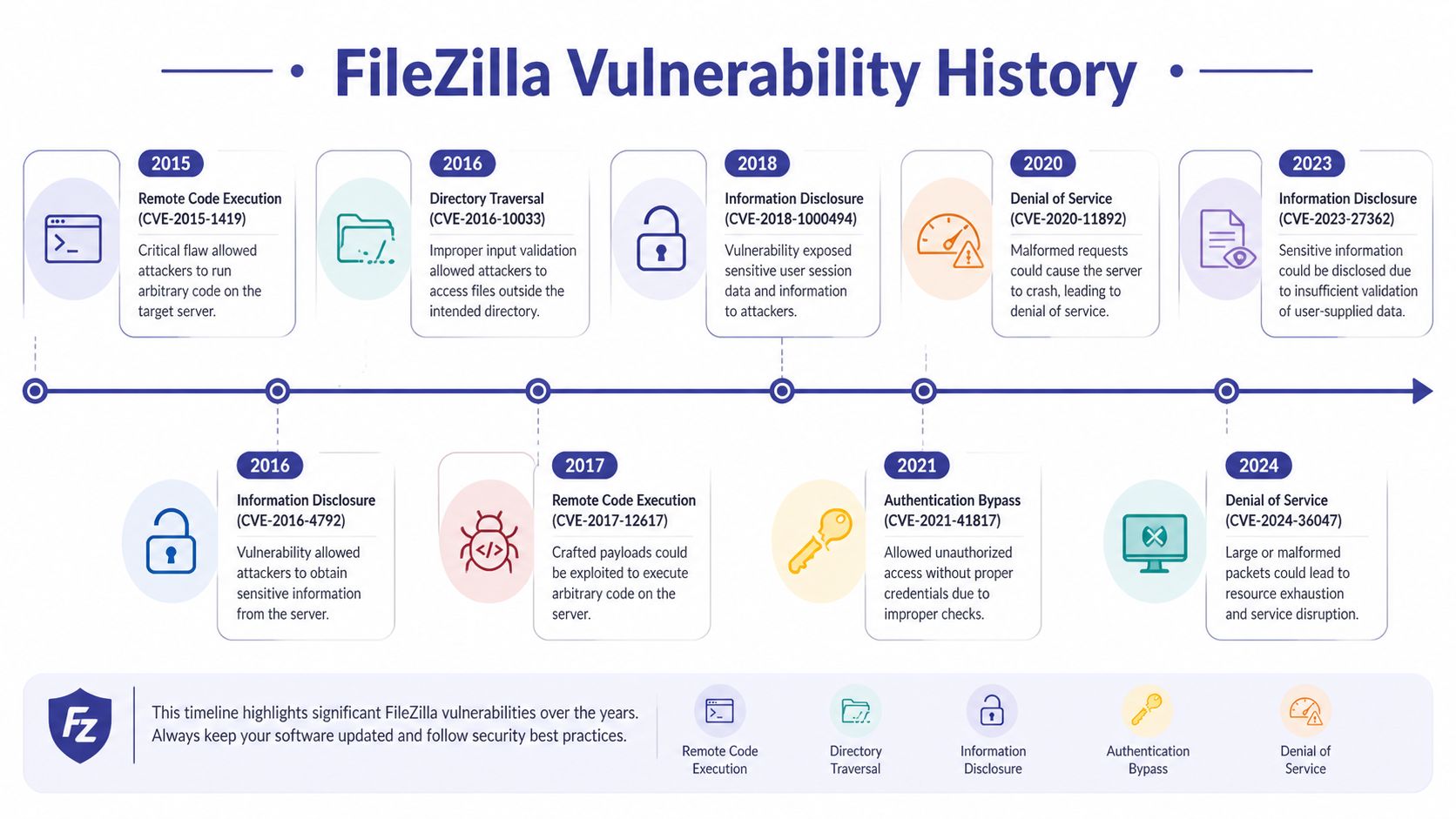
A documented example is CVE-2023-53959, published on March 5, 2026, affecting FileZilla Client 3.63.1 with a CVSS score of 9.8 (Critical). The issue allows DLL hijacking, which can lead to remote code execution without authentication when a crafted DLL is placed in the application directory, according to the FileZilla entries tracked through OpenCVE vendor records for FileZilla.
That’s not abstract. In a real office, remote code execution means the transfer tool can become the doorway to a compromised workstation. If that workstation stores tax documents, case files, or saved connection details, the blast radius grows quickly.
Another documented issue, CVE-2022-29620, had a 6.5 (Medium) score and was published on November 21, 2024 in the same OpenCVE record. There’s also an older issue, CVE-2016-15003, tied to version 3.17.0.0. The point isn’t that every user gets hit. The point is that this is not a product history you should wave away if your firm depends on stable, protected transfers.
The FileZilla Server side has its own lesson. A 2024 Subgraph audit for the Open Technology Fund identified a medium-severity denial-of-service vulnerability in the HTTP interface. Parallel authentication requests could crash the server because of improper handling in src/filezilla/http/handlers/authorizator.cpp. The audit reproduced the issue on an August 13, 2024 nightly build, and the flaw caused a 100% crash rate with 50+ parallel requests during testing. It was resolved in version 1.10.3, as described in the updated FileZilla audit PDF from the Open Tech Fund.
That isn’t a glamorous hacker movie problem. It’s an availability problem. During tax season or active litigation, if your self-hosted transfer service crashes, work stops. Staff members start emailing files they shouldn’t email. Clients get told to “try again later.” People create unsafe workarounds under pressure.
A medium-severity server flaw can still cause major business damage when it interrupts deadlines, client handoffs, and internal workflows.
The same audit also praised positive controls like Secure, HttpOnly, and SameSite=Strict cookie flags with path restrictions and short expirations. That’s good engineering. It shows some parts were designed carefully.
But here’s the business takeaway. Even audited software still needs patching, monitoring, and sane rate limiting. A small accounting office or law firm rarely wants to own that responsibility for a free transfer stack. The security question becomes operational very fast: who is watching it, who updates it, and who notices trouble before your client does?
Three things stand out:
If you’re a small business owner, that’s the key message. FileZilla can function. But its history shows why “free and popular” isn’t the same as low risk.
If you’re going to keep using FileZilla, tighten the setup immediately. Don’t treat the defaults as acceptable for business use. The goal is to reduce avoidable exposure, not to pretend the tool becomes enterprise-grade with one checkbox.
First, stop using plain FTP for anything sensitive. Use SFTP where possible. If a legacy partner requires FTPS, confirm that encryption is enabled and documented. If a vendor only supports plain FTP, that’s a vendor problem you should challenge, not accommodate casually.
Use this simple rule: if the file would create a serious problem when exposed, it shouldn’t travel over plain FTP.
Passwords are easy to share, easy to reuse, and easy to mishandle. For staff who use SFTP regularly, prefer key-based authentication when your environment supports it. That won’t solve every problem, but it reduces dependence on reusable passwords that tend to spread across notes apps, spreadsheets, and memory.
For shared workflows, avoid one generic login used by the whole office. Shared accounts destroy accountability. If someone uploads the wrong file or a credential leaks, you won’t know who used it.
Security advice: Convenience accounts create forensic blind spots. Give each employee their own access whenever the receiving system allows it.
This is one of the biggest practical mistakes firms make. If malware lands on a workstation, saved transfer credentials become a target. Your transfer client should not double as a vault for sensitive logins.
Treat FileZilla as a connection tool, not a password manager. Use a proper credential management process outside the client if your team must retain access details.
Use this as a standing policy for your team:
| Protocol | Encryption | Authentication | Best For |
|---|---|---|---|
| FTP | None | Basic credentials | Avoid for business-sensitive transfers |
| FTPS | Encrypted | Credentials and certificate-based server trust | Legacy compatibility with added protection |
| SFTP | Encrypted | Credentials or SSH keys | Routine secure transfers when you must use a standalone client |
FileZilla doesn’t exist in a vacuum. Restrict who can install software. Limit admin rights on staff machines. Keep logs at the network and endpoint level if your business depends on file movement. For self-hosted FileZilla Server, apply rate limiting and watch for authentication flood patterns rather than assuming the service will defend itself.
If your firm is reviewing encrypted file workflows more broadly, it helps to align this with a documented approach to file share encryption and protected document access. That moves the conversation away from one app and toward a repeatable security standard.
A disciplined solo user can make FileZilla reasonably safe for limited use. A multi-user firm with regulated data faces a different reality. Hardening reduces risk, but it doesn’t create native MFA, centralized audit trails, or clean compliance evidence. Those gaps don’t disappear because your team uses SFTP carefully.
That’s why I don’t advise most accounting and legal firms to build their long-term process around FileZilla. You can harden it. You still inherit too much operational burden.
A lot of users focus on software vulnerabilities and miss the simpler threat. They download the wrong copy.
That’s not a minor risk. A March 2026 Malwarebytes report described a fake FileZilla site hosting a legitimate portable version bundled with a malicious DLL, exploiting Windows DLL search order so malware ran stealthily without exploiting a FileZilla vulnerability, according to Malwarebytes’ report on the fake FileZilla site hosting a malicious download.

A staff member can think they downloaded FileZilla and still install something dangerous. The app may even appear to work normally. That’s what makes this class of attack dangerous for accounting and legal firms. The workflow continues while malware establishes a foothold.
For a professional office, this becomes a purchasing and process issue, not just a user awareness issue. If everyone is free to search, download, and install utilities on demand, your file transfer process is already weak.
Give your team a short, mandatory procedure:
The same discipline should extend to account protection. If your transfer process depends on a single password and no second factor around the surrounding systems, you’re leaving too much to chance. Build that habit into the rest of your environment with a clear understanding of what two-factor authentication does for business access security.
Here’s a short explainer worth sharing with non-technical staff before they install anything:
Don’t let end users source security-sensitive tools by web search.
That one policy eliminates a surprising amount of risk. Professional services firms tend to assume malware arrives through email. Sometimes it arrives because a rushed employee searched for a utility they needed before lunch.
If your office can’t verify where a transfer client came from, don’t trust the machine it’s installed on.
For businesses, the problem with FileZilla isn’t only whether it can encrypt a transfer. The problem is whether it gives management enough control over who accessed what, when they accessed it, and how you prove that later.
For accountants, law firms, and nonprofits, that gap matters. Clients don’t just expect secure handling. They expect traceability, disciplined access control, and a process that doesn’t depend on every employee making perfect technical choices.

A secure protocol can protect data in transit. It does not give you a complete audit trail, centralized policy enforcement, or mandatory multi-factor authentication by itself. That’s where FileZilla starts to fall short for regulated environments.
Privacy Guides discussions note that FileZilla lacks native enterprise features such as MFA and audit trails for SFTP transfers that meet stringent corporate standards, making it a poor fit for businesses dealing with stricter controls, as discussed in their thread on why SFTP and FileZilla may not be recommended.
A professional office usually needs more than a working transfer session:
Those are management requirements, not optional IT extras.
If your firm has to answer client security questionnaires, internal governance reviews, insurer questions, or regulatory expectations, “we use SFTP” is not a complete answer. You may be asked how access is controlled, whether authentication is strengthened, what logs are retained, and how incidents are investigated.
That’s why firms should think in terms of managing compliance risk across systems and workflows, not just choosing an encrypted transport protocol. Security tools that don’t provide evidence and control create administrative exposure even when the data path is encrypted.
A secure connection is one control. A defensible business process requires several.
If your firm handles client financial records, legal files, or regulated documents, don’t build your compliance story around a free file transfer client. It leaves too many questions unanswered. You can operate it carefully, but you’ll still be compensating for missing business controls with manual process and policy reminders.
That’s fragile. And fragile processes tend to fail when your office is busiest.
At some point, the right question stops being “is filezilla safe” and becomes “why are we still depending on a standalone transfer client for sensitive business workflows?”
There are other SFTP clients. Some are cleaner, some are more polished, and some may fit a technical user better. But for a small professional services firm, the bigger improvement usually isn’t switching from one client to another. It’s moving the workflow into a managed platform where access, backups, support, and security controls are handled consistently.
That’s the business case. You remove the burden of verifying installers, policing saved credentials, maintaining self-hosted transfer services, and explaining ad hoc user behavior after the fact.
A managed cloud environment can centralize business applications and file access behind stronger operational controls. That matters more than whether a desktop utility can connect over SFTP. You want your staff opening the files they need inside a governed environment, not improvising transfer habits on local machines.
For firms evaluating that shift, Cloudvara is one example of a hosted model that provides 2FA, automated daily backups, remote desktop access, and a 99.5% uptime guarantee, while centralizing business applications and file access in a managed cloud environment through its cloud data protection approach. That doesn’t make risk disappear, but it moves patching, infrastructure maintenance, and access control into a framework that is easier to govern than a free desktop transfer tool.
That’s good news. The safest workflow is often the least dramatic one. Users sign in the same way every day. Files live in expected places. Access is controlled centrally. Support exists when something breaks. Audit and backup practices aren’t left to memory.
If you want a deeper grounding in the kind of security thinking professionals apply to these decisions, the Mindmesh Academy CISSP practice materials are a useful reference point for how security teams think about control design, access, and operational risk.
My advice is simple. If your firm handles sensitive client files, stop treating file transfer as a standalone utility choice. Treat it as part of your business infrastructure.
Not in the way most firms mean by “secure.” The bigger issues are still download hygiene, credential handling, configuration quality, and missing enterprise controls. A paid edition doesn’t automatically solve operational risk.
The official software itself isn’t described as malware by the vendor. The bigger danger is downloading a fake or trojanized copy, or installing bundled software carelessly. The risk often comes from the source and the surrounding workflow, not the brand name alone.
Using it casually. That usually means one of three things: downloading it from the wrong site, saving credentials in the client, or using plain FTP for convenience.
No. SFTP improves transport security. It doesn’t create audit trails, mandatory MFA, centralized oversight, or a clean compliance story for a team.
Only if someone owns patching, monitoring, rate limiting, and incident response. Most small firms don’t want that burden, and they usually shouldn’t take it on.
If your firm is still relying on ad hoc file transfers for sensitive documents, it’s time to simplify the process and reduce the risk. Cloudvara gives accountants, law firms, nonprofits, and small businesses a managed cloud environment for secure application access, file handling, backups, and two-factor authentication without depending on a free desktop transfer tool as the backbone of operations.




