A lot of small businesses think they're covered because they already have a firewall, antivirus, and password policies. Then something odd happens. A staff member logs in at an unusual time. A server starts talking to systems it normally never touches. A file share gets browsed in a way that doesn't match normal work.
Nothing is visibly broken, but something is off.
That's the gap an intrusion detection system fills. It doesn't replace your other security tools. It gives you visibility into suspicious behavior that might otherwise stay hidden until the problem turns into downtime, data exposure, or a painful client conversation.
For firms handling accounting records, legal documents, nonprofit donor data, or internal financial systems, that visibility matters. Security isn't only about stopping attacks at the edge anymore. It's also about seeing what's happening inside your environment, especially in cloud-hosted and hybrid setups where users, apps, and data move across more than one system. Strong basics still matter, and these cloud security practices for businesses are a good starting point. But basics alone won't tell you when something suspicious is already underway.
A good way to think about an intrusion detection system is this. Your firewall is the front door lock. Your endpoint protection is the alarm on the laptop. Your IDS is the guard who keeps watching the hallways, server room, and file cabinets after everyone assumes the building is secure.
That matters because many real security problems don't start with a dramatic smash-and-grab. They start subtly. Someone reuses a password. Malware gets in through email. A compromised account begins poking around shared folders. A remote worker connects from a legitimate device, but the behavior behind that session isn't legitimate at all.
An IDS watches for those signs. It looks at network or host activity, notices patterns that suggest unauthorized access, policy violations, or unusual behavior, and raises an alert before the issue spreads.
A small business usually doesn't fail on security because it lacked one more product. It fails because nobody saw the warning signs early enough.
This isn't a fringe tool anymore. The global IDS market was valued at USD 5.7 billion in 2024 and is projected to grow at a 7.3% CAGR through 2034, reflecting how widely organizations now use IDS for monitoring and alerting on suspicious activity, according to GM Insights on the IDS/IPS market.
For an SMB owner, the practical takeaway is simple. An intrusion detection system gives you early warning. Early warning buys time. In security, time is often the difference between a contained incident and a business disruption.
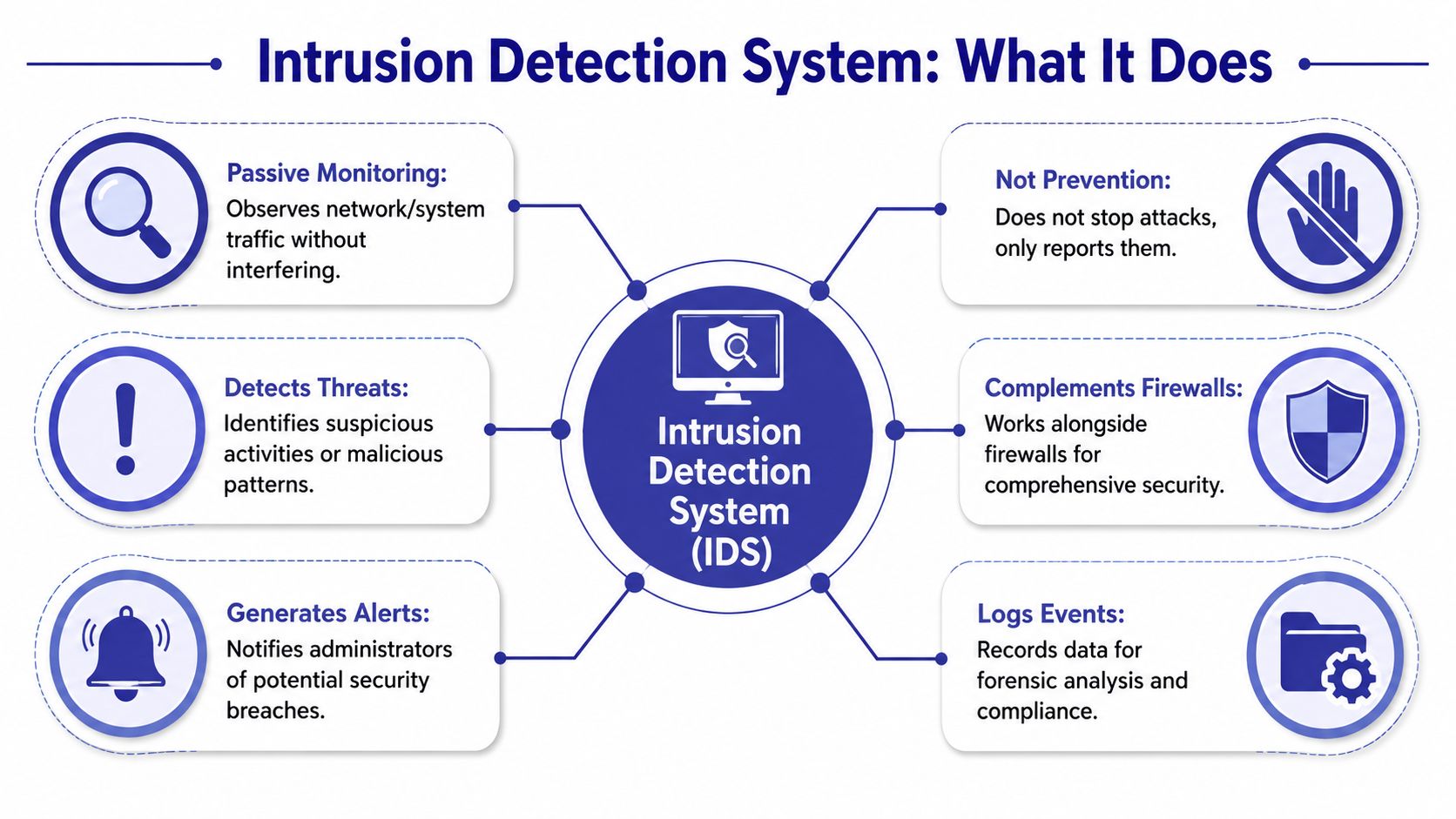
An intrusion detection system doesn't act like a roadblock. It acts like surveillance with judgment.
It watches activity across your environment and flags behavior that looks malicious, suspicious, or out of policy. That can include known attack patterns, unusual traffic flows, strange user actions, or events that suggest someone is testing your defenses before attempting something worse.
Think of a commercial office building.
That distinction matters. If you buy an IDS expecting it to automatically block attacks, you'll be disappointed. Its core job is to detect and alert, not directly stop traffic.
A properly deployed IDS can help detect:
Historically, IDS architecture evolved to use multiple detection methods, including signature-based, anomaly-based, and stateful protocol analysis, because attackers use varied tactics. IDS is also commonly divided into network-based IDS and host-based IDS for layered monitoring, as explained by American Military University's overview of IDS and IPS techniques.
For a small firm, the business value isn't the acronym. It's the visibility.
You may already use managed firewalls, endpoint tools, and cloud access controls. That's good. But those controls don't always show what's moving sideways inside the environment or how a low-level compromise behaves after it lands. That's where continuous network monitoring in business environments becomes useful, and IDS is one of the controls that supports it.
Practical rule: If your business stores sensitive client data, relies on a line-of-business server, or has remote users accessing shared systems, you need a way to spot suspicious activity before users notice symptoms.
Not every intrusion detection system watches the same place. That's where many buying decisions go wrong. A business owner hears “IDS” and assumes it's one product category with one job. In reality, the best fit depends on what you need to see.
A network-based IDS, often called NIDS, monitors traffic moving across the network.
This is the best fit when you want visibility into communication between systems. For example, an accounting firm may want to know if a user workstation starts communicating oddly with a file server that stores tax returns. A law office may want alerts if unusual traffic appears around a document management server.
NIDS is strongest when you need a broad view. It can show scanning, suspicious connections, and internal movement that endpoint tools may not fully capture.
Its limitation is context. It sees traffic patterns well, but it may not tell you everything happening inside a specific device.
A host-based IDS, or HIDS, lives on an individual server or endpoint and watches what's happening there.
That makes it valuable when the system itself matters more than the traffic around it. If you run a server hosting accounting software, practice management tools, or a document archive, HIDS can help spot changes to files, unusual log activity, and suspicious user behavior on that machine.
HIDS gives you detailed local visibility. The trade-off is scope. It's excellent on the systems where it's installed, but it won't give you the same broad network picture as NIDS.
A cloud-native IDS is built for virtual infrastructure, hosted workloads, and cloud applications rather than a traditional office-only network.
This option makes sense when your business runs systems in hosted environments, uses remote desktop access, or depends on cloud infrastructure to centralize software and files. In those setups, you need monitoring that understands virtual networks, cloud traffic patterns, and the fact that users may connect from many locations.
If your environment has already moved beyond a single office server closet, it helps to understand how cloud infrastructure changes security planning. The monitoring approach should match the architecture.
| IDS Type | What It Monitors | Best For | Key Limitation |
|---|---|---|---|
| NIDS | Traffic across network segments | Firms that need visibility into internal traffic and lateral movement | Less detailed insight into what happened inside a specific host |
| HIDS | Activity on an individual server or endpoint | Protecting critical servers, applications, and file stores | Limited visibility outside the monitored host |
| Cloud-native IDS | Activity in hosted workloads and cloud environments | SMBs running business apps in managed or hybrid cloud setups | Effectiveness depends on good integration with the cloud environment |
Most small businesses don't need to think in absolutes.
A better question is this: where would a hidden problem hurt the most?
For many SMBs, the right answer isn't one type alone. It's a layered mix that covers both the systems that matter and the traffic around them.
The detection engine is where an intrusion detection system either becomes useful or becomes noisy.
Most modern IDS tools rely on two core approaches. They work differently, and each has a trade-off you need to understand before you trust the alerts.
Signature-based detection works like checking a suspect against a known fingerprint file.
The IDS compares activity against known attack patterns. If the traffic or behavior matches something already identified as malicious, it triggers an alert. This method is strong when the threat is familiar and the pattern is well understood.
That's why signature detection is usually fast and reliable for known threats. It's also why it won't help much when an attacker uses something new, modified, or subtle enough to avoid matching an existing pattern.
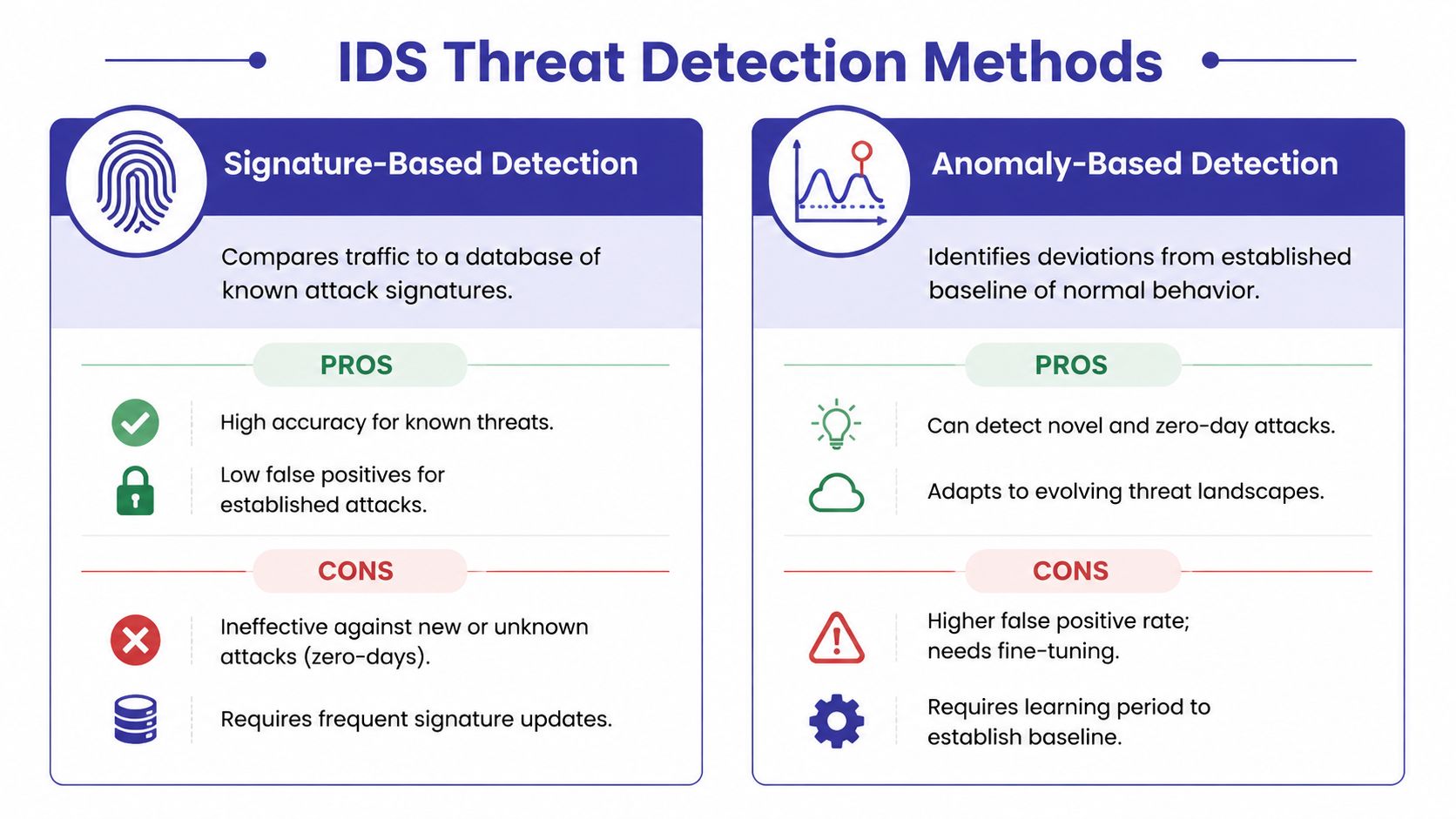
Anomaly detection works differently. It learns what “normal” looks like, then flags behavior that falls outside that baseline.
That's useful when the suspicious activity doesn't match a known pattern. A user logging in at a strange time might be fine. A user suddenly touching systems they never access, generating odd traffic, and behaving unlike their usual pattern is more concerning.
The challenge is obvious. Normal isn't always stable. Businesses change. Staff roles shift. Software updates alter traffic patterns. If the baseline isn't tuned well, anomaly detection can create too many alerts.
According to Wikipedia's overview of intrusion detection systems, signature-based detection excels at identifying known threats with low false positives but misses new attacks, while anomaly-based detection can catch zero-day threats by identifying deviations from a normal baseline, though it is more prone to false positives if the baseline isn't well-tuned.
Most businesses shouldn't choose between these methods. They should expect both.
Signature detection tells you, “We've seen this attack before.” Anomaly detection tells you, “We haven't seen this behavior before.”
That combination is where an IDS becomes operationally useful. One method catches what's already known. The other gives you a shot at spotting what isn't.
For SMBs, the practical question isn't whether the engine sounds advanced. It's whether the alerts are understandable, actionable, and tied to the systems you actually care about.
Buying an intrusion detection system is the easy part. Placing it properly is what determines whether you get useful visibility or a lot of blind spots.
If you're running a small accounting practice, your highest-risk assets usually aren't every device equally. They're the systems holding tax files, financial reports, client records, and authentication services.
If you're running a law firm, the priority may be document repositories, case management systems, and remote access paths used by attorneys and staff.
Start with the places where a compromise would create immediate business pain:
That placement matters because many network IDS deployments are out of band. They analyze a copy of traffic rather than sitting directly in the traffic path. Palo Alto Networks explains that this design avoids adding latency, but it also means the IDS generally alerts rather than blocks, which is why integration with response tools matters in practice. You can read that in their explanation of how out-of-band IDS monitoring works.
A common mistake is dropping in an IDS and assuming it now “handles intrusion detection.”
It doesn't. It produces evidence and alerts. Someone or something still has to interpret those alerts and act on them. That's why deployment should be tied to your firewall, logging platform, and incident response workflow.
If your business is modernizing infrastructure at the same time, this kind of server setup planning guide helps frame where monitoring belongs around critical workloads.
Many SMBs focus too heavily on the internet edge. That's understandable, but it leaves a blind spot.
Once an attacker gets access, the next move often happens internally. They look around. They test permissions. They move from one system to another. Security teams call that lateral movement, but the plain-English version is simple. The intruder tries doors inside the building after getting through the front entrance.
That's why internal monitoring matters.
If you only watch what enters the network, you may miss what happens after entry. For many businesses, the damage starts in that second phase.
A short overview can help if you want a visual explanation of the concept:
Here's the blunt version.
An IDS won't rescue a weak security program. It will, however, make a decent one much more informed.
The first operational test of an intrusion detection system isn't whether it detects something. It's whether your team can tell the difference between a real problem and background noise.
A false positive is an alert that looks suspicious at first but turns out to be legitimate activity. Every IDS generates some of them.
That doesn't mean the system is broken. It means detection always involves judgment. An accounting application may behave differently during filing deadlines. A law firm may see unusual after-hours access during trial prep. If the IDS doesn't understand those patterns yet, alerts can pile up.
The answer isn't to ignore alerts. It's to tune the system over time.
Many SMB owners hear “compliance logging” and think paperwork. In practice, it's more useful than that.
An IDS creates records of suspicious activity, policy violations, and notable events. Those logs help during investigations, but they also help when clients, auditors, insurers, or regulators ask a basic question: how do you know what happened in your environment?
That audit trail is especially relevant for businesses dealing with payment data, health-related information, financial records, or confidential client documents. If your organization is working through control frameworks, SOC compliance requirements for service organizations are a helpful reference point for understanding why documented monitoring matters.
Strong alert management is less about speed and more about discipline.
| Alert Handling Practice | Why It Matters |
|---|---|
| Triage by business importance | Alerts touching critical systems deserve immediate attention |
| Correlate across tools | An IDS alert is more meaningful when endpoint or login data supports it |
| Document outcomes | Repeated patterns reveal whether rules need tuning |
| Retain logs appropriately | Historical records support audits, forensics, and client assurance |
Good IDS operations don't aim for zero alerts. They aim for alerts that a real person can trust enough to investigate.
For SMBs, that's the right standard. Not perfection. Practical signal.
For most small businesses, the hard part isn't understanding why an intrusion detection system matters. The hard part is running it well.
A managed cloud environment changes that equation because the IDS doesn't have to live as a neglected side project on an already overloaded internal IT list. It can be part of the hosted security architecture, alongside logging, access controls, backups, and server management.

That matters because IDS still has a useful role even when you already have firewalls and endpoint tools. In a modern stack, IDS remains valuable for passive, out-of-band monitoring of east-west traffic, along with forensic investigation and compliance logging, without disrupting network operations. SecurityScorecard discusses that complementary role in its article on how IDS works in today's security stack.
A solid managed setup should cover the pieces SMBs struggle to maintain on their own:
If you're comparing options for surrounding tooling, it can also help to understand the broader ecosystem of Redchip Online IT Store security, especially where SIEM appliances and related monitoring tools fit into a larger response workflow.
The smartest way for an SMB to approach IDS is not as one more box to buy. It's as one layer in a managed security model that turns visibility into action.
If your business runs critical accounting, legal, nonprofit, or back-office applications in the cloud, Cloudvara can help you build a hosted environment where security monitoring, resilient infrastructure, and day-to-day usability work together. Start with a conversation about your applications, compliance needs, and risk points, then map the right level of intrusion detection and managed protection around them.




