
Preventing a ransomware attack isn't about finding one magic bullet. It’s about building a multi-layered defense that combines proactive tech, disciplined backups, smart access controls, and ongoing employee training. Think of it less as a single tool and more as an interconnected defensive framework that makes your business a much harder—and less profitable—target.
This approach dramatically cuts the risk of an attack ever succeeding. And if one does slip through, it ensures you can get back on your feet fast.

To stand a real chance against modern ransomware, you need a resilient and layered security posture. Forget the idea of a single wall; you're building a fortress with multiple lines of defense. If one layer gets breached, another is right there to stop the threat in its tracks.
This strategy moves way beyond just having antivirus software. It addresses the entire attack lifecycle, from the first phishing email to the final attempt at data encryption.
The whole point is to make infiltrating your organization so difficult and time-consuming that cybercriminals give up and move on to an easier victim.
A strong ransomware defense is built on four critical pillars. They all work together, and neglecting even one leaves a gaping hole for attackers to waltz right through. Your strategy absolutely must integrate:
A layered defense works because it creates redundancy. No single point of failure can bring you down.
For example, a phishing email might slip past your email filter (layer one), but a well-trained employee should recognize it as suspicious and report it (layer two). If they make a mistake and click the link, your endpoint protection software should kick in and block the malicious download (layer three). Each layer backs up the others.
To put it into perspective, here's a quick summary of how these defensive layers stack up.
| Defensive Pillar | Primary Function | Key Action |
|---|---|---|
| Backups & Recovery | Your last line of defense; ensures business continuity. | Implement the 3-2-1 rule and test restores regularly. |
| Technical Controls | Actively blocks threats from entering or executing. | Patch systems promptly and deploy endpoint protection. |
| Access Control | Limits the blast radius if an account is compromised. | Enforce Multi-Factor Authentication (MFA) everywhere. |
| User Training | Empowers employees to be a human firewall. | Conduct ongoing phishing simulations and awareness training. |
This table illustrates how each pillar serves a distinct but complementary purpose in your overall defense.
A robust backup strategy is often the deciding factor between a manageable incident and a catastrophic business failure. The statistics back this up, showing that 64% of organizations hit by ransomware avoided paying by restoring data from their backups.
Ultimately, every pillar reinforces the others. Disciplined patch management shrinks the attack surface, while employee training reduces the chances of human error creating an opening. This integrated framework is the bedrock of any successful plan for preventing ransomware attacks.
Strategy is the blueprint, but the real defense is built with technical tools that actively block and tackle threats. Think of these proactive controls as your digital sentinels, working around the clock to stop ransomware before it ever gets a foothold. This isn't just about installing software; it's about building a smart, layered defense system where every piece works together.
So, let's move beyond theory and get into the practical controls that form your most formidable barrier. Don't see them as individual items on a checklist. Instead, picture them as interconnected gears in your security machine—when one turns, it supports the next, creating a unified front against attackers.
Let’s be blunt: unpatched software is a wide-open door for ransomware. Cybercriminals actively hunt for known vulnerabilities in operating systems, common applications like SharePoint, and network devices. Leaving a system unpatched isn't just an oversight; it's an open invitation.
The data backs this up. Organizations with slow or inconsistent patching schedules face a nearly sevenfold increase in their likelihood of getting hit with ransomware. It's a critical failure that attackers are ready and waiting to exploit.
A disciplined patch management program isn't optional. It should include:
Patching isn't just an IT chore. It's one of the most fundamental ways you can shrink your attack surface.
Your old-school antivirus isn't going to cut it anymore. Modern ransomware is specifically designed to sidestep signature-based detection. This is where Endpoint Detection and Response (EDR) and Extended Detection and Response (XDR) solutions come in.
Unlike basic antivirus that just looks for known bad files, EDR and XDR tools watch what's happening on your systems. They hunt for suspicious behaviors that signal an attack in progress, such as:
For example, a good EDR tool would spot a Microsoft Word document trying to launch a PowerShell script—a classic calling card of a malicious macro. It would instantly block the script and quarantine the endpoint to keep the threat from spreading. That’s how you stop ransomware in its tracks.
The Principle of Least Privilege (PoLP) is a simple but incredibly powerful concept: people should only have access to the data and systems they absolutely need to do their jobs. Nothing more. An accountant doesn't need admin rights to the marketing server, and an intern has no business being anywhere near financial records.
By enforcing PoLP, you drastically contain the damage if a user's account gets compromised. When a hacker gets into a standard user account, they’re stuck. They can't move laterally across the network to deploy ransomware on your critical servers.
Limiting an attacker's movement is paramount. A compromised account with excessive permissions gives a threat actor the keys to the kingdom, turning a minor breach into a full-blown ransomware crisis.
This principle goes hand-in-hand with another non-negotiable control: Multi-Factor Authentication (MFA). Requiring a second form of verification—like a code from a mobile app or a physical security key—makes stolen passwords almost useless to an attacker. If you want to dive deeper, check out our complete guide that explains what two-factor authentication is and how it keeps you safe. Rolling out MFA across all your critical apps, remote access tools like VPNs, and privileged accounts is one of the most effective security moves you can make.

When a ransomware attack hits, your ability to recover isn't defined by your security tools. It comes down to the strength of your backup strategy. A solid, well-tested backup plan is your ultimate safety net, turning a potentially catastrophic event into a manageable—albeit stressful—recovery operation.
Think about it: a good backup renders an attacker's primary leverage completely useless. If they can’t hold your data hostage because you have clean copies ready to restore, their entire business model falls apart.
The classic 3-2-1 backup rule has been a data protection standard for years, but it’s more critical than ever in the age of ransomware. It’s a simple, powerful framework for building true data resilience.
Here’s the breakdown:
By sticking to this principle, you create layers of redundancy. If one backup gets compromised or is unavailable, you still have other places to turn, which dramatically improves your odds of a successful recovery.
When an attack happens, a clean, off-site backup is the single most important factor in avoiding a ransom payment. It's the difference between having options and having none.
Not all backups are created equal, and the type you choose affects both your storage needs and recovery time. Getting this right is key to building an efficient strategy. You can also explore how to automate backups to ensure consistency and cut down on manual effort.
Let's break down the common types:
A popular and effective strategy is to perform a full backup weekly (say, on a Sunday) and then run differential or incremental backups daily. This gives you a nice balance between storage efficiency and recovery speed.
Modern ransomware is smart. Attackers know you have backups, so they specifically design their malware to find and encrypt backup files stored on your network. This is where air-gapped and immutable backups become non-negotiable.
An air-gapped backup is one that is physically disconnected from the network. Think of offline tape backups or external hard drives that are unplugged after the job completes. An attacker on your network simply cannot reach them.
An immutable backup is a logically isolated copy that, once written, cannot be altered or deleted for a set period. Many cloud storage providers offer this feature, creating a digital fortress around your data that even an admin with compromised credentials can't tear down. It's a game-changer, and it’s why implementing immutable backup solutions is now considered a best practice.
A backup plan you've never tested isn't a plan; it's a theory. And the worst possible time to discover your restore process is broken is during a real crisis.
You must regularly test your ability to restore data from your backups. This doesn't mean you have to restore your entire production environment every week. Instead, you can:
Regular testing verifies that your backups are viable, confirms your team knows the recovery procedures, and helps you set a realistic Recovery Time Objective (RTO). This practice ensures your safety net will actually hold when you need it most.

Technical controls are non-negotiable, but let’s be honest—even the most advanced firewall can be bypassed by a single, clever phishing email. This is where the human element becomes your most critical line of defense. Cybercriminals know your employees are the most direct path to your network, which is why they’re always the primary target.
But what if you could turn that vulnerability into your greatest defensive strength? By building a strong security awareness program, you can empower every person on your team to become a vigilant part of a "human firewall." The goal isn't just about memorizing rules; it's about embedding a security-first mindset into your company’s DNA.
That old model of a mandatory annual training video followed by a simple quiz just doesn't cut it anymore. To build a genuine human firewall, your training needs to be continuous, engaging, and directly relevant to the threats your team actually sees. Think of it as an ongoing conversation, not a one-time lecture.
A modern approach combines several key pieces to make secure behaviors stick:
Hands down, the most effective way to test and strengthen your human firewall is with controlled phishing simulations. These exercises send safe, simulated phishing emails to your staff to see how they respond. It’s a practical way to gauge your program's effectiveness and create powerful, teachable moments.
A good simulation program is about education, not about trying to trick people. When an employee clicks a simulated malicious link, they should land on a page that clearly explains the red flags they missed. That immediate feedback is priceless. For example, you could send a fake invoice from a known vendor to teach the finance team to always verify unexpected attachments through a separate, trusted channel.
The best security programs shift the culture from fear and blame to one of shared responsibility. When employees feel safe reporting a potential mistake—like clicking a suspicious link—your security team gains the critical time needed to contain a threat before it spirals out of control.
A huge part of your training is simply teaching employees what to look for. Attackers are getting craftier, and they often target specific sectors. Ransomware attacks frequently hit critical infrastructures like education and healthcare. In fact, the education sector alone faced 180 ransomware attacks globally in just the first three quarters of one year. You can dig into these ransomware attack trends to see how specific the threats have become.
Arming your team with a simple checklist can make a massive difference. Another core part of this defense is ensuring everyone follows solid password management best practices, since strong credentials can stop an attacker even if they do get tricked.
Here’s a quick-reference guide to help your team spot the most common phishing red flags. Take a look and share it around.
This table breaks down the classic warning signs that an email might not be what it seems.
| Red Flag Category | Specific Examples to Watch For |
|---|---|
| Sense of Urgency | "Your account will be suspended in 24 hours!" or "Immediate action required." |
| Suspicious Senders | The email address is slightly misspelled (e.g., "Microsoftt.com") or is from a generic public domain like Gmail. |
| Unusual Requests | A sudden request to change bank details for a payment or a demand for sensitive personal information. |
| Generic Greetings | The email starts with "Dear Customer" instead of your actual name, signaling a mass phishing attempt. |
| Grammar & Spelling | Poor grammar, awkward phrasing, and spelling mistakes are common signs of a fraudulent email. |
Encouraging your team to pause and look for these signs before clicking can be the simple action that stops a devastating attack in its tracks.
Even with the best defenses in the world, the harsh reality is that a determined attacker might still find a way through. While prevention is the goal, your ability to respond swiftly and effectively during a crisis is what truly defines resilience. This is where an Incident Response (IR) plan becomes your most valuable asset.
An IR plan isn't some theoretical document that gathers dust on a shelf. It's a precise, actionable playbook designed to guide your team through the chaos of a security incident, minimizing damage and restoring operations as quickly as possible. When it comes to ransomware, this preparation is the difference between a controlled recovery and a business-ending catastrophe.
Without a plan, panic sets in. Critical decisions are made under extreme duress, communication breaks down, and precious time is lost. A well-crafted plan ensures everyone knows their role, what steps to take, and who to contact, turning a chaotic event into a structured, manageable process.
A strong IR plan is structured around a recognized lifecycle. Understanding these phases helps you organize your efforts and ensure no critical step is missed when you're under pressure. Each stage builds on the last, creating a logical flow from the initial alert to the final review.
Your plan should address these core areas:
An incident response plan transforms your reaction from frantic improvisation to a coordinated, strategic effort. The average downtime after a ransomware attack is 20 days; a solid plan can drastically reduce that timeline by eliminating guesswork and indecision.
When an attack hits, the last thing you want to be doing is frantically searching for phone numbers or trying to get a lawyer on the phone for the first time. A critical part of your preparation is a pre-vetted list of external experts and internal stakeholders who will be involved in the response.
This list should be printed and stored in a secure, offline location, accessible even if your entire network is down. You can find comprehensive guidance on building out the human side of your strategy in our article covering how to build a data breach response plan.
Your contact list must include:
A plan on paper is just a theory. You absolutely need to know if it actually works. That's the purpose of a tabletop exercise—a simulated cybersecurity incident where you gather your response team and walk through the plan step-by-step.
During a tabletop exercise, a facilitator presents a realistic ransomware scenario. For example: "A user in accounting has reported that all files on the shared drive are encrypted, and a ransom note has appeared on their screen. What do you do now?"
The team then discusses their roles and actions according to the IR plan. These exercises are invaluable for identifying gaps, clarifying responsibilities, and building the muscle memory needed for a real event. It's where you discover that a key contact's phone number is outdated or that the process for isolating a server isn't nearly clear enough. Conducting these drills at least annually ensures your plan remains a living, effective tool.
Even with a solid defense plan, tricky questions always come up. It's one thing to have a strategy on paper, but it's another to feel confident about the "what-ifs" that can cause hesitation when it matters most. Let's tackle some of the most common questions we hear from businesses trying to lock down their ransomware defenses.
Getting these details right is the key to building a plan your team can execute without a second thought.
The short answer from just about every cybersecurity pro and law enforcement agency out there, including the FBI, is a hard no. Paying the ransom is a huge gamble, and the odds are not in your favor. There's zero guarantee the attackers will even give you a working decryption key. We've seen cases where the tool they provide is buggy, painfully slow, or worse, corrupts the data it's supposed to be saving.
Beyond the technical risks, paying up essentially paints a target on your back. Your company's information often gets sold on dark web forums, flagging you as a "willing payer" to other criminal groups. You become a known source of easy money. Most importantly, every dollar paid fuels the ransomware ecosystem, helping these groups refine their attacks and go after more victims.
Forget about stocking up on cryptocurrency for a ransom. The best investment you can make is in a robust backup and recovery system that you test constantly. A clean, verified backup completely flips the script—it takes extortion off the table and turns a potential catastrophe into a manageable recovery operation.
Security awareness can't be a "one-and-done" checkbox exercise. If you’re only running a single training session once a year, the lessons are forgotten almost as soon as they’re learned, leaving your human firewall wide open.
Real security culture comes from consistent, ongoing effort. It’s not an event; it's a process. A much stronger approach layers different types of training throughout the year:
This steady drumbeat of information keeps security front and center, creating a vigilant culture where people feel like they’re part of the solution, not just a potential problem.
While you absolutely need a layered defense with firewalls, endpoint protection, and MFA, the single most critical defense is having regularly tested, offline, and immutable backups. You have to assume that even the most advanced security stack can eventually be beaten by a determined and well-funded attacker.
When that happens, your ability to restore your systems and data from a clean, isolated backup is your ultimate safety net. It’s what allows your business to survive without ever having to think about paying a ransom.
This is why the standard incident response flow always ends with recovery. It's the final, and most critical, stage.
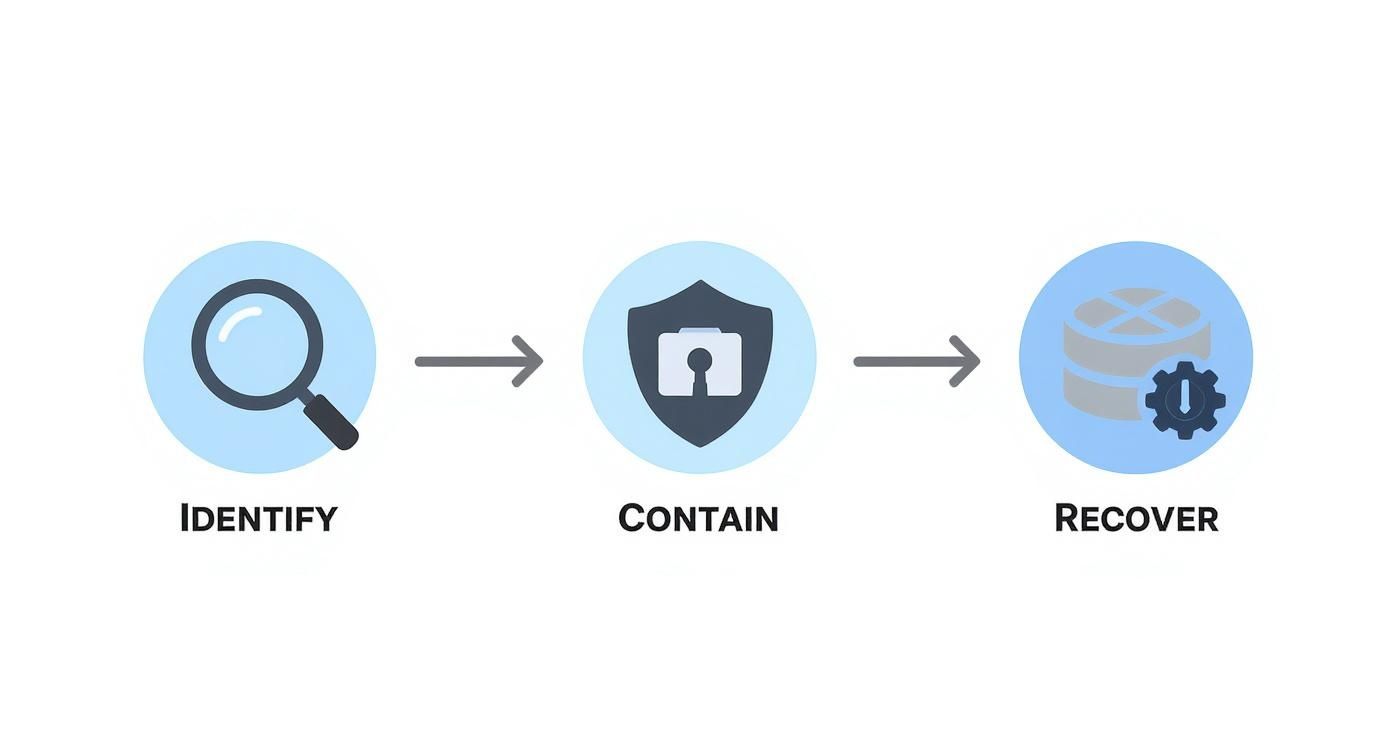
As you can see, recovery isn't just an afterthought. It's the entire goal of the response process, which makes a bulletproof backup strategy completely indispensable.
At Cloudvara, we build our cloud hosting solutions around this principle of resilience. We provide automated daily backups and a secure, centralized platform designed to protect your most critical applications, ensuring your business can bounce back fast from any disruption. Learn more about our secure hosting services.




