Picture your entire office desktop—all your files, specific software, and personal settings—securely streamed to any device you own, no matter where you are. That’s the simple idea behind hosting a virtual desktop. Instead of being chained to a physical computer in a specific location, you're accessing a powerful, centralized desktop that lives in the cloud.
This isn't just a tech upgrade; it's a strategic shift in how modern businesses operate. By moving the entire computing environment from an individual's machine to a secure, professionally managed data center, you centralize control, simplify updates, and guarantee a consistent experience for every single user. It doesn't matter if they're on a company laptop, a personal tablet, or a thin client at a satellite office.
Think of it like this: instead of every employee maintaining their own separate, disorganized library, you give everyone a key to a single, state-of-the-art central library. In that library, the resources are always up-to-date, perfectly organized, and protected by top-tier security, accessible only with the right credentials.
Hosting a virtual desktop environment is about more than just remote access; it’s about building a more resilient and efficient way to work. The advantages become obvious almost immediately:
This shift decouples the user's work environment from their physical hardware. It means your business operations are no longer limited by the location or capability of a specific machine, providing true operational freedom.
This becomes especially important for companies that are expanding globally or bringing on remote teams. When you're leveraging talent through models like nearshore development, you need to ensure everyone can access a standardized, secure work environment from day one, regardless of where they are.
By moving to a hosted desktop model, you're not just solving today’s challenges—you're getting ready for whatever comes next. This setup allows for incredibly rapid scaling. You can add or remove users in minutes without ever touching a piece of new hardware.
As your business evolves, your IT can adapt instantly. This is a core part of modern digital workplace solutions that prioritize business continuity and agility. It's a foundational step toward a more secure, productive, and flexible future.
Let's pull back the curtain on the technology behind a hosted virtual desktop.
Think of building your company's IT from scratch like constructing a house. You have to pour the foundation, run the plumbing, wire the electricity, and handle all the upkeep. It's a massive, expensive project.
A hosted virtual desktop, on the other hand, is like leasing a fully furnished, high-tech office. A specialized provider takes care of all the heavy lifting—the infrastructure, security, and maintenance—from their secure, remote data center. Your entire desktop environment, from the operating system to your apps and data, lives there instead of on your physical computer.
When an employee logs in from their laptop, tablet, or even a basic thin client, they're just opening a secure connection to their personal desktop running on that powerful server. The only things traveling over the internet are screen updates, keystrokes, and mouse clicks. Your actual data and all the processing power stay safely inside the data center.
To really get it, you need to understand the two main ways this technology is deployed. Each one has a completely different approach to who manages the hardware.
This is a critical distinction because it shifts who carries the responsibility—and the cost. The global move to remote work has poured fuel on this market. Valued at over USD 20 billion, the Virtual Desktop Infrastructure (VDI) market is expected to rocket to nearly USD 100 billion by 2033, growing at a strong compound annual rate of 19.2%.
At the heart of both VDI and DaaS is server virtualization. This is the technology that lets a single, powerful physical server get sliced up into multiple, isolated virtual machines (VMs). Each VM can run its own operating system and apps, acting like its own independent computer.
By separating the software (your desktop) from the hardware (the physical machine), virtualization unlocks incredible efficiency and flexibility. This is the core principle that makes the whole hosted desktop concept possible.
For example, one beefy server could easily host dozens of individual Windows 10 desktops, with each one assigned to a different employee. Pooling resources like this is far more cost-effective than buying a separate physical PC for every person on your team. If this is new to you, you can learn more about how server virtualization works and why it's such a game-changer. It’s the engine that powers the entire hosted desktop experience.
The move to hosted virtual desktops isn't just a tech trend—it’s a direct answer to the real-world headaches modern businesses face every day. Across different fields, companies are finding that centralizing their digital workspaces solves nagging problems with security, compliance, and remote access. This is especially true for industries that live and breathe sensitive information or rely on a mobile workforce.
For these businesses, a hosted desktop isn't just a nice-to-have; it's a competitive edge. It pulls mission-critical data off vulnerable laptops and locks it down in a fortified data center. This completely changes how they protect client information and gives their teams the freedom to work effectively from anywhere.
Accounting firms are built on trust and confidentiality. They juggle incredibly sensitive financial data, from personal tax records to corporate P&L statements, all while navigating a maze of compliance rules. The old model of storing this information on local office servers or individual laptops is a huge security gamble.
A hosted desktop environment solves this problem cleanly. Picture a CPA working from a client’s office or burning the midnight oil at home during tax season. Instead of transferring risky files or logging in through a potentially insecure VPN, they simply access their virtual desktop.
The legal field is another perfect fit. Attorneys and paralegals need instant, secure access to case files, legal research tools, and practice management software, whether they’re in a courtroom, at a deposition, or on the road. Relying on physical folders or scattered digital documents is slow, inefficient, and risky.
Hosting a virtual desktop creates a single, secure hub for the entire legal team. An attorney can pull up a key document on a tablet moments before walking into court, with the exact same security and access they'd have at their desk. This seamless workflow is something traditional IT setups just can't deliver.
By decoupling access from a specific device, law firms empower their legal professionals to be more responsive and productive. It ensures that confidential client information remains protected under a single, robust security umbrella, no matter where work happens.
For small and mid-sized businesses (SMBs), the biggest hurdle is often resources. Shelling out for expensive on-premise servers, hiring IT staff, and managing all that infrastructure can be a budget-killer. This is where the economics of hosting a virtual desktop really shine.
Instead of a massive upfront capital expense (CapEx), SMBs get a predictable, per-user monthly subscription (OpEx). This gives them access to enterprise-grade technology and security without the enterprise-sized price tag. When the business grows, bringing on a new employee is as simple as adding another user license—a process that takes minutes, not weeks of buying and setting up hardware.
This same need for airtight security and accessibility is critical in other regulated sectors, too. You can learn more about how specialized hosting supports industries like healthcare in our article on cloud solutions for healthcare providers.
When it's time to roll out virtual desktops, businesses arrive at a fork in the road. Do you build it all yourself with on-premise Virtual Desktop Infrastructure (VDI)? Or do you partner with a provider for a hosted cloud desktop solution, often called Desktop-as-a-Service (DaaS)? This single decision ripples through your budget, your IT team's workload, and how fast your company can adapt.
A great way to think about it is choosing between buying a house and renting a fully managed apartment.
Buying a house (on-premise VDI) gives you ultimate control, but you’re on the hook for everything—the huge upfront cost, every bit of maintenance, security, and all the repairs. Renting an apartment (hosted desktops) lets you move in and get to work right away. You have a predictable monthly payment, and a professional management company handles all the complicated upkeep behind the scenes.
The market has already voted with its feet. Cloud-based deployment has pulled ahead of on-premise solutions, capturing over 60% of the market share. This isn't just a small lead; it's a trend that's picking up speed with a projected growth rate of 17% CAGR. Experts agree that the vast majority of virtual desktops will soon be delivered as a service. You can discover more insights about the virtual desktop market and see for yourself why the cloud-first approach is taking over.
To help you see the differences more clearly, here’s a direct comparison of the two models.
This table breaks down the key operational and financial differences you'll face when deciding between building your own VDI and using a hosted cloud desktop service.
| Factor | On-Premise VDI | Hosted Virtual Desktop (DaaS) |
|---|---|---|
| Initial Cost | High capital expenditure (CapEx) for servers, storage, networking hardware, and software licenses. | Minimal to no upfront cost. Pay-as-you-go subscription model. |
| Cost Structure | Capital Expenditure (CapEx) model. Large, infrequent investments. | Operating Expenditure (OpEx) model. Predictable, recurring monthly fees per user. |
| Maintenance | Your internal IT team is responsible for all hardware repairs, software updates, patches, and system monitoring. | The provider manages all backend infrastructure, updates, and maintenance. |
| Security | You are fully responsible for physical data center security, cybersecurity, and ensuring compliance. | The provider handles enterprise-grade physical and digital security, often with dedicated expert teams. |
| Scalability | Slow and expensive. Adding or removing users requires procuring and configuring new hardware, which can take weeks or months. | Fast and flexible. New desktops can be provisioned in minutes. Scale up or down on demand. |
| IT Workload | Heavy burden on the internal IT team, requiring specialized VDI expertise. | Frees up the IT team to focus on strategic business goals instead of infrastructure management. |
As you can see, the choice isn't just about technology—it’s about how you want to run your business. The hosted model prioritizes agility and predictable spending, while the on-premise route is for organizations that need absolute control and have the resources to manage it.
The most immediate difference between these models is how you pay for them. It’s a classic showdown between capital expenditure (CapEx) and operating expenditure (OpEx).
On-premise VDI requires a massive upfront investment. You have to buy the servers, the storage arrays, the networking gear, and all the software licenses before a single person can even log in. This CapEx model can be a huge hurdle for small and mid-sized businesses and locks you into that specific hardware for years.
In contrast, hosting a virtual desktop with a provider like Cloudvara flips the script. The entire cost moves to a predictable, per-user monthly subscription. This OpEx model gets rid of the need for a huge initial payment, making top-tier technology accessible without draining your bank account. It turns IT from a major capital purchase into a manageable operating cost.
With an on-premise setup, the security burden lands squarely on your shoulders. Your IT team is responsible for absolutely everything:
This takes specialized skills and constant watchfulness, which can easily stretch an internal IT team to its breaking point. Hosted cloud desktops shift this immense responsibility to the provider. Their entire business is built around keeping a secure, high-performance environment running. They have teams of security experts and operate from data centers with layers of physical and digital protection—a level of security most SMBs could never achieve on their own.
Business needs can change in a heartbeat. On-premise VDI just can't keep up. If you need to add new employees, it means buying, installing, and setting up new hardware—a process that can take weeks, if not months. Scaling down is just as clunky, leaving you with expensive equipment gathering dust.
Hosted solutions, on the other hand, offer almost instant scalability. Need to bring on five new people for a seasonal project? Their desktops can be ready in minutes. Once the project is over, you just scale back down. This on-demand flexibility is a massive advantage, letting your business pivot quickly without being chained to its physical IT infrastructure.
Key Takeaway: While on-premise VDI offers deep control for organizations with large, specialized IT departments, the hosted model delivers superior flexibility, predictable costs, and enterprise-grade security. For agile businesses focused on growth, it has become the clear choice.
Understanding the core differences between cloud and on-premise models is crucial for making the right IT decisions for your business. For a more detailed breakdown, you can explore our guide on the difference between cloud and on-premise solutions to see how this applies beyond just virtual desktops. This foundational knowledge will help you build a more resilient and adaptable technology strategy.
Making the jump to a hosted virtual desktop can feel like a huge undertaking, but it doesn't have to be. When you break the process down into a clear, logical plan, what seems like a massive IT project becomes a series of simple, manageable steps. This ensures a smooth transition for your team and keeps daily operations running without a hitch. A successful migration is all about thoughtful planning, not just technical wizardry.
The first step is always to look inward. Before you can even think about picking a provider, you need a crystal-clear picture of your current setup. This means taking a detailed inventory of every single application your team relies on, from Microsoft Office to your most specialized industry software. Getting this foundation right is everything.
You’ll want to document which applications are absolutely critical and, just as importantly, how your employees use them day-to-day. Do you have any old-school legacy programs that might throw a wrench in the works? Who needs access to what, and are there any unique performance demands, like for a designer running graphics-heavy software?
Think about it: an accounting firm needs QuickBooks and tax software to run flawlessly, while a law practice is dead in the water without its case management system. Nailing down these details in a discovery phase prevents nasty surprises later on and ensures your new virtual environment is built for exactly what you do.
This is where you really see the difference between trying to build this yourself (on-premise VDI) and opting for a managed, hosted solution (DaaS).
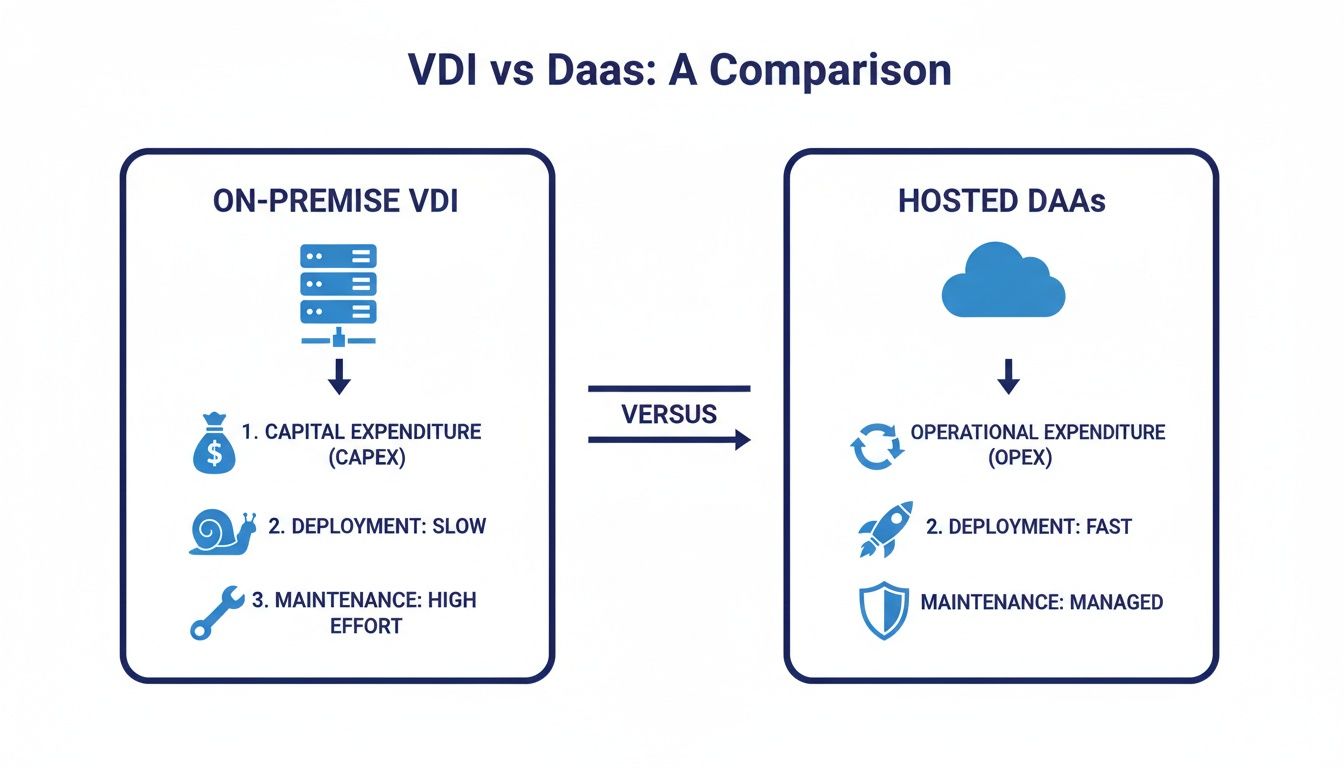
The image above says it all. You're shifting from a slow, expensive capital expense (CapEx) model to a flexible, fast, and predictable operating expense (OpEx) model. It's a game-changer.
Once you have a provider in your corner, it's time to map out the actual move. This is where you decide how and when to get your data and applications from point A to point B. Are you going to do a simple "lift and shift" of your current servers, or is this the perfect chance to clean house and organize your data? For most businesses, a phased approach works best.
You could start by migrating less critical applications first. This lets you build momentum and iron out any kinks in the process with low stakes. Creating a detailed timeline with clear milestones is an absolute must. For a deeper dive into this stage, our comprehensive cloud migration checklist gives you an even more detailed roadmap to follow.
Before you flip the switch for the entire company, run a pilot program. Pick a small, representative group of users and let them test-drive the new environment in a real-world setting. This is your golden opportunity to get feedback on performance, usability, and any workflow tweaks that are needed. This test run is invaluable for catching and fixing issues before they affect everyone.
A pilot program turns your end-users into partners. Their feedback is the most valuable data you can collect, allowing you to fine-tune the environment and ensure a positive experience for the entire organization upon full rollout.
After a successful pilot and a few adjustments, you can schedule the full rollout. During this final phase, communication is everything. Arm your team with training materials, clear instructions, and a go-to person for support. A well-communicated and thoroughly tested migration guarantees a smooth, successful launch of your new hosting virtual desktop solution.
Picking a provider for hosting your virtual desktop is about more than just finding the lowest price. It's about finding a strategic partner who will become the bedrock of your daily operations, keeping your data secure and your team productive. You have to look past the marketing slogans and focus on the core capabilities to make a choice you won’t regret later.
The right provider acts as an extension of your own IT team, bringing expertise and infrastructure that would be far too expensive to build yourself. They should offer a transparent, reliable service that lets you focus on your business, not on managing servers.
The first thing you should ask any potential provider about is their performance guarantee, which is usually laid out in a Service Level Agreement (SLA). Think of the SLA as their promise to you—a legal document defining their commitment to uptime, performance, and how quickly they’ll respond when you need help. A solid SLA is non-negotiable.
Look for providers that guarantee high uptime, like 99.5% or better. This ensures your virtual desktops are there when you need them, preventing the kind of costly downtime that grinds business to a halt. Anything less should be a major red flag.
For industries like accounting and law, security isn’t just a feature—it’s the whole foundation. Your provider has to prove they’re serious about protecting your sensitive client data, and that goes way beyond simple firewalls and antivirus software.
Ask potential providers for proof of their security credentials and compliance certifications. Here are a few key ones to look for:
Choosing a provider with proven compliance, like a Microsoft Cloud Solution Provider, means you're partnering with an expert vetted by industry leaders. This external validation gives you peace of mind that your data is in safe hands.
You wouldn't buy a car without a test drive, right? The same logic applies here. You shouldn't commit to a virtual desktop provider without trying it out first. A free trial or a live demo is the single best way to see if a provider's claims hold up and how the environment performs with your actual business software.
This hands-on experience lets you answer the important questions before you sign on the dotted line. Is the desktop responsive? Does your specialized software run smoothly? Is the interface easy for your team to use?
At Cloudvara, we believe in proving our value upfront. That’s why we offer a free trial that lets you test the full platform with your own applications. It ensures a perfect fit and gives you complete confidence that you’re choosing the right long-term partner for your business.
As businesses start thinking about hosting a virtual desktop, a few practical questions always come up. Getting clear, straightforward answers helps you move forward with confidence, making sure you know exactly how this technology fits into your day-to-day work.
We’ve gathered the most common questions to give you the direct information you need, covering everything from technical requirements to the security of your company’s most important data.
For most standard office tasks—think email, editing documents, and using business apps—a stable connection with 1-2 Mbps of bandwidth per user is plenty. What’s often more important than raw speed is having low latency, which is the time it takes for data to travel between your device and the server. Low latency is what makes your desktop feel snappy and responsive, without any lag.
Of course, if your team is doing more intensive work like graphic design or video editing, you'll need higher bandwidth to keep things running smoothly. Your provider can help you figure out your specific needs when you get started.
Yes, absolutely. One of the biggest advantages of hosting a virtual desktop is that it works with the software you already own and rely on. A good provider will work with you to install and set up your licensed, Windows-based applications.
This includes everything from universal software like Microsoft Office to highly specialized programs for your industry. For example:
This compatibility ensures a seamless transition for your team, letting them work with the tools they already know in a more secure and flexible setup.
Security is the foundation of a hosted desktop service. Instead of your data being stored on individual devices that can be lost, stolen, or hacked, it all lives in a highly secure data center. These facilities are protected by multiple layers of security.
This centralized model means that even if a laptop is stolen from an employee's car, zero company data is compromised. Access can be revoked instantly, securing your sensitive information.
Reputable providers use enterprise-grade firewalls, intrusion detection systems, and end-to-end encryption to guard your information. They also maintain compliance with strict standards like SOC 2, offering a level of security that’s often too complex and expensive for a small or medium-sized business to manage on its own. If you have more general questions about digital services, you might find answers in their general FAQ section.
Ready to see how a secure, flexible virtual desktop can transform your business operations? At Cloudvara, we make the transition simple. Test our platform with your own software, risk-free. Start your free trial at https://cloudvara.com today.




