
Hosted QuickBooks Desktop is the full-featured version of the software you already know and trust, but instead of living on your local office computer, it runs on a secure, remote server. This setup gives you the rock-solid functionality of Desktop with the get-it-anywhere access of the cloud.
It’s the perfect answer for businesses that can't live without specialized features like job costing or advanced inventory management but also need the flexibility to support a remote or traveling team.
You love the powerful, in-depth features that QuickBooks Desktop delivers, but your business needs the agility and freedom that only cloud access can provide. This is the core reason so many companies are making the switch to a hosted QuickBooks Desktop environment.
It’s not about ditching your trusted software; it’s about making it work better for you.
Think about a construction company where project managers need to pull complex job costing reports from different sites. Or a CPA firm whose accountants need secure, simultaneous access to multiple client files from their home offices. These are the kinds of real-world scenarios where the value of hosting becomes immediately clear.
A common fear when considering a move away from Desktop is losing the deep functionality you rely on every day. Many of the fully online accounting alternatives just don't cut it—they often strip away the advanced reporting, inventory management, and industry-specific tools that businesses like yours need.
A hosted solution solves this problem beautifully. You get to keep the exact same software interface and feature set, which means no steep learning curve or disruptive retraining for your team. The only thing that changes is where the software lives.
By moving to the cloud, you're not sacrificing features for access—you're getting the best of both worlds. The robust engine of QuickBooks Desktop is preserved, while its accessibility and security are significantly upgraded.
The decision to host QuickBooks is more than an IT upgrade; it's a strategic move backed by some serious operational benefits. It directly addresses the common pain points that growing businesses face and modernizes your accounting infrastructure without forcing you onto a less capable platform.
QuickBooks already holds a massive share of the small business accounting software market, capturing over 84% of the category. A huge number of those users, especially in specialized fields like construction and accounting, depend on its unique desktop features.
Hosting gives these businesses a clear path forward by adding some critical advantages:
For companies with international operations, moving QuickBooks Desktop to the cloud can also supercharge its native capabilities. It complements the advanced tools found in leading multi-currency accounting software solutions. This move isn't just about convenience; it's a smart investment in your business's continuity and efficiency.
Picking a provider for your hosted QuickBooks Desktop is easily the most important decision you'll make in this entire process. This choice directly affects your data security, your team's day-to-day productivity, and frankly, your own peace of mind. You have to look past the flashy marketing claims to find a genuine partner, and that requires a solid framework for evaluation.
This isn't just about renting server space. You're entrusting your company's entire financial core to a third party. So, the first step is understanding who you're dealing with.

One of the clearest distinctions you can make is whether a provider is an Intuit Authorized Host. This isn't just a fancy badge for their website; it means the provider has been thoroughly vetted by Intuit to meet specific, high standards for reliability, security, and customer support.
An authorized host has a direct line to Intuit's own technical team, which can be a lifesaver when complex, software-specific issues pop up. They are proven experts in the QuickBooks ecosystem, ensuring your software is always up-to-date and configured properly from day one. While other providers might dangle a cheaper price tag, the expertise and dedicated support from an authorized partner can prevent the kind of costly downtime that wipes out any initial savings.
Your financial data is one of your most sensitive assets, so security is absolutely non-negotiable. Don't just nod along to vague promises of "top-notch security." You need to dig for specific, verifiable credentials that prove a provider is serious about protecting your information.
Key security and performance indicators to look for include:
A provider's security measures are a direct reflection of their professionalism. If they can't provide clear documentation on their security protocols, disaster recovery plans, and compliance certifications, consider it a major red flag.
Beyond just security, raw performance is what your team will notice every single day. Ask about server responsiveness and, more importantly, whether they offer a demo or a trial period. Testing the environment firsthand with your actual company file is the only real way to gauge if the speed will meet your team's needs.
To make a confident choice, you need to compare your options systematically. Don't get swayed by a single flashy feature; you need to look at the whole picture. For a more detailed breakdown, our article on how to choose a cloud provider offers a much deeper dive into the selection process.
Here's a quick comparison table to help you organize your thoughts. Fill it out for each provider you're seriously considering.
| Feature | Provider A | Provider B | Your Requirement |
|---|---|---|---|
| Intuit Authorized | e.g., Yes/No/Preferred | ||
| Uptime SLA | e.g., 99.9% or higher | ||
| SOC 2 Compliance | e.g., Must have | ||
| 24/7 QB Support | e.g., Phone/Chat/Ticket | ||
| Backup Frequency | e.g., Daily, offsite | ||
| 3rd-Party Apps? | e.g., Yes, specific apps | ||
| Scalability Plan | e.g., Add users easily | ||
| Trial/Demo | e.g., Yes, for 7+ days |
Ultimately, choosing the right hosting provider comes down to finding a reliable partner who will safeguard your financial data and actively support your business operations. Armed with these questions and a clear checklist, you can confidently select a provider that truly fits what you need.
A successful move to a hosted QuickBooks Desktop environment starts long before your data ever touches the cloud. Think of it like packing before a big move—prepping your company file is the single most important step to prevent headaches, data corruption, and frustrating surprises after you go live. A clean, healthy file guarantees a much faster and smoother transition.
This whole prep phase is about finding and fixing hidden issues within your data. Over years of daily use, QuickBooks files can pick up minor errors or get bloated with old information. Those little things can slow down performance and make the migration a real slog. Taking the time to sort this out now will save you a ton of effort later.
The process boils down to a simple, three-step workflow that ensures your file is ready for its new home.
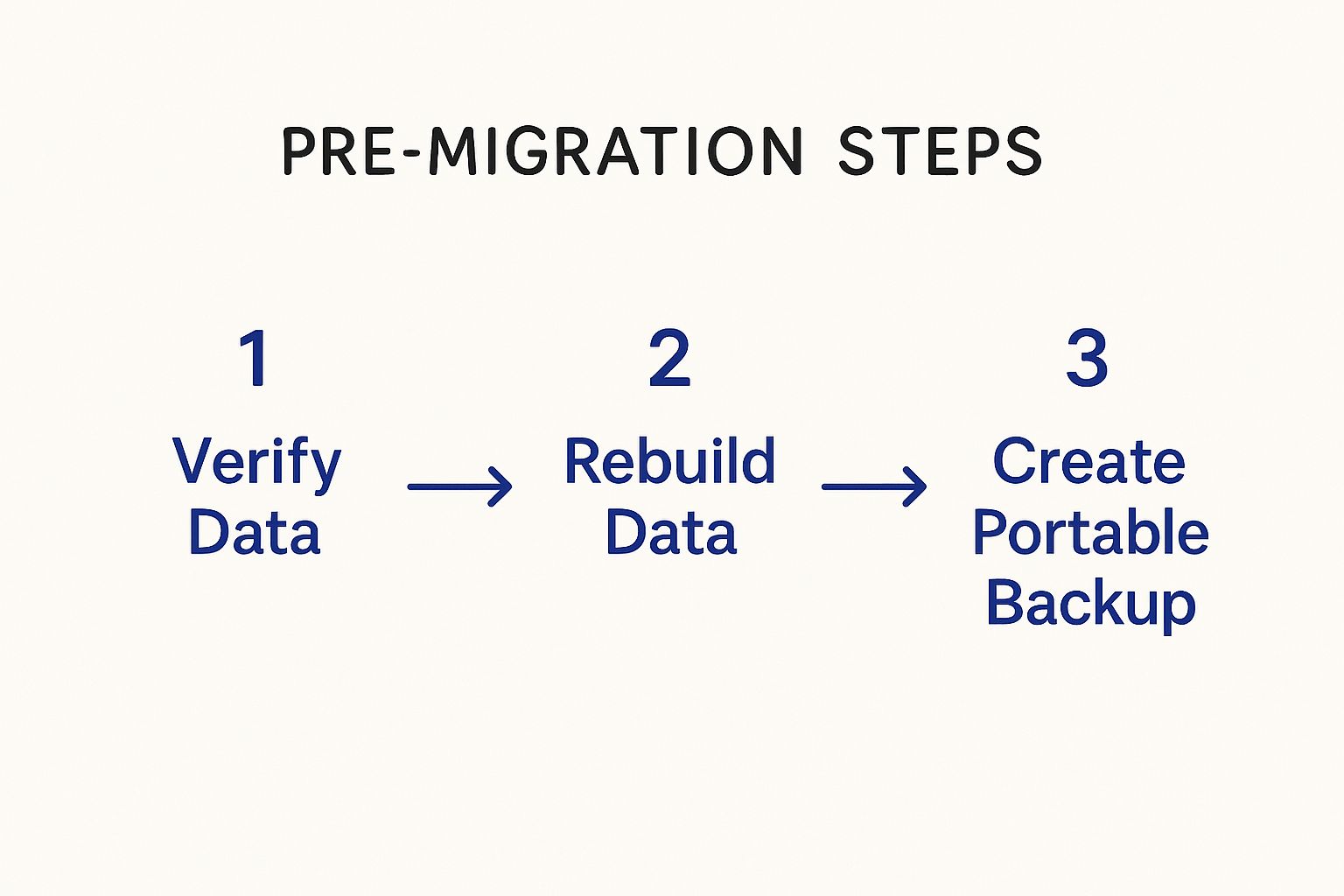
This sequence—Verify, Rebuild, and Back Up—is your go-to toolkit for ensuring data integrity before you hand anything over to your hosting provider.
Your first move should be to use the powerful, built-in tools QuickBooks provides for file maintenance. These utilities are designed to sniff out and fix data inconsistencies you might not even know exist.
Running these utilities is non-negotiable. Trying to migrate a file with underlying corruption is one of the top reasons migrations fail, and it can lead to some serious downtime.
A clean bill of health from the 'Verify Data' utility is your green light to proceed. Skipping this check is like setting sail in a storm without checking for leaks—you're just asking for trouble.
Once your file is verified and clean, the next step is to make it as lean and portable as possible. An oversized file can dramatically slow down the upload and setup process on the new server.
If your business has years of historical data, using the Condense Data utility in QuickBooks can be a game-changer. This tool reduces your file size by summarizing old, closed transactions into journal entries, all while keeping your balances perfectly intact. It makes the file much lighter without losing your critical financial history.
After cleaning and maybe condensing, your final prep step is creating a portable company file (.qbb). This is a compact version of your company file that's ideal for sending to your hosting provider. It’s significantly smaller than a standard backup (.qbb) and is specifically designed for easy transport.
Finally, before you make the move, take a few minutes to document your current setup. This list will be your roadmap for getting back up and running quickly.
Having this documentation handy ensures you can recreate your exact working environment on the new hosted platform without missing a beat.
You’ve prepped your company file and picked a hosting provider—now it’s time for the main event. This is where we move your financial operations to their new home in the cloud, getting your data securely transferred and your team set up for remote access.
While a good hosting partner will handle the technical heavy lifting, understanding the process helps you manage things on your end and keep downtime to a minimum.
The first real step is getting your portable company file (.qbb) uploaded to the new server. Most providers give you a secure client portal or a dedicated FTP (File Transfer Protocol) to get this done. This isn't just a simple upload; it ensures your sensitive financial data is encrypted and protected the entire way.
Once your file arrives, the provider’s technical team takes over. They'll restore the file on your dedicated virtual server and install the correct version of QuickBooks Desktop to run it.
As you get into the thick of it, a solid cloud migration checklist can be your best friend, making sure no small detail gets overlooked.
With the software installed and your company file live, the next critical phase is user access. The goal here is to mirror the exact permissions your team had on the local network. Everyone should have precisely the access they need—and absolutely nothing more. This is no time to hand out generic admin rights.
Your hosting provider will create individual accounts for each team member. From there, you'll log in as the QuickBooks administrator to set up permissions inside the software, just like you always have.
Taking a methodical approach here prevents security holes and ensures your team can get right back to work without hitting frustrating permission walls.
A hosted QuickBooks Desktop setup is more than just the accounting software. It’s about recreating your entire financial ecosystem in the cloud. That includes mapping network drives for shared documents and installing any third-party apps that plug into QuickBooks.
For instance, if your team relies on a specific app for time tracking or inventory management, you’ll work with your provider to get it installed on the server. The process is usually pretty straightforward, but you absolutely have to test these integrations to make sure data is flowing correctly between the apps.
Notice how the interface in the screenshot looks exactly the same? That’s the point. Your team gets to work with the exact software they already know, which means you can skip a painful and disruptive learning curve.
Key Takeaway: A successful migration is all in the details. Taking the time to properly configure users, map drives, and test every integration is what separates a seamless transition from a frustrating one.
For a deeper dive into the technical side of things, our detailed guide on essential cloud migration steps breaks it all down. Following a structured plan is the best way to ensure your team is logged in and fully productive from day one.
Alright, you’ve migrated to a hosted QuickBooks Desktop, and the heavy lifting is done. But don't close the book just yet. Now comes the part where we fine-tune your new environment to really make it hum, and get you ready to handle the little hiccups that can pop up. A few small tweaks now will make a massive difference in your team's day-to-day workflow.
This move to the cloud isn't just a small shift for your business; it's part of a much bigger trend. By 2020, cloud adoption rates had already soared past 78% for small businesses, which tells you just how well hosted solutions fit into a market that demands flexibility. You can discover insights on small business software adoption to see the full picture.
Even with a fantastic hosting provider, the performance you experience is still at the mercy of your local internet connection. If things feel a bit laggy—especially on a slower network—you can often fix it by adjusting a few remote desktop settings. The goal is to reduce the amount of data your computer has to process.
Here are a few quick adjustments that almost always improve responsiveness:
For a deeper dive, our guide on using a remote desktop for QuickBooks covers more advanced configurations you can explore.
Once your team starts working in the new environment, you'll likely run into a few common operational hurdles. Knowing how to handle them yourself means less downtime and fewer support tickets for minor issues.
Don't let small glitches disrupt your day. Most common issues in a hosted environment have straightforward solutions that you can manage directly, empowering your team to be self-sufficient and efficient.
Here are a handful of frequent scenarios and how to get past them:
By proactively tweaking your setup and knowing these troubleshooting basics, you can ensure your hosted environment stays the powerful, efficient tool you need it to be.
Moving your financial hub to a new environment is a big step, so it’s natural to have questions. When you’re looking at a hosted QuickBooks Desktop solution, getting clear answers upfront is essential. This isn’t just an IT decision—it’s a move that impacts how your entire business operates.
We’ve gathered the most common questions we hear from business owners who are right where you are. Think of this as your guide to cutting through the noise and getting the straightforward info you need to move forward with confidence.
This is easily the most frequent question we get. The short answer is no—they are completely different. Confusing hosted QuickBooks Desktop with QuickBooks Online (QBO) is a common mix-up, but they serve very different needs.
Choosing a hosted solution means you get the anytime, anywhere access of the cloud without giving up the powerful features your business relies on.
"What about my time-tracking app?" or "Will it connect to my inventory system?" This is a close second in the list of concerns, and it's a critical one. For most businesses, QuickBooks is part of an ecosystem, connecting to CRMs, payment processors, and other vital tools.
The good news is that a quality hosting provider’s environment is built to support these integrations. Most third-party applications that work with your desktop version will work seamlessly in a hosted setup. A key part of your evaluation should be to confirm compatibility with your specific apps. An experienced provider will often handle the installation for you, ensuring everything talks to each other correctly from day one.
The whole point of hosting is to improve your current workflow, not break it. A great provider sees your integrated apps as essential and works to ensure they function perfectly in the new environment.
Handing over your financial data can feel like a leap of faith, but a professional hosting environment is almost always more secure than a typical in-office server. Reputable providers offer enterprise-grade security that’s simply out of reach for most small businesses.
Look for providers that offer:
As for speed, performance should feel just as fast—if not faster—than running QuickBooks locally, especially if you're upgrading from older hardware. The experience ultimately depends on the provider’s server infrastructure and your own internet connection. Always ask for a free trial to test drive it with your actual company file.
Ready to experience the power and flexibility of a hosted environment firsthand? Cloudvara offers a seamless, secure, and fully supported platform for your QuickBooks Desktop. Start your free 15-day trial today and see the difference for yourself.




