
To host your applications effectively, you need more than just rented server space. It’s about building a strategy around a flexible, scalable, and cost-effective infrastructure that actually fuels your business growth. This means moving away from traditional, clunky on-premise hardware and embracing dynamic cloud environments like those offered by Cloudvara.
The core idea is simple: pay only for what you use. This allows your application to grow with user demand without forcing you to sink huge amounts of cash into hardware upfront.

Moving your application to the cloud is far more than a simple technical update—it's a fundamental change in how your business operates. Companies are making this switch to get a competitive leg up, deliver better service, and build systems that don't crumble under pressure. The conversation has shifted from if a business should move to the cloud to how and when.
The numbers back this up. Today, a staggering 94% of companies use cloud services in some form, and an impressive 60% of all business data is now stored in the cloud. This massive shift highlights a clear trend away from physical data centers. In fact, only 5% of companies say they plan on moving back to on-premises solutions after experiencing the cloud.
The benefits of cloud hosting sound great on paper, but what does that actually look like for a real business?
Imagine an e-commerce platform that used to run on its own on-premise servers. Every Black Friday, their website would slow to a crawl or crash completely under the traffic spike, leading to lost sales and angry customers. It was a predictable disaster.
After migrating to the cloud, they could tap into auto-scaling. This feature automatically spins up more computing resources when traffic surges and then scales them back down as things quiet down. Not only did this stop the crashes, but it also meant they weren't paying for powerful, idle servers during slow months.
By moving to the cloud, the business transforms a potential point of failure—unpredictable user demand—into a manageable, automated process that supports growth instead of hindering it.
One of the most powerful arguments for cloud hosting is the financial one: you move from a Capital Expenditure (CapEx) model to an Operational Expenditure (OpEx) one.
Here’s the breakdown:
This shift frees up cash that can be put back into what really matters, like product development, marketing, or customer support. It also makes top-tier technology accessible to small and mid-sized businesses that could never afford a full-scale on-premise setup.
To help you visualize the differences, here’s a quick comparison of the two models.
This table highlights the fundamental differences between hosting applications on-premises versus in the cloud, helping you understand the key advantages of a cloud-first approach.
| Factor | On-Premises Hosting | Cloud Hosting |
|---|---|---|
| Initial Cost | High upfront capital expenditure (CapEx) for hardware. | Low to no upfront costs; pay-as-you-go model (OpEx). |
| Scalability | Limited and slow; requires manual hardware upgrades. | High and rapid; resources scale automatically or on demand. |
| Maintenance | Full responsibility of in-house IT team for all hardware/software. | Managed by the provider, freeing up your internal teams. |
| Accessibility | Limited to physical location unless complex VPNs are set up. | Accessible from anywhere with an internet connection. |
| Security | Entirely dependent on your in-house security measures. | Shared responsibility with provider, who offers advanced security. |
| Reliability | Single point of failure if redundancy isn't built in (which is costly). | High availability with built-in redundancy across data centers. |
As you can see, the cloud model offers a more agile and financially sensible path for most businesses today. Mastering this transition is key to building high-performing, reliable applications that can thrive under any condition. For a deeper look at these financial and operational upsides, check out our complete guide on the https://cloudvara.com/benefits-of-cloud-hosting/.

A successful cloud migration starts long before you move a single byte of data. It begins with a practical, well-defined blueprint—a strategic plan that turns a massive technical project into a series of calculated, manageable steps.
Guesswork is the enemy here. A solid foundation is built on a thorough understanding of what you have, where you're going, and precisely why you're making the move in the first place.
The first order of business is a realistic, no-fluff assessment of your current applications. This isn't just about listing server specs. You need to dig deep and map out all the critical dependencies, from obscure third-party APIs to that legacy database the original developer built a decade ago. Pinpointing these connections early prevents nasty surprises down the road.
At the same time, you need to identify existing performance chokepoints. Is your database struggling under heavy loads? Does your application grind to a halt during specific reporting tasks? Documenting these issues now gives you a clear benchmark for success once you’ve moved to the cloud.
Before you can chart a course, you have to understand the terrain. Cloud services generally come in three flavors, each offering a different level of control and management.
Your application's architecture heavily influences which model fits best. A modern, containerized app built on microservices might thrive on a PaaS offering, while a complex, monolithic legacy app might initially need the granular control of IaaS to get off the ground.
The goal is to match the service model to your application's needs and your team's capabilities. Choosing PaaS when you need deep, IaaS-level control will only lead to frustration. On the flip side, trying to manage IaaS without the necessary expertise can open you up to security risks.
With a clear picture of your application and the service models, the next move is deciding how you'll get there. Not all migrations are created equal, and the right strategy hinges on your goals, budget, and timeline.
There are three primary strategies to consider:
For a more detailed walkthrough of what this entails, you can explore these key cloud migration steps that break down each phase of the process.
Finally, a blueprint is useless without a destination. To effectively host applications in the cloud, you need to define success in concrete, measurable terms. Vague goals like "improve performance" just won't cut it.
Instead, set specific Key Performance Indicators (KPIs) from day one. Your objectives should be clear and quantifiable.
Here are a few real-world examples:
These metrics do more than just prove ROI. They guide your architectural decisions, inform your testing cycles, and keep the entire project focused on delivering tangible business value.
Picking where you'll host applications in the cloud is one of the biggest decisions you’ll make. With giants like Amazon Web Services (AWS), Microsoft Azure, and Google Cloud Platform (GCP) dominating the conversation, it’s easy to feel overwhelmed. The trick is to tune out the marketing hype and zero in on what your application actually needs to thrive.
The cloud market is absolutely booming. Spending on cloud infrastructure services rocketed to $99 billion in the second quarter of 2025 alone. That's an incredible jump of over $20 billion from the same time in 2024, thanks in large part to the explosion in AI development. As it stands, AWS holds a 30% market share, followed by Azure at 20% and Google Cloud at 13%. You can dig into more on this rapid expansion over at CRN.com.
All this growth brings more powerful services, but it also brings more complexity. You need a clear framework to cut through the noise—one based on your technical requirements, your team's skills, and your budget.
Stop trying to compare every last feature each provider offers. That’s a recipe for analysis paralysis. Instead, let your application’s architecture be your guide. A data-hungry AI model has completely different needs than a simple e-commerce site that just needs a blazing-fast Content Delivery Network (CDN).
For instance, a startup building a machine learning app would probably lean toward a platform with mature, easy-to-use AI and GPU tools, like Google Cloud's Vertex AI or AWS SageMaker. On the other hand, a global marketing website would find the CDN capabilities from a provider like Cloudflare or Azure to be far more important for getting content to users quickly.
This simple breakdown shows the three pillars that should drive your decision from the start.
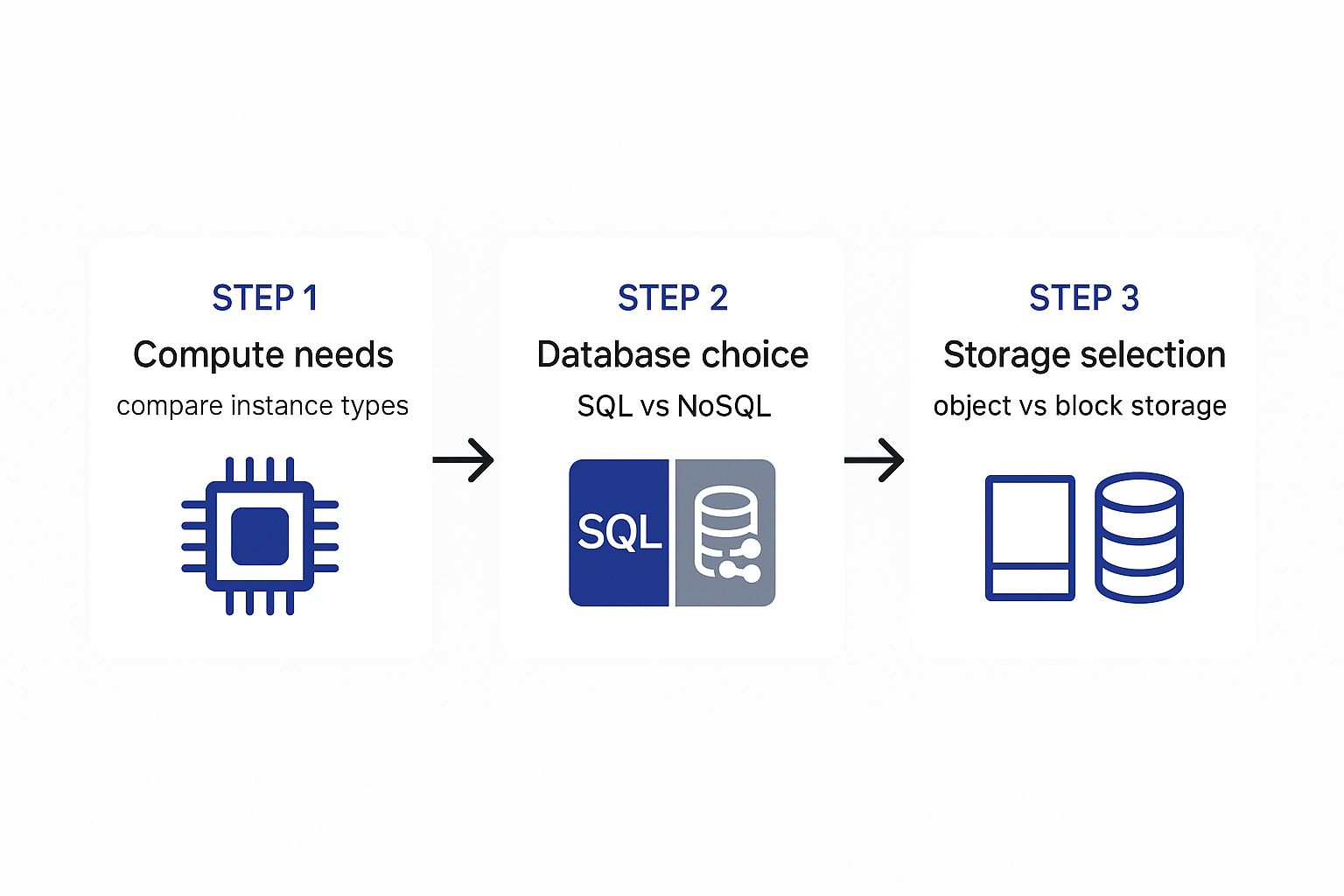
As you can see, the whole process should begin with the fundamentals: how your app processes information, manages data, and stores files.
Let's get into the three pillars you need to evaluate: compute, database, and storage. The choices you make here will become the very backbone of your cloud setup.
Choosing a cloud platform isn't about finding the "best" one; it's about finding the best fit for your specific workload and team. A platform that plays to your team’s strengths—for example, a group of long-time Windows developers will probably find Azure more intuitive—can slash the learning curve and get you to launch day much faster.
To make a truly informed choice, you have to look beyond the tech specs and consider the business reality. Your budget, your team’s expertise, and your long-term vision are just as critical as the technology itself.
Take a small law firm that needs to host its document management software. Their priorities are security, reliability, and ease of use—not experimental AI or immense processing power. For them, a managed provider like Cloudvara, which focuses on centralizing key business applications, makes a lot more sense than trying to navigate the vast, complex world of a major public cloud.
This is where a real evaluation pays off. For a deeper dive into weighing all these factors and making a decision that aligns with your business goals, check out our guide on how to choose a cloud provider. By focusing on what you truly need and understanding the trade-offs, you can select a platform that will be a solid foundation for growth.
This is where the rubber meets the road—the point where your detailed blueprint becomes a living, breathing application. Making the jump from planning to a live service isn’t about flipping a single switch. It’s a series of careful, hands-on steps to bring your vision online securely and efficiently.
The first move you’ll make isn’t with your code; it’s with your network. Building a secure perimeter from the outset is the most critical part of the process when you decide to host applications in the cloud.
Before you even think about deploying code, you need to carve out a secure, isolated space within the cloud provider's massive infrastructure. This is done by setting up a Virtual Private Cloud (VPC). The easiest way to think of a VPC is as your own private, fenced-off property in the public cloud—a space where you have complete control over who and what comes in or out.
Inside this VPC, you’ll create subnets. These are smaller segments that help organize and isolate your resources. For instance, your public-facing web servers can live in a public subnet, while your databases, which hold sensitive information, are tucked away in a private subnet with no direct internet access. This simple act of segregation is a bedrock security practice that dramatically shrinks your application's attack surface.
Setting up your VPC correctly from the start is non-negotiable. It's the digital equivalent of building a strong foundation and walls for your house before moving in your valuables. Retrofitting security is always more difficult and less effective.
Once your network structure is solid, the next big challenge is getting your data moved over without causing a major disruption to your business. A sloppy data migration can lead to downtime, lost data, and a flood of angry user emails.
For most applications, the database is the beating heart. Taking it offline for hours on end just isn't an option. This is exactly why techniques like live database replication are so essential.
Instead of a clunky "dump and load" method that guarantees hours of downtime, live replication sets up a real-time, synchronized copy of your on-premise database in the cloud. Your current application keeps humming along, totally uninterrupted, while the data is mirrored. When you're ready to make the final cutover, it takes minutes, not hours, making the entire switch almost invisible to your users.
Here are a few other data migration tactics I’ve seen work well:
With a secure network in place and your data safely migrated, you're finally ready to deploy your application code and set up the infrastructure that will keep it running, no matter the load.
Deploying the application code is often the most straightforward part of this whole phase, especially if you're already using modern tools like containers or Infrastructure as Code (IaC). Instead of logging into servers and manually configuring them, you use scripts and templates to spin up identical, repeatable environments.
After your code is live on the virtual servers (often called compute instances), you need to manage the traffic flowing to them. A load balancer is crucial here. It acts like an air traffic controller, spreading incoming requests evenly across multiple instances of your application. This prevents any one server from getting swamped and keeps your app online even if an instance fails, because the load balancer just redirects traffic to the healthy ones.
This setup paves the way for auto-scaling, one of the cloud's most powerful features. By creating an auto-scaling group, you can set rules that automatically add or remove servers based on what's happening in real-time. For example, you might set a rule to launch a new server anytime the average CPU usage across your instances climbs above 70% for five consecutive minutes. When traffic dies down, it automatically removes those extra servers so you’re not paying for resources you don't need. This dynamic response is what turns unpredictable traffic spikes from a crisis into a non-event.
Getting your application live is a huge win, but it’s really just the starting line. The real work begins now, shifting focus to the daily discipline of keeping your cloud environment secure, fast, and healthy. When you host applications in the cloud, you’re stepping into a partnership, and understanding your role is everything.
This relationship is what the industry calls the shared responsibility model. In a nutshell, your cloud provider (that’s us) handles the security of the cloud—the physical data centers, the core network, all the hardware. Your job is to manage security in the cloud. That means controlling who gets access, locking down your data, and making sure your application is configured properly.
Great security isn’t a single product you buy; it's a layered strategy built on smart principles that limit your attack surface. Your first and most important line of defense is managing who can do what, and when.
This is where Identity and Access Management (IAM) becomes your best friend. The goal here is simple: enforce the principle of least privilege. This just means that any person or service should only have the bare-minimum permissions needed to do their job—and absolutely nothing more. For example, an intern in your marketing department should never have the credentials to access a production database.
A solid IAM strategy involves a few key habits:
Think of your cloud environment like a secure building. IAM acts as the system of keycards and clearance levels, ensuring people can only get into the specific rooms they're authorized for.
Beyond just people, you need to control the traffic flowing to and from your application. This is where security groups come in. They act as a virtual firewall for your cloud servers, letting you set strict rules. For instance, you can configure them to only allow web traffic on specific ports from certain IP addresses, which instantly blocks a massive amount of automated attacks.
Your data is the heart of your application, and protecting it is non-negotiable. This means securing it both when it’s flying across the internet (in transit) and when it’s sitting on a hard drive (at rest).
For a deeper dive into building a robust defense, our guide on how to implement effective cloud security solutions in 2024 is a great resource. If you want to go even further, consider implementing a Zero Trust security model, which treats every request as a potential threat until it's verified.
You can’t fix a problem you don't know you have. That’s why proactive monitoring is so critical—it helps you spot trouble long before your users do. Tools like Amazon CloudWatch or Azure Monitor are designed for this, giving you a constant stream of data on your application's vital signs.
To start, focus on tracking these key areas:
Once you establish a baseline of what "normal" looks like, you can set up smart alerts that ping your team the second a metric goes off the rails. This moves you from a reactive posture—scrambling to fix things after they break—to a proactive one, where you keep your application running smoothly and securely.
Getting your application live is a huge win, but it’s really just the beginning. The real work in cloud hosting is the constant cycle of refinement that comes next. Your cloud environment is never static, and if you're not paying attention, neither is your monthly bill. Post-launch optimization is all about making sure you’re getting the most performance for your money without burning through your budget.
It always starts with one thing: visibility. You can’t optimize what you can’t see. The first habit to build is regularly digging into your cloud provider’s usage and cost reports. These dashboards are goldmines, showing you exactly where your money is going and often pointing directly to quick wins for savings.
One of the biggest culprits of budget bloat is simple waste. I’m talking about "zombie" assets—resources that were spun up for a quick test or a temporary project and then completely forgotten. They just sit there, silently draining your budget.
Keep an eye out for these common offenders:
The goal here is to build a habit of financial hygiene in the cloud. It’s like cleaning out your garage—you’ll be amazed at how much junk has piled up and how much space (or in this case, budget) you can reclaim.
Even with the best plan, managing a cloud environment isn't always straightforward. It's worth understanding the common challenges in cloud organization and AI solutions because they directly impact both your performance and your bottom line over the long run.
Beyond just cutting waste, you can unlock some serious savings by shifting away from on-demand pricing to more strategic commitment models. If you have workloads that are predictable and long-term, these options are a no-brainer.
Cloud providers love commitment, and they reward it with some pretty steep discounts. The two main options you'll run into are Reserved Instances (RIs) and Savings Plans. With RIs, you commit to a specific instance type in a certain region for a one or three-year term, and in return, you can slash your costs by up to 72%. Savings Plans give you a bit more flexibility, letting you commit to a specific hourly spend in exchange for lower rates across a variety of instance types.
For a deeper look at these strategies, our guide to cloud cost optimization lays out a detailed roadmap.
Cost optimization and performance tuning are really two sides of the same coin. A faster, more efficient application almost always uses fewer resources, which translates directly into a lower monthly bill.
A great place to start is by right-sizing your databases. A sluggish database can be a massive performance bottleneck, and the knee-jerk reaction is often to just throw more expensive compute resources at it. Instead, analyze your query performance and make sure your database has the right amount of memory and IOPS (Input/Output Operations Per Second) it needs—no more, no less.
You should also lean heavily on caching strategies to take the load off your core infrastructure. By storing data that’s frequently accessed in a high-speed cache, you can serve requests almost instantly. Pair this with a Content Delivery Network (CDN), and you’ve got a powerful combo. A CDN distributes your static files to servers around the globe, dramatically cutting down response times for your users, no matter where they are. This continuous loop of monitoring, analyzing, and refining is what builds a truly efficient and cost-effective application.
Moving your applications to the cloud is a big step, and it’s completely normal to have questions. In fact, it's smart to get answers before you dive in. This isn't just a technical switch; it's a shift in how your business operates.
We get these kinds of questions all the time from businesses making the move. Let's walk through some of the most common ones we hear.
This is usually the first thing on everyone's mind, and the honest answer is: it depends. Unlike traditional on-premise setups that demand a huge upfront investment in hardware, cloud pricing works on a pay-as-you-go model. Your final bill reflects exactly what you use—things like computing power, storage, and data transfer.
While that flexibility is a massive plus, it can feel a little unpredictable at first. The key to keeping costs in check is staying on top of your usage and optimizing where you can.
At Cloudvara, we focus on making our pricing straightforward so you're never caught off guard. We'll work with you to figure out what your application actually needs to set up a predictable monthly cost, helping you sidestep the complex billing you often see with the giant cloud providers.
Security is, without a doubt, a critical concern. The good news is that a well-managed cloud environment can be far more secure than a typical on-premise setup, but it’s crucial to understand the shared responsibility model.
Think of it this way: the cloud provider (like us) secures the fundamental infrastructure—the physical data centers, the network, the hardware. Your job is to secure what you put on that infrastructure, like your data, your applications, and who has access to them.
Here’s how you can lock down your side of the deal:
A properly configured cloud environment, paired with good security habits, gives you a level of defense that most small or mid-sized businesses could never afford to build on their own. It brings enterprise-grade tools and centralized security management within reach.
This is exactly where the cloud shines. On-premise servers would buckle or crash under an unexpected load, but cloud platforms are designed for this kind of elasticity.
Using a feature like auto-scaling, your environment can automatically spin up more computing resources in real-time to handle a sudden surge in traffic. No manual intervention needed.
Then, once things quiet down, the system scales back down on its own. This means you only pay for that extra power when you genuinely need it. This automated scalability keeps your app running smoothly for users while keeping your costs efficient, turning a potential crisis into a complete non-issue.
Ready to simplify your IT and move your essential business applications to a secure, reliable cloud? At Cloudvara, we specialize in making the transition seamless. Get a personalized quote and start your free 15-day trial today at https://cloudvara.com.




