At its heart, the choice between QuickBooks Online and QuickBooks Desktop boils down to accessibility versus depth. QBO is a cloud-based service you can access from any web browser, designed for flexibility and real-time teamwork. QBD, on the other hand, is a powerful program installed locally on your machine, loaded with deep, industry-specific features for more complex accounting.
Picking between QuickBooks Online (QBO) and QuickBooks Desktop (QBD) is one of the biggest software decisions a business can make. The right answer really depends on your company's day-to-day operations, industry, and plans for growth. QBO runs on a Software-as-a-Service (SaaS) model, where a monthly subscription gets you continuous access and automatic updates.
QuickBooks Desktop uses a more traditional software license model. You buy an annual subscription and install the program directly onto your computer. While that sounds simple, the choice impacts everything from how your team accesses the books to data security and the total cost of ownership over time.
The most obvious difference is in their architecture. QBO’s cloud-native design is perfect for remote teams and owners who need to check their financials from anywhere with an internet connection. This kind of access is a game-changer for service-based businesses or companies with a distributed workforce.
Conversely, QBD is a feature powerhouse installed on a local machine. It offers faster processing for large data files and more robust, industry-specific functions. Despite its on-premise nature, options for hosting QuickBooks Desktop can provide cloud-like accessibility without sacrificing its advanced capabilities, creating a hybrid solution that works for many businesses.
The platform you choose fundamentally shapes your accounting workflow. QBO prioritizes collaborative access and ease of use, while QBD delivers deep, specialized functionality that certain industries cannot operate without.
Interestingly, the market still shows a strong preference for the traditional model. QuickBooks Desktop commands a massive 62.23% of the accounting software market, while QuickBooks Online holds a more modest 4.35%. This gap highlights just how much businesses in specialized fields rely on the Desktop version's power.
Before we get into the nitty-gritty details, this table gives a quick summary of the key differentiators.
| Feature | QuickBooks Online (QBO) | QuickBooks Desktop (QBD) |
|---|---|---|
| Platform Model | Cloud-based (SaaS) | Locally Installed (Licensed Software) |
| Accessibility | Anywhere with an internet connection | Limited to installed computers |
| Pricing Structure | Monthly Subscription | Annual Subscription Fee |
| Best For | Service-based businesses, remote teams | Complex inventory, contractors, manufacturing |
This at-a-glance comparison sets the stage for a deeper analysis of how these differences play out in real-world scenarios.

When you look at the difference between QuickBooks Online and QuickBooks Desktop, a simple feature checklist won't cut it. The real story is in how those features actually work day-to-day and shape your workflows. Both platforms nail core accounting, but they take wildly different paths, especially when it comes to invoicing, inventory, and reporting.
QuickBooks Online (QBO) is designed from the ground up for speed and simplicity. Take its invoicing workflow—you can whip up and send a professional-looking invoice from any device in just a few minutes. It's a perfect fit for service-based businesses, freelancers, and consultants who need to get paid fast without getting bogged down.
QuickBooks Desktop (QBD), on the other hand, is all about power and granular control. The interface might not feel as modern, but the functionality runs much, much deeper. This becomes obvious when you need to do things like batch invoicing for dozens of clients at once, a task that’s vastly more efficient in Desktop.
The operational split is obvious right away. QBO’s bank feeds are generally more intuitive, making bank reconciliation a smooth, almost automated process for businesses with straightforward transaction volumes.
But for companies that need tighter control, QBD provides a much more robust framework. Its ability to handle complex journal entries, set hard closing dates with strict controls, and manage a more detailed chart of accounts gives seasoned accountants and bookkeepers the precision they demand.
Let’s look at a practical invoicing scenario:
The critical differentiator is workflow depth. QBO excels at streamlined, single-transaction processes perfect for modern service businesses. QBD dominates with its capacity for batch processing and multi-step workflows, which is non-negotiable for product-based or high-volume companies.
This core design philosophy echoes across both platforms. QBO is about making individual tasks as frictionless as possible. QBD is about efficiently managing complex, interconnected operational systems. It’s a key reason why so many established businesses are hesitant to migrate, even with Intuit’s heavy push toward its cloud solution.
Nowhere is the feature gap more obvious than in inventory management. QBO’s inventory tools are fine for basic needs, letting you track product quantities and costs. For a small e-commerce shop or a simple retailer, it might be all you need.
However, for any business with even moderately complex inventory, QBD Enterprise is in another universe. It offers advanced features that are absolutely essential for manufacturing, wholesale, and distribution.
Key inventory features that are exclusive to or far superior in QuickBooks Desktop include:
For a business that assembles products, runs a warehouse, or deals with complex supplier terms, these aren't just "nice-to-haves"—they are the backbone of daily operations. This functional depth is why so many product-based businesses stick with the Desktop version.
Reporting is another area where the platforms show their true colors. QBO provides a solid library of pre-built reports that are easy to run and understand. If you need a quick profit and loss statement or an A/R aging summary, they work perfectly.
QuickBooks Desktop, especially the Premier and Enterprise editions, delivers a far more powerful and customizable reporting engine. You can generate industry-specific reports (like for contractors, nonprofits, or retailers), filter data by an incredible number of data points, and build custom reports from scratch. This is vital for businesses that rely on deep data analysis for strategic decisions.
For example, a construction company can use QBD’s job costing reports to see the exact profitability of each project, comparing estimated costs against actual expenses for labor, materials, and subs. That level of granular insight is nearly impossible to replicate with QBO’s more basic project tools.
The market reflects this split. While QuickBooks Online revenue has exploded to $5.8 billion—dwarfing Desktop's $2.3 billion—Desktop still commands a massive 62.23% market share. QBO's growth is undeniable, with Online Accounting revenue up 23% quarterly and 22% annually in FY2025, but the numbers show that a huge, powerful user base still depends on the robust features only Desktop can provide. You can explore more about these trends to understand the bigger picture. The market is shifting to the cloud for simplicity, but power users aren't letting go of Desktop just yet.
The core difference between QuickBooks Online and QuickBooks Desktop boils down to one thing: where your financial data lives. This isn’t just a technicality—it dictates how you work, who’s responsible for security, and what happens when disaster strikes. Your choice has real-world consequences for your daily workflow and long-term peace of mind.
QuickBooks Online (QBO) gives you that classic cloud experience: access your books anytime, anywhere. As long as you have an internet connection, you can log in from a laptop, tablet, or phone. This is a game-changer for business owners on the go, teams working from different locations, and accountants who need to collaborate with clients without the clumsy back-and-forth of sending files.
QuickBooks Desktop (QBD), on the other hand, is a traditional on-premise setup. The software and your company file are installed on a single computer or a local server. Access is inherently tied to that physical location, which can create a serious bottleneck for remote work and makes real-time collaboration a headache.
QBO’s cloud accessibility comes with a completely different security model. Intuit manages everything—the servers, network security, firewalls, encryption, and threat detection. It’s a core part of their service, and they handle the heavy lifting.
If you're leaning toward cloud software, it helps to understand the basic principles behind data protection. Learning a bit about cloud security fundamentals can give you confidence in how providers keep your information safe.
With QBD, that security burden lands squarely on your shoulders. You’re responsible for protecting the computer or server where your data is stored. That means managing antivirus software, configuring firewalls, controlling physical access to the machine, and securing your network. If that hardware fails, gets stolen, or is hit with malware, your financial data is at risk.
The crucial distinction is who manages risk. With QuickBooks Online, you’re trusting Intuit’s enterprise-grade security. With QuickBooks Desktop, you’re in charge of building and maintaining your own secure fortress.
This is where a third option completely changes the conversation: hosted QuickBooks Desktop. By moving your licensed Desktop software to a secure cloud server, you get the best of both worlds. You keep all the powerful, industry-specific features of Desktop while gaining the secure, remote access you’d expect from Online.
A hosting provider manages the server infrastructure, security, and maintenance, taking that massive responsibility off your plate. Your team can then log into the full-featured Desktop application from any device, anywhere, just like they would with QBO.
This approach fixes the biggest limitation of QBD without forcing you to give up the advanced functionality your business relies on. Taking a closer look at QuickBooks cloud hosting security reveals how a hosted environment can provide enterprise-level protection that’s often out of reach for a small business to build on its own.
Nowhere is the difference between the two platforms sharper than in backup and continuity planning. QBO handles backups for you, automatically. Your data is continuously saved in the cloud across redundant servers, so if one fails, your information is safe and accessible. This built-in disaster recovery is a massive plus.
With an on-premise QBD setup, backups are a manual chore that’s 100% your responsibility. You have to remember to create them, store them somewhere safe (and separate!), and have a tested plan to restore everything if the worst happens.
Think about these scenarios:
A hosted Desktop environment solves this problem, too. Reputable hosting providers perform automated, daily backups and store them in secure, geographically separate data centers. This gives you the same business continuity and peace of mind as QBO, closing a major vulnerability for Desktop users. It makes the difference between QuickBooks Online and QuickBooks Desktop less about risk and more about which feature set fits you best.

No accounting software is an island. The true power of QuickBooks often comes from its ability to connect with the other tools you use to run your business. Both platforms support third-party apps, but their approach to integration is fundamentally different, creating one of the most significant dividing lines between them.
This isn’t just about the number of apps available; it’s about the very nature of those connections.
QBO was built for the modern web, with an open API that makes it incredibly easy for other cloud-based apps to plug in. This has fueled a massive marketplace with over 750 apps covering everything from CRMs and e-commerce platforms to project management tools.
If your business runs on tools like Shopify, Stripe, or Mailchimp, QBO offers seamless, near-instant data syncs that automate workflows and cut down on manual data entry.
In contrast, QuickBooks Desktop integrations are often deeper and more powerful, even if the total number of apps is smaller. These apps are typically designed for complex, high-stakes industries like manufacturing, construction, or wholesale distribution.
These aren't just simple data syncs. They are robust operational systems that embed themselves directly into Desktop’s powerful backend, essentially extending its core functionality in ways QBO can't match.
The primary difference between QuickBooks Online and QuickBooks Desktop integrations comes down to breadth versus depth. QBO’s ecosystem is wide and accessible, perfect for businesses that need to connect a variety of modern, cloud-based tools into a central accounting hub. The focus is on ease of use and broad connectivity.
QuickBooks Desktop, on the other hand, is all about specialized, industry-specific power. An application like Fishbowl Inventory doesn't just pass data back and forth with QBD; it becomes the central nervous system for a company's entire manufacturing and warehouse operation. It handles complex assemblies, multi-location inventory, and barcode scanning with a level of detail that lighter cloud integrations can't touch.
The core decision is strategic: Do you need a wide net of simple connections to automate general business tasks, or do you need a deeply embedded, mission-critical tool to run a specialized operation? QBO excels at the former, while QBD is the undisputed champion of the latter.
This distinction is crucial. A retail business might find QBO’s Shopify integration to be the perfect solution for managing online sales. A manufacturer needing a true Material Requirements Planning (MRP) system, however, will find that the most powerful solutions are built exclusively for QuickBooks Desktop.
Let's look at how this plays out in the real world. A law firm needs to manage client trust accounts and bill for time with pinpoint accuracy. While QBO has plenty of apps for time tracking, QBD integrates with specialized legal practice management software that handles complex IOLTA compliance and billing rules—a non-negotiable for that industry.
Thinking about how your business can leverage app connections is a great next step. You can explore more by learning about integration with QuickBooks Online and how it can extend its core functionality for various business needs.
Here’s a quick table to break down the two ecosystems.
The choice between QBO and QBD often hinges on the specific tools your business relies on. This table highlights the philosophical and practical differences in their app ecosystems.
| Integration Aspect | QuickBooks Online | QuickBooks Desktop |
|---|---|---|
| Philosophy | Broad connectivity, ease of use | Deep, industry-specific functionality |
| Best For | E-commerce, SaaS, service businesses | Manufacturing, construction, distribution, legal |
| App Type | Cloud-native, lightweight syncs | Embedded, powerful operational systems |
| Example | Connecting Stripe for seamless payment processing | Integrating an advanced MRP system for manufacturing |
Ultimately, reviewing the specific apps you need is the best way to determine which platform offers the right foundation for your operational workflows.
The sticker price for QuickBooks is just the beginning of the story. To really understand what you'll spend, you need to look at the total cost of ownership (TCO), because the financial models for each platform are worlds apart. The biggest difference between QuickBooks Online and QuickBooks Desktop comes down to predictable operating costs versus potentially massive capital outlays.
QuickBooks Online (QBO) is built on a simple Software-as-a-Service (SaaS) model. You pay a monthly subscription fee, making it a predictable operational expense (OpEx). That fee bundles everything you need—software access, automatic updates, security, and data backups—into one straightforward payment.
The cost scales neatly with your needs. If you add more users or need advanced tools like project profitability or inventory tracking, you just move up to a higher subscription tier. This pay-as-you-go structure gives you total clarity and helps manage cash flow without surprise upfront costs.
QuickBooks Desktop (QBD) follows a completely different financial path. At first glance, it seems simple: you buy an annual license. But that’s just the first piece of a much larger cost puzzle, especially if you plan to run it on-premise. The license fee is a capital expense (CapEx) that gets you the software, but it doesn't cover the infrastructure needed to run it securely and effectively.
The hidden costs of a self-hosted Desktop setup can add up fast and are easy to overlook.
The real cost of Desktop isn't the license fee—it's the license plus the unpredictable and often substantial costs of the infrastructure needed to support it. This makes budgeting far more challenging than QBO's all-inclusive subscription.
This is where a hosted QuickBooks Desktop solution flips the script and offers a compelling financial alternative. Hosting converts the unpredictable capital expenses of an on-premise setup into a predictable, monthly operational expense, much like QBO. Instead of buying and maintaining your own server, you pay a manageable monthly fee to a provider who handles all the hardware, security, and backups for you.
This approach gives you the cost predictability of QBO while letting you keep the powerful, feature-rich environment of Desktop. For businesses that need Desktop’s advanced capabilities but want to avoid surprise IT bills, hosting is a financially sound strategy. Many companies are exploring this path as part of a broader effort toward reducing total cost of ownership for their essential business software. By shifting IT burdens to a specialized provider, they can focus their resources on growing the business, not on server maintenance.
Choosing between QuickBooks Online and Desktop isn’t about which one is universally “better.” It’s about finding the right tool for your specific operational reality. A generic pros-and-cons list just doesn’t cut it—what makes one platform indispensable for a particular industry can make it a terrible fit for another. The decision really comes down to your daily workflows, compliance needs, and how you plan to grow.
For a lot of businesses, this choice is a major strategic step. Taking the time to assess the value proposition of cloud migrations helps you figure out if the benefits of moving from Desktop to Online are truly worth the investment, especially for industries with very specialized needs.
For tax and accounting pros juggling a diverse client portfolio, QuickBooks Desktop Accountant Edition is still king. Its killer feature is the ability to toggle between different industry editions—like contractor, retail, or nonprofit—all from a single platform. QBO simply can’t match that.
This lets an accountant work in a client's specific environment, using the exact reports and workflows their client uses every day. On top of that, the tools for correcting client data entry errors and managing historical data are far more granular in Desktop, making it the clear winner for complex cleanup and advisory work.
Law firms have to follow strict rules, especially around IOLTA (Interest on Lawyers' Trust Accounts) and trust accounting. QuickBooks Desktop offers the detailed, three-way reconciliation and class-tracking features needed to manage these funds with audit-proof accuracy. QBO’s more generalized trust accounting tools often fall short of these tough requirements.
Nonprofits also lean heavily on QBD's specialized features. The ability to generate fund accounting reports, track grants against specific programs, and create Statements of Functional Expenses is essential for maintaining transparency and securing funding. These aren't just nice-to-haves; they're critical for compliance and donor relations.
For industries with strict compliance and reporting rules, like legal and nonprofit sectors, QuickBooks Desktop’s specialized editions aren't just a preference—they're a necessity. QBO’s one-size-fits-all approach just can't provide the required depth.
The decision tree below maps out the different cost models, comparing the predictable subscription of QBO against the more variable costs of a self-hosted QBD setup.
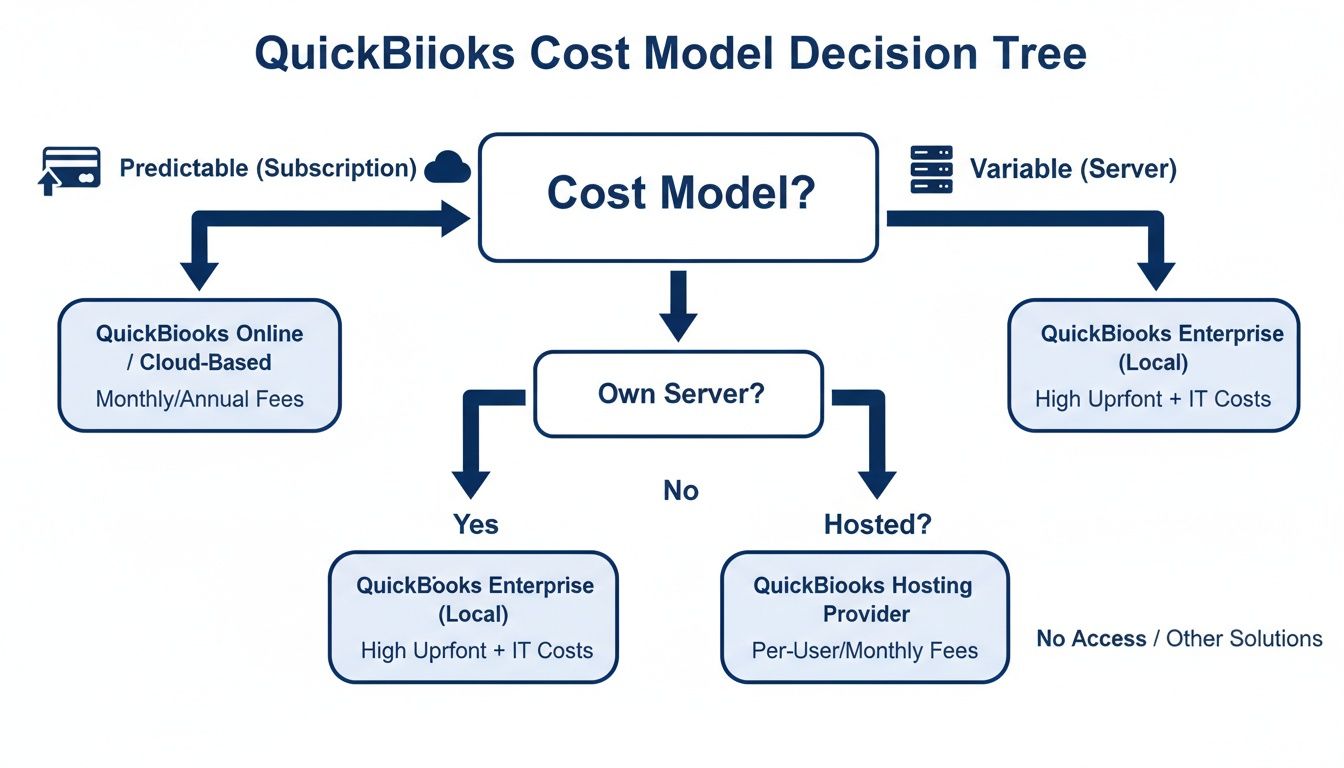
This visual highlights the core financial trade-off. QBO gives you a clear, fixed operational expense, while a self-managed QBD can involve high and sometimes unpredictable capital expenses for hardware and maintenance.
For a small business, the right choice really depends on its business model and where it is in its growth journey. A lean startup or a service-based consultancy can thrive on QBO. Its simplicity, mobile access, and smooth integrations with payment processors like Stripe are a perfect match for a business focused on straightforward invoicing and cash flow.
But the moment a business starts managing physical products, the equation changes. A growing retail or e-commerce business will quickly find QBO's basic inventory tracking too limiting. The lack of true sales order management, build assemblies, and advanced pricing rules creates operational headaches that can actually hold back growth.
This is where the difference between QuickBooks Online and QuickBooks Desktop becomes a make-or-break business issue. For any company in manufacturing, wholesale, or distribution, QBD Enterprise is the logical next step. Its advanced inventory and sales order systems are built to handle the complex realities of a product-based supply chain. Even a fundamental feature like "build assemblies" for manufacturing is completely missing in QBO, making it a non-starter for businesses that build their own products.
A deeper look into how to choose accounting software can give you a structured framework for weighing these critical operational needs against what each platform offers.
What if you need the heavy-duty power of Desktop but crave the remote access of Online? A hosted QBD environment offers the best of both worlds. This approach delivers the full, feature-rich Desktop application right from the cloud, making it accessible from any device.
This hybrid model gets rid of the biggest drawback of QBD—its on-premise limitation—without forcing you to compromise on functionality. A manufacturer can manage complex assemblies from a remote office, and a law firm can securely access trust accounting records from the courthouse, all while using the unmatched power of QuickBooks Desktop.
When you're weighing QuickBooks Online against Desktop, a few key questions always come up. Getting these answers straight can help you sidestep common frustrations and pick the platform that truly fits your workflow.
Yes, you can, and Intuit offers a migration tool to help you move your company file from Desktop to Online. But be warned: it’s not always a simple, one-click process.
Some of the more complex data—think detailed inventory records or deep payroll history—might not transfer over perfectly. Before you even think about migrating, it's absolutely essential to create a full backup of your data to prevent any loss of critical financial information.
Not at all. While Intuit is definitely pushing QuickBooks Online as its flagship product, QuickBooks Desktop isn’t going anywhere. It’s still actively sold, updated, and supported, particularly the Enterprise version.
Why? Because Desktop serves specific industries with complex needs—like manufacturing, construction, and wholesale—that QBO just can’t handle yet. The biggest change is that Intuit has moved all its Desktop products to an annual subscription model, so the era of one-time purchases is over.
This is where the core difference between the two platforms really shines. QuickBooks Online was built from the ground up for collaboration, letting multiple users log in simultaneously from anywhere with an internet connection. No special setup required.
QuickBooks Desktop, on the other hand, requires you to purchase multi-user licenses. To get remote access, you'll need to set up a server or use a third-party hosting service, which adds a layer of complexity and cost.
The bottom line is this: QBO is designed for teams that need collaborative, remote access. Desktop excels when you need powerful, industry-specific features managed from a central hub. The better choice depends entirely on how your team actually works.
Ready to combine the power of QuickBooks Desktop with the flexibility of the cloud? Cloudvara offers secure, reliable hosting that lets your team access your software from anywhere, anytime. Explore our QuickBooks hosting solutions today!




