
Dedicated server hosting gives your business exclusive use of an entire physical server, unlocking the highest levels of performance, security, and control. Your applications and data live in a completely isolated environment, safe from the resource drains and security risks that come with shared hosting.
Think of most hosting plans—like shared or VPS hosting—as renting an apartment in a crowded building. You share plumbing, entryways, and walls with other tenants. If a neighbor throws a loud party or forgets to lock the main door, you feel the impact. This is the "noisy neighbor" effect in action, where another website's traffic spike can slow your business to a crawl.
A dedicated server is completely different. Instead of renting a room, you get the keys to your own private, secure house. You control the entire property. No one else has access, and every resource—from processing power to storage—is yours and yours alone.
For professional firms like accounting and legal practices that handle sensitive client information, this isn't just a technical preference; it's a foundational requirement.
At its heart, a dedicated server means you lease an entire physical machine from a hosting provider. All of its processing power (CPU), memory (RAM), storage, and network bandwidth are reserved exclusively for you. This undivided attention delivers a few major advantages:
This approach isn't just about better tech; it's a strategic move to build a stable, secure foundation for your business. It ensures your client data stays protected and performance remains predictable, which builds trust and operational confidence.
The demand for this level of control is surging. The dedicated server hosting market is expected to jump from $20.04 billion in 2025 to $23.94 billion in 2026, a massive one-year leap. Projections show the market reaching $49.08 billion by 2030, growing at an impressive compound annual rate of 19.7%. You can explore the market research on dedicated server hosting for a deeper look. For professionals, this isn't just an upgrade; it's a core business decision.
Picking the right hosting is one of the most critical infrastructure decisions you can make for your business. It’s the foundation that determines your website speed, application reliability, and, most importantly, the security of your client data. To really grasp the value of dedicated server hosting solutions, it helps to see how they stack up against the other options out there.
Think of your company’s digital operations as needing a physical home. The property you choose dictates your performance, privacy, and control. This handy visual breaks down the hierarchy of control and resources among the most common hosting types.
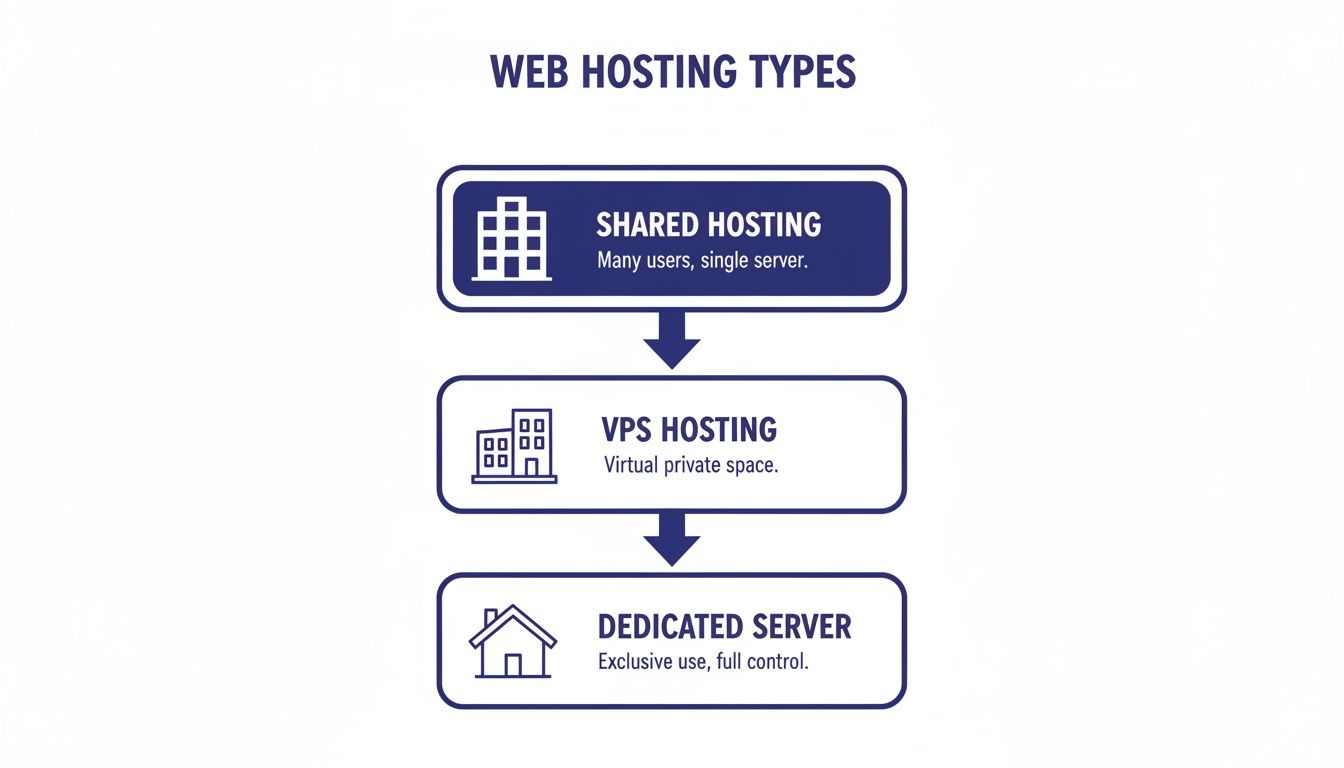
As you can see, there’s a clear path from shared, crowded environments to the total isolation of a dedicated server. It’s a lot like moving from a budget apartment to your own private house.
Shared hosting is the most basic and cheapest option on the market, which is why it's popular for personal blogs or brand-new businesses just starting out. With this plan, your website shares one server—and all its resources—with hundreds or even thousands of others.
It’s like renting a room in a massive apartment complex. The price is low, but you have no control over your neighbors.
A Virtual Private Server (VPS) is a solid step up from shared hosting. You’re still sharing a physical server with other users, but virtualization technology splits it into several separate, isolated virtual machines.
Think of it as owning a private condo on your own floor. You get your own front door and a defined space, but you still share the building’s core infrastructure, like the plumbing and electricity.
While a VPS gives you far more control and guaranteed resources than shared hosting, your performance can still be affected if the provider oversells space on the main machine. You can dive deeper into the nuances in our detailed guide comparing cloud servers versus dedicated servers.
Public cloud hosting from giants like Amazon Web Services (AWS) or Google Cloud offers incredible scalability. You’re essentially renting computing power from a massive global network, paying only for what you use.
The model is a lot like your electric bill—you can scale power up or down instantly. But that flexibility comes with a huge catch for many small and mid-sized businesses: unpredictable costs. A sudden traffic surge or a misconfigured app can lead to a shocking bill at the end of the month, making budgeting a nightmare.
This brings us to dedicated server hosting solutions. A dedicated server means you get exclusive access to an entire physical server. No sharing resources, no noisy neighbors, and complete control over the entire environment.
It’s your own private, gated estate.
To help you see all the options side-by-side, here’s a quick breakdown of how these hosting solutions compare on the features that matter most to a growing business.
| Feature | Shared Hosting | VPS Hosting | Dedicated Server | Public Cloud |
|---|---|---|---|---|
| Performance | Inconsistent, affected by others | Stable but limited by the host machine | Guaranteed & Highest | Scalable, but can be inconsistent |
| Security | Shared risk, lowest isolation | Isolated, but on a shared machine | Completely Isolated | Strong, but requires expert configuration |
| Control | None, limited to a control panel | Root Access within your partition | Full Root Access to the entire machine | Full control, but highly complex |
| Cost | Lowest price, but unpredictable | Moderate, predictable monthly fee | Predictable Fixed Price | Pay-as-you-go, can be unpredictable |
For professional firms where downtime is not an option and data security is paramount, the guaranteed performance and total isolation of a dedicated server aren't just nice-to-haves—they are fundamental tools for doing business.
When you’re a professional firm handling sensitive information, security isn’t just a line item on an IT budget. It’s the foundation of your client relationships and your entire business. A single data breach can spiral into financial ruin, a damaged reputation, and serious legal trouble. This is exactly where the isolation of a dedicated server becomes your most powerful shield.
Think back to the shared hosting apartment building analogy. If one tenant leaves their door unlocked, the whole building is at risk. With dedicated server hosting solutions, you get your own private estate with a high-security fence around it. You’re completely walled off from your neighbors, immediately cutting down the number of ways attackers can get in.
This control is a big reason why businesses are returning to dedicated servers. The market for dedicated hosts was valued at $3.36 billion in 2024 and is expected to climb to $8.97 billion by 2033. It’s driven by a “repatriation” movement, with 42% of companies pulling workloads back from the public cloud last year to get better stability and customized security.
A dedicated server hands you the keys to the kingdom—exclusive resources and total administrative control. This is what you need to build a defense-in-depth security strategy, something that’s just not possible in a shared environment where you're stuck with the provider’s one-size-fits-all rules.
With your own dedicated environment, you can lock things down with critical security layers:
The real power of a dedicated server is that it gives you complete authority over your security. You aren’t inheriting the risks of hundreds of other businesses. You control every access point, every policy, and every protocol.
For law firms and accounting practices, meeting regulations like GDPR, HIPAA, or SOC isn't optional. Trying to prove compliance on a shared server can be a nightmare because you have no real say over where your data is or who else is on the same machine.
Dedicated server hosting solutions make this process much, much simpler.

Because you have your own physical hardware, you get pinpoint control over two crucial compliance factors:
At the end of the day, top-tier security and easier compliance are two of the biggest wins you get with a dedicated server. For an even stronger posture, it's also worth mastering application security best practices to protect your software from the inside. With a managed provider like Cloudvara, you get an isolated, compliance-ready server, with our experts handling all the patching, monitoring, and security updates for you.
Slow software costs more than just time—it costs you money and erodes client trust. When your accounting software freezes during tax season or your CRM lags while you’re on a call, the entire firm feels the drag. These performance bottlenecks are almost always a direct result of sharing server resources, creating a hidden tax on your productivity.
This is where a dedicated server gives you a serious competitive edge. Instead of splitting resources with hundreds of other businesses, you get a machine that is 100% yours. Every bit of its processing power (CPU), memory (RAM), and network bandwidth is devoted solely to keeping your applications running at top speed.

That exclusive access translates directly into faster, more reliable performance for your entire team, no matter where they’re working from.
Think of it like this: a shared server is like using the office’s communal Wi-Fi, which slows to a crawl every afternoon. A dedicated server is your own private, high-speed fiber line installed directly into your suite. The difference is night and day.
For professional firms, this means:
This isn’t just about raw speed—it’s about consistency. You completely eliminate the "noisy neighbor" problem, where another company's website traffic could bring your operations to a halt. Your applications just work, day in and day out.
When your firm runs on software, its performance is your performance. A dedicated server ensures your tools are always sharp and responsive, directly impacting your bottom line and client satisfaction.
Having a powerful server is one thing; keeping it running at its absolute peak is another. This is why managed support is such a critical piece of any good dedicated hosting solution. Unless you have an IT expert on staff, you shouldn’t be spending your time on server optimization, security patches, or network monitoring.
A managed provider acts as your dedicated IT partner, making sure your server is always perfectly tuned for the specific applications you rely on.
For example, a managed support team can:
This hands-on management takes the entire technical burden off your shoulders. You get all the performance of a high-end server without ever needing to become a server administrator. It’s the final piece of the puzzle for firms that want to focus on their clients, not their IT.
For a closer look at how these optimizations work, you can learn more about improving application performance and the specific techniques involved. With a partner like Cloudvara, you get a fully managed solution where our experts handle all the backend work, ensuring your critical applications always deliver the speed your business demands.
Technical specs like guaranteed performance and tight security are great on paper, but what do they actually look like day-to-day? Let’s connect those concepts to real business wins by walking through a few common scenarios where dedicated server hosting solutions make a direct, tangible difference.
These real-world examples show how professional firms solve their biggest operational headaches by moving to a dedicated environment. They highlight the clear return on investment that comes when performance and security simply can't be compromised.
Picture an accounting firm with a dozen CPAs. Their entire workflow revolves around a central QuickBooks Enterprise file. On their old, in-house server, remote access was painfully slow, and the system would choke whenever more than a few people logged in—especially during the chaos of tax season.
By switching to a managed dedicated server, they effectively built a private cloud just for their core software.
This kind of shift is a game-changer for financial professionals. For Cloudvara’s clients in tax and legal, having a dedicated platform for QuickBooks, Sage, or CRM software with 99.5% uptime and 24/7 support is what keeps their business running smoothly. As firms adopted more digital tools after 2020, the need for secure, compliant hosting grew. Dedicated servers, which can cut breach risks by up to 70% compared to shared plans, became a key part of that move. You can read more about these trends in dedicated server hosting.
By centralizing its core software on a high-performance server, the firm not only solved its immediate bottleneck but also built a scalable foundation that can support its growth for years to come.
Next, think about a mid-sized law firm managing thousands of sensitive case files, contracts, and privileged client communications. Their number one concern is shielding this confidential data from any unauthorized access while ensuring their attorneys can pull up information instantly.
Using a generic cloud storage service or a shared server just wasn't an option—it introduced far too many compliance risks. The firm needed an environment where it had total control over its security policies.
A dedicated server gave them the power to host a private, compliant document management system. They could enforce strict access controls, implement end-to-end encryption, and generate detailed audit logs to prove they were meeting all industry regulations.
Finally, imagine a growing e-commerce business gearing up for its biggest Black Friday sale ever. In past years, their shared hosting plan buckled under the traffic surge, causing the website to crash right at the peak of the shopping frenzy. The outcome? Lost sales and angry customers.
With a dedicated server, the business gets exclusive access to all the CPU, RAM, and bandwidth it needs. No sharing, no competing for resources.
These stories prove that dedicated server hosting solutions aren't just about IT infrastructure. They are powerful business tools that directly fuel efficiency, security, and growth.
Moving to a dedicated server might feel like a massive technical project, but it’s much more straightforward when you break it down into a few logical steps. A smooth switch is all about good planning and working with a partner who knows the ropes. This checklist helps demystify the process, turning a complex-sounding upgrade into an achievable goal.

The main goal here is to move all your applications and data with the least possible disruption to your team’s daily work. With a hands-on provider like Cloudvara, this entire process is managed for you, so you get a seamless switch without needing to become an IT expert overnight.
Before you touch a single file, you need a thorough inventory of your current setup. Think of this as the blueprint for your entire migration—it ensures nothing important gets left behind. A good provider will walk you right through this during your first chat.
This preparation is the most critical part of a pain-free transition. The more detailed you are here, the smoother everything else will go.
With a solid plan in place, the actual move becomes a well-organized event. A managed provider really takes the lead here, handling all the technical heavy lifting while keeping you in the loop.
A huge benefit of working with an experienced partner is the manual, hands-on migration. Instead of relying on automated scripts that can cause frustrating hiccups, a team of engineers handles the transfer to guarantee accuracy and prevent downtime.
The process usually looks something like this:
Once everything is moved, the testing phase kicks off. This is where a risk-free trial becomes incredibly valuable. Cloudvara's 15-day free trial lets you test your actual software in the live environment before you fully commit. Your team can confirm everything works just right, giving you total confidence in the new setup. For a deeper look at the logistics, check out our guide on moving servers to the cloud.
The very last step is scheduling the cutover. This is almost always done during off-peak hours—think overnight or on a weekend—to ensure zero impact on your business operations. After a final sync, your domain points to the new server, and your team can start working in the faster, more secure environment from day one.
As you get closer to choosing a hosting solution, it's normal for a few practical questions to pop up. Here are some straightforward answers to the most common ones we hear, designed to help you make a confident, well-informed decision for your business.
It’s true that dedicated servers come with a higher price tag than shared hosting, but looking at the sticker price alone can be misleading. For businesses that depend on their applications to run smoothly, a dedicated server often ends up being the smarter financial move.
Think about the hidden costs of cheaper plans: a single hour of downtime, a security breach, or even just sluggish software can cost you far more in lost revenue and productivity. A dedicated server is an investment in stability. With providers like Cloudvara, you get transparent, fixed pricing—no surprise bills like you might see with a public cloud. This makes budgeting predictable and simple, which is exactly what small and mid-sized businesses need.
Not at all, as long as you opt for a managed dedicated hosting provider. The term "managed" is key here. It means the provider takes care of all the heavy lifting—server setup, security updates, constant monitoring, and all the ongoing maintenance.
You get all the power, security, and performance of a dedicated server without needing an in-house IT wizard to run it. Your provider becomes your expert IT partner, handling the infrastructure so you can stay focused on your business.
This model gives you a rock-solid foundation without the technical headaches. If you're still weighing the differences, our article comparing VPS versus dedicated servers is a great resource to check out.
The timeline really depends on how complex your current setup is and how much data needs to be moved. But when you work with an experienced provider, the entire process is mapped out to cause as little disruption as possible to your daily operations.
A typical migration is surprisingly quick, often taking just a few days. The process usually looks like this:
For instance, Cloudvara even offers a 15-day free trial. This lets you test everything with your own data and software in the new environment before making the final switch. It’s the best way to ensure a smooth transition with absolutely no surprises.
Ready to see how Cloudvara can provide a secure, high-performance home for your critical applications? Explore our managed hosting solutions and start your risk-free 15-day trial today at https://cloudvara.com.




