
A client calls your accounting office to ask whether their engagement has been renewed. One colleague checks a desktop spreadsheet, another searches the shared inbox, and the partner with the latest notes is working from home. Nobody lacks information. They lack a dependable place to find it.
Moving those records into a cloud-based CRM can help, but hosting alone won't settle which record is correct or who should see it. The useful decision is about data ownership and access, not just software features.
In that small accounting office, a customer relationship management system, or CRM, could connect the client's contact details, engagement history, outstanding tasks, and renewal status. Instead of asking who has the latest spreadsheet, an authorized employee opens the shared client record.
A cloud-based CRM runs on a provider's servers and is accessed through a browser or application. Your team uses the software over an internet connection rather than maintaining its underlying servers in the office.
Think of it as renting a managed flat rather than building your own house. The landlord maintains the building, but you still decide what belongs inside and who gets a key.
That analogy has a limit: the provider's responsibilities must be written into the service agreement. Hosting doesn't automatically include every application update, backup option, or administrative task.
The shared record normally connects contacts, organizations, interactions, tasks, opportunities, and linked documents. A professional-services firm might track prospective engagements rather than sales deals. A law practice might associate contacts with matters, while keeping its specialist case-management software for detailed legal work.
Shared access makes collaboration possible without passing copies of a client list between colleagues.

CRM is mainstream, although adoption figures shouldn't be mistaken for cloud-only usage. Metrigy's CRM market analysis reported that 74.5% of surveyed organizations used CRM in 2024, up 18.9 percentage points from its previous study, and that 75.9% of organizations with 250 or fewer employees used CRM.
The same analysis describes CRM platforms as predominantly cloud-delivered. For a small team, that makes the practical question less about whether cloud CRM is established and more about how to adopt it without moving existing confusion into a shared system.
The infrastructure decision is a choice between paying a provider to operate the environment and taking responsibility for it yourself. Neither arrangement removes the need to manage your records.
Cloud-based versus on-premise CRM by key factor
| Factor | Cloud-Based CRM | On-Premise CRM |
|---|---|---|
| Where software and data live | Provider data centers, accessed through a browser, app, or hosted desktop | Your office, server room, or infrastructure you manage |
| Upfront cost | Subscription-led, with possible setup and migration charges | Servers, licences, installation, and configuration |
| Pricing model | Recurring subscription, often based on users and service tier | Licence purchase plus maintenance and hardware renewal |
| Software updates | Provider-managed when included in the service agreement | Scheduled, tested, and installed by your IT team |
| Backups | Provider-managed when included; verify coverage and restoration | Run and verified by your staff or IT contractor |
| Adding a new user | Create an account, allocate a licence, and assign permissions | Allocate a licence and configure application and network access |
| Remote access | Supported devices using approved authentication | Usually requires a VPN, remote desktop, or another secure gateway |
| Internal IT staffing | Application administration and provider coordination | Server administration plus application support |
| Control of hardware and data location | Restricted to provider options and contractual commitments | Direct control over equipment and physical location |
A subscription doesn't mean implementation is finished. Someone still needs to configure fields, approve workflows, train employees, and decide who can change settings. A hosted desktop application also isn't identical to browser-native software: ask whether the provider maintains the CRM application, the hosting environment, or both.
Backups deserve their own questions. A completed backup job isn't proof of a successful recovery. Ask to see a restoration test and establish whether restoring an accidentally deleted client record requires recovering the entire database.
On-premise costs aren't one-off either. Your team must plan for hardware replacement, storage growth, maintenance, and recovery equipment. The cloud versus on-premise comparison provides a broader framework for weighing those responsibilities.
Decision rule: Choose the operating model your team can govern consistently, not the one with the shortest feature list or lowest headline fee.
For a small office without dedicated IT staff, staffing and remote access may decide the question. For a firm with contractual data-location requirements, location and administrative control may carry more weight. Cloud hosting can meet some residency requirements, so verify the actual locations rather than assuming local servers are mandatory.
The benefits become meaningful when they change an everyday task. Being able to sign in remotely matters less than being able to answer a client accurately without asking someone to visit the office.
The main advantages fit into these practical categories.

Say an accountant is working from home during a filing deadline. They can check the client's last conversation, see who owns the next action, and record a callback without creating a separate set of notes. A colleague visiting a client can update the same record from a supported mobile device.
The pitfall: Remote access can spread unsafe login habits across more devices, so apply the access checklist below before allowing it.
A nonprofit preparing a fundraising campaign can provision accounts for temporary staff without buying another office server. Those employees can receive a limited view of campaign contacts rather than unrestricted access to donor histories.
The pitfall: Easy provisioning makes unused paid accounts easy to overlook, so assign someone to review subscriptions when campaigns end.
When the service includes infrastructure maintenance, the provider handles server patching, hardware faults, and platform availability work. Your office administrator can focus on practical questions such as whether the intake form captures the right information and whether departing employees still own open tasks.
The pitfall: Reduced infrastructure work doesn't remove the need for a named application administrator.
Test these benefits against your workload. List the tasks employees repeat most often, such as finding a client's history, assigning an engagement follow-up, and checking outstanding requests. Ask a user to perform each task during a demonstration, including from the devices they'll use.
A benefit is useful only if it removes work without creating another checking task. If someone must compare the CRM against a spreadsheet afterward, the workflow still needs attention.
A useful CRM helps employees keep records current while they work. If updating it feels like separate administrative homework, even a well-designed database can become stale.
Use the demonstration to test ordinary actions, not just polished dashboards.
Core CRM features and what to verify in a demo
| Feature | What It Does | What to Verify in a Demo |
|---|---|---|
| Contact and company records | Stores client profiles with custom fields | Can you add a field without vendor help, and does it export cleanly? |
| Activity logging | Associates emails, calls, and meetings with a client | Does email sync support shared mailboxes and exclude private messages? |
| Tasks and reminders | Assigns follow-ups with owners and due dates | Can an authorized colleague see and reassign open tasks? |
| Pipeline or case stages | Tracks opportunities, engagements, or matters | Can stages match your workflow without custom code? |
| Reporting dashboards | Displays workload, pipeline, and service activity | Can reports be exported to Excel or CSV? |
| Integrations | Connects accounting, document, and Microsoft tools | Does a representative test batch create duplicates or overwrite correct fields? |
| Mobile access | Supports updates away from the desk | Do mobile permissions match the web application? |
Start with the tools employees already use: Outlook, Microsoft 365, QuickBooks, Sage, document management, e-signature, and payment applications. Don't assume that an integration means every field moves in both directions.
For accounting connections, establish which application owns billing names, addresses, account balances, and customer identifiers. A CRM user changing a display name shouldn't accidentally overwrite an approved billing entity. This guide to CRM integration with QuickBooks is a useful starting point for planning that connection.
A native connector can reduce the number of suppliers involved, but it isn't automatically more dependable than a third-party connector. Check support ownership, failure logs, retry behavior, and duplicate handling. Ask the demonstrator to show a failed update and explain who receives the alert.
For platform-level trade-offs, CapyScout's guide to choosing a CRM offers another comparison lens. Keep your own workflow tests beside any product comparison so broad feature claims don't become buying criteria by default.
Prioritize these connections in a controlled trial:
Use permission-approved, non-sensitive records for these tests. A document link is useful only if it opens the correct version for the right person.
The same CRM can support different work, but each audience needs different boundaries around its records. Begin with the workflow, then choose the fields and permissions that support it.
A shared workspace should help employees coordinate without giving everyone access to everything.

CRM use cases by audience
| Audience | Primary Workflow | Key Feature | Main Risk |
|---|---|---|---|
| Accounting firms | Client engagements, renewals, and tax-season deadlines | Recurring tasks and client document links | Missed deadlines when renewal dates use inconsistent formats |
| Law firms | Contacts linked to matters, conflict checks, and billing contacts | Matter-level permissions | Confidential matter details visible without a need to know |
| Nonprofits | Donor, grant, and volunteer tracking | Donor history and renewal reminders | Donor information shared beyond authorized staff |
| Small businesses | Quotes, orders, and after-sale service | Pipeline stages and shared inbox sync | Duplicate quotes and conflicting customer responses |
Consider a hypothetical CPA practice consolidating scattered client spreadsheets. Contact storage might be its initial reason for moving, but the more useful improvement could be assigning renewal reminders to an engagement owner. Staff no longer need to remember which list contains the next follow-up.
That example also shows the boundary of CRM. It can record that reconciliation work is outstanding without replacing the tool used to perform it. For that separate evaluation, BankStatementWizard's discussion of bank reconciliation software pricing and security provides relevant purchasing questions.
For an accounting firm, test what happens when an engagement changes owners. For a law firm, confirm that a contact search doesn't expose restricted matter descriptions, and don't treat a general CRM search as a substitute for a validated conflict-check procedure.
Nonprofits should distinguish campaign access from access to sensitive donor notes. Small businesses should decide who can issue or revise a quote so customers don't receive competing versions.
Use the video below as an additional discussion aid while evaluating team workflows.
Before comparing products, write down your most time-consuming workflows and identify where employees wait for another person's information. Accounting practices can use this CRM selection guide for accounting firms to connect those handoffs with evaluation criteria.
An overly broad permission can expose more than a single file when employees work in a shared CRM. Access should follow job responsibilities, not convenience or seniority.
The NIST cloud standards roadmap identifies confidentiality, integrity, and availability as primary cloud-security objectives and treats security as a responsibility across the cloud architecture. That means evaluating the application, identity controls, administration, and recovery arrangements together.
Use this checklist before approving client information:
Translate these decisions into an administrator's procedure using practical access-control guidance. Test with restricted accounts, not only an administrator login.
AI features need explicit boundaries too. Decide which client information employees may submit to prompts, whether the provider retains it, and where generated summaries are stored. Require review before a summary becomes part of an authoritative client record.
Before committing: Ask someone with an ordinary staff account to attempt an action they shouldn't be allowed to perform.
Run a controlled trial with non-sensitive copies of representative records. Confirm restricted access, export behavior, account removal, and restoration before migrating confidential information. Neither a provider-managed environment nor an office server is automatically safer without these checks.
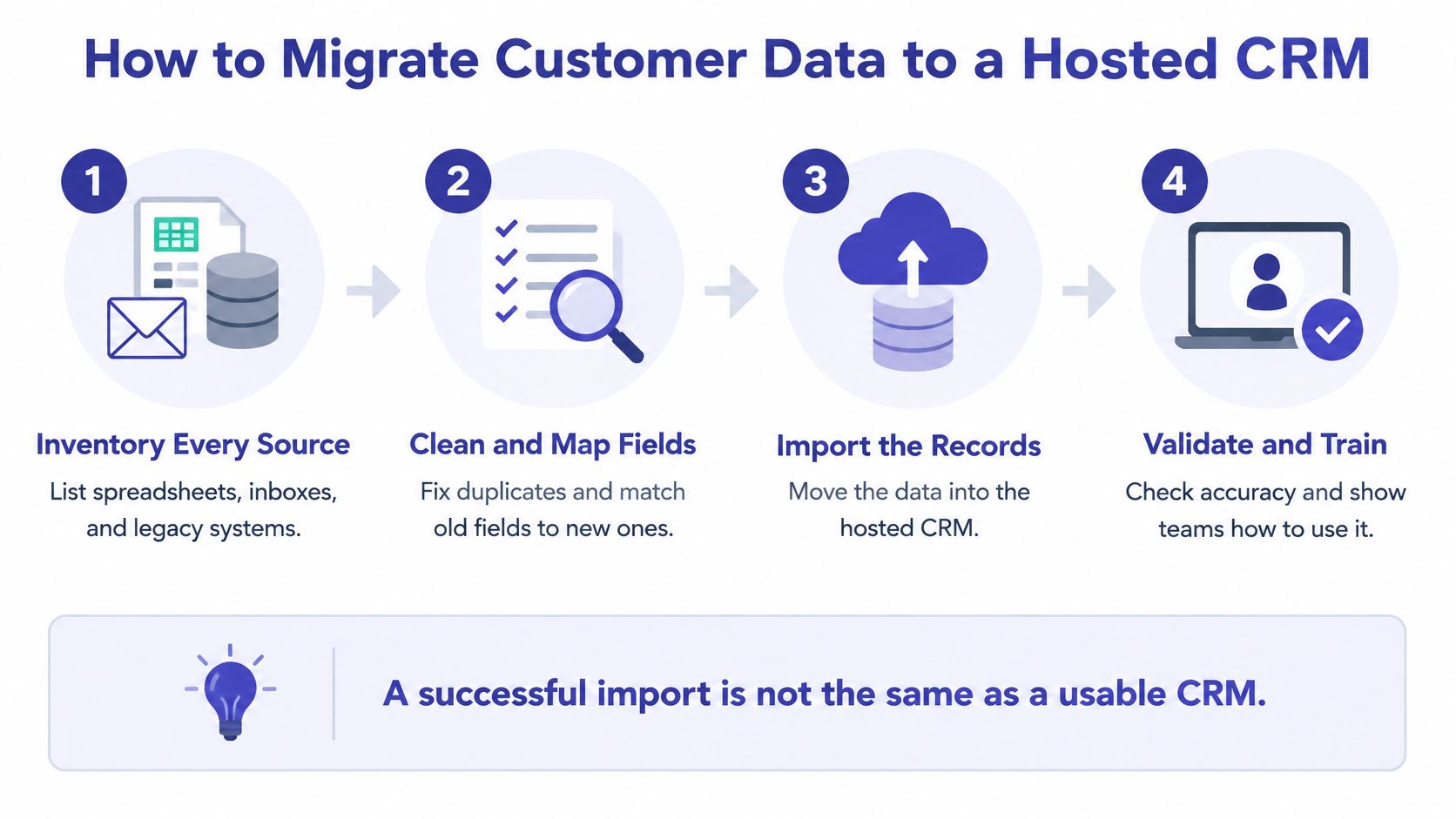
A customer record can reach a hosted CRM intact and still be unreliable. Outdated contact details, duplicate organizations, and conflicting ownership fields can make the new system harder to use than the old one. Plan to clean and validate the records as part of implementation, since moving them to a shared platform also makes their quality and access rules more consequential.
Use the four-step CRM migration infographic to keep validation and training alongside the import.
Pre-migration data-quality scorecard
| Check | How to Test on Sample | Action If Failed |
|---|---|---|
| Duplicate contacts | Compare repeated emails and approved unique identifiers | Review and merge confirmed duplicates |
| Inconsistent organization names | Compare spellings and legal entity names | Standardize names in a mapping sheet |
| Missing consent records | Check the documented consent or engagement basis where applicable | Hold affected records for review |
| Stale contact details | Compare phone numbers and addresses with recent correspondence | Flag for owner verification |
| Conflicting owner fields | Identify contradictory assignments | Assign an accountable owner per field group |
| Retention status | Classify records as keep, archive, or delete | Apply approved retention decisions |
| AI readiness | Check completeness of fields intended for generated summaries | Correct those fields before enabling AI |
Use a data migration checklist to assign sign-off responsibilities before the final transfer. A completed import is only one checkpoint. Success means employees can find, access, and maintain trustworthy records under the agreed rules.
Keep identity and data rules consistent across the CRM, accounting applications, and document tools. Cloudvara offers managed application hosting for CRM, accounting, and document software in a shared cloud environment. Visit Cloudvara to discuss your existing applications and ask how access controls, backup restoration, and a controlled migration would work for your team.




