Let's be blunt: accounting firms are a goldmine for cybercriminals. The sheer volume of sensitive financial data you manage—from tax IDs and payroll records to client financial statements—makes your practice an incredibly valuable target. Because of this, strong accountant cyber security isn't just an IT problem; it's a fundamental pillar of business survival.

The shift from paper ledgers to interconnected digital systems brought amazing efficiency to the accounting world. But that same connectivity opened the door to significant, unique risks that go far beyond what a typical business faces.
Cybercriminals don't see you as just another company. They see you as a custodian of highly monetizable information. You don't just hold one client's data; you hold the keys to the financial kingdom for dozens, if not hundreds, of individuals and businesses.
Attackers are after more than just credit card numbers. They're hunting for the rich, concentrated data that lets them commit large-scale fraud, identity theft, or sell entire profiles on the dark web.
Here's a look at what they're after:
This treasure trove of data makes your firm a one-stop shop. Breaching a single accounting practice is far more profitable than attacking dozens of individuals, which is central to understanding the link between cybersecurity and accounting.
"CPA firms deal with a lot of sensitive financial and personal information, which makes them a big target for cyberattacks. In the current landscape, clients are looking for that extra layer of trust, and knowing their data is secure can really set a firm apart and build long-term confidence."
To illustrate just how real these threats are, let's look at the kinds of attacks that firms are seeing every day.
The table below breaks down the most common threats, how they typically get in, and the devastating impact they can have on your firm's operations and reputation.
| Threat Type | Common Attack Vector | Potential Business Impact |
|---|---|---|
| Ransomware | Phishing emails with malicious attachments, exploiting unpatched software vulnerabilities. | Complete operational shutdown, loss of client data, extortion demands, severe reputational damage. |
| Phishing & Spear Phishing | Deceptive emails impersonating clients, vendors, or government agencies (like the IRS). | Credential theft, wire transfer fraud, malware installation, unauthorized data access. |
| Data Breaches | Weak passwords, insider threats (malicious or accidental), or insecure cloud configurations. | Regulatory fines (e.g., GDPR, CCPA), client lawsuits, loss of trust, and competitive disadvantage. |
| Business Email Compromise (BEC) | Gaining access to an executive's email account to authorize fraudulent payments. | Significant financial loss, damaged vendor relationships, and potential legal liability. |
Understanding these specific vectors is the first step toward building a defense that actually works. Generic security advice won't cut it when the attacks are this targeted.
Imagine this: it’s the first week of April, right in the thick of tax season. An employee gets a convincing email that looks like it's from a trusted software vendor. They click a link, and within hours, every single client file on your server is encrypted.
Your entire operation grinds to a halt. You can't access tax returns, process payroll, or pull up financial statements. The attackers then demand a six-figure sum in cryptocurrency, threatening to leak your clients' most sensitive data to the public if you refuse to pay.
This isn't just a scary story; it's a devastating reality for many firms. The financial sector faces an average data breach cost of about $5.90 million, second only to healthcare. For a mid-sized practice, the cost of a major breach—including downtime, legal fees, and reputational damage—could easily wipe out an entire year's profit.
The ripple effect is catastrophic. Clients lose trust, crucial deadlines are missed, and your firm is suddenly facing potential regulatory fines and lawsuits. This scenario hammers home why robust accountant cyber security isn't a luxury—it's an absolute necessity for survival and growth.
Before you can build a solid defense, you first need to map the battlefield. A security risk assessment isn’t some abstract exercise for creating jargon-filled reports; it’s a practical process to figure out where your most critical data lives, who touches it, and what threats are most likely to come knocking.
This process moves you from a state of guessing to one of informed action. You can't protect what you don't know you have. Think of it as the foundational first step in building a resilient accountant cyber security strategy, helping you focus your time and money where they’ll make the biggest impact.
First things first: you need to know exactly what sensitive information your firm is responsible for. This is all about identification, creating a detailed inventory that goes beyond just servers and software to the data itself.
Get your team together and start asking the hard questions to map out your firm's data landscape.
I’ve seen this discovery process become an eye-opener for many firms. It’s not uncommon to find sensitive client files tucked away in unsanctioned personal cloud drives or to realize that ancient, outdated software still holds a treasure trove of legacy data.
A thorough risk assessment provides clarity. It transforms abstract fears about cyberattacks into a concrete, prioritized list of actions that directly reduce your firm's exposure to real-world threats.
Once you have a clear map of your data, the next step is to think like an attacker. What's the path of least resistance to get to that information?
Here are some of the most common weak spots I see in accounting firms:
After you've listed the potential threats, it's time to prioritize. A simple way to do this is to rank each risk by its likelihood (how probable is it?) and its potential impact (how bad would it be?). A ransomware attack that locks up all your client files in the middle of tax season is a high-impact, high-likelihood event that should be right at the top of your list.
This ranking process lets you allocate your limited resources wisely. To formalize this and tie it directly to your firm's goals, it's often helpful to perform a comprehensive business technology assessment. For firms looking to master risk management and stay on top of regulatory standards, having someone trained as a Cyber Security Governance, Risk, and Compliance Professional on the team is invaluable. This structured approach ensures your security efforts give you the biggest bang for your buck.
Alright, you’ve assessed your risks. Now it's time to move from planning to doing by putting foundational technical controls in place. These aren't just abstract ideas—they're the digital locks, alarms, and safety nets that will form the core of your firm’s defense.
For accounting firms, where data is everything, these controls are completely non-negotiable. Getting them right is what shifts your accountant cyber security posture from reactive to proactive. Let's dig into the three most critical pillars you need to build: access management, comprehensive encryption, and bulletproof backups.
If you take one thing away from this section, let it be the principle of least privilege. In simple terms, it means every user should only have access to the absolute minimum data and systems needed to do their job. Nothing more.
This single concept directly shuts down the most common attack methods. If a hacker manages to steal an employee’s password, the principle of least privilege severely contains the damage they can do.
Think about this real-world scenario for a moment:
A junior accountant gets a very convincing phishing email, clicks a malicious link, and unknowingly hands their login credentials over to a criminal.
The goal is to make every user account a dead end for an attacker, not an open door. By segmenting access based on roles, you build internal walls that prevent a single breach from becoming a catastrophe.
Adopting this mindset is a huge first step. You can take this concept even further by learning how to implement Zero Trust security, which builds on this foundation. This approach is especially powerful when a secure cloud provider enforces these permissions centrally for you.
Encryption is just a fancy word for scrambling your data so it's unreadable to anyone without the correct key. Think of it as putting your most sensitive client files into a digital safe that only authorized people can open. For accounting firms, encryption has to be applied in two critical states.
Encryption at Rest
This protects data that’s just sitting there—on a server, a laptop hard drive, or a backup tape. If a physical device is stolen, the data on it is completely useless to the thief without the encryption key.
Encryption in Transit
This protects data as it moves from one place to another, like when you email a file to a client or access your systems remotely. It prevents "man-in-the-middle" attacks where a criminal could intercept the data as it travels across the internet.
End-to-end encryption ensures data is shielded from the moment it leaves your device until it arrives at its destination. A good cloud partner often handles this complexity for you, making sure all data in their infrastructure is encrypted by default, both at rest and in transit. And don't forget about data at the end of its life; proper disposal through secure hard drive shredding is crucial to prevent recovery from discarded hardware.
If a ransomware attack is your worst nightmare, then automated and immutable backups are your ultimate safety net. A backup is just a copy of your data stored somewhere else, allowing you to restore everything if disaster strikes.
But modern attackers are smart. They actively hunt for your backups and try to delete or encrypt them before they launch their main attack. This is where immutability is so vital.
An immutable backup is a copy of your data that cannot be altered or deleted by anyone—not even an administrator with the highest privileges—for a set period. This makes it completely invulnerable to ransomware.
Your backup strategy needs to include these key elements:
Ransomware isn't a distant threat; it’s a clear and present danger for accountants. In the UK, for instance, ransomware is projected to cost businesses over £1 billion annually, and accounting practices are prime targets. Attackers now use double-extortion tactics, threatening to leak sensitive tax and payroll data if a ransom isn't paid. This new reality makes robust, immutable backups a non-negotiable part of your defense.
Your firm’s advanced firewalls, encryption protocols, and security software are all critical pieces of the puzzle. But the truth is, the best technology can be sidestepped by one clever phishing email and one accidental click. This is why the most resilient cybersecurity strategies focus just as much on people as they do on platforms.
Your team isn’t a liability to be managed; they are your single greatest security asset waiting to be activated. The goal is to build a "human firewall," transforming every employee from a potential target into a vigilant first line of defense. This isn't about a once-a-year, check-the-box training session. It's about creating an ongoing culture of security awareness.
Today's attackers are frighteningly good at what they do. Gone are the days of spam riddled with spelling errors. Now, they craft highly specific, convincing emails designed to exploit the daily workflows and pressures of a busy accounting firm.
It's crucial your team understands what these modern threats actually look like in their inbox.
Email is the primary front door for cyberattacks against accountants, a fact that’s only become more true as remote work normalizes online approvals. This shift has fueled a sharp increase in BEC attacks where criminals impersonate partners or clients to redirect funds. In Australia, for example, BEC was cited as the main cause of cybercrime-related financial losses in FY2023–24, during a year with over 87,400 reported incidents.
Globally, mobile phishing rates hit an all-time high in 2022, as people are far more likely to click malicious email links on their smartphones. You can discover more about email cyber threats to accountants on karbonhq.com.
A strong training program is built on a few non-negotiable pillars. These practices need to become second nature to every single member of your team, from interns to managing partners.
1. Unshakeable Password Hygiene
Weak or reused passwords are a gift to attackers. Your firm needs to enforce a strong password policy that includes complexity requirements and a strict ban on using the same password across multiple systems.
Even more important, this is where a password manager becomes non-negotiable. A good password manager generates and stores unique, complex passwords for every single application, meaning your staff only has to remember one master password. To get this right, check out our guide on password management best practices.
2. Mandatory Multi-Factor Authentication (MFA)
MFA is the single most effective control for stopping unauthorized account access. It’s that simple. By requiring a second form of verification—like a code from a phone app—in addition to a password, you shut down most automated attacks. Enforce MFA on every system that offers it, especially email, accounting software, and remote access tools.
The core principle of a human firewall is simple: empower, don't blame. Create a culture where an employee who spots a suspicious email feels confident reporting it immediately, knowing they will be praised for their vigilance, not reprimanded for being tricked.
3. A Secure Remote Work Policy
Your security perimeter is no longer the office walls; it’s wherever your employees are working. A clear, enforceable remote work policy is absolutely essential.
Your policy must explicitly cover:
By training your team to be skeptical, vigilant, and empowered, you build a security culture that actively protects your firm from the inside out.
Even with the best defenses in place, a determined attacker can sometimes find a way in. Simply hoping for the best isn't a strategy. When a breach, ransomware attack, or major system failure hits, panic becomes your biggest enemy. A clear, pre-planned response is what separates a manageable hiccup from a business-ending catastrophe.
This is where your Incident Response Plan (IRP) comes into play. Think of it as the playbook your firm follows in a crisis—it details exactly who to call, what steps to take, and how to communicate when every second counts. Without one, you’re just improvising under pressure, which is a recipe for expensive mistakes.
Before you can even write a plan, you need to know who’s going to execute it. Your first move is to formally create an Incident Response Team. This isn't just a concept; it means assigning specific roles and responsibilities to actual people in your firm.
Your team needs a mix of skills and authority to be effective:
Defining these roles ahead of time cuts through the confusion when the pressure is on. Everyone knows their job, which means the response is swift and organized from the start.
A solid IRP follows a logical progression, guiding your team from the first sign of trouble all the way through the final review. While every incident has its own unique wrinkles, the basic framework stays the same.
1. Preparation
This is all the work you do before an incident ever happens. It includes creating the IRP document, putting your response team together, and running drills to make sure the plan actually works.
2. Identification
This phase kicks off the moment an anomaly is detected. It could be an unusual login alert from your firewall or an employee reporting a phishy-looking email. Your technical team jumps in to investigate and confirm whether you have a genuine security incident on your hands.
3. Containment
Once a breach is confirmed, the immediate priority is to stop the bleeding. This might mean taking affected systems offline to prevent malware from spreading across your entire network.
4. Eradication
After the threat is contained, you have to find the root cause and completely remove it from your environment. This isn't just about deleting a virus; it's about closing the vulnerability the attacker exploited to get in.
5. Recovery
Here, the focus shifts to restoring your systems and data from clean, secure backups. The goal is to get back to normal business operations as quickly and safely as possible.
6. Lessons Learned
After the dust settles, it's time for a post-incident review. What went well? What could have gone better? The insights you gain here are gold—use them to strengthen your security controls and update the IRP itself.
An Incident Response Plan isn’t a document you write once and forget about. It's a living guide that needs to be tested, reviewed, and updated at least once a year to keep up with changes in your firm's technology, team, and the ever-evolving threat landscape.
To build out your framework, it helps to see what a complete data breach response plan looks like. This ensures you cover all the critical components.
This diagram breaks down the simple but powerful steps your team can take to become a human firewall.
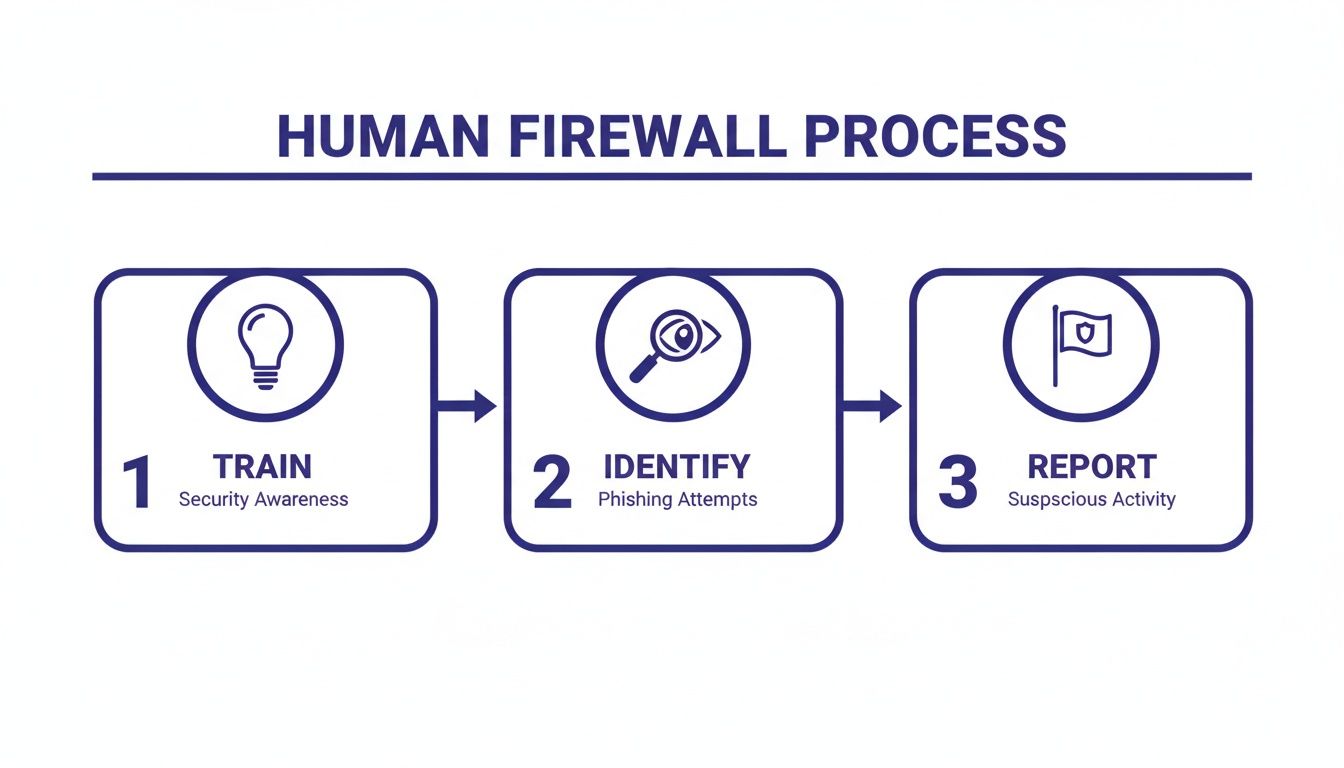
This process really drives home the point that effective defense starts with empowering your people to train, identify, and report potential threats.
Your IRP is designed to handle the immediate security crisis, but what about serving your clients while all that is going on? That’s where your Business Continuity Plan (BCP) comes in. The BCP is a broader strategy focused on keeping the firm operational during any kind of disruption, including a cyberattack.
A secure cloud environment is the backbone of a modern BCP. With guaranteed uptime and rapid-restore features, a dedicated cloud partner can ensure your essential applications and client data remain accessible even if your physical office is compromised. This is absolutely key to minimizing downtime, maintaining client trust, and keeping revenue flowing right through a crisis.
Even with a solid plan, a few specific questions always pop up when firms start tightening their security. Let's tackle the most common ones I hear from accounting professionals. My goal here is to give you direct answers so you can move forward with confidence.
If I had to pick just one thing, it would be mandatory Multi-Factor Authentication (MFA). No question. This needs to be on every single system—email, your main accounting software, client portals, and any remote access tools.
MFA creates a powerful barrier that stops an attacker cold, even if they somehow get their hands on a valid password. It’s a simple concept, but it makes a criminal's job exponentially harder. The best way to get this right is to centralize your applications on a secure cloud platform that forces MFA by default. That way, there are no exceptions and no gaps.
This is a big one. You have to push past the marketing fluff and ask for real, verifiable proof of their security. "We take security seriously" is not an acceptable answer.
Here are the non-negotiable questions you should be asking any potential provider:
A transparent provider will welcome these questions. They should be able to clearly show you their security setup, including things like dedicated servers, continuous monitoring, and a proven track record of protecting sensitive financial data for firms just like yours.
It's a fair question, but we need to reframe it. Strong accountant cyber security isn't an expense—it's a critical investment in your firm's survival and reputation.
For most small to mid-sized firms, partnering with a dedicated cloud hosting provider is the most cost-effective way to get enterprise-grade security. Think about it: instead of paying for in-house IT staff, expensive server hardware, and a stack of security software licenses, you're tapping into the provider's already-built infrastructure.
This model gives you access to a level of security that would be financially impossible to build from scratch, including advanced firewalls, professional monitoring, and automated immutable backups, all for a predictable monthly fee.
At Cloudvara, we provide a secure, centralized cloud hosting environment that enforces these critical security controls for you. By migrating your firm's applications to our dedicated servers, you gain the peace of mind that comes with 24×7 support, automated daily backups, and a 99.5% uptime guarantee. This lets you focus on your clients, not your IT.
Learn more about how Cloudvara can fortify your firm's defenses.