Two-factor authentication (2FA) is a security process that requires you to provide two different verification factors to prove you’re really you. It’s like needing both a key and a unique, one-time passcode to open a safe, making your online accounts worlds safer than just using a password alone.
Think of your password as the key to your digital life. For years, a single key felt like enough, but today, those keys are easier to copy, steal, and break than ever before. Relying on just a password is like securing your front door with a simple lock that any determined burglar can pick.
This isn't some far-off, hypothetical problem; it’s a daily reality. Cybercriminals have an arsenal of sophisticated tools and sneaky techniques designed specifically to crack that first line of defense. The risks are constant, and a single stolen password can have devastating consequences.
Today’s digital threats are far more advanced than just random guessing. Criminals use automated and deceptive strategies to get their hands on your sensitive information, from financial details to personal communications.
Here are the primary ways they bypass password-only security:
The harsh reality is that a password alone is a single point of failure. If it's compromised through any of these methods, there is nothing left standing between a criminal and your private data.
This is precisely why a second layer of security is no longer just a nice-to-have—it is absolutely essential for protecting your digital life. Understanding strategies for cloud data loss prevention is a great first step, but it all starts with securing your access points. Two-factor authentication provides that critical second lock on your digital door.
If you've ever used an ATM, you already get the core idea behind two-factor authentication (2FA). To pull out cash, you need your physical debit card (something you have) and your private PIN (something you know). Having both means that even if a thief snags one, they can't get your money without the other.
That simple, powerful logic is exactly how 2FA protects your online accounts.
So, what is two-factor authentication? It’s a security system that demands two separate, distinct proofs of identity before letting you in. Instead of just relying on a password—which can be stolen, guessed, or leaked—2FA adds a second layer of defense. A hacker might manage to steal your password, but they won't have your second factor, stopping them in their tracks.
This process works by combining two out of three possible types of identification factors.
Every method used to prove you are who you say you are falls into one of three fundamental categories. Real two-factor authentication always uses a combination of two different types, not two of the same kind (like a password and a security question, since both are just "something you know").
To illustrate this, let's break down the three factors:
| Factor Category | Description | Examples |
|---|---|---|
| Knowledge | Information only you should know. | Password, PIN, answer to a secret question |
| Possession | A physical item you own. | Smartphone (for an authenticator app), USB security key, key fob |
| Inherence | A biological trait unique to you. | Fingerprint, facial scan, voice recognition, retina scan |
By layering any two of these categories, you create a much stronger barrier against anyone trying to break in.
The infographic below helps visualize how these distinct factors form the foundation of 2FA.
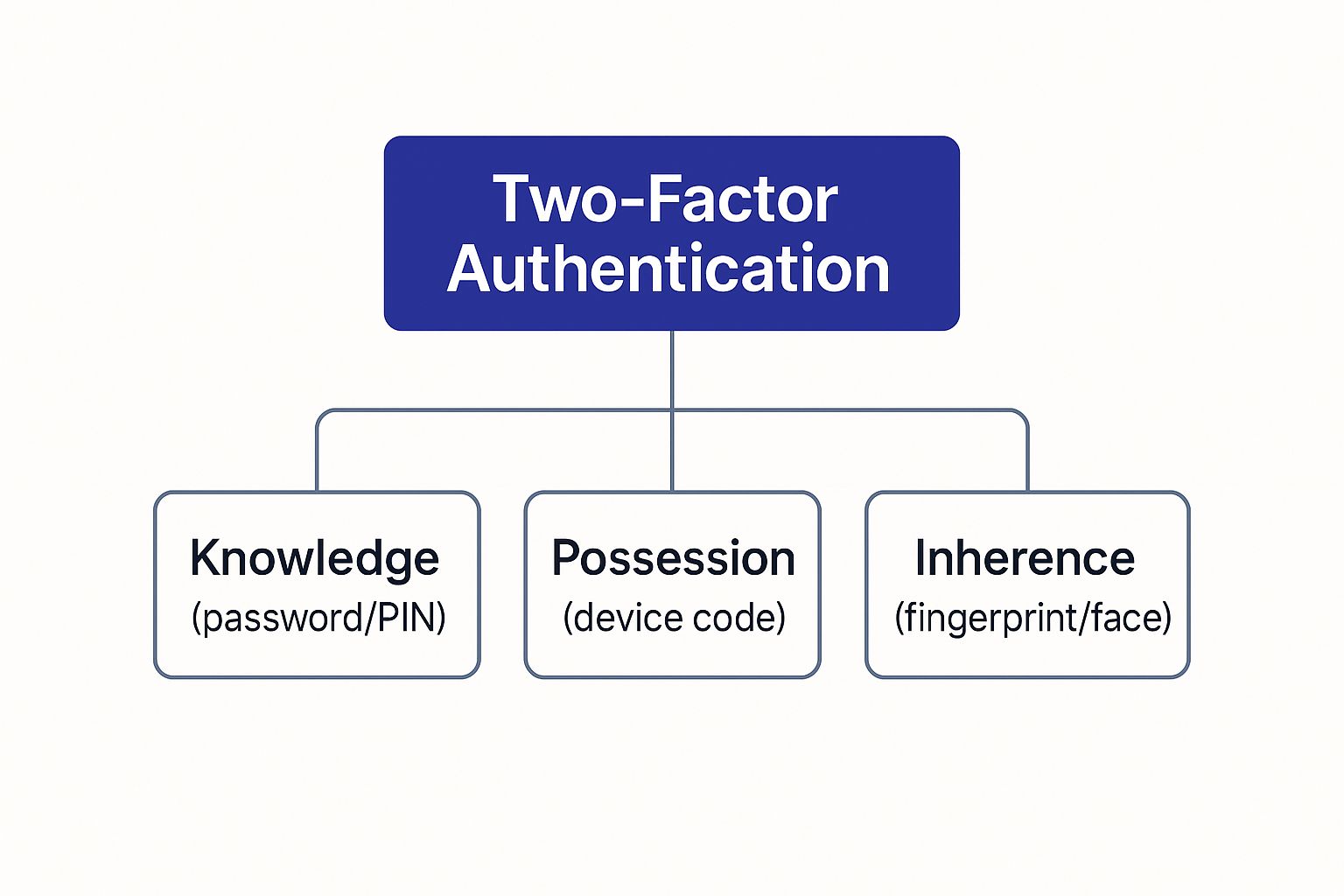
This layered approach is precisely what makes 2FA so effective. It forces an attacker to compromise two completely different things to gain access.
The impact of adding this simple security step is enormous. A landmark report from Microsoft found that enabling two-factor authentication can block 99.9% of automated account attacks. That single statistic shows just how essential 2FA has become in protecting our digital lives.
Ultimately, understanding the basics of 2FA is the first step toward better digital security. As you secure your own accounts, it’s also important to know how your partners are protecting your data. You can learn more about how Cloudvara implements two-factor authentication to safeguard your hosted applications and information.
Believe it or not, you've probably used two-factor authentication countless times without even thinking about it. While the term might sound technical, 2FA is already woven into our daily digital lives—from checking a bank account to logging into Instagram. So, let's move from theory to practice and look at the common 2FA methods you're likely already using.

Each approach strikes a different balance between security and convenience. Understanding how they work helps you make smarter choices about protecting your most important accounts.
The most familiar face of 2FA is the code sent to you through a text message (SMS) or email. You try to log in, and the service sends a temporary, single-use code to your phone or inbox. You just type that code into the login screen to prove you’re the one who has access to that account.
While it’s incredibly common and easy, SMS-based 2FA has some well-known weaknesses. A determined attacker can pull off a "SIM swap," tricking your mobile carrier into porting your phone number over to a device they control. Once they have your number, they start getting your 2FA codes, completely sidestepping this layer of security. It's definitely better than nothing, but it's far from the most secure option out there.
For a serious security upgrade, authenticator apps are the way to go. Popular choices like Google Authenticator, Microsoft Authenticator, or Authy are simple apps you install on your smartphone. Once you link an account, the app generates a fresh six-digit code every 30 to 60 seconds.
This method brings two huge advantages to the table:
Using an authenticator app is one of the single best upgrades you can make to your personal and professional digital security. It provides a robust defense that is nearly as convenient as an SMS code but significantly more secure.
Push notifications just might be the smoothest 2FA experience available. Instead of making you hunt for an app and type in a code, the service sends a simple notification straight to your trusted device. You just tap "Approve" or "Deny" on the pop-up to grant or block access.
Many services, including Google and Microsoft, rely on this method. It's fast, intuitive, and gets rid of the friction of manual code entry. It confirms your identity by verifying that you’re holding the physical device that received the notification, making it both a strong and user-friendly choice.
When you need the highest level of security possible, nothing beats a physical security key. This is a small hardware device—often looking like a little USB stick—that you plug into your computer or tap against your phone. When prompted to authenticate, you just touch a button on the key to prove you're physically there.
These keys use advanced cryptography to create a login process that's virtually impossible to phish. Because a physical object is required, an attacker on the other side of the world can't bypass it, even if they've stolen your password. They are widely considered the gold standard for protecting your most valuable accounts.
Think of two-factor authentication as the digital equivalent of a bank vault's second lock. A thief might steal the key (your password), but they're still stuck in front of a massive steel door they can't open. This is exactly how 2FA shuts down some of the most common and effective tricks cybercriminals use every day.

When a massive data breach happens and your password gets leaked online, it suddenly becomes a useless piece of information to a hacker. Without that second factor—the code from your phone or a quick tap on a security key—the stolen password gets them nowhere. They’re stopped cold.
It’s the same story with phishing scams. Even if a cleverly designed email fools you into entering your password on a fake website, the criminals still hit a wall. They can’t get the real-time code from your authenticator app, which makes their whole scam fall flat.
Most cybercriminals are looking for the path of least resistance. By turning on 2FA, you instantly make your accounts a much harder target. That little bit of extra effort required to get past the second layer is often more than enough to make them give up and move on to someone with weaker defenses.
This simple security step completely changes the game. It takes those easy, high-volume attacks off the table, forcing criminals to sink way more time and resources into an attack that has a much lower chance of success. This is a core idea in building a strong security posture, something we cover in our broader cloud security recommendations.
Two-factor authentication turns a compromised password from a catastrophe into a minor, contained incident. It’s the difference between a criminal walking right into your house and them just rattling a locked doorknob before giving up.
The numbers don't lie. Between 2017 and 2021, the use of 2FA jumped by 51% as more people and businesses caught on to just how powerful it is. Even with some debate around certain methods like SMS codes, Microsoft found that enabling 2FA can block an incredible 96% of bulk phishing attacks and 76% of targeted attacks. It’s a true frontline defense.
Ultimately, 2FA is about protecting what matters most, from financial accounts to private messages. To see how it can be applied to your digital communications, check out this guide on multi-factor authentication for email security.
Ready to add that crucial layer of security to your accounts? Great news: turning on two-factor authentication is usually a quick and painless process. While the exact button clicks might look a little different from one service to another, the core steps are nearly identical everywhere you go.
This guide is a general roadmap to help you confidently set up 2FA on your most important accounts—from social media and email to your financial software. The whole thing often takes less than five minutes but gives you a permanent, powerful upgrade to your digital security.
First thing's first: you have to find the right menu. Luckily, almost every online service tucks its 2FA options in a similar spot.
Once you’re in, look for a header like "Two-Factor Authentication" or "2-Step Verification" and click the button to get started.
After you kick off the setup, the service will ask you to pick your preferred method for getting that second code. Most platforms will give you a few common options.
Don’t Forget Your Backup Codes!
During the setup, you'll almost always be given a set of single-use backup codes. This step is critical. Save these codes somewhere safe and offline—think a password manager, a physical safe, or a printed document stored with other important papers. If you ever lose your phone, these codes are your lifeline to get back into your account.
Securing your personal accounts is just as important as protecting your business data. For companies that depend on financial software, secure access is non-negotiable. The same principles of 2FA apply directly to services like secure cloud hosting for QuickBooks, where multiple layers of protection are essential for safeguarding sensitive financial information. By following these simple steps, you can apply this best practice across your entire digital life.
As we look ahead, two-factor authentication isn't just a best practice—it's the first step in a much bigger shift toward a smarter, more secure digital world. The days of relying on a simple password are numbered. Businesses and regulators alike are pushing for stronger, more dynamic ways to prove we are who we say we are online.
This change is being driven by both necessity and innovation. Just look at the multi-factor authentication market. Valued at roughly USD 10.3 billion in 2025, it’s projected to explode to USD 32.8 billion by 2035, a clear sign of the urgent and growing demand for better security. You can dig into the numbers in Future Market Insights' detailed market analysis.
The future isn’t just about piling on more verification steps; it’s about making authentication seamless, intelligent, and maybe even invisible. The real goal is to move past clunky, manual codes and into far more sophisticated systems.
Here are the key trends shaping what’s next:
Adopting 2FA today is not just about protecting your accounts now—it’s about preparing for the future of online identity. It builds the security habits and understanding needed for the even stronger protections that are on the horizon.
Ultimately, these advancements are all part of the broader evolution in cloud technology, where security is becoming more deeply integrated and responsive. By getting comfortable with 2FA, you’re stepping onto the path of modern digital identity, making sure you stay ahead of threats as technology keeps moving forward.
Even when the concept is clear, the real-world details of using two-factor authentication can bring up questions. Let's tackle some of the most common ones to clear up any lingering doubts and help you use 2FA with confidence.
Yes, and the difference is significant. SMS codes are convenient, but they travel over cellular networks where they can be intercepted. Criminals use a surprisingly common technique called SIM swapping, where they trick your mobile provider into transferring your phone number to a device they control. Once they do that, they get your 2FA codes.
Authenticator apps completely sidestep this risk. They generate codes directly on your phone, and the codes never leave your device. Nothing is sent over a network, so there’s nothing for a hacker to intercept. This makes an app a much stronger choice for protecting important accounts.
This is the number one fear people have, and it's exactly why services give you backup codes the moment you set up 2FA. Think of these single-use codes as the emergency spare key to your digital life.
Your top priority after enabling 2FA should be to save these codes somewhere safe and offline. Store a printed copy in a fireproof safe, with your passport, or in a secure digital vault separate from your main devices.
If you lose your phone, you can simply use one of those codes to log in, remove the old device from your account, and set up the authenticator app on your new phone. It’s a clean and simple recovery process, as long as you’ve saved those codes! Some apps also offer encrypted cloud backups to make restoring everything even easier.
While 2FA is a massive leap forward in security, no single tool can make an account 100% unhackable. A highly sophisticated and targeted attack could still theoretically trick someone into giving up both their password and their 2FA code at the same time through an elaborate phishing scam.
But let’s be realistic. For the overwhelming majority of cyberattacks that happen every day—like automated password guessing and credential stuffing—2FA is a brick wall. It makes you an exponentially harder target for criminals, and it’s widely considered the single most effective step an individual can take to secure their online identity.
At Cloudvara, we build security into everything we do, and that includes integrating robust measures like two-factor authentication to protect your hosted applications. Explore our secure cloud hosting solutions and discover how we keep your business's critical data safe.




