What if you could access your office desktop—with all its files, software, and data—securely from your home, a client’s office, or even a coffee shop? That’s the simple promise of remote access technology. It's any system that creates a secure bridge between the device in your hands and a computer or network somewhere else.

Think of it as a private, encrypted tunnel connecting your laptop directly to your office workstation. For professionals in accounting or law, this means you can work just as productively and securely from anywhere, without skipping a beat. This capability is the engine that drives modern work, giving firms the flexibility to operate without interruption, no matter where their team is located.
It’s no surprise that the demand for flexible work has fueled a boom in remote jobs, all of which depend on solid remote access. While the idea isn’t new, its adoption has accelerated dramatically.
Fueled by broadband, mobile tech, and new collaboration tools, telecommuting has surged 216% since 2005. This growth has fundamentally transformed how businesses operate, with 4.7 million people in the U.S. now working from home.
To get a sense of how this shift happened, you can find a great historical overview from Virtual Vocations that details the evolution of telecommuting. But for now, let's focus on the core benefits that empower professional firms to thrive in this new environment.
Before we dive into the specific tools, here’s a quick summary of how remote access directly impacts a professional firm’s daily operations and long-term strategy.
| Benefit | Impact for Your Firm |
|---|---|
| Operational Resilience | Keep your firm running during office closures, power outages, or other disruptions. |
| Increased Productivity | Access essential software and client files from any location, turning downtime into productive time. |
| Enhanced Security | Centralize sensitive data on a secure server instead of scattering it across vulnerable laptops. |
| Talent Acquisition | Attract and retain top talent by offering the flexibility of remote or hybrid work. |
This table just scratches the surface. Each of these benefits is a direct result of having the right technology in place.
For a professional services firm, remote access isn't just about convenience—it’s a strategic advantage that protects your clients and your bottom line. Let's look at the immediate impact.
Next, we’ll explore the specific types of technologies that deliver these benefits, from familiar tools like VPNs to powerful solutions like managed cloud desktops.
To really understand what is remote access technology today, it helps to look back at how we got here. The idea isn't new at all—it actually goes back to the 1960s with tools like Telnet, which let a user command a distant computer using just a text-based interface. It was clunky and slow, almost like sending instructions by telegraph, but it planted the seed for controlling systems from miles away.
The journey sped up with the creation of TCP/IP, the foundational language of the internet, and the first laptops. Suddenly, the idea of a mobile office started to feel real, moving from a niche concept for tech gurus to a plausible business strategy. Early remote desktop programs like pcAnywhere popped up, giving users a graphical window into their office PC over a shaky dial-up connection.
The 1990s were a massive turning point. As home internet access became more common, businesses began to seriously experiment with remote work, and the results were compelling.
A U.S. Federal government study of 2,000 federal workers proved that telecommuters were more productive, had a better work-life balance, and saved a fortune on commuting. This pushed major companies like American Express and IBM to create formal telecommuting policies by 1995, solidifying the trend.
This shift created an urgent need for more powerful and secure access. The slow, unreliable connections of the past just wouldn't cut it for professionals who needed constant, stable access to their files and demanding software.
The core challenge was no longer just about connecting to a remote machine. It became about doing so securely, reliably, and with enough performance to feel like you were sitting right there in the office.
Each step forward in this journey was built on fixing the problems of the last generation. The growing need for better security and simpler management led directly to the development of today’s advanced tools, like VPNs and VDI.
These early hurdles laid the groundwork for modern solutions, especially the hosted virtual desktop. To see how this technology delivers a complete, secure office computer that lives in the cloud, check out our guide on what a hosted virtual desktop is. This evolution—from sending simple text commands to running a fully interactive desktop from anywhere—shows just how far we've come.
Not all remote access methods are built the same. Each one bridges the distance between your team and your office network differently, and choosing the right one is a bit like picking between an armored convoy, a direct remote control, or a complete office-in-the-cloud. The best fit depends entirely on what your team needs to do and the sensitivity of the data they’re handling.
The way we connect has come a long way, evolving from clunky command-line tools to the seamless cloud systems that now power modern firms.
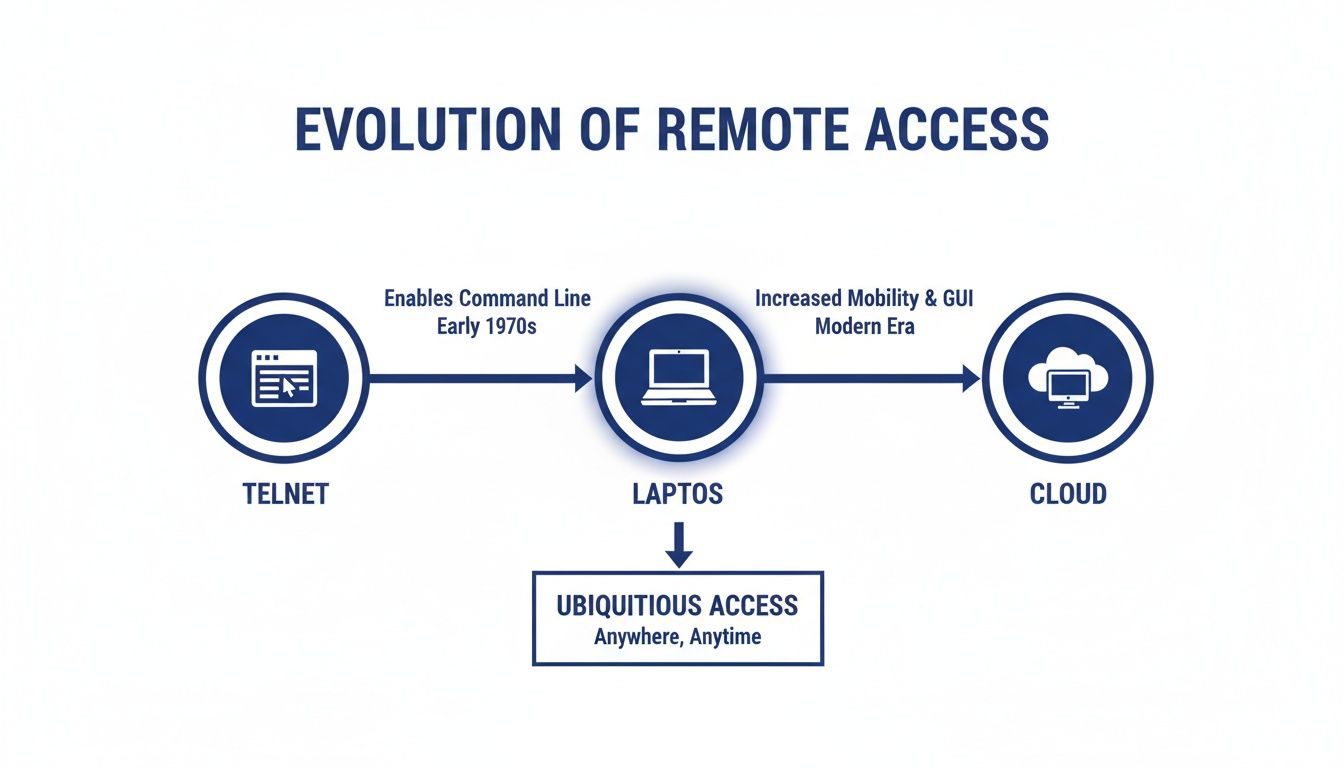
This evolution points toward a clear goal: giving users a complete, interactive office experience from anywhere, which is exactly what today’s cloud-hosted desktops deliver.
A Virtual Private Network (VPN) is likely the most familiar tool for remote access. It creates a private, encrypted tunnel for your data to travel safely across the public internet. Think of it like an armored convoy for your digital information, shielding everything from onlookers as it moves between your device and the office network.
This makes a VPN perfect for securely accessing shared files on a server or logging into internal company websites. But here’s the key distinction: a VPN gets your remote device on the network, but it doesn’t give you control of your actual office computer. Performance can also be a bottleneck, as it relies heavily on the user's home internet speed.
Remote Desktop Protocol (RDP) lets you take direct control of your office computer from another device. When you log in, you see your work desktop and can use its files, software, and even printers as if you were sitting right there. It’s a powerful tool for anyone who needs to run specific software that’s only installed on their work PC.
RDP creates a direct, one-to-one connection, giving you complete control over a single machine. It’s an effective way to access a specific workstation without ever moving files to your local device.
Virtual Desktop Infrastructure (VDI), often delivered as a cloud-hosted desktop, takes this concept to the next level. Instead of connecting to one physical PC in the office, your team connects to a powerful, virtualized desktop environment that lives on a secure central server. It’s like having a high-performance office computer that exists in a secure data center, accessible from any screen you own.
This approach is a game-changer for firms handling sensitive information. A recent BitSight study found that working from home increases malware exposure by 3.5 times, which makes centralized security more critical than ever. With a cloud desktop, client data never leaves the secure server, slashing the risks tied to unsecured home networks.
If you’re weighing the pros and cons, our guide on VDI vs. VPN offers a deeper comparison tailored for professional firms.
To help you see the differences at a glance, we've put together a quick comparison of these core technologies. Each one solves a unique remote work challenge, so understanding their strengths is key.
| Technology Type | Best For | Security Level | Analogy |
|---|---|---|---|
| VPN | Securely accessing shared network files and internal websites. | High (for data in transit) | An armored convoy on the public internet. |
| RDP | Directly controlling a specific physical office computer. | Moderate to High | A remote control for your office PC. |
| VDI / Cloud Desktop | Providing a full, standardized desktop experience from a secure server. | Very High | A high-performance office computer in the cloud. |
Ultimately, the choice comes down to your firm’s specific needs. A VPN secures your connection, RDP gives you control over your physical PC, and a cloud desktop provides a complete, secure, and centrally managed workspace accessible from absolutely anywhere.

For professionals in tax, accounting, or law, remote access isn't just about convenience—it's a high-stakes balancing act. You're handling incredibly sensitive client data, from financial records to confidential legal strategies. In this world, security and compliance aren't just features; they're the absolute foundation of your firm's reputation.
Generic remote access tools often create more problems than they solve. They can expose your firm to huge risks, especially when employees connect from less-secure home networks. In fact, working from home increases the likelihood of encountering malware by 3.5 times, which makes robust, centralized security essential.
When every single file contains privileged information, the consequences of a data breach are severe. This is where standard, off-the-shelf tools just don't cut it.
Understanding these risks is the first step. For a deeper dive, explore our guide on remote access security best practices.
To truly protect your firm, you need a system built on a zero-trust security model, where every single access request is verified. The goal is to create multiple layers of defense that protect your data no matter where your team is working.
Secure remote access has become the backbone of modern business continuity. This shift accelerated rapidly in 2020, when a Ponemon Institute survey found that 54% of industrial organizations invested in new secure remote access solutions, moving quickly to protect newly connected systems.
This means implementing specific, non-negotiable security controls. These include end-to-end encryption to shield data as it travels, multi-factor authentication (MFA) to prove user identities, and strict access controls to ensure team members only see the information they absolutely need for their job.
It’s also crucial to understand the weaknesses of common solutions, like the challenges faced by VPNs in restricted environments. A managed solution that bakes these security layers in from the start removes the burden from your team. It helps your firm meet its compliance obligations and safeguard its reputation, all without needing a dedicated IT security department.
Putting remote access into practice is more than just picking a tool. The real work—and the real security—comes from a smart implementation plan. It’s about building a system that gives your firm the flexibility it needs without ever putting sensitive client data on the line.
A successful rollout is all about a solid foundation. You need a secure framework that protects your data from every angle, whether your team is across town or across the country. This isn't about quick fixes; it's about creating a durable and compliant remote work environment that lasts.
Your first line of defense is always proving who’s at the door. You have to be absolutely sure the person logging in is who they say they are. In today's world, relying on just a password is a massive, unnecessary risk.
Not everyone in your firm needs the keys to the entire kingdom. The Principle of Least Privilege is a game-changer for reducing your firm’s attack surface. All it means is that employees should only have access to the specific data and applications they need to do their jobs. Nothing more.
Think of it like a hotel. You wouldn't give every guest a master key. Instead, you give them a keycard that only opens their room. Role-based controls work the same way, drastically limiting the potential damage if an individual's account is ever compromised.
This structured approach doesn't just boost security; it makes compliance audits a breeze. It proves that sensitive client information is only ever visible to authorized staff, protecting both your clients and your reputation. If you need help evaluating different systems, you can learn more by exploring a detailed remote access software comparison.
Even with the best defenses, you have to be ready for the unexpected. A reliable data backup and recovery plan is your ultimate safety net. It’s what gets you back up and running quickly after a hardware failure, cyberattack, or even a natural disaster.
Automated, daily backups are a core part of true business continuity.
These three pillars—strong authentication, tight access controls, and reliable backups—are the bedrock of any secure remote access strategy. Partnering with a managed service provider can take these technical headaches off your plate, minimizing risk and freeing your firm to focus on what it does best: serving clients.
Professional firms run on trust, but managing IT overhead, security risks, and business continuity on a tight budget can put that trust at risk. Cobbling together separate tools for remote access, security, and backups often creates more problems than it solves, leaving dangerous gaps in your defenses.
This is where a unified managed hosting solution makes all the difference. Instead of juggling multiple vendors and mismatched software, you get a single, secure platform built for the way you work. It’s the difference between trying to build a security system from scratch and moving into a fortress that already has guards on patrol.
We know an accounting firm’s workflow is nothing like a law office’s, which is why a one-size-fits-all approach just doesn’t work. A true managed service gives you a dedicated hosting environment fine-tuned for the software you depend on every single day.
The goal is simple: We take the IT burden off your shoulders, make sure your critical data is always protected and backed up, and give you a platform that can grow right alongside your firm. You get to offload the technical headaches and put your full focus back on serving your clients.
This integrated approach, combining remote access technology with managed security and backups, delivers something every firm needs: peace of mind. See for yourself how a modern, secure platform can transform your practice.
As you consider moving your firm to a more flexible work model, a few key questions always surface. Let's tackle the big ones that professionals in law and accounting ask most often.
This is the big one, and for good reason. The honest answer is that remote access is only as secure as you make it. Just letting someone connect from home isn't enough—true security comes from building the right protective layers from the ground up.
For any firm handling sensitive client files, a few features are non-negotiable.
A managed provider is the surest way to know these standards are always met. They handle the complex setup behind the scenes, so your firm is protected by default, not by chance. This takes the security burden off individual employees and their home networks.
Absolutely. This is one of the biggest myths about moving to the cloud. You don't have to ditch the specialized desktop software you've relied on for years in favor of a less powerful web-based tool.
Modern solutions like a hosted cloud desktop are designed specifically to take your firm’s essential applications—like QuickBooks, Sage, or your case management software—and make them securely available from anywhere. Your team keeps their familiar workflows, but with the added freedom of remote access.
It's a common point of confusion, but they do very different jobs, even though they often work together. A VPN creates a secure, encrypted tunnel to your office network, while remote desktop access lets you actually operate a specific computer on that network.
Think of it like this: the VPN is the secure, private road leading to your office building. The remote desktop is the key that lets you unlock the door, walk in, and sit down at your desk.
At Cloudvara, we specialize in providing a secure, all-in-one managed platform that handles these critical needs for you. We host your essential applications, implement robust security like two-factor authentication, and manage daily backups, giving you complete peace of mind. Learn more and start a free trial at Cloudvara.com.




