
Think of your disaster recovery plan as a detailed escape route for your business during a crisis. Now, think of disaster recovery testing as the fire drill you run to make sure everyone knows the route by heart and all the emergency exits actually open. It’s the process of deliberately stress-testing your plan in a safe, controlled way to find cracks before a real disaster shows up unannounced.
This proactive approach is what ensures your systems, data, and—most importantly—your people are ready to handle an outage without missing a beat.

Having a recovery plan tucked away in a binder isn't enough. On paper, it's just a theory. Testing is what turns that theory into a proven capability you can bank on when things go wrong.
Disaster recovery testing is a methodical practice where you simulate a disruptive event—maybe a critical server failure, a ransomware attack, or even a regional power outage. The goal is to confirm your organization can restore its IT infrastructure and get back to business within the timeframe you’ve promised your customers and stakeholders. It’s about moving from hoping your plan works to knowing it does.
This process almost always uncovers hidden flaws that documentation alone can’t. A test might reveal that key contacts in the plan have left the company, backup servers are running incompatible software versions, or there are huge gaps in your team’s response protocol. Before diving into the nitty-gritty of testing, it’s helpful to understand the wider context of Business Disaster Recovery Planning.
To get a clearer picture, here’s a quick breakdown of what disaster recovery testing involves.
| Component | Description |
|---|---|
| Simulation | Creating a controlled scenario that mimics a real-world disruptive event. |
| Validation | Actively verifying that recovery procedures, systems, and personnel perform as expected. |
| Identification | Uncovering weaknesses, gaps, or outdated information in the existing recovery plan. |
| Refinement | Using the test results to update and improve the disaster recovery plan. |
Ultimately, these components work together to build confidence and resilience across the organization.
Too many organizations learn the hard way that an untested plan is often no better than having no plan at all. It can create a false sense of security that shatters the moment it’s actually needed.
Despite how critical it is, consistent testing remains a major blind spot for many businesses.
A Kaseya survey of over 3,000 IT professionals revealed a startling gap: only 20% test their disaster recovery plan weekly. Even more concerning, 12% admitted to testing on an "ad hoc" basis or not at all, leaving their operations wide open to risk.
By proactively running these drills, you can turn weaknesses into strengths. Regular testing helps you:
Grasping what is disaster recovery testing is the crucial first step. The next is to build a plan worth testing. You can learn more about how to create a disaster recovery plan in our detailed guide.
Having a disaster recovery plan collecting dust on a shelf is like owning a state-of-the-art fire extinguisher you’ve never actually checked. It creates a dangerous illusion of safety. In reality, an untested plan is nothing more than a collection of assumptions—assumptions that can easily crumble under the pressure of a real crisis, taking your business down with them.

The stakes are much higher than simple data loss. The true cost of a failed recovery is measured in lost revenue, steep regulatory penalties, and a damaged reputation that can take years to rebuild. Just like well-practised emergency evacuation procedures are essential for physical safety, your digital preparedness needs to be rigorously validated to be effective.
Every minute your systems are offline, money is walking out the door. It's not a small problem. A recent report from senior tech executives found that 100% of them lost revenue due to IT downtime in the last year. The issue is constant, with 55% facing outages every single week, averaging 86 incidents per organization annually.
These numbers tell a clear story: downtime isn't a possibility; it's an inevitability. This financial bleeding isn't just about paused sales, either. It includes paying idle employees, disrupting supply chains, and facing potential contract penalties for not meeting service-level agreements (SLAs).
An untested plan isn't a safety net; it's a bet against the odds. Disaster recovery testing transforms that gamble into a calculated, strategic investment in your company's survival and long-term stability.
To see the real-world impact, let’s imagine two similar companies, "Innovate Corp" and "Momentum Inc.," both blindsided by the same ransomware attack.
Innovate Corp's Gamble: They had a disaster recovery plan but hadn’t tested it in over a year. When the attack hit, their IT team discovered their backup servers were misconfigured, key contact lists were outdated, and the recovery sequence completely failed. The result? Days of chaotic scrambling, massive data loss, and public apologies that shattered customer trust.
Momentum Inc.'s Preparation: Momentum Inc. ran disaster recovery tests every quarter. Their team had already walked through this exact scenario. They calmly executed their validated plan, isolated the threat, and restored operations from clean, verified backups within hours. Their customers barely even noticed a disruption.
This story highlights a crucial truth. Disaster recovery testing is the dividing line between resilience and ruin. It shifts your business from a position of hoping for the best to being prepared for the worst. For smaller organizations, a proven strategy is even more critical; a well-structured small business disaster recovery plan that is regularly tested provides a powerful competitive advantage.
Not all disaster recovery tests are created equal. The right one for you depends entirely on your company’s resources, maturity, and what you’re trying to achieve. Think of it like this: reviewing a building's blueprint is a world away from running a full-scale fire drill. Both are valuable for ensuring safety, but they serve different purposes and demand vastly different levels of effort.
DR tests exist on a similar spectrum, ranging from simple tabletop discussions to complex, hands-on simulations. The good news? Starting with a basic test is far better than doing nothing. You can always work your way up to more advanced methods as your team and capabilities grow.
Let's break down the common approaches, starting with the simplest.
The Paper Walkthrough, also known as a Tabletop Exercise, is a discussion-based session. Your team gathers around a table to verbally walk through the disaster recovery plan, step-by-step. It’s like reviewing that architectural blueprint—you’re looking for logical errors, outdated phone numbers, and procedural gaps without touching a single live system.
A step up from that is the Parallel Test. In this scenario, you spin up your recovery systems in an isolated environment, running them alongside your live production setup. This lets you confirm that your backups can be restored and that your critical apps will actually run on the secondary infrastructure, all without disrupting daily operations. It's the equivalent of building a scale model to test its integrity before constructing the real thing.
Finally, we have the most comprehensive and resource-heavy option: the Full Failover Test. This is the live fire drill. You intentionally shut down your primary production systems and switch everything over to your disaster recovery site. It’s the ultimate test of your plan, proving your organization can truly operate from its backup environment. While it provides the highest level of assurance, it also carries the most risk of business disruption if things don't go as planned.
This infographic breaks down how these common test types stack up against each other.
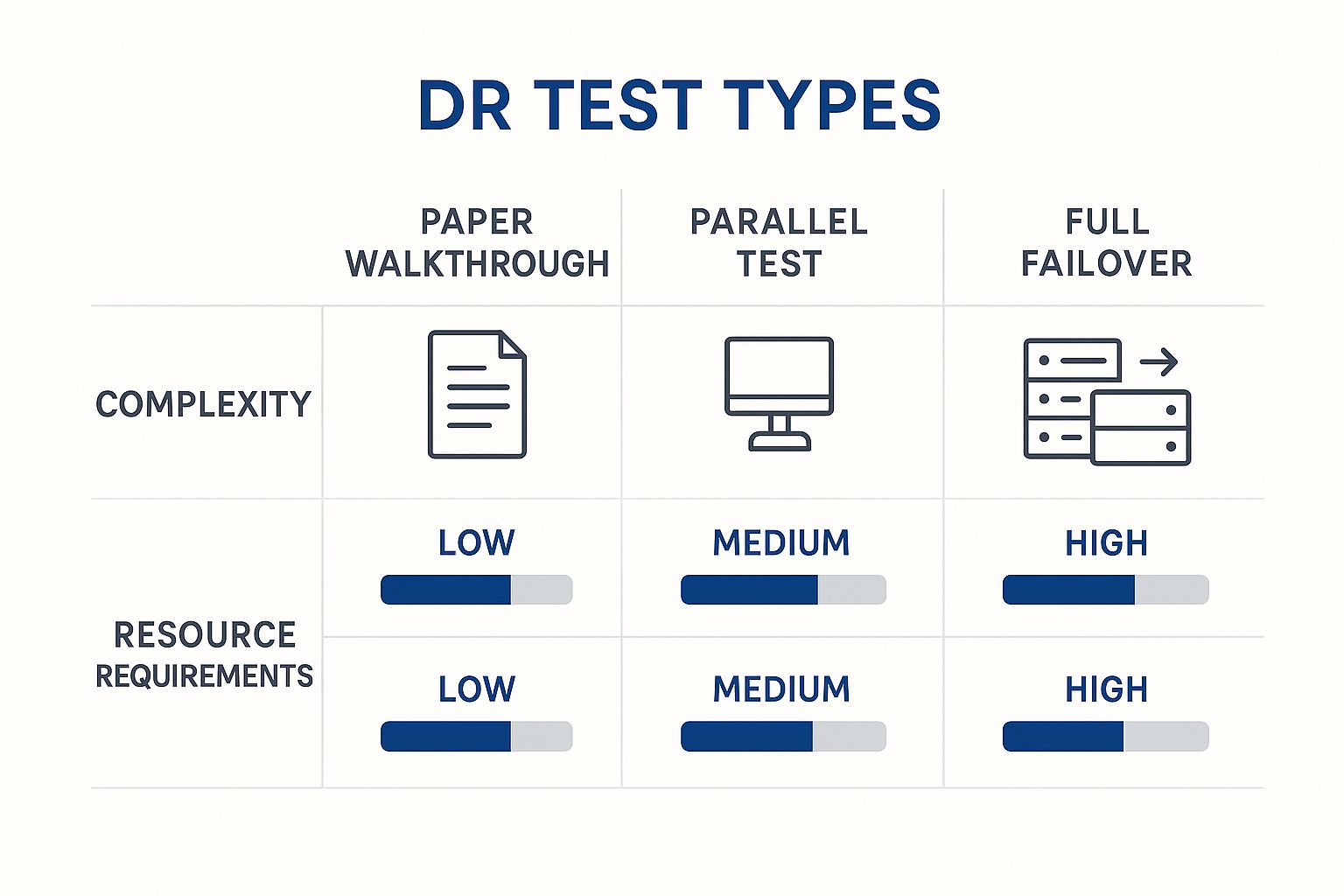
As you can see, as the complexity of the test ramps up, so do the resource costs and potential impact on your day-to-day operations.
To make the choice clearer, here’s a table that lays out the core differences between these testing methodologies. It breaks down what you can expect in terms of complexity, cost, and the ripple effect on your live operations.
| Test Type | Complexity | Resource Cost | Operational Impact |
|---|---|---|---|
| Paper Walkthrough | Low | Low | None |
| Parallel Test | Medium | Medium | Low to None |
| Full Failover | High | High | High |
This comparison helps frame the decision-making process. A Paper Walkthrough is a fantastic, low-stakes starting point, while a Full Failover is the ultimate proof of resilience but requires careful planning.
So, where should you start? It really depends on your needs. A small business might kick off with quarterly tabletop exercises just to make sure everyone knows their role in a crisis. A larger enterprise, on the other hand, might conduct parallel tests twice a year and a full failover annually.
The goal is not to immediately jump to the most complex test. The key is to create a consistent, repeatable testing cadence that aligns with your business objectives and risk tolerance, steadily building confidence in your recovery capabilities over time.
No matter which method you choose, the foundation of any successful recovery is a solid, reliable backup. An effective offsite backup solution ensures your data is secure, isolated, and ready for restoration the moment you need it. When you combine a robust backup strategy with the right testing methodology, you build a truly resilient operation that’s ready for anything.

Crafting a disaster recovery (DR) testing strategy today looks nothing like it did a decade ago. The rise of cloud computing and Disaster Recovery as a Service (DRaaS) has given us powerful new tools, but it's also added layers of complexity. Most modern IT environments are a tangled web of on-premise servers, private clouds, and public cloud services, making the old one-size-fits-all playbook obsolete.
This shift isn't just a trend; it's the new standard. An IDC survey found that organizations now run, on average, 44% of their backup or disaster recovery from the public cloud. But managing these sophisticated systems has created new headaches. To navigate the growing cyber skills gap, 100% of U.S. technology leaders now lean on third-party tools just to keep an eye on their recovery environments. You can read the full research about modern DR strategies to see just how deep these changes go.
Before you can build a strategy that actually works, you have to define what "recovery" means to your business. This is where two critical metrics come into play, and they are everything.
Recovery Time Objective (RTO): This is the stopwatch on downtime. It answers the question, "How long can we afford to be offline after a disaster?" An RTO of one hour is a world away from an RTO of 24 hours in terms of cost and complexity.
Recovery Point Objective (RPO): This defines the maximum amount of data you can stand to lose, measured in time. It answers, "How much work are we willing to redo from scratch?" An RPO of 15 minutes demands backups running constantly, while an RPO of 12 hours is much more relaxed.
These aren't just technical jargon; they are fundamental business decisions that shape your entire strategy. Your RTO and RPO will dictate the technology you buy, how often you test, and the total budget for your DR plan.
Setting an RTO of "zero downtime" and an RPO of "zero data loss" sounds like the gold standard, but it's incredibly expensive and often unnecessary. A realistic strategy aligns these goals with the actual needs of your most critical applications, not some theoretical ideal.
A solid DR strategy today is iterative and built to adapt. It all starts with a clear-eyed view of your business priorities, which then guides every technical decision you make.
Ultimately, a strong strategy is built on a foundation of dependable backups. Exploring options like managed backup services can simplify this crucial layer, ensuring your data is always protected and ready to be recovered—which is, after all, the entire point of a DR test.
Moving from a DR strategy on paper to a proven capability in the real world is all about execution. Effective disaster recovery testing isn't a massive, one-off drill you run once a year. It’s a consistent, repeatable process that builds resilience over time. Following a few proven guidelines ensures every test you run delivers maximum value.
A successful test begins long before the simulation ever starts. It all comes down to a clear, well-documented test plan that outlines specific goals, success metrics, and the scope of the exercise. Think of this document as your roadmap—it ensures everyone involved knows exactly what’s being tested and why.
Your test plan should be the single source of truth for the entire exercise. It needs to define clear objectives, like validating a specific RTO or confirming data integrity after a full restore. Don't leave anything to chance.
This is also where you nail down roles and responsibilities. When a real crisis hits, there’s absolutely no time for confusion. Every team member, from IT engineers to communication specialists, must know their exact part in the recovery process. Documenting this ahead of time guarantees a coordinated and efficient response.
In today’s fast-moving IT environments, annual DR tests just don't cut it anymore. Instead of aiming for one massive, disruptive "big bang" test, start with smaller, more frequent exercises. Running quarterly tabletop exercises or parallel tests can uncover significant issues without ever touching your production systems.
This iterative approach builds institutional muscle memory. It makes testing a normal part of operations rather than a dreaded annual event. Consistency is how you find vulnerabilities before they become critical failures.
A disaster recovery plan that hasn't been tested is merely a theory. Regular, practical testing transforms that theory into a proven capability, providing tangible proof that your organization can recover when an incident occurs.
The most valuable part of any disaster recovery test happens after it's over. It’s absolutely essential to document every step, every outcome, and every unexpected snag that came up during the simulation.
Once you have this information, hold a blameless post-mortem with everyone involved. The goal isn't to point fingers but to honestly assess what worked and what didn't. Use these insights to refine your DR plan, update your documentation, and improve training for next time.
When you treat every test as a learning opportunity, you create a cycle of continuous improvement that builds true operational resilience. This proactive approach is especially important when you automate backups, as testing is the only way to confirm your automated processes are actually working as intended.
Let’s be honest: manual disaster recovery testing is a huge pain. It’s a heavy lift that often demands significant downtime and pulls your best people away from their real jobs. This friction is exactly why so many companies test far less often than they know they should.
Thankfully, automation is flipping the script. It’s making DR testing faster, cheaper, and a whole lot more reliable.
Instead of blocking out a whole weekend for a massive, disruptive annual test, automated tools can run checks continuously right in the background. Think of it like having software that automatically spins up a copy of your recovery environment, confirms every server boots up correctly, and verifies that your data is intact—all without anyone lifting a finger. This approach takes the guesswork out of the equation and dramatically cuts down the risk of human error.
Modern automation platforms can perform constant health checks on your entire recovery setup. This isn't a once-a-year event anymore; it's a daily operational metric that gives you a near real-time snapshot of your readiness.
Here's what that looks like in practice:
Automation acts as a powerful force multiplier. It frees your skilled IT pros from the tedious, repetitive grind of manual checks, letting them focus on bigger-picture improvements to the disaster recovery plan itself.
Ultimately, automation transforms what is disaster recovery testing from a reactive, periodic chore into a proactive, continuous process. By bringing these tools into your strategy, you build a much more robust and dependable resilience plan that’s actually fit for today’s complex IT environments.
Even with a solid strategy in place, a few questions always pop up when it's time to actually implement a disaster recovery testing program. Let's tackle some of the most common ones we hear.
There’s no single magic number, but the old advice of "test annually" just doesn't cut it anymore for most businesses.
A great place to start is quarterly testing for your most critical systems. This frequency hits the sweet spot—it’s often enough to catch issues that creep in from changes in your IT environment, but not so often that it overwhelms your team.
For less essential systems, testing every six months might be perfectly fine. The real key? Always test after any major change, like a big software upgrade or a move to new infrastructure. That’s the only way to know for sure that your plan still works.
It’s incredibly common to mix up a Disaster Recovery (DR) plan and a Business Continuity Plan (BCP), but they play very different roles.
The DR plan is just one (very important) piece of the overall BCP puzzle.
A disaster recovery plan answers, "How do we get our servers back online?" A business continuity plan answers, "How do we keep taking customer orders while the servers are being restored?"
Absolutely. The idea that DR testing is just for massive enterprises is a total myth. Modern cloud-based tools and DRaaS (Disaster Recovery as a Service) have made it accessible and affordable for companies of any size.
Even a simple, low-cost tabletop exercise or a "paper walk-through" can provide tremendous value. These exercises clarify who does what and expose gaps in your process without touching a single piece of hardware. When you think about it, the cost of not testing is always going to be way higher than the investment in a basic, regular drill.
At Cloudvara, we build resilience into our cloud hosting solutions from the ground up, providing automated backups and a secure infrastructure to support your business continuity goals. Discover how our dedicated hosting can simplify your disaster recovery strategy by visiting https://cloudvara.com.




