Think of a dedicated server as your own private, physical server that a single business leases and uses exclusively. You get 100% of its CPU, RAM, and storage—no sharing required. Unlike shared hosting, where you're splitting resources with countless other users, this single-tenant setup means your performance is never dragged down by "noisy neighbors."

Let's imagine you're running a busy restaurant. Shared hosting is like renting a table in a crowded, noisy food court. You share the space, the kitchen, and the staff with everyone else, which can lead to unpredictable service and slowdowns during peak hours.
A dedicated server, on the other hand, is like owning the entire restaurant building. You get the whole property—the kitchen, the staff, and every table—all to yourself. This exclusive access means faster service for your customers, complete control over the environment, and the peace of mind that no one else can just walk in and disrupt your operations.
This analogy gets to the heart of what a dedicated server provides: a private, powerful, and secure foundation for your business's digital presence. When you can't afford to compromise on performance or security, owning your digital "real estate" is the only way to go.
To make it even clearer, here's a simple breakdown of what defines a dedicated server.
| Feature | Description |
|---|---|
| Tenancy | Single-tenant; one server is leased to a single client. |
| Resources | All CPU, RAM, and storage are 100% yours. No sharing, no competition. |
| Control | Full administrative ("root") access to install any software or OS you need. |
| Security | Isolated environment significantly reduces risks from other users' activities. |
| Performance | Consistent and predictable, as resources are never split with anyone else. |
This straightforward model gives businesses the raw power and control they need to run demanding applications without interference.
Understanding dedicated hosting really comes down to a few key concepts that set it apart. It’s not just about having a machine to yourself; it’s about the fundamental advantages that exclusivity brings to the table. These are the principles that drive so many growing businesses to eventually make the switch.
Here’s a quick rundown of what makes this model unique:
A dedicated server offers a single-tenant environment, meaning one physical server is exclusively used by one client. This isolation prevents resource contention and provides a higher level of security, making it a preferred choice for businesses with high-traffic websites, sensitive data, or specific compliance needs.
This level of control and power is driving serious market growth. The global dedicated server hosting market recently hit USD 20.15 billion and is projected to reach USD 80.49 billion by 2032, expanding at an impressive 18.9% CAGR. This surge reflects the rising demand from sectors like e-commerce and finance that require absolute reliability.
For businesses weighing different infrastructure options, understanding how various models function is key. To see how this compares to another popular solution, check out our guide on what is cloud hosting.
To really grasp what makes a dedicated server special, it helps to see how it stacks up against the other hosting options out there. Think of it like real estate. Shared hosting is like renting an apartment in a big building—you split the utilities and common areas with everyone else. It’s affordable, but it can get noisy and crowded fast.
A Virtual Private Server (VPS) is a step up, kind of like a townhouse. You have more of your own space and fewer neighbors, but you’re still sharing the underlying foundation and land. A dedicated server, on the other hand, is like owning your own house on its own plot of land. Every single resource, from the driveway to the roof, belongs to you and you alone.
This difference is everything for professionals in fields like law and accounting. When you’re running resource-hungry software like QuickBooks or a legal CRM, you need consistent, reliable power—not the performance dips you often get in a shared setup.
To make this even clearer, let's break down the key differences between the main hosting types. The right choice really depends on your specific needs for performance, control, and budget.
| Feature | Dedicated Server | VPS Hosting | Shared Hosting |
|---|---|---|---|
| Performance | Highest, guaranteed resources | Good, but can be affected by other VPS users on the same hardware | Lowest, resources are shared among all users |
| Security | Highest, total physical and network isolation | Good, isolated at the software level | Lowest, a breach on one site can potentially affect others |
| Control | Full root access and complete hardware control | Root access to the virtual server, but hardware is shared | Limited to a control panel; no server-level changes |
| Customization | Complete freedom to install any OS and software | Can install custom software but limited by the provider's setup | Very limited, restricted to pre-approved software |
| Cost | Highest initial and ongoing cost | Mid-range, balanced cost and performance | Lowest cost, ideal for beginners |
| Best For | High-traffic sites, large businesses, and sensitive data | Growing businesses, developers, and moderately busy sites | Small websites, blogs, and personal projects |
This table gives you a quick snapshot, but the real impact of these differences shows up in day-to-day operations, especially when things get busy.
The biggest dividing line between hosting types is always performance. With a shared plan, your website is just one of many tenants pulling from the same pool of CPU, RAM, and bandwidth. If another site on your server suddenly gets a huge traffic spike, your performance will tank. It’s the classic "noisy neighbor" problem.
A VPS tries to solve this by slicing up a physical server into several virtual ones, each with its own slice of the resource pie. It’s definitely more stable than shared hosting, but you're still sharing the main hardware. For a deeper look at these two powerful options, you can explore the differences between a cloud server vs dedicated server.
A dedicated server just sidesteps these issues completely. Because you're the only one on the machine, 100% of the server's resources are yours, all the time. That means you get consistent, predictable, high-end performance—which is non-negotiable for running critical business apps, processing huge datasets, or handling a popular website without a hitch.
Security is another area where the differences are night and day. In a shared environment, a security breach on one person's account could potentially open a door for attackers to hit everyone else on that server. Hosting providers do their best to wall things off, but the shared model itself comes with built-in risk.
A VPS is more secure thanks to virtualization, which isolates your digital space from your neighbors on the same machine. Still, the hypervisor—the software that runs all the virtual machines—can become a target for a clever attack.
With a dedicated server, your environment is physically isolated from all other users. This single-tenant architecture drastically reduces the attack surface and gives you complete control over your security protocols, firewalls, and access policies, a non-negotiable for firms handling sensitive client data.
The amount of control you have is directly tied to your hosting plan. Shared hosting gives you the least, locking you into a pre-set environment where you can’t install much custom software. You can manage your website files, sure, but you can’t touch the server's core settings.
A VPS gives you much more freedom, including root access to your virtual machine. This lets you install the software you need and tweak the environment. But you’re still working within the limits of the provider’s hardware and virtualization setup.
A dedicated server gives you full root access to the whole machine. That means you can:
This total control is vital for businesses with unique software needs or those that have to meet strict compliance standards. When weighing a dedicated server against other options like the flexible and scalable nature of cloud computing, businesses have to balance factors like control, performance, and management.
Of course, cost is often the bottom line, and it’s where these hosting models diverge the most. Shared hosting is the cheapest, making it a great starting point for brand-new websites or small businesses. VPS hosting is the middle ground, offering a good mix of performance and price.
A dedicated server is the premium option. You’re paying for exclusive use of powerful hardware, and that naturally costs more. But for any business where downtime means lost revenue, that price is easily justified by the rock-solid performance and security you get in return.
Knowing how a dedicated server works is one thing, but seeing its direct impact on your business is where its value truly clicks. Moving to a dedicated server unlocks several game-changing advantages that are simply out of reach in a shared or even a VPS environment. These aren't just technical perks; they translate into better performance, tighter security, and greater operational freedom.
For professionals in fields like accounting or law, where application speed and data integrity are non-negotiable, these advantages are fundamental. Let's walk through the five core benefits that make a dedicated server such a powerful asset.
The most immediate and noticeable benefit is unmatched performance. Because you're the only tenant, 100% of the server's resources—CPU, RAM, and disk I/O—are yours and yours alone. There are no "noisy neighbors" hogging bandwidth or slowing down your applications when you need them most.
Imagine an accounting firm during the final week of tax season. Multiple users are running resource-intensive software like QuickBooks or Sage all at once. On a shared server, that surge could cause crippling slowdowns for everyone. With a dedicated server, performance stays fast and responsive, ensuring your team can work efficiently without frustrating delays, even under a full load.
This diagram helps visualize where dedicated servers stand compared to other hosting types.
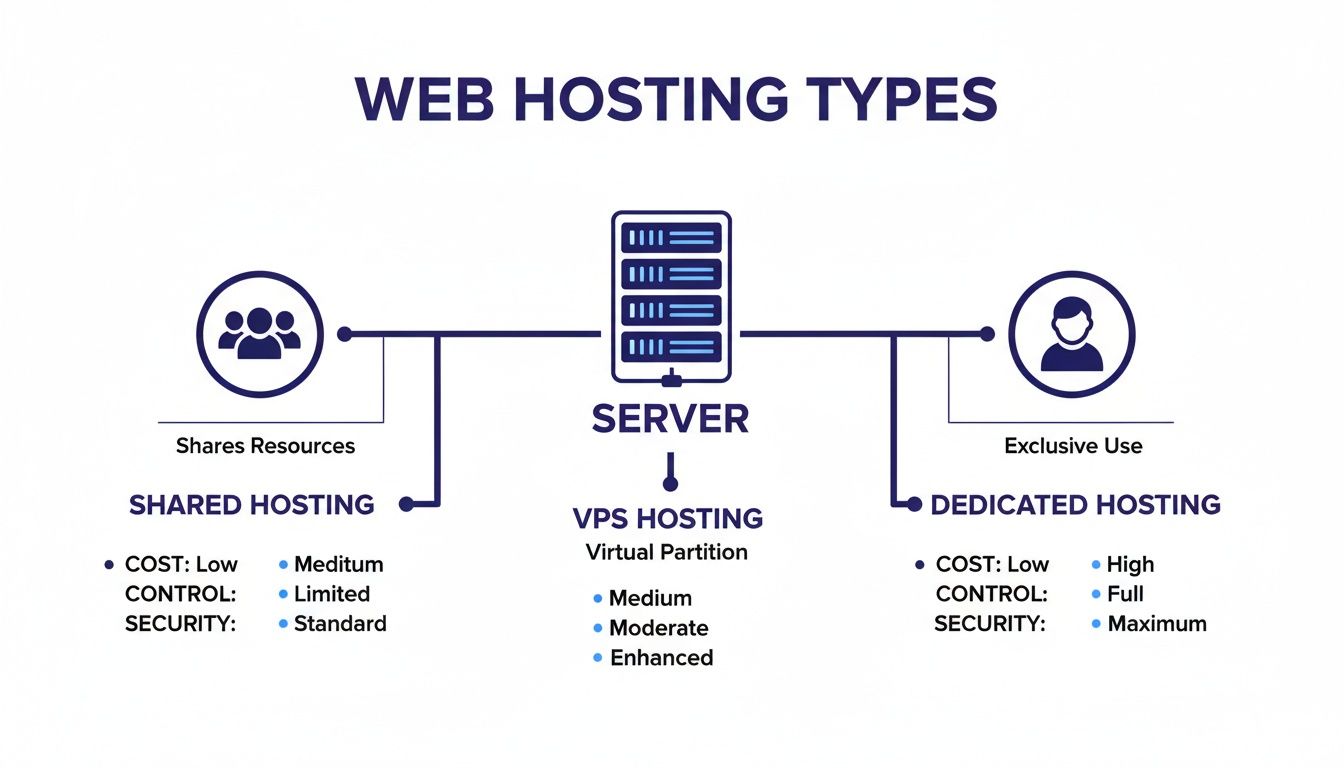
As you can see, while dedicated servers represent a higher investment, they deliver the absolute maximum in control and security. That makes them the clear choice for mission-critical operations.
In a world of constant cyber threats, security can't be an afterthought. A dedicated server offers a fundamentally more secure environment thanks to its physical and network isolation. Since you aren't sharing the server with anyone else, you eliminate the risk of being compromised by another user's sloppy security practices.
A dedicated server's single-tenant architecture significantly reduces the attack surface. You have the power to implement custom firewalls, configure unique access controls, and install specialized security software tailored to your specific compliance needs, such as HIPAA for healthcare or FINRA for financial services.
This level of control is essential for a law firm handling sensitive client information or a nonprofit managing donor data. You can build a fortress around your data that just isn't possible in a shared setting.
A dedicated server gives you full root access, meaning you have total administrative control over the entire machine. This opens the door for deep customization that shared or even VPS hosting can't touch.
You can:
This freedom is crucial for businesses with specific technical requirements or those looking to build a highly optimized environment for their applications.
Downtime isn't just an inconvenience; it costs money and damages your reputation. Dedicated servers are inherently more reliable because their resources aren't stretched thin across multiple users. Most providers also offer a Service Level Agreement (SLA) that guarantees a certain level of uptime, often 99.9% or higher.
This reliability is vital for e-commerce sites that lose sales every minute they're offline or for businesses running critical internal apps that must be available 24/7. This robust infrastructure is a key reason the global servers market, valued at USD 145.15 billion, keeps growing. Rack servers, the typical format for dedicated hosting, are projected to capture 50.96% of the market share, highlighting their importance for organizations that demand unwavering stability. You can find more insights about global server market trends on Fortune Business Insights.
Finally, a dedicated server gives you a straightforward and powerful way to scale. As your business grows, so will your resource needs. With a dedicated server, you can easily upgrade individual components like RAM, storage, or CPU power to handle more traffic and data. This component-level scalability is far more granular and cost-effective than being forced to jump to a completely new, more expensive plan. It ensures your hosting solution grows right alongside your business.
How do you know when you’ve truly outgrown your current hosting plan? It’s a question every growing business eventually faces. The jump from shared or VPS hosting to a dedicated server isn't just about getting bigger—it's a strategic move to fix specific pain points that are starting to cost you customers and revenue.
Spotting the warning signs early means you can be proactive, making the switch before small headaches turn into major operational problems. If your current setup is holding you back, the signs are usually pretty clear and have a direct impact on your bottom line.
This is the most obvious red flag. If your site consistently takes more than a few seconds to load, especially during peak hours, you’re losing visitors and frustrating customers. Sluggish performance is often the first sign that your shared or VPS resources are stretched to their absolute limit.
When multiple users are hitting resource-heavy applications—like accounting software or a large e-commerce catalog—the competition for CPU and RAM gets intense. A dedicated server completely eliminates this resource battle, ensuring your applications always have the power they need to run at full speed.
As your business grows, so do your security responsibilities, especially if you handle sensitive customer data. If you find yourself worried about vulnerabilities from other tenants on a shared server or struggling to meet strict compliance standards like HIPAA or PCI DSS, it’s a clear signal you need more control.
A dedicated server gives you a physically isolated environment, which is the foundation of robust security. You can implement custom firewalls, specialized security software, and access controls tailored to your specific industry regulations.
When your business is responsible for protecting sensitive client information—whether financial records, legal documents, or personal data—the isolated, single-tenant environment of a dedicated server isn't just a benefit; it's a necessity for risk management and maintaining client trust.
This level of control means your security is defined by your policies, not the limitations of a shared platform.
Are you running complex applications—a large CRM, an extensive database, or specialized industry software—that frequently crash or freeze? These tools consume significant server resources. On a shared or VPS plan, a single demanding process can eat up all available memory and CPU, bringing your entire operation to a standstill.
Upgrading to a dedicated server gives you exclusive access to all the hardware's power. This means you can run demanding software without worrying about it interfering with other processes or being throttled by your host. The stability you gain is critical for keeping your business running smoothly. To better understand what comes next, you can learn more about the process of moving servers to the cloud.
Finally, one of the clearest indicators for an upgrade is when your operational needs simply outgrow the permissions of your current plan. If you need to install a custom operating system, fine-tune server settings for peak performance, or deploy specific software that isn’t supported by your provider, you’ve hit a wall.
A dedicated server hands you full root access, giving you complete and unrestricted control over the entire machine. This freedom lets you build a highly customized environment perfectly tuned to your business's unique technical needs, unlocking a new level of efficiency and capability.

Deciding to upgrade is a big step, but the actual process of picking and moving to a dedicated server doesn’t have to be a headache. With a clear plan, you can make the switch smoothly and start tapping into the power of your new infrastructure right away.
The key is to break it down into two manageable phases: first, selecting the right server, and second, planning a seamless migration. This approach ensures you get the hardware you need without disrupting your daily operations.
Choosing the right server is like picking the right tool for a critical job—it has to match your specific needs. If you rush this step, you could end up overspending on power you don't use or, even worse, getting a server that can't keep up with your applications.
Start by focusing on three core hardware components:
Beyond the hardware, you'll face a critical decision: managed or unmanaged hosting. An unmanaged server is a blank canvas, but you're on the hook for all maintenance, security, and updates. This route is really only for businesses with a dedicated IT team.
For most small businesses, law firms, and accounting professionals, a managed dedicated server is the ideal solution. The provider, like Cloudvara, handles all the technical heavy lifting—from security patches to performance monitoring and 24/7 support—so you can focus on running your business, not managing a server.
The trend toward robust infrastructure is clear. North America's data center server market is projected to swell from USD 72.33 billion to USD 134.58 billion. With giants like Dell reporting quarterly server revenues of USD 11.6 billion, it's obvious businesses are investing in reliability. A dedicated server ensures performance isn't throttled during critical deadlines, a key reason so many are making the switch. You can dive deeper into the data center server market trends on Mordor Intelligence.
Once you’ve picked your server, the next step is moving your data and applications. A well-designed migration plan is the secret to a transition with almost no downtime and zero data loss. The goal is to make the move so seamless your users barely notice anything changed.
Your migration journey breaks down into three logical steps.
Audit Your Current Setup: Before you move a single file, take a full inventory of your current environment. Document every application, database, user account, and custom configuration. This audit is your blueprint, making sure nothing gets left behind.
Create a Detailed Migration Plan: Work with your new provider to map out the entire process. Your plan should have a timeline, assign key responsibilities, and include a strategy for testing everything before you flip the switch. A good plan always has a rollback strategy, just in case.
Execute and Validate: During a low-traffic period, start the migration. Once the data is moved, thoroughly test every single application and function to confirm it all works exactly as it should. After validation, you can point your domain to the new server and finalize the transition.
Partnering with a provider that specializes in managed migrations can make all the difference. At Cloudvara, we become your migration partner, handling the technical details to ensure your move is completely seamless and stress-free. For more pointers, check out our guide on how to choose a hosting provider.
Even after weighing the benefits, it’s smart to have a few questions before you commit to a dedicated server. Getting total clarity is the final step, and it helps you move forward with confidence. We’ve answered some of the most common questions business owners ask when they’re on the verge of this important upgrade.
Think of these as the last few details to clear up any doubts you might have about cost, management, and how a dedicated server stacks up against other popular hosting options.
The price of a dedicated server can swing quite a bit, typically landing somewhere between $100 to over $500 per month. What drives the cost? The hardware inside. A server loaded with a top-tier processor, tons of RAM, and blazing-fast SSD storage will naturally sit at the higher end of that range.
It’s a bit like buying a company vehicle. A basic van gets the job done, but a heavy-duty truck built for specialized tasks costs more because it delivers far more power and capability. In the same way, a server’s price tag reflects its raw performance potential.
The investment often makes perfect sense when you factor in the cost of downtime, sluggish performance, or a security breach. For a high-traffic e-commerce store, the price of a dedicated server is a small fraction of the revenue it protects by keeping the site online and fast during a big sale. It’s less of an expense and more of an investment in operational stability.
This is one of the questions we hear most often, and the difference really boils down to physicality versus virtualization. A dedicated server is a single, physical machine that you lease all for yourself. You get 100% of its resources, 100% of the time.
A cloud server, on the other hand, is a virtual machine (VM). It’s a slice of a much larger physical server that it shares with other VMs. While cloud servers are incredibly flexible—you can scale resources up or down in minutes—they don’t give you that same guaranteed level of resource consistency. Performance can sometimes dip if other tenants on the same hardware get busy, a classic “noisy neighbor” problem.
A dedicated server offers guaranteed, predictable performance because the hardware is yours alone. A cloud server provides on-demand scalability, but its performance can fluctuate because the underlying physical resources are shared.
For businesses running applications that can’t afford to slow down, like a law firm’s case management software, the raw, uncontested power of a dedicated server is almost always the right call.
Technically, yes. With an unmanaged dedicated server, you get full root access and total control over the machine. But—and this is a big but—it also means you’re personally responsible for every single aspect of server administration.
Managing a server is a serious technical job. It involves:
This requires deep technical expertise and a significant time commitment. For most business owners, accountants, or lawyers, that’s just not a practical use of time. This is exactly why managed dedicated hosting is the go-to choice for the vast majority of businesses.
With a managed plan, your hosting provider becomes your outsourced IT team. They handle all the security, updates, and maintenance, letting you enjoy all the benefits of a powerful server without any of the administrative headaches.
Unlike the instant setup you get with shared hosting or some cloud services, a dedicated server takes a little more time to get going. Because it’s a physical piece of hardware, a technician has to physically assemble the components you chose, install the server in a rack, and hook it up to the network.
This process, called provisioning, usually takes anywhere from a few hours to 24-48 hours. The exact timeline depends on the provider and how complex your custom build is. While it requires a short wait, it also ensures your server is built and configured exactly to your specs, ready to deliver peak performance right from the start. To see how dedicated servers fit into the bigger picture, you can learn more in our guide comparing VPS vs dedicated servers.
At Cloudvara, we specialize in making the move to a powerful, secure hosting environment completely seamless. Our commercial-grade managed dedicated servers deliver the performance your business demands, all backed by our 24/7 expert support and a 99.5% uptime guarantee. Let us handle the technical complexities so you can focus on what you do best.
Start your free 15-day trial today and experience the Cloudvara difference.




