A partner reviews file activity after an employee departure and sees a login that should have been disabled weeks ago. The account still opens tax workpapers, client correspondence, and archived financial statements. Nobody noticed because the password hadn't changed, the access list was never reviewed, and offboarding lived in an HR checklist instead of an IT control.
That situation isn't rare because small firms often grow faster than their internal controls. A legal or accounting practice adds staff, contractors, seasonal help, and outsourced support. Access gets granted quickly so work can move. It rarely gets cleaned up with the same urgency.
For law firms and accounting firms, that gap creates more than a security problem. It creates a confidentiality problem, a compliance problem, and in many cases an ethics problem. Client records, tax data, settlement documents, payroll files, trust account information, and medical or financial attachments all sit behind usernames and passwords that many firms still manage informally.
User access controls are the digital version of locking offices, file rooms, and records cabinets. They decide who gets in, what they can see, what they can change, and when that access should end. If those controls are weak, every other security measure is working uphill.
A small practice can look orderly on the surface while access is chaotic underneath. The office manager knows who works there. The partners know which clients are sensitive. The IT provider knows the systems. But if nobody owns the full picture of who can access what, risk accumulates unnoticed in everyday routines.
A common pattern looks like this: a staff accountant changes responsibilities but keeps old permissions “just in case.” A paralegal gets temporary access to a matter folder and never loses it. A terminated employee's Microsoft 365 account is disabled, but their remote application login still works. None of those decisions feel dramatic in the moment.
They become dramatic after a dispute, a mistaken deletion, a suspicious login, or a client asking who had access to their records.
Legal and accounting firms don't just store business data. They hold information clients assume will be protected with discipline. That expectation is part of the service itself. If a client can't trust your handling of records, they start questioning your judgment in other areas too.
In practice, user access controls sit at the intersection of:
Access mistakes usually start as convenience decisions. They end as governance failures.
The firms that handle this well don't treat access as a one-time IT setup. They treat it like records management or trust accounting. Someone owns it. It follows policy. It gets reviewed. It changes when roles change.
That discipline matters because access isn't only about outsiders breaking in. It's also about insiders, former insiders, and well-meaning staff working with more visibility than they need.
Think of your firm like an office building. The records room, partner offices, reception desk, server closet, and archive room don't all use one identical key. They shouldn't. Digital systems work the same way.
A sound access model starts with four plain questions. Who is the person. How do they prove it. What are they allowed to open. Which systems or files are worth protecting most tightly.
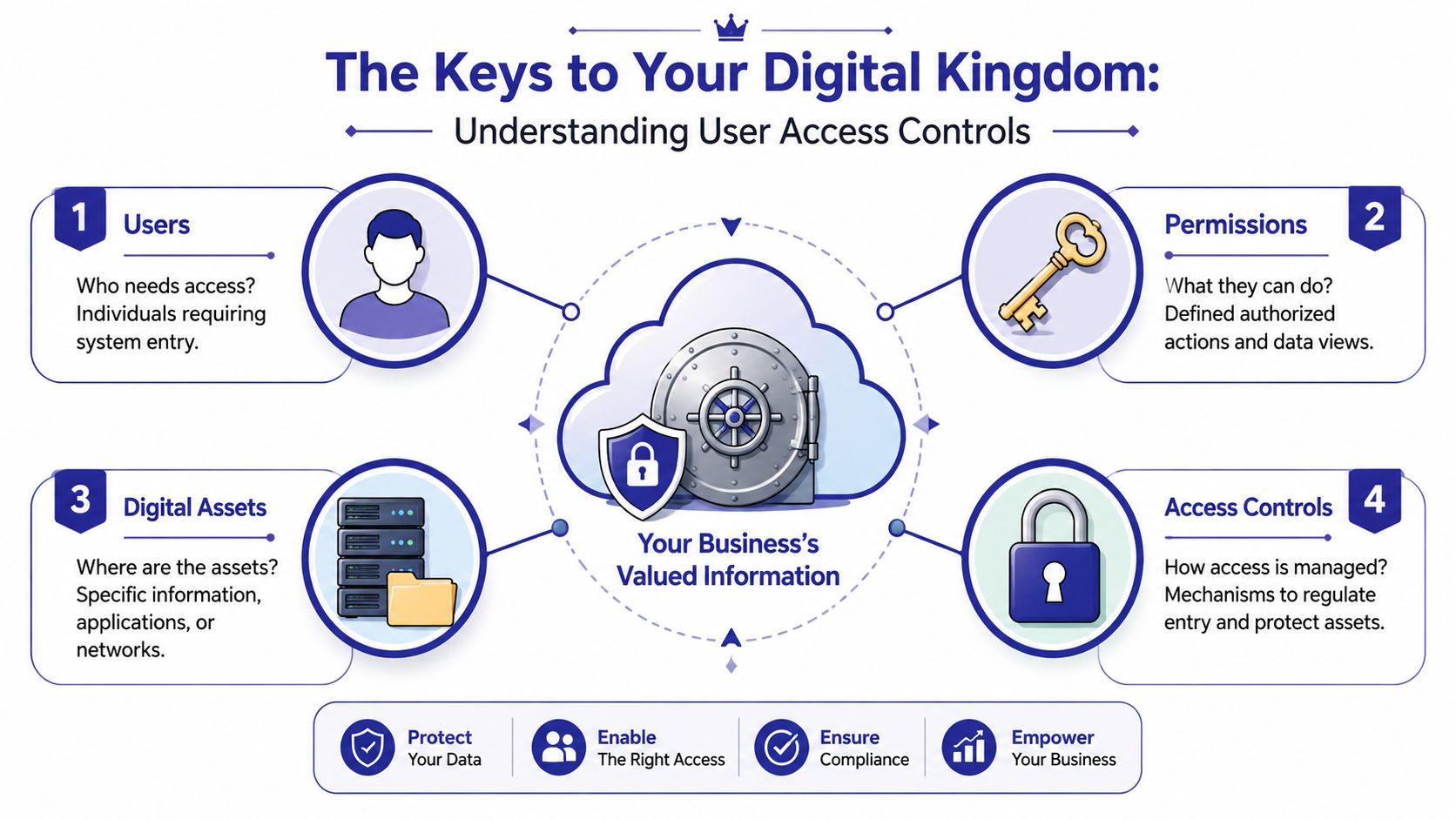
A user identity is the named person holding the key. In a firm setting, that means every employee should have their own account. Shared logins are like a communal office key passed around a hallway. When something goes wrong, nobody can say with confidence who used it.
Authentication is the security guard checking ID at the door. A password is one check. Multi-factor authentication adds another. If you need a plain-language primer, this guide to two-factor authentication is useful for non-technical teams.
Authorization is the access list tied to that person after identity is confirmed. It decides whether the user can only read a document, edit it, export it, or approve financial activity.
A practical summary from AssuranceLab's guidance on user access controls is worth adopting directly: a high-assurance design should combine unique user identities, strong authentication, and role-aligned authorization because access decisions only matter if the system first verifies identity and then enforces least-privilege permissions.
The Principle of Least Privilege means giving someone the smallest key ring that still lets them do their job. If a bookkeeper needs QuickBooks access, that doesn't mean they also need HR records, litigation files, admin settings, or archived tax engagements. If a receptionist schedules appointments, they shouldn't be able to browse every client folder.
That sounds obvious, but firms often drift the other way for understandable reasons:
Practical rule: If removing a user's access would break three unrelated systems no one remembered they had, your access model is too loose.
Not every system deserves the same level of restriction. Your client document repository, tax software, legal practice management platform, payroll system, and email archive usually need tighter controls than low-risk internal tools.
That means maintaining a current register of where sensitive data lives. Many firms skip this step and then try to solve access one application at a time. That usually produces blind spots. You can't assign the right keys if you haven't mapped the building.
Once the basic key idea makes sense, the next question is how to issue those keys at scale. Most firms don't stay small forever. New hires, interns, contractors, remote staff, and outside specialists all increase permission complexity.
The two models that matter most in practice are Role-Based Access Control (RBAC) and Attribute-Based Access Control (ABAC). Most small law and accounting firms should start with RBAC and add ABAC where context matters.
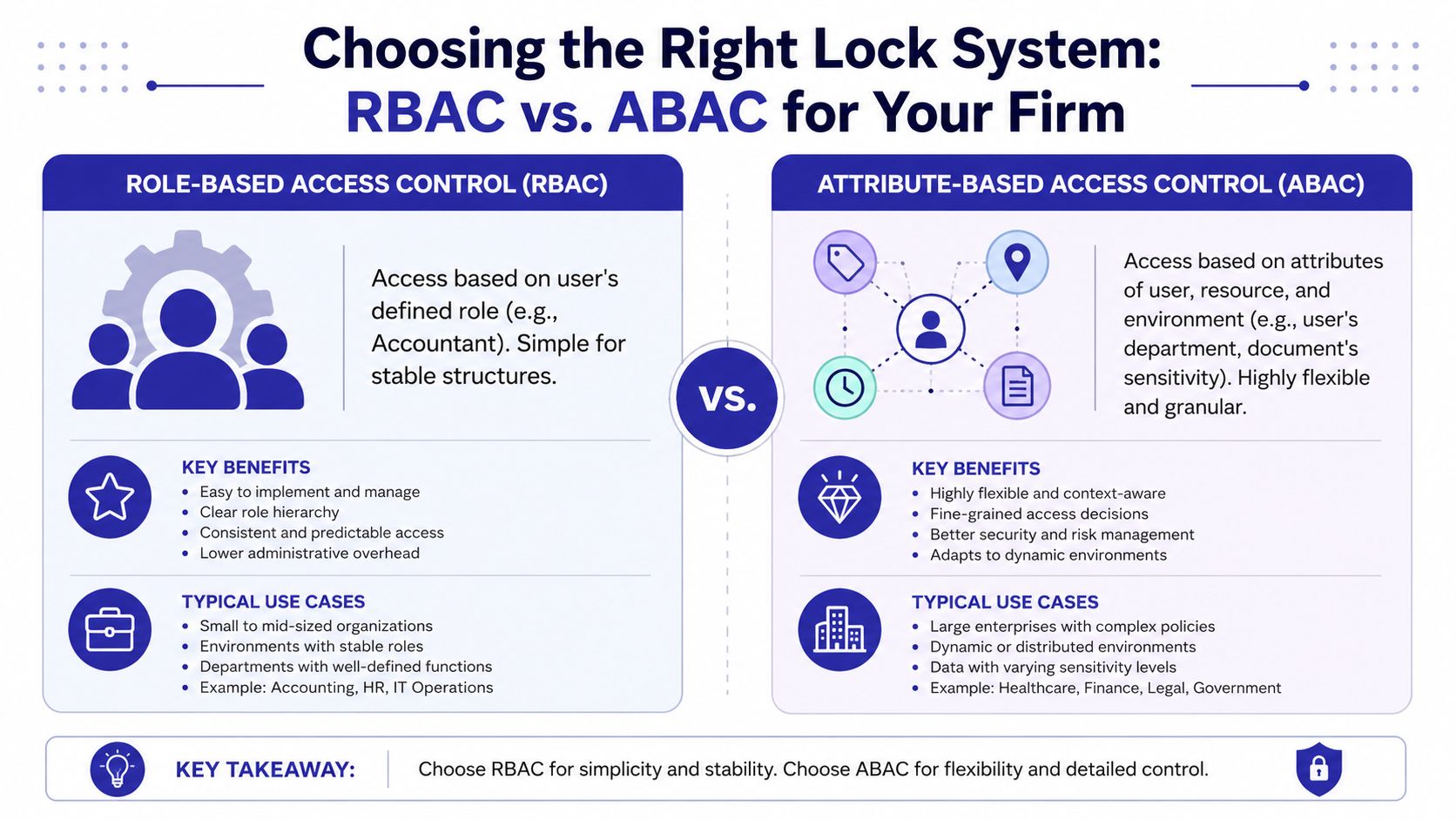
RBAC assigns access based on role. If someone is a staff accountant, paralegal, AP clerk, payroll specialist, or partner, their permissions follow that job function. This is usually the cleanest place to begin because it replaces ad hoc user-by-user decisions with standard access bundles.
Examples in a firm setting:
RBAC reduces manual error because managers aren't reinventing permissions for every hire.
ABAC looks beyond job title. It uses attributes such as device type, location, time of day, department, or data sensitivity. This is useful when access should depend on context, not just role.
A practical example: a partner may be allowed to open a merger file only from a company-managed device, during approved access conditions, and only if the document is labeled for their practice group. That's ABAC thinking.
According to Tricentis guidance on user access control, the most scalable pattern is using RBAC for stable job functions and ABAC for dynamic conditions, because role grouping lowers administrative error while attribute-based policy adds finer control for context-sensitive access.
| Feature | Role-Based Access Control (RBAC) | Attribute-Based Access Control (ABAC) |
|---|---|---|
| Core logic | Access follows job role | Access follows attributes and context |
| Best fit | Stable teams and repeatable duties | Sensitive data and exception-heavy workflows |
| Administrative effort | Easier to manage at first | More complex to design and maintain |
| Audit clarity | Usually straightforward | Can be harder to interpret without good policy documentation |
| Typical firm use | Accounting staff, paralegals, billing teams | Remote access restrictions, device-based controls, sensitive matter access |
| Main trade-off | Can become too broad if roles are sloppy | Can become too complicated if overengineered |
A hybrid model is often the sensible answer:
If your firm uses Microsoft-centric business systems, these insights on Dynamics 365 security are a useful example of how role-based design translates into real application permissions. The same logic applies well beyond Dynamics.
For firms moving toward a tighter security posture, Zero Trust security implementation guidance can help frame why role and context should both influence access decisions.
In many businesses, poor access control is a technical weakness. In law and accounting, it can also be a breach of duty.
If a staff member can open client files outside their assignment, if a departed employee retains access, or if a shared login masks who changed a document, the problem isn't limited to cybersecurity. It touches confidentiality, defensibility, and professional judgment.

A verified data point makes this hard to dismiss. A 2021 Ponemon Institute report found that 60% of organizations experienced a data breach caused by insider threats, and 34% of those incidents came from employees with excessive access privileges beyond their roles. The same report tied these failures directly to the need for least privilege and stronger access lifecycle management, as summarized in the verified data provided for this article.
For professional firms, insider risk often isn't a dramatic sabotage scenario. More often it's one of these:
Law firms are expected to preserve client confidentiality and control access to matter information. Accounting firms are expected to protect financial records, tax data, payroll information, and supporting documentation that could expose clients to fraud, privacy harm, or reporting issues if mishandled.
That means access control supports several real-world obligations at once:
A firm can't claim information was tightly safeguarded if too many people could open it and nobody reviewed the list.
Firms that want a business-focused view of this overlap between cybersecurity and financial practice should read cybersecurity guidance for accounting environments. It connects technical controls to the risks partners and firm managers own.
Clients rarely ask for a detailed access matrix. They assume one exists. When an incident shows that permissions were informal, trust drops fast. Opposing counsel, auditors, insurers, and regulators may all ask variations of the same question: who had access, why did they have it, and when should that access have been removed?
If your firm can answer those questions clearly, you have a control environment. If you can't, you have a problem that technology alone won't fix.
Most firms don't need a grand redesign first. They need a controlled cleanup. Start with visibility, then roles, then enforcement, then routine review.
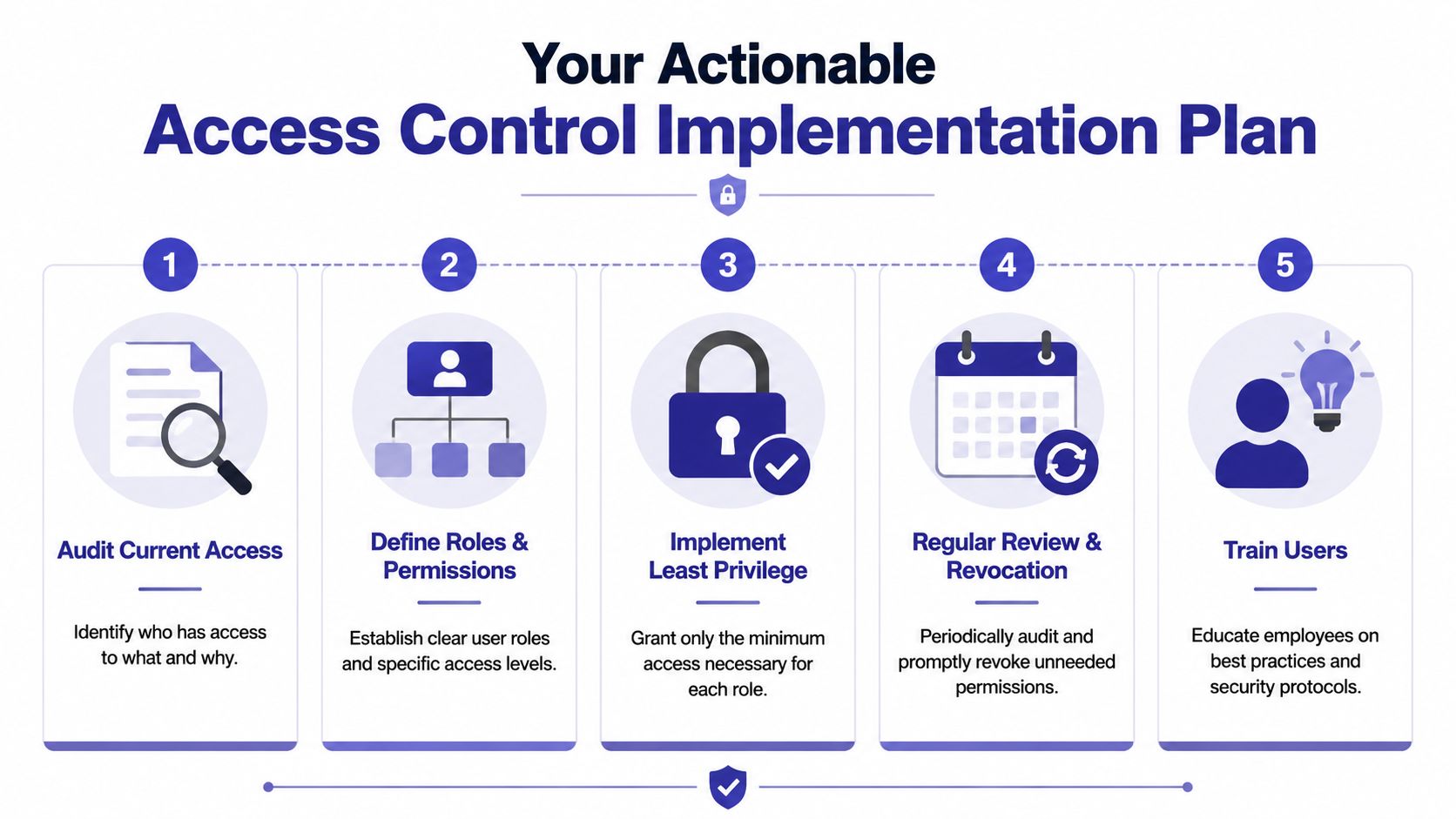
Begin by auditing actual access, not assumed access. Pull user lists from Microsoft 365, line-of-business applications, document management tools, tax software, remote access platforms, and any hosted desktops. Include former employees, dormant accounts, outside consultants, and service accounts.
Then define clean role groups. Don't start with edge cases. Start with the repeatable jobs your firm has today.
A short training resource can help non-IT stakeholders grasp why remote usage conditions matter when reviewing permissions. These remote access security best practices are a good companion for firm leadership and operations staff.
Once roles exist, enforce least privilege. Remove legacy access that no longer aligns with current work. Firms often hesitate at this stage, fearing disruption. The answer isn't to avoid tightening. It's to stage changes and give managers a quick path for approved exceptions.
Make multi-factor authentication mandatory for all user accounts, especially remote access, cloud email, and any system holding client records. The 2023 Verizon DBIR found that 82% of breaches involved weak or stolen credentials, and organizations using MFA saw a 99.9% reduction in account compromise. Those figures appear in the verified data provided for this article and are one reason MFA belongs near the top of the implementation list, not the bottom.
Management view: If a control blocks the most common credential-based failures, delaying it is usually more expensive than deploying it.
This short walkthrough is a useful visual reference before you brief staff or managers:
Automate onboarding and offboarding where possible. Manual emails like “please remove access” are where firms lose control. Access should follow employment status and role changes with formal approvals and a clear owner.
Use this checklist to keep the plan grounded:
The firms that succeed treat access control like a standing business process, not a cleanup project they'll “finish” later.
Managing permissions becomes harder when applications live in different places. One system sits on an old office server, another runs through a local workstation, email is in Microsoft 365, document storage is somewhere else, and remote access depends on a mix of VPN habits and saved credentials. That sprawl is what makes user access controls brittle.
A centralized hosted environment simplifies the problem because users, applications, and access paths are managed in one place instead of many. For firms running QuickBooks, Sage, tax applications, document management systems, CRM tools, and Microsoft applications, that centralization can make role assignment and user offboarding much more consistent.
When applications are hosted centrally, firms can usually manage these controls with less friction:
For firms evaluating hosted infrastructure, secure cloud hosting is relevant because it shows how centralizing applications changes the access-control conversation from scattered exceptions to managed policy.
Cloudvara is one example of that model. It hosts business applications in a centralized cloud environment, supports remote desktop access, allows different user permission levels, and can fit firms that want fewer local servers and a cleaner place to manage who gets into what. That doesn't remove the need for policy, but it does make policy easier to apply consistently.
A hosting platform won't fix sloppy role design, weak approvals, or unmanaged exceptions. If partners still ask IT to “just give them access for now,” a hosted environment can spread that mistake more efficiently.
Use the platform to enforce discipline, not bypass it:
Centralization's value lies in operational clarity. One environment. Fewer one-off access paths. Less guesswork when someone joins, changes roles, or leaves.
User access controls aren't background IT housekeeping. In a law or accounting firm, they're part of how you protect confidentiality, meet obligations, and preserve client trust. The question isn't whether your firm has access controls. Every firm does in some form. The question is whether they're deliberate, current, and defensible.
The practical path is straightforward. Give every user a unique identity. Require strong authentication. Align permissions to role. Limit exceptions. Review access regularly. Remove it immediately when it's no longer justified. Keep sensitive systems on a short leash.
Firms that do this well usually become easier to manage in other ways too. Onboarding gets cleaner. Offboarding gets faster. Audit questions get easier to answer. Staff spend less time improvising access and more time doing billable work.
That's why secure access is a business cornerstone. It reduces avoidable risk, supports compliance, and signals maturity to clients who care where their information goes and who can touch it. If your current setup depends on memory, shared accounts, or informal approvals, that's the place to start changing. Tight access control is not bureaucracy. It's how a professional firm stays professional under pressure.
If your firm wants a simpler way to manage applications, remote access, and user permissions in one place, explore Cloudvara. A centralized cloud setup can make user access controls easier to apply, review, and maintain without relying on scattered local systems.




