Think of a small business cloud server as your company's digital headquarters. Instead of being a noisy box in a storage closet, it's hosted securely in a remote data center, giving your team access to everything they need—from anywhere, on any device. It's enterprise-level power with a small-business-friendly price.

Let's use an analogy. A traditional, on-site server is like a private library you own and operate yourself. To get a book (your data or software), you have to physically be in the building. You're also responsible for everything—the electricity, security, and even fixing a leaky roof.
A small business cloud server flips that model completely. Imagine having a secure, private suite inside a state-of-the-art, professionally managed archive. Your critical software—like QuickBooks, Sage, or other industry-specific tools—runs on powerful computers inside that secure facility.
Your team accesses this "digital office" through a secure internet connection. They log in and see a familiar desktop environment, whether they're on a laptop at home, a PC in the office, or even a tablet. All the heavy lifting—the processing, storage, and software operations—happens on the high-performance remote server, not their local device.
The biggest win here is moving from a capital-heavy model of buying and maintaining your own gear to a simple, predictable operational cost. You’re no longer responsible for the "building" and all its headaches.
This means:
This shift is more than a trend; it's one of the most strategic essential IT solutions for business can make. You get access to enterprise-grade IT without the enterprise-level budget, freeing your team to work securely and productively from anywhere.
This digital workspace is more than just remote access; it’s a central hub for your entire operation. Every file and application lives in one secure, unified place. This setup is a key piece of what's known as cloud infrastructure, the backbone of modern business IT.
A cloud server transforms your business operations from being tied to a physical location to being accessible anywhere. It centralizes your critical software, ensuring every team member works from the same, up-to-date information, which boosts both collaboration and security.
This model is quickly becoming the norm. In fact, 63% of small and medium-sized enterprises (SMEs) are expected to host their workloads on the cloud in the coming years. This surge highlights a clear move toward scalable, accessible solutions that remove the burden of managing on-premise hardware for good.

Switching from an old-school server in the office to a cloud-based model opens up some powerful advantages that solve the exact headaches small businesses face every day. A small business cloud server isn't just a tech upgrade; it’s a strategic shift that changes how you work, collaborate, and grow.
Instead of pouring cash into hardware that’s outdated the moment you unbox it, you get access to a secure, professionally managed system that just works. This move lets you get back to what you do best—serving clients and driving revenue—while your IT hums along quietly in the background. The upsides go way beyond convenience, touching your bottom line, security, and ability to adapt.
The first and most obvious win is financial. A traditional server on-site demands a huge upfront investment, not to mention the constant costs of power, cooling, maintenance, and eventually, replacement. A cloud server flips that script, trading unpredictable capital costs for a simple, predictable monthly fee.
This model is a lifesaver for small businesses where cash flow is everything. You dodge the five-figure price of a new server and the gut-punch of a surprise hard drive failure. Everything from the hardware to the expert management is rolled into one clear price, making your budget clean and simple.
Your business changes, so why should your IT be stuck in concrete? A cloud server gives you incredible flexibility to adjust your resources as your needs evolve. Think of an accounting firm during tax season—for a few months, their computing needs go through the roof.
With a cloud server, they can instantly add more processing power or storage to handle the extra load, then scale right back down when things quiet down. This elasticity means you only pay for what you actually use, cutting out the waste of keeping an oversized server running all year just for those peak times. This is one of the key benefits of cloud hosting for small businesses that leads to smarter spending.
For most small businesses, achieving true enterprise-grade security is just too expensive. A managed cloud provider completely levels the playing field, giving you protections you could never build on your own.
These security measures almost always include:
This robust security and automated backup system provides essential peace of mind. It protects your business from local disasters like fire, theft, or hardware failure, creating a resilient foundation for business continuity.
A cloud server becomes your central hub, giving your team secure access to their files and software from anywhere with an internet connection. An attorney can pull up client files from the courthouse, a nonprofit director can check donor data from home, and an accountant can run QuickBooks during an off-site audit. This freedom boosts productivity and supports the flexible work arrangements that modern teams expect.
This shift is making a real impact. Businesses that adopt cloud servers report 21% higher profits and 26% faster growth rates compared to those stuck with on-premise solutions. With 63% of small business workloads now in the cloud, it's clear this is a powerful tool for growth. Small nonprofits can also find immense value in cloud tools, for instance by leveraging Google for Nonprofits to access a suite of powerful applications.
Picking the right small business cloud server model can feel like a huge decision, but it all boils down to two things: your team’s technical skills and how much control you want over your digital infrastructure. Think of it like finding a place to live—each option offers a different balance of convenience, control, and responsibility.
Let’s break down the three main models using that simple analogy. Seeing the practical differences will help you pinpoint the perfect fit for your business, so you invest in a solution that helps your team, not one that creates new headaches.
Managed cloud hosting is like buying a fully furnished, move-in-ready home. Everything is handled for you, from the foundation and roof repairs to the landscaping. You just move in, arrange your belongings (your software and data), and get to work. Your provider takes care of all the technical heavy lifting.
This model is perfect for small businesses that don't have a dedicated IT department or simply prefer to focus on their core operations instead of server management.
This approach is for businesses that want to "set it and forget it," knowing that experts are managing their critical systems 24/7. It offers the ultimate peace of mind.
A Virtual Private Server, or VPS, is the condo of the cloud world. You own and control your individual unit—your virtual server—so you're responsible for everything inside it, like the furniture, paint, and appliances. However, you share the building's core infrastructure, like the plumbing and electricity, with other tenants.
With a VPS, you get a dedicated slice of a server's resources. While you don’t have to worry about the physical hardware, you are responsible for managing your server's operating system, installing software, and handling security configurations.
A VPS offers a middle ground, providing more control and customization than managed hosting but requiring more technical know-how. It's a great step up for businesses that have some IT skills on staff and need to tailor their environment more specifically.
This model suits businesses that are growing and have unique software requirements but aren't quite ready to build and manage an entire infrastructure from the ground up.
Public cloud Infrastructure as a Service (IaaS) is like buying a plot of land. You get the raw materials—computing power, storage, and networking—but you're responsible for designing and building the entire house from scratch. This includes the foundation, framing, plumbing, and every other detail.
Platforms like Amazon Web Services (AWS) and Microsoft Azure fall into this category. They provide incredible flexibility and scalability, but that freedom comes with immense responsibility. You need a highly skilled technical team to architect, build, secure, and manage your entire environment. For those interested in the technical specifics, you can learn more about what is Infrastructure as a Service and how it functions as the building block of the cloud.
This option is best suited for tech companies or businesses with a full-fledged IT department that requires complete control to build custom applications. For most professional service firms, the complexity and management overhead of IaaS are often unnecessary and far too costly.
To make the choice even clearer, here's a side-by-side comparison of the three models. This table breaks down the key differences in management, cost, and technical requirements, helping you visualize where your business fits best.
| Feature | Managed Cloud Hosting (e.g., Cloudvara) | Virtual Private Server (VPS) | Public Cloud IaaS (e.g., AWS, Azure) |
|---|---|---|---|
| Management | Fully managed by the provider | You manage the OS and software; provider manages the hardware | You manage everything: OS, software, security, and virtual hardware |
| Technical Skill | Low (basic computer skills) | Medium (some IT knowledge required) | High (requires a dedicated, expert IT team) |
| Control | Low (provider handles all configurations) | Medium (full control over your virtual server) | High (complete control over the entire infrastructure) |
| Cost Structure | Predictable, fixed monthly fee | Lower monthly fee, but requires your time/resources | Pay-as-you-go, but costs can be complex and unpredictable |
| Best For | Firms wanting a hands-off, "it just works" solution | Growing businesses with some IT staff and specific needs | Tech companies building custom applications from scratch |
Ultimately, the best cloud server model isn’t about which one is "better" in general, but which one is the right tool for your specific job. By matching the model to your team's skills and business goals, you set yourself up for a smooth, secure, and scalable future.
Moving your business to a small business cloud server feels like a huge project, but when you break it down into clear, manageable steps, the whole process becomes much less intimidating. A good migration plan is your roadmap—it ensures a smooth transition with as little disruption to your daily work as possible.
Following a proven process turns a complex technical shift into a series of logical phases. It gives you the confidence that every important detail is covered from start to finish.
Before you pack your bags, you need to know exactly what you’re moving. This first assessment is the foundation of your entire project, defining the scope and what you’ll need from your new cloud setup.
Start by making a complete inventory of every piece of software your business depends on, from your accounting and tax programs to your CRM. Next, take stock of your data: how much is there, where does it live, and what are its security requirements? Finally, map out who needs access to what so your new cloud environment supports your team’s existing workflows from day one.
Picking the right cloud provider is easily the most critical decision you'll make in this process. You’re not just buying technology; you’re looking for a partner who gets the unique demands of your industry and your specific applications.
When you’re weighing your options, zero in on these factors:
This decision tree gives you a visual guide to help choose between different cloud models, whether it's managed hosting, a VPS, or building out your own infrastructure.
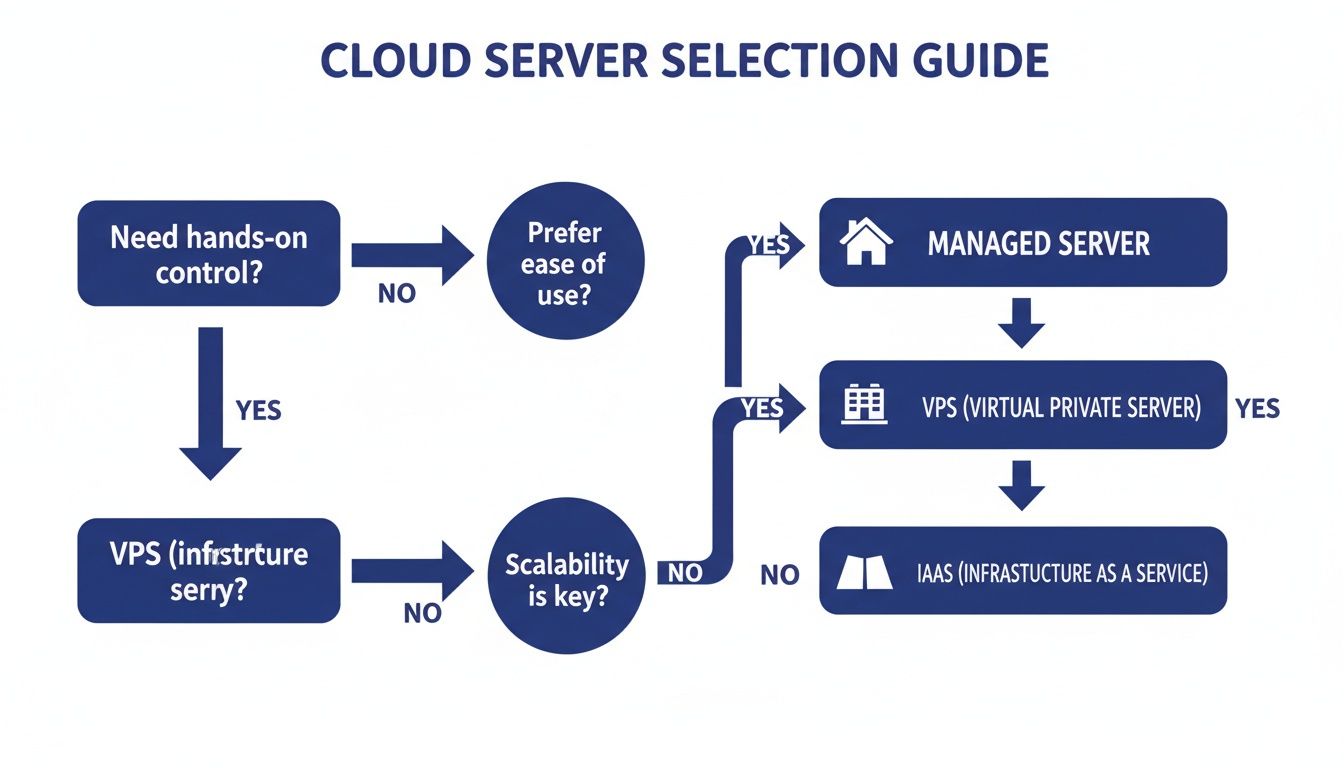
It simplifies the choice by focusing on what matters most to your business—control, ease of use, and scalability—pointing you toward the best fit.
With your partner chosen, it’s time to build the migration plan. A good managed provider will take the lead here, working alongside you to map out a timeline that causes the least amount of downtime. This usually involves scheduling the secure transfer of your data and applications after hours or over a weekend.
Clear communication is non-negotiable during this phase. Make sure your team knows the timeline, what to expect, and how to use the new system. A well-communicated plan reduces anxiety and helps everyone get ready for the switch.
Once the plan is locked in, the provider’s technical crew will handle the secure data transfer. They use encrypted methods to move all your information from the old server to the new cloud environment, ensuring nothing gets lost or compromised along the way.
After all the data has been moved, the testing begins. Your provider should help you verify that every application runs correctly and that all your data is accessible and intact. This is your chance to walk through your team’s daily workflows and confirm everything performs just as it should.
Once you’ve given the green light, it’s time to "go live." This is the moment your team officially starts working in the new cloud environment. To make sure the adoption is seamless, plan for training that empowers your staff to use the new remote desktop system confidently. For a more granular guide, check out our complete cloud migration checklist to make sure all your bases are covered.
Theory is great, but seeing how a small business cloud server solves everyday headaches is where it all clicks. For professional service firms, this isn't just an IT upgrade—it’s a business tool that directly shapes client service, efficiency, and data security.
Let's walk through a few scenarios to show how different industries put cloud servers to work, turning common challenges into real advantages. These examples highlight how centralizing software and data builds a more flexible, secure, and collaborative workplace.
Picture an accounting firm deep in the throes of tax season. The team is stretched thin, with some people at the office, others working from home, and partners meeting clients on-site. With a traditional setup, pulling up client QuickBooks files or tax software remotely is often a slow, clunky, and insecure experience.
But when you host the entire software suite—QuickBooks, Sage, Lacerte—on a managed cloud server, the game completely changes. The whole firm now operates from a single, centralized dataset.
This shift is already paying off. Today, 54% of small and mid-size businesses spend over $1.2 million annually on cloud services, a huge jump from just two years ago. That shows massive confidence in the ROI, especially for professional services hosting everything from accounting software to document management systems. You can read more about these cloud adoption findings and their impact.
For law firms, confidentiality and compliance are everything. Client data has to be locked down, yet attorneys need reliable access to case files whether they're in the courtroom, at home, or on the road. A cloud server is the perfect answer.
Hosting practice management software like Clio or Time Matters in a secure cloud environment means sensitive information is shielded by enterprise-grade security—far beyond what a small firm could build and maintain in-house.
For a law firm, a cloud server acts as a digital fortress. It centralizes document management, billing, and case files in a compliant environment, ensuring client confidentiality while empowering attorneys with secure, anytime access to critical information.
This setup makes remote work simple and secure. An attorney can pull up a last-minute deposition file on their tablet moments before entering court. It also strengthens business continuity, ensuring that a power outage or hardware failure at the office never brings legal work to a standstill.
Nonprofits often run on tight budgets with limited IT staff. Maintaining an on-premise server is a huge drain on resources that could otherwise go toward their mission.
A small business cloud server offers an affordable, scalable solution for managing donor databases, accounting software, and grant applications without needing a dedicated IT department. It provides a secure, centralized hub where staff and volunteers can collaborate, track fundraising, and manage finances—all for a predictable monthly cost.
Figuring out the financial side of a small business cloud server can feel like a chore, but it's a world away from the unpredictable costs of buying and managing your own hardware. The key is to look past the sticker price and understand the common pricing models and what's actually included in your service agreement.
Most providers bill in one of two ways. You'll often see a per-user model, where you pay a simple, flat monthly fee for each person on your team. The other common approach is a resource-based model, tying your costs to the specific amount of processing power (CPU), memory (RAM), and storage you consume. For most small businesses, the per-user model is far more predictable and easier to budget for.
When a provider talks about "all-inclusive" pricing, it's smart to ask exactly what that covers. A truly all-inclusive plan rolls everything you need into one straightforward monthly fee, so you're never hit with surprise charges.
This typically bundles:
This approach flips your IT expenses from a reactive, unpredictable cost into a stable operational expense. You’re not just renting server space; you’re handing off the entire management, security, and maintenance of your digital backbone to a team of experts.
Beyond the price tag, the Service Level Agreement (SLA) is the single most important document you’ll review. Think of it as the provider's written promise to you. It cuts through the technical jargon to outline their specific commitments on performance, reliability, and support.
The SLA is your guarantee of business continuity. It contractually defines the provider's responsibility for uptime and support, giving you a clear benchmark for the level of service you can expect and deserve.
When you're reading an SLA, keep an eye out for a few key terms. The uptime guarantee is the percentage of time the provider promises your server will be online and working—you should be looking for 99.5% or higher. The agreement should also spell out support response times, clarifying exactly how quickly they’ll jump on any issues you report.
To get a better sense of how these promises work behind the scenes, understanding the difference between an OLA vs SLA can be helpful. Ultimately, the SLA is the contract that ensures your small business cloud server is backed by accountable, reliable service you can count on.
Even after seeing all the benefits, making the jump to a small business cloud server can bring up a few last-minute, important questions. It’s smart to want clear answers before you hand over your company’s most critical data and software to a new provider.
Let’s walk through the most common concerns we hear from business owners. Getting straight answers here is the final step to making a confident decision for your company’s future.
This is usually the number one question, and for good reason. The short answer is a resounding yes. Reputable cloud providers use enterprise-grade security measures that are far more advanced than what most small businesses could ever afford or manage on their own.
Think of it as moving your data from a back-office closet into a digital Fort Knox. This includes:
This multi-layered approach also protects you from local threats like an office theft or natural disaster, making sure your business can always keep running.
This is one of the biggest advantages of a cloud setup. While your office needs internet to connect to the server, the server itself—along with all your files and applications—keeps running securely in the data center without interruption.
A local internet outage no longer means a complete work stoppage. Your team can simply switch to another internet source, like a home office connection or even a mobile hotspot, and log right back in to keep working without missing a beat.
This resilience turns what could have been a business-halting disaster into a minor inconvenience, safeguarding your team's productivity.
In almost every case, yes. A core feature of a managed cloud server is its ability to host the standard desktop applications your business already uses every day. Software like QuickBooks, Sage, Microsoft Office, and other industry-specific tools run perfectly.
Your provider sets up a familiar Windows remote desktop for your team. When they log in, they see the same desktop and applications they’re used to, running just as they would on a local computer. It’s always a good idea to confirm your specific software list with a provider, but broad compatibility is the industry standard.
With a managed provider, the move to the cloud is far simpler and less disruptive than you might think. Their expert team handles all the technical heavy lifting, from securely transferring your data to installing and configuring your applications in the new cloud environment.
They’ll work with you to schedule the final switchover at a time that minimizes downtime, often after hours or over a weekend. A good partner guides you through every step, ensuring a smooth and successful transition with clear communication and support.
Ready to see how a secure, managed small business cloud server can simplify your IT and empower your team? Cloudvara offers a hands-off solution with 24/7 expert support and a 99.5% uptime guarantee. Start your free 15-day trial and experience the peace of mind that comes with a professionally managed cloud. Learn more at Cloudvara.




