Choosing the right remote access software is about more than just comparing features. It’s about finding a solution that fits the unique operational and security demands of your industry. For accountants, that means flawless QuickBooks performance. For law firms, it’s all about document security and compliance. Small businesses just need something scalable and cost-effective that doesn’t create a huge IT headache.
A good remote access software comparison starts with a clear picture of what your business actually needs. The global market for this software is booming, expected to jump from $2.929 billion in 2025 to $5.645 billion by 2030, and that growth is fueled by professionals who need ironclad access to critical tools from anywhere.
Before getting lost in a side-by-side feature list, you have to define what really matters. A solo accountant has completely different priorities than a multi-office law firm or a growing nonprofit. This decision tree offers a simple starting point to pin down your industry's non-negotiables.
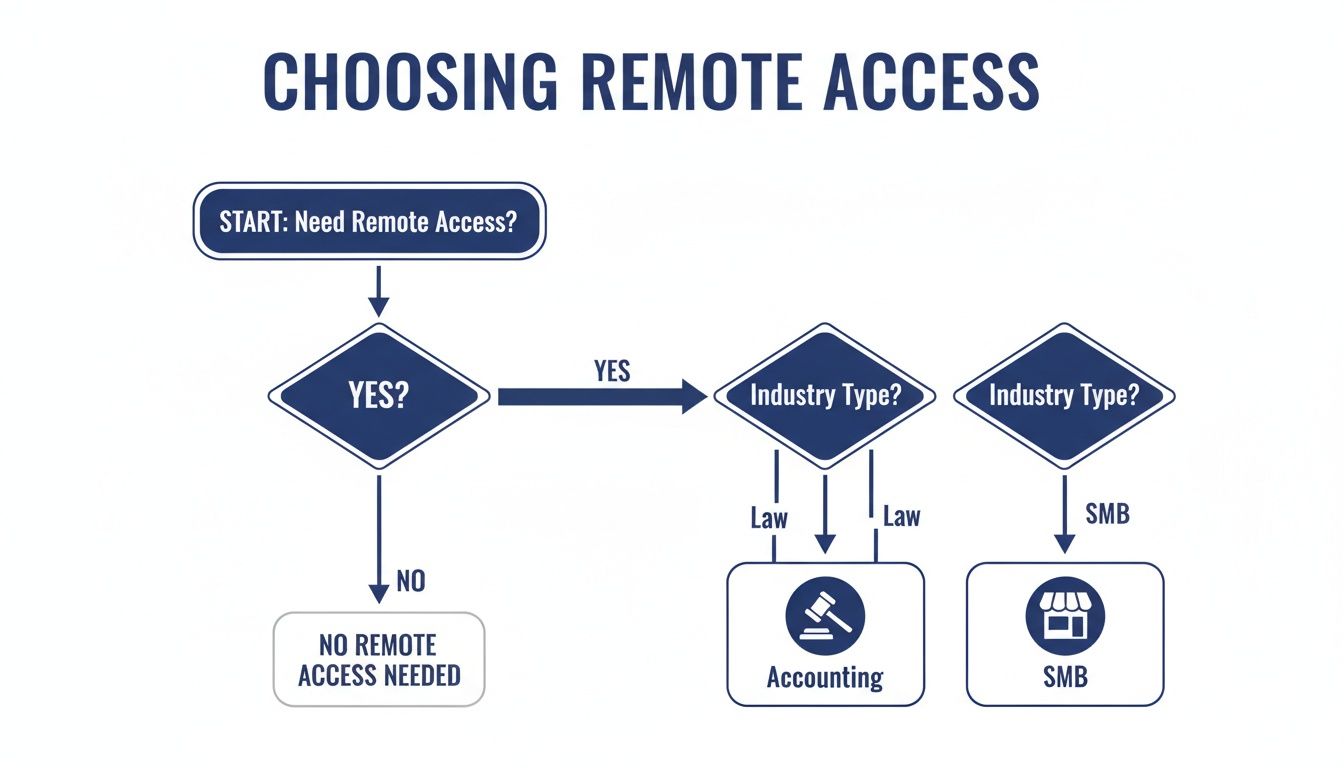
As the flowchart shows, your first step is to lock down your specific industry needs. Everything else flows from there.
To bring some structure to your search, we’re going to focus on four critical pillars. Think of these as the core areas you must investigate to avoid common traps like frustrating performance lags, security holes, or surprise costs. For a wider view on remote work tools, check out this guide on understanding factors for selecting remote team collaboration tools.
These criteria create a balanced framework for judging any solution. For example, some tools might look great on security but fall flat on performance, creating endless frustration for your team. Others might seem cheap upfront but lack the compliance certifications your industry demands. You can dig deeper into how these technologies differ by reading our guide on VDI vs. VPN.
To keep things organized, we'll use a consistent set of criteria to evaluate each solution. This table breaks down what we'll be looking at and why it's so important for your business.
| Evaluation Criterion | Why It Matters for Your Business | Key Questions to Ask |
|---|---|---|
| Security & Compliance | Protects sensitive client data and ensures you meet regulatory standards like HIPAA or SOX. | Does it offer multi-factor authentication and end-to-end encryption? |
| Performance & Reliability | Ensures smooth, lag-free access to critical applications, maintaining productivity. | What is the provider's uptime guarantee? How is latency managed? |
| Usability & Support | Determines how easily your team can adopt the software and get help when needed. | Is the interface intuitive? Is 24/7 expert support available? |
| Total Cost of Ownership | Reflects the true long-term cost beyond the subscription, including IT overhead. | Are there hidden fees for setup, support, or additional users? |
Using this rubric, you can cut through the marketing noise and focus on the factors that will genuinely impact your day-to-day operations. Let's dive in.
Choosing the right remote access software goes way beyond a simple feature checklist. A true comparison means digging into the core criteria that will directly impact your day-to-day operations, security, and bottom line. These are the pillars that help you see past the marketing fluff and understand how a tool will actually perform in the real world.
We’re going to look at five critical areas: security protocols, performance, deployment models, usability, and the total cost of ownership. Each one plays a unique role in telling you whether a solution is a genuine asset or a potential headache waiting to happen.
When you’re handling sensitive client information, security isn't just a feature—it's everything. The bedrock of any secure remote access tool is powerful encryption. You should be looking for solutions that use AES-256 encryption, the same standard trusted by governments to protect classified data. This is what makes your data unreadable, whether it's flying across the internet or sitting on a server.
But encryption alone isn't enough. Multi-factor authentication (MFA) is your next critical layer of defense. By requiring two or more ways to verify an identity, MFA dramatically cuts the risk of someone getting in with stolen credentials. As you compare tools, look into their robust identity verification processes.
Compliance is the other side of the security coin. Your remote access solution absolutely must align with the rules governing your industry.
A remote access tool that can't provide auditable security logs or clear compliance certifications is a massive liability. Always demand that a vendor show proof of adherence to the standards your industry requires. You can learn more by exploring these remote access security best practices.
A fortress-like system is useless if it’s too slow to get any work done. Performance, especially latency, is a huge differentiator when comparing remote access software. Low latency gives you that smooth, responsive feel—like you’re working directly on your office computer. High latency, on the other hand, creates that frustrating lag that crushes productivity, especially when you’re in resource-hungry apps like QuickBooks or design software.
Scalability is just as vital. A solution that’s fine for five people might completely buckle under the load of fifty. Real scalability means the software can handle a growing number of people working at the same time without slowing to a crawl. This is make-or-break for businesses with seasonal spikes, like accounting firms during tax season, or any company with plans to grow.
The best software in the world is the one your team will actually use. An intuitive interface and a straightforward setup are key to getting everyone on board quickly with minimal training. If the user experience is clunky and complicated, you’ll just end up with frustrated employees and a drop in productivity, which defeats the whole purpose.
Integrations with your existing software are just as important. For an accounting firm, seamless, high-performance integration with QuickBooks and Sage is non-negotiable. A law firm might need rock-solid compatibility with its document management or e-discovery platforms. Always confirm that a potential solution doesn't just support your critical applications but actually optimizes their performance.
Finally, you have to look at the total cost of ownership (TCO). This goes far beyond the monthly subscription price. TCO includes all the potential hidden costs, such as:
An option that looks cheaper on the surface can easily end up costing you more in the long run once you add up all these extra expenses. A transparent, all-inclusive pricing model often delivers far better value and predictability.
Generic advice falls flat when high-stakes industries like accounting, law, and small business need reliable remote access. A one-size-fits-all solution just doesn't work for the unique operational pressures, compliance rules, and performance demands each sector faces. The right choice in a remote access software comparison isn't about the longest feature list—it’s about finding the tool that solves specific, real-world industry challenges.
For professional services, the decision comes down to how well a solution handles industry-specific software, protects sensitive data, and keeps the business running when it matters most. Downtime during tax season or a security breach involving client files isn't just an inconvenience—it's a critical business failure. This is where tailored recommendations are essential.

For tax and accounting firms, performance and reliability are completely non-negotiable, especially from January to April. Their entire operation depends on seamless, high-speed access to resource-heavy applications like QuickBooks and Sage. Any lag or system crash can derail productivity, leading to missed deadlines and unhappy clients.
The ideal solution has to guarantee near-perfect uptime. Look for providers offering a 99.5% uptime guarantee or higher, with an environment specifically optimized for accounting software. This ensures that even with the entire team working remotely and pulling large company files at the same time, the system stays stable and responsive.
Your solution should also centralize all applications—tax software, document management, and Microsoft Office—into a single, secure environment. This cuts out the chaos of managing multiple logins and local software installations, which streamlines workflows and tightens up security. Our guide on managed IT services for accounting firms digs into how a dedicated hosting environment can solve these exact challenges.
Security and confidentiality form the bedrock of the legal profession. Law firms handle incredibly sensitive client data, from case files and discovery documents to privileged communications. A data breach could not only destroy a firm's reputation but also trigger severe legal and ethical fallout.
Because of this, the top priority in a remote access software comparison for law firms is uncompromising security. That means choosing a solution with robust features like:
Beyond the core security features, the platform must support integrations with legal-specific tools for e-discovery, case management, and document review. The remote environment has to be compliant with industry standards for data handling, providing a secure, auditable trail for every user action.
A remote access solution for a law firm isn't just an IT tool; it's a core component of its risk management strategy. It must provide a secure, isolated environment where client data is protected from external threats and internal vulnerabilities.
Small and mid-sized businesses (SMBs) need a remote access solution that is cost-effective, scalable, and easy to manage without a big, dedicated IT department. Their main goal is to empower a remote or hybrid workforce to be productive without breaking the budget or creating an administrative headache. The ideal SMB solution perfectly balances powerful features with simplicity and predictable costs.
Key things for SMBs to look for include:
For an SMB, a managed cloud hosting solution often delivers the best value. It offloads the technical headaches of server management, provides expert 24/7 support, and comes with a clear, predictable monthly cost. This frees up business owners to focus on growth instead of troubleshooting IT issues, making it a smart investment in operational efficiency.
One of the first, most fundamental decisions you’ll make when picking a remote access solution is where it will live. Will it be an on-premise setup running on your own servers, or a cloud-hosted solution managed by a provider? This choice dictates everything that follows—from initial costs and daily maintenance to security and your ability to grow.
Each model comes with its own set of trade-offs. The right answer depends entirely on your company's resources, in-house expertise, and long-term vision.
On-premise deployment is the classic IT model: you buy the software, and you run it on your own servers in your own office. It’s a hands-on approach that gives you complete, granular control over your data, hardware, and security.
This level of control is a huge advantage for organizations with skilled IT teams and strict compliance needs. Think of a law firm managing sensitive case files or a large enterprise with specific data sovereignty rules. They can customize everything and directly manage all security updates themselves.
But that control comes at a steep price. You’re looking at a significant upfront capital investment for servers, networking gear, and software licenses. Beyond the money, the burden of maintenance, security patching, backups, and troubleshooting lands squarely on your team's shoulders.
An on-premise deployment has a few defining traits:
This model is really built for organizations that already have a robust IT department and the budget to match. For a deeper dive into how these models stack up, check out our guide on the difference between cloud and on-premise solutions. The trade-off is crystal clear: you get maximum control in exchange for higher costs and much greater responsibility.
In stark contrast, a cloud-hosted model offloads the entire infrastructure headache to a third-party provider. Instead of buying and managing servers, you pay a predictable subscription fee for access to a secure, professionally managed environment. This instantly flips a massive capital expense into a manageable operational one.
Cloud solutions bring incredible flexibility and scalability to the table. Need to add ten new accountants for tax season? A cloud provider can make that happen almost instantly. When things quiet down, you can scale back just as easily. This agility is a game-changer for growing businesses or firms with seasonal demand.
The core value proposition of a cloud deployment is simplicity and predictability. It removes the IT management headache, provides built-in disaster recovery, and delivers a consistent monthly cost, allowing businesses to focus on their primary operations instead of server maintenance.
This approach is a natural fit for small to mid-sized businesses, accounting firms, and nonprofits that don't have the resources—or the desire—to manage a complex IT infrastructure. The provider handles all the backend work: security updates, data backups, and ensuring critical 99.5% uptime so your team stays productive.
By choosing a cloud-hosted solution, you're essentially outsourcing IT complexity to the experts. This frees up your team to focus on what they do best: serving your clients and growing your business.
While most comparisons pit one remote access tool against another, there's a different path altogether—one that turns remote access from a simple utility into a full-blown IT strategy. Partnering with a managed hosting provider isn't just about logging into a computer from afar; it's about moving your entire operational environment to a secure, professionally managed cloud. The decision to go this route usually comes down to your organization's resources, priorities, and long-term vision.
This model is a game-changer for businesses without a dedicated, in-house IT department. For a small law firm or a growing nonprofit, the time and money spent managing servers, applying security patches, and fixing software conflicts is a massive drain. A managed provider lifts that entire burden off your shoulders, taking full responsibility for the backend infrastructure.

It’s a fundamental shift from DIY IT to a fully supported service, letting you get back to your core business instead of becoming an accidental server admin.
For businesses where downtime simply isn't an option, a managed solution offers a critical advantage. Accountants during tax season, for example, can't afford for their QuickBooks or Sage applications to go offline. A managed hosting provider offers a service-level agreement (SLA) that guarantees uptime, often at 99.5% or higher.
That guarantee is backed by a team of experts whose only job is to monitor, maintain, and secure the environment 24/7. They handle all the messy details of server maintenance, automated backups, and disaster recovery planning, making sure your essential apps are always ready when you and your clients need them most.
Perhaps the biggest win is the ability to bring your entire software suite together on a single, unified platform. Instead of juggling dozens of logins and worrying about whether one app will break another, a managed provider creates a centralized digital workspace for you.
This all-in-one approach simplifies operations and tightens up security. It creates a seamless experience where every employee, no matter their location, logs into the exact same software environment. This consistency puts an end to the performance hiccups and security holes that pop up when running applications on individual local machines.
A managed hosting solution transforms remote access from a standalone tool into a comprehensive, hassle-free IT strategy. It’s the ideal choice for firms aiming to offload IT complexity, guarantee performance, and create a secure, centralized hub for all their business-critical software.
Making the right choice involves looking beyond a software feature list. For a detailed framework, our guide on how to choose a hosting provider offers practical steps and key considerations. This strategic approach ensures your remote access capabilities align perfectly with your operational needs and long-term goals.
Making the final call on remote access software usually comes down to a few last-minute, make-or-break questions. Getting straight answers is the only way to pick a solution that fits your technical needs and your real-world operations. We’ll tackle the most common points of confusion to help you move forward with confidence.
These questions almost always circle back to security, core functionality, and how well your applications will actually run. Nailing down these details is the final step to ensuring you choose a platform that empowers your team, not one that creates new headaches.
This is the single most important question for any business handling sensitive client or company information. Real data security in a remote setup stands on two unshakable pillars: encryption and authentication. Think of them as a locked vault and a guarded door—you absolutely need both.
First, end-to-end encryption (E2EE) is non-negotiable. It wraps your data in an unbreakable code from the second it leaves your device until it lands on the remote server. If a hacker somehow intercepted that data in transit, it would be a useless, unreadable jumble. Always look for solutions using the AES-256 standard, the same encryption level trusted by governments for classified information.
Second, multi-factor authentication (MFA) is your best defense against stolen credentials. Passwords alone just don't cut it anymore; studies show that compromised logins are a factor in a staggering 81% of hacking-related breaches. MFA forces users to provide a second proof of identity—like a code from their phone—making it exponentially harder for an attacker to get in, even with a stolen password.
By combining strong encryption with mandatory multi-factor authentication, you create a layered defense. One protects your data in motion, and the other protects the gateways to your network.
This is a classic point of confusion because both technologies connect you remotely, but they do fundamentally different jobs. Getting this distinction right is key to choosing the right tool.
A Virtual Private Network (VPN) creates a secure, encrypted tunnel from your device to the company’s network. It essentially makes your computer act like it's physically plugged in at the office, giving you access to shared drives and other internal resources. The catch? The actual performance still depends entirely on the power of your local machine. If your home computer is slow or doesn't have the right software installed, a VPN can't fix that.
Remote access software, on the other hand, gives you full control over a different computer—either your powerful office PC or a cloud-hosted desktop. You aren’t just connecting to the network; you're operating the remote machine itself, using all its processing power and its installed applications. This is a far more powerful and versatile solution, especially for running demanding software.
Here’s a simple way to think about it:
This is where many generic remote solutions completely fall apart. It's one thing to say an application is "supported," but it's another thing entirely to optimize it for a smooth, lag-free remote experience. This is especially true for demanding, industry-specific software.
For example, accounting firms live and die by the performance of QuickBooks and Sage. These programs can be notoriously fussy about network latency and need serious processing power, especially with large company files. A remote solution has to be specifically configured to handle those workloads without the frustrating delays that kill productivity during tax season.
Likewise, law firms depend on specialized practice management, document review, and e-discovery tools. A generic remote desktop setup might choke on these applications, leading to crashes or sluggish performance that disrupts critical client work. The best remote access solutions are hosted in environments fine-tuned for these exact programs, ensuring they run just as well—or even better—than they would on a local high-end machine. When you're comparing options, always ask providers for specific proof that they can optimize your mission-critical software.
Ready to stop worrying about IT and start focusing on your business? Cloudvara offers a fully managed, secure cloud hosting solution that centralizes all your critical applications—from QuickBooks to your industry-specific software—with a 99.5% uptime guarantee and 24/7 expert support. Learn more and start your free 15-day trial today.