At its core, the difference between QuickBooks Online and QuickBooks Desktop is simple: it’s all about how you access it. QuickBooks Online (QBO) is cloud-based software you use through a web browser, giving you the freedom to work from any device. On the other hand, QuickBooks Desktop (QBD) is the traditional software you install directly onto your computer, delivering robust, localized power.
This single distinction—cloud versus installed—shapes everything else. It impacts the pricing model, how your team collaborates, the way your data is managed, and how easily you can scale down the road. Picking the right platform isn't just a small choice; it's one of the most critical decisions you'll make for your company's financial health and daily efficiency.
To get a clearer picture, let's start with a high-level look at what sets them apart.
This table cuts straight to the chase, breaking down the most significant differences between QuickBooks Online and QuickBooks Desktop at a glance.
| Aspect | QuickBooks Online | QuickBooks Desktop |
|---|---|---|
| Access Method | Cloud-based; access via web browser from any device. | Installed software; requires access to a specific computer. |
| Pricing Model | Monthly subscription (SaaS model). | Annual subscription for most versions (previously one-time). |
| Collaboration | Real-time, multi-user access from anywhere. | Limited to local network or requires remote access solutions. |
| Data Backup | Automatic, handled by Intuit in the cloud. | Manual; user is responsible for creating and storing backups. |
| Updates | Automatic and seamless; always the latest version. | Manual updates and annual upgrades are typically required. |
As you can see, the platforms are built on fundamentally different philosophies, which leads to different user experiences.
This infographic helps visualize those primary distinctions: how you access the software, how you pay for it, and how you work together with your team.
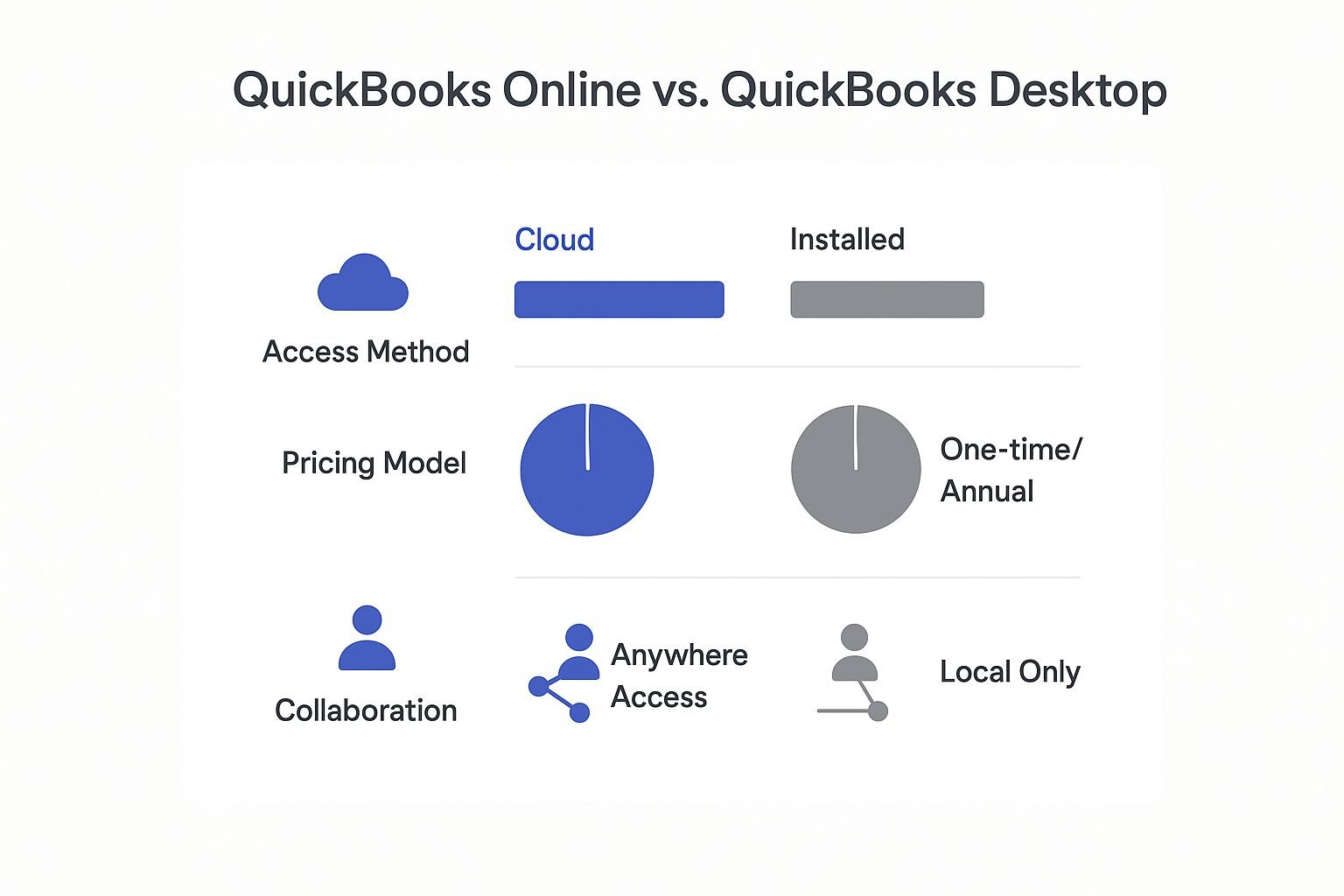
The image makes it clear: QBO is designed for flexibility and a modern subscription model, while QBD is structured around localized control and traditional software ownership. Nearly every other difference between the two stems from this foundational split.
The decision isn't just about features; it's about choosing an operational philosophy. Do you prioritize anytime, anywhere access and automatic updates, or do you need the deep, industry-specific power that comes with installed software?
This idea of cloud accessibility is central to how modern businesses operate. For a deeper dive into its benefits, our simple guide for business owners explains what is cloud accounting and how it can completely change your workflow.
Ultimately, the best choice depends entirely on your specific business needs, industry requirements, and how your team works together. We'll explore these nuances in greater detail to help you make an informed decision that supports your company's growth.
When you're weighing QuickBooks Online against Desktop, it's easy to get lost in a feature-by-feature comparison. But if you want to know where things are really headed, you need to look at Intuit's own strategy. The accounting world is making an undeniable move to the cloud, and the financial data tells the whole story.
This isn’t just a passing trend. It’s a deliberate pivot driven by overwhelming demand for more flexible, scalable tools. Modern businesses need software that supports remote teams, updates automatically, and plugs into a massive ecosystem of other apps. That’s exactly what QuickBooks Online was built for, while Desktop, for all its power, remains tied to a more traditional, on-site approach.

This strategic shift has a direct impact on long-term support, innovation, and the features you’ll see down the road. Intuit is pouring resources into the QBO ecosystem, and its own financial reports prove it. The message is crystal clear: the future of QuickBooks is online.
A quick glance at Intuit’s financial reports shows exactly where the company is placing its bets. The revenue gap between the two platforms has become a chasm, highlighting the powerful momentum behind cloud accounting.
Between fiscal years 2022 and 2024, the data paints a stark picture. QuickBooks Online revenue shot up from $4,438 million in FY'22 to $5,759 million in FY'23. It kept that momentum going with $1,618 million in the first quarter of FY'24 alone. That’s consistent, aggressive expansion.
Meanwhile, QuickBooks Desktop revenue barely budged, inching from $2,022 million in FY'22 to $2,279 million in FY'23 before dropping to $726 million in Q1 of FY'24. The platform isn’t just stagnating; it's being left behind.
This financial trajectory is no accident. It’s the result of a conscious decision to steer new users away from Desktop and funnel investment into the more profitable and scalable Online subscription model. For any business choosing a platform today, this context is everything.
This market shift isn't just about Intuit's bottom line; it has real-world consequences for you. A platform that's getting more investment is far more likely to get new features, better security, and a wider range of third-party integrations.
On the flip side, a platform being de-emphasized will likely see innovation slow to a crawl and long-term support dwindle. While QuickBooks Desktop is still a fantastic tool for certain industries, its future looks limited compared to its cloud sibling. Picking a platform that aligns with where the industry is going ensures you'll benefit from future advancements, not get stuck on a legacy system.
The core decision is whether to invest in a platform built for yesterday's business models or one designed for the future. The market has already voted.
For companies that see this writing on the wall but still rely on Desktop's heavy-duty features, a direct jump to QBO isn't the only answer. You have hybrid options. By exploring different cloud accounting solutions, you can get the best of both worlds—the feature depth of Desktop with the anytime, anywhere access of the cloud. And if you're ready to make the move, check out a practical guide to migrating to the cloud to ensure the transition is a smooth one. This way, you get the flexibility your business needs without giving up the functionality it depends on.
To really grasp the difference between QuickBooks Online and Desktop, we need to look past the sales pitches and get into the weeds of the tools you'll be using day in and day out. How each platform handles core jobs like invoicing, reporting, and inventory will directly shape your workflow, efficiency, and financial clarity.
The "right" choice really hinges on the practical, on-the-ground needs of your business. For instance, a field service company and a small manufacturer both need to send invoices, but their demands are worlds apart. One needs mobile access for on-the-spot billing; the other requires complex batch processing and detailed job costing. Let's pull these critical features apart to see where each platform truly shines.
Invoicing is far more than just sending a bill—it's the engine of your cash flow. QuickBooks Online and Desktop approach this vital task with different strengths, designed for different kinds of businesses.
QuickBooks Online is all about speed and accessibility. Its biggest win is mobile-friendly, real-time invoicing. A technician can fire off an invoice from their phone right at the job site, and the payment can be processed instantly. For service-based businesses, this can slash the payment cycle from weeks to minutes.
QuickBooks Desktop, on the other hand, is built for power and deep customization. Its strength is in batch invoicing, letting you send out hundreds of personalized invoices at once. You can also design invoice templates with a much greater level of detail, which is a must-have for businesses needing to include specific industry data or complex branding elements.
Key Differentiator: QBO prioritizes immediate, on-the-go invoicing for businesses in motion. QBD delivers deep customization and heavy-duty batch processing for companies with high-volume or intricate billing needs.
Both platforms offer solid reporting, but they come from two very different philosophies. QBO is designed for quick, dashboard-driven insights, while QBD is all about forensic-level detail and industry-specific analysis.
With QuickBooks Online, financial data is served up in clean, easy-to-read dashboards. Business owners can get a quick pulse on key metrics like profit and loss, cash flow, and top expenses without needing an accounting degree. This makes QBO fantastic for real-time monitoring of your business's health.
QuickBooks Desktop, particularly the Enterprise version, is a data powerhouse. It comes loaded with over 200 standard reports, many of them tailor-made for specific industries like manufacturing, construction, and retail. These reports provide a level of granularity that QBO just can't touch. A contractor, for example, can run detailed job profitability reports that track costs against budget for every single project.
Here’s a quick rundown of their reporting strengths:
Nowhere is the difference between QuickBooks Online and Desktop more obvious than in inventory management. For any product-based business, this is often the feature that makes the decision.
QuickBooks Online (Advanced) has certainly improved its inventory features, now offering FIFO costing, location tracking, and barcode scanning. It's more than enough for many e-commerce and retail businesses that just need solid, straightforward inventory control.
However, it simply can’t go toe-to-toe with the industrial-strength capabilities of QuickBooks Desktop Enterprise. For businesses in manufacturing or wholesale distribution, Desktop's features are non-negotiable. If you need the most advanced tools, our detailed look at QuickBooks Desktop Enterprise breaks down its specific functionalities.
Just look at this comparison:
| Feature | QuickBooks Online Advanced | QuickBooks Desktop Enterprise |
|---|---|---|
| Assemblies | No, requires a third-party app. | Yes, can build assemblies and subassemblies from inventory parts. |
| Landed Costs | Limited functionality. | Yes, can factor shipping, duties, and other costs into item profitability. |
| Sales Order Management | Basic sales orders. | Advanced, with fulfillment workflows and pick, pack, and ship features. |
| Unit of Measure | Basic (buy small, sell large). | Advanced, with multiple units of measure for the same item. |
This table makes it crystal clear: for any business with a complex supply chain or manufacturing process, Desktop is still king. The ability to create build assemblies, for instance, is a deal-breaker for manufacturers. This feature lets them combine raw materials into finished goods—a process QBO can't handle on its own. Picking the wrong platform here could create major operational headaches down the line.
When you’re comparing QuickBooks Online and Desktop, the price tag on the box is only the beginning of the story. To make a smart financial decision, you have to look past the monthly or annual fee and calculate the total cost of ownership (TCO). That means adding up all the hidden expenses that can pile up over time.
QuickBooks Online runs on a simple subscription model. You pay a predictable monthly fee that covers your software access, automatic updates, data storage, and basic support. It’s an all-in-one price that makes budgeting straightforward and clean.
QuickBooks Desktop, on the other hand, comes with a whole different set of potential costs, even with its move to an annual subscription for Plus versions. The initial fee is just the starting line. The real expenses pop up when you need to give your team remote access—something QBO includes right out of the box.
To use QuickBooks Desktop outside a single office, you have to add a new layer of costs that many businesses don't see coming. These aren’t just optional add-ons; they are necessary investments if you want to match the built-in flexibility of a cloud-based system.
Here’s where the expenses really start to add up:
The true cost of QuickBooks Desktop isn't the software license; it's the entire infrastructure you must build and maintain around it to achieve the remote collaboration that QuickBooks Online offers out of the box.
Understanding these variables is critical for anyone trying to get their finances in order. For a deeper look, exploring strategies for reducing total cost of ownership can paint a clearer picture of your long-term IT spending. These hidden costs can easily make Desktop the more expensive option, especially for growing teams.
Intuit’s own playbook gives us a huge clue about where the long-term value lies. The company is actively phasing out popular Desktop products like Pro and Premier for new users, which signals a clear pivot to the cloud. This strategic shift is backed by some serious numbers.
By 2023, the QuickBooks Online ecosystem generated around $5.8 billion in revenue, completely dwarfing the Desktop ecosystem's $2.3 billion. This trend makes it obvious where future innovation, support, and integrations are going to be focused.
Choosing QBO aligns your business with where the industry is heading, ensuring you get the benefits of continuous feature development and a booming app marketplace. While QuickBooks Desktop is still a powerful tool, its world is shrinking. This makes QBO's all-inclusive subscription more than just a cost calculation—it's a strategic investment in a platform built for what's next. The simplicity of its pricing model eliminates surprise IT bills and delivers a more stable, and often lower, total cost over the software's lifetime.
Choosing the right accounting software isn't about picking the one with the longest feature list. It’s about matching a platform’s core strengths to the messy, real-world demands of your industry. A generic comparison won’t tell you which tool will save you hours and which will create bottlenecks that drive your team crazy.
The decision is a lot like choosing between custom vs. off-the-shelf software, where you have to balance out-of-the-box convenience against specialized, powerful functionality. So let’s move past the theory and dive into practical examples to see where each platform really shines.
Think about a mobile pet grooming business or an HVAC repair company. Your technicians are always on the move, finishing jobs and collecting payments far from the main office. In this scenario, QuickBooks Online is the undisputed champion.
Because it lives in the cloud, a technician can create and fire off a professional invoice from their tablet the second a job is done. They can even swipe a credit card on the spot. This immediate transaction loop radically improves cash flow and gets rid of the mountain of paperwork that usually waits at the end of the day. For any business built on speed and service, QBO’s anytime, anywhere access isn’t just a nice-to-have—it’s a fundamental operational advantage.
Now, let’s flip the script to a small manufacturing firm that produces custom metal parts. This company’s financial world is far more complex. It revolves around raw materials, production costs, and managing a supply chain. This is where QuickBooks Desktop Enterprise truly excels.
One of its killer features is the ability to create build assemblies, which lets you combine raw materials like sheet metal and fasteners into a finished product with its own distinct cost. Desktop also handles advanced inventory costing and can track products across multiple warehouses with pinpoint accuracy.
A manufacturer trying to jury-rig QuickBooks Online for complex assemblies would need a clumsy and expensive collection of third-party apps. QuickBooks Desktop builds these industrial-strength features right in, making it the obvious choice for any product-based business.
The right choice becomes even sharper when you look at other specialized fields. Each one has unique needs that one platform serves much better than the other.
Construction Contractors: These businesses live and breathe by job costing. QuickBooks Desktop Premier (Contractor Edition) delivers incredibly detailed reports that track costs, profits, and change orders for every single project. That level of granular financial control is essential for staying on budget and is miles ahead of what QBO can offer.
Retail Businesses: For a brick-and-mortar shop with a physical point-of-sale system, QuickBooks Desktop tends to integrate more smoothly with POS hardware. Its advanced inventory tools, like managing sales orders and tracking items by different units of measure, are built to handle a high volume of physical products.
Professional Services (Consultants, Lawyers, Marketers): These firms are all about time tracking, project billing, and easy collaboration with their accountant. QuickBooks Online is the clear winner here. Its clean interface makes it simple for team members to log billable hours, and its cloud access lets an accountant review the books without passing clunky files back and forth.
Ultimately, the best platform is the one that mirrors how you actually work. When you analyze your daily operations—how you make money, manage your inventory, and track your costs—you can cut through the marketing noise and choose a tool that will genuinely help your business grow.
What happens when your business is caught in the middle? You need the heavy-duty, industry-specific features of QuickBooks Desktop, but the idea of being chained to a single office computer feels completely outdated. This is a common dilemma, and it often feels like an all-or-nothing choice.
Fortunately, there’s a powerful third option that bridges this gap: a hybrid solution. By hosting QuickBooks Desktop in the cloud, you can eliminate its biggest weakness—its physical limitations—without sacrificing its robust functionality. This approach really does give you the best of both platforms.
Hosting essentially places your installed Desktop software onto a secure, remote server. Your team then accesses it through an internet connection, just like any other cloud application. Suddenly, the full-featured QuickBooks Desktop environment is available from anywhere, on any device.
This setup transforms how your business operates, delivering some key benefits:
Beyond simple remote access, a hosted solution removes the IT burden from your shoulders. This is a critical advantage for small businesses that don't have a dedicated tech team.
A hosted QuickBooks Desktop environment doesn't just replicate your on-premise setup in the cloud; it enhances it with professional IT management, automated backups, and expert support, giving you enterprise-level infrastructure without the enterprise-level cost.
This managed approach helps explain why so many businesses stick with Desktop. Recent market analysis shows QuickBooks Desktop commands approximately 62.23% of the accounting software market, while QuickBooks Online holds just 4.35%. This significant gap underscores the ongoing demand for Desktop's powerful features, which can be supercharged with cloud accessibility. You can find out more by checking out the full QuickBooks market share analysis on acecloudhosting.com.
Choosing this path offers a future-proof strategy, combining the software you rely on with the flexibility you need. To see how this works in practice, explore the benefits of a dedicated hosted QuickBooks Desktop solution that handles all the technical complexities for you.
When you're weighing QuickBooks Online against Desktop, a few key questions always come up. Let's clear the air on some of the most common points of confusion so you can make your final choice with confidence.
Yes, you absolutely can. Intuit provides a built-in tool to help you migrate your company file from Desktop to Online. But—and this is a big but—the transition isn't always a clean one.
It’s really important to know that complex data doesn't always transfer perfectly. Think advanced inventory records, custom reports, and certain transaction histories. Before you even think about starting the migration, make a thorough backup of your Desktop file. A little prep work now can save you from major data loss and operational headaches later on.
Both platforms are secure, but the responsibility model is completely different. With QuickBooks Online, security is all on Intuit. They handle the bank-level encryption and manage professional data centers, which is a huge relief if you don't have a dedicated IT team.
QuickBooks Desktop, on the other hand, puts security squarely in your hands. Its safety is only as good as your own network’s integrity, hardware firewalls, and backup routines.
A hosted Desktop environment gives you the best of both worlds. It combines Desktop's powerful features with the airtight protection of a professional data center, all managed by security experts.
The writing is on the wall. Intuit has officially stopped selling new subscriptions for its popular Desktop products, Pro and Premier, to new customers in the U.S. This is a clear signal of their push toward QuickBooks Online.
While existing subscribers are still supported and the powerhouse Desktop Enterprise version is still available, the trend is undeniable. The industry is moving to the cloud. This long-term strategic shift from Intuit is a critical factor to weigh in your decision, as it will definitely impact future innovation and support.
Ready to combine the power of QuickBooks Desktop with the flexibility of the cloud? Cloudvara provides secure, reliable hosting that gives you the best of both worlds. Explore our solutions and start your free trial at https://cloudvara.com.




