Your office server is humming along under a desk or in a back room. It stores QuickBooks, tax files, case documents, email archives, and the small details your business depends on every day. Then one hot afternoon, it freezes. Staff can't log in. A backup job didn't finish. Clients are waiting.
That moment is why the components of a data center matter, even if you never plan to walk into one.
A data center is the professional version of that back-room server setup. It's built to keep business systems available, secure, and stable when real life gets messy. Power flickers. Hardware fails. Cooling systems work overtime. People make mistakes. Strong infrastructure is designed around those realities, not around best-case conditions.
For a small business owner, this isn't just an IT topic. It's an operations topic. If your accounting software slows down during payroll, or your CRM is unreachable when your team is remote, the problem isn't abstract. It affects revenue, deadlines, and trust.
Think about a small accounting firm in March. Staff members are in QuickBooks all day. Partners are reviewing files from home at night. A client calls asking for a report right away. In that environment, an in-house server can start to feel like a weak front door protecting the entire business.
A data center is different. It works more like a digital fortress. Instead of one server and one office power feed, it layers protection around everything your team needs to access. That includes electricity, cooling, physical access, internet connectivity, storage, backups, and monitoring.

A business owner doesn't need to memorize every part. But it helps to know what sits behind the phrase "hosted in a secure data center." Those words should mean something concrete. They should mean your work isn't relying on a single aging machine beside a filing cabinet.
When you understand the basic components, you can ask better questions:
If you're comparing providers, it also helps to recognize different build approaches. For example, a modern modular data center can be useful to understand because it shows how facilities can be designed for flexible growth without sacrificing core reliability.
Practical rule: If your business depends on one application being available every day, your infrastructure is no longer just "computer stuff." It's part of your business continuity plan.
Every data center starts with the same basic question. How do you keep computing equipment running all the time without frying it?
The answer begins with two foundational systems: power and environmental control. If servers are the engines, these are the fuel line and climate system that keep the whole building operational.
In 2024, data centers worldwide consumed 415 terawatt-hours of electricity, with demand growing 12 to 15 percent annually. The same source explains that Power Usage Effectiveness, or PUE, is a key efficiency measure, and that top-tier facilities aim well below the global average PUE of 1.58 because lower values mean less energy is wasted on cooling and power distribution, according to Atlas Systems' overview of data center infrastructure.
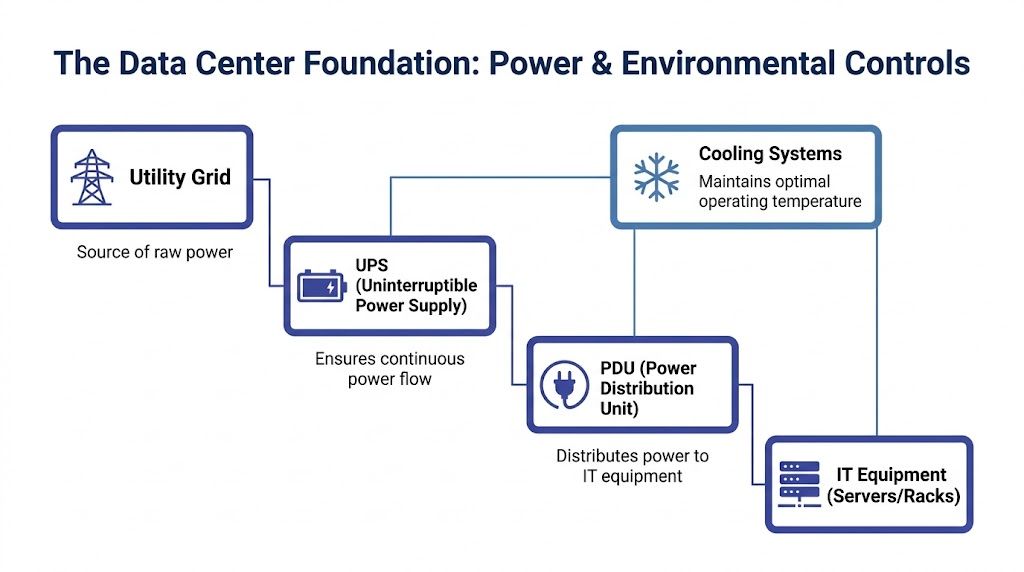
A lot of non-technical readers assume electricity just goes from the wall to the server. In a business-grade facility, the path is more controlled than that.
Utility feed
This is the incoming power from the local grid. It's the starting point, not the only source.
UPS systems
A UPS, or uninterruptible power supply, acts like a shock absorber for electricity. If utility power dips or cuts out, the UPS keeps systems running long enough for backup power to take over without dropping your session.
Generators
Backup generators are the next layer. They support the facility during longer outages so users can keep working instead of waiting for power to return.
PDUs and remote power panels
These distribute electricity safely and consistently to racks, servers, and storage equipment. Think of them as the organized electrical wiring behind the scenes.
If your staff uses hosted QuickBooks or a CRM system, power design affects whether they can log in at all. A proper setup reduces the chance that one utility problem turns into a full business interruption.
For small firms, this is often the hidden value of professional hosting. You're not paying for "electricity." You're paying for redundant electricity managed in a way an office server room usually can't match.
Servers generate heat nonstop. Put enough of them in one room without disciplined airflow, and performance starts dropping. Components wear out faster. Unexpected shutdowns become more likely.
That's why data centers treat cooling the way a hospital treats clean air. It's not a comfort feature. It's a requirement.
Common environmental controls include:
A good data center doesn't just provide power. It provides stable power and a controlled operating environment, hour after hour.
PUE can sound academic, but the business meaning is simple. Lower waste usually means a better-run facility. Less energy lost to inefficient cooling and electrical distribution can support more predictable operations.
Some providers also invest in cleaner or more efficient infrastructure choices. If sustainability matters to your firm, it's worth understanding how green data centers approach power and cooling decisions in practical terms.
Some facilities are also looking beyond the traditional grid connection. Behind-the-meter power resources, such as co-located gas plants or solar parks with backup support, are being used to deal with connection delays and strengthen redundancy. That approach can help mission-critical applications stay available even when the broader grid is under pressure.
Once power and cooling are handled, the next question is straightforward. What is the data center holding?
The visible machinery includes: racks, servers, and storage. If the building is the fortress, these are the rooms, workstations, and vaults inside it.
A rack is a tall frame that holds IT equipment in an organized layout. It resembles industrial shelving in a records archive. Instead of storing boxes of paper, it stores servers, networking gear, and power equipment in a compact, serviceable arrangement.
That organization matters more than it seems. A messy rack isn't just unattractive. It can block airflow, make repairs slower, and increase the chance of mistakes during maintenance.
According to DataBank's explanation of data center infrastructure and operations, improper rack spacing can create hotspots that reduce hardware lifespan by 20 to 50 percent, and optimized layouts can cut cooling energy consumption by 15 to 25 percent.
A server is a computer designed to deliver applications, processing, and shared resources to many users at once. In a small office, one physical server might try to do everything. In a data center, workloads are usually organized more cleanly.
A few common examples help:
The important idea isn't the model number. It's that servers in a data center are built for sustained use, centralized management, and easier recovery when something goes wrong.
Storage is where your data lives. Not just today's files, but revisions, backups, attachments, and system records.
A simple way to picture it:
For a law office, that might mean matter-related files and email archives. For an accounting firm, it might mean QuickBooks company files, scanned receipts, payroll exports, and tax returns.
Business view: Fast applications depend on more than CPU power. They also depend on how neatly hardware is organized and how quickly storage can deliver data.
Many business owners notice symptoms before they understand the cause. A hosted application feels sluggish in the afternoon. File access gets inconsistent. Staff complain that one process is "slow today."
Sometimes the issue isn't the software at all. It can be the physical layout of the hardware supporting it. If equipment is packed poorly, airflow suffers. If cooling struggles, performance can become unstable. Good rack design protects both uptime and responsiveness.
Here's a practical comparison of who handles that work.
| Responsibility | On-Premise (Your SMB) | Cloudvara Hosted Infrastructure |
|---|---|---|
| Rack setup and spacing | Your team or local IT vendor handles it | Managed as part of the hosted environment |
| Server replacement planning | You budget, buy, and install hardware | Provider manages underlying server lifecycle |
| Storage growth | You estimate future needs and add equipment | Capacity can be expanded within the hosted platform |
| Cooling impact of hardware layout | Your office setup may have limited controls | Facility-grade airflow and equipment organization are managed centrally |
| Hardware troubleshooting | Staff or outside IT responds when issues appear | Infrastructure specialists handle core hardware operations |
If you're trying to understand the hosted model in more practical terms, this overview of servers in the cloud gives a useful plain-English explanation of how businesses use computing resources without owning every physical machine themselves.
A data center can have excellent power, tidy racks, and powerful servers, but none of that helps if systems can't talk to each other or to your staff. Networking is the nervous system. It carries signals between internal components and out to the people who need access.
For a remote accountant opening QuickBooks from home, that network path shapes the entire experience. If connectivity is stable, the application feels responsive. If it's poorly designed, every click feels delayed.
Inside a data center, a few networking components do most of the heavy lifting:
These parts work together constantly. The user usually never sees them, but they determine whether remote access feels smooth or frustrating.
Business continuity isn't only about backup power. A strong data center also avoids relying on one network path whenever possible. If a single connection fails, another route can keep traffic moving.
That principle becomes even more important as power demand and infrastructure pressure grow. To deal with grid bottlenecks and connection delays that can take 2 to 3 years for U.S. hyperscalers, some data centers are adopting behind-the-meter power resources like co-located gas plants or solar parks. This can enhance redundancy for mission-critical applications and cut IT infrastructure costs by 20 to 30 percent, according to this discussion of emerging data center power components.
That may sound like a power topic rather than a networking one, but the business outcome overlaps. If the facility can stay online despite infrastructure constraints, the network carrying your application sessions can keep doing its job.
When networking is healthy, your team notices simple things:
When networking is weak, users often blame the software first. In reality, the application may be fine. The bottleneck may be in how traffic is routed, filtered, or prioritized.
For a grounded explanation of this layer, cloud networking basics can help connect the technical terms to everyday business use.
The fastest server in the world won't help much if your users reach it through a weak or brittle network path.
Security in a professional data center works like the defense plan for a secure building. You don't rely on one locked door. You use layers. Physical barriers slow down unauthorized entry, and digital controls restrict what approved users can do even after they get in.
For businesses handling financial records, legal documents, donor information, or HR files, that layered model matters. Sensitive data needs protection from both physical tampering and cyber threats.
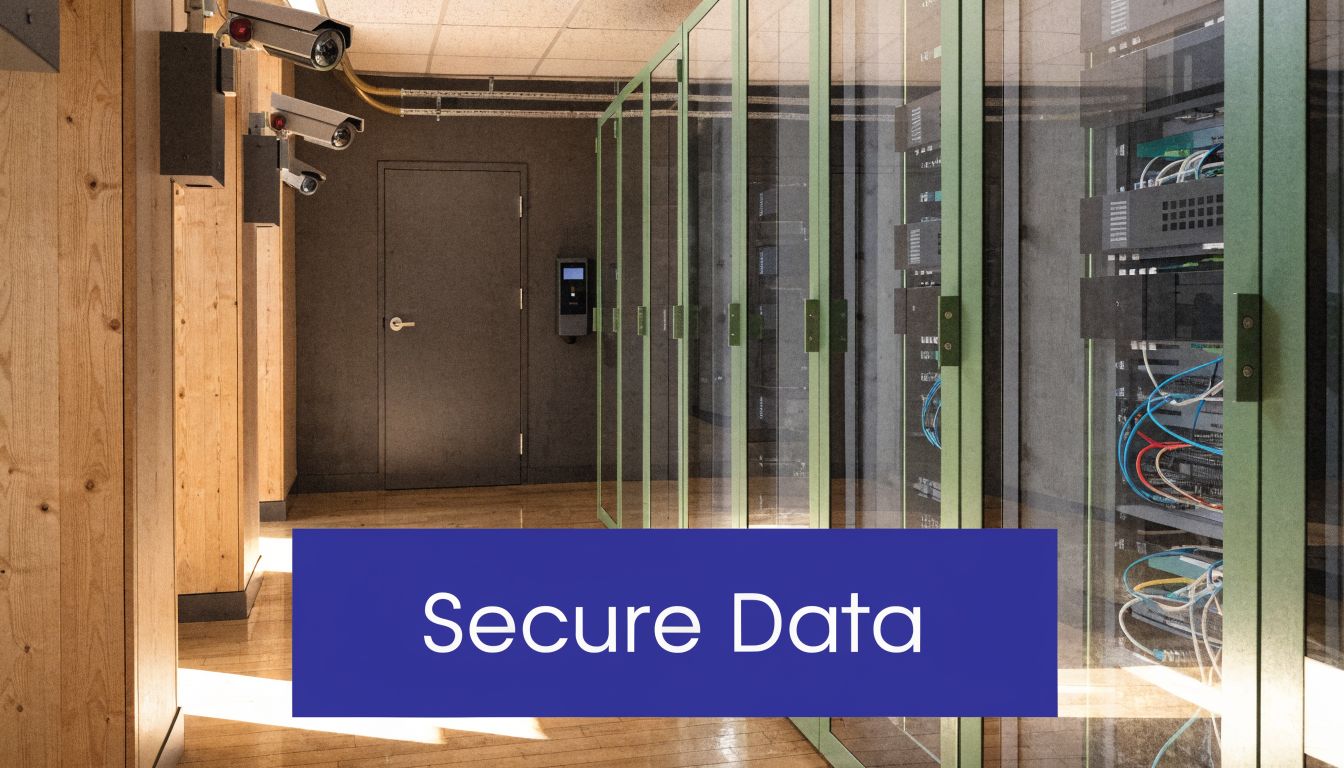
Physical security starts before anyone reaches a server room door. A well-run facility may include gated entry points, surveillance, controlled visitor procedures, and limited access to equipment areas.
If you've ever reviewed building security upgrades for an office, the same logic applies at a larger scale. Resources on access control system installation can be helpful for understanding how layered entry systems are designed to reduce unauthorized access.
Inside the facility, access is usually restricted further. Only approved personnel should be able to enter sensitive spaces. Even then, activity is typically controlled and documented.
Physical security protects the hardware. Logical security, sometimes called cyber security, protects the systems and data on that hardware.
That usually includes:
A small business could try to assemble those layers on its own, but doing it well takes expertise, time, and constant upkeep.
Here's a useful visual overview of how layered protection works in practice:
Business owners sometimes think, "If a provider hosts my applications, security is their problem." That's only partly true. The provider handles a big share of infrastructure protection, but you still need to understand the basics so you can judge whether the environment matches the sensitivity of your data.
A cloud environment should make secure access easier, not looser. If your team works from home, shared office space, or client locations, that matters even more. This guide to small business cloud security is a practical starting point for connecting those protections to day-to-day operations.
Good data center security doesn't depend on one heroic tool. It depends on multiple controls working together so one mistake doesn't expose everything.
A strong facility doesn't just sit there and hope everything keeps working. People and systems constantly watch it. Monitoring is the watchtower. Backup and recovery are the emergency plan when prevention isn't enough.
This is one of the least visible parts of a data center, and one of the most valuable. Most users never notice monitoring when it's doing its job well. That's the point.
Operators monitor server health, storage behavior, power conditions, and environmental signals so they can respond before users feel a problem. They also watch for unusual login activity, failed processes, and performance slowdowns.
That gives the support team a chance to intervene before a small issue becomes a business outage.
Examples of what monitoring can flag include:
For a plain-language look at this discipline, infrastructure monitoring is a helpful concept to understand because it ties technical oversight directly to user experience.
Monitoring helps prevent some failures. It doesn't eliminate the need for recovery. Files can still be deleted. Software can still break. Malware can still corrupt data. That's why backups matter.
A backup is a recoverable copy of your data and systems. The critical issue isn't whether backups exist. It's whether they're automated, current, and usable when needed.
A good recovery approach usually answers questions like these:
How often are backups created?
Frequent backups reduce the amount of work lost after a problem.
Where are backup copies stored?
Copies need separation from the original environment so one incident doesn't affect everything.
How are restores handled?
Recovery should be organized, not improvised under pressure.
Operational advice: Don't judge a hosting environment only by how it performs on a normal day. Judge it by how calmly it can recover on a bad one.
Disaster recovery is the larger plan around backups, replacement systems, and continuity procedures. If one system or site has a serious problem, recovery planning helps the business continue operating with less disruption.
For SMBs, that means fewer panicked calls, fewer manual workarounds, and less dependence on one employee who "knows where everything is."
Once you understand the components of a data center, hosted infrastructure becomes easier to evaluate. You can look past broad promises and ask what the provider is managing on your behalf.
Cloudvara's role is to take these infrastructure layers off your plate so your team can use applications without owning the burden of the facility underneath them. That matters for firms that need remote access to QuickBooks, Sage, CRM systems, document management tools, Microsoft applications, and other business software without building a server room around them.

At a practical level, the service model means businesses don't have to manage the difficult parts described throughout this article:
The business result is simple. Your team spends less time worrying about infrastructure and more time doing client work.
For a small accounting practice or nonprofit, in-house infrastructure often creates hidden jobs nobody wanted. Someone has to coordinate updates. Someone has to check backups. Someone has to react when the office internet or server room has a bad day.
Hosted infrastructure shifts that responsibility to specialists who focus on running that environment full time.
That can help businesses in a few practical ways:
Cloudvara states a 99.5% uptime guarantee in its service positioning. For a small business owner, that matters because uptime is the plain-English version of infrastructure quality. It means the provider is taking responsibility for keeping your hosted environment available at a defined service level.
That kind of commitment is easier to understand once you know what sits underneath it. Uptime isn't just a slogan. It's supported by the power chain, environmental controls, organized hardware, network design, security layers, and recovery planning described above.
Hosted cloud value isn't only "your apps are online somewhere else." The real value is that someone else is managing the fortress those apps depend on.
Most SMBs don't want to become miniature data center operators. They want dependable access to the software they already use. They want secure remote work. They want backups, support, and fewer points of failure.
That's where a managed hosting provider fits. Instead of asking your office manager, local IT consultant, or most patient staff member to keep everything running, you move into an environment built for that job.
Because it helps you judge quality. You don't need to engineer the environment yourself, but you do need to know what questions matter. If a provider can't explain power backup, security layers, backup practices, or infrastructure management in plain language, that's a warning sign.
Speed isn't only about your laptop or internet plan. It also depends on the server resources behind the application, the way storage is organized, and the quality of the network path between your team and the hosted environment. If those components are well managed, the application usually feels more consistent.
Physical security protects the building and equipment. That includes controlled entry, surveillance, and restricted server-room access. Cyber security protects the systems and data using tools like firewalls, encryption, and authentication controls. You need both.
Focus on practical outcomes:
Each component supports continuity in a different way. Power systems help applications stay online. Cooling protects hardware from stress. Networking keeps users connected. Security reduces unauthorized access. Monitoring and backups make recovery more orderly if a problem occurs.
Tier labels can be useful, but they shouldn't be the only thing you look at. Ask what level of redundancy, operational discipline, and support the provider delivers for your workloads. A label matters less than whether your staff can reliably access the systems they need every day.
If you're ready to move away from office-server stress and give your team secure access to QuickBooks, Sage, CRM, tax, and document management applications from anywhere, take a closer look at Cloudvara. It offers hosted infrastructure, automated backups, business continuity support, and a straightforward path to running the software you already rely on without managing the data center yourself.




