Choosing between cloud and on-premise infrastructure really boils down to one core question: control versus convenience.
An on-premise setup gives you complete, hands-on control over your data and hardware. But it comes with a price—a significant upfront investment and the ongoing headache of IT management. On the other hand, cloud solutions offer flexibility and scale with a predictable subscription fee, letting you trade direct control for outsourced expertise and maintenance.
Making the right IT choice goes way beyond technical jargon. For professionals in accounting, law, and other small to mid-sized businesses, this decision directly impacts daily operations, security, and your ability to grow. The two models represent fundamentally different ways of thinking about your technology.
The numbers tell a compelling story. Global spending on cloud services is rocketing towards $723.4 billion, signaling a massive shift in how businesses operate.
But that doesn't mean on-premise setups are history. While a staggering 96% of companies now use some form of public cloud, 55% still run traditional systems right alongside them. This hybrid reality is especially true for professionals who handle sensitive client data and operate under strict compliance rules.
The "best" choice isn't universal; it depends entirely on your firm's unique needs for security, compliance, remote access, and budget. Modernizing your approach is the key to staying competitive, and understanding these differences is the first step in effective IT infrastructure modernization.
To cut through the noise, here’s a high-level look at the core trade-offs between the two models. This table gives you a quick snapshot to frame your thinking.
| Factor | Cloud Infrastructure | On-Premise Infrastructure |
|---|---|---|
| Cost Model | Operational Expense (OpEx) – Subscription-based | Capital Expense (CapEx) – Upfront purchase |
| Control | Managed by provider; less direct control | Full control over hardware, software, and data |
| Scalability | High; easily scale resources up or down | Low; requires new hardware procurement |
| Maintenance | Handled by the cloud provider | Responsibility of your internal IT team |
| Remote Access | Native; accessible from anywhere with internet | Requires complex setup (e.g., VPNs) |
Each model has its place. The cloud excels at delivering agility and reducing your IT burden, while on-premise offers unmatched control for those who need it. As we dig deeper, you'll see which factors matter most for your specific situation.
When you're weighing cloud vs. on-premise, the money talk often starts and stops with Capital Expenditures (CapEx) versus Operational Expenditures (OpEx). While that’s a decent starting point, it’s a surface-level view that misses what really matters: the Total Cost of Ownership (TCO). TCO is the framework that pulls back the curtain on the true, long-term financial reality of each model.
An on-premise solution obviously requires a big check upfront for hardware and software licenses. But those initial costs are just the tip of the iceberg. The ongoing expenses needed to keep that infrastructure running can pile up fast, often in ways you didn't see coming.
This isn’t just theory; it’s reflected in how businesses are spending their money. Right now, organizations are splitting their IT budgets almost down the middle, with 49% going to cloud services and 47% to on-premise setups. This near-even split, detailed in this insightful market report, shows that there's no single right answer. Businesses are clearly weighing the complete cost picture before committing.
Owning a server is a lot like owning a car—the sticker price is only where the spending begins. The real costs show up over its entire lifespan. For an on-premise setup, these often-overlooked expenses are significant and they never really go away.
Here’s what you’re really paying for long-term:
If you don’t account for these variables, your budget will be based on wishful thinking, leading to some nasty financial surprises down the road. It’s critical to look past the initial purchase price. For a real shot at reducing the total cost of ownership, you have to analyze everything.
The cloud flips the script to a predictable, subscription-based fee. This OpEx approach gets rid of the need for huge upfront investments, making powerful technology accessible to SMBs, law firms, and accounting practices that simply don’t have enterprise-level cash reserves.
But the cloud model isn’t without its own financial quirks that demand attention. You're not buying hardware, but your monthly bill is tied directly to what you use. This can be both a blessing and a curse.
The primary financial risk in the cloud isn't overspending on necessary resources, but rather paying for idle capacity. Forgetting to scale down after a busy tax season or leaving development environments running can lead to significant budget waste.
This risk highlights just how important active resource management is. Firms also need to be aware of potential data egress fees—charges you incur for moving large amounts of data out of the cloud provider’s network. While it’s often a minor cost for day-to-day work, it can become a real factor if you ever decide to switch providers or have workflows that move massive files around.
Ultimately, a true cloud vs. on-premise comparison demands a full TCO analysis. On-premise requires you to budget for a laundry list of direct and indirect costs, while the cloud requires you to be disciplined and make sure you’re only paying for what you actually use.
For accountants and law firms, security isn't just a feature—it's the bedrock of client trust. Your choice in the cloud vs. on-premise debate directly impacts how you protect sensitive financial records, legal documents, and personal information. The real question isn’t which is "more secure" in a vacuum, but which model aligns with your firm's specific regulatory duties and internal capabilities.
An on-premise setup gives you the ultimate level of control. You own the servers, you configure the firewalls, and you manage who walks through the door to the hardware. This hands-on authority is often seen as a must-have for meeting strict data sovereignty rules and regulations like the Sarbanes-Oxley Act (SOX) or HIPAA.

But with absolute control comes absolute responsibility. The entire security burden—from patching software on time to detecting sophisticated threats and responding to incidents—falls squarely on your shoulders. Without a dedicated, expert IT team, this can quickly become a significant vulnerability.
Cloud hosting operates on a shared responsibility model, a critical concept for any professional services firm to grasp. In this framework, the security workload is split between you and the cloud provider, allowing you to offload a huge piece of the security puzzle.
Here’s how those duties typically break down:
This division of labor gives SMBs access to enterprise-grade security that would be incredibly expensive to build in-house. Top-tier cloud providers invest millions in security protocols, far more than a typical small business can afford. You can dive deeper into how this framework strengthens your firm’s defenses by exploring guides on small business cloud security.
The key takeaway from the shared model is that it lets you focus on client work instead of moonlighting as a full-time cybersecurity expert. The provider handles the complex infrastructure protection, so you can focus on managing secure access for your team.
For law and accounting firms, a few specific compliance worries always come up in the cloud vs. on-premise discussion. It’s important to look past generalizations and see how a quality cloud provider tackles these issues head-on.
Data Residency and Sovereignty
A common fear is that client data might end up outside a specific geographic jurisdiction, violating regulations. While on-premise guarantees this by default, reputable cloud providers solve this by letting you choose the physical location of your data center. This ensures your data never leaves the country, satisfying any sovereignty requirements.
Multi-Tenancy Risks
The idea of multi-tenancy—where multiple clients share the same physical server—can set off alarm bells. However, modern cloud architecture uses sophisticated logical separation and encryption to completely isolate each client's environment. For firms that need the highest level of assurance, a dedicated or private cloud hosting solution offers the best of both worlds: your own server, managed by cloud experts.
Vetting a Cloud Provider's Credentials
The right cloud partner will be upfront about their security and compliance posture. Before you sign anything, always verify their certifications. Look for reports like SOC 2 Type II, which audits their controls over time, and ask for proof of compliance with standards relevant to your practice, such as HIPAA for firms handling protected health information. This due diligence ensures your chosen partner is just as committed to security as you are.
Your firm's infrastructure has to do more than just keep the lights on—it needs to flex with your business without sinking your budget or slowing down your team. When you're weighing cloud vs. on-premise, the ability to scale resources up or down is one of the biggest differentiators, and it hits your bottom line directly.
The cloud’s killer feature here is elasticity. This is the power to add or remove computing resources—like processing power or storage—almost instantly. For any business with fluctuating workloads, like an accounting firm buried in tax season, this kind of flexibility is a total game-changer.
Picture your accounting team working around the clock, pushing QuickBooks and Sage to their absolute limits. In a cloud environment, you can instantly give your servers more resources to handle that massive load, keeping applications running smoothly. As soon as the deadline passes and things quiet down, you scale those resources right back down.
This on-demand model means you only pay for that high-performance capacity when you actually use it. It’s a smart way to prevent wasted spending on idle hardware. To see exactly how this works, you can dig into the fundamentals of what cloud scalability is and how it keeps IT costs lean.
Scaling an on-premise setup, on the other hand, is a slow and expensive project. It involves:
This whole process can take weeks, if not months, leaving you completely unable to respond to an immediate business need. By the time the new hardware is online, the peak demand might be long gone, and you’re stuck with over-provisioned, expensive equipment just sitting there.
Performance isn't just about raw speed anymore; it's about delivering a consistent, reliable experience to your team, no matter where they're logging in from. On-premise systems can be incredibly fast for users who are physically in the same office as the server. For a law firm where everyone works from one location, that localized speed can feel like an advantage.
But that’s not how most of us work today. The modern workforce is spread out. When your team needs to access critical files and applications from home, client sites, or while traveling, a well-designed cloud solution offers far better performance and accessibility.
The performance debate has shifted from "which is faster?" to "which is more accessible?" For remote teams, consistent access from any device is the true measure of high performance, eliminating the bottlenecks and security headaches of traditional VPNs.
To see how these different approaches handle real-world business demands, let's look at a few common scenarios.
| Business Scenario | Cloud Response | On-Premise Response |
|---|---|---|
| Seasonal Demand Surge (e.g., Tax season for an accounting firm) |
Resources are scaled up in minutes via a control panel. Costs increase temporarily and return to normal after the peak. | Requires pre-purchased, oversized hardware to handle the peak, which sits idle most of the year. Or, the system slows down. |
| Unexpected Rapid Growth (e.g., A law firm lands a major, data-intensive case) |
Storage and processing power are added on-demand. The new capacity is available almost immediately to support the team. | A capital expenditure project is initiated. The team waits weeks for new hardware procurement, installation, and setup. |
| Sudden Downturn (e.g., A project is canceled, reducing server load) |
Resources are scaled down instantly. The monthly bill reflects the lower usage, saving money immediately. | The hardware is already paid for. The excess capacity sits unused, offering no cost savings. |
This table makes it clear: the cloud is built for agility, while on-premise infrastructure requires you to predict the future.
This decision tree infographic helps visualize that initial choice based on your most pressing business needs.
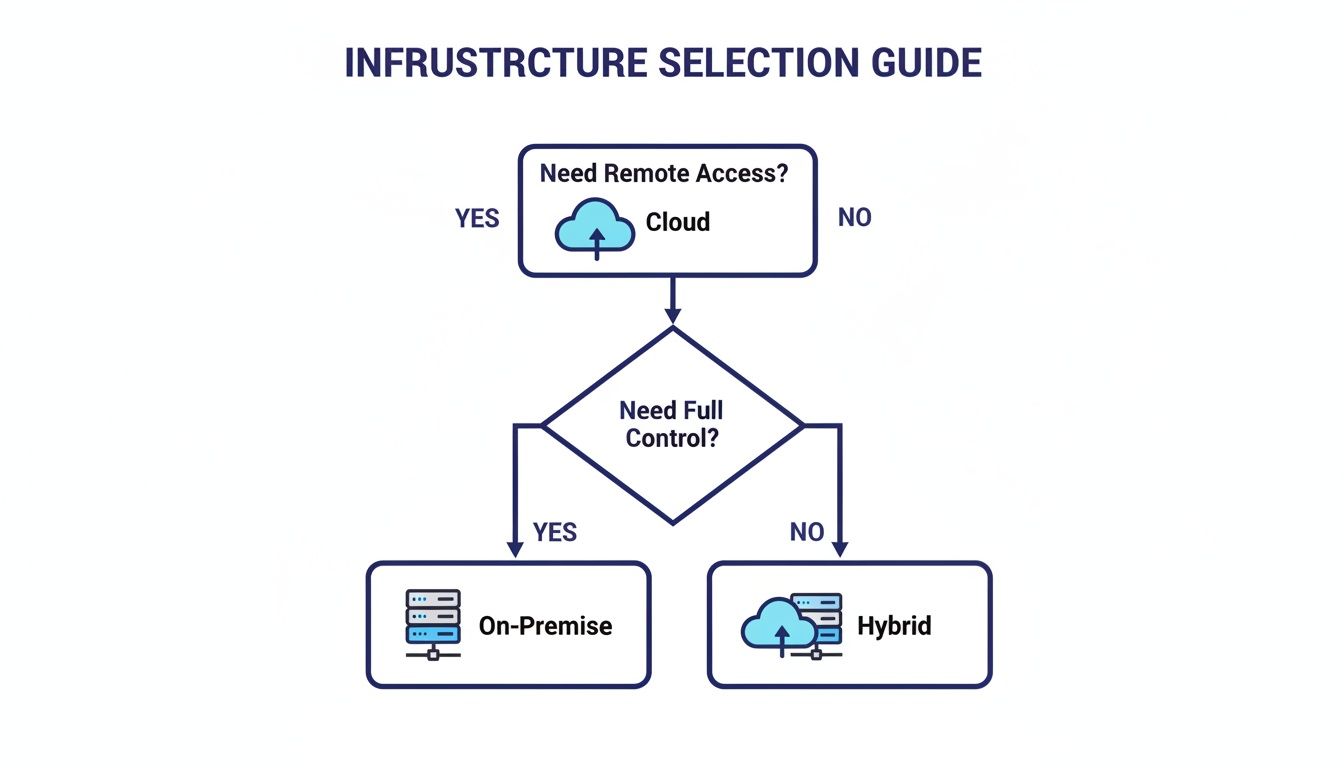
As the flowchart shows, if your team needs to work from anywhere, the path points directly to a cloud solution. If your priority is absolute, hands-on control, the decision leans toward on-premise. It’s a perfect illustration of the fundamental trade-offs you’re facing.
Choosing your firm's IT foundation isn't just about picking a technology—it's about defining your entire operational strategy. There's no single "best" answer, only the right fit for your specific circumstances. The decision really boils down to a clear-eyed look at your budget, growth plans, security needs, and how your team actually works day-to-day.
Take a brand-new law firm built on a remote or hybrid model, for example. A cloud solution is a natural fit. The low initial cost sidesteps a massive capital expense, and the built-in scalability means the firm can grow at its own pace without ever worrying about outgrowing its servers.
On the flip side, think about an established accounting firm with a large, stable client base and predictable, heavy workloads. If that firm operates under strict data sovereignty rules that demand client files stay in a specific location, a modern on-premise server might be the more cost-effective and compliant choice in the long run.
This is where the black-and-white choice of "cloud vs. on-premise" starts to fade into a more practical, hybrid reality. The data shows this shift away from an all-or-nothing mindset is already happening. Today, 32% of companies run a mix of cloud and on-premise resources, and another 50% operate across multiple clouds. As you can see, the era of pure 'cloud vs. on-prem' thinking is evolving.
The modern IT decision is not a simple choice between two opposing poles. It’s about finding the right blend of control, flexibility, and cost-efficiency that aligns with your business objectives and client obligations.
This trend toward blended environments is all about getting the best of both worlds. Specialized managed solutions are now bridging the gap, offering the rock-solid security and control of dedicated servers with the seamless accessibility and low maintenance of the cloud.
To cut through the noise, work through this checklist. Your answers will point you toward the most logical path for your firm—whether that's cloud, on-premise, or a hybrid approach that pulls from the strengths of both.
Budget and Financial Strategy
Security and Compliance Needs
Scalability and Growth Projections
Remote Access and Collaboration
By honestly answering these questions, you move from a theoretical comparison to a practical, strategic decision that will support your firm’s success for years to come.
For many firms, the cloud vs. on-premise debate feels like an impossible choice between convenience and control. What if you didn't have to choose? What if you could keep the full-featured desktop software your team knows inside and out—like QuickBooks or Sage—while getting all the security and remote access benefits of the cloud?
This is exactly where managed hosting comes in. It bridges the gap by taking your existing desktop applications and hosting them on a dedicated cloud server. It’s a hybrid approach that offers the best of both worlds: your team gets the same consistent experience with the software they already use, while your firm offloads the heavy cost and headache of maintaining physical hardware.
This isn’t just a technical workaround. It’s a strategic business decision that delivers real, tangible benefits designed for the needs of accountants, law firms, and other SMBs.
A quality managed hosting provider essentially becomes your outsourced IT department, handling all the infrastructure so you can focus on client work. This partnership is built to deliver reliability and peace of mind through a few key promises.
This approach simplifies IT management by turning it from a capital expense (buying servers) into a predictable operating expense (a monthly fee). It lets you empower secure remote work without forcing your team into a disruptive software change.
Thinking beyond just cloud or on-premise, it's also useful to understand different operational models. For instance, a detailed comparison of staff augmentation vs. managed services highlights how outsourcing can fill specific gaps in your operations. This is precisely the kind of value a dedicated hosting partner brings to the table.
Ultimately, this model transforms the complex cloud vs. on-premise comparison into a practical, real-world solution. You can learn more about how managed cloud services can modernize your firm's operations without forcing you to abandon the essential software you already trust. It's an approach built for efficiency, security, and the realities of running a modern business.
When you're comparing cloud vs. on-premise, a handful of questions always come up, especially for professionals who handle sensitive client data. Here are the straight-up answers we give accountants, lawyers, and small business owners every day.
Yes, but only if you partner with the right provider. A reputable cloud hosting service invests in enterprise-grade security that most small businesses simply can't afford on their own. We're talking about heavy-duty data encryption, two-factor authentication, and dedicated servers that aren't shared with anyone else.
The most critical part is doing your homework. Ask to see a provider’s compliance certifications, like SOC 2 or HIPAA, and have them walk you through their security protocols. Make sure their standards line up with your industry's specific regulations.
It almost always comes down to two things: ongoing maintenance and the specialized IT staff you need to manage it. The initial hardware purchase is just the price of admission. After that, you're on the hook for IT salaries, bigger utility bills to power and cool the server room, and physical security measures.
And don't forget, you'll be facing another huge capital expense every 3-5 years just to replace the aging hardware. Those operational costs are what really inflate the total cost of ownership over the server's life.
The real cost of an on-premise server isn't the hardware itself, but the continuous investment in people, power, and periodic replacements needed to keep it secure and operational.
Absolutely. This is exactly what specialized application hosting providers do. We take the desktop programs you already own and use—like QuickBooks or Sage—and move them onto a secure cloud server. The software looks and feels the same, but now you can access it from any device with an internet connection.
It's the best of both worlds. You get the anywhere-access of the cloud without forcing your team to learn a whole new system or give up the full-featured software they rely on.
The complexity really depends on who you work with. A managed hosting provider is built to make this process feel effortless for you. A good partner will handle the entire migration—transferring your data and applications, setting up user access, and configuring all the security settings.
Their team should work with you to map out the entire transition, minimizing downtime so you can keep your business running smoothly. They essentially become your dedicated IT department, handling all the technical heavy lifting so your team can stay focused on what they do best.
Ready to see how the security and flexibility of the cloud feel, without giving up the desktop software you depend on? Cloudvara offers a seamless migration, 24/7 support from real experts, and a 99.5% uptime guarantee. Start your free, no-obligation 15-day trial and find out how we can transform your firm's IT. Get Your Free Trial




