Finding the right payroll software feels less like a purchase and more like hiring a critical team member. The best option isn't a one-size-fits-all solution; it’s about finding a perfect fit for your unique business, whether that’s an all-in-one suite like Gusto or something that integrates deeply with your existing accounting tools, like QuickBooks Payroll.
Picking a payroll system is a foundational decision that impacts your company's financial health. Think of it like choosing a vehicle: a solo consultant might only need a nimble scooter for simple tasks, while a growing retail store with hourly staff needs a reliable van that can handle complex schedules.
The right software does more than just cut checks—it becomes a core part of your operational engine.
This guide will walk you through the features that matter most for your specific company size, industry, and long-term goals. We'll also explore why cloud-hosted solutions are quickly becoming the standard. They give you the power of robust desktop applications, like QuickBooks or Sage, combined with the flexibility of secure, anywhere access.

Let's be honest: manual payroll is not just time-consuming; it's a huge source of risk. Small mistakes can snowball into compliance violations, tax penalties, and unhappy employees. Automated software transforms this recurring headache into a tool for efficiency and accuracy.
The numbers back this up. The HR payroll software market is expected to grow by USD 7.84 billion between 2024 and 2029, with a compound annual growth rate (CAGR) of 15.9%. Small businesses are leading this charge, adopting cloud solutions that can cut down manual errors by up to 80%.
Your payroll system can't operate in a silo. It’s a critical piece of your larger financial and human resources puzzle. A good payroll tool often fits into a larger Human Resource Management System (HRMS), which handles everything from hiring to benefits.
Even more importantly, its ability to sync with your accounting software is non-negotiable. Seamless integration eliminates the need for manual data entry—a common source of costly errors. You can check out our guide on the https://cloudvara.com/best-accounting-software-for-small-business/ to see how these systems are meant to work together.
The goal is a seamless flow of information. When your time tracking, payroll, and accounting systems talk to each other automatically, you get a clear, real-time view of your labor costs and financial health without spending hours reconciling spreadsheets.
To make things clearer, here’s a quick breakdown of what different businesses should be looking for in their payroll software.
| Business Need | What to Prioritize in Software | Cloud Hosting Benefit |
|---|---|---|
| Accounting Firms serving multiple clients | Multi-client dashboards, strong compliance features, and client portals. | Centralized, secure access for your team and clients. |
| Law Firms with complex compensation structures | Flexible pay scales, expense reimbursement, and trust accounting links. | Enhanced security and audit trails for sensitive data. |
| Nonprofits managing grants and volunteers | Grant tracking, direct deposit for stipends, and robust reporting. | Cost-effective scalability and remote access for volunteers. |
| General SMBs focusing on growth | Ease of use, employee self-service, and HR feature add-ons. | Flexibility to scale resources up or down as the team grows. |
This table should help you zero in on the features that will deliver the most value for your specific operations, making your final decision much easier.
Choosing the right payroll software is about looking past the shiny sales pitches and getting down to what the system actually does. I like to think of it like building a house. First, you lay the foundation—these are the core, non-negotiable features you absolutely need to operate legally and pay your people on time.
Then, once the foundation is solid, you can start adding the custom rooms and high-end finishes. These are the advanced capabilities that solve more complex problems as your business grows, giving you a much clearer view of your operations.

Every small business needs a payroll system that has absolutely mastered the fundamentals. These are the bedrock features that ensure your team is paid correctly and your business stays on the right side of the law. Without these, you're building on shaky ground.
Automated Payroll Runs and Direct Deposit: At a minimum, the software has to automate the grunt work of calculating wages, deductions, and net pay. You should be able to set a schedule and run payroll with just a few clicks. Direct deposit isn't a luxury anymore; it’s a standard expectation for paying employees securely and quickly.
Tax Calculations and Filings: Let's be honest, this is the big one. The software must automatically calculate federal, state, and local payroll taxes for every employee, every single time. A true "full-service" solution will also file those taxes for you and handle year-end forms like W-2s and 1099s, lifting a massive compliance burden off your shoulders. For businesses with an international footprint, understanding how the software handles obligations like the UK PAYE system is crucial.
Time-Off Tracking: Trying to track vacation days and sick leave in a spreadsheet is a recipe for disaster. Good payroll software includes a simple system for employees to request time off and for managers to approve it, with balances that update automatically. No more manual math.
Once your foundational needs are covered, you can start looking at the features that really drive efficiency and give you a strategic edge. These capabilities are what separate a system that just processes paychecks from one that helps you manage your entire workforce more effectively.
These tools are becoming essential. In fact, North America leads the way in adopting HR payroll management software, holding a 32.6% market share. This growth is fueled by cloud solutions that can cut costs for small businesses by 25-40% by bundling in these advanced features.
Employee Self-Service Portals: A self-service portal is a massive time-saver. It empowers your team to access their own pay stubs, download tax forms, update personal info, and manage their direct deposit details—all without having to ask someone in HR.
Benefits Administration: As you start offering health insurance, retirement plans, or other perks, you need a system that can handle the deductions seamlessly. Advanced payroll software integrates benefits administration, automatically calculating and withholding contributions each pay period.
Detailed Reporting and Analytics: Going beyond basic payroll registers is key. Advanced reporting gives you real insight into labor costs, overtime trends, and departmental spending. This is the data that helps you make smarter business decisions and forecast future expenses with confidence.
Key Takeaway: The best payroll solution grows with you. Start with a provider that nails the core functions, but make sure it offers a clear path to add advanced capabilities as your team and your needs evolve.
Your payroll software shouldn't operate in a silo. Its ability to connect with the other business tools you rely on is what creates a smooth workflow and kills redundant data entry for good.
The connection between your payroll and accounting software is a perfect example. When these systems talk to each other, every payroll run automatically syncs with your general ledger, keeping your financial records perfectly accurate without any manual reconciliation. If you want to streamline your finances, learning about a powerful QuickBooks Online integration is a great place to start—it can save you countless hours of administrative work.
Choosing the right payroll software goes way beyond just comparing features. You have to get into the weeds on three critical areas that can make or break your experience: pricing, compliance, and security. Getting these right protects your bottom line, keeps you on the right side of the law, and shields your most sensitive company data.

Payroll software pricing can feel intentionally confusing, but it usually boils down to a few common structures. Think of it like a cell phone plan—there's a base fee, and then costs that scale with how much you use it. Understanding these models is the key to figuring out your real cost and avoiding sticker shock down the line.
The most common model you'll see is a base monthly fee plus a per-employee-per-month (PEPM) charge. For instance, a provider might charge a $45 base fee plus $6 per employee. This structure is predictable and scales cleanly as your team grows.
You’ll also run into a few other pricing plans:
Always be on the lookout for hidden costs. Make sure to ask vendors directly about extra fees for things like year-end tax form filings (W-2s/1099s), off-cycle payroll runs, or direct deposit setup. Transparent pricing is the mark of a partner you can trust.
Let’s be honest, one of the biggest reasons to get good payroll software is to put compliance on autopilot. Tax laws and labor regulations are a moving target, and a single mistake can lead to some painful penalties. Your software should act like a digital compliance officer, working quietly in the background to keep you out of trouble.
A solid system will automatically handle the tedious but critical tasks, like calculating and withholding the right amount for federal, state, and local taxes. Even better, a "full-service" payroll provider will also file and remit those taxes for you, so you never miss a deadline. That automation alone lifts a massive weight off your shoulders.
It should also take care of year-end reporting by generating and distributing W-2 forms for employees and 1099-NEC forms for your independent contractors. This feature turns one of the most stressful times of the year into a non-event.
Payroll data is a goldmine for cybercriminals. It’s packed with sensitive information like names, addresses, Social Security numbers, and bank account details. A data breach could be absolutely devastating for both your business and your employees, which makes security a top-priority, must-have feature.
Look for software providers that offer enterprise-grade security. These are the non-negotiables:
This is an area where cloud hosting really shines. By hosting your payroll application in the cloud, you’re moving your data off a potentially vulnerable office computer and into a secure, professionally managed data center. This gives you a level of protection that would be far too expensive for most small businesses to build themselves. If this is a new concept for you, our guide on small business cloud security breaks down how this technology keeps your vital information safe.
Your payroll software shouldn't be an island. For it to be truly effective, it needs to connect seamlessly with the other tools you use every single day. Think of your business software like a city’s transportation network; your payroll system is the central station where data from accounting software, time-tracking apps, and HR platforms all meet.
This connected ecosystem is what separates a basic payroll tool from a strategic business asset. When these systems communicate, you eliminate the soul-crushing task of manual data entry, which is a massive source of costly errors. Just one mistyped number can snowball into incorrect paychecks, tax miscalculations, and hours of frustrating detective work.
Seamless integration creates a single source of truth for your financial data. Instead of juggling spreadsheets and trying to reconcile numbers between different programs, you get a clear, unified view of your business's health in real-time.
When your payroll platform talks to your other software, it creates a powerful ripple effect of efficiency. It’s like having an automated assistant who ensures every piece of information is exactly where it needs to be, without you lifting a finger.
This connectivity is a top priority for savvy business owners. In fact, research shows that 73% of organizations now use integrated HR suites, recognizing that connected systems are vital for accuracy and productivity.
Here are the most critical integrations to look for:
The core benefit is simple: automation eliminates redundant work and reduces human error. Every hour you save on manual data entry is an hour you can spend growing your business, serving customers, or leading your team.
Now, let's talk about how cloud hosting takes this entire ecosystem to the next level, especially for small businesses that rely on powerful desktop applications like QuickBooks or Sage. Traditionally, these robust programs lived on a single office computer, creating bottlenecks and serious security risks.
Cloud hosting acts as a bridge, giving you the best of both worlds. It takes the feature-rich desktop software you know and love and moves it into a secure, high-performance data center. This means you can access your payroll and accounting software from anywhere, on any device, with the exact same power and functionality you'd have in the office.
For businesses that need robust, industry-specific tools, you can learn more about the advantages of a dedicated cloud hosting environment for QuickBooks to see how this approach provides unparalleled flexibility and security.
Moving your payroll to a hosted environment is more than just a convenience—it's a strategic move that strengthens your business operations from the ground up. It’s like upgrading from a single, vulnerable safe in your office to a professionally guarded vault with 24/7 surveillance.
This approach delivers tangible benefits that directly impact your security and efficiency.
You’ve done the research and figured out exactly what features you need. Now it’s time to turn that knowledge into a real-world tool by picking a vendor and planning a smooth, headache-free rollout. This last stage is all about validation and careful planning to make sure your decision pays off.
Making the final call requires a structured approach. Think of it like the final walkthrough before buying a house—you need to look past the sales pitch and check that the foundation is solid. Your checklist should focus on real-world usability and the quality of support you'll get.
Start by scheduling live demos with your top two or three contenders. A demo is a test drive; it’s your best chance to see if the software can handle your specific, day-to-day payroll situations. Don't settle for a generic presentation. Go in prepared with a list of your trickiest scenarios, like split-rate overtime, 1099 contractor payments, or grant-funded positions.
A vendor’s willingness to tackle your unique challenges during a demo says a lot about their software's flexibility and the quality of their support team. If they can't show you how to solve your specific problems, it's a major red flag.
The market for these tools is huge and competitive. The global payroll software market hit $8.4 billion in 2024, with the top 10 vendors holding over 60% of the market share. This means small businesses can tap into proven, feature-rich solutions that have been tested and refined by thousands of other companies. You can find more details on market-leading payroll vendors and their growth on appsruntheworld.com.
Once you’ve signed on the dotted line, the real work begins. A successful launch depends on a clear, methodical plan. Rushing this part of the process is a recipe for errors and frustration down the road. A good provider will guide you, but you need to own the process internally.
Here’s a simple roadmap to get you started:
This process really highlights how payroll software ties into other financial systems, creating a seamless flow from accounting to HR and back again.
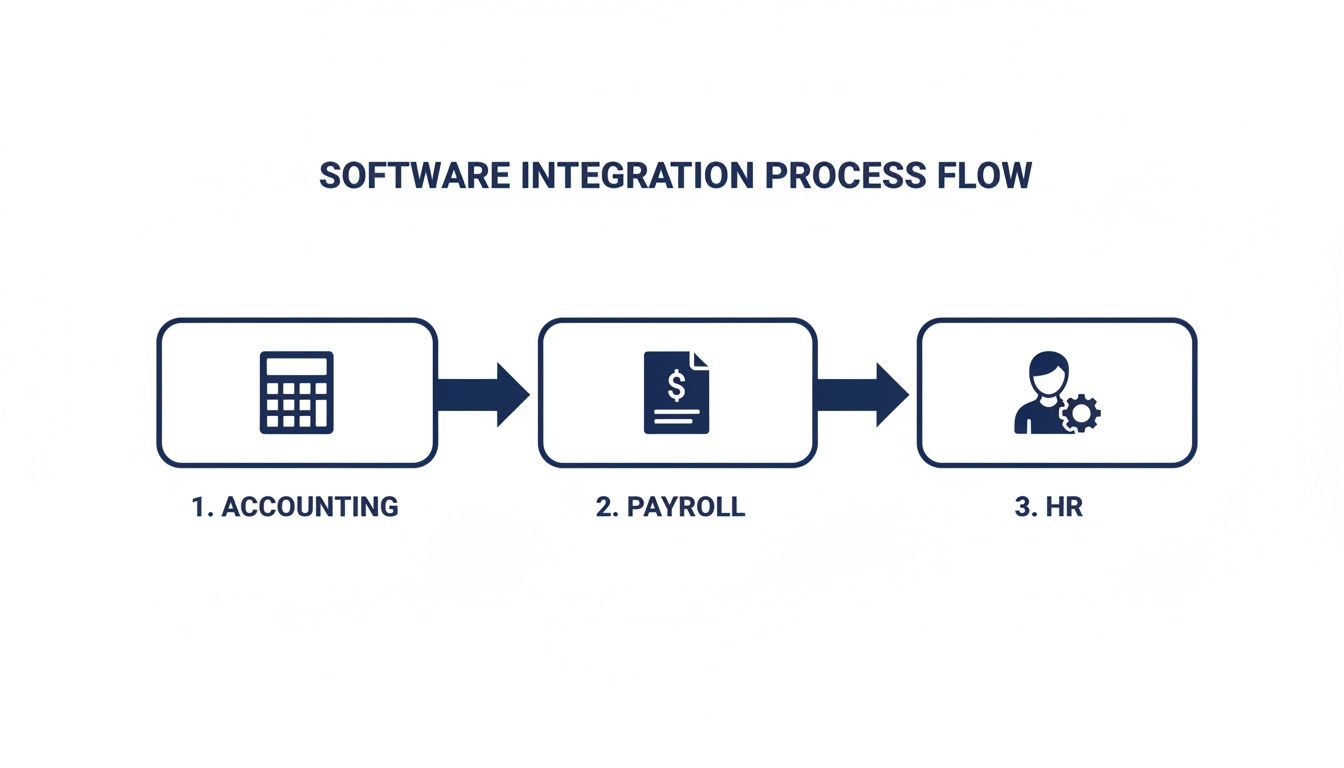
As you can see, payroll often acts as the central hub connecting your accounting and HR functions, which is why getting the implementation right is so important for overall efficiency.
Here’s one final, crucial tip: run your new system in parallel with your old one for at least one full pay cycle. It might feel like double the work, but it’s the ultimate safety net. You’ll process payroll in both systems at the same time, allowing you to compare the net pay, taxes, and deductions from both reports side-by-side. This helps you catch any setup errors or data issues before they affect your employees’ paychecks, ensuring a confident and seamless transition.
For more guidance on choosing foundational business tools, check out our guide on how to choose accounting software.
It’s one thing to read a list of software features on a pricing page. It’s another thing entirely to see how they actually solve problems in the real world. Abstract features come to life when we connect them to the messy, specific challenges that businesses like yours face every day.
Let's walk through a few scenarios to see how a flexible, secure payroll system adapts to different industries, moving beyond a simple paycheck calculator to become a core operational tool.
Picture an accounting firm juggling payroll for a dozen different small businesses. Their world is a constant cycle of tight deadlines and immense complexity. Using a generic, single-company payroll system would be a nightmare—a chaotic mess of multiple logins, scattered data, and a high risk of embarrassing (and costly) errors.
For a firm like this, a few features are completely non-negotiable:
A cloud-hosted solution is practically a given here. It lets the firm’s accountants securely access client data from the office, home, or a conference, ensuring payroll gets done on time, no matter what.
Now, think about a small law firm with partners, associates, and administrative staff. Their compensation structure is anything but simple. Partners take draws, associates get bonuses tied to billable hours, and the support staff receives a standard salary.
A one-size-fits-all payroll calculator would fail spectacularly here. The firm needs a system that can handle variable and irregular payments without forcing them into manual workarounds—which are notorious for causing serious mistakes.
The key features for a law firm look a little different:
A nonprofit plays by an entirely different set of rules. They’re often juggling multiple grants, and each one comes with its own specific budget and staffing requirements. Every single payroll expense has to be meticulously tracked and allocated to the correct funding source to keep donors happy and maintain compliance.
Their payroll software has to be a master of organization and reporting.
In each of these scenarios, a secure, cloud-hosted payroll solution like the one you can run on Cloudvara provides the flexibility and control needed to get the job done right. It stops being just a tool for cutting checks and becomes a strategic asset, perfectly tailored to the unique operational DNA of the business.
Even after narrowing down your options, a few last-minute questions always seem to pop up. It’s completely normal. Think of this as the final check-in to clear up any lingering uncertainties so you can move forward with total confidence.
Getting these last details right is the difference between a good choice and the perfect choice for your business.
Yes, you absolutely can, but it’s a project that demands careful planning. A mid-year switch means you have to migrate every bit of year-to-date payroll data for each employee—gross wages, taxes withheld, deductions, everything. If this data isn't perfect, your year-end W-2s will be a mess.
The best times to make a switch are at the end of a quarter or, ideally, at the end of the calendar year. This makes reconciling taxes much cleaner and dramatically cuts down the risk of errors. Insist on a detailed implementation plan from your new vendor to ensure nothing gets missed.
This is a huge distinction that comes down to one thing: how much control you want to keep. Payroll software is a tool you use to automate your internal processes. You remain the official employer of record and are responsible for all compliance and HR decisions. The software just makes your job easier.
A Professional Employer Organization (PEO), on the other hand, becomes a co-employer for your team. They handle your payroll, HR, benefits, and compliance under their own tax ID, effectively becoming your outsourced HR department.
Software is perfect for businesses that want to keep HR in-house, while a PEO is built for those looking to offload that entire operational burden.
Hosting your desktop payroll software on a secure cloud server is a game-changer for security. It takes your most sensitive financial data off a vulnerable computer in your office and moves it into a commercial-grade, professionally managed data center. Frankly, it provides a level of protection most small businesses could never afford to build themselves.
Just look at what you get:
In short, cloud hosting gives your small business the security backbone of a major corporation.
Ready to elevate your security and accessibility? Cloudvara provides a secure, reliable cloud hosting environment for your essential business applications, including your payroll software. Eliminate IT headaches and ensure your data is always protected and available. Get started with a free 15-day trial today!




