For most small businesses, the biggest wins from moving to the cloud are simple: huge cost savings, better security, and a level of flexibility you just can’t get with old-school IT. Shifting from a server humming away in a closet to a cloud environment lets you swap unpredictable hardware costs and maintenance headaches for a straightforward, scalable monthly plan. This one change frees you up to focus on running your business, not your IT.
Think of your old, on-premise server like a high-maintenance car you own outright. You paid a fortune for it upfront, and now you’re constantly sinking money into repairs, upgrades, and keeping it safe in a secure garage. It’s expensive, demands constant attention, and when it breaks down, your entire business grinds to a halt. For too many small businesses, that’s the painful reality of managing their own tech.
Cloud hosting, on the other hand, is like a reliable, on-demand ride service. You just pay a simple fee to get where you need to go, without ever worrying about insurance, flat tires, or oil changes. This isn't some high-tech model reserved for Silicon Valley giants; it's a genuine game-changer for accountants, law firms, and nonprofits that need dependable technology to serve their clients and communities.
To help you visualize the shift, here’s a quick comparison of the two models.
This table breaks down the core differences between managing your own servers and using a cloud provider.
| Feature | On-Premise Servers | Cloud Hosting |
|---|---|---|
| Initial Cost | High (hardware, software, setup) | Low (no upfront hardware costs) |
| Ongoing Costs | Variable (electricity, cooling, maintenance) | Predictable (monthly subscription) |
| Scalability | Difficult (requires new hardware) | Easy (adjust resources on demand) |
| Accessibility | Limited (often tied to the office) | Global (access from anywhere) |
| Maintenance | Your responsibility (patches, repairs) | Handled by provider |
| Security | Your responsibility (physical & digital) | Shared responsibility (provider manages infrastructure) |
| Uptime | Dependent on your hardware & power | High (backed by provider SLAs & redundancy) |
As you can see, the cloud model is built for agility and efficiency, letting you offload the technical burdens and focus on what you do best.
Switching to the cloud frees you from the physical and financial weight of that "server closet." Instead of stressing about hardware failures or security patches, your team can get back to what they were hired to do. If you want to dig deeper into the nuts and bolts, you can learn more about the process of moving servers to the cloud and what the transition involves.
This move delivers more than just convenience; it offers a real competitive edge. As businesses take this step, finding the best cloud storage for small business is often a top priority, as it forms the foundation of a more agile and resilient operation.
The core idea is simple: stop managing technology and start using it to grow. By offloading IT management to a specialized provider, you gain access to performance and security that would be prohibitively expensive to build in-house.
This shift allows you to redirect precious capital and your team’s time toward strategic projects, better client services, and innovation. It’s not just a tech upgrade; it’s a fundamental change in how your business operates, positioning you to be far more efficient and resilient.
Moving to the cloud isn't just a technical upgrade; it's about building a smarter, more resilient business from the ground up. It’s a shift that tackles the real-world challenges growing companies face every day, from unpredictable IT costs and security threats to the need for a flexible, remote-ready team.
Let's break down the core benefits that make this transformation possible.
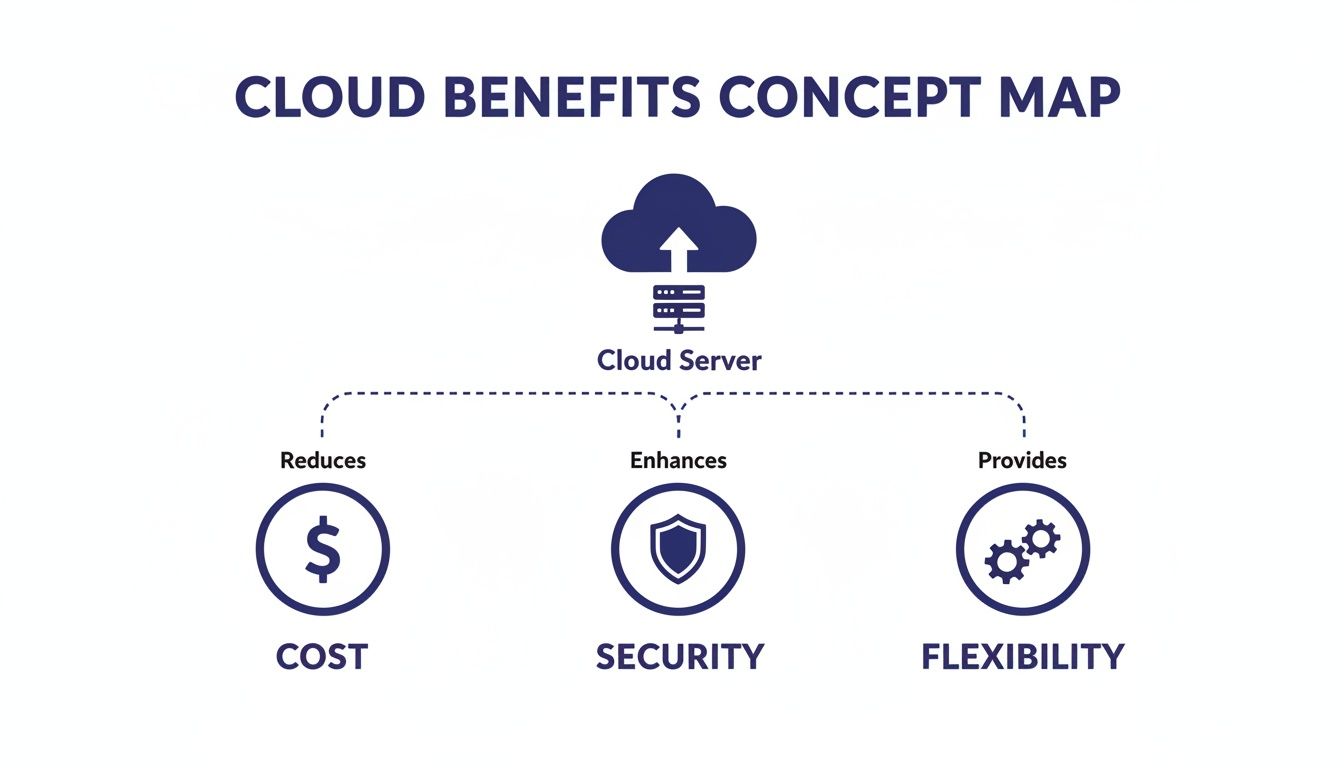
This map shows how cloud technology directly strengthens your finances, security, and the way you operate.
One of the biggest wins with the cloud is scalability. Imagine it’s tax season and you need another accountant on board temporarily. With an old-school server in your office, you'd be stuck buying new hardware and software licenses—a total headache for a short-term need.
In the cloud, you can add a new user in minutes. When the busy season ends, you can remove them just as easily. You only pay for what you use, when you use it.
This agility leads directly to massive cost savings. Instead of shelling out huge, unpredictable sums for servers that will be obsolete in a few years, you switch to a stable, manageable monthly expense. This predictable subscription model frees up your cash flow and makes budgeting a breeze.
By trading a large, upfront investment for a predictable monthly fee, small businesses can access enterprise-level technology without the enterprise-level price tag. This allows you to allocate resources to growth-focused activities instead of IT maintenance.
You’re no longer paying to power and cool a server in a closet, nor are you holding your breath for an expensive emergency repair. Every dollar you spend on your cloud setup is tied directly to the resources your business actively needs to thrive.
Fears about security and reliability used to keep businesses chained to their on-premise hardware. Not anymore. Today, the cloud has proven to be a far better guardian of your data, with 60% of business data now stored securely in cloud environments.
Think about it: a dedicated provider manages all the security patches and updates. Studies even show that cloud environments can cut the risk of a data breach by up to 50% compared to an SMB trying to manage it all in-house.
This fortress-like security is paired with incredible uptime and reliability. Top providers offer service level agreements—like Cloudvara’s 99.5% uptime guarantee—backed by redundant systems that keep your business online even if one component fails. For a small business, that means your team always has access to critical apps like QuickBooks or client files, preventing costly downtime.
On top of that, automated backups and business continuity provide an essential safety net. With daily, automatic backups, you can rest easy knowing that if a file gets deleted by accident or your system is hit with ransomware, you can restore your data in minutes with minimal disruption.
The modern workforce runs on flexibility, and the cloud is the engine that powers it. With remote access, your team can securely log into their applications and files from any device, anywhere they have an internet connection. This empowers you to hire the best talent, regardless of their zip code, and offer the kind of flexible work that top performers expect.
This all works through centralized application hosting. Instead of installing and updating software like Sage or your CRM on every single computer, everything is hosted in one secure, central place. It simplifies IT management, guarantees everyone is using the same up-to-date software, and makes team collaboration seamless.
Finally, the cloud makes compliance far less painful. For industries like law or accounting with strict regulations, reputable cloud providers offer environments that are already built to meet standards like HIPAA. They handle the complex security infrastructure, helping you meet your obligations with less stress and effort.
To get a better handle on this, check out our guide on building a successful cloud adoption strategy.
The real power of cloud hosting for a small business clicks into place when you see how it solves genuine, day-to-day problems. This isn’t just about abstract technology—it’s about making work smoother, safer, and more efficient for professionals who need to focus on their clients, not their IT closet.

Let's look at how three very different fields are using the cloud to get ahead.
For any CPA, tax season is a logistical marathon. Before the cloud, client collaboration was a nightmare of endless email chains, risky thumb drives passed back and forth, and the constant anxiety of working from an outdated QuickBooks file. It was messy and inefficient.
Hosting accounting software like QuickBooks in the cloud changes the entire game. Instead of juggling files, accountants and their clients can log in and work on the very same data, at the same time, from anywhere. This live collaboration kills version control headaches and speeds everything up.
With a centralized, secure cloud platform, an accountant in their office and a client at home can review the exact same financial records in real time. This single change turns a chaotic tax season into a streamlined, secure workflow.
This means a CPA can answer a client’s question instantly just by looking at the live file, not by waiting for them to email over an updated copy. The result? Fewer errors, happier clients, and a much less frantic busy season.
Law firms are guardians of some of the most sensitive information on the planet, which makes top-notch security and compliance completely non-negotiable. An on-premise server puts the entire burden of protecting that data—and meeting strict rules like HIPAA—squarely on the firm’s shoulders.
The cloud offers a much stronger defense. By moving case files and document management to a secure cloud environment, firms tap into enterprise-grade security features they could never afford on their own. This includes advanced encryption, tight access controls, and detailed audit logs that track every single action. You can see how specific cloud solutions for law firms are built to tackle these unique challenges.
Attorneys can securely pull up critical case files from the courtroom, a client’s office, or their home, all while knowing the data is locked down by industry-leading security.
Nonprofits are driven by their mission but often held back by tight budgets. Sinking precious donor funds into expensive server hardware that demands constant upkeep is a tough pill to swallow. The cloud provides a smart, cost-effective alternative that lets them pour more resources directly into their cause.
Here’s how they win:
By embracing the cloud, a nonprofit can operate with the same technological muscle as a big corporation, boosting its efficiency and extending its reach without ever breaking the bank.

To really grasp the financial return of moving to the cloud, you have to look beyond the monthly subscription cost. The true value comes from adding up both the direct cost savings and the powerful, indirect benefits that help your business grow faster. It's a mental shift from seeing technology as a line-item expense to viewing it as a strategic investment.
The most obvious win is cutting out huge capital expenditures. You no longer have to buy expensive servers, pay for their constant maintenance, or cover the surprisingly high electricity bills just to keep them cool. These direct savings are a massive part of the equation, turning unpredictable capital costs into a simple, manageable operational expense.
The financial case for the cloud is built on a simple trade-off: replace large, risky capital investments in hardware with a predictable, scalable operating expense. This frees up cash flow and allows you to invest in growth, not just in keeping the lights on.
This financial pivot is catching on fast. Small and mid-sized businesses are expected to shift over 50% of their tech budgets to cloud services by 2025. Why? Because it allows them to cut operational spending by 30-50% and slash their total IT costs by an average of 38% after making the move.
Beyond the direct savings, the cloud delivers some serious indirect value that quietly boosts your bottom line. These benefits are just as important, but you need to look at them through a slightly different lens to see the impact.
When calculating your ROI, don't forget how integrated, cloud-based tools wipe out daily inefficiencies. For example, when you streamline billing processes through CRM software QuickBooks integration, you save countless administrative hours that add up fast.
By understanding both the direct and indirect gains, you can build a rock-solid business case for migration. If you're ready to get into the nitty-gritty, our guide on cloud cost optimization is a great place to start.
Picking a cloud provider isn't just a technical decision—it’s like choosing a long-term business partner. This is the team you'll trust with your most critical business assets, so it's a choice that deserves careful thought. The right provider will get your specific needs for reliability, support, and security, while the wrong one can lead to downtime, surprise costs, and a whole lot of frustration.
To avoid the headaches, you need a straightforward way to evaluate your options. Think of this as a simple checklist to make sure you’re asking the right questions and looking at the details that really matter. This way, you can move forward feeling confident that your business is in good hands.
The Service Level Agreement (SLA) is the single most important document you’ll get from a provider. It's their legally binding promise to you about performance, and the most critical number in it is the uptime guarantee. You want to see a provider offering 99.5% or higher. Anything less is a red flag.
But don't just stop at the percentage. Dig into the fine print. What happens if they fail to meet that promise? A solid SLA will spell out exactly how they’ll make it right, usually with service credits or some form of compensation. This holds them accountable and shows they stand behind their service.
When a problem pops up at 2 a.m., waiting until the next business day is simply not an option. That's why 24/7 technical support is non-negotiable for any small business. Make sure you can get a real, knowledgeable human on the phone or via live chat anytime, day or night. That immediate access is your lifeline when things go wrong.
Security is the other side of that same coin. Your provider has to offer serious measures to protect your data. At a bare minimum, look for these three things:
Here’s a great example of a provider's website that clearly lays out its services and support, leaving no room for guesswork.
The screenshot above gets right to the point, highlighting immediate support and specific software hosting. This is what a customer-focused provider looks like—they make their value clear from the start.
A great cloud partner acts as an extension of your team. They don't just provide technology; they provide peace of mind through unwavering support, ironclad security, and total transparency.
By working through this checklist, you can cut through the marketing fluff and find a provider that truly has your back. Taking the time to vet these critical areas ensures your move to the cloud becomes a real strategic advantage, not just another operational headache.
Understanding the benefits of the cloud is one thing; actually making the move is another. Shifting from the “why” to the “how” can feel like a huge leap, but the migration journey is far more manageable than you might think—especially with the right partner guiding you.
The process isn't about flipping a switch and hoping for the best. It’s a clear, staged approach that starts with a simple plan. First, you’ll want to take stock of your applications and data to figure out what’s most critical to your daily operations. This initial inventory helps prioritize what moves first and sets a realistic timeline.
A great partner cuts through the technical jargon and handles the heavy lifting, letting you stay focused on running your business. The journey usually follows a few key phases:
For a more granular breakdown, our cloud migration checklist offers a step-by-step guide to get your team ready for a smooth and painless transition.
Adopting the cloud is more than just a technology upgrade—it's a foundational business strategy. It unlocks new levels of efficiency, security, and growth for any small business ready to thrive.
Ultimately, making this move helps your business become more agile, resilient, and competitive. It’s not just about keeping up; it’s about setting the stage for long-term success.
Moving your company's digital foundation is a big decision, so it's completely normal to have a few questions. Let's walk through some of the most common concerns business owners have before they make the switch.
Many people start by asking about the safety of their information, and rightly so. It’s a valid concern, and one that modern cloud hosting is built to solve.
Yes—and for most small businesses, a reputable cloud provider offers security that’s miles ahead of what an on-premise server can deliver. Top-tier providers invest millions in advanced encryption, sophisticated firewalls, and 24/7 physical and digital monitoring. Building that kind of fortress on your own would be incredibly expensive.
Your data is shielded by multiple layers of security protocols. This means sensitive client files for an accounting firm or confidential case documents for a law office are protected by the same caliber of security used by large enterprises.
Think of it this way: a quality cloud provider is like a bank vault for your data. While you could keep cash under a mattress at home, a bank offers specialized, round-the-clock security that’s simply on another level.
The migration process is much simpler than most people think, especially when you have an experienced partner guiding you. A good cloud provider does the heavy lifting, mapping out a detailed plan to move your existing applications—like QuickBooks, Sage, or your CRM—with as little disruption as possible.
They'll handle all the technical details, from transferring your data to reconfiguring the software so it runs perfectly in the new environment. The goal is always a smooth transition, where your team can log off the old system one day and log right into the new one the next.
This is a really important distinction to make: the cloud's uptime is completely separate from your office's internet connection. If your local internet goes out, your applications and data in the cloud keep running, safe and sound. They aren't affected at all.
This means that while you might not be able to get to them from that one specific location, your data is still secure and accessible. Any employee working from home, a coffee shop, or even using a mobile hotspot can still connect and keep the business moving without missing a beat.
Ready to see what the cloud can do with a partner who understands your needs? Cloudvara offers a free 15-day trial to experience our secure, reliable, and fully-supported application hosting.
Explore your options at https://cloudvara.com.