Think of Backup as a Service (BaaS) as your company's digital insurance policy, managed by a team of experts. Instead of buying, installing, and managing a mountain of your own backup hardware and software, you simply subscribe to a service that handles it all for you. This approach brings top-tier data protection within reach for businesses of any size.
In a world where data is currency, the risk of losing it has never been higher. A single event—a server crash, an employee's accidental click, or a ransomware attack—can grind your operations to a dead halt. Traditional methods like external hard drives or old-school tape backups just don't cut it anymore. They're often manual, prone to failure, and simply not built for modern threats.
This is where Backup as a Service changes the game completely. It’s not just about stashing copies of files somewhere; it’s a full-blown strategy for business resilience. BaaS automates the entire backup process, ensuring your data is consistently and securely copied to a remote, hardened cloud location without your team ever needing to lift a finger.
One of the biggest wins with BaaS is how it flips the financial model on its head. It turns data protection from a huge, upfront capital expense (CapEx) into a predictable, monthly operational expense (OpEx).
Here’s what that looks like in practice:
This shift makes bulletproof data protection affordable even for businesses with tight budgets. It's a key reason our guide on cloud backup for small business sees so much interest from growing companies.
BaaS is no longer a luxury; it's a fundamental part of modern business. It provides a critical safety net, ensuring that when disaster strikes, recovery is a matter of hours, not days or weeks.
The market’s explosive growth tells the story. The BaaS market jumped from USD 25.97 billion to USD 30.74 billion in a single year, and it’s projected to hit USD 98.59 billion by 2032 as more businesses seek scalable protection against rising threats. This principle of safeguarding information is universal—while BaaS is for businesses, the core idea is just as vital for individuals, which is why understanding personal data backup is equally important.
To really nail down why this matters, let's look at the specific problems BaaS solves for businesses day in and day out. Traditional backup methods often create more headaches than they cure, from human error to budget-breaking hardware costs.
The table below breaks down these common challenges and shows exactly how a BaaS model steps in to fix them.
| Business Challenge | Traditional Backup Limitation | How BaaS Solves It |
|---|---|---|
| High Upfront Costs | Requires large capital investment in servers, storage, and software licenses. | Shifts to a predictable monthly subscription (OpEx), eliminating hardware purchases. |
| Manual, Error-Prone Processes | Relies on staff to run backups, swap tapes, and verify success, leading to human error. | Automates the entire backup and verification process, ensuring consistency and reliability. |
| Limited Scalability | Adding storage is slow and expensive, often requiring new hardware purchases. | Provides on-demand scalability, allowing storage to grow or shrink with business needs instantly. |
| Slow Recovery Times | Restoring from tape or off-site drives can take days, causing prolonged downtime. | Enables rapid, granular file recovery and full system restoration from the cloud in minutes or hours. |
| Inadequate Security | On-premise backups are vulnerable to local disasters (fire, flood) and ransomware. | Stores encrypted data in geographically redundant, secure data centers, isolating it from local threats. |
| Heavy IT Management Burden | IT teams spend significant time on backup maintenance, troubleshooting, and testing. | Offloads all management, monitoring, and support to the BaaS provider, freeing up internal IT resources. |
As you can see, BaaS isn't just an alternative; it's a direct solution to the most persistent and costly problems that plague traditional data protection strategies. It modernizes your approach, letting you focus on your business instead of worrying about your backups.
Backup as a Service might sound technical, but the way it works is actually quite straightforward. It starts with a small, secure software program called an agent, which gets installed on your company's servers, workstations, and virtual machines. This agent is like a silent security guard for your data, working quietly in the background without getting in your way.
Once it's up and running, the agent's main job is to watch for new or changed files based on the schedule you set. Before any of that data leaves your network, it’s locked down with powerful encryption like AES-256. Think of it as sealing your information inside a digital armored truck before it even hits the road—completely unreadable to anyone without the key.
This encrypted data then travels securely over the internet to the BaaS provider's cloud infrastructure. It’s stored in highly secure data centers that are spread out across different geographic locations. This geographic redundancy is a huge deal; it means that if a disaster like a hurricane or power grid failure hits one location, your data is safe and sound in another, totally unaffected.
This flowchart shows how BaaS shifts your data protection strategy from a point of weakness to a position of strength.
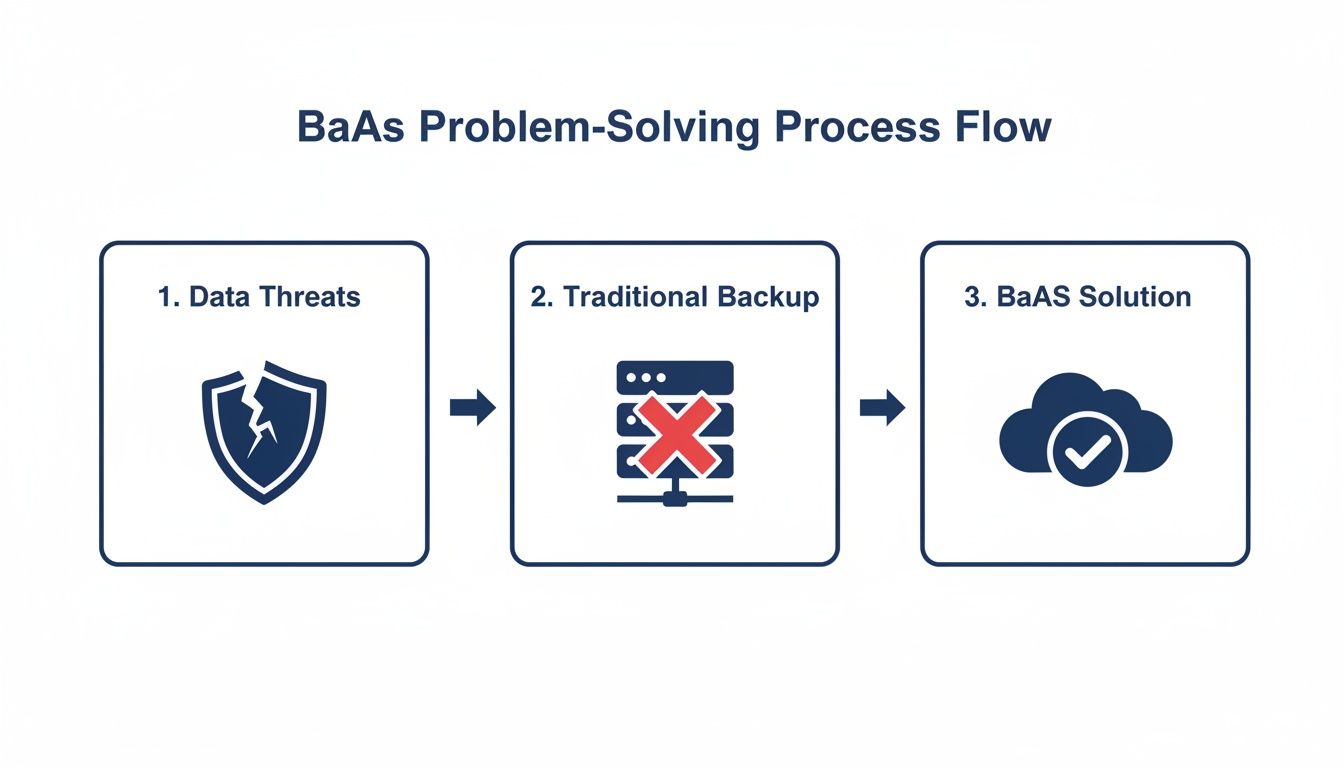
This process is a clear step up, moving past the common breaking points of old-school backups toward a resilient, cloud-based solution.
Not all backups are created equal. BaaS solutions use different methods to balance speed, storage space, and recovery time. Understanding them helps you appreciate why BaaS is so effective.
Imagine your data is a massive library full of books.
Full Backup: This is like photocopying every single book in the entire library. It’s the most complete copy you can make, but it also takes the most time and uses the most storage. This complete copy serves as the baseline for all other backup types.
Incremental Backup: This method is much smarter. After the first full backup, it only copies the books that have been added or changed since the last backup—no matter if that last one was full or incremental. It's fast and light on storage, but restoring can take longer because you might need to piece together the full backup plus several small updates.
Differential Backup: This one takes a middle ground. It copies all the books that have changed since the last full backup. Each differential backup is bigger than the last, but restoring is much faster because you only need two things: the last full backup and the most recent differential backup.
Modern BaaS platforms intelligently mix these methods to give you the perfect blend of speed, efficiency, and quick recovery. You get the best of all worlds without having to juggle the complexity yourself.
The real beauty of BaaS is how simple it is to manage. All of this powerful technology is handled through an easy-to-use web portal. This portal is your command center for everything related to data protection.
From a single dashboard, you can set backup schedules, check on the health of your backups, define how long to keep old data, and—most importantly—kick off a restore. You can bring back a single lost file or an entire server with just a few clicks.
This centralized control takes all the guesswork and manual effort out of traditional backup systems. The entire process of ensuring robust cloud data protection becomes streamlined and accessible.
To keep data constantly available, many BaaS solutions also bring in advanced techniques. For instance, they often use database replication software to create real-time copies of your live databases. This approach minimizes potential data loss down to just a few seconds.
Ultimately, BaaS turns data protection from a cumbersome chore into a seamless, automated, and powerful strategy for business resilience.
To really get a feel for what Backup as a Service (BaaS) brings to the table, it helps to see how it stacks up against other ways of protecting data. Lots of businesses are still wrestling with older, manual methods or aren't quite sure where BaaS fits next to things like disaster recovery. When you put them side-by-side, the advantages become obvious.
Let’s start with traditional, on-premises backups. This is the old-school approach: using local hardware like tape drives, external hard drives, or a server tucked away in an office closet. While it might seem simple on the surface, this method is loaded with hidden costs and risks that can bring a business to its knees when something goes wrong.
Just managing it all is a huge drain on IT. Staff have to manually run backup jobs, check if they worked, figure out why they failed, and physically haul tapes or drives off-site. The whole process is a magnet for human error—one forgotten tape swap or a botched configuration can leave your most important data completely exposed.
On top of that, on-premises hardware is a capital expense that loses value over time and needs constant care and eventual replacement. It’s also a sitting duck for local disasters. A fire, flood, or even a simple office break-in can wipe out both your live data and your backups in one shot.
When you compare BaaS to these traditional methods, the difference is night and day. BaaS gets rid of the need for any on-site backup hardware, turning a big upfront investment into a predictable monthly operational cost. The entire backup process is automated and handled by experts, which lifts the management burden off your team and drastically cuts the risk of human error.
With BaaS, your data is encrypted and tucked away in secure, geographically separate data centers, keeping it safe from local threats like ransomware or physical disasters. Recovery is a completely different world, too. Trying to restore files from a clunky tape library can take days, but a BaaS platform lets you bring back a single file or an entire system in hours, if not minutes.
Now, let's clear up the difference between BaaS and its close cousin, Disaster Recovery as a Service (DRaaS). They're both vital for keeping a business running, but they do different jobs.
Think of it like this:
BaaS is like having a secure, fireproof vault off-site where you store perfect copies of your most valuable assets and blueprints. If something happens to your main office, you have everything you need to rebuild from scratch.
DRaaS, on the other hand, is like having a fully furnished, identical duplicate office on standby, ready for you to move in and get back to work immediately.
BaaS focuses squarely on data backup and recovery. Its sole purpose is to make sure you have a clean, usable copy of your information. DRaaS takes it a huge step further by providing the full IT infrastructure—servers, networking, storage—needed to run your business applications from a different location. It's a complete business continuity solution, but it comes at a much higher price. For a deeper look, our guide on business continuity vs disaster recovery breaks these ideas down even more.
The right choice often boils down to two key questions:
DRaaS is built for near-zero RTO and RPO, while BaaS strikes an effective balance between fast recovery and affordability, making it a perfect fit for most businesses.
This table breaks down the key differences between all three data protection strategies, showing where each one shines.
| Feature | On-Premises Backup | Backup as a Service (BaaS) | Disaster Recovery as a Service (DRaaS) |
|---|---|---|---|
| Primary Goal | Data copy | Data backup and recovery | Full business continuity |
| Scope | Copies data to local media | Copies data to a secure cloud | Replicates entire IT environment to the cloud |
| Cost Model | High CapEx (hardware, software) | Predictable OpEx (subscription) | High OpEx (subscription) |
| Management | Manual, IT-intensive | Fully managed by provider | Fully managed by provider |
| RTO/RPO | High (hours to days) | Low (minutes to hours) | Near-zero (seconds to minutes) |
| Ideal For | Small, non-critical datasets | All businesses needing reliable data protection | Organizations with zero tolerance for downtime |
In the end, Backup as a Service hits that sweet spot. It delivers enterprise-level data protection without the headaches of traditional methods or the hefty price tag of a full-blown DRaaS solution.

Moving to backup as a service (BaaS) is much more than a simple IT upgrade. It's a strategic move that delivers real, compounding advantages for your business. When you leave behind clunky, in-house systems, you unlock benefits that strengthen your bottom line, tighten your security, and boost your overall efficiency.
The most immediate win is a sharp drop in costs. A traditional backup setup demands a huge upfront investment in servers, storage hardware, and software licenses—not to mention the constant drain from maintenance, electricity, and cooling. BaaS wipes those costs off the books, converting them into a predictable, scalable monthly expense.
This financial shift also frees up your most valuable resource: your IT team. Instead of sinking hours into managing backup jobs, troubleshooting hardware, or physically swapping out tapes, your team can focus on projects that actually drive the business forward.
In an era of relentless cybercrime, a flimsy security posture is a risk you can’t afford. BaaS delivers a multi-layered defense that’s nearly impossible to match with an on-premises setup. Your data is shielded by a few key features:
The massive surge in ransomware—with over 70% of organizations getting hit in recent years—has made BaaS a go-to solution. Businesses are now leaning on immutable and air-gapped backups to slash their recovery times from agonizing days down to just hours. Industry research shows this trend is driving market growth projected at 20%-40% CAGR.
As your business grows, so does your data. With traditional systems, scaling up means a painful and expensive cycle of buying more hardware. BaaS, on the other hand, scales effortlessly. You can increase or decrease your storage on demand, paying only for what you actually use. This flexibility ensures your data protection can grow right alongside your business.
BaaS brings your entire data protection strategy under one roof—a single, user-friendly dashboard. You can monitor backup health, set policies, and restore files for all your systems, whether they're on-site or in the cloud.
This streamlined, central management gives you complete visibility and control, ending the headache of juggling different backup tools. It simplifies compliance reporting and gives you the confidence that all your critical data is protected exactly as you need it to be. By offloading these complex tasks, you unlock a host of cloud backup benefits that directly build a more resilient and agile business. That’s how adopting backup as a service becomes a true strategic advantage.

Choosing a partner for your backup as a services needs is a decision that directly impacts your ability to survive a crisis. With a sea of options all making bold promises, it’s easy to get lost. A methodical approach is your best defense against picking a provider that doesn't truly fit your business.
This isn't just about finding the cheapest storage; it's about entrusting your most critical asset—your data—to someone else. Your evaluation has to be thorough, zeroing in on security, reliability, support, and transparency. A great provider acts like an extension of your own team, dedicated to keeping you resilient.
To cut through the noise, you need a practical checklist. The right provider will tick every box, giving you confidence that your data isn't just stored, but genuinely protected.
Your first and most important checkpoint is security. Don't just take a provider's word for it; ask for proof. Reputable providers undergo tough, independent audits to validate their security controls and operational processes.
Look for key certifications that show a real commitment to security. These aren't just badges; they are hard-earned proof that a provider follows globally recognized standards for data protection.
Key certifications to look for include:
Any provider that hesitates to share its compliance documentation should be an immediate red flag. This level of verification is a critical first step in building a trustworthy partnership.
A Service Level Agreement (SLA) is more than a document; it’s a legally binding contract that spells out the provider's commitments. This is where promises are put into writing, so you have to read the fine print.
The SLA should clearly define the two most critical metrics for any backup strategy:
The SLA is your ultimate guarantee. Look for specific, measurable commitments, such as 99.5% uptime or a guaranteed four-hour RTO. Vague language is a warning sign.
Also, check what happens if the provider fails to meet these terms. A solid SLA will include penalties or service credits, showing that the provider stands behind its promises.
When your data is on the line, the last thing you want is to wait in a support queue. A provider’s support model is a direct reflection of how much they value your business continuity. Look for 24x7x356 support with access to live, knowledgeable engineers who can solve problems fast.
You also need to know where the provider's data centers are located. Data sovereignty—the rule that data is subject to the laws of the country where it’s stored—is a major compliance concern. Make sure your provider can store your data in a specific geographic region to meet regulatory needs like GDPR.
Hidden fees can quickly turn an affordable service into a budget nightmare. A trustworthy provider will offer simple, transparent pricing. You should know exactly what you’re paying for, including storage, data transfer fees, and any extra services.
Finally, never commit to a provider without taking them for a spin first. The best way to vet a platform is with a free trial. This gives you a risk-free chance to:
A provider confident in its service will happily offer a trial, letting you experience the value before you sign on the dotted line. For more guidance on this topic, our guide on how to choose a cloud provider offers additional valuable insights.
Even after seeing the benefits, jumping into a new technology like Backup-as-a-Service naturally brings up a few questions. As you think about making the switch, you’re probably wondering about security, performance, and what the service really covers.
This section gives you direct answers to the questions we hear most often from business leaders. We’ll clear up the core concerns around data security, explain what crucial terms like RTO and RPO actually mean for your business, and show you how BaaS protects more than just your local servers.
Handing over your company's most critical asset—its data—is a big deal, and security is rightly the top concern. Reputable BaaS providers get this, which is why they build their services on a multi-layered security strategy designed to protect your data from every angle.
It all starts with powerful end-to-end encryption, usually the AES-256 algorithm. This is the same impenetrable standard trusted by banks and government agencies. It means your data is scrambled and unreadable both while it’s traveling to the provider’s data center (in-flight) and while it’s sitting on their servers (at-rest). Without the unique encryption key, your data is just gibberish. This is your first and most important line of defense.
But modern threats require more than just a lock on the door. Leading providers add advanced features to stay ahead.
These two acronyms—RPO and RTO—are the heart of any good backup and recovery plan. They aren't just technical jargon; they are the concrete promises your provider makes about getting your business back on its feet after a disruption. They define how resilient you’ll actually be when something goes wrong.
Recovery Point Objective (RPO) is all about data loss. It answers the question: "How much data can we afford to lose?" Measured in time, it represents the maximum age of the files you can get back from a backup.
For instance, an RPO of one hour means your BaaS provider backs up your data at least every 60 minutes. If the worst happens, the data you restore will be, at most, one hour old.
Recovery Time Objective (RTO) is all about downtime. It answers the question: "How quickly do we need to be back online?" This metric sets the maximum amount of time it should take to restore your systems and get back to business as usual after a disaster. A solid BaaS solution is built to deliver a low RTO.
A reliable BaaS provider will work with you to define RPOs and RTOs that make sense for your business, then lock those commitments into a formal Service Level Agreement (SLA).
Yes, absolutely—and this is one of the most critical and overlooked areas of data protection today. There’s a dangerous misconception that because data is in a major cloud platform like Microsoft 365 or Google Workspace, it's automatically safe and sound. It's not.
These big cloud providers operate on a shared responsibility model. In simple terms, they promise to keep their platform running (the infrastructure), but you are responsible for protecting your data that lives on their platform. They’ll protect you if their own server fails, but they won’t save you from common data loss scenarios like:
This gap is where specialized BaaS solutions for SaaS applications come in. They plug directly into your cloud accounts to back up your emails, files (from OneDrive and SharePoint), contacts, and calendars to a separate, secure location. It’s a vital safety net that goes far beyond the basic, short-term recovery options (like the Recycle Bin) that the platforms offer themselves. Without it, your cloud data is surprisingly vulnerable.
At Cloudvara, we tackle these challenges head-on with a solution built for total peace of mind. Our service includes automated daily backups, 24×7 expert support, and a 99.5% uptime guarantee to ensure your RTO and RPO needs are always met. We invite you to see our commitment to security and reliability for yourself with a free 15-day trial.
Discover how Cloudvara can protect your entire business at https://cloudvara.com.




