Picture this: your most critical software, like QuickBooks or Sage, running inside its own secure, digital bubble, completely separate from your computer’s main operating system. That’s the core idea behind application virtualization for desktops. It’s a powerful way to run any application on any device, minus the usual installation headaches.
Think of a standard application install like a plant with roots that dig deep into your computer’s soil—the operating system (OS). If you try to plant two programs with conflicting "roots," they can get tangled up, causing system slowdowns, instability, or even crashes. Application virtualization neatly sidesteps this problem by putting each plant in its own self-contained pot.
This "pot" is a virtual layer that holds everything the application needs to run: its files, settings, and unique components. The application thinks it’s talking directly to the OS, but it’s actually interacting with this tidy, controlled environment. Your underlying desktop stays clean and untouched.
This approach untangles applications from the specific device they're on, which makes IT management incredibly simple, especially for businesses without a big tech team. For example, instead of manually updating tax software on 20 different accountant laptops, an admin can update the single virtualized app on the server. Just like that, every user gets the new version the next time they log in.
For the person using the software, the experience is seamless. They click an icon on their desktop, and the virtualized application launches just like any other program. What's happening behind the scenes is that the application’s components are streamed from a central server to the user's device as needed, but they never actually install or make permanent changes to the local system.
This is a fundamental shift from direct software installation and brings some powerful benefits to the table:
It's easy to confuse application virtualization with other remote technologies. To clear things up, here’s a quick breakdown of how they differ.
| Understanding Application Delivery Methods | ||
|---|---|---|
| Technology | What It Delivers to the User | Best Use Case |
| Application Virtualization | A single, isolated application that runs on the user's local desktop like a native app. | Delivering specific, resource-intensive legacy or custom applications to any device without local installation. |
| VDI (Virtual Desktop Infrastructure) | A full, personalized desktop operating system (like Windows 10/11) hosted on a central server. | Providing a complete, standardized, and secure desktop environment for roles with complex software needs or high security requirements. |
| RDS (Remote Desktop Services) | A shared desktop session where multiple users access applications running on a single server OS. | Cost-effective delivery of a common set of applications to many users who don't need personalized desktops (e.g., call centers). |
| Application Streaming | Delivers bits of an application "just-in-time" as the user needs them, without a full upfront install. | Fast deployment of applications over a network, often used in conjunction with virtualization to speed up launch times. |
While VDI and RDS deliver entire desktops, application virtualization is all about delivering just the app. This makes it far more lightweight, efficient, and cost-effective for businesses that simply need to give their teams secure access to key programs.
The move toward flexible work has made this technology more essential than ever. The desktop virtualization market, which includes application virtualization for desktops, is seeing huge growth. It’s projected to expand by USD 23.5 billion between 2024 and 2029, with small and mid-sized businesses leading the charge as they adopt cloud solutions to support their teams. You can read the full market analysis on Technavio.
For an accounting firm, this means every team member can securely access the exact same version of QuickBooks from anywhere during tax season. For a law practice, it ensures sensitive client documents are never stored on a personal laptop, closing a major security loophole.
This technology isn't just a matter of convenience; it’s a strategic move that delivers the agility, security, and efficiency that modern professional services firms need to thrive.
For professional services firms, shiny new tech is just a distraction unless it solves real-world problems. This is where desktop application virtualization truly delivers, tackling the daily operational headaches that accounting and law firms know all too well: security risks, unpredictable costs, and clunky access to critical software.
The core idea is simple but powerful. Instead of running essential programs on dozens of individual, vulnerable computers, you move them to a single, controlled, and secure environment.
Think about tax season for a moment. Imagine every single accountant—whether they're in the office, at home, or meeting a client—launching the exact same, fully updated version of your firm's tax software. No more version mismatches causing filing errors. No more frantic calls to IT because an update failed on someone's personal laptop. That's the kind of effortless consistency you get by centralizing applications.
Or consider a law firm's greatest nightmare: a data breach from a lost or compromised laptop. With application virtualization, sensitive client data from your case management software never actually lives on the local device. It's streamed securely from the server, effectively patching one of the biggest security holes in the modern workplace.
In professions built on confidentiality, data security isn't just a feature; it's the foundation of your reputation. Application virtualization acts as a digital fortress around your most valuable asset: client information. Since every program runs from a central server, your firm gains granular control over who can access what, and from where.
This centralized model is a game-changer for compliance. Forget worrying about files being copied to personal USB drives or stored on unsecured home networks. All activity is contained within the secure server environment, which makes it far simpler to meet the strict data-handling rules of regulations like GDPR or other industry standards.
By centralizing application access, firms can enforce uniform security policies across the board. An attorney leaving the firm can have their access to critical case files revoked in seconds—a task that is nearly impossible when data is scattered across multiple physical devices.
While locking down security is often the main driver, the financial upside is just as compelling. Application virtualization breathes new life into your existing hardware. Because all the heavy lifting is done on the server, older, less powerful desktops and laptops can keep running smoothly as simple access terminals.
This means you can push back those expensive hardware refresh cycles for another year or two. A five-year-old desktop that chokes on the latest accounting software can seamlessly run the virtualized version with fantastic performance. Across an entire firm, those savings add up fast.
IT management costs also plummet. Think about all the hours your IT team or managed service provider spends on tasks like:
With application virtualization, these jobs are done once, on the central server. This frees up your valuable IT resources to work on projects that actually move the business forward. To see how this impacts the bottom line, check out our insights on IT support for accounting firms.
What happens when a partner’s laptop dies the night before a huge court filing? Or when a snowstorm shuts down the office during the busiest week of tax season? Without a solid continuity plan, these everyday disasters can bring your operations to a screeching halt.
Desktop application virtualization is a cornerstone of modern business continuity.
Because your applications and data are hosted in a secure data center, they are completely insulated from local problems like hardware failure, power outages, or natural disasters. Employees can just grab any available device—a home computer, a tablet, even a brand-new laptop—log in securely, and get right back to work with full access to all their essential tools.
This setup is especially powerful for enabling secure remote work, a strategy often paired with a reliable VPN for remote workers. Together, they ensure your team stays productive and secure no matter where they are, turning potential crises into minor bumps in the road.
Getting a handle on remote technology can feel like sorting through alphabet soup—VDI, RDS, app streaming. They all deliver software to users, but they work in completely different ways. Picking the right one for your firm means understanding what makes each one unique.
Think of it like this: Virtual Desktop Infrastructure (VDI) is like leasing a fully furnished, secure office. You get the whole environment delivered to your screen—the operating system, files, and every single application. It’s a complete, self-contained workspace, perfect for users who need a standardized and locked-down environment from top to bottom.
Application virtualization, on the other hand, is more like having a specialized tool delivered directly to your existing desk. You don’t get a new office; you just get the one application you need, and it runs right alongside your local programs as if it were installed there. It's an incredibly efficient way to deliver specific, resource-heavy, or sensitive software without the overhead of a full virtual desktop.
Application streaming is a close cousin to virtualization, but its magic lies in the delivery. Imagine you’re downloading a huge piece of software. Instead of waiting for the entire thing to finish, streaming lets you launch the program as soon as its core parts arrive. The rest of the application downloads quietly in the background as you use it.
This "just-in-time" delivery makes applications feel like they open instantly, which is a huge win for user experience. It’s often paired with application virtualization to get the best of both worlds: the isolation of virtualization and the speed of streaming.
These technologies are critical for business continuity, and North American firms are setting the pace. The region commanded a 35.09% global share of the desktop virtualization market in 2023, largely driven by hybrid work in regulated industries. With the U.S. market alone expected to jump from USD 5.38 billion to USD 32.68 billion by 2035, it's clear these tools are becoming central to how modern businesses operate. You can see the full breakdown in the latest market report from Fortune Business Insights.
So, which path should you take? The best answer almost always comes down to your goals for security, what your users actually need, and the hardware you already have.
This decision tree helps visualize the right strategy depending on whether your firm is working with older hardware, supporting a remote team, or needs high-security "containerized" applications.
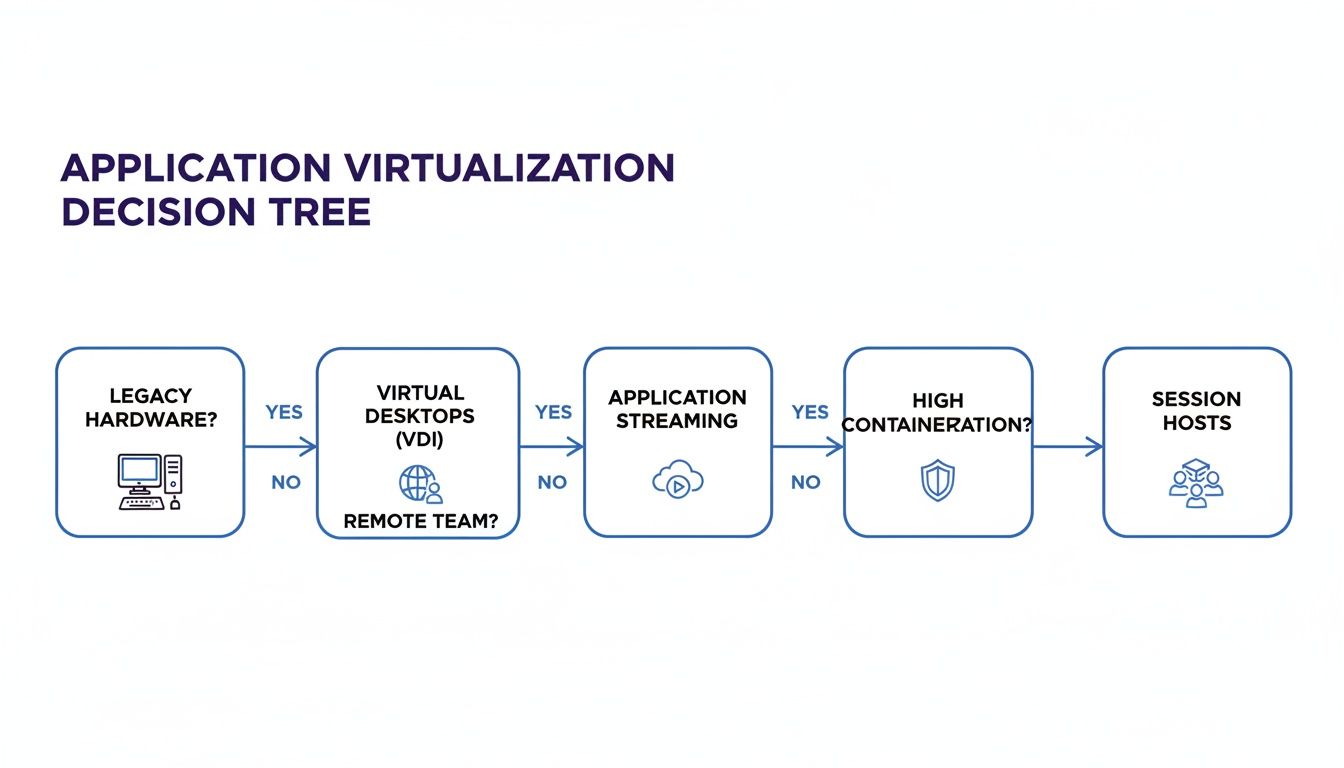
As the flowchart shows, firms that want to get more life out of their existing hardware while delivering a few key applications often get the most bang for their buck with a targeted app virtualization strategy.
The good news is you don’t have to pick just one. Many businesses thrive on a hybrid approach managed by an expert provider. For instance, your partners might get a full VDI desktop for total control, while the accounting team gets virtualized access to just QuickBooks and Sage. You can dig into how Cloudvara tailors these setups in our overview of desktop and app virtualization services. A strategy like this strikes the perfect balance between flexibility, security, and cost.

Moving to a virtualized environment can feel like a huge undertaking, but with a clear plan, it breaks down into a series of manageable steps. A well-thought-out migration is the difference between a seamless switch and a period of disruptive chaos. The goal is simple: sidestep the common roadblocks and keep your firm’s daily operations running without a hitch.
This process doesn't start with technology. It starts with a deep understanding of your applications, your users, and your current infrastructure. Taking the time to assess these areas upfront will pay massive dividends, ensuring the final solution perfectly aligns with how your team actually gets work done.
First things first: take inventory of every piece of software your firm relies on. Not all applications are created equal, and some are much better candidates for virtualization than others. Make a list and start categorizing each program to figure out your priorities.
A common mistake is trying to virtualize everything at once. Instead, identify the top three to five applications that will deliver the biggest impact on security, performance, or cost savings. This phased approach makes the whole migration much more manageable.
Once you know what you're virtualizing, you need to understand who will be using it. Different roles inside your firm have wildly different needs. A senior partner who mostly uses email and a document management system has simpler requirements than a paralegal who needs instant access to multiple research databases and billing software at the same time.
Create user profiles or personas to map out exactly what each group needs:
Planning is especially crucial when onboarding remote employees, as virtualization can give new hires secure, immediate access to all their tools from day one. For a more detailed breakdown of the entire process, our comprehensive cloud migration checklist offers a valuable, step-by-step guide.
Use this checklist to prepare your business for a successful and seamless transition to application virtualization.
| Migration Step | Key Consideration | Action Required |
|---|---|---|
| Application Audit | Which software provides the most benefit when virtualized? | List all critical applications; rank them by security, performance, and management needs. |
| User Profiling | Who needs access to which apps, and from where? | Segment users by role and map their specific application and performance requirements. |
| Network Assessment | Is our internet connection and internal network ready? | Measure bandwidth and latency to ensure they can handle virtual app traffic without lag. |
| Data Backup | Are all application data and user files backed up? | Perform a complete, verified backup of all data before starting the migration process. |
| Licensing Review | How do our software licenses work in a virtual environment? | Consult with vendors to confirm licensing compliance and any necessary changes. |
| Pilot Program | How can we test the solution with a small group first? | Select a few users from different roles to test the virtual apps and provide feedback. |
Taking these steps methodically will help you anticipate challenges and ensure your team is ready for the change, paving the way for a smooth transition.
Think of your network as the highway connecting your users to their virtualized applications. A slow or unreliable network will create a frustrating experience, no matter how powerful your servers are. Before you flip the switch, you have to be sure your infrastructure is ready for the new traffic.
This means looking at your internal network switches, routers, and—most importantly—your internet connection. Work with your IT provider to measure key metrics like bandwidth (how much data can be sent) and latency (how long it takes for data to arrive). A stable, low-latency connection is absolutely critical for making virtual applications feel responsive and natural to your team. This proactive check helps you avoid performance bottlenecks and ensures a productive transition for everyone.
Rolling out desktop application virtualization can seriously boost your firm’s efficiency, but two major hurdles can trip up even the best plans: performance hiccups and licensing headaches. Ignoring these is like building a race car but forgetting to check the fuel lines or registration—you simply won't get very far.
A successful virtual setup lives and dies by the user experience. If launching an app feels slow or laggy, your team’s frustration will build fast. This is where your infrastructure takes center stage.
Think of your network as a highway and the data from the server as cars. Your users are at the destination waiting for those cars to arrive. The most common cause of a bad virtual experience is latency, which is the time it takes for a car to complete its trip. Even with a wide highway (high bandwidth), major traffic jams (high latency) will make your applications feel sluggish and unresponsive.
To get ahead of this, you need to make sure your network is solid and your server resources are properly allocated.
The rapid growth in this space shows just how critical these technologies have become. The application virtualization market is expected to jump from USD 3.52 billion in 2026 to USD 7.88 billion by 2032, largely because hybrid workforces need flexible and secure ways to access their tools. You can find more details about this market growth on ResearchAndMarkets.
While performance is a technical puzzle, software licensing is a legal and financial one. Many agreements from vendors like Intuit or Microsoft were written for old-school, on-premise installations and can get incredibly confusing in a virtual world. One wrong move here can lead to non-compliance and some painfully expensive fines during an audit.
Failing to align your licensing with your virtual deployment is one of the costliest mistakes a firm can make. It's crucial to review every End-User License Agreement (EULA) before migrating an application.
Getting a handle on the main licensing models is the first step toward staying compliant.
Navigating this maze requires careful planning and, often, a direct conversation with your software vendors. A managed service provider with real expertise in virtualization can be an invaluable partner, making sure your setup is both high-performing and fully compliant. For a deeper dive, check out our guide on the best practices for software license management.
By tackling performance and licensing head-on, you can ensure your investment in application virtualization pays off in both productivity and peace of mind.
When firms start looking into application virtualization, the same handful of practical questions always come up. It's smart to ask them. Concerns about security, software licensing, and performance are exactly what you should be thinking about. Let's tackle these head-on so you have the clear, straightforward answers you need.
Security isn't just a feature; it's the entire foundation of this technology. Because every application runs inside a protected bubble on a central server, your confidential client data never gets stored on the end-user’s local device. That one shift dramatically shrinks your firm's attack surface.
Think about it: if a laptop is ever lost or stolen, there’s simply no sensitive data on it to begin with. This centralized approach also makes it incredibly simple to enforce security policies, manage who has access to what, and nail down compliance with strict standards like HIPAA or financial data regulations.
This is a big one, and the honest answer is: it depends on your software vendor. Licensing can be a tricky landscape to navigate. Generally, licenses that are per-user transition beautifully to a virtual environment because the license is tied to a person, not a specific machine.
However, older agreements, especially per-device licenses, might need a quick chat with your software provider to make sure everything's above board. It's crucial to review each End-User License Agreement (EULA) before you make the switch to stay compliant and avoid surprise fees. A good cloud partner can be a huge help in sorting through these details.
While application virtualization is very efficient with data, it obviously depends on a stable internet connection. But here’s the key: the most important metric isn't just raw download speed (bandwidth), it’s latency—the time it takes for data to make a round trip. For that snappy, responsive feel where the app seems like it's running locally, a low-latency connection is far more important than a massive pipeline.
The good news is that most modern business-class internet connections are more than enough. As a general rule of thumb, a stable connection with at least 25 Mbps download speed per user and latency under 100ms will deliver an excellent, lag-free experience.
Yes, absolutely. In fact, this is one of the most powerful reasons firms choose application virtualization. So many small businesses and professional firms rely on older, mission-critical software that just won't play nice with modern operating systems like Windows 11.
By placing that legacy application inside a virtual bubble, you can run it on any new device without compatibility issues. This extends the life of your essential software, saving you from costly and disruptive upgrades or replacements. It’s a perfect way to bring your proven tools into your modern workflow.
Ready to see how application virtualization can secure your data and simplify IT management? The experts at Cloudvara can build a customized cloud desktop solution for your firm. Explore our services and start your free 15-day trial today.




