The biggest difference between a zero client and a thin client really comes down to a single idea: local intelligence. Think of it this way: zero clients are purpose-built, stateless devices with no local operating system. They’re designed to do one thing really, really well. On the other hand, thin clients run a stripped-down, locked-down OS, which gives them more flexibility but also means a bit more management overhead.
When businesses start looking for alternatives to traditional PCs, zero and thin clients are often the top contenders. They both act as simple endpoints for a centralized computing setup, but they get there from completely different directions. This core difference impacts everything from how fast you can deploy them to your overall security posture and even what the day-to-day user experience feels like.
Both device types grew out of the old-school terminal computing of the 80s and 90s, but they’ve since evolved down separate paths based on how much processing happens at the endpoint. Thin clients keep a little bit of intelligence local, while zero clients push almost everything back to the host server. This is a huge plus for regulated fields like accounting and law, where centralized cloud hosting helps meet compliance standards like HIPAA and GDPR by keeping sensitive data off the desk and in the cloud. For more on this, an in-depth analysis on Virtualization Review offers some great perspective on how the endpoint landscape is changing.
Here’s a simple analogy: a zero client is like a basic cable box. It has one job—decode a signal from a central source. You can't run apps on it or store files locally. A thin client is more like a smart TV. It has a lightweight OS that lets it connect to different services (or protocols) and gives you more configuration options, but it's still way simpler than a full-blown PC.
This distinction is critical for the kinds of organizations Cloudvara works with. For an accounting firm handling sensitive tax returns or a law practice managing confidential case files, the endpoint device is a vital link in the security chain. The choice you make here directly affects how your team accesses data and how well that data is protected.
To make things even clearer, the table below gives a high-level summary of the key differences. Seeing these attributes side-by-side is the first step in picking the right endpoint for your team and pairing it with a powerful backend like a secure hosted virtual desktop.
| Attribute | Zero Client | Thin Client |
|---|---|---|
| Operating System | None (firmware only) | Minimal, locked-down OS (e.g., Linux, Windows IoT) |
| Local Storage | None (stateless) | Minimal flash storage for OS and configuration |
| Flexibility | Low (tied to specific VDI protocol) | High (supports multiple protocols and peripherals) |
| Management | Ultra-simple, often zero-touch | Simple, but requires OS patching and updates |
| Boot-up Speed | Very fast (seconds) | Fast (typically under a minute) |
| Security Footprint | Extremely small attack surface | Small, but larger than a zero client due to OS |
| Ideal Use Case | Highly standardized and secure environments | Diverse environments needing protocol flexibility |
Ultimately, this table helps frame the decision. If your priority is maximum security and minimal management in a uniform environment, zero clients have a clear edge. If you need to connect to different systems or support a wider range of peripherals, the flexibility of a thin client might be the better fit.
When you get down to the brass tacks of zero clients vs. thin clients, the conversation always lands on three things: security, performance, and day-to-day management. While both are a huge leap forward from traditional PCs, their core designs create different trade-offs. Those differences directly impact your IT team’s workload and your company's overall risk.
For organizations like law firms and accounting practices, where data integrity is everything, the endpoint device is your first line of defense. Getting this choice right is absolutely critical.
The biggest security difference comes down to the attack surface. A zero client is designed to be as simple as a device can get. It has no local operating system and no storage for data. This stateless design means there’s virtually nothing for malware to infect or for a hacker to exploit on the device itself.
A thin client, on the other hand, runs a stripped-down, hardened operating system—usually a special version of Linux or Windows. It’s far more secure than a standard desktop, but it’s still an OS. That means it has a potential attack surface, and vulnerabilities can pop up, requiring patches to keep it secure.
Think of a zero client as a sealed room with just one secure door to the server. A thin client is like a room with a reinforced door and locked windows—still incredibly secure, but with more potential entry points to keep an eye on.
This has immediate consequences for risk. If a zero client is lost or stolen, the risk of a data breach is essentially zero because nothing is stored on it. While that's mostly true for thin clients, their OS introduces a tiny, theoretical risk if a vulnerability were ever exploited. For any organization that puts security above all else, the sheer simplicity of a zero client is tough to beat.
When it comes to performance, we're not talking about raw processing power. It’s all about how efficiently the device connects to the host server. This is where the specialized nature of zero clients really shines.
Zero clients are typically built and optimized for a single remote display protocol, like PCoIP or HDX. Because the hardware is dedicated to that one job, the user experience is incredibly fluid and responsive, even with video playback or graphics-heavy applications.
Thin clients are the versatile option. Their local OS can handle a wide range of protocols, so they can connect to different virtual desktop environments, older legacy systems, or various cloud services. That flexibility is a huge plus for organizations with a mixed IT environment. The trade-off? You might not get the same seamless, out-of-the-box optimization that a protocol-specific zero client delivers.
For example:
The final piece of the puzzle is management. The "zero" in zero client also applies to management headaches. These devices are truly plug-and-play. They often configure themselves automatically when plugged into the network, requiring almost no hands-on work from your IT staff. Firmware updates are rare and can be pushed out centrally with minimal fuss.
Thin clients need a more hands-on management strategy. Since they have an OS, they require regular security patches and firmware updates to stay protected. Centralized management tools make this process pretty efficient, but it's still an ongoing task for the IT team.
Beyond their daily use, smart endpoint management includes solid IT Asset Management best practices to track devices throughout their lifecycle. Properly tracking and retiring these assets is a key part of the total ownership picture.
Both devices simplify endpoint management compared to PCs, but the level of effort is different. And remember, no matter which device you choose, implementing strong remote access security best practices is essential. The endpoint is just one part of a secure, centralized computing strategy.
When you're comparing zero clients and thin clients, just looking at the sticker price is a mistake. The real story is in the Total Cost of Ownership (TCO), which covers every single expense from the day you buy the device until the day you retire it. For any budget-conscious SMB, law firm, or nonprofit, getting a handle on TCO is the only way to make a smart, long-term investment.
This isn't about the initial purchase; it's about the ongoing operational costs, which is where the most significant savings are hiding. Both client types are far cheaper to run than traditional PCs, but they get you there in slightly different ways.
At first glance, the upfront cost for zero and thin clients looks pretty similar. Often, zero clients come in a little cheaper simply because their hardware is so basic—it's a streamlined box built for one job: decoding a remote display protocol.
Thin clients, on the other hand, have a wider price range. If you need a model with a beefier processor, extra ports, or the ability to drive multiple high-resolution monitors, you'll naturally pay more. The trick is to match the device to the job. Don't overspend on features your team will never touch.
One of the biggest long-term wins comes from pure energy efficiency. Both zero and thin clients demolish traditional PCs on this front, and in an office full of them, the savings add up fast. In fact, a major driver for companies ditching PCs is TCO, with centralized management slashing endpoint support time by double-digit percentages.
While the hardware itself made up about 38.4% of the global thin client market revenue in 2023, the operational savings tell the real story. Your average desktop PC pulls 60–150 watts. Most thin or zero clients sip power, running on just 8–20 watts. If you replace just 100 old PCs with these devices, you could cut your annual electricity use by several megawatt-hours. That's thousands of dollars back in your pocket.
Plus, less power means less heat. In a packed office, that can even lead to lower air conditioning bills.
This is where the two devices really start to show their differences. Zero clients offer near-zero touch management. Because they're stateless and have no local operating system, your IT team spends almost no time patching, updating, or fixing issues on the device itself. You just plug it in, and it works.
Thin clients are still a world away from managing PCs, but they do need a little attention. Their local OS requires occasional security patches and firmware updates. Modern management tools make this pretty painless, but it still represents time and labor costs over the device's life.
For a small business without a dedicated IT department, the minimal management of a zero client translates directly into lower support costs and more time focused on core business activities.
The final piece of the TCO puzzle is how long the hardware actually lasts. With few or no moving parts and minimal processing happening on the device, both zero and thin clients are built like tanks. They have a typical lifecycle of 6–8 years, which is more than double the 3–5 year lifespan of a standard PC.
This durability means you replace hardware far less often, which cuts down on long-term capital spending and makes your budget more predictable. But it's not just about the money. This longer lifespan is a huge plus for sustainability, making them a great choice for organizations focused on reducing e-waste and extending device lifespan. Choosing a more durable endpoint isn't just a smart financial move; it's a responsible one. Our guide offers more tips on reducing your total cost of ownership with the right IT strategy.
The technical specs are one thing, but the real test is how these endpoints solve everyday business problems. Deciding between a zero client and a thin client becomes much clearer when you map them to your specific operational goals, security demands, and team workflows.
Let’s walk through a few real-world scenarios. By looking at how different organizations might tackle this choice, we can move from theory to practical, strategic decisions.
Imagine an accounting firm with three offices scattered across the state. Their number one concern? Protecting sensitive client financial data like tax returns and payroll records. For them, compliance isn't just a goal; it's a requirement, and a data breach would be devastating. They also need a standardized IT setup that can be rolled out quickly and reliably for new branch locations.
For this firm, zero clients are the clear winner.
By standardizing on zero clients, the accounting firm builds a fortress-like security posture. Each endpoint becomes a simple, secure gateway to their cloud-hosted applications, slashing risk and management headaches across all locations.
This move mirrors a broader market trend. The healthcare industry, another sector obsessed with data security, contributed USD 508.43 million to the thin client market in 2022, a figure expected to reach USD 822.46 million by 2032. This growth is fueled by the exact same logic: keep sensitive data on secure, centralized servers, not on individual devices. For accounting or law practices using cloud-hosted platforms, these numbers show a clear global shift toward simpler endpoints and bigger investments in secure cloud infrastructure. You can discover more insights about these market trends and what they mean for your industry.
Now, let's picture a dynamic law practice. Their paralegals and attorneys need access to a mixed bag of tools—a modern, cloud-based case management system, an older on-premise legal research database, and the usual Microsoft Office suite. Flexibility is non-negotiable, and they often rely on different peripherals like specialized scanners or dictation microphones.
In this case, thin clients offer the ideal balance.
The firm still wants the security of centralized computing, but they can't afford to be locked into a single protocol. Thin clients, with their lightweight local OS, give them the versatility to connect to multiple systems and support a wide range of peripherals without opening the door to the security risks of a full PC. The IT team can still manage and lock down these devices from a central point while giving staff the flexible tools they need to be productive.
Finally, consider a nonprofit organization working with a tight budget and a variety of user needs. Some employees handle sensitive donor financial data and require maximum security. Others in the marketing department need more freedom to connect to social media and design platforms. On top of that, they have a few public-access computer stations in their lobby.
A hybrid model is the most strategic path forward here.
This blended strategy lets the nonprofit put its resources where they matter most. They can apply the highest level of security where it’s mission-critical while providing flexibility for other roles, all without breaking their budget.
Alright, let's cut through the technical jargon. Choosing between zero clients and thin clients really comes down to a clear-eyed look at how your organization actually works day-to-day. Forget the spec sheets for a moment and focus on your operational reality.
This checklist will walk you through the critical questions that lead to a confident, practical decision. The flowchart below gives you a quick visual, mapping priorities like security and flexibility to the right device.
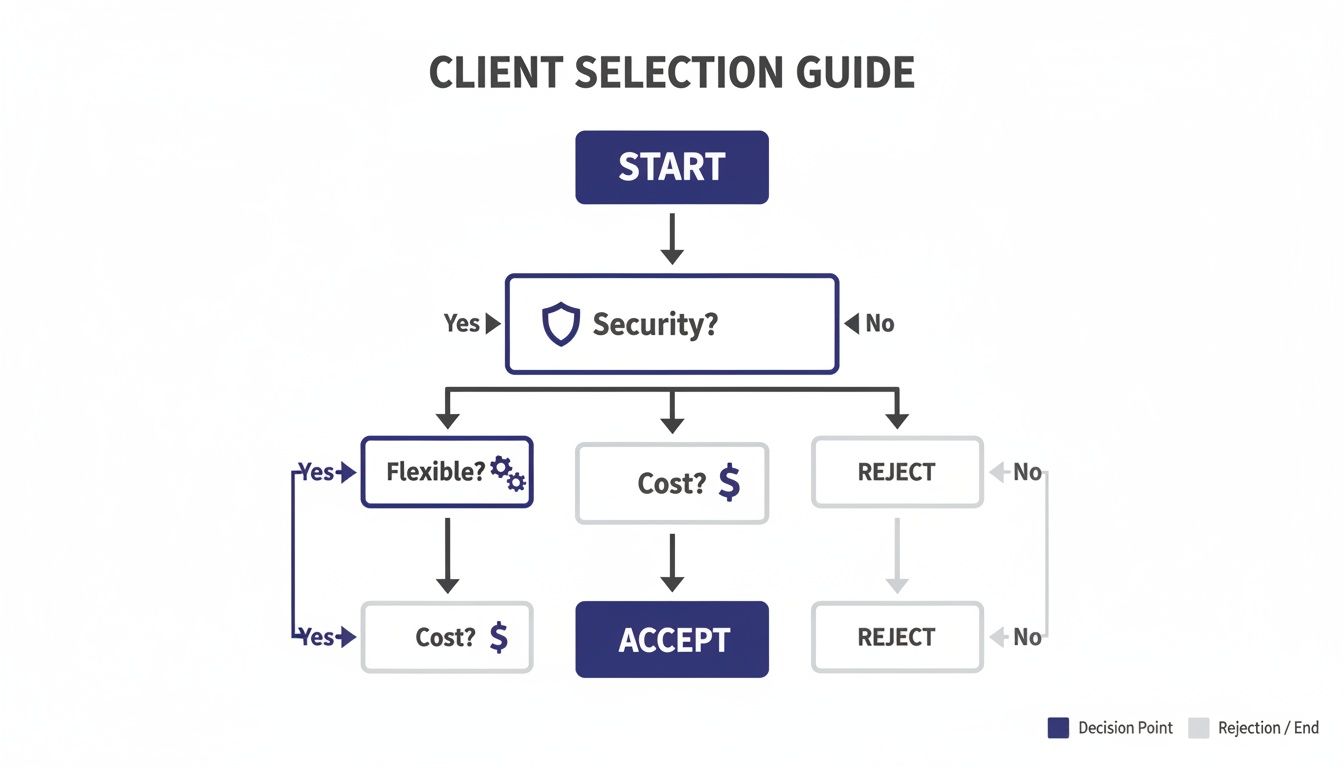
As you can see, what your organization values most will naturally point you toward one solution or the other.
Answering these questions honestly will make the right choice obvious.
1. How critical is endpoint security for your compliance needs?
If you handle sensitive data governed by regulations like HIPAA or PCI DSS, minimizing your attack surface isn't just a goal—it's a requirement. A zero client's stateless design offers almost no target for malware, making it the clear winner for maximum-security environments. A thin client is still very secure, but its local OS is another layer that needs consistent patching to keep vulnerabilities closed.
2. What is your IT team's capacity for ongoing management?
Be realistic about your IT resources. A zero client is the definition of "set it and forget it," demanding almost no hands-on management after deployment. This is a game-changer for small teams. Thin clients, while managed efficiently with centralized tools, still require a regular patching and update schedule to keep their operating systems secure.
The core of the decision is often a trade-off: The ultimate simplicity and security of a zero client versus the versatile connectivity of a thin client. Your answer reveals what your organization values more.
3. Do your users need to connect to multiple, distinct systems?
If your team logs into a single, standardized VDI or cloud desktop environment, a zero client built for that specific protocol will deliver a faster, more seamless experience. However, if users need to jump between various cloud services, legacy apps, and different remote desktop platforms, the protocol flexibility of a thin client is non-negotiable.
4. How standardized is your application and peripheral environment?
Think about the tools your team uses every single day. A zero client thrives in a uniform setup where everyone uses the same applications and standard peripherals like keyboards and mice. If your workflow involves a wide array of specialized USB devices—like scanners, signature pads, or unique printers—or requires access to locally installed browser tools, a thin client provides the necessary OS-level support and driver compatibility.
Making this choice is a key step in modernizing your IT. To ensure a smooth transition, our cloud migration checklist offers comprehensive guidance. It’s a great resource to help you plan every stage of your move to a more secure and efficient cloud-based infrastructure.
The debate over zero clients vs thin clients often gets stuck on the hardware, but that’s only half the story. Whether you choose the streamlined simplicity of a zero client or the added flexibility of a thin client, its real power is unlocked by the cloud platform it connects to. Your choice of endpoint matters, but the cloud infrastructure is what makes the entire system hum.
Think of it like this: the endpoint is the steering wheel and pedals of a car, but the cloud platform is the engine. No matter how perfect the controls feel, the car’s actual performance, reliability, and safety depend entirely on what’s under the hood.
A secure, managed cloud platform provides the high-octane host environment that both zero and thin clients need to perform. It’s what delivers the consistent speed your team needs, keeps your data centrally protected, and offers the expert support required to keep everything running without a hitch.
This synergy creates a powerful, unified system—not just a collection of parts. The right cloud partner elevates your endpoint strategy from a simple hardware purchase into a real operational advantage.
The endpoint device determines how a user connects, but the cloud platform determines what they connect to. The quality of that connection—its speed, security, and stability—is entirely dependent on the backend infrastructure.
Ultimately, the goal is a seamless and secure computing environment. The hardware on your desks is a critical first step, but the strength of your centralized platform is what guarantees business continuity and protects your sensitive files. Whether it's an accounting firm accessing tax software or a law practice managing case files, the backend has to be flawless.
Choosing the right endpoint is a crucial decision, but it’s the first step, not the last. Real success comes from finding a cloud provider that understands how to optimize the entire ecosystem, from the server all the way down to the user's screen. A great platform ensures that no matter which hardware you pick, your team gets a reliable, secure, and productive experience every time they log in.
This integrated approach is the key to maximizing your return on investment. To learn more about what to look for, exploring different VDI cloud providers can offer valuable insights into finding a partner that aligns with your security and performance needs. Your endpoints deserve a platform that lets them perform at their best.
When you're weighing the move to zero or thin clients, practical questions always come up. How do these devices actually fit into a real office? How do they handle the messy reality of remote work and lost hardware? Let's clear up a few of the most common queries.
These aren't just technical details; they get to the heart of day-to-day operations and the strategic shift that comes with a centralized computing model.
Yes, and in many cases, you absolutely should. There’s no hard-and-fast rule demanding an all-or-nothing approach. A hybrid setup is often the smartest way to go, letting you align the right device with the right role.
Think of it this way: you could give your accounting team zero clients to lock down security and keep workflows uniform. Meanwhile, your marketing department might get thin clients, giving them the flexibility to connect to various cloud services or use specialized peripherals. It's all about matching the hardware to the job at hand.
They’re not just suitable; they’re practically built for it. Both zero and thin clients are fantastic for remote work because they solve two of the biggest remote-work headaches: security and management. The magic is that no company data ever lives on the local device, which is a massive security win when your team is scattered across home offices.
This design all but eliminates the risk of a data breach from a lost or compromised laptop. On top of that, your IT team can manage, update, and fix issues from one central location. No more shipping laptops back and forth or trying to troubleshoot over the phone—it’s a far more efficient way to support a distributed team.
This is where zero and thin clients truly shine. If a device goes missing, the fallout is surprisingly minimal.
Because no sensitive data is stored locally, a lost or stolen endpoint is merely a hardware loss, not a data breach. This distinction is critical for any organization handling confidential client or financial information.
There is zero risk to your corporate data. Your employee can get back to work almost instantly. Just hand them a new device, have them plug it in, and they can log right back into their secure desktop. Business keeps moving, and you completely sidestep the compliance nightmare of a potential data leak.
Ready to see how a secure, centralized cloud platform can transform your operations? Cloudvara provides a robust and reliable hosting environment perfect for powering your zero or thin clients. Get started with a free 15-day trial today!




