Infrastructure monitoring is the practice of continuously collecting and analyzing data from your business’s core technology—servers, networks, and software. It acts as an early warning system, helping you find and fix issues before they cause a business-stopping outage.
Imagine driving your car without a dashboard. You wouldn’t know your speed, fuel level, or if the engine was overheating until you were stranded on the side of the road. In the business world, your IT infrastructure is the engine that powers everything. Infrastructure monitoring is its digital dashboard.
It’s the discipline of systematically tracking the health and performance of every component that keeps your company running. This isn’t just about waiting for something to break; it’s about proactively watching for signs of trouble so your digital operations run smoothly, securely, and efficiently.
At its heart, understanding infrastructure monitoring is about shifting from a reactive "break-fix" model to a proactive "predict-and-prevent" strategy. Instead of scrambling to fix a server that has already crashed and taken your business offline, monitoring tools alert you to the warning signs, such as:
This oversight allows your IT team or managed provider to step in and resolve the issue, often without your employees or clients ever noticing a problem. It’s the difference between a mechanic calling you about a worn-out part during a routine check-up versus you calling a tow truck from the highway. To learn more, explore our detailed guide on the fundamentals of network monitoring.
You don’t need to be a large tech firm to benefit from this. If your business relies on technology to serve clients, manage data, or process transactions, then you rely on your IT infrastructure. A recent study found that a single hour of downtime can cost a small business anywhere from $1,000 to over $100,000, depending on its industry.
Infrastructure monitoring is no longer a luxury for large enterprises; it's a fundamental necessity for any organization aiming for operational resilience and business continuity. It provides the visibility needed to turn raw data into actionable insights, preventing minor glitches from becoming major disasters.
This process is about more than just keeping the lights on. It’s about ensuring reliability, protecting sensitive data, and delivering a consistent experience for both your team and your customers. By having a clear view of your systems, you can plan for growth, optimize costs, and secure your operations against unexpected disruptions. To delve deeper into the fundamentals of keeping your systems healthy, read more about what is infrastructure monitoring.
To get real business value from infrastructure monitoring, we need to move beyond the abstract idea and look at its practical building blocks. A truly effective strategy is built on five essential pillars. Each one plays a unique role, and together, they give you a complete, real-time picture of what’s happening inside your systems.
This diagram shows how these pillars work together to support your entire business by keeping a close watch on the servers, networks, and software that power your operations.
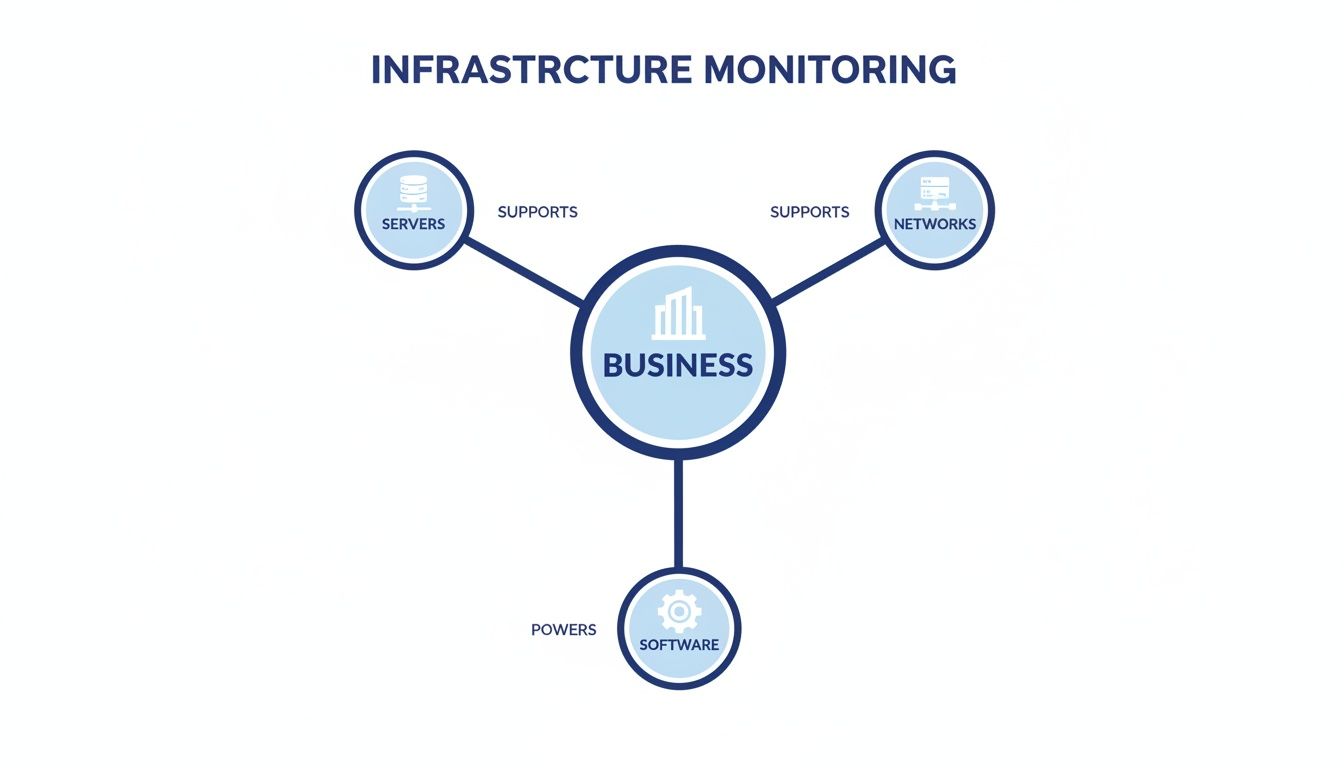
As you can see, the business sits right at the center. It's a great reminder that the ultimate goal of all this tech is to ensure your core functions run smoothly and reliably.
Think of metrics as the vital signs for your technology. Just like a doctor checks your heart rate and blood pressure, monitoring tools track specific, hard numbers from your hardware and software. These aren’t vague feelings; they’re quantitative data points that tell a story.
For example, memory utilization on your accounting server is a key metric. You’d expect it to be high during month-end closing, but if it’s pegged at 95% on a normal Tuesday afternoon, that’s a red flag. It’s a clear signal that something needs attention before the server grinds to a halt.
While metrics measure internal health, probes check for external availability. Imagine them as lookouts who periodically walk the perimeter of a castle to make sure all the gates are secure and accessible. Probes are your digital sentries.
You might set up a probe to check if your company website is online every minute from different cities. If it fails to get a response from London, it immediately flags that the site is down for that region—even if the server itself reports it’s running just fine.
To get the really good stuff—the detailed metrics from deep inside a server or application—you need an agent. An agent is a small, specialized piece of software installed directly onto a machine. It acts like an on-the-ground reporter, collecting rich details that you could never see from the outside.
For instance, an agent can pinpoint exactly which process is hogging all the CPU or pull detailed error logs from your CRM. That level of detail is what makes troubleshooting fast and accurate. While some monitoring can be done without agents, they provide a much deeper level of insight, a key part of application performance monitoring best practices.
All this data is useless if you can’t make sense of it. That’s where dashboards come in. A dashboard is a visual interface that pulls everything—metrics, probe statuses, and agent reports—into a single, easy-to-read "mission control" screen. It uses charts, graphs, and simple color codes (like green for healthy, red for critical) to present complex data at a glance.
A well-designed dashboard doesn’t just show data; it provides answers. It helps you instantly spot trends, connect events, and understand the health of your entire infrastructure without digging through thousands of lines of raw data.
Your IT team can look at a dashboard and immediately see that a spike in network traffic lines up perfectly with a drop in application response time, pointing them straight to the bottleneck.
The final, and arguably most critical, pillar is alerts. Alerts are the automated notification system that turns monitoring from a passive, backward-looking activity into a proactive defense. When a metric crosses a pre-set line—like server disk space dropping below 10%—an alert is automatically triggered.
These aren't just annoying pop-ups. Modern alert systems are smart. They can route notifications to the right person through email, text, or a support ticket. This means that when a problem pops up at 2 AM, your IT provider gets the signal and can start working on a fix long before your team even grabs their morning coffee. Defining these rules is a core part of any good setup, and it's wise to follow established Infrastructure Monitoring Best Practices to get it right.
Beyond the technical definitions, what does infrastructure monitoring actually do for your business? The answer is simple: it shifts your IT from a reactive, costly "break-fix" model to a proactive, strategic approach that delivers real returns. This is about more than just technology; it’s about guaranteeing business continuity, tightening security, and protecting your bottom line.
Think of proactive monitoring not as an IT expense, but as a direct investment in your company’s stability. Every minute your systems are down translates to lost productivity, missed client opportunities, and a hit to your reputation. By catching issues before they blow up, you turn your IT from a source of fire drills into a reliable asset that drives your business forward.
For any professional service firm, uptime isn't just a goal—it's everything. An inaccessible server during tax season or a system crash before a major court filing can be catastrophic. This is where proactive monitoring delivers its most immediate and obvious value.
It acts as a 24/7 watchtower for your most important systems. By tracking performance trends and how resources are being used, it can flag potential failures before they happen. For instance, it can alert your IT provider that a server is about to run out of memory, giving them time to add resources before it crashes and takes your critical applications offline with it.
This kind of preemptive action is the foundation of a strong business continuity plan. Studies show a single hour of server downtime can cost a small business thousands of dollars in lost revenue and recovery work. Proactive monitoring helps you sidestep those costs completely. You can see how this fits into the bigger picture by exploring ways to build business continuity in the cloud.
Your IT infrastructure is a prime target for security threats. A sudden spike in network traffic or a series of unusual login attempts could be nothing, or they could be the first signs of a data breach. Without continuous monitoring, you’d likely never know until the damage was done.
Infrastructure monitoring gives you the visibility needed to spot these anomalies the moment they occur. It establishes a baseline of "normal" activity, so any deviation stands out immediately. This is critical for:
By keeping a constant eye on system behavior, you add a powerful layer of defense that protects both your business and your clients' sensitive data.
While there's a cost to setting up infrastructure monitoring, the return on investment (ROI) is often fast and significant. The financial wins come from several places, moving beyond simple uptime to create lasting value.
The true cost of an IT problem isn't the price of the repair; it's the cost of the disruption. Proactive monitoring minimizes both, preventing expensive emergency fixes and protecting your revenue stream from the impact of unexpected downtime.
This value shows up in both direct and indirect cost savings. Take a look at the financial impact:
| Cost Savings Category | How Infrastructure Monitoring Helps |
|---|---|
| Preventing Emergency Costs | Proactive maintenance helps you avoid the premium rates charged for emergency, after-hours IT support and hardware replacement. |
| Optimizing Resource Usage | Monitoring spots over-provisioned or underused servers, letting you "right-size" your resources and cut down on hosting bills. |
| Boosting Employee Productivity | A fast, reliable system means your team isn't wasting billable hours fighting slow applications or waiting for a system to be restored. |
| Reducing Reputation Risk | Consistent reliability builds client trust and prevents the customer churn that often follows a major service outage. |
Ultimately, looking at infrastructure monitoring from a business perspective means seeing it as a tool for financial health. It empowers you to make informed decisions, get a grip on IT spending, and ensure your technology investments are actively helping your bottom line instead of creating unpredictable risks. A smooth, responsive system not only makes your employees more effective but also delivers the reliable experience your clients have come to expect.
Putting a formal monitoring plan in place might sound overly technical, but it’s really just about answering a few practical business questions. It’s the strategic step that moves you from simply hoping your systems work to ensuring they do. Think of it as your roadmap for turning raw data into protective actions that keep your business running.

The goal isn't to watch every single byte of data that flows through your network. It’s to focus on what matters most for business continuity and keeping your clients happy. Let's walk through how to build your first plan.
Before you can monitor anything, you have to know what you can't live without. These are the systems where even a tiny disruption causes major headaches, lost revenue, or a hit to your reputation.
Start by making a simple "can't-fail" list. What technology is absolutely essential for your business to operate on a normal day?
This list becomes the sharp focus of your monitoring efforts. Everything else is secondary.
Once you know what to watch, you need to define what "good" performance actually looks like. In technical terms, this is called setting a baseline—a snapshot of your systems running under normal, everyday conditions.
Why is this so important? Without a baseline, you have no context for what you're seeing. For instance, is 50% CPU usage on your main server perfectly fine or a sign that something is about to break? Your baseline gives you the answer.
To get this snapshot, you or your IT partner will need to measure key metrics over a typical business cycle, like a full week or month. This process gives you a data-driven feel for your system's natural rhythms.
A baseline turns monitoring from a guessing game into a science. It gives you the objective standard needed to tell the difference between a routine flutter and a genuine problem that needs your attention right away.
Alerts are your early warning system, but they’re only useful if they're set up correctly. A flood of meaningless notifications—a problem known as alert fatigue—is just as bad as having no alerts at all. People just learn to ignore them.
The best alerts focus on thresholds that signal a real business impact. For example:
The key is to set thresholds that are early enough to give you time to react but not so sensitive that they fire on every minor hiccup. This is where an experienced IT partner really shines, as they can help tune your alerts based on years of experience.
Gathering data and sending alerts is only half the job. The final, most crucial step is knowing exactly what to do when an alert actually goes off. A clear incident response plan is what turns that data into swift, effective action.
For every critical alert, your plan should answer three simple questions:
A well-defined plan cuts through the chaos of a crisis. It makes sure the right people are activated with clear instructions, which dramatically reduces the time it takes to fix the problem and get services back online. This ties directly into a broader strategy for effective resource management, a topic we cover in our guide on server capacity planning.
Picking a cloud provider is more than just renting server space—it's handing over the keys to your digital operations. When infrastructure monitoring is part of the deal, the stakes get even higher. Your choice will determine whether you get a passive vendor or a proactive IT partner who’s genuinely invested in your success.

Here's a straightforward checklist to help you vet potential partners and confidently pick one that will protect your business, not just sell you a service.
The first thing to look at is the provider's uptime guarantee. This number, usually a percentage, isn't just marketing fluff; it’s a contractual promise of how reliable their service will be. You should be looking for a Service Level Agreement (SLA) that guarantees at least 99% uptime.
If a provider is confident enough to promise 99.5% or more, it shows they’re serious about maintaining a resilient, well-oiled infrastructure. This is your first line of defense against downtime that can cost you dearly in lost revenue and customer trust.
Plenty of providers claim they offer 24/7 support, but what does that really mean? Too often, it’s just a reactive help desk you call after a disaster has already hit. A real partner offers proactive support, meaning their team is actively watching your systems around the clock.
This is the difference between you discovering a problem and them spotting a server running hot at 3 AM, fixing it, and preventing an outage before your team even logs on. Don't be shy—ask potential partners these direct questions:
The quality of their support team directly reflects their commitment to your business continuity.
A partner’s dedication to keeping your data safe is non-negotiable. Don’t just take their word for it; dig into the specifics of their security and data protection policies. Your partner should be a fortress for your digital assets.
Choosing a partner is an exercise in trust but verify. A reputable provider will be transparent about their security measures, seeing it as a key selling point, not a proprietary secret. They understand that their security infrastructure is fundamental to your peace of mind.
Demand a provider who offers automated, daily backups as a standard feature. This ensures that even in a worst-case scenario, your data can be restored quickly with minimal disruption. Also, confirm they provide strong security features like two-factor authentication and firewalls to guard against unauthorized access. For more on what to look for, see our guide on finding the right managed cloud services.
Finally, a trustworthy partner is completely transparent, especially about pricing. Hidden fees, confusing bills, and surprise charges are all major red flags. A good provider will have a simple, predictable pricing model you can easily understand and budget for.
Look for a partner who offers:
By carefully evaluating these four key areas, you can move beyond a simple vendor relationship and find a true IT partner who is invested in your stability and growth.
When you start digging into infrastructure monitoring, a few common questions always surface. It’s a technical field, but the core ideas are surprisingly straightforward and tie directly to keeping your business stable and ready for growth. Let's cut through the jargon and get you clear answers.
This is one of the biggest myths out there. The short answer? Absolutely not.
Any business that relies on technology—from a small accounting firm using cloud software to a law practice managing client files—gets huge value from monitoring. The need isn't about company size; it’s about how much you depend on your tech to operate.
Downtime doesn’t care if you have five employees or five hundred. A server crash can bring a small team to a grinding halt just as easily as it can a massive enterprise. In fact, smaller businesses often feel the sting more, since they don't have a deep bench of resources for a quick fix. Monitoring helps level that playing field.
It's a great question because both are about protection, but they do very different jobs.
Think of antivirus software as a security guard posted at your front door. Their job is specific: check for known threats like viruses and malware and stop them from getting in. It’s a vital role, but a narrow one.
Infrastructure monitoring, on the other hand, is the entire building's facilities management team. It doesn't just watch the door. It’s checking the electrical grid (server health), the plumbing (network traffic), and the air conditioning (application performance) to make sure the whole operation is running smoothly.
Here’s a simple way to see the difference:
Monitoring spots performance bottlenecks, hardware about to fail, and network outages—critical problems that antivirus software isn't even designed to look for.
Yes, you can, and this is where modern IT services really shine. While you could technically buy and configure monitoring tools yourself, doing it right takes a lot of technical skill and, even more importantly, a ton of time. For most businesses running without an in-house IT department, the DIY route is impractical and often leads to the "alert fatigue" we mentioned earlier.
The most effective approach for businesses without dedicated IT staff is to partner with a managed cloud provider. They handle the complex setup, expert configuration, and 24/7 oversight, letting you get all the benefits of enterprise-grade monitoring while you focus on your actual business.
This model turns infrastructure monitoring from a potential headache into a fully managed service. You get the peace of mind that comes from knowing experts are watching your systems around the clock, ready to solve an issue before you even know it happened.
The price of skipping proactive monitoring is much more than the bill for a single emergency repair. It’s a cascade of financial and reputational damage that can hurt your business long-term. The true cost is the cost of disruption.
When your systems go down, the expenses stack up fast:
Proactive monitoring is an investment in preventing these much larger, and sometimes catastrophic, expenses. It's the difference between paying for an oil change and having to pay for a whole new engine.
Stop worrying about IT failures and start focusing on your business. Cloudvara provides fully managed cloud hosting with proactive, 24/7 infrastructure monitoring built-in. We watch your systems so you don't have to. Experience true peace of mind with a free, no-obligation trial.




