Your office phone system usually starts breaking long before it fully fails. Calls ring at the front desk while the receptionist is helping a client. Staff members forward business calls to personal cell phones. Someone works from home and misses a transfer because the desk phone in the office is the only endpoint that matters. Meanwhile, your accounting software, files, and email already live in a mix of old servers, cloud apps, and remote desktops.
That's why small business cloud PBX matters now. It isn't just a phone upgrade. It's a way to make your business reachable, consistent, and easier to manage without adding another box in the server closet.
For firms like accountants, law offices, nonprofits, and small service businesses, the key decision isn't only cloud PBX versus on-premise PBX. The better question is whether your phone system should become part of a larger cloud operating model that also supports QuickBooks, document management, Microsoft apps, and secure remote access. That's where the practical gains show up.
Small businesses used to accept phone friction as normal. Missed calls. Voicemails stuck on one desk phone. Expensive moves and changes every time someone changed roles or offices. That model doesn't fit how small businesses work anymore.
A cloud-hosted PBX fixes the core problem by moving the phone system out of your office hardware and into a provider-managed service. That gives you the business phone features owners want, like call routing, mobile access, and easier administration, without the capital expense of maintaining an on-site PBX cabinet.
One industry guide puts it plainly: “for most small businesses in 2025, a cloud-hosted PBX is the ideal choice,” citing low upfront cost, built-in scalability, and simpler management than legacy systems in its review of PBX phone systems in 2025. The same guide notes that the global Cloud PBX market was valued at USD 7,162.99 million in 2025, with projections of USD 7,793.34 million in 2026.
The shift happened because owners stopped asking for “a better phone system” and started asking for a better way to run communication.
They want to:
For readers comparing options, it also helps to discover hosted business VoIP in plain business terms, especially if you're weighing flexibility against the limits of a traditional office phone setup.
A phone system now touches sales, support, intake, scheduling, and compliance. If your team already relies on remote access and hosted apps, telephony shouldn't stay isolated on old hardware. Businesses moving broader systems off local servers often evaluate communication tools alongside cloud hosting for small business so staff can reach both clients and line-of-business apps from the same working environment.
Cloud PBX became standard because it fits the way small teams already operate. Distributed, mobile, and budget-conscious.
A traditional PBX is like owning an old building. You control it, but you also pay for the repairs, the wiring, the maintenance, and the specialist who shows up when something breaks.
A cloud PBX is closer to leasing a fully serviced office suite. You still use the phones, numbers, extensions, and menus. But the infrastructure lives somewhere else and the provider maintains the engine behind it.

According to RingCentral's overview of cloud PBX architecture, a small-business cloud PBX is delivered as a hosted IP or VoIP service. Call switching and management move into provider data centers, and some providers note setup can take less than 24 hours.
In an on-premise setup, the logic for call routing, voicemail, extensions, and system management sits on hardware you own or host locally. In a cloud model, that logic runs in the provider's environment.
Your business then connects through devices you already understand:
That's the key architectural shift. You stop buying a phone appliance and start subscribing to a communications service.
For a non-technical owner, the biggest change is administrative. Instead of calling a vendor every time you need to adjust extensions or forwarding rules, many changes happen in software.
Common tasks usually become simpler:
| Task | On-premise habit | Cloud PBX habit |
|---|---|---|
| Add a user | Buy or configure more hardware | Add a seat in the admin portal |
| Change call flow | Need technician help | Update routing in software |
| Support remote work | Workarounds or forwarding chains | Assign app access on any device |
| Recover from office outage | Risk losing local access | Redirect calls elsewhere quickly |
If you want the networking side explained in plain language, this overview of what cloud networking is helps connect the phone system discussion to the wider business infrastructure underneath it.
Practical rule: If your office has to touch a physical box every time the business changes, the phone system is probably too rigid for a growing company.
Feature lists can get noisy fast. Most providers advertise dozens of tools, and that alone doesn't help an owner decide anything. What matters is which features solve a real operating problem.
Net2phone says modern cloud PBX platforms bundle 40+ features including secure video conferencing, call recording, business text messaging, analytics, and mobile access in its overview of cloud PBX capabilities. That matters because a small business cloud PBX is no longer just a dial tone replacement. It's a shared communications workspace.

Some features directly affect how clients experience your business.
These aren't cosmetic. They reduce caller confusion and make a small office sound organized.
Other features matter more internally than externally.
A mobile app keeps a business line with the employee instead of exposing a personal number. Voicemail transcription lets a manager scan messages between meetings. Call recording can help with training, record-keeping, or dispute review where appropriate for the business.
RingCentral also describes a unified platform for calling, SMS/MMS, internet fax, HD video, and integrations with tools like Salesforce, Microsoft, and Google in the same source noted earlier. In practice, that kind of bundling reduces app sprawl.
A good phone system should remove handoffs, not create new ones.
This is the category owners often underestimate. Administration matters because somebody has to manage users, numbers, greetings, routing logic, and permissions.
Look for:
If you're comparing providers, this breakdown of small business VoIP system features and pricing can help frame feature trade-offs against budget and complexity.
Businesses also outgrow systems at different speeds. That's why it helps to understand what cloud scalability means before choosing a platform that might fit today but strain later.
Features tell you what the system can do. Benefits tell you why you should care. For most small companies, the business case for a cloud PBX comes down to three things: cost control, operational flexibility, and support for the way people work.
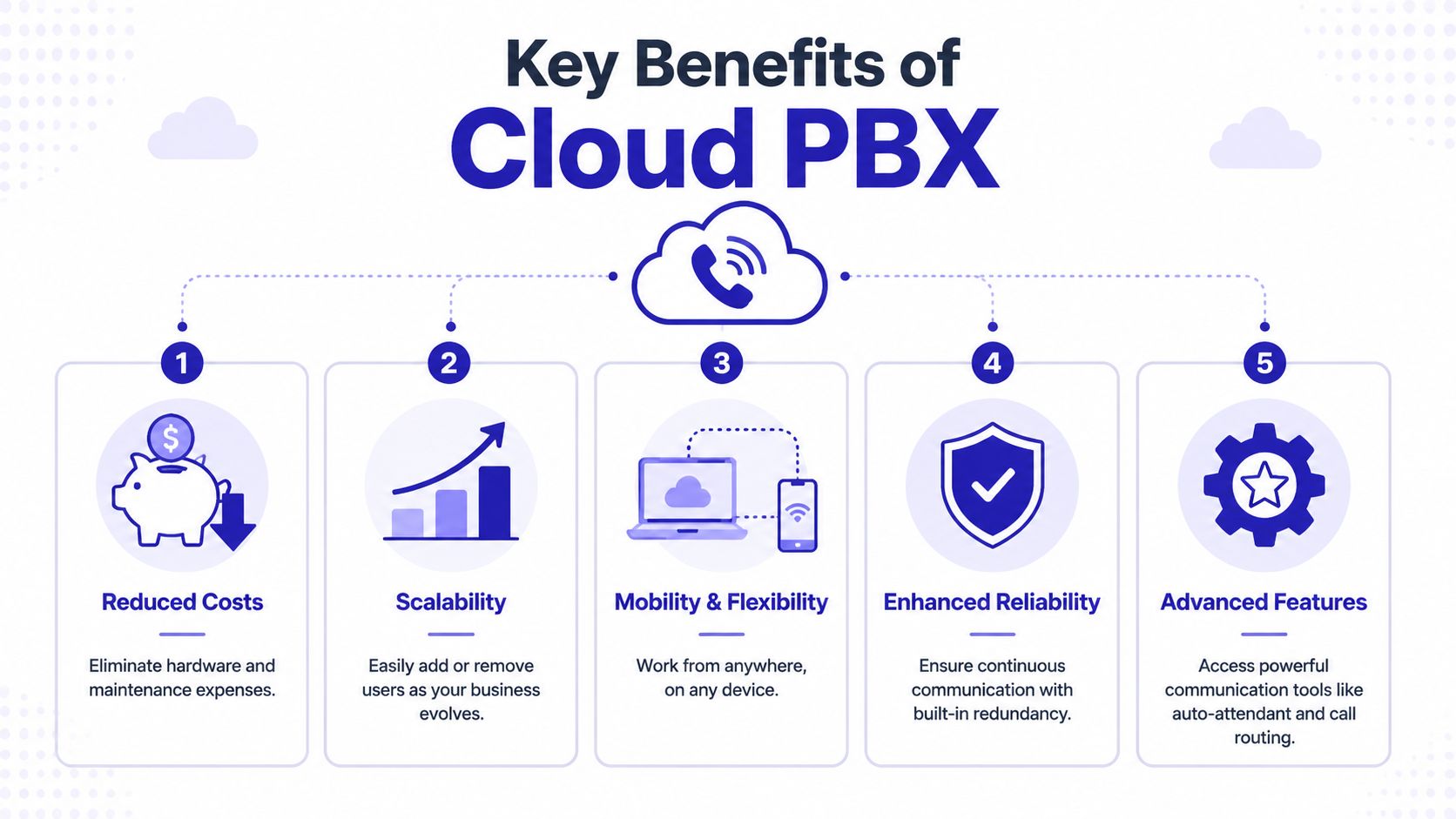
A 2025 market analysis notes that migrating to cloud-based VoIP or cloud PBX can reduce communication infrastructure costs by up to 40% for organizations with more than 200 employees, and it ties cloud communications to remote work models adopted by 63% of global businesses after the pandemic in its report on the cloud PBX market. While many small businesses are below that employee count, the underlying logic still applies. Fewer hardware commitments and simpler administration usually produce cleaner operating costs.
On-premise PBX spending often lands in the wrong places for a small business. Hardware. Maintenance. Specialist support. Upgrades that don't improve client service.
Cloud PBX shifts the model toward subscription pricing. That doesn't make every option cheap, but it usually makes costs easier to forecast.
A simple comparison looks like this:
| Cost area | Traditional on-premise PBX | Cloud PBX |
|---|---|---|
| Initial spend | Higher due to hardware and setup | Lower upfront entry point |
| Maintenance | Your responsibility or contractor cost | Mostly provider-managed |
| User changes | Can require manual intervention | Usually software-based |
| Budgeting | Irregular project spend | Predictable monthly billing |
Growth breaks rigid systems. New hires need numbers. A seasonal team needs temporary access. A second office opens and wants the same call flow as the first.
Cloud PBX handles those changes better because extensions, users, and routing typically change in software rather than through hardware additions. That matters even if your business only grows modestly. Flexibility helps during normal turnover too.
Remote work used to be treated as an exception. For many small businesses now, it's just normal staffing. One person is in the office, another is at home, and someone else is traveling to a client.
Cloud PBX fits that model because the phone system follows the user. Calls can ring to a desktop app, a smartphone, or both, while the company still presents one professional identity.
If your team can access the CRM from anywhere but not the business phone system, your communication stack is incomplete.
Professional services firms don't buy communications tools because they love telecom. They buy them because intake, responsiveness, and record-keeping affect revenue and trust.

A small law office usually has a simple problem that becomes expensive fast. New inquiries arrive unpredictably, attorneys are rarely sitting idle, and callers don't want to explain their situation twice.
With cloud PBX, the firm can route new matters through an auto-attendant, send urgent calls to intake first, and use call recording where appropriate for internal review and record consistency. Attorneys can answer through desktop or mobile apps without publishing personal numbers.
That setup tends to work well because it protects professionalism without forcing every call through one receptionist bottleneck.
Accounting firms feel phone pressure when deadlines pile up. Clients call about tax documents, payroll questions, amended filings, and appointments. If all of that reaches one main line with no structure, the office loses time sorting avoidable confusion.
A better small business cloud PBX setup might separate tax prep, bookkeeping, payroll, and admin through call routing. Staff can check voicemails from email or app interfaces while moving between client work. If the firm also uses QuickBooks, tax software, and remote desktops, the phone system works best when it sits alongside the rest of that cloud-accessible workflow instead of outside it.
This short video gives a simple visual on how cloud phone systems support modern business communication:
Nonprofits often have lean teams and inconsistent schedules. A coordinator may be in the office one day, remote the next, and at an event later in the week. Volunteers may need contact without exposing private mobile numbers.
Cloud PBX helps by putting the business number at the center. Calls can route by program, time of day, or staff availability. That creates continuity even when staffing shifts hour to hour.
What doesn't work is treating the phone platform as a separate island while every other application has its own remote access method. That creates confusion for staff and more support overhead than the business expected.
A phone migration goes smoothly when the business makes a few decisions early. Most problems come from skipping inventory, underestimating number porting, or buying based on price alone.
Use this as a working checklist, not a theoretical one.
Before talking to vendors, write down what you use today.
If you're planning a broader move off local servers, this cloud migration checklist is useful because the phone system shouldn't migrate in a vacuum.
Cloud PBX is simpler than on-premise telephony, but it still depends on planning.
Ask these operational questions:
The easiest migration is the one where the receptionist, office manager, and firm owner all understand the new call flow before go-live.
Don't stop at monthly pricing. Ask about fit.
What works is a phased rollout, documented call flows, and clear ownership inside the business.
What fails is trying to recreate every quirk of the old phone system just because “that's how we've always done it.” A migration is the right time to simplify greetings, routing rules, and who really needs a direct line.
Many small businesses make a preventable mistake at this stage. They replace the phone system, then leave the rest of the office stack fragmented. Voice goes one direction, files another, accounting software sits on a local server, and remote staff need separate login methods for everything.
That's not modernization. It's just a new silo.
As noted in The Network Installers' discussion of PBX phone systems for small business, most cloud PBX guides miss the key question of what happens to the rest of the office software. Many firms still need centralized access to QuickBooks, document management, or Microsoft applications, and the stronger approach is to bundle telephony into a broader hosted workspace strategy.
For an accounting or legal firm, communication and application access usually belong together.
That means:
For businesses evaluating this broader model, managed cloud services can provide the hosted environment for line-of-business applications that still need centralized control while cloud PBX handles communications separately but as part of the same operational plan. That's especially relevant for firms running QuickBooks, Sage, tax software, document systems, or Microsoft workloads that don't fit a simple browser-only setup.
The practical takeaway is simple. A small business cloud PBX solves a real communication problem. But it delivers more value when it's part of a complete cloud operating model instead of a stand-alone purchase.
If you're planning to modernize phones and the rest of your office stack at the same time, Cloudvara is worth evaluating as part of that conversation. It provides cloud hosting for business applications such as QuickBooks, Sage, document management, CRM, tax, and Microsoft environments, which can help firms align remote application access with a broader communications strategy.




