Servers in the cloud are powerful, off-site computers you access over the internet to store data and run your applications. Instead of buying and maintaining a physical server in your office closet, you rent space on a massive, professionally managed network of servers housed in ultra-secure data centers.
This approach gives you access to the kind of robust IT infrastructure that was once only available to large corporations, all without the steep upfront costs or the constant maintenance headaches.
Think of a traditional office server like a single, high-maintenance generator you keep in the basement. It needs constant attention, expensive fuel (in the form of upgrades and electricity), and if it breaks down, your entire operation grinds to a halt.
In contrast, servers in the cloud are like plugging into the national power grid. It's a vast, resilient, and professionally managed system that delivers reliable power whenever you need it.
You're not buying the power plant; you’re just paying for the electricity you actually use. These "servers" aren't literally floating in the sky, of course. They are real, high-performance computers located in highly secure data centers all over the world, managed by expert teams who handle all the hardware, cooling, networking, and security around the clock.
The real shift here is from ownership to access. Instead of buying, housing, and maintaining your own physical machine, you’re renting computing resources from a cloud provider. This simple change impacts everything from your budget to your ability to adapt quickly.
To get the full picture of how these servers work and fit into a modern business, it helps to understand the basics of what network infrastructure is and how it all connects.
This isn't just a passing trend; it's a massive global movement. The worldwide cloud computing market hit $752.4 billion in 2024 and is projected to more than triple to $2.39 trillion by 2030, with cloud servers being the engine of this growth. For a deeper dive into the numbers, you can explore the data on the rapid expansion of cloud infrastructure services on Statista.com.
This incredible growth shows just how many businesses are choosing managed, scalable solutions over aging in-house hardware. Our own guide on what cloud infrastructure is offers a closer look at the components that make this technology so powerful.
The image below breaks down the primary benefits driving this adoption, focusing on cost savings, simplified maintenance, and universal access.
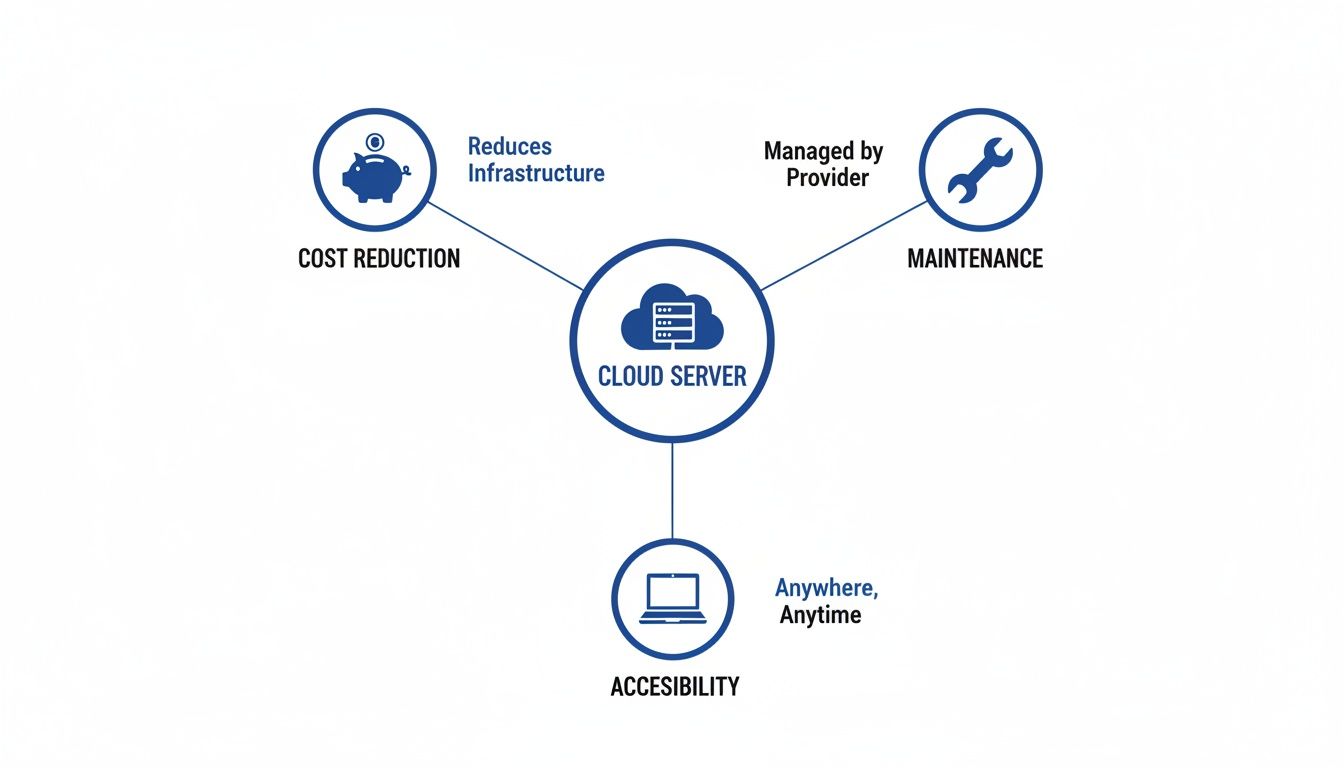
As the visual shows, moving to the cloud allows businesses to convert large, unpredictable capital expenses into manageable, predictable operational costs, all while freeing up their internal teams from the grind of routine IT upkeep.

Understanding what a cloud server is is one thing. Seeing how it directly impacts your bottom line and daily operations is where the real value clicks into place. For small and mid-sized businesses (SMBs), these advantages aren't just minor perks—they're powerful tools for growth, resilience, and staying competitive.
Moving away from that physical server humming in your office closet translates into tangible outcomes that save time, slash risks, and boost productivity across the board. Instead of getting lost in technical jargon, let's look at the concrete benefits you can actually expect to see.
Imagine a nasty storm knocks out the power in your office building. If you have an on-premise server, your entire team grinds to a halt. Client work stops, deadlines get missed, and you lose revenue for every single hour you’re down.
Cloud servers, on the other hand, live in geographically scattered data centers with redundant power, cooling, and internet connections. If one location has an issue, your services can automatically failover to another one. This means your team keeps working from anywhere with an internet connection, keeping the business running even when the physical office can't.
Key Takeaway: For an SMB, this level of uptime is a game-changer. It turns potential disasters into minor inconveniences, protecting your reputation and revenue from disruptions you can't control.
This built-in resilience ensures your critical software—whether it’s for accounting or client management—is always available when you and your customers need it most.
For any modern business, data is everything. If a law firm loses client files, it's catastrophic. If an accounting practice has its financial records corrupted during tax season, the damage could be devastating.
With a traditional server, disaster recovery means complex manual processes, expensive backup hardware, and regular testing that often gets pushed to the back burner. Cloud providers, however, build automated backups and recovery right into their core services. Your data is frequently snapshotted and stored in multiple secure locations. If a data loss event like a ransomware attack or hardware failure strikes, you can restore your systems to a recent, clean state in a fraction of the time it would take with a physical server.
This approach delivers incredible peace of mind, knowing your most valuable asset is protected by enterprise-grade systems you don't have to manage yourself.
The modern workplace isn't confined to a single office anymore. Your team needs to access critical files and applications from home, a client’s site, or while traveling. An on-premise server makes this complicated and often opens up security holes.
Cloud servers are designed for secure remote access from the ground up. By centralizing your applications and data, you give your team the freedom to log in from any authorized device, anywhere in the world. An accountant can finalize tax returns from home, while a lawyer can pull up case files on a tablet right before walking into court.
This flexibility isn't just a convenience; it's a major competitive advantage that improves employee satisfaction and boosts productivity. Many firms have discovered the unique benefits of cloud hosting for small businesses when building a more agile work environment.
This massive shift is reflected in spending patterns. Global public cloud spending is projected to hit $723.4 billion in 2025, a huge leap from $595.7 billion in 2024. While cost management is a key concern for 82% of decision-makers, an overwhelming 94% report better security after moving to the cloud, proving the model's effectiveness.
For many small businesses, especially those in regulated fields like law and finance, maintaining robust security and compliance is a massive headache. It requires specialized expertise and a hefty budget that most SMBs just don't have.
Leading cloud providers invest billions of dollars every year in security measures that are far beyond what a small business could ever implement on its own. These include:
By using servers in the cloud, you essentially inherit the benefits of this massive security infrastructure. It helps you protect sensitive client data and meet your regulatory obligations more easily and affordably than you ever could alone.

When comparing on-premise hardware to servers in the cloud, the conversation always comes down to two things that matter most to any business owner: cost and reliability. The price of a physical server might look straightforward on an invoice, but the real expense is almost always buried in a long list of ongoing operational costs.
This is where the idea of Total Cost of Ownership (TCO) becomes so important. TCO is a financial model that pulls back the curtain to show you the true, all-in cost of owning a piece of hardware over its entire life, which is usually about five years.
To see the difference clearly, it helps to put the numbers side-by-side. The sticker price of an on-premise server is just the ticket to entry; the real costs are in keeping it running. A cloud server, on the other hand, bundles everything into a predictable fee.
| Cost Factor | On-Premise Server (TCO) | Cloud Server (Subscription) |
|---|---|---|
| Initial Investment | High: Hardware purchase, software licenses, setup labor. | Low to None: No hardware to buy; setup is minimal. |
| Ongoing Expenses | Variable & High: Electricity, cooling, IT staff salaries, maintenance contracts, parts replacement. | Predictable: Fixed monthly or annual fee covers everything. |
| Staffing | Required: Needs dedicated IT staff for management, security, and troubleshooting. | Included: Provider's expert team manages the infrastructure 24/7. |
| Upgrades/Scaling | Costly & Disruptive: Requires new hardware purchases and downtime for installation. | Seamless: Scale resources up or down on demand with a few clicks. |
| Uptime & Redundancy | Expensive to Achieve: Requires redundant power, internet, and hardware, which is often out of reach for SMBs. | Built-in: Guaranteed uptime through vast, redundant data center infrastructure. |
| Space & Utilities | Significant Overhead: Needs a secure, climate-controlled room, adding to rent and utility bills. | Zero Footprint: No physical space or direct utility costs for your business. |
As the table shows, the on-premise model is front-loaded with capital expenses and peppered with unpredictable operational costs. The cloud model smooths everything out, turning a major financial headache into a simple, manageable expense.
Buying a physical server is just the beginning. It's a major Capital Expenditure (CapEx)—a big, upfront purchase that can put a serious dent in your budget. But the spending is far from over.
The TCO for an in-house server is loaded with ongoing expenses that add up fast:
Add it all up, and the initial purchase price can easily double or triple over the server's lifespan.
Servers in the cloud flip this entire financial model on its head. Instead of a huge upfront CapEx, you move to a predictable, subscription-based Operating Expenditure (OpEx) model. You pay a simple monthly or annual fee that covers everything.
This approach gets rid of surprise costs. Your provider handles all the hardware, power, cooling, and maintenance. You get access to enterprise-grade infrastructure without the enterprise-grade price tag, turning a volatile IT budget into a stable, predictable line item.
Cloud computing allows businesses to trade large, upfront capital expenses for smaller, variable operating expenses. This model not only preserves cash flow but also aligns IT spending directly with business usage and growth.
For small and mid-sized businesses that need to manage cash flow carefully, this financial predictability is a game-changer.
Beyond the money, the biggest difference is reliability. For a small business, trying to achieve high uptime with an in-house server is both incredibly difficult and expensive. You’d need redundant power supplies, backup internet connections, and spare hardware on standby—a setup that’s usually out of reach.
This is where Service Level Agreements (SLAs) come in. A cloud provider’s SLA is a contractual promise of a certain level of service—most importantly, a guarantee of uptime.
Top-tier providers often guarantee 99.9% uptime or higher. That might not sound much different from 99%, but the math tells a different story.
For any business, those extra days of being offline can mean thousands in lost revenue and eroded client trust. Cloud providers can hit these high numbers because they have massive, redundant infrastructure that a single business could never afford to build. Understanding these agreements is key, and our guide on the distinctions between an OLA vs SLA offers deeper insight. At the end of the day, that guaranteed uptime ensures your team and your clients can always get to the tools they need, when they need them.
The benefits of cloud servers—like better uptime, tighter security, and lower costs—sound great in theory. But their real value shines when you see how they solve specific, real-world business problems. Every industry has its own hurdles, from navigating strict compliance rules to stretching a tight budget, and this is where servers in the cloud truly make a difference.
Let's look at how accounting firms, law practices, and non-profits are putting cloud servers to work. These examples show how this technology is much more than a simple IT upgrade; it’s a core part of their strategy for growth and efficiency.
For any accounting or tax professional, the entire year is a cycle of deadlines, data accuracy, and absolute client confidentiality. During the chaos of tax season, the last thing a firm can afford is a server crash that brings all work to a grinding halt.
An on-premise server is a single point of failure. If it goes down, the whole team is locked out of essential software like QuickBooks, Sage, or Drake Tax. Cloud servers solve this problem head-on by hosting those exact applications in a resilient, high-availability environment.
This setup changes a firm's IT from a potential headache into a reliable asset, ensuring work continues uninterrupted during the most critical times of the year.
Law firms manage some of the most sensitive information you can imagine, from confidential case files to financial settlements. The consequences of a data breach are massive, making security and compliance completely non-negotiable.
Using servers in the cloud helps law practices meet these demands far more effectively than a server closet ever could. Cloud providers invest billions in security infrastructure that a small or mid-sized firm simply can't replicate on its own.
By moving to a secure cloud environment, law firms gain access to top-tier security protocols and compliance certifications. This helps them safeguard client data, meet ethical obligations, and reduce the risk of costly breaches.
For instance, a firm handling personal injury cases deals with huge volumes of medical records, all protected under strict regulations. These firms often need to be HIPAA compliant to avoid serious penalties. Learning more about secure cloud hosting for the healthcare industry shows how specialized providers deliver the necessary safeguards for this kind of sensitive data.
This approach offers several clear advantages:
Ultimately, this lets lawyers get back to practicing law, confident that their firm's data is protected by the best security in the business.
Non-profit organizations are almost always working with tight budgets and small IT teams. Their focus is on maximizing their impact, not managing complicated hardware. An old, unreliable server can be a constant drain on precious resources that should be going toward fundraising or community programs.
For these organizations, servers in the cloud are a lifeline. They get access to powerful, reliable technology through an affordable subscription model. This eliminates the need for a huge upfront investment in hardware, freeing up cash for their core mission.
A non-profit can host its donor management software, like Raiser's Edge or DonorPerfect, in the cloud. This ensures staff and volunteers can securely access donor information from anywhere—the office, a fundraising event, or at home. During a major giving campaign, the server can handle a sudden surge in website traffic without crashing, making sure every potential donation is captured.

Moving your business to the cloud can feel like a massive project, but it’s far less intimidating when you break it down into clear, manageable steps. Think of it less as a giant leap of faith and more as a well-planned journey. A methodical approach is the key to avoiding common mistakes and ensuring a smooth transition with minimal disruption.
This checklist is designed to demystify the process and give you a practical roadmap to follow. By working through these stages, you can confidently prepare your business for a successful move to a more flexible, resilient IT environment. Let’s walk through the essential steps to get you started.
Before you can map out your destination, you need to know exactly where you’re starting from. This first stage is all about taking a detailed inventory of your existing IT infrastructure. Don’t skip this; a thorough assessment now will save you from major headaches down the road.
First, conduct a complete software audit. List every single application your business relies on—from accounting software and your CRM to email and file-sharing tools. Make a note of which ones are absolutely critical for daily operations.
Next, take a hard look at your hardware. Document the specs of your current on-premise server, including its age, processing power, memory, and storage. You’ll also need to figure out your bandwidth needs. How much data does your team move around each day? A clear picture here helps you pick a cloud plan that delivers the performance you need without overpaying for resources you won’t use.
Not every application has to move to the cloud, and they certainly don’t all have to move at once. With your software audit complete, it's time to decide the fate of each application. This bit of strategic planning is crucial for an efficient migration.
For each piece of software, you have a few options:
This phase helps you prioritize what moves, how it moves, and when. For a more detailed breakdown, our comprehensive cloud migration checklist provides deeper insights into structuring your plan.
Picking a cloud provider is one of the most important decisions you’ll make. The market is buzzing with competition. In the second quarter of 2025, global enterprise spending on cloud infrastructure services rocketed to $99 billion—a massive jump of over $20 billion from the previous year. Amazon Web Services (AWS) still leads the pack with a 30% market share, followed by Microsoft Azure and Google Cloud.
While these giants offer immense power, their complexity can be overwhelming for a small or mid-sized business. This is where a managed service provider often becomes a much better fit. They handle the technical heavy lifting, offering direct support and expertise so you can focus on running your business, not configuring virtual machines.
Key Consideration: Look for a partner who understands your industry, offers transparent pricing, and provides dedicated, 24/7 support. A true partner acts as your IT advocate, ensuring your cloud environment is optimized for your specific goals.
With a solid plan and the right partner, it’s time for the final step: moving your data. This is the most delicate part of the entire process. The goal here is to transfer all your critical information securely and efficiently, with the least possible downtime.
Start with a trial run. Migrate a small, non-critical dataset first to test your process and iron out any kinks. Once you’re confident, schedule the full migration during a quiet period, like a weekend or overnight, to minimize the impact on your team and clients.
Keep communication lines open with your staff so everyone knows what to expect. After the move is complete, thoroughly test every application to make sure everything works just as it should before you officially pull the plug on your old hardware.
The journey from a noisy, expensive server in a closet to the quiet flexibility of the cloud is a strategic one. We've walked through how cloud servers deliver superior uptime, automated backups, and enterprise-grade security—advantages that used to feel out of reach for most small businesses. This shift does more than just get rid of unpredictable hardware costs; it empowers your team to work securely from anywhere.
Adopting cloud technology isn't just an IT upgrade. It’s a fundamental business decision that builds a foundation for growth and resilience. When you move your critical applications to a professionally managed environment, you free up your team's time and your company's resources. That means you can focus on serving clients instead of troubleshooting hardware. For businesses aiming to maximize agility and efficiency in their cloud operations, partnering with expert DevOps consultants can be a crucial next step.
By embracing the cloud, you're not just buying server space—you're investing in business continuity, operational efficiency, and a more agile future for your organization.
If you’re ready to make this transition but want an expert guide in your corner, exploring a managed cloud service is the perfect solution. At Cloudvara, we become your dedicated IT partner, handling all the technical complexities so you can just enjoy the benefits.
Even after seeing all the benefits, it’s completely normal to have a few questions before you make a big change to how your business runs. Moving to servers in the cloud is a significant step, and you should feel confident about it.
Let's walk through some of the most common questions we hear from business owners. Our goal is to give you straightforward answers so you can clear up any final doubts and move forward.
For most small and mid-sized businesses, the answer is a resounding yes. Just think about the sheer amount of resources the world’s top cloud providers pour into security. They have entire teams of cybersecurity experts working 24/7, using advanced threat detection systems and protecting their physical data centers with things like biometric scanners and constant surveillance.
Replicating that level of security in your own office would be financially out of reach for most businesses. Your company's data is almost always safer inside a fortified, professionally managed data center than it is in a server closet down the hall.
When you move to the cloud, you're essentially inheriting a world-class security posture that keeps your most valuable asset—your data—protected.
A common worry is feeling "locked in" to one provider forever. The good news is, you always own your data. Any reputable cloud service provider has clear, established procedures that allow you to take your data with you.
This means you can export your files and applications whenever you decide to make a switch. While the process requires some planning to make sure it's a smooth transition, you are never trapped. This freedom keeps providers honest—they have to continue earning your business with excellent service.
This is one of the most powerful features of using servers in the cloud. Adjusting your computing power is incredibly simple and happens almost instantly. Most providers give you an easy-to-use control panel where you can scale your resources up or down with just a few clicks.
Imagine your accounting firm is heading into tax season and needs more horsepower to run software without lag. You can instantly add more memory or processing power to handle the extra work. Once things quiet down, you can scale right back to your normal levels, ensuring you only ever pay for what you actually use.
Not at all. You don't lose control; you just change what you control. You still have full administrative access to your virtual servers, which means you can manage your software, user permissions, and data just like you did before.
What you give up is the headache of managing the physical hardware. The cloud provider takes care of all the maintenance, repairs, security, and networking for the underlying infrastructure. This frees you from worrying about failing hard drives or power outages and lets you put all that energy back into running your business.
Ready to stop worrying about hardware and start focusing on growth? At Cloudvara, we make the transition to a secure, reliable cloud environment simple. See how our managed hosting can work for your business with a free 15-day trial and discover a better way to manage your IT.




