Moving from on-premise to the cloud is all about shifting your company's digital backbone—your applications, data, and daily workloads—from physical servers humming away in a back office to a network of remote servers managed by experts.
Think of it less as a technical chore and more as a strategic business decision. It’s a chance to finally break free from costly hardware maintenance and embrace a more flexible, scalable, and secure way of operating.

If you're still managing servers in a closet or a dedicated data center, you know the drill. There’s the relentless cycle of expensive hardware refreshes every three to five years, the late-night calls about a failing hard drive, and the constant scramble to keep up during your busy season.
For professional services firms—like accounting, legal, or nonprofits—these aren't just IT headaches. They directly impact client service, billable hours, and overall efficiency. Sticking with an on-premise model means you're constantly grappling with significant, often hidden, costs that act as a financial anchor, holding back growth and innovation.
Let’s get real about the financial and operational weight of maintaining your own hardware. It’s not just the price tag on the server itself. You’re also paying for:
This old-school model also limits your ability to adapt. A law firm needing secure remote access for attorneys heading to court, or an accounting firm scaling up for tax season, will always face hurdles. The hardware you own dictates your limits, not your business needs.
The breaking point often arrives when a major hardware refresh is on the horizon. A business facing a potential $50,000+ capital expense on new servers has a powerful incentive to explore the more agile, operational expense model the cloud offers.
Moving from on-premise to the cloud isn't just a technology swap; it's a fundamental shift in business strategy. You’re trading a capital-intensive, rigid infrastructure for a flexible, subscription-based service that grows right alongside you. To really see why this move is so critical, it helps to understand the core benefits of cloud computing for small businesses.
This transition empowers your team to work securely from anywhere, pulling up critical client files or donor databases without being chained to the office. It enables your nonprofit to handle a sudden surge in online donations without the system crashing.
For a deeper dive, our guide explores the specific benefits of cloud migration in more detail. Ultimately, this move is about building a resilient, future-ready foundation that lets you focus on serving your clients and growing your organization—not on managing IT hardware.
A successful jump to the cloud is all about the prep work. Rushing this first phase is one of the most common—and costly—mistakes I see. It’s what leads to surprise budget overruns and operational headaches down the road. Think of it like drawing up a detailed blueprint before building a house; you need to know where everything goes and why.
Your first move is a deep-dive discovery and assessment of your current environment. The simple truth is, you can't migrate what you don't fully understand. The goal here is to create a complete inventory of every piece of hardware, software, and data that keeps your firm running.
Start by documenting everything in your server room. I'm not just talking about a list of server names. This needs to be a granular look into the guts of your operation.
Your inventory should detail:
This process almost always uncovers "shadow IT"—those random applications and services that have been running for years without any official oversight. Finding them now saves you from major surprises during the migration.
A thorough inventory is your single source of truth. It prevents orphaned data, ensures no critical application is left behind, and forms the bedrock of your entire migration strategy.
Once you know what you have, the next step is figuring out how it all works together. Applications rarely operate in a vacuum. Your case management software might pull data from a separate contact database, which in turn syncs with your email server.
Create a dependency map that visually connects these systems. This map is your guide for planning the migration in logical waves, making sure interdependent applications are moved together so you don't break critical workflows.
Next, you need to assign a criticality rating to each application. Which systems would bring your business to a grinding halt if they went down?
This impact analysis helps you prioritize where to focus your energy and resources. It's also the perfect time to start thinking about addressing technical debt, as old, clunky systems can seriously complicate a move to the cloud.
Finally, get crystal clear on why you're doing this. What's the business case? Having measurable goals will guide every decision you make, from choosing a provider to picking a migration strategy.
Are you trying to:
With these goals defined and your current environment fully documented, you've built a solid foundation. You’re no longer guessing; you’re executing a well-defined plan. To help you keep all these moving parts organized, our complete cloud migration checklist can provide a structured path forward.
Okay, so you've mapped out your pre-migration playbook. Now comes the big decision: how are you actually going to move your applications and data to the cloud?
There’s no magic bullet here. The right path depends entirely on your specific applications, your budget, and what you want to achieve long-term.
For most small to mid-sized firms, it really boils down to two main approaches: Lift-and-Shift (also called Rehosting) or Replatforming (sometimes known as Lift-and-Reshape). Each one strikes a different balance between speed, cost, and future benefits.
This isn't just a hypothetical exercise. The move to the cloud is happening right now, and fast. By 2025, over 94% of enterprise organizations had already adopted cloud computing, with more than half of all workloads now running on public clouds. Why the rush? Because the benefits are real, from faster app deployment to total cost of ownership (TCO) reductions of up to 40%. You can dig into more of these numbers in this breakdown of cloud computing statistics from CloudZero.com.
Think of Lift-and-Shift as packing up your entire server—operating system, applications, data, everything—and moving it, as-is, to a new home in the cloud. You’re essentially taking a virtual snapshot of your on-premise server and dropping it onto a cloud instance.
This is almost always the fastest and simplest way to get to the cloud. It demands minimal changes to your application's architecture, which dramatically cuts down the complexity and timeline of the migration project.
Lift-and-Shift is a fantastic starting point if you:
A law firm running a reliable, decades-old document management system is a perfect example. The software works just fine but was never built for the cloud. A lift-and-shift gets it into a more resilient environment fast, solving immediate hardware headaches without a disruptive software overhaul.
Key Takeaway: Lift-and-Shift is all about speed and simplicity. It’s the path of least resistance for moving your existing workloads, but it doesn't really tap into the powerful, cloud-native features you might want later on.
Replatforming takes the lift-and-shift model and adds a few smart, strategic tweaks. You still move the core application mostly as-is, but you swap out certain components for their cloud-native equivalents to get an immediate boost in performance and manageability.
The most common example? Moving a database that you manage yourself (like a SQL Server running on a machine in your office) to a managed cloud database service like Amazon RDS or Azure SQL Database.
Even this one simple change can offer huge advantages:
An accounting firm moving its core practice management software is a great use case for replatforming. The application itself can be moved over as-is, but migrating its database to a managed service instantly improves backup reliability and performance—especially during the chaos of tax season. It's a small change that delivers massive value. Getting this choice right is a cornerstone of a solid cloud adoption strategy.
To make the decision clearer, let's break down the trade-offs between these two popular strategies. The right choice often comes down to balancing your immediate needs for speed and simplicity against your long-term goals for efficiency and performance.
| Factor | Lift-and-Shift (Rehosting) | Replatforming (Lift-and-Reshape) |
|---|---|---|
| Speed | Fastest. Minimal changes mean a quicker migration timeline. | Moderate. Requires some planning to identify and implement optimizations. |
| Cost | Lowest upfront cost. Little to no code modification needed. | Slightly higher upfront cost. Involves minor development or configuration work. |
| Risk | Lowest risk. The application remains unchanged, reducing compatibility issues. | Low to moderate risk. Changes are minor but still require testing. |
| Cloud Optimization | Minimal. Doesn't leverage cloud-native features like auto-scaling or managed services. | Partial. Begins to tap into cloud benefits, improving performance and reducing admin tasks. |
| Best For | Legacy apps, quick data center exits, teams with limited cloud skills. | Apps where minor tweaks can yield big gains (e.g., moving to a managed database). |
| Long-Term Value | Lower. You may face higher operating costs later without cloud optimizations. | Higher. Immediately reduces operational overhead and improves application resilience. |
Ultimately, choosing between these two is about a simple trade-off. Lift-and-Shift gets you to the cloud faster, while Replatforming requires a bit more planning but starts paying you back in efficiency and lower operational headaches almost immediately.
When you move to the cloud, the conversation naturally shifts to security. For any accounting firm, law practice, or nonprofit, protecting sensitive data isn't just a good idea—it’s a promise you make to your clients and donors. Handing over your infrastructure can feel like a leap of faith, but it’s important to know you aren’t giving up control.
Instead, you’re stepping into a partnership defined by the shared responsibility model. This is one of the most critical concepts to grasp on your cloud journey because it clearly draws the line between what the cloud provider handles and what you still own.
Think of it like renting a high-security storage unit. The facility owner takes care of the building's security—the main gates, the locks on the exterior doors, the surveillance cameras. But you’re still responsible for putting a strong lock on your own unit and deciding who gets a key.
The cloud works the same way. The provider is responsible for the security of the cloud, which covers:
Your job is to secure what you put in the cloud. This means managing who has access, encrypting your data, and configuring your network correctly. This teamwork lets you benefit from the provider's massive security budget while you focus on the things you can directly control.
Once you know your role, you can put targeted security measures in place to protect your firm’s data. This isn't about becoming a cybersecurity expert overnight; it's about applying practical, effective controls.
Start with Identity and Access Management (IAM). This is your digital bouncer, making sure only authorized people can get into specific areas. Instead of giving everyone the "keys to the kingdom," you use the principle of least privilege. An administrative assistant, for example, might only need access to scheduling software, while a partner gets access to sensitive client legal files.
Next up is data encryption. Modern cloud platforms make it easy to encrypt data both "at rest" (when it's just sitting on a server) and "in transit" (as it moves between your office and the cloud). Think of this as your last line of defense. Even if someone somehow got access to the physical storage, the data would be gibberish without the encryption keys.
The shared responsibility model empowers you to leverage enterprise-grade security without the enterprise-grade budget. Your provider secures the foundation, and you secure the house you build on top of it.
Security is more than just stopping breaches; it’s about making sure you can keep the lights on no matter what happens. Your old on-premise backup plan might have involved swapping tapes or plugging in an external hard drive—processes that are manual and notoriously prone to human error.
The cloud completely changes the game for business continuity. With automated, cloud-native backup tools, you just set a schedule and trust that your data is being copied consistently without anyone lifting a finger. These backups are often stored in multiple geographic locations, giving you a level of redundancy that would be incredibly expensive to build yourself.
This makes robust disaster recovery plans a reality. If a natural disaster hit one data center, for instance, your operations could be failed over to a replica in another region with very little downtime. This turns disaster recovery from a costly, complex headache into something truly achievable for small and mid-sized firms. For a deeper look, our guide on essential cloud security practices for businesses can help you fortify your setup.
Alright, your strategy is locked in, and the playbook is ready. Now for the hard part: making it happen. This is where all that careful planning gets put into action, moving your firm from familiar on-premise hardware into a more dynamic cloud environment. Success from here on out is all about precision—from the migration tools you choose to how you prepare your team for the switch.
The move itself is more than just a big copy-and-paste job. Cloud providers and specialized third-party vendors offer tools designed to make this much smoother. Think of them as the professional movers for your digital world. They handle everything from replicating servers to synchronizing data, often with features that keep your old and new systems in sync right up until you flip the final switch, which dramatically cuts down on downtime.
Be realistic with your timeline. One of the most common mistakes I see is firms underestimating how long testing will really take. You need to build in generous buffers to find and fix the inevitable hiccups before you go live.
Executing the migration is a technical job, but confirming it worked is a human one. This is where User Acceptance Testing (UAT) becomes your most important pre-launch task. Your IT team can tell you if a server is running, but only your accountants, paralegals, or program managers can tell you if their mission-critical software actually works the way it’s supposed to.
Get a cross-section of your team to run through their daily, real-world tasks:
This is the feedback that matters most. It’s what uncovers those small but infuriating issues—a misconfigured printer, a form that loads like molasses—that purely technical tests will always miss. And just in case, have a well-documented rollback plan ready. It's your safety net, outlining the exact steps to switch back to your on-premise system if something goes seriously wrong.
Getting to the cloud is a huge milestone, but the work isn't over when you launch. Those first 90 days are a critical stabilization period. You’ll be shifting from a migration project mindset to an ongoing operational one, and that’s when the real work of optimizing your new environment starts.
One of the first things to get a handle on is cloud cost management. Unlike the fixed, predictable costs of on-premise hardware, cloud spending is variable. If you're not watching it closely, you can be in for a nasty surprise.
The biggest post-migration shock for most firms is a bill that doesn’t line up with their forecast. It almost always comes down to a resource being left running by mistake or being "oversized" for the job it's actually doing. Proactive monitoring isn't optional.
The dashboards and tools your cloud host provides are your best friends here. Use them to track spending in real-time. Set up budget alerts so you get a notification if costs are trending too high. Regularly reviewing your resource usage helps you spot and eliminate waste, making sure you only pay for what you actually need.
This kind of financial governance is the cornerstone of a smart long-term cloud strategy. It's no wonder the global cloud migration market is projected to hit $806.41 billion by 2029. Firms are chasing major efficiency gains; after all, cloud infrastructure can be up to 4.1 times more energy efficient and can slash a workload's carbon footprint by up to 99%. It’s a move that’s both economically and environmentally sound. You can dig deeper into this trend over on AWS.amazon.com.
Of course, a huge part of this new reality is building strong data protection habits. This simple flow shows the three pillars of solid cloud security.
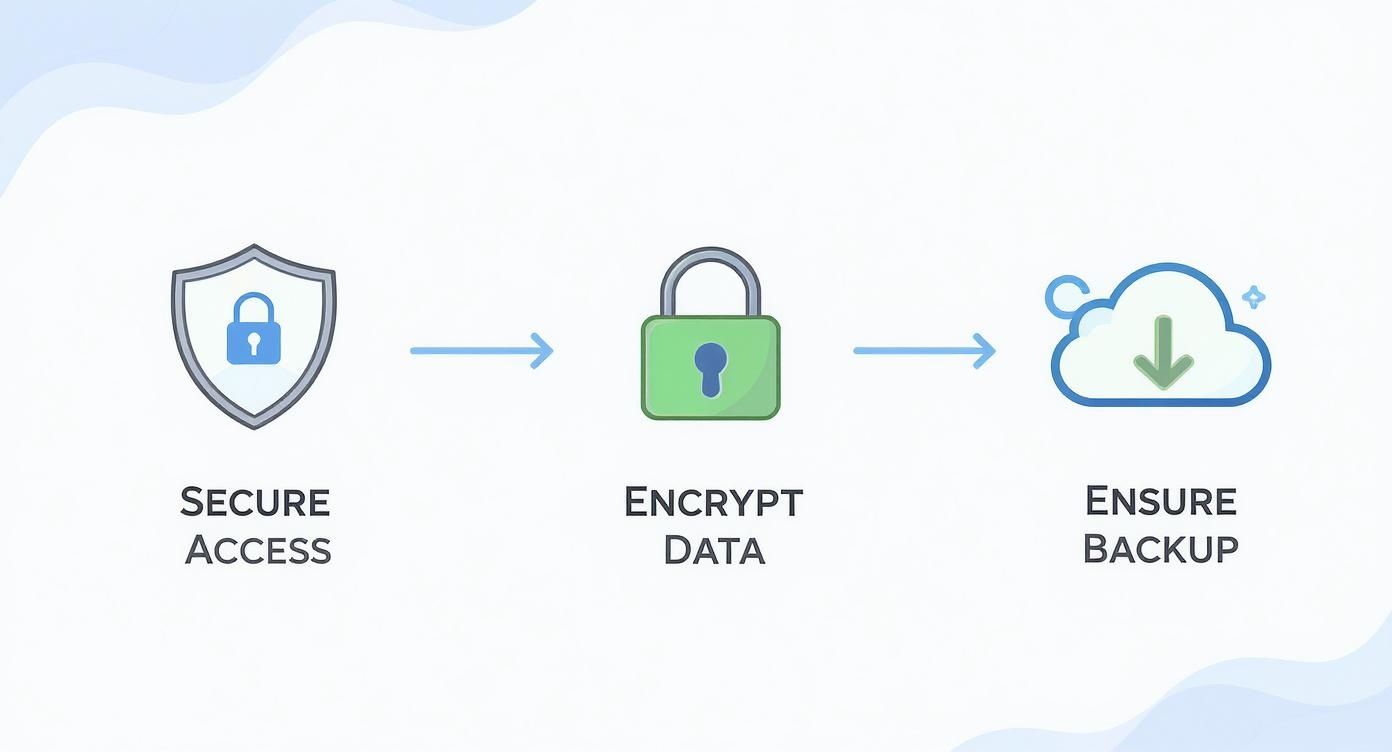
As the visual shows, securing access, encrypting your data, and ensuring you have reliable backups create a continuous loop of protection for your firm’s most valuable information.
Once things have settled down and your environment is stable, your focus should shift to continuous improvement. It’s time to establish a clear cloud governance framework that spells out roles, responsibilities, and policies for managing your new infrastructure. This should cover everything from the rules for creating new resources to managing user access and keeping up with security compliance.
Performance monitoring is another key piece of the puzzle. Are your applications running as smoothly as they should be? Are there any bottlenecks slowing things down? Monitoring tools give you the data you need to answer these questions and fine-tune your setup.
This is where partnering with a provider that offers managed cloud services can be a game-changer. It offloads a lot of this day-to-day management, letting you focus on running your business while experts handle the optimization, security, and upkeep of your cloud environment.
Moving from on-premise to the cloud isn’t a one-and-done project. It’s the start of a new way of operating—one that delivers far more flexibility, resilience, and efficiency when you manage it right.
Even with a great plan, moving from an on-premise server to the cloud can feel like a leap of faith. It's totally normal to have questions. Let's walk through the most common concerns we hear from business leaders to clear things up and give you the confidence to move forward.
A true cost estimate goes way beyond just comparing server prices. The biggest mistake we see is overlooking variable costs like data transfer fees, different storage tiers, and the price of managed services.
The best place to start is with a detailed audit of what you're spending right now. Tally up everything: hardware purchases, software licenses, annual maintenance contracts, power, cooling, and the hours your team sinks into IT upkeep. That number is your on-premise Total Cost of Ownership (TCO).
Next, you can use a cloud provider's TCO calculator for a rough baseline, but for real accuracy, you have to dig into your specific workloads.
A good cloud partner will help model your firm's unique usage patterns to build a detailed forecast. This is a crucial step. It helps you avoid sticker shock and often uncovers immediate savings through strategies like reserved instances or right-sizing your resources from day one.
For most small and mid-sized firms, the answer is a definite yes. Major cloud providers like Amazon Web Services and Microsoft Azure invest billions of dollars every year into security—an amount that’s simply out of reach for a typical business.
This investment covers things like:
The key is understanding your role in the shared responsibility model. The provider secures the core infrastructure, but you are responsible for securing your data and access within that environment. By correctly configuring access controls, enabling encryption, and setting up smart network rules, you can achieve a much stronger security posture than you could ever maintain on your own.
Downtime isn't a given; it's a variable you can control with the right migration strategy. Many leaders worry about a long outage, but a well-planned move can often happen with very little disruption to your daily operations.
For non-critical applications, a simple "Lift-and-Shift" migration can often be done over a weekend with just a few hours of planned downtime. This is usually the easiest path for older, legacy systems.
For your most essential software, like your main accounting or case management platform, there are more advanced strategies. Techniques like phased migrations or real-time data replication can cut the final cutover downtime to just a few minutes. A well-documented plan, thorough testing, and a clear rollback procedure are what separate a seamless transition from a stressful one.
This is a critical detail that can cause major headaches if you overlook it. Never assume your existing software licenses will just transfer over to the cloud. You have to check the terms for every single application you plan to migrate.
Start with a full software license audit during your initial assessment. Some vendors offer a "Bring Your Own License" (BYOL) model, which lets you apply your on-premise licenses in a cloud environment. But the specific terms can be tricky, so it's essential to read the fine print.
In other cases, you might need to switch to a subscription model from the cloud provider's marketplace. This can actually simplify license management in the long run and turn a big capital expense into a predictable operating cost. By sorting this out early, you avoid compliance issues and unexpected fees later on.
Answering these questions is the first step toward a successful migration. The next is finding a partner who can handle the technical complexities so you can focus on your business. Cloudvara centralizes your essential software on a secure, high-performance cloud platform, backed by 24×7 support and a 99.5% uptime guarantee.
Ready to see how simple the cloud can be? Start your free 15-day trial today.




