
Implementing a Zero Trust security framework is less of a single action and more of a fundamental mindset shift. It’s about moving away from the old, comfortable idea of "trust but verify" to a much more rigorous "never trust, always verify" approach. The core idea is simple: you have to explicitly verify every single user and device, enforce access with the absolute minimum privilege necessary, and operate under the assumption that a breach is not just possible, but probable.
This means you’re constantly securing identities, validating the health of endpoints before they connect, and segmenting your network to box in any potential threats.
For decades, we thought about cybersecurity like a medieval castle. We built a strong perimeter—a moat and high walls in the form of firewalls—and just assumed everything and everyone inside the walls was safe. This "castle-and-moat" model was fine when your entire team worked inside the office, but that’s not how business works anymore.
Today, with remote work, cloud services, and personal devices, your people and your data are everywhere. The perimeter has effectively dissolved.
This is exactly why the Zero Trust philosophy isn't just a trend; it's a necessity. Instead of automatically trusting an access request because it came from "inside" the network, you scrutinize every single one, no matter where it originates. It’s a modern approach built on a few non-negotiable pillars.
To understand how these pillars fit together, it's helpful to see them in a structured way.
This table breaks down the foundational concepts of a Zero Trust architecture, showing what each pillar means in principle and what it looks like in practice.
| Pillar | Core Principle | Key Action |
|---|---|---|
| Identity Verification | Assume no user is trusted by default. | Confirm every user is who they say they are, every single time, usually with multi-factor authentication (MFA). |
| Device Health | An unhealthy device is a security risk. | Ensure every device connecting to your network meets strict security standards before it's granted access. |
| Least-Privilege Access | Users should only access what they need. | Grant the absolute minimum level of access required for a user to perform their specific job function—and nothing more. |
| Network Segmentation | Contain breaches before they spread. | Divide your network into small, isolated zones (microsegmentation) to stop an attacker from moving laterally. |
| Continuous Monitoring | Trust is temporary and must be re-earned. | Constantly monitor, log, and analyze all activity to detect and respond to threats in real time. |
Each pillar works together to create a layered, resilient defense that protects your data and applications, no matter where they are.
This shift isn't just a technical upgrade; it's a strategic business decision that acknowledges the reality of modern work. This diagram really drives home the change from the old, vulnerable model to a resilient Zero Trust framework.
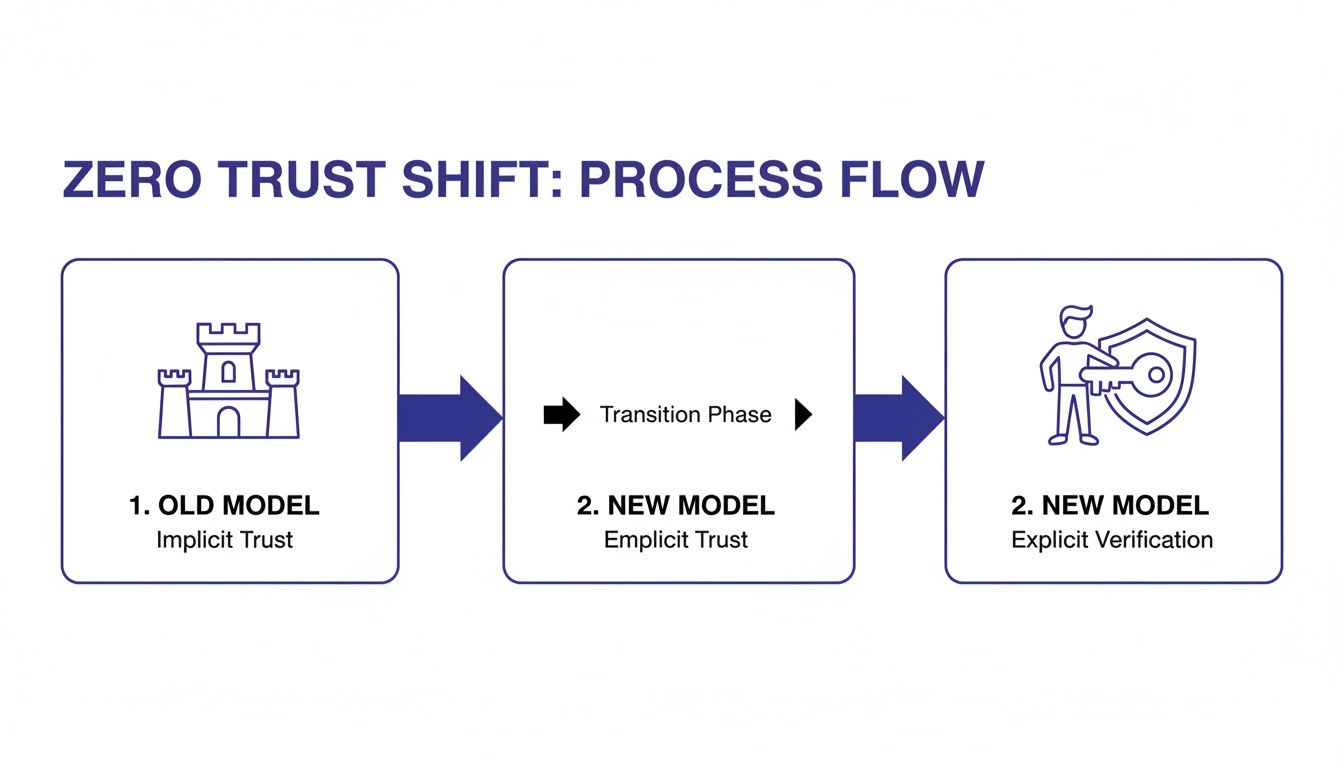
As you can see, the focus moves away from a static, location-based defense toward a dynamic model where security is wrapped tightly around individual users and their specific access rights.
The market reflects this urgency. The global Zero Trust security market is expected to be worth between $34–40 billion by 2025. High-value sectors are leading the charge, with software and finance firms dedicating nearly 28% and 19% of their security budgets, respectively, to these initiatives.
Zero Trust isn’t about making access impossible; it's about making unverified access impossible. It’s a fundamental change that aligns your security with the reality of how modern businesses operate.
As you move away from traditional security, incorporating 10 actionable best practices for network security is essential for building a strong foundation. This shift is also a critical piece of any successful cloud adoption strategy, ensuring your architecture is secure from the ground up.
In the old security model, we built walls. Your network was a fortress, and the goal was to keep bad actors out. But in a Zero Trust world, that perimeter has dissolved. It’s been replaced by something far more precise and powerful: identity.
Now, every single access request starts with one simple but critical question: who is asking? This is why any practical journey into Zero Trust has to begin with strong Identity and Access Management (IAM).
Think of it like the keys to your office. You wouldn't give every employee a master key that opens every single door, from the server room to the CEO's office. You'd issue specific keys that only open the doors they need to do their job. IAM applies that exact same logic to your digital world, making sure every user and device is properly authenticated and authorized before they can touch a single resource.
This "identity-first" approach isn't just a theory; it's how businesses are successfully implementing Zero Trust today. Industry surveys show it's the most common starting point, with 63% of organizations reporting at least a partial rollout by 2024. Security teams are focusing on essentials like multi-factor authentication and role-based access, which can immediately neutralize 25–50% of an environment's risk. You can dig into more Zero Trust adoption trends on expertinsights.com.
If you do only one thing, do this: deploy Multi-Factor Authentication (MFA) everywhere. A password by itself is no longer a defense; it's a single point of failure just waiting to be cracked or stolen.
MFA demands that users provide two or more verification factors to get in. This makes it exponentially harder for an attacker to succeed, even if they have a user's password. It typically combines something you know (a password) with something you have (a code from an app or a physical key).
This screenshot from Wikipedia shows a classic MFA workflow: you enter your password and then get a prompt for a second factor on your phone.
That simple, extra step is an incredibly powerful barrier against unauthorized access. For Cloudvara clients, getting this set up is a breeze. Our platform has native support for two-factor authentication (2FA), giving you the core technology needed to lock down every login.
If you want a deeper dive, check out our guide on what two-factor authentication is and why it's crucial.
Once you’ve confirmed a user is who they claim to be, the next question is, what should they be allowed to touch? This is where the Principle of Least Privilege (PoLP) comes into play. It’s a simple concept with a massive security payoff: give users the absolute minimum permissions needed to do their jobs, and nothing more.
By doing this, you dramatically shrink your attack surface. If an employee's account is ever compromised, the damage is contained because the attacker is stuck with the same limited access as the legitimate user.
Here’s how this looks in the real world:
By meticulously defining roles and permissions, you transform your attack surface from a wide-open field into a series of small, locked rooms. An intruder who gets through one door is still trapped, unable to move laterally to more valuable assets.
This granular control is the heart of making identity your new perimeter. It’s not about keeping people out. It’s about letting the right people in, to the right places, for the right reasons, and only for as long as they need to be there. This requires some upfront work to define roles and policies, but it pays you back every single day in risk reduction.
Once you’ve locked down who can access your systems, the next critical step is to scrutinize the devices they’re using. A verified user on a compromised laptop is still a major threat, which is why Zero Trust demands we verify the health of every single endpoint before granting it access.
After that, we have to assume that a breach is still possible. The goal then becomes limiting the potential blast radius. This two-pronged approach—device health checks and network isolation—is how you move from simply verifying identity to validating the entire connection.

You can no longer afford to be blind to the state of devices connecting to your resources. A device posture check is a non-negotiable step where you automatically assess a device's security health against a predefined baseline before it can connect to your Cloudvara environment.
Think of it as a security checkpoint. Before a laptop, tablet, or phone can get to your critical applications, it must pass a digital health screening. This isn't about being intrusive; it's about basic cyber hygiene. A single outdated device can create a gaping hole in your defenses.
Here are the essential checks you should be running:
If a device fails any of these checks, access is automatically blocked. The user can then be directed to a remediation page with clear instructions on how to bring their device into compliance. This creates a self-service model that improves security without burying your IT team in support tickets.
Once a healthy, verified device connects, your next job is to strictly limit where it can go. Traditional networks are often flat, meaning that once an attacker gets inside, they can move around freely. This concept, known as lateral movement, is how minor breaches snowball into catastrophic incidents.
Microsegmentation is the answer. Instead of one big, open network, you divide your environment into many small, isolated zones, essentially wrapping each application in its own secure bubble. It’s like replacing a large open-plan office with a series of secure rooms, each requiring separate keycard access.
Microsegmentation is the digital equivalent of a ship's watertight bulkheads. If one compartment floods, the barriers prevent the entire ship from sinking. In your network, if one application is compromised, the breach is contained to that single segment.
This approach is incredibly powerful in a Cloudvara dedicated server environment. You can create distinct security zones for different functions, completely isolating them from one another.
For example, you could set up a simple three-zone architecture:
With this setup, even if your web server is compromised, the attacker is trapped. They cannot move laterally to steal data from your database because there is no network path for them to do so. This level of granular control is a cornerstone of an effective Zero Trust architecture, especially when managing access through solutions like Cloudvara's hosted virtual desktops.
Once you’ve locked down identities and devices, it’s time to tackle the core of your business: your applications and data. The old-school approach of using a Virtual Private Network (VPN) just doesn't cut it anymore. A VPN is like giving someone a master key to your entire building—once they're in, they can roam anywhere.
This "all-or-nothing" access creates a massive blind spot. If a hacker gets their hands on a user's VPN credentials, they can move sideways across your network, hunting for weak spots and valuable data. In a Zero Trust world, that kind of built-in trust is a recipe for disaster.

The modern, smarter alternative is Zero Trust Network Access (ZTNA). Instead of connecting people to a network, ZTNA connects a verified user directly to a specific application—and only for as long as they need it. It creates a secure, one-to-one encrypted tunnel that hides your applications from the public internet and isolates traffic from the rest of your network.
Think about it in terms of Remote Desktop services on Cloudvara. Instead of exposing your RDP environment through a wide-open VPN, you wrap it in a ZTNA framework. This means only authenticated users on compliant, healthy devices can even see that the application exists, let alone try to log in. It’s a huge leap forward.
Just how different are these two approaches? Let’s break it down.
The table below highlights the fundamental security differences between granting broad network access and the precise, application-focused control of ZTNA.
| Feature | Traditional VPN | Zero Trust Network Access (ZTNA) |
|---|---|---|
| Access Level | Grants broad access to the entire network. | Provides granular, per-application access. |
| Visibility | Makes internal applications visible on the network. | Hides applications from the internet and unauthorized users. |
| Attack Surface | Large and difficult to manage. | Minimal, as access is restricted to specific resources. |
| Trust Model | Trusts users once they are authenticated. | Continuously verifies trust with every access request. |
As you can see, ZTNA doesn't just improve security—it completely changes the game by eliminating lateral movement and making your critical applications invisible to attackers.
While ZTNA is fantastic for controlling who gets in, you still need to protect the data itself. A solid strategy means knowing what data you have, keeping it secure at all times, and making sure you can get it back no matter what happens.
It all starts with data classification. You can't protect what you don't know you have. Take the time to identify and tag your most sensitive information—think customer PII, financial records, or your company's intellectual property. Once you know what's most important, you can apply your strongest security controls right where they're needed most.
Next up is encryption. Your data should be encrypted both at rest (when it's sitting on a server) and in transit (when it's moving across the network). This is your last line of defense. Even if an attacker somehow manages to grab a file, the data inside is completely unreadable and useless without the decryption key.
But the final, non-negotiable layer of protection is a resilient backup strategy. In a world of ransomware and data corruption, having automated, verified backups is your ultimate safety net.
Implementing proactive strategies to fight against ransomware and malware is essential, and reliable backups are the cornerstone of any recovery plan. Cloudvara’s automated daily backups deliver that crucial peace of mind, ensuring a recent, clean copy of your data is always ready to be restored. For a complete overview of safeguarding your information, check out our guide to effective cloud data protection.
This combination—tight access controls from ZTNA and rock-solid data integrity—is what a modern security framework is all about.
Zero Trust isn’t a piece of software you install and then walk away from. Think of it as a living security strategy, one that demands constant attention. You’re shifting from a “set it and forget it” mindset to one of continuous verification, analysis, and adaptation.
This ongoing process hinges on a solid monitoring and logging engine. To enforce the "always verify" rule, you need to see exactly what’s happening across your environment in real time. Without that comprehensive visibility, your carefully crafted security policies are just static rules in a world that’s anything but.
First things first, you need to collect telemetry from every corner of your infrastructure. This means pulling in logs and event data from all the key pillars of your Zero Trust architecture.
What does this data collection actually look like?
Effective network monitoring is the sensory system of your Zero Trust strategy. It gives you the visibility needed to spot weird behavior before it blows up into a full-blown incident.
Just collecting data is only half the job. The real power of continuous monitoring comes from using those insights to trigger automated responses. This is the feedback loop that makes a Zero Trust model so adaptive and resilient.
Imagine an employee who always works from the Chicago office suddenly logs in from a location overseas just minutes later. This "impossible travel" scenario should immediately kick off an automated security workflow.
Zero Trust isn't just about blocking bad actors at the front door. It's about having the intelligence to spot when a trusted insider's account might be compromised and taking immediate, automated action to contain the threat.
This is where your policy enforcement gets dynamic. Instead of just a one-time check at login, your system should constantly re-evaluate trust based on real-time behavior.
Here are a few examples of automated responses you can build:
This proactive approach really pays off. Well-executed Zero Trust models show real, measurable improvements. Some organizations report up to a 78% reduction in specific security incidents. On top of that, independent analyses from firms like SentryTech Solutions estimate this strategy can lower the average cost of a breach by about $1.76 million.
By tying your monitoring directly to policy enforcement, you create a security posture that doesn't just block known threats but can also intelligently react to new and unexpected ones. This continuous cycle of monitoring, analyzing, and enforcing is the engine that keeps your Zero Trust implementation running strong for the long haul.
Making the shift to a Zero Trust model naturally brings up a lot of practical questions. It’s a major change in how you approach security, so it's smart to think through the complexity, costs, and how it all fits with your existing tech. Let's tackle some of the most common concerns we hear from businesses just starting out.

Not at all. The secret is realizing Zero Trust is a journey, not a switch you flip overnight. Small businesses can get huge security wins by focusing on the fundamentals first and rolling out changes in manageable phases.
Start with the steps that give you the biggest bang for your buck. Implementing Multi-Factor Authentication (MFA) across all your accounts is the perfect first move. It immediately puts up a massive wall against common credential theft attacks. From there, turn your attention to the Principle of Least Privilege. Go through your user permissions and strip away any access that isn't absolutely essential for someone's job.
Just those two actions alone dramatically shrink your attack surface without needing a massive, disruptive project. The goal is steady, meaningful progress—not instant perfection.
This is a great question and a very real-world problem. Many businesses rely on older, critical applications that were built long before modern security was a consideration.
The answer is to use an access proxy or a gateway. Think of it as a modern security bouncer that stands in front of your old application. When a user tries to access that legacy accounting server, for example, they first have to get past the gateway. That gateway enforces all your modern rules—identity verification, MFA, device health checks—before it ever lets the connection through to the old app.
This approach lets you wrap your legacy tech in a modern security blanket. You get to protect these vital systems inside your Zero Trust framework without the headache of rewriting or replacing them right away.
The number one mistake we see is treating Zero Trust like it’s just an IT project. It’s not. It’s a fundamental shift in strategy and culture that needs buy-in from everyone.
Here are a few common traps to watch out for:
One of the best ways to get everyone on board is to frame the changes around enabling secure productivity, not just blocking access. When your team understands that Zero Trust helps them work safely from anywhere, they’re far more likely to embrace it.
The Cloudvara platform gives you several foundational pieces for building your Zero Trust architecture right out of the box. Our built-in Two-Factor Authentication (2FA) is the cornerstone of your identity verification, making it simple to enforce strong MFA from day one.
Our dedicated server options also create the ideal environment for network segmentation, helping you isolate critical applications and databases from the rest of your network. On top of that, our secure Remote Desktop services offer a controlled, auditable way to manage application access that aligns perfectly with Zero Trust principles.
Finally, our robust Service Level Agreements (SLAs) ensure your security infrastructure is always available, while our comprehensive backup solutions protect your data's integrity—a core part of any Zero Trust model. Using these native features lets you build a powerful security foundation directly on the Cloudvara platform.
Ready to build a more secure future for your business? Cloudvara provides the secure, reliable cloud hosting environment you need to implement a strong Zero Trust strategy. Start your free 15-day trial today and see how our platform can protect your critical applications and data. Learn more at Cloudvara.




