
Hosting your business applications in the cloud is really about one thing: moving your software off that physical server in the closet and into a secure, managed data center.
This simple shift lets your team access critical programs—QuickBooks, Sage, or even specialized legal software—from any device, anywhere in the world. You’re essentially trading the headaches of maintaining your own hardware for the efficiency of a service.
For many small and mid-sized firms, the server closet is a source of constant, low-grade anxiety. It's a single point of failure. Overheating, power outages, or a sudden hardware crash can bring your entire operation to a standstill.
And the costs just keep adding up. You’ve got cooling, electricity, and the expense of hiring IT support for every little update and troubleshooting session. That’s the old way of doing things.
Hosting your applications in the cloud completely changes this dynamic. Instead of buying and managing physical servers, you partner with a provider who handles all the infrastructure. Think of it like this: you don't build your own power plant just to keep the lights on; you subscribe to a utility. Cloud hosting is the utility service for your business software.
This transition delivers some immediate, tangible advantages:
The real value here isn't just about the technology. It's about business continuity and focus. When you stop worrying about server maintenance, you can pour those resources back into serving your clients and growing your firm.
To make the choice clearer, it helps to see the differences side-by-side. This table breaks down what you’re managing with an on-premise server versus what a cloud hosting provider handles for you.
| Feature | On-Premise Servers | Cloud Application Hosting |
|---|---|---|
| Initial Cost | High (hardware, software licenses, setup) | Low (no hardware to purchase) |
| Maintenance | Your responsibility (updates, repairs, security) | Handled by the provider |
| Security | Your responsibility to implement and monitor | Enterprise-grade security included |
| Accessibility | Limited to office network unless complex VPNs are set up | Secure access from any device, anywhere |
| Scalability | Difficult and expensive (requires new hardware) | Easy and instant (adjust resources on demand) |
| Uptime | Dependent on your power, cooling, and hardware health | Guaranteed by a Service Level Agreement (SLA) |
The contrast is pretty stark. While on-premise gives you physical control, it comes with a much heavier burden of cost, maintenance, and risk. Cloud hosting shifts that burden to a specialized provider, letting you focus on your business operations.
The market definitely reflects this operational shift. The global web hosting services market was valued at USD 126.41 billion in 2025 and is projected to hit USD 149.30 billion in 2026. Experts see it growing at a compound annual rate of 19.7% through 2032.
This isn't just a tech trend; it's a fundamental change in how businesses, especially in detail-oriented fields like accounting and law, choose to operate. They are actively abandoning traditional servers for more scalable, resilient solutions.
Ultimately, this isn't just an IT upgrade. It’s about building a more flexible and efficient business. When you explore the detailed benefits of cloud hosting, you can see how it directly impacts your bottom line and your ability to adapt.
A successful move to the cloud happens long before you transfer a single file. I've seen it time and time again: firms that rush the process end up tangled in overlooked software dependencies, hit with surprise costs, and facing disruptive downtime. A solid pre-flight check is what separates a smooth transition from a chaotic one.
Think of this stage as taking a detailed inventory of your digital office. For a small accounting firm, that means listing every single piece of software your team touches daily—not just the heavy hitters like QuickBooks or Sage, but also that specialized tax prep tool, the document management system, and even Microsoft Office.
This diagram paints a clear picture of the shift from clunky on-premise servers to a more streamlined and responsive cloud setup.
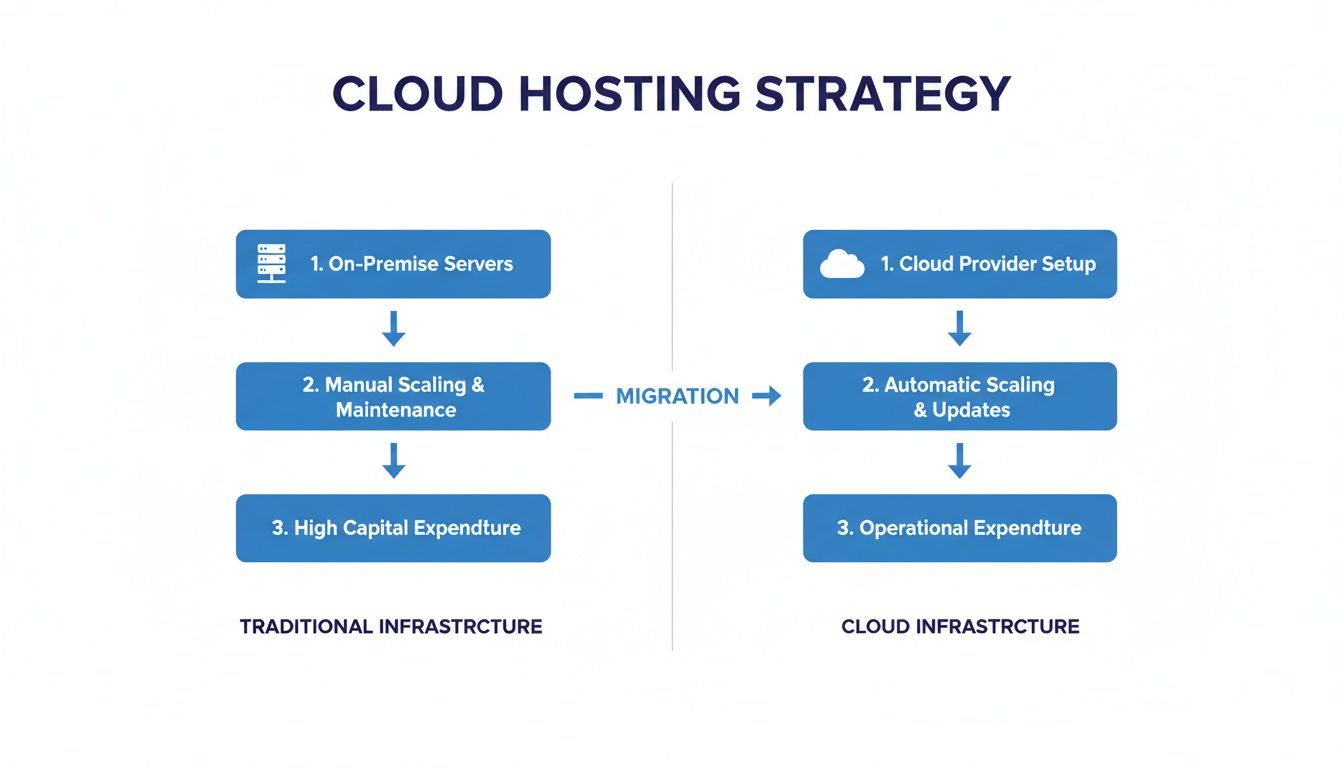
As you can see, the goal is to consolidate and simplify, removing the burden of managing physical hardware from your plate for good.
First things first, open up a spreadsheet. The goal here isn't technical perfection; it's practical clarity. Your inventory needs to capture just a few key details for each application.
For example, a law firm might realize its case management software is tightly woven into its billing system. Trying to move one without the other would break a critical workflow. Spotting these connections early prevents massive headaches down the road. Before you get too deep, using a good pre-migration checklist can be a real lifesaver, ensuring you don't miss a thing.
One of the biggest and most common mistakes I see is overprovisioning resources—essentially, paying for more server power than you actually need. Don't guess. You need to look at your current usage patterns to avoid this.
If you have an IT person, ask them for a report on your server's average CPU usage, RAM consumption, and storage utilization from the last month. If not, even a simple check of your server's task manager during peak business hours can give you a decent snapshot.
Your goal is to match your cloud environment to your real-world needs, not some theoretical maximum. A good cloud provider will help you analyze this data to recommend a starting configuration that you can easily scale up or down as your business evolves.
This kind of proactive planning is quickly becoming the norm. In fact, industry analysis predicts that by 2027, a staggering 90% of enterprises will be using hybrid cloud strategies. This is driven by firms consolidating essential tools like Microsoft apps, CRMs, and tax software onto flexible platforms that can grow with them.
Finally, let's talk about the human element. Who needs access to what, and where will they be working from? Sketch out a simple access map that outlines user roles and the permissions they'll need.
Defining these roles from the get-go helps your cloud provider configure a secure environment from day one. It ensures team members can only access the data they absolutely need to do their jobs, and it makes the onboarding process a whole lot smoother for your staff.
For a deeper dive into organizing your move, check out our complete cloud migration checklist designed specifically for SMBs. This careful planning is what truly separates a seamless migration from a stressful one.

Once your planning is solid, the next big question is how you’ll get your applications into the cloud. The good news is that for most small and mid-sized businesses, this doesn’t need to be some complicated, months-long IT project. The simplest path is often the best one.
When it comes to hosting applications in the cloud, there are several strategies, but they really boil down to a few core approaches. Think of it like moving your office. You could tear down the old building and construct a new one from scratch (re-architecting), do an extensive renovation (re-platforming), or just pack up your existing furniture and move it to a better location.
For established businesses like accounting and law firms, that third option is almost always the right call.
The most direct and cost-effective strategy is known as lift-and-shift, or rehosting. This approach does exactly what it sounds like: it lifts your existing applications and data from your on-premise server and shifts them directly into a cloud environment.
Imagine your QuickBooks or Sage software. It works just fine. You don't need to rebuild it; you just need it to run in a more secure, accessible, and reliable place. With a lift-and-shift migration, your cloud provider creates a virtual server that mirrors your current setup, moves the application over, and makes it available through a secure remote desktop.
This method is incredibly popular for a few key reasons:
This approach is perfect for the legacy applications that are the backbone of your business—the ones that are proven, stable, and essential for getting work done every day.
While lift-and-shift is ideal for most SMBs, it’s helpful to understand the other options to see why they're often unnecessary for this goal. Two other common strategies are refactoring and re-platforming.
Refactoring (or Re-architecting) involves completely rewriting an application to take full advantage of cloud-native features. This is a massive undertaking, really only suitable for large enterprises developing custom software from the ground up. For a firm using off-the-shelf software like a CRM or tax program, it’s completely impractical.
Re-platforming is a middle-ground approach. It involves making some minor tweaks to an application to better use cloud capabilities, like moving from a self-managed database to a managed cloud database service. While it can offer some performance benefits, it still introduces complexity and risk that just isn't necessary when your primary goal is simply better access and security.
The core objective for most firms is business continuity. You need your applications to work reliably without interruption. A complex redevelopment project introduces risks and costs that directly conflict with that goal.
As you choose your path, it's smart to consider established cloud migration best practices to ensure a smooth transition. For most SMBs, the best practice is to keep it simple.
Ultimately, the lift-and-shift model aligns perfectly with the needs of professionals who depend on stable, existing software. You can explore a deeper comparison of these application migration strategies to confirm which path is right for you, but for most, the answer is clear. It provides all the core benefits of the cloud—security, accessibility, and reliability—without the high cost and disruption of a major IT overhaul.
For professionals in fields like law and accounting, data security isn't just a feature—it's the foundation of your practice. When you’re hosting applications in the cloud, you're entrusting your most sensitive client information to a third party. This demands a level of security that goes far beyond a simple password.

This is precisely why generic, multi-tenant public clouds can be a risky choice. A secure, private environment ensures your firm’s data is completely isolated, preventing any possibility of crossover with another company's information. It's the digital equivalent of having your own secure, standalone office building instead of sharing a co-working space.
To properly lock down your hosted environment, a few measures are simply non-negotiable. These aren't optional add-ons; they are the essential pillars that support a compliant and trustworthy practice.
First on that list is Two-Factor Authentication (2FA). A password alone is a weak defense. Implementing 2FA means that even if a password is stolen, unauthorized access is blocked because the intruder lacks the second verification step—typically a code sent to a team member's phone. This single layer is one of the most effective ways to shield client files from bad actors.
Next is robust data encryption. Your data exists in two states, and it needs to be protected in both:
Together, these encryption methods create a secure tunnel and a locked vault for your information, ensuring end-to-end protection.
Business continuity hinges on two critical elements: reliable backups and guaranteed uptime. Without them, even a minor hiccup can escalate into a major business disruption, leading to lost revenue and damaged client trust.
A sound backup strategy must be automated and frequent. Relying on manual backups is a recipe for failure; someone will eventually forget. Your cloud provider should perform automated, daily backups of your entire environment. This ensures that in the event of data corruption or accidental deletion, you can restore your systems to a known good state from the previous day with minimal data loss.
A provider's uptime guarantee, or Service Level Agreement (SLA), is a contractual promise of availability. A 99.5% uptime SLA might sound high, but it still allows for up to 43.8 hours of potential downtime per year. For critical applications, you should look for providers offering 99.9% uptime or greater.
This metric is a direct indicator of the provider's infrastructure reliability and a critical factor when choosing a partner to host the applications your firm depends on. Digging into a detailed list of essential cloud security practices for businesses can provide even more clarity on what to look for.
The push for better security and reliability is a huge driver of the cloud market's growth. In fact, worldwide public cloud revenue is forecasted to hit an astounding US$1.19 trillion in 2026, with Software as a Service (SaaS) leading the way.
This explosive growth is directly tied to the applications legal and accounting teams use daily, like QuickBooks and CRMs. It's all part of a larger movement, with overall cloud services expected to reach $947.3 billion in 2026, fueled by major players like AWS and Azure. You can find more insights on these cloud computing market trends and what they mean for businesses like yours.
All the planning and architectural work has led to this moment—the actual move. This is where the blueprint becomes a reality. A smooth execution isn't about luck; it’s about methodical testing, a perfectly timed cutover, and being diligent in those first few critical weeks.
The transition from your old server to the new cloud environment should feel less like a dramatic leap and more like a carefully orchestrated handover. Your team’s workflow depends on getting this right. The goal is for them to log in on Monday morning and find everything exactly where it should be, just faster and more accessible.
Before you flip the final switch, you have to be absolutely sure every application works flawlessly in its new home. That's the whole point of User Acceptance Testing (UAT). Think of it as a full dress rehearsal where key members of your team log into the cloud environment to run through their everyday tasks.
This isn’t just a job for your IT lead. Get an accountant to run a complex report in QuickBooks. Have a paralegal search for a specific document in your case management system. You want to simulate real-world usage to catch any small glitches before they turn into big problems.
Give your testers a simple checklist to follow:
UAT is what gives you the final green light, giving everyone the confidence that the new system is ready for prime time.
The cutover is the moment you officially move from your old server to the new cloud environment. Timing is everything. The golden rule? Schedule it when business activity is at its lowest to avoid disrupting your operations.
For most accounting and law firms, that means a Friday evening or sometime over the weekend. This window gives your cloud provider plenty of time to run the final data sync, redirect traffic, and handle any surprises without the pressure of a live workday.
The goal of a perfect cutover is for your team to notice almost nothing at all, except perhaps better performance. A well-planned migration should be a non-event for your end-users.
Once the cutover is done, the old server should be taken offline (but don't wipe it just yet) to make sure no one accidentally logs in and works with old data. This clean break is vital for data integrity.
Moving to the cloud is an ongoing process, not a one-time project. That first month is absolutely critical for stabilizing the new environment and setting good habits. A good provider will walk you through this, but having your own checklist makes sure nothing gets missed.
Here’s a practical list of things to focus on during your first 30 days after migrating.
Verify Backup Schedules and Success: Don't just assume backups are working. On day one, ask your provider for proof that the first automated backup ran successfully. Check in weekly for the first month to confirm the schedule is running like clockwork. This is your ultimate safety net.
Monitor Performance and Get Feedback: Check in with your team often. Are applications running smoothly? Is anyone seeing lag? Early feedback helps your provider fine-tune resource allocation and make sure the environment is perfectly sized for your actual workload.
Conduct Team Training on New Access Methods: Even though the cloud desktop looks familiar, the way your team gets to it is new. Hold a quick training session to show them how to log in from different devices—their office desktop, a home laptop, or a tablet. Make sure everyone knows exactly who to call for support.
Review the First Invoice: Take a close look at your first bill. It should line up perfectly with the quote you were given, with no surprise fees. This confirms the transparent pricing you signed up for and gives you a clear picture of your ongoing costs.
Update Security Protocols: Make sure every team member has set up their Two-Factor Authentication (2FA). This is also a great time to review user permissions and remove access for anyone who no longer needs it. It reinforces a secure-first mindset from the very beginning.
This initial period of hyper-care sets the foundation for your long-term success in the cloud. By actively managing these first few weeks, you solidify all the gains from your migration—better security, reliability, and flexibility. For those who prefer a completely hands-off approach, exploring the benefits of fully managed cloud services can provide even greater peace of mind.
Making a big shift in your IT always brings up good questions. Over the years, we've found that business owners, accountants, and legal professionals all tend to ask about the same things when they consider moving their applications to the cloud. Let’s tackle those concerns head-on with some straight, practical answers.
This is easily one of the first and most important questions we hear. In nearly every case, you bring your own licenses (BYOL). You’ve already paid for QuickBooks, Sage, or your firm's specialized case management tool, and you continue to own and use those exact licenses.
Your cloud hosting provider isn't selling you new software. They're simply taking your existing applications and moving them from that server in your office to their secure, high-performance data center. This is a huge plus because you get to skip the expensive and frustrating process of repurchasing everything. It’s always a good idea to confirm your license agreements allow for third-party hosting, but for most modern business software, this is standard practice.
It’s surprisingly simple. In fact, it's often a major upgrade from clunky VPNs or other remote access methods you might be using now. Once the migration is done, your team gets a secure remote desktop icon placed right on their computer's desktop—it works the same whether they’re in the office or at home.
When they click it and log in, they see a familiar Windows desktop. All their applications—QuickBooks, Office, your document manager—are right where they expect them to be. It looks, feels, and works just like their local machine.
A good provider makes sure this entire setup is handled for you, so the login process feels natural from day one. The learning curve for your staff is practically zero because the experience doesn't really change—it just becomes available from anywhere.
For the vast majority of businesses moving off older, on-premise servers, the answer is simple: your applications will run significantly faster. Cloud providers use enterprise-grade hardware that's far more powerful than what a small or mid-sized business could justify buying and maintaining on its own.
Think of it this way: your application and its data are now living in the same super-fast environment. This makes tasks that used to crawl, like generating a huge financial report or searching through years of client files, much quicker. A critical part of any good migration is "right-sizing" your cloud server to ensure you have plenty of processing power, RAM, and high-speed storage for peak performance.
This is where the partnership model of cloud hosting really shines, lifting a massive weight off your shoulders. It creates a clear division of labor that lets you focus on your business, not IT chores.
Here’s how the responsibilities usually break down:
What the Hosting Provider Handles:
What You Still Handle:
This setup lets you run your firm without having to become a part-time IT expert. You get a stable, secure, and backed-up platform, which frees you up to manage the software that actually runs your business.
Ready to stop worrying about server maintenance and start focusing on your business? Cloudvara provides a secure, reliable, and fully managed environment for your essential applications. Get a free 15-day trial to experience the difference for yourself at https://cloudvara.com.