Desktop as a Service (DaaS) is a cloud computing solution that delivers a complete, virtual desktop to any device over the internet. Imagine your work computer isn't a physical box under your desk but a secure, high-performance environment you can stream just like a movie on Netflix. This model liberates businesses from the costly, repetitive cycle of buying and managing physical hardware.
At its core, Desktop as a Service is all about separating your desktop environment—your operating system, applications, files, and personal settings—from the physical machine you use to access it. Instead of running on a local computer, your entire desktop is hosted on powerful servers in a secure data center managed by a DaaS provider.
This completely transforms IT management. Rather than purchasing, configuring, and maintaining hundreds of individual PCs, your IT team can manage every single user desktop from one centralized console. It’s a crucial shift for today's dynamic work environments, where employees need reliable access from multiple locations and devices.
To really appreciate the value of DaaS, it helps to understand what came before it: Virtual Desktop Infrastructure (VDI). With traditional VDI, a company had to build and manage its own private cloud just to host virtual desktops. This meant a huge upfront investment in servers, storage, and specialized IT experts to run it all.
DaaS simplifies this entire process. A third-party provider, like Cloudvara, handles all the backend infrastructure. Your business just pays a predictable monthly subscription for each user.
This pay-as-you-go model converts a large capital expense (CapEx) into a manageable operating expense (OpEx). It effectively democratizes virtual desktop technology, making it accessible even for small businesses without massive IT budgets.
The explosion of remote and hybrid work has made the limitations of physical hardware more obvious than ever. Managing security, software updates, and user support across a distributed workforce is a major headache. Desktop as a Service directly solves these pain points by offering:
This agility is why DaaS is no longer just an IT solution but a strategic business tool. It provides the foundation for a more resilient, flexible, and productive workforce. For businesses looking to modernize their operations, understanding the benefits of options like hosted virtual desktops is the first step toward building a future-proof IT strategy.

Adopting a Desktop as a Service (DaaS) strategy goes way beyond the technical jargon. It delivers real, tangible results for your business. The core benefits come from a fundamental shift: moving your desktops from scattered, vulnerable laptops and PCs to a centralized, managed cloud environment. This single change strengthens your security, simplifies your finances, and makes your entire operation more agile.
One of the first things you’ll notice is a huge improvement in security. Think about it. When an employee’s laptop is lost or stolen, it’s a high-stakes data breach waiting to happen with traditional IT. With DaaS, that risk practically vanishes because no sensitive company data is ever stored on the physical device itself.
Since the entire desktop environment lives securely in the cloud, a lost laptop is just a piece of hardware. All your critical applications and files stay safe and sound in the provider’s data center, accessible only to those with the right credentials.
A DaaS model completely changes how you budget for IT. Instead of massive, unpredictable capital expenditures (CapEx) for new computers every few years, DaaS works on a simple, predictable operational expenditure (OpEx) model. You just pay a consistent monthly subscription per user. This smooths out your cash flow and makes IT costs much easier to forecast.
That financial shift also frees up capital that you can reinvest into other areas of the business. The market sees the appeal here; the global DaaS market is expected to hit roughly $57.83 billion by 2035, growing at an annual rate of over 19.4%. This explosive growth is driven by the need for flexible, multi-device work environments that modern teams demand.
By eliminating the hardware refresh cycle, businesses can reallocate significant funds from maintenance to innovation. This financial flexibility is one of the most compelling reasons organizations are making the switch.
The ability to scale your workforce up or down in an instant is a massive competitive advantage. Imagine you’re onboarding a new team member. With DaaS, their complete, fully configured desktop can be ready in minutes, not days. They can log in from any device and get to work immediately.
This agility works both ways. When a project ends or a seasonal team is no longer needed, you can de-provision their virtual desktops just as quickly, stopping the costs right then and there. This kind of elastic scalability ensures you only ever pay for what you actually use.
Finally, DaaS is a cornerstone of any modern disaster recovery plan. If your physical office becomes inaccessible because of a natural disaster, power outage, or anything else, your business doesn't have to grind to a halt. Your team can securely access their full work desktops from home or any other location with an internet connection.
This keeps productivity high and ensures client services continue without a hitch, no matter what’s happening outside. This level of resilience used to be something only huge enterprises with redundant data centers could afford. Now, small and mid-sized businesses can get the same security and continuity, a topic we dive into deeper in our article on the benefits of cloud hosting for small businesses. This strategy turns your IT from a potential point of failure into a tool for unwavering strength.
Making the switch to Desktop as a Service (DaaS) is a smart move for any business looking to streamline IT and give its team more flexibility. But a successful rollout doesn't just happen—it hinges on careful planning. If you skip the prep work, you could end up with performance headaches and frustrated users, completely undermining the benefits you were hoping for.
Before you even think about picking a provider, you need to look inward. A good migration plan covers everything from your network’s stability to how your most important apps will perform. Get this right, and the transition will feel invisible to your team.
Here's a visual breakdown of just how different the DaaS world is from the old way of doing things.
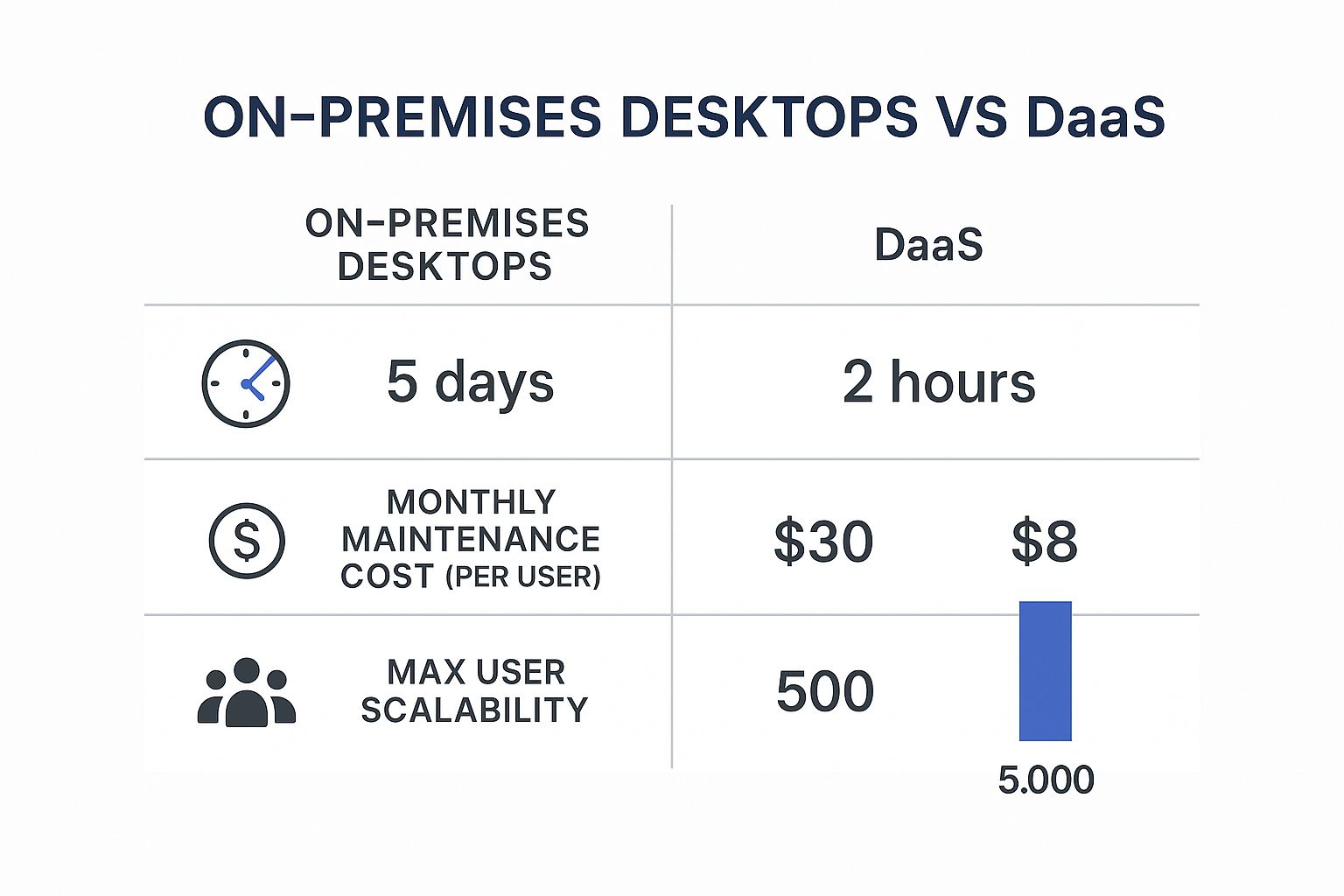
The numbers make it pretty clear: DaaS gets you up and running faster, costs less to maintain over time, and scales up without a hitch.
Your internet connection is the absolute lifeline for your DaaS setup. Every click, every keystroke, every mouse movement travels from the user's device to the cloud and back. Even a tiny bit of lag can make a powerful virtual desktop feel sluggish and clunky.
That’s why the first non-negotiable step is a thorough network health check. This isn't just about bandwidth. You need to get real numbers on latency and packet loss to make sure your connection can handle a smooth, real-time experience.
Think of your internet as the highway between your team and their virtual desktops. If that highway is jammed with traffic or full of potholes, it doesn’t matter how fast the car is. A low-latency connection is the clean, open road your DaaS solution needs to fly.
Not all software plays nicely in a virtual environment. Legacy programs or resource-hungry tools—think graphic design software or complex databases—can sometimes act up when they're running in the cloud. It’s absolutely crucial to audit your essential applications to make sure they’re fully compatible with the DaaS platform you’re considering.
Start by making a complete inventory of every single app your teams depend on. Then, work with potential providers to test how those critical tools perform in their environment. This lets you spot and fix any potential bottlenecks before they become a problem for your entire company. For a structured approach, our cloud migration checklist walks you through every detail you need to consider.
Moving desktops to the cloud is a big security win right off the bat, since you're getting sensitive data off of individual, vulnerable laptops and PCs. But you still have to make sure your provider’s infrastructure meets the specific regulatory rules for your industry, especially if you handle sensitive information.
When you're vetting providers, ask them to show you their compliance certifications. Some of the big ones to look for are:
Choosing a provider that already has these standards covered makes your life a lot easier and gives you confidence that your data is in good hands.
To help clarify the differences, let's compare DaaS directly with the traditional desktop model.
This table lays out the key distinctions between managing virtual desktops in the cloud versus maintaining physical machines on-site.
| Feature | Desktop as a Service (DaaS) | Traditional Desktops |
|---|---|---|
| Initial Setup | Rapid deployment, often within hours. No hardware procurement needed. | Lengthy process involving purchasing, imaging, and deploying physical PCs. |
| Management | Centralized updates, patching, and security from a single dashboard. | Decentralized management; each device requires individual attention. |
| Cost Structure | Predictable monthly subscription (OpEx). Pay-as-you-go model. | High upfront capital investment (CapEx) for hardware and software licenses. |
| Scalability | Scale up or down instantly by adding or removing users as needed. | Scaling requires purchasing new hardware, which takes time and budget. |
| Security | Data is centralized in a secure data center, not on endpoint devices. | Data is stored locally, making devices a prime target for theft and breaches. |
| Accessibility | Access desktops from any device, anywhere with an internet connection. | Tied to a specific physical machine at a specific location. |
As you can see, DaaS offers a fundamentally more agile and cost-effective approach to desktop management, freeing up IT resources to focus on more strategic initiatives.
A successful DaaS project doesn't just stop once everyone is logged in. To keep the user experience top-notch and your team productive, you need to monitor performance continuously. Your IT admins need tools to keep an eye on things like login times, how responsive apps are, and who is using what resources.
This kind of ongoing oversight helps you spot and fix issues proactively, sometimes before users even know there's a problem. It also gives you the data you need to optimize the environment, making sure the right resources go to the right people without wasting money. An effective monitoring strategy turns your Desktop as a Service DaaS solution from a simple tool into a consistently reliable asset for your business.
The real power of Desktop as a Service (DaaS) clicks into place when you see it solving actual business problems. It’s not some one-size-fits-all tech; it's a flexible tool that adapts to the unique headaches of different sectors. Whether it’s locking down patient data in healthcare or fueling heavy-duty design work in engineering, DaaS delivers the specific solutions companies need to get ahead.
By looking at these practical uses, you can see DaaS shift from an abstract IT idea to a genuine business advantage. Let’s dive into how different industries are using it to sharpen their competitive edge, tighten security, and empower their teams in ways that just weren’t possible with old-school hardware.
In the world of healthcare, every second counts. Clinicians need instant, secure access to Electronic Health Records (EHR) from anywhere—a patient's bedside, a consulting room, or even from home. Traditional desktops chain this critical data to one spot, creating workflow jams and serious security risks. A lost or stolen laptop could easily turn into a massive data breach and a HIPAA nightmare.
This is where Desktop as a Service (DaaS) changes the game. Healthcare organizations use DaaS to stream secure, HIPAA-compliant desktops to any authorized device, whether it's a tablet or a thin client on a mobile cart.
The financial services industry is under a microscope when it comes to regulations. Data security and high performance aren't just nice-to-haves; they're non-negotiable. For firms with remote traders or distributed teams, giving secure access to sensitive market data and trading platforms is a huge challenge. Standard remote access tools just don't have the security controls needed, leaving compliance gaps wide open.
DaaS offers a perfect fix by creating a locked-down, high-performance virtual workstation. Firms can give traders access to powerful platforms from their home offices while keeping total control over the data and applications.
With DaaS, financial institutions can enforce strict security policies, like disabling copy-paste functions or blocking data downloads to local drives. This ensures that sensitive client and market data never leaves the secure virtual environment, satisfying even the toughest regulatory requirements.
Engineering and architecture firms live and breathe resource-hungry software like AutoCAD and other CAD applications. Traditionally, that meant buying expensive, high-end physical workstations for every single designer. That model is not only costly but also rigid, chaining designers to their desks.
DaaS with GPU capabilities shatters that limitation. It lets firms deliver workstation-grade performance through the cloud to any standard laptop.
Call centers are all about peaks and valleys. They often need to scale their workforce up for seasonal rushes and then back down during slower times. The old way of buying, setting up, and deploying physical desktops for temporary agents is slow, expensive, and a logistical headache.
DaaS turns this entire process into a simple, on-demand service. A call center can spin up hundreds of fully configured virtual desktops for new agents in minutes. When the peak season is over, those desktops can be shut down just as fast, ensuring the company only pays for what it actually uses. This elasticity allows call centers to react instantly to business needs, turning a major operational hurdle into a real strategic advantage.
Picking a Desktop as a Service (DaaS) provider is one of the most important decisions you’ll make on your cloud journey. This partner becomes the foundation of your virtual desktop environment, so getting it right is essential for long-term success. The right provider feels like an extension of your IT team; the wrong one can lead to performance lags, security holes, and frustrated users.
Your evaluation needs to go beyond just the price tag. You have to dig into the technical specs of their infrastructure, understand their security posture, and get a clear picture of the support you’ll get when you need it most.
The user experience of a desktop as a service daas solution is directly tied to the quality of the provider's hardware and network. One of the biggest factors is the physical location of their data centers. The closer a data center is to your users, the lower the latency—which translates into a faster, more responsive desktop feel.
When looking at different providers, it’s important to know what cloud platform they’re built on, since many use infrastructure like Azure cloud services. Ask potential partners for specifics on their network, storage, and hardware to make sure they can handle your workload without creating bottlenecks. A good provider will be transparent about their setup and how it creates a smooth user experience.
A provider's promise of high performance is meaningless without the hardware and network architecture to back it up. Always ask for proof of their capabilities, including details on data center locations and performance metrics from existing clients in your region.
Handing over your desktop environment to a third party requires a huge amount of trust. That’s why checking a provider's security credentials isn’t just a good idea—it’s non-negotiable. You need a partner who takes a multi-layered approach to security, protecting your data at every level.
Start by asking for their compliance certifications. Certifications like SOC 2 are a strong sign that a provider has solid internal controls for managing and securing client data. If you’re in a regulated industry, you'll also need to confirm they meet specific standards like HIPAA for healthcare or PCI DSS for finance.
Here are a few critical security questions to ask:
How a provider answers these questions will tell you everything you need to know about how seriously they take security.
The Service Level Agreement (SLA) is your contract—it's the document that spells out the provider’s commitments to you. It might look like dense legal text, but it holds crucial details about uptime guarantees and support responsiveness. A strong SLA is the sign of a confident, reliable provider.
Look for a clear uptime guarantee, usually shown as a percentage like 99.5% or higher. This number tells you how much downtime to expect. More importantly, the SLA should specify what happens if they fail to meet that guarantee, like service credits on your bill. Understanding these terms is a key step in our guide on how to choose a cloud provider.
The agreement should also outline their support commitments, including how quickly they’ll respond to different issues. Knowing you can get fast, effective help when something goes wrong is just as important as the technology itself.
Not all DaaS offerings are the same. Some providers give you a basic platform with the tools to build and manage your virtual desktops yourself, which demands significant in-house IT expertise. Others, like Cloudvara, offer a fully managed service, handling all the backend complexity for you.
A managed service provider takes care of updates, patching, security monitoring, and performance tuning so your team can focus on more strategic work. This model is getting more popular, especially for small and medium-sized businesses. In fact, the DaaS market's services segment is projected to grow at a CAGR of around 68.7%, driven by investment in managed services that cut down on IT complexity. Choosing a fully managed partner ensures you get all the benefits of DaaS without the management headache.
Thinking about moving your desktops to the cloud? It’s a big step, and it’s natural to have a few questions. Getting clear on the details of Desktop as a Service (DaaS) is the best way to see how it fits into your IT strategy and clears up any confusion.
One of the first things businesses want to know is how DaaS is any different from its older cousin, Virtual Desktop Infrastructure (VDI). The difference is small but mighty, and it all comes down to who’s managing the heavy lifting behind the scenes. Once you get that, the rest falls into place.
The real difference between DaaS and VDI boils down to management and ownership. With old-school VDI, your company buys, owns, and runs all the servers and software right there in your office. Your IT team is on the hook for every single update, patch, and hardware refresh.
With Desktop as a Service (DaaS), a third-party provider hosts and manages everything in the cloud for you, all for a predictable monthly fee. Think of it like this: VDI is owning a car and dealing with all the oil changes, tire rotations, and repairs yourself. DaaS is just calling an Uber when you need a ride.
Yes, and honestly, it’s often much more secure than keeping everything on traditional office computers. Since all your company’s data lives in a protected, centralized data center—not on individual laptops scattered everywhere—the risk from a lost or stolen device practically disappears. A stolen laptop is just a piece of metal, not a data breach waiting to happen.
Top-tier DaaS providers roll out advanced security measures that most small businesses could never afford to build themselves. We're talking end-to-end data encryption, multi-factor authentication, and strict compliance with standards like HIPAA and PCI DSS.
Absolutely. Modern DaaS platforms are built to handle the needs of even the most demanding power users. Providers now offer specialized virtual desktops loaded with dedicated GPUs (Graphics Processing Units) that are tailor-made for high-performance creative and technical work.
This means professionals using resource-hungry software like AutoCAD, the Adobe Creative Cloud, or complex 3D modeling tools get workstation-level performance from any device they choose. All the intense computational work happens on powerful cloud servers, freeing your team from being chained to a clunky, high-spec machine at their desk.
Ready to simplify your IT and empower your team with secure, flexible virtual desktops? Cloudvara provides a fully managed DaaS solution with 24/7 support and a 99.5% uptime guarantee. Discover a better way to work by exploring our DaaS services.




